
Book 4050 Touch - Tablet ENERGY SISTEM - Free user manual and instructions
Find the device manual for free Book 4050 Touch ENERGY SISTEM in PDF.


| Product Type | Tablet |
| Brand | Energy Sistem |
| Model | Book 4050 Touch |
| Screen Size | 10.1 inches |
| Resolution | 1280 x 800 pixels |
| Touchscreen | Capacitive multi-touch |
| Operating System | Android 10 (Go edition) |
| Processor | Quad-core 1.3 GHz |
| RAM | 2 GB |
| Internal Storage | 32 GB |
| Expandable Storage | microSD up to 128 GB |
| Camera (Rear) | 5 MP |
| Camera (Front) | 2 MP |
| Connectivity | Wi-Fi 802.11 b/g/n, Bluetooth 4.0 |
| Battery Capacity | 6000 mAh |
| Charging Port | Micro USB |
| Audio Jack | 3.5 mm |
| Speakers | Stereo speakers |
| Dimensions | 241 x 171 x 9.8 mm |
| Weight | 520 g |
| Power Supply | 5V/2A charger included |
| Maintenance & Cleaning | Wipe with dry cloth; avoid liquids |
| Safety | Do not expose to high temperatures |
| Spare Parts & Repairability | Contact Energy Sistem support |
Frequently Asked Questions - Book 4050 Touch ENERGY SISTEM
User questions about Book 4050 Touch ENERGY SISTEM
0 question about this device. Answer the ones you know or ask your own.
Ask a new question about this device
Download the instructions for your Tablet in PDF format for free! Find your manual Book 4050 Touch - ENERGY SISTEM and take your electronic device back in hand. On this page are published all the documents necessary for the use of your device. Book 4050 Touch by ENERGY SISTEM.
USER MANUAL Book 4050 Touch ENERGY SISTEM
Contains Reader® Mobile technology by Adobe Systems Incorporated.
Due to continuous updates on the product, all figures in this manual are only for reference, the actual item is the standard.
I. QUICK GUIDE
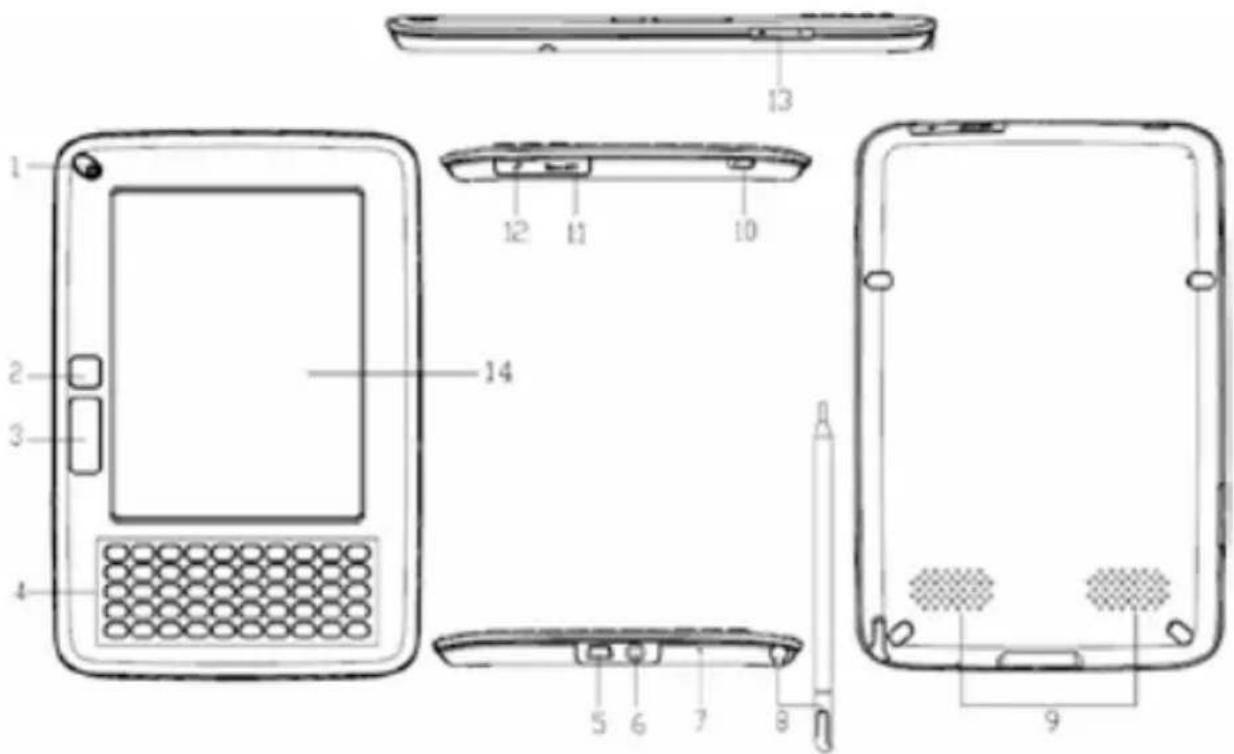
I.I. DEVICE BUTTONS
1. Power button
Press this button to turn on/off the device. The red indicator will light when the device is charging, and the blue indicator will light when the device is operating.
2. Page up button
Click this button turn page up.
3. Page down button
Click this button to turn page down.
4. Keyboard area
Including: Number button, letters, function keys. The integrated QWERTY keyboard enables you to take notes quickly and easily.
▶ Index button (Number)
Press any number button 1\~9 to select and operate the corresponding function at the menus.
▶ Page jump button (Number)
Under the reading status in DOC, TXT, HTXT, HTML, press the number button 0\~9 or any combined number button can jump to the corresponding page directly.
▶ Function shortcut key (Number)
Press "MENU", the function menu will display. Press any number button to select and operate the corresponding function.
▶ Play/record button
Open or close the "Recorder and Player" interface.
▶ Zoom button (Z)
Press this button to zoom in/out the text or pictures.
MENU button
Press this button, function menu will display, press direction button or number button to select and operate the corresponding function.
OK button
Press "OK" to confirm a selection.
Direction buttons
Press these four buttons to turn page or select option.
▶ Return button
Press Return button to cancel the operation or return to the previous menu/screen.
▶ Refresh button
Press this button to refresh screen.
- Mini USB port
USB connection port used for charging the device or transmitting data with computer.
- Earphone outlet
Plug earphone here.
- Microphone
For voice notes recording.
- Pen and Pen slot
When the pen is pulled out or inserted into the slot, it will start up or shut down automatically, and the corresponding icon will appear the top of the screen.
-
Speaker
-
Lock button
Lock/unlock the keyboard.
II. microSD card slot
-
Reserved USB Hot
-
Volume Control
-
Display Screen
1.2. PRECAUTIONS
We strongly recommend reading all the points below before operating this product:
Back up the data periodically to another safe media. Under no circumstances there is any liability regarding to data damage or loss.
Do not place the reader near devices that emit strong magnetic fields. It may cause data damage or loss.
Do not place the reader near devices that emit strong magnetic fields.
It may cause data damage or loss.
▶ Do not disassemble or remodel the device.
▶ Do not let the device drop or shock.
▶ Do not use the device under heavy moisture or wet.
▶ Do not press the device screen.
▶ Do not use the device in a dirty or dusty environment.
▶ Do not use chemicals to clean the device screen.
2. INTERFACE
2.1. MAIN MENU

Turn on the device, the main menu will display automatically.
To return to the main menu from other menus/screens press "MENU" and the number "I".
2.2. READING INTERFACE
The screen is separated into 3 parts:

Status Area: Displays the menu icon, title, battery status, microSD presence, time and "ESC" (equivalent to pressing key).
Reading area: function list, file list, text or pictures will display at this area.
Page information area: display the current page number, total number of pages, "Previous" and "Next" page button, turn 10 pages up or down button.
2.3. RECENT READING
This option shows the last 14 files recently visited (books and pictures only). Press Up/Down button to select a book and press OK to confirm, or press the number button to open a book directly. The book will open on the last-read page. If it is the first time you read this book it will open on the first page.
Note: If one of the books that appear in the list is deleted in the SD card, reading record remains in showing the history of files list recent but cannot open. To remove you from the list the user can clear the (all) recent file history or open new books file disappear from the last 14 searches.
3. BOOKCASE
3.1. BOOK READING
Select "Bookcase" and press "OK" step by step to select one book finally, and then press OK to confirm or press the corresponding number button to open the book directly.
3.2. PAGE TURNING
Press the direction buttons to turn pages, you can also press the page up/down button.
3.3. PAGE JUMPING

Under the reading status, press any number button, and then press "OK" to confirm, the book will jump to the corresponding page directly. If there is an error, click the arrow left to remove the number, and then mark the desired page.
Note: If the number you've input is more than the total page number, the system won't accept this operation.
3.4. ZOOM
Press zoom button (Z) to adjust the font size in 3 levels: small, middle and large.
3.5. REMARK / EXTRACT
Remark: To turn it on press "MENU" and select "Remark" to clear select delete comments and you can select between delete made annotations on the page where is and delete all comments made in the book. Note: You cannot undo the function delete. Formats that support this feature: HTXT, TXT y EPUB.
Extract: To turn it on press "MENU" and select "Extract" select pen stylus desired without taking off the screen pointer words/paragraph show the remark. Then press the icon that appears in the lower left of the screen. Immediately appears a new window where you can save the text in a file extension TXT, you can rename the generated file or to save it with the prefix "(extract)" followed by the name of the book. Format that support this feature: HTXT, TXT.
3.6. SEARCH
3.6.1. Books
Press "MENU" button in the Bookcase screen, select "File Search" in the menu, an input frame will display, you could press any button to input words. Then press "ok" button to find the content that you want, press return button " " to close the frame.
If you want to search the other content, just click the input frame again to awake it, and input anything you want, and then press "ok".
3.6.2. Words
Press "MENU" key read mode, select "Search" in the menu, in the box of entry, type the word you want to search, press "OK" to find the content you want, press key to close the search. If you want to continue searching for the same word, simply click on the "Right" arrow key. The lower bar will display the page where you are.
3.7. BOOKMARK
To mark the desired page must be displayed on screen the desired page, then click the 'MENU' key and the 'Mark page' option, then press the number key "O" you can add a maximum 5 pages per book. To go to the marked page, repeat the steps above and the list of pages with the arrow keys up/down press "OK" on the page desired and automatically takes you to the page.
Note: The bookmarks will be sorted by date; only the recent 5 bookmarks can be shown.
In the image files, only shift bookmark can be added.
4. PICTURE VIEW
4.1. PICTURE VIEW
Select "Picture View" in the main menu and press "OK" Browse and select folders and files, then click "OK" to confirm or press the corresponding number to open the image directly.
There are four display modes for viewing the pictures: Fit Window, Fit Width, Fit Height and Actual Size. Press "MENU" button, and then select the corresponding display modes by press related number button.
5. AUDIO
There are two functions in this option: record and play.
You can play music and record voice notes/sounds.
And supports the following formats: mp3, wav, wma.
5.1. AUDIO LIBRARY
Select "Audio" from the main menu and click "OK" or press the corresponding number or to access the audio library and voice files.
In the "Audio" Library select the song and/or voice memo to play, opens the music player.

Play/Pause: Press the number button "I" to play/pause music or record, and a speaker icon will appear at the status area.
Record: Press the number button "2" to record, and a microphone icon will appear at the status area.
- Stop: Press the number button "3" to stop music or record.
Forward/Rewind: "Forward" and "Rewind" functions are implemented by the number button "4" and "5".
Single/Cycle: These two playing modes are implemented by the number key "6".
VOL+/-: Press the left/right arrow to decrease or increase the volume.
Pre/Next: Press the up/down arrow to select the previous or next music.
5.3. VOICE NOTES
Press"REC" to record the log file is saved in the folder E-audio, wav format. Press the number "I" to play this file recording..
Press key and will be open the music player.
6. NOTEPAD
Select "Notepad" in the main menu to enter the notetaking function.

Click and switch the input method to "Keypad" inputting. Click again and switch the input method to "handwriting".


All remarks on the screen will be cleaned.
Click the input area will disappear. Click anywhere on the screen again, the input area will display.


Click, the input area will display on the top of the screen.
Click, the input area will display at the bottom of the screen.

6.1. WORD RECOGNITION
Under the English Mode, the English word you've written in the input area can be recognized and there is also some candidate words appeared in the input area.
Note: Please keep close between the letters in one word, and leave space between the words.
6.2. NUMBER STRING RECOGNITION
Under the number mode, number strings, and some symbols can be recognized automatically.
6.3. SECONDARY FUNCTION
Candidate words: If the word recognized wrong, please choose the right English word in the candidate words area.
Associated words: In the input area, the associated words will appear. You could select the right word directly. Click the arrow buttons located at the side of the input area will get more associated words.
Handwriting sign: There are some signs for controlling the handwriting.
Tab: Input tabs.
▶ Space: Input a space.
▶ Backspace: Delete the previous character.
▶ Enter: to go in a new line.
7. MEMO
Use this function to perform any kind of drawing or uninterpreted handwriting.
Each document may have multiple pages.
The tools are paint and erase.

8. SETTINGS
Select "Settings" in the main menu, and press "OK" to enter the interface. Press the direction button
to select the corresponding option. You can also press the number buttons to select the function.
8.1. CONTINUOUS TURNING
Activate/deactivate continuous turning for pictures, HTML and TXT file types.
For pictures continuous turning means that you can view the next/previous picture without the need to return to the file browser.
For HTML and TXT continuous turning allows you to open the next book if you are in the last page of the current book or to open the previous book if you are in the first page of the current book.
8.2. HANDWRITING INPUT
▶ Recognition delay: there are three levels (short, middle, long) to indicate how much inactive time has to pass for the device to interpret that the user has stopped writing.
Line Thickness: specify the thickness of the strokes drawn on the screen while handwriting.
8.3. RECENT READING
Enable/disable the tracking of the recently read files in order to show them in the 'Recent files' option.
Clean up: erase the recent files list.
8.4. KEY/PEN-TOUCH SOUND
Turn on or off key-press and pen-touch sounds.
8.5. FONT SETTINGS
There are two effects for displaying font: Clear and Smooth.
And two fonts available: Arial & Black.
8.6. SYSTEM TIME
Display the current date and time in the system.
Modify time: Click "Modify time", or press the direction button to select "System time", and press the number button "I" to open "Modify time" interface, and press the number button directly to input time, and then click "OK" to save the new time. Press return button, the new time will not be saved.
8.7. REFRESH MODE
Part: Refresh only the areas of the screen where the image has changed.
Global: Refresh the whole screen.
8.8. FACTORY DEFAULT
Default: Restore the system to the default settings. Please save all data on the SD card before you restore the system.
Clear temp: Erase the temporary files in the system including bookmarks.
Clear remark: Erase the remarks made within the file types that support this feature.
Download the update package, decompress the package and save it under the root directory in SD card, select "Update", the system will operate the software updating automatically. (Be careful to operate this function, and please refer to the cautions in appendix)
8.10. DEVICE INFORMATION
8.11. LANGUAGE OPTIONS
Select the language for the user interface.
In some cases this setting also affects the dictionaries used by the handwriting recognition engine.
8.12. AUTO SHUTDOWN SETTING
Select if you want the device to shutdown after 40 minutes, 60 minutes or never.
9. ADOBE READER© INSTRUCTION
9.1. DRM
Adobe DRM protected PDF and EPUB files are supported only if Adobe Digital Editions 1.5 or later is installed on your computer and your Ebook is connected r to the computer.
Setup:
- Install the Adobe Digital Edition on your computer.
- After installation, open the above software, and enter your Adobe account
- After turning on the Ebook, (click on "Set DRM" which is included in the "Settings" interface. Please ignore this item if you cannot find it). Then, keep the Adobe Digital Edition open, and connect the Ebook to the computer, there will show a window for activation. Click "Authorization", then DRM activation is completed.
Notes:
The authorization information is stored in SD card. Thus, you need to active the device again if using
a new SD card.
After activated, if you want to use a new account to active, please delete the hidden folder under SD root ".adobe-digital-editions".
Please refer to below website for more information.
http://www.adobe.com/products/digitaleditions
10. OTHER OPERATIONS
10.1. BATTERY CHARGING
We recommend that you do a full battery charge before first use, because it may not be enough charge on the device to perform normal operations.
You can use two modes for charge the battery, AC/DC power adapter and USB cable. Use the AC/DC power to a power outlet adapter to charge it. Or connect the USB cable on available USB port on your computer using the supplied USB cable.
The loading icon of the screen indicates that the device is in charging mode.
The red LED indicator will light; the battery in the status bar icon indicates that the battery is charging. The device will shut down automatically when does not have enough battery.
Please charge the battery when out load.
Note: The charging time is about 4 hours using the USB cable, and 2 hours using the AC/DC power adaptor. The red LED indicator will be off when charging is finished. It's better to charge the battery when the hint screen disappears, and please ensure the battery is fully charged. This will extend the Lithium battery life.
10.2. FILE MANAGEMENT
10.2.1. Connecting to computer
Connect the device to the computer with the USB data cable. Turn on the device, “Are you sure to transmit data?” will display on the screen. Press “OK” to confirm. The computer will automatically detect a new storage device connecting.
10.2.2. File management
From your PC browser you can copy, delete, and organize the files or folders. When you connect your E-book reader will be blocked.
Factory adjustment came from multiple folders on the memory card: e_audio, e_book, e_image, save the files in the folder corresponding and respectively.
The microSDcard is the storage media for the device, so everything (books, documents, music) should be stored in the memory card.
The device will compile all the information stored on the SD card. The process may take several minutes depending on the amount of available memory.
Note: These pre-stored folders can't be renamed or deleted, and please save the files in the right folder, otherwise, the files won't be opened, for example, save TXT, HTXT, PDF, EPUB, DOC, HTML files into "e_book", save pictures into "e_image" and save music into "e_audio".
II. SPECIFICATIONS
Display Technology: E Ink® "Electronic Paper"
Screen Size: Approx. 5" Measured Diagonally
Resolution: 600(H) x 800(V)
Gray Scale: Max. 8-Level Gray Scale
Supported text types: TXT, HTXT, HTML, PDF, EPUB, DOC
Supported image types: JPG, TIF, BMP, PNG, GIF
Max. image size: 3,000,000 pixels
Supported audio types: WAV, WMA, MP3
Storage Media Micro SD Cards up to 32GB
Power Battery Type: Rechargeable Lithium-Polymer 3.7V, 1500mAh
Recharging Time: Approx. 4 Hours with USB charging from powered Computer or Approx. 2 Hours when using AC wall charger
Weight: Approx. 200 grams without cover
Measurements: 173 x 117 x 10.3 mm without cover
Operating temperature: 32 to 104 degrees F (O to 40 degrees C)
Storage temperature: -4 to 113 degrees F (-20 to 55 degrees C)
Power Consuming Less than 200mA@3.3v at EPD refresh time
Less than 2.0mA@3.3v at sleep time.
It can show more than 8000 pages continuously with full charged battery.
II.I. ABOUT SD CARD
If SD card can't be recognized for a long time, you can plug in the SD card again or restart the device.
When the system is reading data, please do not remove the SD card or reset the system.
If SD card needs to be formatted, please backup all data in SD card first, and then select FAT-32 format.
11.2. RESET
When the device present bad function, click the "RESET" hole located at the back of device to restart the system.
II.3. RECOMMENDATIONS
Under the direct sunlight or low-temperature environment, the characters displayed on the screen would be fading, please refresh the whole screen
Due to the limitation of memory, some complex DOC, PDF and HTML files can't be decoded by the device.
Prevent impaired hearing by using earphone for a long time, Please adjust the volume at a lower level before using the earphone.
We recommend that you keep a copy of the contents of the SD card in additional external storage medium (pen drives, hard drives, etc.). We recommend that you keep a copy of the contents of the SD card in additional external storage medium (pen drives, hard drives, etc.).
Energy Sistem Soyntec S.A. warrants its products to be free from defects in materials and workmanship at the time of purchase.
The warranty period is 36 months from the date of purchase.
II.4. WARRANTY PROCEDURE
Visit the Support section at http://support.energysistem.com and select your product to view the FAQ (Frequently Asked Questions). The solution to your problem is very likely to have been already published there. You will also be able to download user manuals, user guides, drivers and updates
If you cannot find an appropriate solution in the Support section, you may send us your enquiry or warranty service request by email: support@energysistem.com
Alternatively, you may prefer to contact the distributor from which you purchased the product, presenting the purchase receipt or invoice.
Specifications are subject to change without notice.
© 2010 by Energy Sistem®. All rights reserved.
12. TRADERMARKS
All company, brand and product names are trademarks or registered trademarks of their respective companies.
13. DECLARATION OF CONFIRMITY
Manufacturer Name: Energy Sistem Soyntec S.A.
Address: Pol. Ind. Finestrat, C/.Calpe n°I, 03509, Finestrat Alicante (Spain)
Tel: 902 388 388
Fax: 902119034
NIF: A53107488
We declare under our own exclusive responsibility that the product:
Energy Sistem® eBook Reader Energy™ Book 4050
Manufacturing country: China
Is in compliance with the essential directives, norms and standards of the European Union 89/336/EEC (EMC Directive).


- QUICK GUIDE
- I.I. DEVICE BUTTONS
- POWER BUTTON
- PAGE UP BUTTON
- PAGE DOWN BUTTON
- KEYBOARD AREA
- PRECAUTIONS
- INTERFACE
- MAIN MENU
- READING INTERFACE
- RECENT READING
- BOOKCASE
- BOOK READING
- PAGE TURNING
- PAGE JUMPING
- ZOOM
- REMARK / EXTRACT
- SEARCH
- BOOKS
- WORDS
- BOOKMARK
- PICTURE VIEW
- AUDIO
- AUDIO LIBRARY
- VOICE NOTES
- NOTEPAD
- WORD RECOGNITION
- NUMBER STRING RECOGNITION
- SECONDARY FUNCTION
- MEMO
- SETTINGS
- CONTINUOUS TURNING
- HANDWRITING INPUT
- KEY/PEN-TOUCH SOUND
- FONT SETTINGS
- SYSTEM TIME
- REFRESH MODE
- FACTORY DEFAULT
- DEVICE INFORMATION
- LANGUAGE OPTIONS
- AUTO SHUTDOWN SETTING
- ADOBE READER© INSTRUCTION
- DRM
- SETUP
- NOTES
- OTHER OPERATIONS
- BATTERY CHARGING
- FILE MANAGEMENT
- CONNECTING TO COMPUTER
- SPECIFICATIONS
- II.I. ABOUT SD CARD
- RESET
- II.3. RECOMMENDATIONS
- II.4. WARRANTY PROCEDURE
- TRADERMARKS
- DECLARATION OF CONFIRMITY
Brand : ENERGY SISTEM
Model : Book 4050 Touch
Category : Tablet