
Hook Wireless - Headphones MAXELL - Free user manual and instructions
Find the device manual for free Hook Wireless MAXELL in PDF.


| Product Type | Wireless Earhook Headphones |
| Brand | Maxell |
| Model | Hook Wireless |
| Dimensions (each earpiece) | 2.4 x 1.6 x 1.2 inches |
| Weight (total) | 0.64 oz (18 g) |
| Driver Size | 10 mm |
| Frequency Response | 20 Hz - 20 kHz |
| Impedance | 32 ohms |
| Connectivity | Bluetooth 5.0 |
| Wireless Range | 33 ft (10 m) |
| Battery Type | Rechargeable Lithium-ion |
| Battery Life (playback) | Up to 8 hours |
| Charging Time | 2 hours |
| Charging Port | Micro USB |
| Microphone | Built-in, omnidirectional |
| Controls | Volume, play/pause, call answer/end, voice assistant |
| Water Resistance | IPX4 (splash resistant) |
| Earhook Design | Yes, over-ear hook for secure fit |
| Color Options | Black, White |
| Cleaning Instructions | Wipe with a dry soft cloth; do not use liquids or solvents. |
| Safety Precautions | Do not disassemble, expose to extreme temperatures, or use while driving. |
| Replaceable Parts | Ear tips and ear hooks are detachable and replaceable. |
| Repairability | Non-repairable by user; contact support for service. |
| Packaging Contents | Headphones, micro USB cable, ear tips (S/M/L), ear hooks, user manual |
| Warranty | 1 year limited warranty |
Frequently Asked Questions - Hook Wireless MAXELL
User questions about Hook Wireless MAXELL
0 question about this device. Answer the ones you know or ask your own.
Ask a new question about this device
Download the instructions for your Headphones in PDF format for free! Find your manual Hook Wireless - MAXELL and take your electronic device back in hand. On this page are published all the documents necessary for the use of your device. Hook Wireless by MAXELL.
USER MANUAL Hook Wireless MAXELL
natural_image
Exterior view of a Bluetooth Wireless Headphone (no signage)USERS MANUAL
MANUAL DE USUARIO
MANUAL DO USUÁRIO
UŽIVATELEKÝ MANUAL
BEDIENLUNGANLEITUNG
ΕΧΕΡΙΔΟ ΧΡΗΣΤΗ
KAYTTÖOHJE
MANUEL DE LUTILISATEUR
KORISNIČKI PRIRUČNIK
HASZNÁLATI ÚTMUTATÓ
MANUALE DUSO
ПРИРАЧИЯ К ЗА ЮСПИСНИЮТ
HANDLEIDING
BRUKSANMISNING
MANUALUL UTILIZATORULUI
Please read this user's manual completely before operating this unit and retain this booklet for future reference.
HEADPHONES OVERVIEW
IN THE BOX
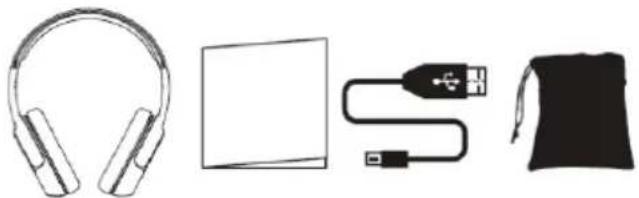
natural_image
Illustration of four electronic devices: headphones, a flatboard, a USB cable, and a black jacket (no text or symbols)Bluetooth Headphone User's Guide USB Charging Cable Carry Pouch
LOCATION OF CONTROLS
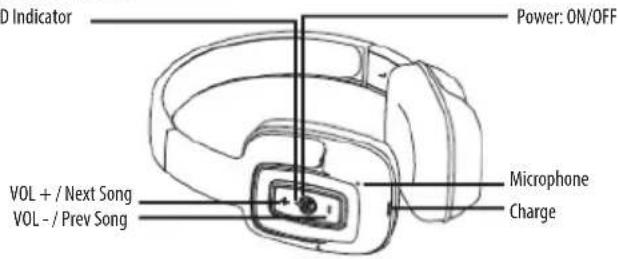
EN
OPERATING INSTRUCTIONS
EN
Charging the headphone
- Your headphone uses a rechargeable built-in battery, so be sure to fully charge the battery before using it for the first time.
- Connect the USB cable to the charging socket on the headphone to charge the battery.
- The LED indicator will remain RED while charging is in progress. After the battery is fully charged the LED will turn OFF.
• Turning the headphone ON
1. Press the POWER switch button for 2 seconds in Shutdown mode, a voice prompt will be heard.
- Turning the headphone OFF
1. Press the POWER switch button for 2 seconds in Standby mode, a voice prompt will be heard.
- Pairing and Connecting the headphone with a mobile phone
- The earphone automatically enters Pairing Mode, indicated by the RED and BLUE lights alternately flashing.
- Enter Bluetooth settings on the mobile phone and search for the headphone.
- Select the headphone (example: EB-BT300) from the available list of devices found by the phone. Pairing is complete. (Note: When pairing is successful, the Blue indicator light flashes)
• Reconnecting the headphone with a phone
-
The headphone will attempt to reconnect to the last paired device automatically each time it is powered on. If the reconnect feature is not available on the phone, the headphone will have to be reconnected from the "paired devices" found on the phone.
-
Answering a call
- Short press the Power switch button to answer a call when the incoming call prompt tone is heard.
- If listening to music when a call is answered, the music will stop while the call is in progress and will resume after the call has ended.
• Ending a call
- Short press the Power switch button to end a call.
-Rejecting a call
- Long press the Power switch button to reject an incoming call.
• Redialing the last number
- Short press the Power switch button twice repeatedly to redial the last number dialed.
-Volume Control
- Short press the Volume Up or Down button to adjust the volume.
- Play or Pause music
- Press the Power switch button to Play / Pause a song.
-Previous or Next song
- Long press and then release the Previous / Next song button to select the previous or next song.
TROUBLESHOOTING TIPS
I cannot turn the headphone on
Make sure that you fully charged the headphone before powering it on.
My mobile phone is not able to locate the Bluetooth headphone
Check that the headphone is in pairing mode (blue/red indicator light flashes quickly).
Delete the existing Bluetooth headphone name in the phone, then search again.
If the headphone still cannot be located by the shone, please restart the headphone and phone, and try again.
After successfully pairing my mobile phone and Bluetooth headphone, the headphone disconnected.
The headphone battery charge is nearly depleted.
The distance between the headphone and phone has exceeded the maximum connection distance (10 m / 33 ft.).
There may be some type of obstruction between the Bluetooth headphone and your phone which is interfering with the connection signal.
When I am answering a call, I cannot hear anything
Verify that the phone is connected via Bluetooth with the headphone and it is not using the phone speaker when answering a call.
Try adjusting the volume on your mobile phone.
Press the Vol+ or Vol- Buttons on the headphone to adjust the volume.
When I am listening to music, I cannot hear anything
Press the Vol+ Button to adjust the volume.
Reconnect the headphone with your mobile phone.
EN
I cannot charge the headphone
Verify that the USB charging cable is seated firmly in the charging socket of the headphone, and that the other end is connected properly to a charging device..
Verify that the charging cable and charger are working properly.
GENERAL PRODUCT FEATURES
— Bluetooth version: V4.2
- Play time: 5-6 hours
— Battery type and capacity: 140mAh Lithium battery
— Charging: Micro USB 5V DC
- Communication / Operating distance: ≤ 10m (33 ft.)
WARNING
— Do not expose to high heat or open flame.
— This product is not waterproof, do not submerse in water.
— Do not disassemble, modify, or attempt to repair this product.
— Standby time, Play time, and Charging time will vary with different devices, volume levels, and physical environments.
— Operating range is up to 10 meters (33 ft.) line-of-sight in an open and unobstructed environment.
— Functions may vary among different devices.
— CHOKING HAZARD! This product contains small parts that must be kept out of reach of children.
— This product is designed for music playback and phone conversations only, please use responsibly.
— Specifications are subject to change without notice.
CAUTION
— Do not incinerate or dispose of the battery in a landfill.
— Do not puncture or crush the product.
— Do not disassemble.
— Lithium batteries must be recycled. DO NOT discard in the trash.
— User to charge the headphone battery with a micro USB 5V power input.
— Charge batteries on a fireproof surface and away from flammable items or liquids.
— Batteries should NEVER be left unattended while charging.
EN
MANUAL DE USUARIO
ES
LOCATION OF CANDHOLSTLACITEK
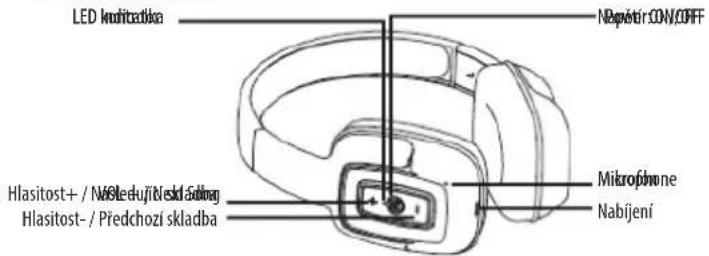
ALLGEMEINE PRODUKTMERKMALE
— Bluetooth-Version: V4.2
DOCKATION OF COMMANDS

40 41
ISTRUZIONI PER L'USO
Caricare le cuffie
I cannot charge the headphone
AOCATAGAREA CONTROLOR DE CONTROL

RO
INSTRUCTIUNI DE UTILIZARE
Încărcarea căstilor
- HEADPHONES OVERVIEW
- EN
- OPERATING INSTRUCTIONS
- Charging the headphone
- • Redialing the last number
- -Volume Control
- - Play or Pause music
- -Previous or Next song
- TROUBLESHOOTING TIPS
- I cannot turn the headphone on
- My mobile phone is not able to locate the Bluetooth headphone
- After successfully pairing my mobile phone and Bluetooth headphone, the headphone disconnected.
- When I am answering a call, I cannot hear anything
- When I am listening to music, I cannot hear anything
- I cannot charge the headphone
- GENERAL PRODUCT FEATURES
- WARNING
- CAUTION
- MANUAL DE USUARIO
- ALLGEMEINE PRODUKTMERKMALE
- DOCKATION OF COMMANDS
- ISTRUZIONI PER L'USO
- Caricare le cuffie
- INSTRUCTIUNI DE UTILIZARE
- Încărcarea căstilor
Brand : MAXELL
Model : Hook Wireless
Category : Headphones