
COM-121 - Webcam Steren - Free user manual and instructions
Find the device manual for free COM-121 Steren in PDF.


| Product Type | Webcam |
| Dimensions | 7.5 x 3.5 x 3.5 cm |
| Weight | 100 g |
| Power Supply | USB powered |
| Max Resolution | 1280 x 720 pixels (HD) |
| Frame Rate | 30 fps |
| Interface | USB 2.0 |
| Built-in Microphone | Yes |
| Field of View | 60° |
| Focus Type | Fixed |
| Included Cable | Yes, 1.5 m |
| Compatibility | Windows, macOS, Linux |
| Primary Functions | Video conferencing, streaming, video recording |
| Maintenance | Clean with a soft dry cloth |
| Safety | Do not expose to moisture or extreme temperatures |
| Spare Parts | Not available |
| Repairability | Not user-serviceable |
| General Information | Brand: Steren, Model: COM-121 |
Frequently Asked Questions - COM-121 Steren
User questions about COM-121 Steren
0 question about this device. Answer the ones you know or ask your own.
Ask a new question about this device
Download the instructions for your Webcam in PDF format for free! Find your manual COM-121 - Steren and take your electronic device back in hand. On this page are published all the documents necessary for the use of your device. COM-121 by Steren.
USER MANUAL COM-121 Steren
natural_image
Illustration of a stylized camera with lens and control buttons (no text or symbols)V0.0 0318A
natural_image
Line drawing of a laptop with an icon and a downward arrow, no text or symbols present- Ajuste

- Reproduzca
natural_image
Illustration of a stylized camera lens with no text or symbolsV0.0 0318A
Instruction Manual
Warnings
Read this manual carefully to avoid any malfunction.
The information shown in this manual serves only as a reference for the product. Due to updates there may be differences.
Please check our website www.steren.com for the most recent version of this manual.
Cautions
- This device is not intended for use by persons (including children), whose physical, sensory or mental abilities are different or reduced, or who lack experience or knowledge.
- Children should be supervised to ensure they do not use the device as a toy.
- Do not clean with aggressive chemicals.
How to use
- Connect
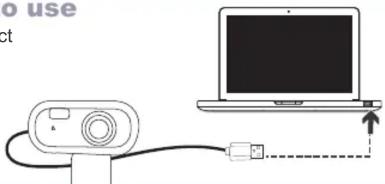
- Place

natural_image
Line drawing of a laptop with an icon and a downward arrow, no text or symbols present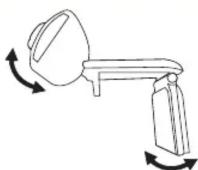
- Play
Use the software for video conferences of your choice.

natural_image
Laptop screen displaying a child's face with a camera icon on top (no visible text or symbols)Specifications
Input: 5 V —— (x USB)
Focus: 5.0 cm to infinity
Frame rate: 15
Brand : Steren
Model : COM-121
Category : Webcam