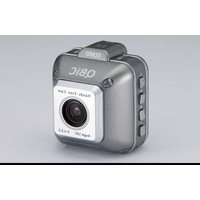
QBIC D1 - Camcorder Elmo - Free user manual and instructions
Find the device manual for free QBIC D1 Elmo in PDF.


| Product Type | Camcorder |
| Brand | Elmo |
| Model | QBIC D1 |
| Video Resolution | Full HD 1080p |
| Photo Resolution | 5 Megapixels |
| Optical Zoom | 10x |
| Display | 2.7-inch LCD |
| Storage | SD/SDHC card slot |
| Battery | Lithium-ion rechargeable |
| Dimensions (approx.) | 120 x 60 x 50 mm (4.7 x 2.4 x 2.0 in) |
| Weight (approx.) | 200 g (7.0 oz) |
| Power Supply | Rechargeable battery via USB (5V) |
| Main Functions | HD video recording, photo capture, image stabilization, playback, zoom |
| Maintenance & Cleaning | Wipe with a soft dry cloth; avoid solvents |
| Safety | Keep away from water, use on stable surface, avoid extreme temperatures |
| Spare Parts | Battery, charger, USB cable (included) |
| Reparability | Contact authorized service center for repairs |
| General Info | Includes wrist strap, user manual; compatible with Windows/Mac |
Frequently Asked Questions - QBIC D1 Elmo
User questions about QBIC D1 Elmo
0 question about this device. Answer the ones you know or ask your own.
Ask a new question about this device
Download the instructions for your Camcorder in PDF format for free! Find your manual QBIC D1 - Elmo and take your electronic device back in hand. On this page are published all the documents necessary for the use of your device. QBIC D1 by Elmo.
USER MANUAL QBIC D1 Elmo
natural_image
Line drawing of two identical 3D camera models with no text or symbolsBEFORE YOU USE....3
QBIC S PACKAGE CONTENTS......4
THE NAME OF EACH PART....5
PREPARATIONS....6
Installation of battery pack / Charging....6
INSERTING microSD CARD AND WiFi CARD....7
PRECAUTIONS WHEN USING QBiC S IN THE OPEN AIR 8
STARTING THE ALERT MODE ....10
POWERING ON....10
Lighting of LED while battery-powered mode is enabled....10
Alarm sound in battery mode....11
POWERING OFF 11
CHECKING THE MAINTENANCE MODE....11
START ALERT MODE (SHIFTING TO ALERT MODE) 12
STOP ALERTING (SHIFTING TO MAINTENANCE MODE) 13
MAINTENANCE TOOL....14
ABOUT QBiC S MAINTENANCE TOOL....14
CHECK PC ENVIRONMENT 14
GET AND INSTALL THE QBiC S MAINTENANCE TOOL 15
UNINSTALL QBiC S MAINTENANCE TOOL....15
CONNECT THIS PRODUCT TO PC VIAUSB CABLE 16
CONNECTING TO WiFi 17
REGISTER FOR ACCESS POINT 17
MASS STORAGE MODE....18
TURNING ON THE MASS STORAGE MODE ....18
UPDATE 19
IMPORTANT SAFEGUARDS....21
BEFORE YOU USE....27
DISCLAIMERS 31
BEFORE YOU USE
Thank you for purchasing QBiC S X1/D1.
This guide is intended to describe the usage and settings of the product for the purpose of appropriate usage and the user's safety.
Please read this guide and the "Important Safeguards" carefully before using the product.
Please refer to the QBiC instruction manual for any other setting and information.
Please keep this guide for future reference.
Please download the QBiC Instruction manual from the following QBiC Website.
QBiC Product Website: http://www.elmoqbic.com/
QBiC S PACKAGE CONTENTS
□ QBiC S (X1/D1)
□ USB cable
□ AC adapter

natural_image
Technical line drawing of a mechanical component with no visible text or symbols
D1(185° lens)

natural_image
Line drawing of a USB cable with connector (no text or symbols)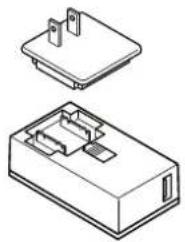
natural_image
Technical line drawing of a two-part electronic component housing (no text or symbols)□ WiFi card
□ microSD card (2GB)
□ Battery pack


natural_image
Simple line drawing of a rectangular electronic device with two ports and a lid (no text or symbols)□ Start-up Guide (This booklet)
□ Warranty card
□ USB packing seal


NOTICE
This product has been carefully packaged with special attention to quality. Should you find anything damaged or missing, please contact your dealer or ELMO.
The drawings and images in this booklet may differ from the actual items.
QBIC S FRONT
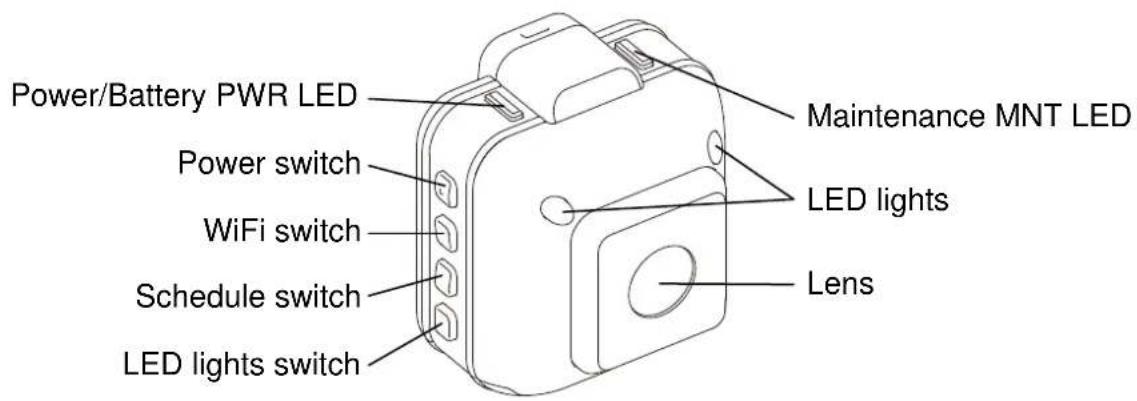
QBIC S BACK


NOTICE
The specification in the above applies to both X1 & D1
PREPARATIONS
INSTALLATION OF BATTERY PACK/CHARGING
*Battery pack is not inserted in the product. Battery is not fully charged at the time of purchase. Charge the battery fully before starting to use the product.
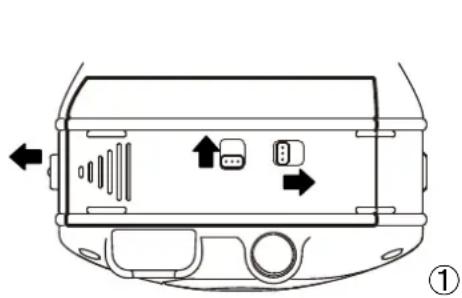
- The rating label which mentions product name; etc. is attached at the bottom of the product (①). Slide 2 knobs to the opposite directions of the arrows on the label and unlock. Slide and open the slot(②). Insert the battery pack. Slide and close the slot. Lock the knobs.
natural_image
Diagram of a car interior showing vent, buttons, and directional arrows (no text or symbols)
natural_image
Diagram of a car front view showing the dashboard and rearview panel with no text or symbols- Turn off the product. Charging is not possible while the power is on.
- Open the micro USB port cover. Connect the micro USB plug (smaller one) of the supplied USB cable to the micro USB port of the product.
- Connect the USB plug of the USB cable to a USB port on the supplied AC adapter your PC.
- [Power LED] on the product blinks in red while charging.
- Battery is fully charged when [Power/LED LED] turns off.

Charging from the USB port on your PC
Charging from the USB port on your PC is possible. However, be sure to turn off the product and note that it takes longer time to charge than when using the AC adapter.
- Insert the supplied micro SD card in the WiFi card.
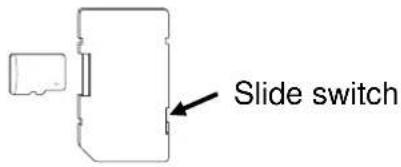
*When the WiFi card is write-protected, recording is not possible. Verify that the slide switch is set to the unlock position. If the slide switch is set to [LOCK], slide it to other end to release the lock.

Pay attention to the direction of the card when inserting the micro SD card. Insert the microSD card until it clicks. Improper insertion of the card may cause error.
- To remove back cover, unlock the lock in the back cover with a flat object such as a coin. Insert the object in ① and turn it to the direction ② indicated with an arrow.
The back cover is removed.

- Insert the WiFi card in the WiFi card slot.


Pay attention to the direction of the card when inserting the WiFi card. Insert the WiFi card until it clicks.
Improper insertion of the card may cause error or damage the product.
- Close the back cover and lock it. Insert a flat object such as a coin in ① and turn it to the direction ② indicated with an arrow.


Make sure to close the cover correctly and lock it tight. Insufficient locking may deteriorate the waterproof performance and damage the product.
PRECAUTIONS WHEN USING QBIC S IN THE OPEN AIR
Please use a commercially available outdoor housing when using this product in the open air.
This product is guaranteed to be waterproof when the USB cover is properly installed (USB cable is not used), but NOT guaranteed if USB cover is NOT properly installed (USB cable is used).
And also waterproof is not guaranteed if this product is used in the open air for an extended period of time, regardless of using the USB cover properly.
Follow the following instructions when you use the camera under water.
- Make sure that all covers, slots and knobs are firmly closed.
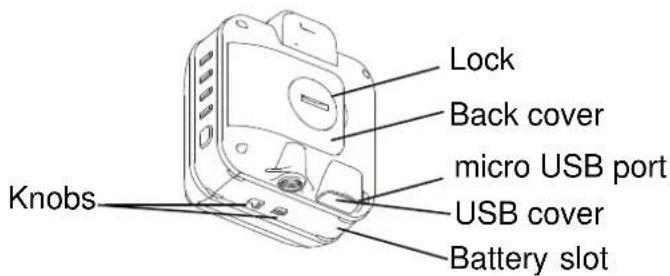
- When this product is used with AC adapter, (①) remove USB cover (②) install USB packing seal to the micro USB port (③) plug the USB cable (with USB packing seal) connect USB cable and AC adapter, and start to use. Use a commercially available outdoor housing if this product is used in the open air.


The supplied AC adapter is not waterproof. Also the USB packing seal does not guarantee waterproof property.
- The inside of outdoor housing may get hot or cold depending on the location of the camera. Be sure to consult with the system installer in advance and use an extra device such as cooling fan or heating equipment together with the outdoor housing if necessary.

The camera is not guaranteed to be waterproof or to be free of trouble or damages under every condition.
Please refer to the QBiC S instruction manual for the details about use of QBiC S in the open air.
Please download QBiC S instruction manual from the following website.
QBiC Product Website: http://www.elmoqbic.com/
STARTING THE ALERT MODE
This product supports “Alert mode” which continuously records video and save it to microSD card and “Maintenance mode” which configures the variety of settings and also plays the recorded movie which is stored in the micro SD card.
In this section the following topics are covered:
[Operation of each mode] / [Indication of LEDs]
POWERING ON/OFF
POWERING ON
Press and hold (over 1second) [Power Switch] to power on the product.
[Power LED] turns blue or green.

NOTICE
The factory setting is "Maintenance mode".
LIGHTING OF LED WHILE BATTERY-POWERDMODE IS ENABLED
This product supports 24-hour continuous monitoring function by the power feeding from AC adapter.
In case the power supply is cut off, electricity is fed from the built-in battery pack; therefore, the alert recording will be continuously operated for up to 2 hours.
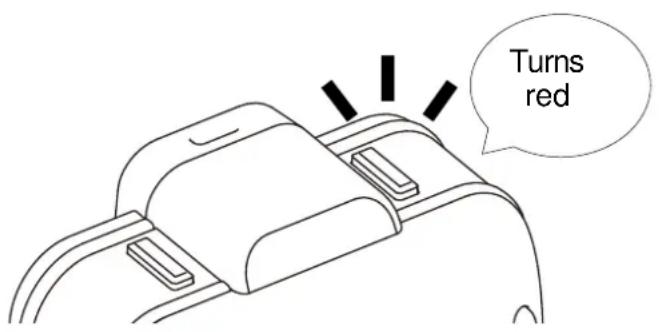
At this time “Power/Battery PWR LED” turns red and it indicates that the product is using the electricity in the built-in battery.
When "Power/Battery PWR LED" turns red, the power is not fed by AC adapter.
The product may unexpectedly turn off; so check the power conditions as soon as you possible.
This product will sound to inform the remaining battery level.
A long beep sound occurs when the product is working in “Alert mode” and the remaining operation time is less than 5 minutes.
Immediately charge if the product starts to makes alarm sound.

NOTICE
Battery alarm can be disabled by using the QBiC S Maintenance Tool.
POWERING OFF
Press and hold (over 2 seconds) [Power Switch] to power off the product. [Power/Battery PWR LED] turns off.
If the power turns off by the power switch in alert mode, the product automatically changes the mode into “Maintenance mode” before powering off.
CHECKING THE MAINTENANCE MODE
The Product boots in "Maintenance mode" when powering on for the first time.
When the product is in “Maintenance mode”, “Maintenance MNT LED” turns red and indicates user that the product is in the “Maintenance mode.
"WiFi LED" lights accordingly to WiFi settings.
START ALERT MODE (SHIFTING TO ALERT MODE)
Press "Alert/Cancel alert REC switch" in "Maintenance mode" and shift the mode to the "Alert mode". When the product is in the "Alert mode", "Maintenance MNT LED" and "WiFi LED" turn off, and instead "REC LED" turns green.

"REC LED" turns on when the product is recording a movie. "REC LED" does not turn on if the product is not recording; e.g. the camera is in the "Scheduling setting" mode. When the camera is in the "Alert mode", the "WiFi LED" turns off regardless of WiFi setting conditions.

When the camera shifts the mode to "Alert mode", the movie is automatically recorded and saved into microSD card which installed in the camera. Date and time to record can be configured in the recording settings.

NOTICE
The factory default setting is VGA/5fps/385Kbps. The movie can be continuously recorded for approx.7 days when using a 32GB microSD card.
Press and hold “Alert/Cancel Alert REC switch” (over 2 seconds) and cancel the “Alert mode”. The camera shifts the mode to the “Maintenance mode”.
Use “QBiC S Maintenance tool” in the “Maintenance mode” to configure a variety of settings and play recorded movies.

No movie is recorded if the camera is in the maintenance mode. When the alert monitoring is set, check that the “Maintenance LED” is turned off and the camera shifts the mode to the “Alert mode”.
MAINTENANCE TOOL
ABOUT QBiC S MAINTENANCE TOOL
QBiC S Maintenance Tool is a tool to configure detailed settings of the camera. Install the tool to PC and connect PC and the camera with the supplied USB tool prior to use.
By using the tool, you can:
● See live viewing video
● Record scheduled movies (day and time)
● Change image quality and frame rate of recording movies
● Set up switch lock for tamper-resistance
● Edit WiFi settings for remote monitoring
CHECK PC ENVIRONMENT
The following OS is supported.
Windows
Microsoft Windows XP* SP3/Windows Vista SP2/Windows 7 SP1

CAUTION
*64 bit version is not supported
Go to QBiC Product Website to download the QBiC S Maintenance Tool.
- Log on as an administrator and execute Setup.exe.
- Follow the messages and install.
Warning messages about hardware compatibility and digital signature may appear, depending on PC environment.
Tick "Always trust software from ELMO COMPANY, LIMITED." And click "Install" button.
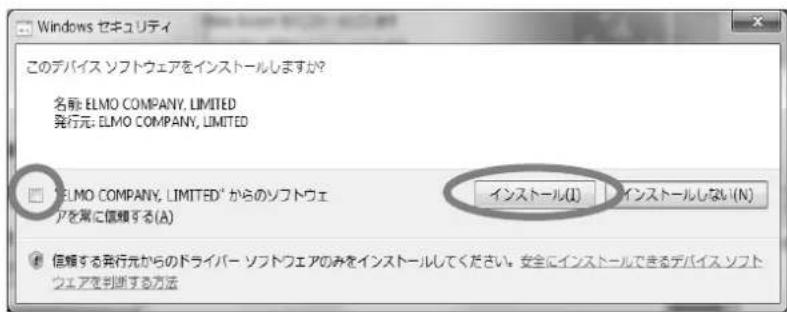
- The "QBiC S Maintenance Tool" icon will be installed on your PC desktop if the installation is successful.

Rebooting may be asked.
When your PC shows the message to ask your PC to reboot, click "Yes" button and reboot your PC.
UNINSTALL QBiC S MAINTENANCE TOOL
To uninstall the QBiC S Maintenance tool, use the uninstall function in OS
- Boot the QBiC S Maintenance Tool.
From start menu in your PC, click "Start" → "All Programs" → "ELMO" → "QBiC S Maintenance Tool". → "QBiC S Maintenance Tool".
Or click the icon of the QBiC S Maintenance tool located on your PC desktop.
- Connect PC to the camera via the supplied USB cable.

- Power on the camera.
QBiC Maintenance tool recognizes the camera and ready to use.

NOTICE
For the details about QBiC Maintenance tool refer to the QBiC S instruction manual.
CONNECTING TO WiFi
By using WiFi the camera can be connected to a network and movies can be displayed to other devices. The configuration differs from wireless LAN router or wireless LAN access point which you use.

CAUTION
● PC in the network is required to use.
- When configuring the settings, be sure that your PC is within the area of working wireless LAN access point.
REGISTER FOR ACCESS POINT
Use the "QBiC S Maintenance Tool" to register an access point.
Check if the "QBiC S Maintenance Tool" is already installed to your PC. If not, install before starting to register.
- Select [Network Settings] [Infrastructure] tag in the QBiC S Maintenance Tool.

- The access point around QBiC S is listed. And choose the access point to use.
NOTICE
If you cannot find any access point to register, select "AP Manual settings" and input the desired SSID and Network KEY.
* The design images may change without notice.
MASS STORAGE MODE
This product can be used as a storage device. Using this mode, you can retrieve the data stored in the micro SD card.
TURNING ON THE MASS STORAGE MODE
- Open the micro USB Port Cover of the product.
- Power off the product. Connect the micro USB plug (smaller one) of the supplied USB cable to the micro USB port of the product. USB plug of the USB cable to a USB port on your PC.
- Press and hold [Power Switch] (over 5 seconds).
- The micro SD card inside the product will be recognized as a removal disk. Three beep sounds occur and the menu appears on the screen of your PC.
- Select the menu and operate.
- Power off the product. Remove the USB cable from the product and attach the micro USB Port Cover.
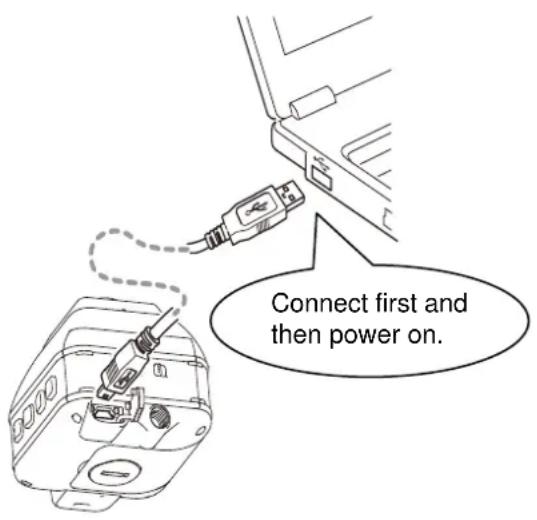

Make sure you attach the cover properly and completely. Insufficient attachment may deteriorate the waterproof performance and damage the product.
UPDATE
This product and the QBiC application software will be updated from time to time to improve their performance and functionality. For the details about updating, refer to the QBiC S Instruction manual.
Please get the latest manual from the following QBiC Product website:
http://www.elmoqbic.com/
QBIC S X1/D1 IMPORTANT SAFEGUARDS
Please read this IMPORTANT SAFEGUARDS carefully before using the product and keep it for future reference.
Also please download QBiC Instruction Manual from the following website and read carefully to ensure safe and proper use.
QBiC Product Website: http://www.elmoqbic.com/
IMPORTANT SAFEGUARDS
Please read all precautions and warnings before starting to use.
The information is provided to ensure proper operation of this product and will prevent you or others from personal injury or loss of assets.
Review the following symbols so that you understand them before reading the rest of the manual.
Please read carefully and keep the manual in a safe place for future reference.
Carefully read the following symbols and definitions before reading the next chapter.
 | Ignoring the warning and operating the system incorrectly subjects the user to an extremely high risk of injury or death. |
 | Ignoring the warning and operating the system incorrectly subjects the user to possible risk of injury or death. |
 | Ignoring the warning and operating the system incorrectly subjects the user to risk of injury or loss of assets. |
Definition
 | Name: Danger/Warning/CautionMeaning: Dangerous action or anything which is needs to be warned or cautioned. |
 - - | Name: ProhibitedMeaning: Do not do |
 - - | Name: ForcedMeaning: Forced to do or follow |
 | Name: Do not touchMeaning: Touching is prohibitedIt could cause electric shock or injure |
 | Meaning: Do not disassembleMeaning: Disassembling is prohibited.It could cause electric shock or injure. to human body |
| ⚠️ | DANGER |
 | The battery used for this product is a rechargeable lithium-ion battery. This battery is susceptible to temperature and humidity.This battery is designed to be used solely with this product. Do not use it with other product.Do not use an apparently damaged or deformed battery. It could cause smoke, fire, electric shock or burn.When charging the battery, make sure to follow the specified method, using the appropriate charger.When disposing of used batteries, follow the instructions of your local government. |
 | Do not use a leaked battery. If liquid leaked from a battery permeates the eye, rinse the eye immediately and consult a doctor for the necessary treatment.Do not use the battery in the wrong way as described below.It could cause the battery to leak, overheat, ignite or burst, leading to injury, death or fire.Carry or store the battery with metal objects.Disassemble, modify or heat the battery or throw it into fire or water.Leave the battery in extremely hot places.Drop or strike the battery.Reverse the positive (+) and negative (-) terminals. |
 | Do not place this product near equipment with heat, such as heating equipment. Do not throw this product into fire or heat it.The built-in battery may ignite or burst and it may subject the user to an extremely high risk of injury, death or fire. |
 | Do not use this product near flammable, ignitable or explosive gas.It could cause fire or explosion. |
 | Do not do compose or remodel the supplied ac adapter.It could cause fire or the electric leakage if you touch inside the device directly.Do not use it as a direct current. |
 | Do not run water over the supplied AC adapter.Do not use it in the bathroom or shower room.It could cause fire or electric shock. |
 | Insert the USB cable properly to the AC adapter until it clicks.Improper insertion could cause the inserting point to detach or ignite leading to fire or electric shock. |
| WARNING | |
 | Do not unscrew or unclench the case.There are some points which have extremely high voltage inside the product. They could cause smoke, fire, electric shock, burn, or failure.Contact your dealer or ELMO Customer Service for check-up or repair. |
 | Keep this product and accessories out of reach from babies and children. The cable may be wound around their neck and may cause choking.WiFi card and microSD card could choke or seriously injure babies and children if swallowed. Contact Emergency Services immediately if this happens.Babies and children may get injured by dropping, stepping on or crushing this product. |
 | If the product begins to smoke or develops a strange odor or abnormal noise, unplug the AC adapter from the consent immediately and power off the product. Or, carefully remove the battery, disconnect all the cables, remove all nearby inflammable objects. Wait from a distance until no more smoke or odor or noise comes from the product.If you continue to use in this condition, fire or electric shock may occur.Make sure that no more smoke appears. Then contact your dealer or ELMO Customer Service for repair.Never attempt to repair it by yourself. |
 | Do not give excessive shock by dropping or bumping this product or the supplied AC adapter.Do not place any heavy objects on this product.Very high risk of smoke, fire, electric shock, burns or malfunction.We do not guarantee the waterproof performance of the product if the body is damaged or deformed due to an external impact. |
  | Do not spill water or insert foreign objects inside the product or the supplied AC adapter. Do not solder wires or pins or insert foreign objects into the USB connector port or card slot.Do not insert irregular plug or connector into the each terminal.Firmly insert the connector into the terminal. Do not touch with wet hand.Very high risk of smoke, fire, electric shock, burns or malfunction.This product is waterproof. However, we do not guarantee its waterproof ability in all conditions. The supplied AC adapter is not waterproof. Pay close attention when using the product when raining, snowing, in and near water.If any abnormality is found during use of the product or the supplied AC adapter, power off the product or carefully remove the battery. Contact your dealer or ELMO Customer Service.Continuous use could lead to fire or electric shock. |
 | If any liquid or any foreign object gets into the product or the supplied AC adapter, remove the AC adapter from the consent and turn off the product immediately or carefully remove the battery. Or carefully remove the battery and disconnect all the cables if connected. Contact your dealer or ELMO Customer Service.Continuous use could lead to smoke, fire, electric shock, or malfunction. |
 | Do not touch this product, the supplied AC adapter or cable-connected devices during thunderstorm.Very high risk of electric shock under these conditions. |
 | Do not swing this product by the hanging strap.It may hit a person or object and it could lead to injury, failure, malfunction or breakdown. |
 | Supplied WiFi card is exclusive to this product. Do not use it with anything else.Do not fold, drop, or apply strong vibration to the card. |
 | The USB cable is exclusive to the product. Do not use it with anything else.Do not place any heavy objects on the USB cable, or do not damage, work on, add bend by force, twist, pull or heat the USB cable connector port to avoid smoke, fire, electric shock or burns. |
 | The supplied AC adapter is exclusive to the product. Do not use it with anything else. Or, do not use anything else as a charging device for the product.Continuous use could lead to fire or electric shock. |
 | Use a commercially available outdoor housing when you use the product in the open air.Carefully choose the equipment in order to maintain the appropriate environment for the product.It could cause fire or electric shock. |
 | CAUTION |
 | Prior to using this product on a commercial airplane or in a hospital, check with authorized personnel.This product will emit electromagnetic energy which can interfere with aircraft instruments or patient monitoring equipment. |
 | Remove the attachments and leave this product uncharged if this product is unused for an extended period or when you do maintenance on the product.(Charge at least every 6 months even if this product is unused for an extended period. Leaving this product uncharged may cause charging trouble).Leaving and storing this product to a “power ON” state may cause degradation of insulation, electric leakage and so on. It may cause smoke, ignition or fire. |
 | Do not use or store this product in a hot place such as a car, in a dusty, humid, or steamy place for an extended period.It could cause fire or electric shockIt could deform the body, leading to a malfunction. |
 | Do not leave this product in areas with smoke, steam or water vapor.It could cause fire or electric shockIt may degrade the waterproof performance. |
 | Do not pull the wire when unplugging a cable from an outlet. Hold the plug to disconnect.Unplug the cable before carrying this product.Damaged cable could cause smoke, fire, electric shock, burns or malfunction. |
 | Hold onto this product when disconnecting a cable, strap, or other accessories such as tripod.This product may pop-up and it may cause injury or malfunction if it falls.Do not look at the white LED light directly at close range. Do not shine white LED light into a human eye. |
 | Do not look at the white LED light directly at close range. Do not shine white LED light into a human eye.It may be a cause of impaired eyesight and so on.Allow 1 meter or longer distance when shooting movies and photos of babies and children.Do not shine white LED on vehicle passenger. It may provoke accident. |
 | Do not directly point the lens at the sun.It could cause smoke, fire, burns or breakdown. |

Do not put this product in contact with your skin for an extended period. Pay close attention if your skin is sensitive.
In case skin irritation occurs after touching this product go to see doctor immediately.
- This product may get hot. Holding this product with hand for an extended period may cause low temperature burns.
- The material of plastic parts and metallic parts of this product may rarely be a cause of the skin irritation.
BEFORE YOU USE
■ ELMO shall not be liable for malfunction and/or breakdown followed by using this product and the AC adapter under excessive conditions and/or misuse by the user.
In that case the product or the supplied AC adopter will no longer be qualified for free repair regardless of warranty period.
■ Install the supplied USB packing seal to the connector part when the product is continuously fed from the USB terminal. Be reminded that waterproof is not guaranteed even if the USB packing seal contacts the product. The product is not waterproof if rain or snow directly showers down on the product.
■ Use a commercially available outdoor housing in case of installing the product in the open air. Consult with the system installer in advance and use an extra device such as cooling fun or heating equipment together with the outdoor housing if necessary.
■ When shooting an important scene, be sure of try shooting beforehand and confirm normal video and audio recording operation.
ELMO shall not be liable for compensation to the user if the visual record or audio record fails due to a problem not related to this product.
■ Use this product under the following environmental conditions:
Temperature: 0° to 40°Celsius (32° to 104°Fahrenheit)
Humidity: 10% to 80% (No condensation)
GPS
● GPS system detects radio waves from satellites and determine location. Radio waves from satellites may be blocked or reflected which may prevent proper location detection if this product is used in the following places. Try to use this product in the open space and off the ground to ensure proper operation.
- Indoor, underground, in a forest, a grove, or tunnels
- Near high building(s), high-voltage wire(s), magnetic, metal, or electric device
- Use GPS in accordance with regulations of countries and regions where you use it.
■ Wireless LAN (WiFi) radio wave
- This product uses 2.4GHz radio waves. This product and the wireless device in this product have been certified under the Radio Law. Using this product in countries other than the country where you purchased it may infringe the radio wave laws of the country where it is used.
- In case of communication problem change location. Depending on the using environment (e.g., there are many obstacles) the wireless communication may be adversely affected. Especially the wireless communication is not available under the following conditions.
- This product uses 2.4GHz radio waves. This product and the wireless device in this product have been certified under the Radio Law. Using this product in countries other than the country where you purchased it may infringe the radio wave laws of the country where it is used. - In case of communication problem change location. Depending on the using environment (e.g., there are many obstacles) the wireless communication may be adversely affected. Especially the wireless communication is not available under the following conditions.
- The product is placed in water
- There are metal and/or concrete between the product and monitor
- Do not use this product under the following conditions:
- Near industrial, scientific, and medical devices, such as a pacemaker
- Near in-plant radio station for mobile equipment identifier (license required and being used in factory line; etc.)
- Near low power wireless base station (license not required)
● Electromagnetic interference caused by using Bluetooth devices and this product at the same area
Bluetooth devices and this product use the same band of frequency (2.4GHz).
So using these devices in the same area may cause electromagnetic interference and it may cause lower communication speed or connection failure.
Turn off the device which is not currently using if the communication problem occurs.
■ Waterproof
● This product is guaranteed to be waterproof under the criteria set forth by us. However, we do not guaranty its waterproof performance in all conditions.
● The product warranty does not cover malfunction due to misuse by the user.
We do not guarantee its waterproof ability if the product is given excessive shock by dropping or bumping it. Contact your dealer or ELMO Customer Service for repair (fee applies).
● Inside of this product, card and battery, and the supplied AC adapter are not waterproof. Do not touch them with wet hands.
■ The transparent dome in front of this product is for lens protection. Pay attention to the handling as this dome is prone to scratches. Clear images may not be able to be obtained if it has been damaged (depending on size and location).
Contact your dealer or ELMO for service to replace transparent dome (fee applies).
■ Do not leave this product in any of the following places:
● Outdoor, humid or dusty place
- In a place exposed to direct sunlight (inside a car or by the window) or high temperature
- In a place where the temperature is below 0°Celsius (or 32°Fahrenheit, freezing place without heating equipment)
- In a place exposed to extreme temperature or humidity variation (such as near air-conditioner or heater)
● In a place exposed to frequent vibration (such as inside vehicle or machines)
● Near magnet or magnetic field
● Where organic solvents are used
■ Using this product in cold place
● Touching metallic parts at the low temperature environment may infect skin. Use gloves when using this product in the low temperature environment.
Condensation
- “Condensation” is the formation of small drops of water on the inside or outside of this product, especially on the inside surface of the lens, when moisture in the air changes to liquid when it is brought from a cold place suddenly into a warm place.
- Using this product with condensation may result in malfunction. If condensation occurs, turn power OFF, swipe the surface with a dry soft cloth, and then leave this product in the place where humidity and dust are less and
temperature is stable (10°-30° Celsius or 50°-86° Fahrenheit is ideal). Start to use again after condensation is completely gone.
If this product is used with the condensation left on the inside of the camera lens, the product may not record clear images.
■ Built-in microphone
● Operational sounds from this product itself may be recorded when the built-in microphone is used; however, that is not a malfunction of this product.
■ Precautions for shooting
● Recording time depends on resolution, quality for recording, and so on.
- Do not use this product where photo or video recording is prohibited by law. Obey all relevant laws. You may be ordered to leave, subjected to fine, be arrested, and/or forfeit the product.
- Do not use this product for purposes prohibited by law. Obey all relevant laws. You may be subjected to fine, be arrested, and/or forfeit the product.
Treatment
- Do not clean this product with strong solvents, such as thinner and benzene; they could cause this product to malfunction.
● Wipe with a dry soft cloth. - When severe contamination is found, first check if the USB connector port and card slot are properly covered, rinse with fresh water, and wipe with a dry soft cloth.
■ Luminescent spot and black spot
- This product uses a CMOS area image sensor composed of numerous pixels, and some of the pixels may not operate normally. Therefore, luminescent spots or black spots could be witnessed on the output screen. This is not a defect but a phenomenon peculiar to the CMOS area image sensor.
■ Image data
● This product is composed of precision electronic parts and components. If this product is handled as follows, the internal data of microSD card could be destroyed:
- WiFi card and micro SD card are dislodged, or power is turned OFF while this product is in operation.
- The USB cable (included in the package) comes out during communication.
● Under those circumstances, ELMO shall not be liable for any damages due to corruption of or loss of the recorded data.
■ WiFi card and microSD CARD
- When using microSD card other than supplied, format it with this product before starting to use. Do not use any other device to format. Some microSD card may not be capable of use even after formatting with this product. The result varies with manufacturer and type.
- Do not remove WiFi card while the device is accessing micro SD card (recording). It may cause malfunction or breakdown.
● After use or for storage or transportation, put WiFi card and microSD card into a case or pouch.
■ Performance and lifetime of built-in battery
● A rechargeable lithium ion battery is used in this product.
● The battery has its own life span. Along with the frequency of use, time of use and the time passed, battery capacity decreases gradually.
- If operation time becomes substantially short at normal temperature (10°-30°Celsius or 50°-86°Fahrenheit is ideal), the battery life seems to have come near its end. Replace it with a new battery.
Contact your dealer or ELMO Customer Service for battery replacement (fee applies).
● Charging may not be possible in the cold and hot environment. In that case leave this product in the moderate temperature ( 10^ - 30^ Celsius or 50^ - 86^ Fahrenheit) for a while and retry.
Pay attention to condensation when moving this product from cold to hot place.
■ Disposal of this product
● Battery recycling
The rechargeable lithium ion battery can be removed from this product. When disposing of this product, please recycle the battery by following your applicable regulations.
Contact your local battery recycling organization for further information on the recycling details.
■ Advice for disposing/giving someone microSD card
● Data in microSD card cannot be completely deleted even if using "format" or "delete" feature in this product or PC.
We recommend “physically” destroying or using exclusive data deletions software available in the market to completely delete all the data. Any data in microSD card shall be managed under the user’s responsibility.
■ About AVC Visual Patent Portfolio License
● The product is licensed by AVC Visual Patent Portfolio License (AVC Video) and this license is provided for your private, non-commercial use only.
- When playing any videos which are recorded as private and non-commercial use
- When playing AVC Videos which are provided by MPEG-LA, LLC license holders
- When using for promotional, commercial use, contact MPEG-LA, LLC.
DISCLAIMERS
■ The contents of this document are subject to change without notice.
The latest version can be obtained from the following website:
http://www.elmoqbic.com/
It is prohibited under copyright law to use or copy any part or the whole of this document without our prior written consent.
■ ELMO shall not be liable for any claim for damage or loss of earnings or any claim raised by a third person due to the use, malfunction or repair of this product.
■ Some items are described in this document as follows:
- "microSD memory card" and "microSDHC memory card" → "microSD card"
● "battery pack"→"battery"
Copyright
Unless used for personal use, it is prohibited strictly under copyright law or international convention to use any still-image or moving-image format file without the prior consent of the copyright holder. It is also prohibited strictly under copyright law or international convention to transfer such a file, whether it is paid for or charge-free, onto the Internet or distribute the same to a third person. If this product should be used for any illegal act against copyright law, be forewarned that ELMO shall not be liable at all for any compensation. Even if using for personal use, be careful that there could be a situation where video or audio recording is restricted or illegal.
All the names, company names and product names referred to in the document are trademarks or registered trademarks of the respective companies.
ATTENTION
● This product is designed to be used in domestic environment. However, if this product is used in close proximity to a radio or television, it may cause interference to radio or television reception.
- Any image, which is obtained through a camera system, and which can be identified, is considered to be private information. Be forewarned that the person who makes sure of such images shall be liable for disclosing of such images.
● Unless used for personal use, it is prohibited by copyright law to record books and pictures without the prior consent of copyright holder.
- Repair parts
Repair parts are the items which are needed to maintain product functionality.
The holding period of such items is equal to the repair period which we will accept.


- BEFORE YOU USE
- QBiC S PACKAGE CONTENTS
- NOTICE
- PREPARATIONS
- INSTALLATION OF BATTERY PACK/CHARGING
- Charging from the USB port on your PC
- PRECAUTIONS WHEN USING QBIC S IN THE OPEN AIR
- STARTING THE ALERT MODE
- POWERING ON/OFF
- POWERING ON
- LIGHTING OF LED WHILE BATTERY-POWERDMODE IS ENABLED
- POWERING OFF
- CHECKING THE MAINTENANCE MODE
- START ALERT MODE (SHIFTING TO ALERT MODE)
- MAINTENANCE TOOL
- ABOUT QBiC S MAINTENANCE TOOL
- CHECK PC ENVIRONMENT
- Windows
- UNINSTALL QBiC S MAINTENANCE TOOL
- CONNECTING TO WiFi
- REGISTER FOR ACCESS POINT
- MASS STORAGE MODE
- TURNING ON THE MASS STORAGE MODE
- UPDATE
- QBIC S X1/D1 IMPORTANT SAFEGUARDS
- IMPORTANT SAFEGUARDS
- ■ Waterproof
- Condensation
- ■ Built-in microphone
- ■ Precautions for shooting
- Treatment
- ■ Luminescent spot and black spot
- ■ Image data
- ■ WiFi card and microSD CARD
- DISCLAIMERS
- ATTENTION
Brand : Elmo
Model : QBIC D1
Category : Camcorder