
SC-BTT430 - Blu-ray player PANASONIC - Free user manual and instructions
Find the device manual for free SC-BTT430 PANASONIC in PDF.
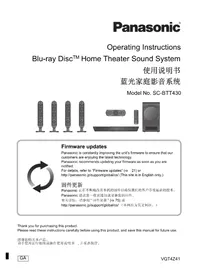


| Product Type | Blu-ray Player |
| Model | SC-BTT430 |
| Brand | Panasonic |
| Dimensions (W x H x D) | 430 x 38 x 249 mm |
| Weight | 2.7 kg |
| Power Supply | AC 220-240 V, 50 Hz |
| Power Consumption | 25 W (Standby: 0.2 W) |
| Disc Playback | Blu-ray, DVD, CD |
| Video Output | HDMI (x1), Component (x1) |
| Audio Output | HDMI, Optical, Analog (2ch) |
| USB Port | 1 x USB 2.0 (front) |
| Ethernet | Yes (RJ-45) |
| Wi-Fi | Built-in |
| Supported Video Formats | AVCHD, MPEG-2, H.264, VC-1 |
| Supported Audio Formats | Dolby Digital, DTS, MP3, AAC |
| Supported Image Formats | JPEG, PNG, GIF |
| Smart TV Features | VIERA Connect (YouTube, Netflix, etc.) |
| HDMI CEC | VIERA Link |
| Remote Control | Included (with batteries) |
| Manual Languages | English (and others) |
| Care Instructions | Clean with soft, dry cloth; avoid liquids |
| Safety | Class 1 laser product; do not open casing |
| Spare Parts & Repairability | Contact authorized service center |
| General Information | Designed for home use; firmware updates available via USB or network |
Frequently Asked Questions - SC-BTT430 PANASONIC
User questions about SC-BTT430 PANASONIC
0 question about this device. Answer the ones you know or ask your own.
Ask a new question about this device
Download the instructions for your Blu-ray player in PDF format for free! Find your manual SC-BTT430 - PANASONIC and take your electronic device back in hand. On this page are published all the documents necessary for the use of your device. SC-BTT430 by PANASONIC.
USER MANUAL SC-BTT430 PANASONIC
Operating Instructions
Blu-ray Disc™ Home Theater Sound System
Operating Instructions
Blu-ray Disc™ Home Theater Sound System
Model No. SC-BTT430


Firmware updates
Panasonic is constantly improving the unit's firmware to ensure that our customers are enjoying the latest technology.
Panasonic recommends updating your firmware as soon as you are notified.
For details, refer to "Firmware updates" (⇒ 21) or
http://panasonic.jp/support/global/cs/ (This site is in English only.)
Firmware updates
Thank you for purchasing this product.
Please read these instructions carefully before using this product, and save this manual for future use.
Thank you for purchasing this product.
To reduce the risk of fire, electric shock or product damage,
- Do not expose this unit to rain, moisture, dripping or splashing.
- Do not place objects filled with liquids, such as vases, on this unit.
- Use only the recommended accessories.
- Do not remove covers.
- Do not repair this unit by yourself. Refer servicing to qualified service personnel.
- Do not let metal objects fall inside this unit.
- Do not place heavy items on this unit.
AC mains lead
To reduce the risk of fire, electric shock or product damage,
- Ensure that the power supply voltage corresponds to the voltage printed on this unit.
- Insert the mains plug fully into the socket outlet.
- Do not pull, bend, or place heavy items on the lead.
- Do not handle the plug with wet hands.
- Hold onto the mains plug body when disconnecting the plug.
- Do not use a damaged mains plug or socket outlet.
The mains plug is the disconnecting device.
Install this unit so that the mains plug can be unplugged from the socket outlet immediately.
Small object
- Keep the Memory Card out of reach of children to prevent swallowing.
- Keep the screws out of reach of children to prevent swallowing.
CAUTION
Unit
- This unit utilizes a laser. Use of controls or adjustments or performance of procedures other than those specified herein may result in hazardous radiation exposure.
- Do not place sources of naked flames, such as lighted candles, on this unit.
- This unit may receive radio interference caused by mobile telephones during use. If such interference occurs, please increase separation between this unit and the mobile telephone.
- This unit is intended for use in tropical climates.
Placement
Place this unit on an even surface.
To reduce the risk of fire, electric shock or product damage,
- Do not install or place this unit in a bookcase, built-in cabinet or in another confined space. Ensure this unit is well ventilated.
- Do not obstruct this unit's ventilation openings with newspapers, tablecloths, curtains, and similar items.
- Do not expose this unit to direct sunlight, high temperatures, high humidity, and excessive vibration.
Speaker
• Use only supplied speakers
The main unit and supplied speakers are to be used only as indicated in these operating instructions. Failure to do so may lead to damage to the amplifier and/or the speakers, and may result in the risk of fire. Consult a qualified service person if damage has occurred or if you experience a sudden change in performance.
- Be careful not to cross (short-circuit) or reverse the polarity of the speaker wires as doing so may damage the speakers.
- Hold the speaker firmly to avoid injury by dropping the speaker when carrying.
- You can damage your speakers and shorten their useful life if you play sound at high levels over extended periods.
- Do not touch the front area of the speakers. Hold by the sides.
- Place speakers on flat, secure surfaces.
- To avoid injury by falling or dropping the speaker, place the speaker cables with care not to stumble or hook.
- Do not stand on the speaker. Be cautious when children are near.
Batteries
Mishandling of batteries can cause electrolyte leakage and may cause a fire.
- Danger of explosion if battery is incorrectly replaced. Replace only with the type recommended by the manufacturer.
- When disposing of the batteries, please contact your local authorities or dealer and ask for the correct method of disposal.
- Do not mix old and new batteries or different types at the same time.
- Do not heat or expose to flame.
- Do not leave the battery(ies) in a car exposed to direct sunlight for a long period of time with doors and windows closed.
- Do not take apart or short circuit.
- Do not recharge alkaline or manganese batteries.
- Do not use batteries if the covering has been peeled off.
Remove batteries if you do not intend to use the remote control for a long period of time. Store in a cool, dark place.
To dispose or transfer this unit
The unit may keep the user settings information in the unit. If you discard this unit either by disposal or transfer, then follow the procedure to return all the settings to the factory presets to delete the user settings. (→ 46, "To return all settings to the factory preset.")
- The operation history may be recorded in the memory of this unit.
- If you see this symbol -
Information on Disposal in other Countries outside the European Union
This symbol is only valid in the European Union. If you wish to discard this product, please contact your local authorities or dealer and ask for the correct method of disposal.

Restriction on use of unauthorized copied content
This unit adopts the following technology for copyright protection.
Cinavia Notice
This product uses Cinavia technology to limit the use of unauthorized copies of some commercially-produced film and videos and their soundtracks. When a prohibited use of an unauthorized copy is detected, a message will be displayed and playback or copying will be interrupted.
More information about Cinavia technology is provided at the Cinavia Online Consumer Information Center at http://www.cinavia.com. To request additional information about Cinavia by mail, send a postcard with your mailing address to:
Cinavia Consumer Information Center, P.O. Box 86851, San Diego, CA, 92138, USA.
Table of contents
Precautions 2
Getting started
Package contents and accessories ..... 5
Unit and media care 6
Playable media 7
Control reference guide 9
STEP 1: Positioning ..... 12
STEP 2: Preparing the speakers ..... 13
STEP 3: Connections ..... 15
STEP 4: Connecting the AC mains lead . . . . 19
STEP 5: Settings.....20
Inserting or removing media ..... 22
Enjoying TV with unit's speakers ..... 22
HOME menu 23
Multi User Mode 24
Playback
Playback 25
Using the iPod/iPhone 28
TV & Radio
VIERA Link "HDAVI Control™" 29
-Enjoying TV and STB with unit's speakers . . . . .30
Listening to the Radio 31
Advanced operations
VIERA Connect
(Enjoying Internet Service) 32
Home Network feature 33
Option menu 34
Setup menu....37
- Speaker settings 43
Changing the sound settings 44
Speaker installation option 44
Reference
Troubleshooting guide 46
Messages 50
Specifications 52
Package contents and accessories
Check the package contents and supplied accessories before using this unit.
Package contents

(SB-HS3300)
FRONT SURROUND
(SB-HF3300) (Speakers)


(Base stands)


(Screws)


(Speaker cables)


SUBWOOFER CENTER
(SB-HW185) (SB-HC3300)

Accessories
□ 1 Remote control (N2QAYB000729)

☐ 2 Batteries for remote control

□ 2 AC mains lead*
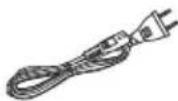
* See page 19 for more information.
□ 1 HDMI cable

□ 1 FM indoor antenna

☐ 1 Sheet of speaker cable sticker

- Product numbers provided in these operating instructions correct as of March 2013. These may be subject to change.
- Do not use AC mains lead with other equipment.
- Please note that the actual controls and components, menu items, etc. may look somewhat different from those shown in the illustrations in these Operating Instructions.
Unit and media care
■ Clean this unit with a soft, dry cloth
- Never use alcohol, paint thinner or benzine to clean this unit.
- Before using chemically treated cloth, carefully read the instructions that came with the cloth.
This unit's lens
Lens cleaner: RP-CL720AE
- This lens cleaner may not be for sale depending on the region.
- This lens cleaner is sold as specific for DIGA, but can be used on this unit as well.
■ Clean discs
DO DO NOT

Wipe with a damp cloth and then wipe dry.
■ Disc and card handling precautions
- Handle discs by the edges to avoid inadvertent scratches or fingerprints on the disc.
- Do not attach labels or stickers to discs.
- Do not use disc cleaning sprays, benzine, thinner, static electricity prevention liquids or any other solvent.
- Clean any dust, water, or foreign matter from the terminals on the rear side of the card.
- Do not use the following discs:
- Discs with exposed adhesive from removed stickers or labels (rented discs etc.). – Discs that are badly warped or cracked.
- Irregularly shaped discs, such as heart shapes.
playable media
| Device | Disc markings | Device types | Contents format |
| BD |  | BD-Video Video | |
| BD-RE Video, JPEG, MPO | |||
| BD-R Video, MKV, Xvid | |||
| DVD |  | DVD-Video Video | |
 | DVD-R | Video, AVCHD, MKV, Xvid, JPEG, MPO, FLAC, MP3, WAV | |
 R DL R DL | DVD-R DL | ||
 | DVD-RW | Video, AVCHD | |
| — | +R/+RW/+R DL | ||
| CD |  | Music CD Music [CD-DA] | |
| — | CD-RCD-RW | MKV, Xvid, JPEG, MPO, FLAC, MP3, Music [CD-DA], WAV | |
| SD |  | SD Memory Card (from 8 MB to 2 GB)SDHC Memory Card (from 4 GB to 32 GB)SDXC Memory Card (48 GB, 64 GB)(Compatible with both mini and micro types) | AVCHD, AVCHD 3D, MP4, MPEG2, JPEG, MPO |
| USB | — | USB devices(up to 2 TB) | MKV, MP4, MPEG2, Xvid, JPEG, MPO, FLAC, MP3, WAV |
- See pages 8 and 53 for more information on the types of content that can be played.
■ Discs that cannot be played by this unit
- DVD-RAM
- Super Audio CD
- Photo CD
- DVD-Audio • Video CD and Super Video CD
- WMA discs
- DivX discs
- HD DVD
■ Region management information BD-Video
This unit can play BD-Video discs supporting the region code "A".
Example:

DVD-Video
This unit can play DVD-Video discs supporting the region number "3" or "ALL".
Example:

Finalize
DVD-R/RW/R DL, +R/+RW/+R DL and CD-R/RW recorded by a recorder, etc. needs to be finalized by the recorder to play on this unit. Please refer to the recorder's instructions.
BD-Video
This unit supports high bit rate audio (Dolby® Digital Plus, Dolby® TrueHD, DTS-HD High Resolution Audio and DTS-HD Master Audio) adopted in BD-Video.
3D
- 3D videos and 3D still pictures can be played back when this unit is connected to a 3D compatible TV using a High Speed HDMI Cable.
- 2D video can be enjoyed as 3D virtually. (→ 37)
Music CD
Operation and sound quality of CDs that do not conform to CD-DA specifications (copy control CDs, etc.) cannot be guaranteed.
SD card
- miniSD Cards, microSD Cards, microSDHC Cards and microSDXC Cards can be used, but must be used with an adaptor card. These are usually supplied with such cards, or otherwise customer provided.

- To protect the card's contents, move the record prevention tab (on the SD card) to "LOCK".
- This unit is compatible with SD Memory Cards that meet SD Card Specifications FAT12 and FAT16 formats, as well as SDHC Memory Cards in FAT32 format and SDXC Memory Cards in exFAT.
- If the SD card is used with incompatible computers or devices, recorded contents may be erased due to the card being formatted etc.
- Usable memory may be slightly less than the card capacity.
USB device
- This unit does not guarantee connection with all USB devices.
- This unit does not support USB device charging.
- FAT12, FAT16, FAT32, and NTFS file systems are supported. • This unit supports USB2.0 High Speed.
- This unit can support an HDD formatted to FAT32 and NTFS.
Some types of HDD may require the use of its external power supply unit.
BD-RE, BD-R
Discs recorded in DR mode using Panasonic Blu-ray Disc recorders may not play back the audio etc., correctly.
- It may not be possible to play the above media in some cases due to the type of media, the condition of the recording, the recording method, and how the files were created.
- The producers of the disc can control how discs are played, so you may not always be able to control play as described in these operating instructions. Read the disc's instructions carefully.
Control reference guide
Remote control

■ Using the remote control
Insert so the poles (+ and −) match those in the remote control.

(Alkaline or manganese batteries)
Point it at the remote control signal sensor on this unit. (⇒ 10)
1 Turn the unit on and off
2 Select title numbers, etc./Enter numbers or characters
3 Select the source
4 Basic playback control buttons (⇒ 25)
5 Select preset radio stations (⇒ 31)
6 Show status messages (⇒ 26)
7 Show the Home screen of the VIERA Connect (⇒ 32)
8 [▲, ▼, ◀, ▶] : Move the highlight for selection [OK] : Confirm the selection (◀▶) (▶▶): Frame-by-frame (⇒ 25)
9 Show OPTION menu (⇒ 34)
10 Coloured buttons (red, green, yellow, blue) Used for various purposes depending on the display
11 Set the sound mode (⇒ 44)
12 Select surround sound effects (⇒ 44)/Set the sleep timer
① Press and hold [−SLEEP].
② While "SLEEP ××" is displayed, press [-SLEEP] several times to select the time (in minutes).
- Timer selection is up to 120 minutes.
- Select "OFF" when cancelling the setting.
- To confirm the remaining time Press and hold the button again.
13 TV operation buttons
[☐ TV]: Turn the television on and off AV, INPUT : Switch the input select [+ - VOL]: Adjust the volume
14 Adjust the volume of the main unit
15 Select audio (⇒ 25)
16 Mute the sound
- "MUTE" flashes on the unit's display while the function is on.
- To cancel, press the button again or adjust the volume.
- Muting is cancelled if the unit is turned off.
17 Switch on/off Secondary Video (Picture-in-picture)
18 Select radio stations manually (see 31)
19 Exit the menu screen
20 Show HOME menu (see 23)
21 Show Pop-up Menu/Top Menu (see 26)
22 Return to previous screen
23 Start up a video communication (see 32)
24 Select speaker channel (see 44)
Main unit (Front)

1 Standby/on switch (↓/l) (see 20)
Press to switch the unit from on to standby mode or vice versa. In standby mode, the unit is still consuming a small amount of power.
2 Open or close the disc tray (⇒ 22) 3 Adjust the volume of the main unit 4 Disc tray
5 SD card slot (⇒ 22) 6 USB port (⇒ 22, 28) 7 Remote control signal sensor
Distance: within approx. 7 m.
Angle: Approx. 20° up and down, 30° left and right
8 Display
Main unit (Rear)

1 AC IN terminal (⇒ 19) 2 Speaker terminals (⇒ 15) 3 Cooling fan 4 LAN port (→ 18) 5 USB port (⇒ 18, 32)
6 HDMI AV OUT (ARC) terminal (⇒ 16) 7 DIGITAL AUDIO IN terminal (⇒ 16, 17) 8 AUX terminal (⇒ 16) 9 FM radio antenna terminal (⇒ 17)
STEP 1: Positioning
For optimum position
Place the front, centre and surround speakers at approximately the same distance from the seating position.
- Adjust the volume using the Delay time function if the distance between each speaker and the seating position is not equal. (⇒ 43)

A Centre speaker
- Put on a rack or shelf not to interfere with the TV's various sensors (ambient light, etc.). Vibration caused by the speaker can disrupt the picture if it is placed directly on the TV.
B Front speakers
© Subwoofer
D Surround speakers
- Place the speakers at the same height or higher than ear level.
- Keep your speakers at least 10 mm away from the system to avoid noise generated by resonance.
- Placing speakers too close to floors, walls, and corners can result in excessive bass. Cover walls and windows with thick curtains.
- For optional wall mount, refer to page 44.
STEP 2: Preparing the speakers
Assembling the speakers
Front speakers, Surround speakers
1 Attach the base stand.

2 Tighten the 2 screws (supplied) securely.

3 Thread the speaker cable through the base stand.

4 Slide the speaker cable into the groove.

5 Attach the speaker cable sticker (supplied) and connect the speaker cables to the speakers. (=> 14)

- After connecting the speaker cable, press the cable into the groove.

- To prevent damage or scratches, lay down a soft cloth and perform assembly on it.
Connecting the speaker cables
Attach the speaker cable sticker (supplied) and connect the speaker cables to the speakers.
e.g., Centre speaker

| Speaker cable sticker Connector | |
| 1 FRONT Lch 1 White | |
| 2 FRONT Rch 2 Red | |
| 3 SURROUND Lch 3 Blue | |
| 4 SURROUND Rch 4 Grey | |
| 5 CENTER 5 Green | |
| 6 SUBWOOFER 6 Purple | |
STEP 3: Connections
Turn off all equipment before connection and read the appropriate operating instructions. Do not connect the AC mains lead until all other connections are complete.
Speaker connection
Connect the speaker cables to the terminals of the same colour.

Connecting to a TV
HDMI
- If you use an optional HDMI cable, use the ARC compatible High Speed HDMI cables.
Non-HDMI-compliant cables cannot be utilized.
It is recommended that you use Panasonic's HDMI cable. When outputting 1080p signal, please use HDMI cables 5.0 meters or less.
- Audio will be output through the system's speakers when "Off" is selected in "HDMI Audio Output". ( ⇒ 39)
TV Audio
- To output TV audio from this unit's speakers, you need to switch the selector. (→ 22)
■ OPTICAL IN
- After making the digital audio connection, make settings to suit the type of audio from your digital equipment. (⇒ 39)
![HDMI cable (supplied) HDMI AVIN OPTICAL OUT AUDIO OUT [ARC] AV OUT DIGITAL AUDIO IN AUX Audio cable*2 (not supplied) Optical digital audio cable*1 (not supplied)](/content/2026/05/1074250/images/a4b3b271c43d25e0289b814a988b320d1bda8197dec524ca595392feec90211d.jpg)
1 If the HDMI terminal on the TV is labelled “HDMI (ARC)”, the connection of the optical digital audio cable is not required. 2 It is also possible to use an audio cable instead of the optical digital audio cable. In this case, connect the AUX terminal on the main unit with the audio output terminal on the TV.
What is ARC?
ARC is an abbreviation of Audio Return Channel, also known as HDMI ARC. This feature allows a home theatre system to receive and play audio from the TV through a single HDMI cable without additional wiring.
FM antenna connection


- Use an FM outdoor antenna if radio reception is poor.
Other device connection
![graph TD A["Computer"] --> B["Set Top Box, etc."] B --> C["Optical OUT"] C --> D["Optical digital audio cable (not supplied)"] D --> E["Digital Audio In"]](/content/2026/05/1074250/images/02ac8d965b891fa7c284bb83882f7d21774215a5b368c57b3dc08351e0f13dbf.jpg)
Connecting to the network
The following services can be used when this unit is connected to broadband.
- Firmware can be updated (⇒ 21)
- You can enjoy VIERA Connect (→ 32)
- You can enjoy BD-Live (→ 26)
- You can access other devices (Home Network) (⇒ 33)
For details about connection method, refer to the instructions supplied with the connected equipment.
Wireless LAN connection
For wireless capability, connect the Wireless LAN Adaptor DY-WL5 (optional). Only DY-WL5 can be used. Read the operating instructions for DY-WL5 thoroughly when using it.

- A wireless LAN connection can be used only in those countries where the wireless function is authorized for use. Use of a wireless LAN connection is prohibited in the regions where DY-WL5 is not sold.
- For up-to-date compatibility information on your wireless router, refer to http://panasonic.jp/support/global/cs/ (This site is in English only.)
- The unit is not compatible with public wireless LAN services provided in airports, stations, cafes, etc.
LAN cable connection
![graph LR A["LAN Cable (not supplied)"] --> B["Broadband router, etc."] C["Internet"] --> D["Network"]](/content/2026/05/1074250/images/c5fb0fe4a115210c23dbdd1aa7c4bd1196d2cb91a8d620619d9e197201dee4b4.jpg)
- Use category 5 or above straight LAN cables (STP) when connecting to peripheral devices.
- Inserting any cable other than a LAN cable in the LAN terminal can damage the unit.
STEP 4: Connecting the AC mains lead
Connect only after all other connections are complete.
AC mains lead with a label is for Thailand.
AC mains lead without a label is for areas other than Thailand.

To a household mains socket
This unit consumes a small amount of AC power (→ 52) even when turned off. For the purpose of power conservation, the unit can be disconnected if you will not be using it for an extended period of time.
STEP 5: Settings
Easy Setting
After connecting your new home theatre for the first time and pressing [⏻], a screen for the basic settings will appear.
Preparation
Turn on the television and select the appropriate video input on the television.
1 Press [⏻].
Setup screen appears.
2 Follow the on-screen instructions and apply the settings.
- You can perform this setup anytime by selecting "Easy Setting" in the Setup menu. (→ 41)
- If this unit is connected to a Panasonic TV (VIERA) supporting HDAVI Control 2 or later via an HDMI cable, then setting information on the TV such as "On-Screen Language" is acquired by this unit.
Easy Network Setting
After completing "Easy Setting", you can perform "Easy Network Setting".
Select "Wired" or "Wireless" and press [OK].

■ "Wired" connection
Follow the on-screen instructions to apply your connection settings.
■ "Wireless" connection
Before beginning wireless connection setup
- Obtain your network name (SSID)*
- If your wireless connection is encrypted, please be sure that you know your encryption key.
- If "Wireless LAN Adaptor is not connected." is displayed, check that the Wireless LAN Adaptor is fully inserted. Alternatively, disconnect and reconnect it. If there is still no change in the display, consult your dealer for advice.
Select "Search for wireless network" or "WPS (PUSH button)" and press [OK], then follow the on-screen instructions and apply the settings.

WPS (PUSH button):
If your wireless router supports WPS (PUSH button), you can easily perform the settings by pressing WPS button on it.
e.g.,

WPS (Wi-Fi Protected Setup™) is a standard that facilitates settings relating to the connection and security of wireless LAN devices.
① Press WPS button or corresponding button of the wireless router until the lamp starts flashing.
- For details, refer to the operating instruction of the wireless router.
② Press [OK].
Search for wireless network:
- When you select "Search for wireless network", the available wireless networks will be displayed. Select your network name and press [OK].
- If your network name is not displayed, search again by pressing the red button on the remote control.
- Stealth SSID will not be displayed when you select "Search for wireless network". Enter manually by using "Manual setting". Press [HOME] → select "Others" and press [OK] → select "Setup" and press [OK] → select "Network" and press [OK] → select "Network Settings" and press [OK] → select "Wireless Settings" and press [OK] → select "Connection Setting" and press [OK] → select "Manual setting" and press [OK]
- If your wireless network is encrypted, Encryption Key input screen will be displayed. Input the encryption key of your network.

- Refer to the operating instructions of the hub or router.
- You can perform this setup anytime by selecting "Easy Network Setting" in the Setup menu. (⇒ 40)
- You can redo these settings individually using "Network Settings". (⇒ 40)
- Do not use this unit to connect to any wireless network for which you do not have usage rights. During automatic searches in a wireless network environment, wireless networks (SSID) for which you do not have usage rights may be displayed; however, using these networks may be regarded as illegal access.
- After performing network settings on this unit, the settings (encryption level, etc.) of the wireless router might change. When you have trouble getting online on your PC, perform the network settings on your PC in accordance with the settings of the wireless router.
- Please be aware that connecting to a network without encryption may result in the content of the communication being illegitimately viewed by a third party, or the leaking of data such as personal or secret information.
1 SSID: An SSID (Service Set IDentification) is a name used by wireless LAN to identify a particular network. Transmission is possible if the SSID matches for both devices. 2 The wireless router compatible with Wi-Fi Protected Setup TM may have the mark.
Reprogramming the remote control
If you have more than one Panasonic products and the remote control operates both products at once, you will need to change the remote control code to prevent this occurrence. (⇒ 42, "Remote Control")
Firmware updates
Occasionally, Panasonic may release updated firmware for this unit that may add or improve the way a feature operates. These updates are available free of charge.
This unit is capable of checking the firmware automatically when connected to the Internet via a broadband connection.
When a new firmware version is available, the following message is displayed.
New firmware is available.
Please update firmware in Setup.
To update the firmware
Press [HOME]
→ select "Others" and press [OK] → select "Setup" and press [OK] → select "System" and press [OK] → select "Firmware Update" and press [OK] → select "Update Now" and press [OK]
DO NOT DISCONNECT the unit from the AC power or perform any operation while the update takes place.
After the firmware is installed, "FINISH" will be displayed on the unit's display. Unit will restart and the following screen will be displayed.

![PANASONIC SC-BTT430 - Press [HOME] - 2](/content/2026/05/1074250/images/e39a1381e410917430f9bb7919323f4abcee01dec20ef04350a896f8b7ce8b69.jpg)
- If downloading on this unit fails or this unit is not connected to the Internet, then you can download the latest firmware from the following website and burn it to a CD-R to update the firmware. http://panasonic.jp/support/global/cs/ (This site is in English only.) To show the firmware version on this unit. (⇒ 42, "Firmware Version Information")
- Downloading will require several minutes. It may take longer or may not work properly depending on the connection environment.
- If you do not want to check for the latest firmware version, set "Automatic Update Check" to "Off". (⇒ 42)
Inserting or removing media

- When inserting a media item, ensure that it is facing the right way up.
- When removing the SD card, press the centre of the card and pull it straight out.
- If you connect a Panasonic product with a USB connection cable, the setup screen may be displayed on the connected equipment. For details, refer to the instructions for the connected equipment.
- Use the front USB port when you connect an iPod/iPhone, USB memory, or a USB HDD. The USB port on the rear panel is only for the following devices:
- Communication Camera - Wireless LAN Adaptor
Enjoying TV with unit's speakers
1 Connect the TV and the main unit. (→ 16)
2 Press [EXT-IN] several times to select the appropriate external input mode. (→ 23)
- Reduce the volume on the TV to its minimum, and then adjust the volume of the main unit.
Selecting the type of audio
Press [AUDIO] several times to select the audio. (M1, M2)
- Set "PCM-Fix" (→ 39) to "Off".
• Only works with Dolby Dual Mono.

- You cannot change the audio type when the TV is connected to this unit via the AUX terminal.
HOME menu
Major functions of this unit can be operated from the HOME menu.
Preparation
Turn on the television and select the appropriate video input on the television.
1 Press [⏻] to turn on the unit.
2 Press [▲, ▼, ◀, ▶] to select the item and press [OK].
- If there are any other items, repeat this step.

EXT IN
When you want to output audio of an external device from this unit, select the name of the terminal to which you have connected the device.
| AUX AUX terminal | |
| ARC | HDMI AV OUT (ARC) terminal |
| DIGITAL IN | DIGITAL AUDIO IN terminal |
If audio output from a TV or STB is selected, "(TV)" or "(CABLE/SATELLITE)" is displayed. (⇒ 39)
Network
| Network Service | Displays the Home screen of VIERA Connect. (⇒ 32) |
| Home Network | DLNA Client (⇒ 33) |
| Media Renderer (⇒ 33) |
FM Radio
| (⇒ 31) |
Videos/Photos/Music
| Disc | Play back the contents. (⇒ 25) |
| SD Card | When multiple contents are recorded, select the types of contents or the title. |
| USB |
Sound
| Select sound quality (equalizer). (⇒ 36) |
iPod
| (⇒ 28) |
Others
| Setup | (⇒ 37) |
| SD Card Management | (⇒ 26) |
| Wallpaper | Changes the background of HOME menu. |
To show the HOME menu
Press [HOME].

- Items to be displayed may vary with the media.
- When the selector is switched, it may take time to play back the selected video and/or audio.
- To save on electricity, the unit is turned off automatically if there is no button operation for about 30 minutes when not playing back (such as when paused, displaying the menu, displaying still pictures, etc.).
Multi User Mode
Multi User Mode is a function that enables switching of multiple settings easily. Up to 4 people can use the unit with their own settings.
The following settings can be personalized.
- The user icon • The wallpaper of HOME menu • The audio and picture settings ( ⇒ 34, 37)

A The user name and icon currently selected B Personalize a new user and switch the users with coloured buttons.
Personalizing a new user
1 Press [HOME]. 2 Press a coloured button that indicates new user personalization. 3 Select an item and change the settings according to the indications. The following items can be set.
| Input Nickname | Personalize a user name. |
| Select Icon | Personalize a user icon.Select from IllustrationsThe image can be selected from prepared illustrations.Create from PhotosIf the Communication Camera is connected, you can shoot and personalize your photo.You can also select a photo in recording media as an icon.(⇒ 34, “Icon Registration”) |
| Select Wallpaper | Personalize a background of the HOME menu.Other than prepared wallpapers, you can also select a photo in recording media as a wallpaper. (⇒ 34, “Wallpaper”) |
| Register Smartphone | Smartphone used as a remote control can be registered with respect to each user.● Multiple users cannot be registered for one smartphone. |
4 Select "Confirm" and press [OK].
To change the personalized user information Select "Edit User Information" from Setup menu. ( ⇒ 42)
Switching the user
There are three ways to switch the user as follows.
Using colored buttons Press the colored buttons in the HOME menu to switch to the user corresponding to the button.
Using facial recognition (Only when connected to Communication Camera ⇒ 32)
This is a function for fun using the Communication Camera and enables user switching by facial recognition. Perform "Create from Photos" (⇒ left) to personalize your facial photo before using this function.
1 Press [OPTION] in the HOME menu, select "Facial Recognition" and press [OK].
2 Turn the face to Communication Camera.
The camera captures your face and determines the closest face from the personalized user photos, and then displays the results.
- Accuracy of the recognition may be reduced depending on the captured image.
3 Follow the indications on the screen.
- To redo the facial recognition, press [RETURN].
Using registered smartphones
When the unit is turned on using the registered smartphone, the user who registered the smartphone will automatically be selected.
- Perform the "Remote Device Settings". (→ 41)
- To use smartphones as a remote control, installation of dedicated software is required. For more details, refer to the following website. http://panasonic.jp/support/global/cs/ (This site is in English only.)
Playback
1 Insert the media.
Playback starts depending on the media.
2 Select the item to play and press [OK].
Repeat this procedure if necessary.
![PANASONIC SC-BTT430 - Select the item to play and press [OK]. - 1](/content/2026/05/1074250/images/f5c357576d196626d0403a263a1297e81c99e20ff0d2d5e3e5d6049bb4954d52.jpg)
- DISCS CONTINUE TO ROTATE WHILE MENUS ARE DISPLAYED. Press [■STOP] when you have finished playback to protect the unit's motor, your television screen and so on. • MKV/Xvid: Successive play is not possible.
- It is not possible to play back AVCHD and MPEG2 video which have been dragged and dropped, copied and pasted to the media.
Operations during playback
Following functions may not work depending on the media and contents.
Stop
Press [■STOP].
The stopped position is memorized.
Resume play function
Press [▶PLAY] to restart from this position.
- The position is cleared if the tray is opened.
- On BD-Video discs including BD-J, the resume play function does not work.
Pause
Press [IPAUSE].
- Press [■■PAUSE] again or [▶PLAY] to restart play.
Search/Slow motion
Search
While playing, press [SEARCH◀◀] or [SEARCH▶▶].
- Music and MP3: The speed is fixed to a single step.
Slow motion
While paused, press [SEARCH◀◀] or [SEARCH▶▶].
- BD-Video and AVCHD: [SEARCH▶▶] only. The speed increases up to 5 steps.
- Press [▶PLAY] to revert to normal playback speed.
Skip
While playing or paused, press [◀◀] or [▶▶].
Skip to the title, chapter or track.
Frame-by-frame
While paused, press [◀] (◀▶) or [▶] (▶▶).
- Press and hold to change in succession forward or backward.
- Press [▶PLAY] to revert to normal playback speed.
- BD-Video and AVCHD: [▶] (■■) only.
Changing audio
Press [AUDIO].
You can change the audio channel number or soundtrack language, etc.
Displaying menus and playback information
Show top menu/pop-up menu
Press [POP-UP MENU/TOP MENU].
Select the item and press [OK].
Show the status messages
While playing, press [STATUS].
The status messages give you information about what is currently being played. Each time you press [STATUS], the display information may change or will disappear from the screen.
- Depending on media and contents, the display may change or may not appear.
e.g., BD-Video
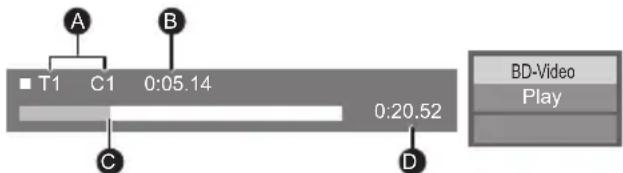
A T: Title, C: Chapter, PL: Playlist B Elapsed time in the title C Current position D Total time
e.g., JPEG
| 1 / 26 | |
| Date | 11.12.2007 |
| Size | 500 x 375 |
| Manufacturer | |
| Equipment | |
Enjoying 3D video and photos
Preparation
Connect a 3D compatible TV to an HDMI AV OUT terminal of this unit using a High Speed HDMI Cable. (=> 16)
- Perform the necessary preparations for the TV.
- Play back following the instructions displayed on the screen. • 3D Settings (=> 37, 39)

- Please refrain from viewing 3D images if you do not feel well or are experiencing visual fatigue. In the event that you experience dizziness, nausea, or other discomfort while viewing 3D images, discontinue use and rest your eyes.
- 3D video might not output the way it is set in "HDMI Video Format" or "24p Output" (=> 38).
- When playing back 3D photos from "Photos" screen, select from the "3D" list. (Still pictures in "2D" are played back in 2D.) If "2D" and "3D" indications are not displayed, press the red button to switch the view of playback contents.
Enjoying BD-Live
With "BD-Live" discs, you can enjoy bonus contents that use Internet access.
For this BD-Live function, insertion of an SD card is necessary along with Internet connection.
1 Perform network connection and settings. (=> 18, 20)
2 Insert an SD card with 1 GB or more free space.
- The SD card is used as the local storage. 3 Insert the disc.
■ Deleting data/Formatting SD cards
Select “SD Card Management” in the HOME menu (⇒ 23), then select “BD-Video Data Erase” or “Format SD Card” and press [OK].

- The usable functions and the operating method may vary with each disc, please refer to the instructions on the disc and/or visit their website.
- "BD-Live Internet Access" may need to be changed for certain discs (⇒ 41).
Slideshow
Play a slideshow of photos and make various settings during the playback.
1 Insert the media. 2 Select "Photos". 3 Select an item and press the green button.
The following items can be set.
| Start Slideshow | Start the slideshow.You can display still pictures in the selected folder one by one at a constant interval. |
| Interval Change | the display interval. |
| Transition Effect | Select the effect when sliding pictures. |
| Repeat Play | Set whether to repeat the slideshow. |
| Soundtrack | Set whether to play background music.You can select the soundtrack from USB device, Music CD and iPod/ iPhone.Some media cannot be selected as the source depending on the case. |
| Soundtrack Folder | Select the folder from which the music files are played. |
| Random Soundtrack | Background music is played in random order. |

- Still pictures displayed as " cannot be played back with this unit.
- When a music CD, a USB device with recorded music, and an iPod/iPhone are inserted/connected to this unit, iPod/iPhone has priority to be played back as background music.
Using the iPod/iPhone
Compatible iPod/iPhone (as of March 2013)
- Update your iPod/iPhone with the latest software before using this unit.
- Compatibility depends on the software version of your iPod/iPhone.
- iPod/iPhone compatibility assures music playback and battery charge functions of this unit as a home theatre system.
iPod touch:
1st, 2nd, 3rd, 4th and 5th generation
iPod nano:
1st, 2nd, 3rd, 4th, 5th, 6th and 7th generation
iPod classic
iPod: 5th generation
iPhone 5 / iPhone 4S / iPhone 4 / iPhone 3GS / iPhone 3G / iPhone

- In some locations, reception status of an iPhone may be poor when it is loaded on this unit.
- When the iPhone receives a call while connected to this unit, playback, etc. of the iPhone may stop. To prioritize the operation with the iPhone connected to this unit, make the setting so that the iPhone does not receive calls.
- Avoid using Wi-Fi mode on your iPhone while the network functions on this unit are in use wirelessly.
About recharging the battery
- iPod/iPhone will not be recharged after the battery charge completion.
- iPod/iPhone will start recharging when this unit is on.
iPod/iPhone Connection
Preparation
- Turn the main unit off or reduce the volume of the main unit to its minimum.
1 Connect the iPod/iPhone.
To purchase a dedicated USB cable, consult your iPod/iPhone dealer.
e.g., iPod/iPhone (not supplied)

iPod/iPhone Playback
1 Press [HOME]. 2 Select "iPod" and press [OK]. 3 Select the item to play.
- Repeat this procedure if necessary.
Album artwork

- If album artwork is not contained in the data, "" will appear on TV.
- Depending on the software version of your iPod/iPhone, the album artwork may not appear properly.
- Some operations may not work while reading the album artwork.
- The setting of the playback mode will be kept until changes are made on the same iPod/iPhone.
- Surround sound effect and sound mode are available.
VIERA Link "HDAVI Control™"
What is VIERA Link "HDAVI Control"?
VIERA Link “HDAVI Control” is a convenient function which will link the operations of this unit and a Panasonic TV (VIERA) under “HDAVI Control”. You can use this function by connecting the equipment with an HDMI cable. See the operating instructions for connected equipment for operational details.
Preparation
① Set "VIERA Link" to "On" ( ⇒ 42). (The default setting is "On".) ② Set the "HDAVI Control" operations on the connected equipment (e.g., TV). ③ Turn on all “HDAVI Control” compatible equipment and select this unit’s input channel on the connected TV so that the “HDAVI Control” function works properly. Also, when the connection or settings are changed, repeat this procedure.
Automatic input switching Power on link
When the following operations are performed, the input channel of the television will be automatically switched and the screen of this unit will be displayed.
When the television is off, the television will automatically turn on.
- When play starts on the unit
- When an action that uses the display screen is performed (e.g., HOME menu)
- This function does not work when the iPod/iPhone selector is chosen. ( ⇒ 28)
Power Off Link
All connected equipment compatible with "HDAVI Control", including this unit, automatically turns off when you switch the television off.
Playing music continuously even after turning off the television
When the unit is connected to a Panasonic TV (VIERA) that supports HDAVI Control 2 or later.
Select "Video" in "Power Off Link" (=> 42)
Easy control only with VIERA remote control
Only when TV supports "HDAVI Control 2" or later
By using the TV remote control, you can perform various playback operations and settings.
See the operating instructions of the TV for more details.
- The buttons that you can use for this unit vary depending on the TV. For details, refer to the operating instructions of the TV.
- The operation of this unit may be interrupted when you press certain buttons on the TV remote control.
- This unit supports "HDAVI Control 5" function. "HDAVI Control 5" is the standard for Panasonic's HDAVI Control compatible equipment. This standard is compatible with Panasonic's conventional HDAVI equipment.
- VIERA Link "HDAVI Control", based on the control functions provided by HDMI which is an industry standard known as HDMI CEC (Consumer Electronics Control), is a unique function that we have developed and added. As such, its operation with other manufacturers' equipment that supports HDMI CEC cannot be guaranteed.
- Please refer to individual manuals for other manufacturers' equipment supporting VIERA Link function.
Enjoying TV and STB with unit's speakers
You can select whether audio is output from the unit's speakers or the TV speakers by using the TV menu settings. Switch the audio output setting of the TV to this unit's speakers.
Select the TV audio
When the TV is turned on, this unit will also automatically turn on.
![graph TD A["Microphone"] --> B["Signal"] B --> C["Optical digital audio cable (not supplied)"] C --> D["Computer"]](/content/2026/05/1074250/images/393527eba913a68d256e07f85587bbc71e73180d12ae7255822db133507bba54.jpg)
① Press [HOME]. ② Press [▲, ▼, ◀, ▶] to select "Others" and press [OK]. ③ Press [◀, ▶] to select "Setup" and press [OK]. ④ Press [▲, ▼] to select "Sound" and press [OK]. ⑤ Press [▲, ▼] to select "TV Audio Input" and press [OK]. ⑥ Press [▲, ▼] to switch "AUX", "ARC" or "DIGITAL IN" and press [OK].
- Select an audio input terminal connected to the unit.
- For details, refer to the operating instructions of the TV.
Select the STB audio
When the STB power is turned on, this unit and the TV will automatically turn on. The video is output from the TV, and the audio is output from the speakers of this unit.
Connecting the optical digital audio cable
- When this unit and the STB are connected by an optical digital audio cable, the settings below are required to enable output of audio from the speakers of this unit.
![graph TD A["Monitor"] -->|e.g., HDMI cable (supplied)| B["TV"] C["Microphone"] -->|e.g.,| D["Set Top Box, etc."] B -->|Optical digital audio cable (not supplied)| E["Audio Cable"] E --> F["Radio Station"] style A fill:#f9f,stroke:#333 style C fill:#ccf,stroke:#333 style B fill:#cfc,stroke:#333 style…](/content/2026/05/1074250/images/ecd307e912983d10a41997031c93e441690fa5a0368b72ce98abb0373e0d420d.jpg)
① Press [EXT-IN] to select "D-IN". ② Press [STATUS] to select "CABLE/SATELLITE AUDIO ON".
Set to "CABLE/SATELLITE AUDIO OFF" when this unit and the STB are not connected by an optical digital audio cable.
Listening to the Radio
You can preset up to 30 channels.
Preparation
Make sure that the FM antenna is connected. (⇒ 17)
Presetting stations automatically
1 Press [RADIO] to select "FM".
2 Press and hold [STATUS] to select "LOWEST" or "CURRENT".
LOWEST
To begin auto preset with the lowest frequency (FM87.50).
CURRENT
To begin auto preset with the current frequency.*
* To change the frequency, refer to "Manual tuning and presetting".
3 Press and hold [OK].
Release the button when "AUTO" is displayed.
The tuner starts to preset all the stations it can receive into the channels in ascending order.
Listening to a preset channel
1 Press [RADIO] to select "FM".
2 Press the number buttons to select the channel.
To select a 1-digit number
e.g., 1: [1] ⇒ [OK].
To select a 2-digit number
e.g., 12: [1] ⇒ [2].
Alternatively, press [∧, ∨] or [▲, ▼].
■ Manual tuning and presetting
Select a radio broadcast.
① Press [RADIO] to select "FM".
② Press [SEARCH◀◀] or [SEARCH▶▶] to select the frequency.
- To start automatic tuning, press and hold [SEARCH◀◀], [SEARCH▶▶] until the frequency starts scrolling. Tuning stops when a station is found.
To preset the channel
③ While listening to the radio broadcast, press [OK].
④ While "P" is flashing on the display, press the number buttons to select the channel.
- A station previously stored is overwritten when another station is stored in the same channel preset.
- The radio settings will be shown on the unit's display. (Some settings are also indicated on the TV screen.)
VIERA Connect (Enjoying Internet Service)
VIERA Connect allows you to access some specific websites supported by Panasonic, and enjoy Internet contents such as photos, videos, etc. from the VIERA Connect Home screen. This unit has no full browser function and all features of websites may not be available.
VIERA Connect provides a variety of selected Internet services such as the following.
• Online movie rental service • Video communication service • Video browsing service
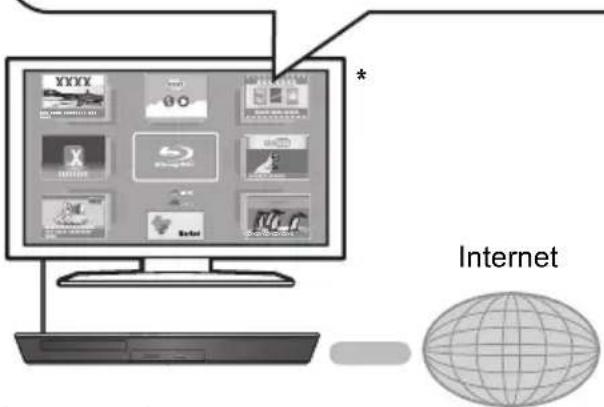
* Images are for illustration purposes, contents may change without notice.
Preparation
• Network connection (=> 18) • Network setting (=> 20)
To enjoy video communication (e.g. Skype™):
- Connect this unit with optional Communication Camera (TY-CC20W or TY-CC10W). Depending on your location, this optional camera may not be available. Please consult your local Panasonic dealer for advice.

- When this unit is connected by wireless LAN connection, connect the Communication Camera via the USB port on the front of this unit.
- For operating method refer to the following website. http://panasonic.jp/support/global/cs/ (This site is in English only.)
1 Press [INTERNET].
- The video communication service can be accessed directly by pressing [] button.
2 Select the item and press [OK].
To exit from VIERA Connect, press [HOME].
![PANASONIC SC-BTT430 - To exit from VIERA Connect, press [HOME]. - 1](/content/2026/05/1074250/images/8206c50f489668d72c5010b6bcd695c5345fd8051333044928c9decef52ded1f.jpg)
- When playing content in the media, VIERA Connect cannot be accessed by pressing [INTERNET].
- In the following cases, settings are possible using the Setup menu items.
- When restricting the use of VIERA Connect (⇒ 41, "Network Service Lock")
- When the audio is distorted (⇒ 40, "Audio Auto Gain Control")
- When wrong time is displayed (⇒ 40, "Time Zone", "Summer Time")
- If using a slow Internet connection, the video may not be displayed correctly. A high speed Internet service with a speed of at least 6 Mbps is recommended.
- Be sure to update the firmware when a firmware update notice is displayed on the screen. If the firmware is not updated, you will not be able to use the VIERA Connect function. (→ 21)
- VIERA Connect Home screen is subject to change without notice.
- The services through VIERA Connect are operated by their respective service providers, and service may be discontinued either temporarily or permanently without notice. Therefore, Panasonic will make no warranty for the content or the continuity of the services.
- All features of websites or content of the service may not be available.
- Some content may be inappropriate for some viewers.
- Some content may only be available for specific countries and may be presented in specific languages.
Home Network feature
Playing back contents on the DLNA server
You can share photos, videos and music stored in the DLNA Certified media server (PC with Windows 7 installed, smartphone, etc.) connected to your home network, and enjoy the contents with this home theatre. You can also enjoy viewing the video and photos recorded in Panasonic DLNA compatible recorders (DIGA). Refer to our website about the sales area, etc. (=> right)
![graph LR A["Home theatre"] --> B["DIGA Server"] B --> C["Home Theatre"] C --> D["Music Icon"] C --> E["Music Icon"] C --> F["Music Icon"] D <--> G["Computer"] E <--> H["Computer"] F <--> I["Computer"]](/content/2026/05/1074250/images/e97ad89167b14156bb872bdaf58aa088738aa3d5ad74d827c64b992618f8f845.jpg)
Preparation
1. Perform network connection (=> 18) and network settings (=> 20) of this unit. 2. Perform Home Network settings of the connected equipment.
When connected to other than DIGA,
3. Add the contents and folder to the libraries of the Windows Media® Player or the smartphone, etc.
- Playlist of Windows Media® Player can play back only the contents that are stored in the libraries.
When connected to DIGA,
3. Register this unit to your DIGA.
1. Press [HOME]. 2. Select "Network". 3. Select "Home Network". 4. Select "DLNA Client".
- The list can be updated by pressing the red button on the remote control.
5. Select the equipment and press [OK]. 6. Select the item to play and press [OK].
- You may be able to use convenient functions depending on the content by pressing [OPTION].
- Control Panel (=> 35) is displayed once the playback starts. Press [OK] if the Control Panel is not displayed, and press [RETURN] to hide the Control Panel.
- About supported formats for DLNA clients (see 53).
To exit Home Network
Press [HOME].
Using the Digital Media Controller
You can use a smartphone, etc., as the Digital Media Controller (DMC) to play back content from a DLNA server on the Renderer (this unit).
Possible applications:![graph TD A["Renderer"] --> B["Mobile"] C["Server"] --> B D["Controller"] --> B B --> E["Music Icon"] E --> F["Printer"] G["Renderer"] --> H["Mobile"] I["Server + Controller"] --> J["Mobile"] J --> K["Music Icon"] K --> L["Printer"]](/content/2026/05/1074250/images/41bfd15e457677a048824a6314a233ace2fe252313b78b0bcd1a551a4505c8ea.jpg)
* DMC-compatible software should be installed.
Preparation
Perform steps ① and ②. (see left)
③ Add the content and folders to the libraries of Windows Media® Player or the smartphone, etc. - Playlists in Windows Media® Player can only play back content stored in the libraries. ④ Perform the "Remote Device Settings". (see 41) - You can register up to 16 devices.
1 Press [HOME]. 2 Select "Network". 3 Select "Home Network". 4 Select "Media Renderer". 5 Operate the DMC-compatible devices.
To exit the Media Renderer screen
Press [HOME].

For more details, refer to the following website and the operating instructions for each device. http://panasonic.jp/support/global/cs/ (This site is in English only.)
- Depending on the content and the connected equipment, playback may not be possible.
- Items displayed in grey on the display cannot be played back by this unit.
- This unit can be played back via connected equipment only when controlled using DMC.
Option menu
A variety of playback operations and settings can be performed from this menu.
Available options differ depending on the playing contents and the condition of the unit.
About Multi User Mode
: Settings of the items with this indication are saved by the respective users registered in the HOME menu.
Please refer to page 24 for details about user registration and switching.
1 Press [OPTION].
e.g., BD-Video

2 Select an item and change the settings.
To exit the screen
Press [OPTION].
Regarding Language: (→ 54)
Operation Menu
Soundtrack
Show or change the soundtrack.
■ Audio channel
Select the audio channel number.
Subtitle
Change the subtitle settings.
Angle
Select the number of the angle.
■ Repeat Play
(Only when the elapsed time is being displayed on the unit's display.)
Select the item that you want to repeat.
- The items displayed differ depending on the type of media.
- Select "Off" to cancel.
Random
Select whether or not to play random.
■ Start Slideshow
Start the slideshow.
Status
Show the status messages.
■ Rotate RIGHT
■ Rotate LEFT
Rotate the still picture.
■ Wallpaper
Set the still picture to the wallpaper of HOME menu. (→ 23)
■ Icon Registration
Set the still picture as your user icon. (→ 24)
Video
The recording method of original video appears.
■ Secondary Video
| Video | Select on/off of images. The recording method of original video appears.During search/slow motion or frame-by-frame, only the primary video is displayed. |
| Soundtrack | Select on/off of audio and the language. |
■ Playback Information Window
Displays the following.
| Audio/video attribute information of disc. | |
| Settings status of “Digital Audio Output”(⇒ 38). | |
| HDMI | HDMI output information. |
Press [RETURN] to exit.
Control Panel
Display the Control Panel.
Playing back while using VIERA Link, etc.
e.g.,

Press [RETURN] to hide the Control Panel.
Top Menu
Display Top Menu.
■ Pop-up Menu
Display Pop-up Menu.
Menu
Display Menu.
Personal Taste
You can access settings to enjoy special features of this unit from this category.
Refer to "Picture Settings" and "Sound Settings" (=> 36) for more details on each setting item.
Picture Settings
■ Picture Mode
Select the picture quality mode during play.
- If you select "User", you can change settings in "Picture Adjustment".
■ Picture Adjustment
Specific picture quality settings can be performed.
- 3D NR: Reduces the rough noise in the background to give a greater feeling of depth. When "24p Output" is set to "On", this function may not operate. (=> 38)
- Integrated NR: Smoothes block noise and reduces the smudging that appears around contrasting sections of the picture.
■ Chroma Process
The high-resolution processing of HDMI chroma signals produces a high resolution picture with rich picture quality.
■ Detail Clarity
The picture is sharp and detailed.
Super Resolution
Pictures of normal image quality are corrected to sharp and detailed images when output as 1080i/1080p from HDMI AV OUT.
■ Progressive
Select the method of conversion for progressive output to suit the type of material being played.
- If the video is disrupted when "Auto" is selected, select either "Video" or "Film" depending on the material to be played back.
24p
Movies and other material recorded on DVD-Video at 24p are output at 24p.
- Only when you have selected "On" in "24p Output" (⇒ 38) and play discs recorded at a rate of 60 fields per second.
- This may not work with PAL content.
Screen Aspect
Switch the screen mode.
■ Reset to Default Picture Settings
Return picture settings to the factory preset.
Sound Settings
"Surround Effects" and "Sound Effects" can also be set by using the [SURROUND] and [SOUND] on the remote control. (⇒ 44)
■ Surround Effects
BD/DVD (Multi-ch Source):
| 3D Cinema Surround | Expand the sound field forward, backward, upward, right and leftward providing a sound with depth and force that better matches 3D images. |
| 7.1ch Virtual Surround | You can enjoy 6.1/7.1-channel surround-like effect using 5.1-channel speakers. |
| 2ch Stereo | You can play any source in stereo. Sound will be output to the front speakers and the subwoofer only. |
TV/CD/iPod (2ch Source):
| Multi Channel Out | You can enjoy sound from the front speakers, as well as the surround speakers even when playing stereo sources. |
| Super Surround | You can enjoy sound from all speakers with stereo sources. |
| Dolby Pro Logic II Movie | Suitable for movie software, or the one recorded in Dolby Surround.(except Xvid) |
| Dolby Pro Logic II Music | Adds 5.1-channel effects to stereo sources.(except Xvid) |
■ Sound Effects 1*2,3
▶ TV/CD/iPod (2ch Source):
Re-master:
This feature gives you brighter sound by increasing the high frequency portion of the audio. (Discs recorded at 48 kHz or less) Recommended setting:
| Re-master 1 Pop and rock |
| Re-master 2 Jazz |
| Re-master 3 Classical |
Digital Tube Sound:
This feature gives you warm sound, like that produced by a vacuum tube amplifier.
Recommended setting:
| Digital Tube Sound 1 | A crisp, delicate sound |
| Digital Tube Sound 2 | A tight, hi-fi sound |
| Digital Tube Sound 3 | A soft, rich sound |
| Digital Tube Sound 4 | A clear, powerful sound |
| Digital Tube Sound 5 | A distinctive mid-range sound |
| Digital Tube Sound 6 | A soft, enveloping sound |
All:
| Equalizer | You can select sound quality settings.Flat/Heavy/Clear/Soft |
| Subwoofer | You can adjust the amount of bass.Level 1 (Weakest effect) to Level 4 (Strongest effect)● Levels can be set by source. |
| H.Bass | You can enhance low-frequency sound so that heavy bass sound can be heard clearly, even if the acoustics of your room are not optimal. |
| Whisper-Mode Surround | You can enhance the surround effect for low volume sound. (Convenient for late night viewing.) |
| Centre Focus | You can make the Centre channel sound seem like it is coming from within the TV. |
■ High Clarity Sound Plus
When playing back music contents, it improves the sound quality by stopping the video output.
3D Settings
■ Signal Format
| Original Keep | original picture format. |
| Side by side | 3D picture format comprising of left and right screens. |
| 2D to 3D | Converts 2D pictures to 3D effect. |
■ 3D Picture Mode
| Normal | Play back pictures with normal 3D effects. |
| Soft | You can enjoy 3D pictures with a feeling of broadness, holding back the depth perception. |
| Manual | Play back 3D pictures with settings of “Manual Settings”. |
■ Manual Settings
| Distance | Set the amount of depth perception. |
| Screen Type | Selects how the screen appears during 3D playback (flat or round). |
| Frame Width | Set the amount of feathering at the edge of screen. |
| Frame Colour | Set the colour of feathering at the edge of screen. |
■ Graphic Display Level
(Only when "Full HD" is selected in "3D Type" (⇒ 39).)
3D position for the Option menu or message screen, etc. can be adjusted during 3D playback.
Setup menu
Change the unit's settings if necessary. The settings remain intact even if you switch the unit to standby.
Some items in the Setup menu are common to the Option menu. You can get the same effect with both menus.
About Multi User Mode
: Settings of the items with this indication are saved by the respective users registered in the HOME menu.
Please refer to page 24 for details about user registration and switching.
1 Press [HOME].
2 Press [▲, ▼, ◀, ▶] to select “Others” and press [OK].
3 Press [◀, ▶] to select "Setup" and press [OK].

4 Select an item and change the settings.
To exit the screen
Press [HOME].
■ Picture Mode (⇒ 35)
■ Picture Adjustment (→ 35)
■ Chroma Process 📁 (⇒ 35)
■ Detail Clarity (⇒ 35)
■ Super Resolution 📁 (⇒ 35)
■ HDMI Output
Press [OK] to show the following settings:
HDMI Video Format
The items supported by the connected devices are indicated on the screen as “*”. When any item without “*” is selected, the images may be distorted.
- If "Automatic" is selected, the best suited output resolution to the connected television is automatically selected.
- To enjoy high-definition video up-converted to 1080p, you need to connect the unit directly to 1080p compatible HDTV (High Definition Television). If this unit is connected to an HDTV through other equipment, the other equipment must also be 1080p compatible.
24p Output
When this unit is connected to a TV supporting 1080/24p output using an HDMI cable, movies and other material recorded at 24p are output at 24p.
- When playing DVD-Video, set to "On" and then set "24p" in "Picture Settings" (⇒ 35) to "On".
- When BD-Video images other than 24p are played, images are output at 60p.
- 24p: A progressive image recorded at a rate of 24 frames per second (motion-picture film). Many BD-Video movie contents are recorded in 24 frames/second in accordance with the film materials.
HDMI Colour Mode
This setting is for selecting colour-space conversion of the image signal when the unit is connected using an HDMI cable.
Deep Colour Output
This setting is for selecting whether to use Deep Colour output when a television that supports Deep Colour is connected.
Contents Type Flag
Depending on the playback content, the TV will output adjusting to the optimal method when a TV that supports this function is connected.
Still Mode
Select the type of picture shown when you pause playback.
| Automatic | Automatically selects the type of picture shown. |
| Field | Select if jittering occurs when “Automatic” is selected. |
| Frame | Select if small text or fine patterns cannot be seen clearly when “Automatic” is selected. |
Seamless Play
The chapter segments in playlists are played seamlessly.
- Select "On" when the picture freezes for a moment at the chapters segment in playlists.
Sound
■ Surround Effects 📁 (⇒ 36)
■ Sound Effects (⇒ 36)
■ Dynamic Range Compression
You can listen at low volumes but still hear dialogue clearly.
(Dolby Digital, Dolby Digital Plus and Dolby TrueHD only)
- “Automatic” is effective only when playing Dolby TrueHD.
■ Digital Audio Output
Press [OK] to show the following settings:
Dolby D/Dolby D +/Dolby TrueHD DTS/DTS-HD MPEG Audio
Select the audio signal to output.
- Select "PCM", when the connected equipment cannot decode the respective audio format. This unit decodes the audio format and transmits to the connected equipment.
- Not making the proper settings may result in noise.
BD-Video Secondary Audio
Select whether or not to mix the primary and secondary audio (including the button click sound).
If "Off" is selected, the unit outputs the primary audio only.
HDMI Audio Output
This setting selects whether or not to output audio from HDMI.
- Audio will be output through the system's speakers when "Off" is selected.
■ Digital Audio Input
Press [OK] to show the following settings:
PCM-Fix
Selects the audio output from the devices connected to this unit.
- "On": PCM is available.
- "Off": DTS, PCM and Dolby Digital are available.
Select "On" if the sound is cut off intermittently.
TV Audio Input
Select the TV audio input to work with the VIERA Link operations.
Downmix
Select the downmix system of multi-channel to 2-channel sound.
- Select "Surround encoded" to enjoy the surround sound.
- There is no downmix effect on the bitstream audio signal.
- The audio will be output in "Stereo" in the following cases:
- AVCHD playback – Dolby TrueHD playback
- Playback of secondary audio (including the button click sound).
■ Audio Delay
Synchronization between picture and sound is corrected by adjusting the delay time of the audio output.
Speaker
Refer to page 43.
3D
■ 3D BD-Video Playback
Select the playback method of 3D compatible video software.
■ 3D AVCHD Output
Select the output method of 3D AVCHD videos.
■ 3D Type
Select the format of the connected TV.
- Change the settings for 3D on the TV also when "Side by side" is selected.
■ 3D Playback Message
Set to display or hide the 3D viewing warning screen when playing back 3D compatible video software.
■ Manual Settings 📁 (→ 37)
■ Graphic Display Level 📁 (→ 37)
Language
■ Soundtrack Preference
Choose the language for audio.
- If "Original" is selected, the original language of each disc will be selected.
- Enter a code (→ 54) when you select "Other *****".
■ Subtitle Preference
Choose the language for the subtitle.
- If "Automatic" is selected and the language selected for "Soundtrack Preference" is not available, subtitles of that language will automatically appear if available on that disc.
- Enter a code (→ 54) when you select "Other *****".
■ Menu Preference
Choose the language for the disc menus.
- Enter a code (→ 54) when you select "Other *****".
■ On-Screen Language
Choose the language for menus and on-screen messages.
Network
■ Easy Network Setting (→ 20)
■ Network Settings
Perform network-related settings individually. Press [OK] to show the following settings:
LAN Connection Mode
Select the LAN connection method.
Wireless Settings
This allows the wireless router and connection settings to be set. Current connection settings and connection state can be checked.
Connection Setting
The wireless router connection wizard will be displayed.
Double Speed Mode Setting (2.4GHz)
Set the connection speed.
- If you connect using "Double Speed Mode (40MHz)", 2 channels use the same frequency band, and there is consequently a greater risk of reception interference. This can cause the connection speed to drop or become unstable.
IP Address / DNS Settings
This is for checking the state of the network connection and setting the IP address and DNS-related.
Press [OK] to show the respective setting.
Proxy Server Settings
This is for checking the state of connection with the Proxy server and performing settings.
Press [OK] to show the respective setting.
➢ Network Service Settings (⇒ 32) (VIERA Connect)
Press [OK] to show the following settings:
Audio Auto Gain Control
Volume that is different depending on the contents is adjusted automatically to the standard volume while using the VIERA Connect.
- Depending on contents, this function effect will not work.
- Select "Off" when the audio is distorted.
Time Zone
By selecting the time zone, it is possible to set the unit's time to match your location.
- Some VIERA Connect contents require the time zone to be set. Set the time zone if necessary.
Summer Time
Select "On" when using Daylight Saving time.
▶ Remote Device Settings (⇒ 33)
Press [OK] to show the following settings:
Remote Device Operation
Enable to operate by DMC.
- If "On" is selected, "Quick Start" is fixed to "On".
Device Name Entry
Set the name of this unit to be displayed on the connected equipment.
Registration Type
| Automatic | Allow connection to all the equipment that is accessing this unit. |
| Manual | Set the permission of the connection individually for the equipment that is accessing this unit. |
Remote Device List
Registering/deregistering of the displayed equipment can be performed when "Manual" in "Registration Type" is selected.
▶ BD-Live Internet Access (⇒ 26)
You can restrict Internet access when BD-Live functions are used.
- If "Limit" is selected, Internet access is permitted only for BD-Live contents which have content owner certificates.
Ratings
The following items use the same password.
Don't forget your password.
■ DVD-Video Ratings
Set a ratings level to limit DVD-Video play.
■ BD-Video Ratings
Set an age limit of BD-Video play.
■ Network Service Lock
You can restrict the usage of VIERA Connect.
System
■ Easy Setting
You can execute basic settings.
TV Settings
Press [OK] to show the following settings:
TV Aspect
Set to match the type of television connected. When connected to a 4:3 aspect television and playing 16:9 ratio image:
| 4:3 | The sides are cut off so the picture fills the screen.When playing BD-Video, video is output as “4:3 Letterbox”. |  |
| 4:3Letterbox | Black bands appear at the top and bottom of the picture. |
When connected to a 16:9 widescreen television and playing 4:3 ratio image:
| 16:9 | Video is displayed as a 4:3 ratio image in the centre of the screen. |
TV System
Perform the setup so it matches the TV System of the connected TV.
Screen Saver Function
This is to prevent burn-in on the screen.
- When this is set to "On": If a list of playback content is displayed and there is no operation for 10 minutes or more, the screen switches to HOME menu automatically.
- While playing and pausing, etc., this function is not available.
On-Screen Messages
Choose whether to show status messages automatically.
VIERA Link
Set to use "HDAVI Control" function when connected via HDMI cable to a device that supports "HDAVI Control".
- Select "Off" when you do not want to use "HDAVI Control".
Power Off Link
Select the desired power off link setting of this unit for VIERA Link operation (⇒ 29). (This works depending on the settings of the connected VIERA Link “HDAVI Control” compatible equipment.)
Video/Audio
When the TV is turned off, this unit will turn off automatically.
Video
When playing back audio only content, the unit will not turn off automatically.
Unit Settings
Press [OK] to show the following settings:
Front Panel Display
Changes the brightness of the unit's display.
- If "Automatic" is selected, the display is set to bright and only dimmed during playback.
Edit User Information
Change the user information registered in the HOME menu.
Quick Start
Speed of startup from standby mode is increased.
- When set to "On", the internal control unit will be powered and the idle power consumption will increase so compared to when set to "Off".
■ Remote Control
Change the remote control code if other Panasonic products react to this remote control.
■ Firmware Update (⇒ 21)
Press [OK] to show the following settings:
▶ Automatic Update Check
When this equipment remains connected to the Internet, it will check for the latest firmware version when it is turned on and you can update it if necessary.
Update Now
You can update the firmware manually if a firmware update is available.
■ System Information
Press [OK] to show the following settings:
Software Licence
Information about the software used by this unit is displayed.
Firmware Version Information
Display firmware version of this unit and wireless LAN module.
■ Default Settings
This returns all values in the Setup menu and the Option menu to the default settings, except for some settings of network, ratings, remote control code, language, etc.
Speaker settings

Ⓐ Volume (Channel balance) ⑧ Delay time for the Centre speaker © Delay time for the Surround speakers
■ Adjusting speaker level
(Effective when playing multi-channel audio)
1 Select "Test" and press [OK].
A test signal is output.
2 While listening to the test signal
Press [▲, ▼] to adjust the volume of each speaker ( )dB 0
The volume can be adjusted between +6 dB to -6 dB.
- Set each speaker level according to the volume of the Front (L) and Front (R) speaker volume respectively.
3 Press [OK].
The test signal stops.
■ Delay time
For optimum listening with 5.1-channel sound, all the speakers, except for the subwoofer, should be the same distance from the seating position. If either distance ① or ② is less than ③, measure the distance and adjust the time to make up for the difference (see the table below).
![graph TD A["①"] --> B["②"] B --> C["C"] C --> D["R"] D --> E["L"] B --> F["SW"] B --> G["RS"] B --> H["LS"] B --> I["RS"] style A fill:#f9f,stroke:#333 style B fill:#ccf,stroke:#333 style C fill:#cfc,stroke:#333 style D fill:#fcc,stroke:#333 style E fill:#ffc,stroke:#333 style F fill:#cff,stroke:#33…](/content/2026/05/1074250/images/80e4403615977a53808fb01429902698ea7536396f3d95f96eb37dfae69a184b.jpg)
① ② ③: Primary listening distance
A Actual speaker position B Ideal speaker position
1 Press [▲, ▼, ◀, ▶] to select the distance box (vs. 0.0) and press [OK]. 2 Press [▲, ▼] to select the setting and press [OK].
Delay time for the Centre speaker
Subtract the distance ① from ③
| Distance (Approx.) Setting | |
| 34 cm 1.0 ms | |
| 68 cm 2.0 ms | |
| 102 cm 3.0 ms | |
| 136 cm 4.0 ms | |
| 170 cm 5.0 ms | |
Delay time for the Surround speakers
Subtract the distance ② from ③
| Distance (Approx.) Setting | |
| 170 cm 5.0 ms | |
| 340 cm 10.0 ms | |
| 510 cm 15.0 ms | |
To finish the speaker setting
Press [▲, ▼, ◀, ▶] to select "Complete" and press [OK].
Changing the sound settings
For more details on each setting, refer to "Sound Settings" on the Option menu. (⇒ 36)
Surround Effects
① Press [SURROUND]. ② Press [▲, ▼] to select "MULTI CH SOURCE" or "2CH SOURCE", and then press [OK]. e.g.,

③ While the mode is displayed Press [▲, ▼] to select the desired setting. (⇒ 36)
■ Adjusting speaker level during play
① Press [CH SELECT] to activate the speaker setting mode. ② Press [CH SELECT] several times to select the speaker.
- Press [◀, ▶] to adjust the balance of the front speakers.
③ Press [▲] (increase) or [▼] (decrease) to adjust the speaker level for each speaker. -6 dB to +6 dB
Sound Effects
① Press [SOUND]. ② Press [▲, ▼] to select "2CH SOURCE" or "ALL SOURCE", and then press [OK]. e.g.,

③ While the mode is displayed Press [▲, ▼] to select the desired setting and press [OK]. Repeat this procedure if necessary. (→ 36)
- The sound effects/modes may not be available or have no effect with some sources.
- You may experience a reduction in sound quality when these sound effects/modes are used with some sources. If this occurs, turn the sound effects/modes off.
Speaker installation option
Consult a qualified building contractor when attaching the speakers to a wall. Improper attachment may result in damage to the wall and speakers and personal injury.
Attaching to a wall
You can attach all of the speakers (except subwoofer) to a wall.
- The wall or pillar on which the speakers are to be attached should be capable of supporting 10 kg per screw.
1 Drive a screw (not supplied) into the wall.
A At least 30 mm B ∅ 4.0 mm C ∅ 7.0 mm to ∅ 9.4 mm D Wall or pillar E 5.5 mm to 7.5 mm

2 Fit the speaker securely onto the screw(s) with the hole(s).
| e.g., Front speaker | |
| DO NOT DO | |
| [W62K]In this position, the speaker will likely fall if moved to the left or right. |  Move the speaker so that the screw is in this position. Move the speaker so that the screw is in this position. |
Use the measurements indicated below to identify the screwing positions on the wall.
- Leave at least 20 mm of space above the speaker and 10 mm on each side to allow enough space for fitting the speaker.
Centre speaker

Front speaker, Surround speaker
Attach to a wall without the base stand.

D 45 mm E 92 mm F 156 mm
To prevent tipping/falling of the speakers
Preventing tipping
Front speaker, Surround speaker
Preventing falling
Front speaker, Surround speaker, Centre speaker
1 Thread a string to the speaker.
- Use a string of less than ∅ 2.0 mm, which is capable of supporting over 10 kg.
e.g., Front speaker, Surround speaker

A String (not supplied)
B Rear of the speaker
2 Thread a string from the wall to the speaker and tie tightly.

© Screw eye (not supplied) D Wall or pillar E Approx. 150 mm F Approx. 120 mm
Troubleshooting guide
Before requesting service, please perform the following checks.
If the problem remains unresolved, consult your dealer for instructions.
Do you have the latest firmware installed?
Firmware updates may be released to correct operating irregularities that are discovered with certain movies. (⇒ 21)
The following do not indicate a problem with this unit:
– Regular disc rotating sounds. – Image disturbance during search. – Image disturbance when replacing 3D discs.
■ Unit does not respond to remote control or front panel buttons.
Press and hold [∅/l] on the main unit for 3 seconds.
- If still unable to turn the unit off, disconnect the AC mains lead, wait 1 minute, then reconnect the AC mains lead.
Cannot eject disc.
The unit may have a problem.
1. Turn the unit off. 2. Press and hold [OK], the yellow button, and the blue button on the remote control at the same time for more than 5 seconds. "00 RET" is displayed on the unit's display. 3. Repeatedly press [▶] (right) on the remote control until "06 FTO" is displayed on the unit's display. 4. Press [OK].
General operation
To return to the factory preset.
Select "Yes" in "Default Settings" in the Setup menu. (→ 42)
To return all settings to the factory preset.
Reset the unit as follows: 1. Turn the unit off. 2. Press and hold [OK], the yellow button, and the blue button on the remote control at the same time for more than 5 seconds.
- "00 RET" is displayed on the unit's display.
3. Repeatedly press [▶] (right) on the remote control until "08 FIN" is displayed on the unit's display. 4. Press and hold [OK] for at least 3 seconds.
This unit is turned off when the input for the TV is switched.
This is a normal phenomenon when using VIERA Link (HDAVI Control 4 or later). For details please read the operating instructions for the TV.
The remote control does not work properly.
Change the batteries in the remote control. (⇒ 9) The remote control and main unit are using different codes. If "SET □" is displayed on the unit's display when a button is pressed on the remote control, change the code on the remote control. (⇒ 42, 50)
The TV tuner mode is not displayed when the TV is switched on.
This phenomenon may occur, depending on the TV setting, when "Quick Start" is set to "On". Depending on the TV, this phenomenon may be prevented by reconnecting the HDMI cable to a different HDMI input terminal or by changing the HDMI auto connection setting.
You have forgotten your ratings password. You want to cancel the ratings level.
The ratings level returns to the factory preset. ① Turn the unit on. ② Press and hold [OK], the yellow button and the blue button on the remote control at the same time for more than 5 seconds. —"00 RET" is displayed on the unit's display. ③ Repeatedly press [▶] (right) on the remote control until "03 VL" is displayed on the unit's display. ④ Press [OK].
This unit does not recognize the USB connection correctly.
➢ Disconnect and reconnect the USB cable. If it still does not recognize the connection, turn this unit off and on again. USB devices may not be recognized by this unit when connected using the following: - a USB hub
- a USB extension cable other than the one supplied with the Wireless LAN Adaptor DY-WL5 (optional)
If you connect a USB HDD to this unit, use the USB cable that is supplied with the HDD.
The unit switches to standby mode.
This unit will automatically turn to standby mode after 30 minutes if it is inactive. (⇒ 23) When the time set for the sleep timer has passed, the main unit will be turned off. (⇒ 9) One of the unit's safety devices is activated. Press [∅/l] on the main unit to turn the unit on.
The unit does not turn off.
① Press and hold [∅/l] on the main unit for 3 seconds. (If still unable to turn the unit off, disconnect the AC mains lead, wait 1 minute, then reconnect the AC mains lead.) ② Reset the unit as follows: While the unit is off, press and hold [VOL +], [▲ OPEN/CLOSE] and [∅/l] on the main unit at the same time for more than 5 seconds.
Picture
The images from this unit do not appear on the TV.
Picture is distorted.
Jittering occurs.
An incorrect resolution is selected in "HDMI Video Format". Reset the setting as follows:
① Turn the unit on. ② Press and hold [OK], the yellow button and the blue button on the remote control at the same time for more than 5 seconds. —"00 RET" is displayed on the unit's display.
③ Repeatedly press [▶] (right) on the remote control until "04 PRG" is displayed on the unit's display.
④ Press and hold [OK] for at least 3 seconds. Set the item again. (⇒ 38) —When Dolby Digital Plus, Dolby TrueHD, and DTS-HD audio are not output properly, select "Yes" in "Default Settings" and make proper settings. (⇒ 42)
The unit and television are using different video systems.
① Turn the unit on. ② Press and hold [OK], the yellow button and the blue button on the remote control at the same time for more than 5 seconds. —"00 RET" is displayed on the unit's display.
③ Repeatedly press [▶] (right) on the remote control until "05 P/N" is displayed on the unit's display.
④ Press and hold [OK] for at least 3 seconds. The system switches from PAL to NTSC or vice versa.
The system used on the disc doesn't match your television. —PAL discs cannot be correctly viewed on an NTSC television. When "3D BD-Video Playback" in the Setup menu is set to "Automatic", images may not be output depending on the connection method. After removing the disc from this unit, select "Set before play" in the Setup menu, and select "2D Playback" in the setup screen displayed when playing 3D discs. (→ 39) If irregular colouring occurs on your TV, turn the TV off for about 30 minutes. If it persists, move the speakers further away from the TV.
Video is not output in high-definition.
➢ Confirm that "HDMI Video Format" in the Setup menu is set properly. (⇒ 38)
3D video is not output.
Change the settings as required by the connected TV format. (⇒ 39, "3D Type") Are the settings on this unit and the TV correct? (⇒ 26) Depending on the connected TV, the video being played back might switch to 2D video due to changes in resolution etc. Check the 3D setting on the TV. ➢ Check that proper HDMI video input is selected on the TV.
3D video is not output correctly as 2D.
Select "Set before play" in the Setup menu, and select "2D Playback" in the setup screen displayed when playing 3D discs. (⇒ 39, "3D BD-Video Playback")
Discs that have recorded titles with Side by Side (2-screen structure) and that can be enjoyed in 3D are played back in accordance with the settings of the TV.
A black band is displayed around the edge of the screen.
The aspect ratio of the screen is abnormal.
Confirm the “TV Aspect” is set properly. (⇒ 41) Adjust the aspect setting on the television.
Sound
No sound.
Low volume.
Distorted sound.
Cannot hear the desired audio type.
Check connections to speakers and other equipment. (⇒ 13–19) Ensure the speaker settings for your speakers are correct. (⇒ 43) To output audio from a device connected with an HDMI cable, set "HDMI Audio Output" to "On" in the Setup menu. (⇒ 39) When "BD-Video Secondary Audio" is set to "On", Dolby TrueHD, Dolby Digital Plus, DTS-HD Master Audio and DTS-HD High Resolution Audio are output as Dolby Digital or DTS Digital Surround. Re-master will not work when the bitstream signal is output from the HDMI AV OUT terminal. (⇒ 36) Depending on the connected equipment, the sound may be distorted if this unit is connected with an HDMI cable. The multi-channel audio from a device connected to the TV is not output in its original multi-channel form. If the device has an optical audio output terminal, connect the device to this unit's DIGITAL AUDIO IN terminal. (⇒ 17)
No surround sound.
Press [SURROUND] to select a surround effect. (⇒ 44)
Cannot switch audio.
When audio is output from the HDMI AV OUT terminal, set "Dolby D/Dolby D +/Dolby TrueHD", "DTS/DTS-HD" or "MPEG Audio" to "PCM". (38)
No sound from the TV.
Press [EXT-IN] to select the corresponding source. (→ 22) When connecting the unit to a TV using an HDMI cable, check whether the HDMI terminal on the TV is labeled "HDMI (ARC)". If not labeled in this way, connect using the HDMI cable in combination with an optical digital audio cable. (→ 16) If there is no sound from the equipment connected to this unit's DIGITAL AUDIO IN terminal, please make sure that the optical audio output of the equipment is set to PCM.
Playback
Disc cannot be played.
The disc is dirty. (→ 6) The disc is not finalized. (→ 8)
Still pictures (JPEG) do not play back normally.
The images that were edited on the PC, such as Progressive JPEG, etc., may not be played back.
I can't play back BD-Live.
The SD card is write-protected. (→ 8) Confirm that this unit is connected to the broadband Internet. (→ 18) Confirm the "BD-Live Internet Access" settings. (→ 41) Confirm an SD card is inserted into the SD card slot. (→ 22)
Alternative soundtrack and subtitles cannot be selected.
The languages are not recorded on the disc. You may not be able to use the Option menu to change the soundtrack and subtitles on some discs. Use the disc's menus to make changes. (→ 26)
iPod/iPhone operation
Cannot charge or operate.
Check that the iPod/iPhone is connected firmly. (→ 28) The battery of the iPod/iPhone is depleted. Charge the iPod/iPhone, and then operate again. When unexpected operation occurs while using the iPod/iPhone, connect the iPod/iPhone again or try to restart the iPod/iPhone.
Radio
Distorted sound or noise is heard.
Adjust the position of the antenna.
A beep sound is heard.
➢ Try to keep a certain amount of distance between the antenna and the TV.
Noise is excessive.
Change the audio to be output as monaural. Press [AUDIO] to select "MONO". The sound becomes monaural. - To cancel, press the button again or change the frequency. In normal circumstances, select "AUTO STEREO".
Network
I can't connect to the network.
➢ Confirm the network connection and settings. (⇒ 18, 20, 40) There may be obstacles that prevent the unit from detecting your home network. Bring the unit and the wireless router closer to each other. ➢ Check the operating instructions for each device and connect accordingly.
When using wireless LAN connection, video from the DLNA Certified media server is not played back or video frames are dropped during playback.
➢ Higher transfer rate router such as 802.11n (2.4 GHz) wireless router may solve the problem. If you use 802.11n (2.4 GHz) wireless router, it is necessary to set the encryption type to “AES”. Simultaneous use with a microwave, cordless telephone etc. at 2.4 GHz may result in connection interruptions or other problems. On the “Wireless Settings” screen (⇒ 40), the continuous lighting of at least 4 “Reception” indicators is the target for a stable connection. If 3 or fewer indicators are lit or the connection is being interrupted, change the position or angle of your wireless router and see if the connection state improves. If there is no improvement, connect to a wired network and perform the “Easy Network Setting” (⇒ 20) again.
Messages
The following messages or service numbers may appear on the TV or unit's display.
On the television
Cannot play.
You inserted an incompatible disc.
Cannot play on this unit.
You tried to play a non-compatible image. Confirm "SD" on the unit's display is not displayed and re-insert the card.
No disc inserted.
The disc may be upside down.
This operation is not available.
Some operations are unsupported by the unit. (For example, reverse slow-motion, etc.)
IP address is not set.
The "IP Address" in "IP Address / DNS Settings" is "---. ---. ---. ---". Set the "IP Address", "Subnet Mask", and "Gateway Address". (Select the automatic address acquisition if necessary.)
The wireless access point currently has a low network security setting. It is recommended to change to a higher setting.
Set a stronger network security level referring to the wireless router operating instructions.
On the unit's display
F99
The unit fails to operate properly. Press [⏻/l] on the main unit for 3 seconds to switch the unit to standby, then switch back on.
NET
While connecting to a network.
No PLAY
There is a viewing restriction on a BD-Video or DVD-Video. (See page 41)
No READ
The media is dirty or badly scratched. The unit cannot play.
PLEASE WAIT
The unit is carrying out an internal process. This is not a malfunction. You cannot operate the unit while "PLEASE WAIT" is displayed.
REMOVE
The USB device is drawing too much power. Remove the USB device.
SET □
(“□” stands for a number.)
The remote control and main unit are using different codes. Change the code on the remote control.
Press and hold [OK] and the indicated number button at the same time for more than 5 seconds.
U59
The unit is hot.
The unit switches to standby for safety reasons. Wait for about 30 minutes until the message disappears.
Select a position with good ventilation when installing the unit.
H□□ or F□□
(“□”stands for a number.)
➢ Check and correct the speaker cable connections. There is something unusual. ➢ Check the unit using the troubleshooting guide. If the service number remains displayed, do the following. ① Disconnect the plug from the household mains socket, wait a few seconds, then reconnect it. ② Press [∅/l] to turn the unit on.
If the service number remains displayed despite doing the above, request service from the dealer. Inform the dealer of the service number when requesting service.
IPOD OVER CURRENT ERROR
The iPod/iPhone is drawing too much power. Remove the iPod/iPhone, and turn the unit off and on again.
START
The system is being restarted during the firmware update. Please do not turn off the unit.
UPD□/□
(“□”stands for a number.)
The firmware is being updated. Please do not turn off the unit.
FINISH
The firmware update is complete.
NOT CONDITIONAL
The requested operation cannot be conducted.
SET OK
The stations are set, and the radio tunes to the last preset station.
ERROR
Automatic presetting is unsuccessful. Preset the stations manually.
TUNED/STEREO
Stereo broadcasting or stereo sound is selected.
TUNED
Monaural broadcasting or monaural sound is selected.
Specifications
GENERAL
| Power consumption | Approx. 80 W |
| Power consumption in standby mode | Approx. 0.1 W |
| Power supply | AC 220 V to 240 V, 50 Hz/60 Hz |
| Dimensions (W×H×D) | 460 mm × 47.7 mm × 265.4 mm |
| Mass Approx. 2.4 kg | |
| Operating temperature range | 0 °C to 40 °C |
| Operating humidity range | 35 % to 80 % RH (no condensation) |
| LASER Specification | Class 1 LASER ProductWave length: 790 nm (CDs)/660 nm (DVDs)/405 nm (BDs)Laser power: No hazardous radiation is emitted with the safety protection |
AMPLIFIER SECTION
| RMS TTL POWER OUTPUT | 1000 W |
| 1 kHz, 10 % total harmonic distortionFRONT: 160 W per ch (3 Ω)CENTRE: 160 W per ch (3 Ω)SURROUND: 160 W per ch (3 Ω) | |
| 100 Hz, 10 % total harmonic distortionSUBWOOFER: 200 W per ch (3 Ω) | |
| Audio Input | AUX × 1 |
| Digital Audio Input | Optical × 1 |
| Sampling frequency:32 kHz, 44.1 kHz, 48 kHz | |
| Audio Format:PCM, Dolby Digital, DTS |
SPEAKER SECTION
| Front | Full range | 6.5 cm CONE TYPE × 2 |
| Super tweeter | Piezo type | |
| Centre Full range | 6.5 cm CONE TYPE | |
| Super tweeter | Piezo type × 2 | |
| Surround | Full range | 6.5 cm CONE TYPE × 2 |
| Super tweeter | Piezo type | |
| Subwoofer Woofer | 20 cm CONE TYPE | |
| Dimensions(W (mm)×H (mm)×D (mm)) | Mass(Approx. kg) | |
| Front | Speaker with the base stand (high position) | |
| 157.8 × 544.5 × 156.3 1.5 | ||
| Centre | 280 × 84.4 × 72.5 | 0.65 |
| Surround | Speaker with the base stand (high position) | |
| 157.8 × 544.5 × 156.3 1.5 | ||
| Subwoofer | 232 × 406 × 316 | 5.7 |
* The impedance of all the speakers is 3 Ω.
FM TUNER SECTION
| Frequency range | 87.50 MHz to 108.00 MHz (50 kHz step) |
| Antenna terminals | 75 Ω (unbalanced) |
TERMINAL SECTION
| USB slot USB2.0 | 2 system |
| SD card slot Connector | 1 system |
| Ethernet 10BASE-T/1 | 00BASE-TX1 system |
VIDEO SECTION
| Signal system PAL/NTSC | |
| HDMI AV output* Output connector:Type A (19 pin) 1 system |
* This unit supports "HDAVI Control 5" function.
Specifications are subject to change without notice.
File format
| File format | Extension Reference | |
| MP3 “.MP3”, “.mp3” | This unit supports ID3 tags, but only titles, artist names and album names can be displayed. | |
| JPEG “.JPG”, “.jpg” | MOTION JPEG and Progressive JPEG are not supported.You may not be able to play back the file if you have edited the folder structure or the file name on a PC or other device. | |
| MKV | “.MKV”, “.mkv” | Some MKV/Xvid files may not be played back, depending on the video resolution and frame rate condition. |
| Xvid “.AVI”, “.avi” | ||
| FLAC “.FLAC”, “.flac” | Maximum sampling rate: 192 kHz/24 bit | |
| WAV | “.WAV”, “.wav” | Maximum sampling rate: 48 kHz/16 bit |
| MPO | “.MPO”, “.mpo” 3D still picture | |
- With certain recording states and folder structures, the play order may differ or playback may not be possible.
Supported format for DLNA
- File formats that are not supported by your DLNA server cannot be played.
Video
| Container | Video codec | Audio codec | Example of file extension |
| AVCHD | H.264 | Dolby Digital | .mts |
| MP4 | H.264 | AAC | .mp4 |
| PS | MPEG2 | Dolby DigitalLinear PCM | .mpg.mpeg |
| TS | MPEG2H.264 | AACDolby Digital | .m2ts.ts |
Photo
| Format Example of file extension | |
| JPEG | .jpg |
Audio
| Audio codec | Example of file extension |
| MP3 | .mp3 |
| AAC | .m4a |
| FLAC | .flac |
| Linear PCM | — |
Display languages list
| Display Language | Display Language | Display Language | |||
| ENG | English | JPN | Japanese | ARA | Arabic |
| FRA | French | CHI | Chinese | HIN | Hindi |
| DEU | German | KOR | Korean | PER | Persian |
| ITA | Italian | MAL | Malay | IND | Indonesian |
| ESP | Spanish | VIE | Vietnamese | MRI | Maori |
| NLD | Dutch | THA | Thai | BUL | Bulgarian |
| SVE | Swedish | POL | Polish | RUM | Romanian |
| NOR | Norwegian | CES | Czech | GRE | Greek |
| DAN | Danish | SLK | Slovak | TUR | Turkish |
| POR | Portuguese | HUN | Hungarian | * | Others |
| RUS | Russian | FIN | Finnish | ||
Language code list
| Language | Code | Language | Code | Language | Code |
| Abkhazian: | 6566 | Gujarati: | 7185 | Rhaeto-Romance: | |
| Afar: | 6565 | Hausa: | 7265 | 8277 | |
| Afrikaans: | 6570 | Hebrew: | 7387 | Romanian: | 8279 |
| Albanian: | 8381 | Hindi: | 7273 | Russian: | 8285 |
| Amharic: | 6577 | Hungarian: | 7285 | Samoan: | 8377 |
| Arabic: | 6582 | Icelandic: | 7383 | Sanskrit: | 8365 |
| Armenian: | 7289 | Indonesian: | 7378 | Scots Gaelic: | 7168 |
| Assamese: | 6583 | Interlingua: | 7365 | Serbian: | 8382 |
| Aymara: | 6589 | Irish: | 7165 | Serbo-Croatian: | 8372 |
| Azerbaijani: | 6590 | Italian: | 7384 | Shona: | 8378 |
| Bashkir: | 6665 | Japanese: | 7465 | Sindhi: | 8368 |
| Basque: | 6985 | Javanese: | 7487 | Singhalese: | 8373 |
| Bengali; Bangla: | Kannada: | 7578 | Slovak: | 8375 | |
| 6678 | Kashmiri: | 7583 | Slovenian: | 8376 | |
| Bhutani: | 6890 | Kazakh: | 7575 | Somali: | 8379 |
| Bihari: | 6672 | Kirghiz: | 7589 | Spanish: | 6983 |
| Breton: | 6682 | Korean: | 7579 | Sundanese: | 8385 |
| Bulgarian: | 6671 | Kurdish: | 7585 | Swahili: | 8387 |
| Burmese: | 7789 | Laotian: | 7679 | Swedish: | 8386 |
| Byelorussian: | 6669 | Latin: | 7665 | Tagalog: | 8476 |
| Cambodian: | 7577 | Latvian, Lettish: | 7686 | Tajik: | 8471 |
| Catalan: | 6765 | Lingala: | 7678 | Tamil: | 8465 |
| Chinese: | 9072 | Lithuanian: | 7684 | Tatar: | 8484 |
| Corsican: | 6779 | Macedonian: | 7775 | Telugu: | 8469 |
| Croatian: | 7282 | Malagasy: | 7771 | Thai: | 8472 |
| Czech: | 6783 | Malay: | 7783 | Tibetan: | 6679 |
| Danish: | 6865 | Malayalam: | 7776 | Tigrinya: | 8473 |
| Dutch: | 7876 | Maltese: | 7784 | Tonga: | 8479 |
| English: | 6978 | Maori: | 7773 | Turkish: | 8482 |
| Esperanto: | 6979 | Marathi: | 7782 | Turkmen: | 8475 |
| Estonian: | 6984 | Moldavian: | 7779 | Twi: | 8487 |
| Faroese: | 7079 | Mongolian: | 7778 | Ukrainian: | 8575 |
| Fiji: | 7074 | Nauru: | 7865 | Urdu: | 8582 |
| Finnish: | 7073 | Nepali: | 7869 | Uzbek: | 8590 |
| French: | 7082 | Norwegian: | 7879 | Vietnamese: | 8673 |
| Frisian: | 7089 | Oriya: | 7982 | Volapük: | 8679 |
| Galician: | 7176 | Pashto, Pushto: | 8083 | Welsh: | 6789 |
| Georgian: | 7565 | Persian: | 7065 | Wolof: | 8779 |
| German: | 6869 | Polish: | 8076 | Xhosa: | 8872 |
| Greek: | 6976 | Portuguese: | 8084 | Yiddish: | 7473 |
| Greenlandic: | 7576 | Punjabi: | 8065 | Yoruba: | 8979 |
| Guarani: | 7178 | Quechua: | 8185 | Zulu: | 9085 |
"AVCHD", "AVCHD 3D", "AVCHD Progressive" and "AVCHD 3D/Progressive" are trademarks of Panasonic Corporation and Sony Corporation.
Java is a registered trademark of Oracle and/or its affiliates.
Manufactured under license from Dolby Laboratories. Dolby, Pro Logic, and the double-D symbol are trademarks of Dolby Laboratories.
Manufactured under license under U.S. Patent Nos: 5,956,674; 5,974,380; 6,226,616; 6,487,535; 7,392,195; 7,272,567; 7,333,929; 7,212,872 & other U.S. and worldwide patents issued & pending. DTS-HD, the Symbol, & DTS-HD and the Symbol together are registered trademarks & DTS-HD Master Audio | Essential is a trademark of DTS, Inc. Product includes software. © DTS, Inc. All Rights Reserved.
HDMI, the HDMI Logo, and High-Definition Multimedia Interface are trademarks or registered trademarks of HDMI Licensing LLC in the United States and other countries.
This product is licensed under the AVC patent portfolio license and VC-1 patent portfolio license for the personal and non-commercial use of a consumer to (i) encode video in compliance with the AVC Standard and VC-1 Standard ("AVC/VC-1 Video") and/or (ii) decode AVC/VC-1 Video that was encoded by a consumer engaged in a personal and non-commercial activity and/or was obtained from a video provider licensed to provide AVC/VC-1 Video. No license is granted or shall be implied for any other use. Additional information may be obtained from MPEG LA, LLC. See http://www.mpegla.com.
HDAVI Control™ is a trademark of Panasonic Corporation.
VIERA Connect is a trademark of Panasonic Corporation.
MPEG Layer-3 audio coding technology licensed from Fraunhofer IIS and Thomson.
SDXC Logo is a trademark of SD-3C, LLC.
“DVD Logo” is a trademark of DVD Format/Logo Licensing Corporation.
"Wi-Fi", "Wi-Fi Protected Setup", "WPA" and "WPA2" are marks or registered marks of the Wi-Fi Alliance.
DLNA, the DLNA Logo and DLNA CERTIFIED are trademarks, service marks, or certification marks of the Digital Living Network Alliance.
Windows is a trademark or a registered trademark of Microsoft Corporation in the United States and other countries.
"Made for iPod", and "Made for iPhone" mean that an electronic accessory has been designed to connect specifically to iPod, or iPhone, respectively, and has been certified by the developer to meet Apple performance standards.
Apple is not responsible for the operation of this device or its compliance with safety and regulatory standards.
Please note that the use of this accessory with iPod, or iPhone may affect wireless performance.
iPhone, iPod, iPod classic, iPod nano, and iPod touch are trademarks of Apple Inc., registered in the U.S. and other countries.
The "S" logo and Skype™ are trademarks of Skype.
Copyright 2004-2010 Verance Corporation. Cinavia™ is a Verance Corporation trademark. Protected by U.S. Patent 7,369,677 and worldwide patents issued and pending under license from Verance Corporation. All rights reserved.
This product incorporates the following software:
(1) the software developed independently by or for Panasonic Corporation, (2) the software owned by third party and licensed to Panasonic Corporation, (3) the software licensed under the GNU General Public License, Version 2 (GPL v2), (4) the software licensed under the GNU LESSER General Public License, Version 2.1 (LGPL v2.1) and/or, (5) open sourced software other than the software licensed under the GPL v2 and/or LGPL v2.1
For the software categorized as (3) and (4), please refer to the terms and conditions of GPL v2 and LGPL v2.1, as the case may be at
http://www.gnu.org/licenses/old-licenses/gpl-2.0.html and http://www.gnu.org/licenses/old-licenses/lgpl-2.1.html. In addition, the software categorized as (3) and (4) are copyrighted by several individuals. Please refer to the copyright notice of those individuals at http://panasonic.net/avc/oss/bdplayer/AWBPP12.html
The GPL/LGPL software is distributed in the hope that it will be useful, but WITHOUT ANY WARRANTY, without even the implied warranty of MERCHANTABILITY or FITNESS FOR A PARTICULAR PURPOSE.
At least three (3) years from delivery of products, Panasonic will give to any third party who contacts us at the contact information provided below, for a charge no more than our cost of physically performing source code distribution, a complete machine-readable copy of the corresponding source code covered under GPL v2/LGPL v2.1.
Contact Information cdrequest.bdplayer@gg.jp.panasonic.com
Source code is also freely available to you and any other member of the public via our website below. http://panasonic.net/avc/oss/bdplayer/AWBPP12.html
For the software categorized as (5) includes as follows.
- This product includes software developed by the OpenSSL Project for use in the OpenSSL Toolkit. (http://www.openssl.org/)
- This product includes software developed by the University of California, Berkeley and its contributors.
3. FreeType code. 4. The Independent JPEG Group's JPEG software.
(1) MS/WMA This product is protected by certain intellectual property rights of Microsoft Corporation and third parties. Use or distribution of such technology outside of this product is prohibited without a license from Microsoft or an authorized Microsoft subsidiary and third parties.
(2) Vorbis, FLAC, WPA Supplicant The software licenses are displayed when "Software Licence" in the Setup menu is selected. (=> 42)

Made for

iPod iPhone

| CAUTION - VISIBLE AND INVISIBLE LASER RADIATION WHEN OPEN.DO NOT STARE INTO BEAM, FDA 21CFR/CLASS D (Ia) | |
| CAUTION - CLASS 2 VISIBLE AND INVISIBLE LASER RADIATION WHEN OPEN.DO NOT STARE INTO THE BEAM, EQ0025-1CLASS 2 | |
| ATTENTION - RAYONNEMENT LASER VISIBLE ET INVISIBLE,CLASSE 2,EN CAS D'OUVERTURE, NE PAS REGARDER DANS LE FAISCEAU. | |
| FORSIGTIG - SYN LIG O USYN LIG LASERSTRALING KLASSE 2, NÄR LÄGET ERÄBENT, UNDGÄ AT SE LIGE IND I STRÄLEN. | |
| VARO - AVATTAESSA OLET ALT TINA LUOKAN 2 NAKYVÄÄ JA NAKYMÄTÖNTÄLASERSATELYÄ, ALÄ TULIOTA SÄTEESEN. | |
| VARNING - KLAS 2 SYN LIG OCH OSYN LIG LASERSTRALNING NÄR DENNA DEL ÄRÖPPNAD, STRRA EJ IN I STRÄLEN. | |
| VORSICHT - SICHTBARE UND UNSICHTBARE LASERSTRAHLUNG KLASSE 2,WENN ABDECKUNG GEÖFFNET, NICHT IN DEN STRAHL BLICKEN. | |
| 注意 - 打开时有可见及不可见激光辐射。避免光束照射。 | |
| 注意 - ここを聞くとクラス2の可視及び不可視レーゼ放射が出るビームをのぞき込まないこと VQL2P54 |
(Inside of product)


(base)


(screws)


(speaker cable)


Accessories
DVD-Video
3 Pass the speaker cable through the base.

4 Slide the speaker cable into the groove.

▶ TV/CD/iPod (two-channel source):
▶ TV/CD/iPod (two-channel source):
Original update:
A 18 mm
B 73 mm
© 135 mm
Front speaker, surround speaker
Install the speaker on the wall without using the stand.

D 45 mm
E 92 mm
F 156 mm
To prevent the speaker from tipping over / falling
Preventing tipping over
Front speakers, surround speakers
Preventing falling
Front speakers, surround speakers, center speaker
1 Thread the string through the speaker.
A String (not supplied)
B Rear of the speaker
2 Thread the string through the wall and the speaker, then tie it tightly.

DLNA, the DLNA Logo and DLNA CERTIFIED are trademarks, service marks, or certification marks of the Digital Living Network Alliance.
http://panasonic.net/avc/oss/bdplayer/AWBPP12.html
http://panasonic.net/avc/oss/bdplayer/AWBPP12.html
For category (5), the following software is included:
(2) Vorbis, FLAC, WPA Supplicant
| CAUTION | - VISIBLE AND INVISIBLE LASER RADIATION WHEN OPEN.DO NOT STARE INTO BEAM. FDA 21DFRCLASS E(IIa) |
| CAUTION | - CLASS 2 VISIBLE AND INVISIBLE LASER RADIATION WHEN OPEN.DO NOT STARE INTO THE BEAM. EQ8825-ICLASS 2 |
| ATTENTION | - RAYONNEMENT LASER VISIBLE ET INVISIBLE CLASSE 2,EN CAS D'OUVERTURE, NE PAS REGARDER DANS LE FAISCEAU. |
| FORSIGTIG | - SYN LIG OG USYN LIG LASERSTRALING KLASSE 2, NÄR LÄGET ERÄBENT, UNDGÄ AT SE LISE IND I STRÄLEN. |
| VARO | - AVATTAESSA OLET ALT'TTINA LUOKAN 2 NAKYVÄÄ JA NAKYMÄTÖNTÄLASERSÄTELYÄ, ÄLÄ TULIOTA SÄTEESEN. |
| VARNING | - KLASS 2 SYN LIG OCH OSYN LIG LASERSTRALNING NÄR DENNA DEL ÄRÖPPNAD, STIRRA EJ IN I STRÄLEN. |
| VORSICHT | - SICHTBARE UND UNSICHTBARE LASERSTRAHLUNG KLASSE 2,WENN ABDECKUNG GEÖFFNET. NICHT IN DEN STRAHL, BUCKEN. |
| 注意 | - 打开时有可见及不可见激光辐射。避免光束照射。 |
| 注意 | - ここを聞くとクラスの可視及び不可視レーザ放射が出るビームをのぞき込まないこと VQL2P54 |
(Inside the product)
Panasonic Corporation
Web Site: http://panasonic.net


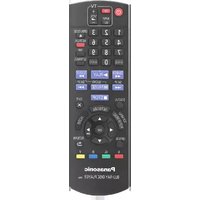
- OPERATING INSTRUCTIONS
- BLU-RAY DISC™ HOME THEATER SOUND SYSTEM
- FIRMWARE UPDATES
- AC MAINS LEAD
- SMALL OBJECT
- CAUTION
- UNIT
- PLACEMENT
- SPEAKER
- BATTERIES
- TO DISPOSE OR TRANSFER THIS UNIT
- IF YOU SEE THIS SYMBOL
- INFORMATION ON DISPOSAL IN OTHER COUNTRIES OUTSIDE THE EUROPEAN UNION
- RESTRICTION ON USE OF UNAUTHORIZED COPIED CONTENT
- TABLE OF CONTENTS
- GETTING STARTED
- PLAYBACK
- TV & RADIO
- ADVANCED OPERATIONS
- REFERENCE
- PACKAGE CONTENTS AND ACCESSORIES
- PACKAGE CONTENTS
- ACCESSORIES
- UNIT AND MEDIA CARE
- DISCS THAT CANNOT BE PLAYED BY THIS UNIT
- REGION MANAGEMENT INFORMATION BD-VIDEO
- DVD-VIDEO
- FINALIZE
- BD-VIDEO
- D
- MUSIC CD
- SD CARD
- USB DEVICE
- BD-RE, BD-R
- CONTROL REFERENCE GUIDE
- REMOTE CONTROL
- USING THE REMOTE CONTROL
- TV OPERATION BUTTONS
- MAIN UNIT (FRONT)
- MAIN UNIT (REAR)
- STEP 1: POSITIONING
- FOR OPTIMUM POSITION
- STEP 2: PREPARING THE SPEAKERS
- ASSEMBLING THE SPEAKERS
- CONNECTING THE SPEAKER CABLES
- STEP 3: CONNECTIONS
- SPEAKER CONNECTION
- CONNECTING TO A TV
- HDMI
- TV AUDIO
- OPTICAL IN
- WHAT IS ARC
- FM ANTENNA CONNECTION
- OTHER DEVICE CONNECTION
- CONNECTING TO THE NETWORK
- WIRELESS LAN CONNECTION
- LAN CABLE CONNECTION
- STEP 4: CONNECTING THE AC MAINS LEAD
- STEP 5: SETTINGS
- EASY SETTING
- PREPARATION
- PRESS [⏻]
- FOLLOW THE ON-SCREEN INSTRUCTIONS AND APPLY THE SETTINGS
- EASY NETWORK SETTING
- SELECT "WIRED" OR "WIRELESS" AND PRESS [OK]
- WIRED" CONNECTION
- WIRELESS" CONNECTION
- BEFORE BEGINNING WIRELESS CONNECTION SETUP
- WPS (PUSH BUTTON)
- SEARCH FOR WIRELESS NETWORK
- REPROGRAMMING THE REMOTE CONTROL
- PRESS [HOME]
- INSERTING OR REMOVING MEDIA
- ENJOYING TV WITH UNIT'S SPEAKERS
- SELECTING THE TYPE OF AUDIO
- HOME MENU
- PRESS [⏻] TO TURN ON THE UNIT
- PRESS [▲, ▼, ◀, ▶] TO SELECT THE ITEM AND PRESS [OK]
- EXT IN
- TO SHOW THE HOME MENU
- MULTI USER MODE
- PERSONALIZING A NEW USER
- SELECT "CONFIRM" AND PRESS [OK]
- SWITCHING THE USER
- INSERT THE MEDIA
- SELECT THE ITEM TO PLAY AND PRESS [OK]
- OPERATIONS DURING PLAYBACK
- STOP
- PRESS [■STOP]
- RESUME PLAY FUNCTION
- PAUSE
- PRESS [IPAUSE]
- SEARCH/SLOW MOTION
- SEARCH
- WHILE PLAYING, PRESS [SEARCH◀◀] OR [SEARCH▶▶]
- SLOW MOTION
- WHILE PAUSED, PRESS [SEARCH◀◀] OR [SEARCH▶▶]
- SKIP
- WHILE PLAYING OR PAUSED, PRESS [◀◀] OR [▶▶]
- FRAME-BY-FRAME
- WHILE PAUSED, PRESS [◀] (◀▶) OR [▶] (▶▶)
- CHANGING AUDIO
- PRESS [AUDIO]
- DISPLAYING MENUS AND PLAYBACK INFORMATION
- SHOW TOP MENU/POP-UP MENU
- PRESS [POP-UP MENU/TOP MENU]
- SHOW THE STATUS MESSAGES
- WHILE PLAYING, PRESS [STATUS]
- ENJOYING 3D VIDEO AND PHOTOS
- ENJOYING BD-LIVE
- SLIDESHOW
- USING THE IPOD/IPHONE
- COMPATIBLE IPOD/IPHONE (AS OF MARCH 2013)
- ABOUT RECHARGING THE BATTERY
- IPOD/IPHONE CONNECTION
- CONNECT THE IPOD/IPHONE
- IPOD/IPHONE PLAYBACK
- ALBUM ARTWORK
- VIERA LINK "HDAVI CONTROL™
- AUTOMATIC INPUT SWITCHING POWER ON LINK
- POWER OFF LINK
- PLAYING MUSIC CONTINUOUSLY EVEN AFTER TURNING OFF THE TELEVISION
- EASY CONTROL ONLY WITH VIERA REMOTE CONTROL
- ONLY WHEN TV SUPPORTS "HDAVI CONTROL 2" OR LATER
- ENJOYING TV AND STB WITH UNIT'S SPEAKERS
- SELECT THE TV AUDIO
- SELECT THE STB AUDIO
- CONNECTING THE OPTICAL DIGITAL AUDIO CABLE
- LISTENING TO THE RADIO
- PRESETTING STATIONS AUTOMATICALLY
- LOWEST
- CURRENT
- LISTENING TO A PRESET CHANNEL
- MANUAL TUNING AND PRESETTING
- VIERA CONNECT (ENJOYING INTERNET SERVICE)
- VIERA CONNECT PROVIDES A VARIETY OF SELECTED INTERNET SERVICES SUCH AS THE FOLLOWING
- TO ENJOY VIDEO COMMUNICATION (E.G. SKYPE™)
- PRESS [INTERNET]
- SELECT THE ITEM AND PRESS [OK]
- TO EXIT FROM VIERA CONNECT, PRESS [HOME]
- HOME NETWORK FEATURE
- PLAYING BACK CONTENTS ON THE DLNA SERVER
- WHEN CONNECTED TO OTHER THAN DIGA
- WHEN CONNECTED TO DIGA
- TO EXIT HOME NETWORK
- USING THE DIGITAL MEDIA CONTROLLER
- TO EXIT THE MEDIA RENDERER SCREEN
- OPTION MENU
- ABOUT MULTI USER MODE
- PRESS [OPTION]
- SELECT AN ITEM AND CHANGE THE SETTINGS
- OPERATION MENU
- REPEAT PLAY
- RANDOM
- START SLIDESHOW
- STATUS
- ROTATE RIGHT
- WALLPAPER
- ICON REGISTRATION
- VIDEO
- SECONDARY VIDEO
- PLAYBACK INFORMATION WINDOW
- CONTROL PANEL
- TOP MENU
- POP-UP MENU
- MENU
- PERSONAL TASTE
- PICTURE SETTINGS
- PICTURE MODE
- PICTURE ADJUSTMENT
- CHROMA PROCESS
- DETAIL CLARITY
- SUPER RESOLUTION
- PROGRESSIVE
- P
- SCREEN ASPECT
- RESET TO DEFAULT PICTURE SETTINGS
- SOUND SETTINGS
- SURROUND EFFECTS
- SOUND EFFECTS
- HIGH CLARITY SOUND PLUS
- D SETTINGS
- GRAPHIC DISPLAY LEVEL
- SETUP MENU
- HDMI OUTPUT
- HDMI VIDEO FORMAT
- P OUTPUT
- HDMI COLOUR MODE
- DEEP COLOUR OUTPUT
- CONTENTS TYPE FLAG
- STILL MODE
- SEAMLESS PLAY
- SOUND
- DYNAMIC RANGE COMPRESSION
- DIGITAL AUDIO OUTPUT
- BD-VIDEO SECONDARY AUDIO
- HDMI AUDIO OUTPUT
- DIGITAL AUDIO INPUT
- PCM-FIX
- TV AUDIO INPUT
- DOWNMIX
- AUDIO DELAY
- D BD-VIDEO PLAYBACK
- D AVCHD OUTPUT
- D TYPE
- D PLAYBACK MESSAGE
- MANUAL SETTINGS 📁 (→ 37)
- GRAPHIC DISPLAY LEVEL 📁 (→ 37)
- LANGUAGE
- SOUNDTRACK PREFERENCE
- SUBTITLE PREFERENCE
- MENU PREFERENCE
- ON-SCREEN LANGUAGE
- NETWORK
- EASY NETWORK SETTING (→ 20)
- NETWORK SETTINGS
- LAN CONNECTION MODE
- WIRELESS SETTINGS
- CONNECTION SETTING
- DOUBLE SPEED MODE SETTING (2.4GHZ)
- IP ADDRESS / DNS SETTINGS
- PROXY SERVER SETTINGS
- ➢ NETWORK SERVICE SETTINGS (⇒ 32) (VIERA CONNECT)
- AUDIO AUTO GAIN CONTROL
- TIME ZONE
- SUMMER TIME
- REMOTE DEVICE SETTINGS (⇒ 33)
- REMOTE DEVICE OPERATION
- DEVICE NAME ENTRY
- REMOTE DEVICE LIST
- BD-LIVE INTERNET ACCESS (⇒ 26)
- RATINGS
- DVD-VIDEO RATINGS
- BD-VIDEO RATINGS
- NETWORK SERVICE LOCK
- SYSTEM
- TV SETTINGS
- TV ASPECT
- TV SYSTEM
- SCREEN SAVER FUNCTION
- ON-SCREEN MESSAGES
- VIERA LINK
- VIDEO/AUDIO
- UNIT SETTINGS
- FRONT PANEL DISPLAY
- EDIT USER INFORMATION
- QUICK START
- FIRMWARE UPDATE (⇒ 21)
- AUTOMATIC UPDATE CHECK
- UPDATE NOW
- SYSTEM INFORMATION
- SOFTWARE LICENCE
- FIRMWARE VERSION INFORMATION
- DEFAULT SETTINGS
- SPEAKER SETTINGS
- ADJUSTING SPEAKER LEVEL
- DELAY TIME
- CHANGING THE SOUND SETTINGS
- ADJUSTING SPEAKER LEVEL DURING PLAY
- SPEAKER INSTALLATION OPTION
- ATTACHING TO A WALL
- DRIVE A SCREW (NOT SUPPLIED) INTO THE WALL
- FIT THE SPEAKER SECURELY ONTO THE SCREW(S) WITH THE HOLE(S)
- CENTRE SPEAKER
- FRONT SPEAKER, SURROUND SPEAKER
- TO PREVENT TIPPING/FALLING OF THE SPEAKERS
- PREVENTING TIPPING
- PREVENTING FALLING
- THREAD A STRING TO THE SPEAKER
- THREAD A STRING FROM THE WALL TO THE SPEAKER AND TIE TIGHTLY
- TROUBLESHOOTING GUIDE
- THE FOLLOWING DO NOT INDICATE A PROBLEM WITH THIS UNIT
- UNIT DOES NOT RESPOND TO REMOTE CONTROL OR FRONT PANEL BUTTONS
- CANNOT EJECT DISC
- THE UNIT MAY HAVE A PROBLEM
- GENERAL OPERATION
- TO RETURN TO THE FACTORY PRESET
- TO RETURN ALL SETTINGS TO THE FACTORY PRESET
- THIS UNIT IS TURNED OFF WHEN THE INPUT FOR THE TV IS SWITCHED
- THE REMOTE CONTROL DOES NOT WORK PROPERLY
- THE TV TUNER MODE IS NOT DISPLAYED WHEN THE TV IS SWITCHED ON
- YOU HAVE FORGOTTEN YOUR RATINGS PASSWORD. YOU WANT TO CANCEL THE RATINGS LEVEL
- THIS UNIT DOES NOT RECOGNIZE THE USB CONNECTION CORRECTLY
- THE UNIT SWITCHES TO STANDBY MODE
- THE UNIT DOES NOT TURN OFF
- PICTURE
- THE IMAGES FROM THIS UNIT DO NOT APPEAR ON THE TV
- PICTURE IS DISTORTED
- JITTERING OCCURS
- VIDEO IS NOT OUTPUT IN HIGH-DEFINITION
- D VIDEO IS NOT OUTPUT
- D VIDEO IS NOT OUTPUT CORRECTLY AS 2D
- A BLACK BAND IS DISPLAYED AROUND THE EDGE OF THE SCREEN
- THE ASPECT RATIO OF THE SCREEN IS ABNORMAL
- NO SOUND
- LOW VOLUME
- DISTORTED SOUND
- CANNOT HEAR THE DESIRED AUDIO TYPE
- NO SURROUND SOUND
- CANNOT SWITCH AUDIO
- NO SOUND FROM THE TV
- DISC CANNOT BE PLAYED
- STILL PICTURES (JPEG) DO NOT PLAY BACK NORMALLY
- I CAN'T PLAY BACK BD-LIVE
- ALTERNATIVE SOUNDTRACK AND SUBTITLES CANNOT BE SELECTED
- IPOD/IPHONE OPERATION
- CANNOT CHARGE OR OPERATE
- RADIO
- DISTORTED SOUND OR NOISE IS HEARD
- A BEEP SOUND IS HEARD
- NOISE IS EXCESSIVE
- I CAN'T CONNECT TO THE NETWORK
- WHEN USING WIRELESS LAN CONNECTION, VIDEO FROM THE DLNA CERTIFIED MEDIA SERVER IS NOT PLAYED BACK OR VIDEO FRAMES ARE DROPPED DURING PLAYBACK
- MESSAGES
- ON THE TELEVISION
- CANNOT PLAY
- CANNOT PLAY ON THIS UNIT
- NO DISC INSERTED
- THIS OPERATION IS NOT AVAILABLE
- IP ADDRESS IS NOT SET
- THE WIRELESS ACCESS POINT CURRENTLY HAS A LOW NETWORK SECURITY SETTING. IT IS RECOMMENDED TO CHANGE TO A HIGHER SETTING
- ON THE UNIT'S DISPLAY
- F
- NET
- NO PLAY
- NO READ
- PLEASE WAIT
- REMOVE
- SET
- (“□” STANDS FOR A NUMBER.)
- U
- H□□ OR F
- (“□”STANDS FOR A NUMBER.)
- IPOD OVER CURRENT ERROR
- START
- UPD
- FINISH
- NOT CONDITIONAL
- SET OK
- ERROR
- TUNED/STEREO
- TUNED
- SPECIFICATIONS
- FM TUNER SECTION
- TERMINAL SECTION
- VIDEO SECTION
- FILE FORMAT
- SUPPORTED FORMAT FOR DLNA
- DISPLAY LANGUAGES LIST
- LANGUAGE CODE LIST
- TO PREVENT THE SPEAKER FROM TIPPING OVER / FALLING
Brand : PANASONIC
Model : SC-BTT430
Category : Blu-ray player