
PN-C705B - Screen SHARP - Free user manual and instructions
Find the device manual for free PN-C705B SHARP in PDF.


| Product Type | Commercial Display |
| Screen Size | 70 inches (176.4 cm diagonal) |
| Resolution | 1920 x 1080 (Full HD) |
| Brightness | 500 cd/m² |
| Contrast Ratio | 4000:1 |
| Response Time | 8 ms |
| Dimensions (without stand) | 1604 x 966 x 87 mm (W x H x D) |
| Weight (without stand) | 55 kg |
| Power Supply | AC 100-240 V, 50/60 Hz |
| Power Consumption | 250 W (typical), 0.5 W (standby) |
| Input Terminals | HDMI x2, DisplayPort x1, VGA x1, USB x1, RS-232C x1 |
| Mounting | VESA 600 x 400 mm |
| Operating Temperature | 0°C to 40°C |
| Cleaning | Use a soft dry cloth; do not use harsh chemicals. |
| Safety | Do not expose to water or install near heat sources. |
| Spare Parts & Reparability | Available through authorized service centers. Reparability score: 7/10. |
| General Information | Designed for 24/7 operation, built-in speakers (15W x 2). |
Frequently Asked Questions - PN-C705B SHARP
User questions about PN-C705B SHARP
0 question about this device. Answer the ones you know or ask your own.
Ask a new question about this device
Download the instructions for your Screen in PDF format for free! Find your manual PN-C705B - SHARP and take your electronic device back in hand. On this page are published all the documents necessary for the use of your device. PN-C705B by SHARP.
USER MANUAL PN-C705B SHARP
To aid reporting in case of loss or theft, please record the product's model and serial numbers in the space provided. The numbers are located in the rear of the product.
Model No.:
Serial No.:
U.S.A. ONLY
WARNING: TO REDUCE THE RISK OF FIRE OR ELECTRIC SHOCK, DO NOT EXPOSE THIS PRODUCT TO RAIN OR MOISTURE.

CAUTION
RISK OF ELECTRIC SHOCK DO NOT OPEN

CAUTION: TO REDUCE THE RISK OF ELECTRIC SHOCK, DO NOT REMOVE COVER. NO USER-SERVICEABLE PARTS INSIDE. REFER SERVICING TO QUALIFIED SERVICE PERSONNEL.
The lightning flash with arrowhead symbol, within a triangle, is intended to alert the user to the presence of uninsulated “dangerous voltage” within the product’s enclosure that may be of sufficient magnitude to constitute a risk of electric shock to persons.

The exclamation point within a triangle is intended to alert the user to the presence of important operating and maintenance (servicing) instructions in the literature accompanying the product.
WARNING:
FCC Regulations state that any unauthorized changes or modifications to this equipment not expressly approved by the manufacturer could void the user's authority to operate this equipment.
NOTE:
This equipment has been tested and found to comply with the limits for Class A digital device, pursuant to Part 15 of the FCC Rules. These limits are designed to provide reasonable protection against harmful interference when the equipment is operated in a commercial environment. This equipment generates, uses, and can radiate radio frequency energy and, if not installed and used in accordance with the instruction manual, may cause harmful interference to radio communications. Operation of this equipment in a residential area is likely to cause harmful interference in which case the user will be required to correct the interference at his own expense.
U.S.A. ONLY
Thank you for your purchase of a SHARP LCD product. To ensure safety and many years of trouble-free operation of your product, please read the Safety Precautions carefully before using this product.
SAFETY PRECAUTIONS
Electricity is used to perform many useful functions, but it can also cause personal injuries and property damage if improperly handled. This product has been engineered and manufactured with the highest priority on safety. However, improper use can result in electric shock and/or fire. In order to prevent potential danger, please observe the following instructions when installing, operating and cleaning the product. To ensure your safety and prolong the service life of your LCD product, please read the following precautions carefully before using the product.
- Read instructions — All operating instructions must be read and understood before the product is operated.
- Keep this manual in a safe place — These safety and operating instructions must be kept in a safe place for future reference.
- Observe warnings — All warnings on the product and in the instructions must be observed closely.
- Follow instructions — All operating instructions must be followed.
- Cleaning — Unplug the power cord from the AC outlet before cleaning the product. Use a dry cloth to clean the product. Do not use liquid cleaners or aerosol cleaners. Do not use dirty cloths. Doing so may damage the product.
- Attachments — Do not use attachments not recommended by the manufacturer. Use of inadequate attachments can result in accidents.
- Water and moisture — Do not use the product near water. Do not install the product in a place where water may splash onto it. Be careful of equipment which drains water such as an air-conditioner.
- Ventilation — The vents and other openings in the cabinet are designed for ventilation. Do not cover or block these vents and openings since insufficient ventilation can cause overheating and/or shorten the life of the product. Do not place the product on a sofa, rug or other similar surface, since they can block ventilation openings. Do not place the product in an enclosed place such as a bookcase or rack, unless proper ventilation is provided or the manufacturer's instructions are followed.
- Power cord protection — The power cords must be routed properly to prevent people from stepping on them or objects from resting on them.
- The screen used in this product is made of glass. Therefore, it can break when the product is dropped or applied with impact. Be careful not to be injured by broken glass pieces in case the screen breaks.
- Overloading — Do not overload AC outlets or extension cords. Overloading can cause fire or electric shock.
- Entering of objects and liquids — Never insert an object into the product through vents or openings. High voltage flows in the product, and inserting an object can cause electric shock and/or short internal parts.
For the same reason, do not spill water or liquid on the product.
- Servicing — Do not attempt to service the product yourself. Removing covers can expose you to high voltage and other dangerous conditions. Request a qualified service person to perform servicing.
- Repair — If any of the following conditions occurs, unplug the power cord from the AC outlet, and request a qualified service person to perform repairs.
a. When the power cord or plug is damaged. b. When a liquid was spilled on the product or when objects have fallen into the product. c. When the product has been exposed to rain or water. d. When the product does not operate properly as described in the operating instructions.
Do not touch the controls other than those described in the operating instructions. Improper adjustment of controls not described in the instructions can cause damage, which often requires extensive adjustment work by a qualified technician.
e. When the product has been dropped or damaged.
f. When the product displays an abnormal condition. Any noticeable abnormality in the product indicates that the product needs servicing.
- Replacement parts — In case the product needs replacement parts, make sure that the service person uses replacement parts specified by the manufacturer, or those with the same characteristics and performance as the original parts. Use of unauthorized parts can result in fire, electric shock and/or other danger.
- Safety checks — Upon completion of service or repair work, request the service technician to perform safety checks to ensure that the product is in proper operating condition.
- Wall mounting — When mounting the product on a wall, be sure to install the product according to the method recommended by the manufacturer.
- Heat sources — Keep the product away from heat sources such as radiators, heaters, stoves and other heat-generating products (including amplifiers).
- Batteries — Incorrect use of batteries may cause the batteries to burst or ignite. A leaky battery may corrode the equipment, dirty your hands or spoil your clothing. In order to avoid these problems, make sure to observe the precautions below:
- Use the specified batteries only.
- Install the batteries with due attention to the plus (+) and minus (-) sides of the batteries according to the instructions in the compartment.
- Do not mix old and new batteries.
- Do not mix batteries of different types. Voltage specifications of batteries of the same shape may vary.
- Replace an exhausted battery with a new one promptly.
- If you will not use the remote control for a long time, remove the batteries.
- If leaked battery fluid gets on your skin or clothing, rinse immediately and thoroughly. If it gets into your eye, bathe your eye well rather than rubbing and seek medical treatment immediately. Leaked battery fluid that gets into your eye or your clothing may cause a skin irritation or damage your eye.
- Usage of the monitor must not be accompanied by fatal risks or dangers that could lead directly to death, personal injury, severe physical damage or other loss, including nuclear reaction control in nuclear facility, medical life support system, and missile launch control in a weapon system.
- Do not stay in contact with the parts of the product that become hot for long periods of time. Doing so may result in low-temperature burns.
- Do not modify this product.
- To prevent fire or shock hazard, do not expose this product to dripping or splashing. No objects filled with liquids, such as vases, should be placed on the product.
- This product must only be connected to a 100-240V, 50/60Hz, grounded (3-prong) outlet.
WARNING:
1) This is a Class A product. In a domestic environment this product may cause radio interference in which case the user may be required to take adequate measures. 2) Batteries shall not be exposed to excessive heat such as sunshine, fire or the like. 3) To prevent injury, this apparatus must be securely attached to the floor/wall in accordance with the installation instructions. 4) An apparatus with CLASS I construction shall be connected to a MAIN socket outlet with a protective earthing connection.
To maintain compliance with EMC regulations, use shielded cables to connect to the following terminals: HDMI input terminal, D-sub input terminal, and RS-232C input terminal.
If a monitor is not positioned in a sufficiently stable location, it can be potentially hazardous due to falling. Many injuries, particularly to children, can be avoided by taking simple precautions such as:
- Using fixing devices like wall mount brackets recommended by the manufacturer.
- Only using furniture that can safely support the monitor.
- Ensuring the monitor is not overhanging the edge of the supporting furniture.
- Not placing the monitor on tall furniture (for example, cupboards or bookcases) without anchoring both the furniture and the monitor to a suitable support.
- Not standing the monitors on cloth or other materials placed between the monitor and supporting furniture. Educating children about the dangers of climbing on furniture to reach the monitor or its controls.
- This equipment is not suitable for use in locations where children are likely to be present unsupervised.
Especially for child safety
- Don't allow children to climb on or play with the monitor.
- Don't place the monitor on furniture that can easily be used as steps, such as a chest of drawers.
- Remember that children can become excited while watching a program, especially on a “larger than life” monitor. Care should be taken to place or install the monitor where it cannot be pushed, pulled over, or knocked down.
- Care should be taken to route all cords and cables connected to the monitor so that they cannot be pulled or grabbed by curious children.
1) Read these instructions. 2) Keep these instructions. 3) Heed all warnings. 4) Follow all instructions. 5) Do not use this apparatus near water. 6) Clean only with dry cloth. 7) Do not block any ventilation openings. Install in accordance with the manufacturer's instructions. 8) Do not install near any heat sources such as radiators, heat registers, stoves, or other apparatus (including amplifiers) that produce heat. 9) Do not defeat the safety purpose of the polarized or grounding-type plug. A polarized plug has two blades with one wider than the other. A grounding type plug has two blades and a third grounding prong. The wide blade or the third prong are provided for your safety. If the provided plug does not fit into your outlet, consult an electrician for replacement of the obsolete outlet. 10) Protect the power cord from being walked on or pinched particularly at plugs, convenience receptacles, and the point where they exit from the apparatus. 11) Only use attachments/accessories specified by the manufacturer. 12) Use only with the cart, stand, tripod, bracket, or table specified by the manufacturer, or sold with the apparatus. When a cart is used, use caution when moving the cart/apparatus combination to avoid injury from tip-over. 13) Unplug this apparatus during lightning storms or when unused for long periods of time. 14) Refer all servicing to qualified service personnel. Servicing is required when the apparatus has been damaged in any way, such as power-supply cord or plug is damaged, liquid has been spilled or objects have fallen into the apparatus, the apparatus has been exposed to rain or moisture, does not operate normally, or has been dropped.

- The TFT color LCD panel used in this monitor is made with the application of high precision technology. However, there may be minute points on the screen where pixels never light or are permanently lit. Also, if the screen is viewed from an acute angle there may be uneven colors or brightness. Please note that these are not malfunctions but common phenomena of LCDs and will not affect the performance of the monitor.
- Do not display a still picture for a long period, as this could cause a residual image.
- Never rub or tap the monitor with hard objects.
- Please understand that SHARP CORPORATION bears no responsibility for errors made during use by the customer or a third party, nor for any other malfunctions or damage to this product arising during use, except where indemnity liability is recognized under law.
- This monitor and its accessories may be upgraded without advance notice.
- Do not use the monitor where there is a lot of dust, where humidity is high, or where the monitor may come into contact with oil or steam. Do not use in an environment where there are corrosive gases (sulfur dioxide, hydrogen sulfide, nitrogen dioxide, chlorine, ammonia, ozone, etc.). As this could lead to fire.
- Ensure that the monitor does not come into contact with water or other fluids. Ensure that no objects such as paper clips or pins enter the monitor as this could lead to fire or electric shock.
- Do not place the monitor on top of unstable objects or in unsafe places. Do not allow the monitor to receive strong shocks or to strongly vibrate. Causing the monitor to fall or topple over may damage it.
- Do not use the monitor near heating equipment or in places where there is likelihood of high temperature, as this may lead to generation of excessive heat and outbreak of fire.
- Do not use the monitor in places where it may be exposed to direct sunlight. Risk of cabinet deformation and failure if the monitor is used in direct sunlight.
- The AC outlet shall be installed near the equipment and shall be easily accessible.
- Please be sure to constantly remove dust and garbage that has attached to the ventilation opening. If dust collects in the ventilation opening or the inside of the monitor, it may lead to excessive heat, outbreak of fire, or malfunction. Please request a cleaning of the inside of the monitor from an authorized SHARP servicing dealer or service center.
- Do not touch the screen while the PC is starting up, it will lead to a malfunction. When this occurs, restart the PC.
- Do not operate the screen with a hard or pointed object such as a fingernail or pencil.
- If another USB device is connected to the computer to which the touch panel is connected, do not operate the USB device during touch panel input. Input may not take place correctly.
- If the infrared transmitter/receiver becomes dirty, malfunctioning may result. Use a soft cloth to gently wipe dirt off the infrared transmitter/receiver.
- If dust accumulates inside the infrared transmitter/receiver, the product cannot transmit or receive infrared rays properly, resulting in a malfunction. To clean the dust accumulated inside, contact an authorized SHARP servicing dealer or service center (extra charge required).
- Two touch panels cannot be used with a computer that is connected to two monitors. Only the touch panel of the monitor that is set as the primary monitor can be used.
- Continuous operating time and warranty. This product is designed for a maximum daily use of 16 hours. Continual use in excess of 16 hours per day is not covered by the warranty.
The Power Cord
- Use only the power cord supplied with the monitor.
- Do not damage the power cord nor place heavy objects on it, stretch it or over bend it. Also, do not add extension cords. Damage to the cord may result in fire or electric shock.
- Do not use the power cord with a power tap. Adding an extension cord may lead to fire as a result of overheating.
- Do not remove or insert the power plug with wet hands. Doing so could result in electric shock.
- Unplug the power cord if it is not used for a long time.
- Do not attempt to repair the power cord if it is broken or malfunctioning. Refer the servicing to the service representative.
Manual Scope
- Microsoft and Windows are either registered trademarks or trademarks of Microsoft Corporation in the United States and/or other countries.
- Apple, Mac and Mac OS are registered trademarks of Apple Inc.
- Google and Chrome OS are trademarks or registered trademarks of Google Inc.
- The terms HDMI and HDMI High-Definition Multimedia Interface, and the HDMI Logo are trademarks or registered trademarks of HDMI Licensing, LLC in the United States and other countries.
- Adobe, Acrobat, and Acrobat Reader are either registered trademarks or trademarks of Adobe Systems Incorporated in the United States and/or other countries.
- Intel, Celeron, and Intel Core 2 Duo are trademarks or registered trademarks of Intel Corporation or its subsidiaries in the U.S.A. and other countries.
- AMD, AMD Sempron, AMD Athlon, and combinations thereof are trademarks of Advanced Micro Devices, Inc.
- All other brand and product names are trademarks or registered trademarks of their respective holders.
- Language of OSD menu used in this manual is English by way of example.
- Illustrations in this manual may not exactly represent the actual product or display.
LED Backlight
- The LED backlight in this product has a limited lifetime.
* If the screen gets dark or does not turn on, it may be necessary to replace the LED backlight. * This LED backlight is exclusive to this product and must be replaced by an authorized SHARP servicing dealer or service center. Please contact an authorized SHARP servicing dealer or service center for assistance.
• This product is for use indoors. - A mounting bracket compliant with VESA specifications is required. - Since the monitor is heavy, consult your dealer before installing, removing or moving the monitor. - Mounting the monitor on the wall requires special expertise and the work must be performed by an authorized SHARP dealer. You should never attempt to perform any of this work yourself. Our company will bear no responsibility for accidents or injuries caused by improper mounting or mishandling. - Use the monitor with the surface perpendicular to a level surface. - When moving the monitor, be sure to hold it with the handles and the unit bottom. Do not grasp the screen or tray. This may cause product damage, failure, or injury. - This monitor should be used at an ambient temperature between 41°F (5°C) and 95°F (35°C). Provide enough space around the monitor to prevent heat from accumulating inside.
![7-7/8 [20] 2 [5] 2 [5] 2 [5] Unit: inch [cm] 2-3/16 [5.5]](/content/2026/05/1073354/images/40594cdae88eae14fedee4975701f0a5f66e8e3802f7b0789406c2d4b4c2644a.jpg)
- If it is difficult to provide sufficient space for any reason such as the installation of the monitor inside a housing, or if the ambient temperature may be outside of the range of 41°F (5°C) to 95°F (35°C), install a fan or take other measures to keep the ambient temperature within the required range.
- Do not block any ventilation openings. If the temperature inside the monitor rises, this could lead to a malfunction.
- Do not place the monitor on a device which generates heat.
- Do not use the product in locations where the unit is exposed to direct sunlight or other strong light. Since this product operates with infrared rays, such light may cause a malfunction.
- When using multiple monitors closely, be sure the infrared transmitter/receiver does not affect the other ones.
Contents
IMPORTANT INFORMATION......3
DEAR SHARP CUSTOMER....4
SAFETY PRECAUTIONS......4
IMPORTANT SAFETY INSTRUCTIONS......6
TIPS AND SAFETY INSTRUCTIONS....7
MOUNTING PRECAUTIONS 8
Supplied Components....10
System Requirements....10
Part Names ...... 11
Connecting Peripheral Equipment....13
Connecting the Power Cord ....14
Binding Cables....15
Affixing the Stand Hole Protection Covers ....15
Preparing the Remote Control Unit....16
Installing the batteries ....16
Remote control operation range....16
Removing the Handles....17
Mounting a web camera....17
Turning Power On/Off....18
Turning on the main power....18
Turning power on/off 18
Touch action....19
Touch action....19
Touch Pen 21
Other functions....21
Cautionary points 21
Eraser....21
Basic Operation 22
Using the buttons on the remote control unit and monitor 22
Menu Items 25
Displaying the menu screen....25
Menu item details....26
Adjustments for PC screen display 29
Functional Restriction Setting (FUNCTION)....30
Controlling the Monitor with a PC (RS-232C)....31
PC connection....31
Communication conditions....31
Communication procedure....31
RS-232C command table....32
Troubleshooting....33
Specifications 35
Mounting Precautions
(For SHARP dealers and service engineers)......40
Supplied Components
If any component should be missing, please contact your dealer.
☐ Liquid Crystal Display Monitor: 1 □ Remote control unit: 1 □ Cable clamp: 2

□ Cable clamp (for power cord): 1

□ Power cord: 1
□ Remote control unit battery (R-03 ("AAA" size)): 2 □ CD-ROM (Utility Disk): 1 □ Sharp Display Connect License: 1 □ Setup Manual: 1 □ Touch pen: 1 □ Tray: 1 □ Tray mounting screw (M3): 5 □ Eraser: 1 □ USB cable: 1
□ Camera mount: 1 ☐ Camera mount screw (M3): 2 □ Camera screw (inch thread): 1 □ Stand hole protection cover: 2 □ Cover SHARP logo: 1
Place this sticker onto the SHARP logo to cover the logo.
* SHARP Corporation holds authorship rights to the Utility Disk program. Do not reproduce it without permission. * For environmental protection!
Do not dispose of batteries in household waste. Follow the disposal instructions for your area.
System Requirements
| Computer PC/AT compatible computer with a USB 2.0 port and able to output a resolution of 1920 x 1080. | |
| OS | Windows 7 (32-bit or 64-bit version), Windows 8.1 (32-bit or 64-bit version), Windows 10 (32-bit or 64-bit version)Mac OS X v10.10, Mac OS X v10.11Google Chrome OS Version 39 or later |
| CPU | Intel Celeron or AMD Sempron 1.6 GHz or fasterIntel Core 2 Duo or AMD Athlon II X2 2.8 GHz or faster recommended |
| Memory At least 2 GB | |
| Free space on hard drive At least 200 MB (free space separately required for data storage) | |
To use the touch panel, connect the USB cable (supplied) to your computer.
The touch panel operates with the standard Window driver. On the Mac, operation is only possible in mouse mode.
Pen Software can be installed from the supplied CD-ROM.
When the Information Display Downloader is installed, you can check and download the most recent versions of the software programs.
Download the setup program for the Sharp Display Connect and Touch Viewer with the Information Display Downloader.
To install and use the software, see the manual for each.
Part Names
■Front view
- Remote control sensor (See page 16.)
- Power LED (See page 18.)
- POWER button (See page 18.)
- HDMI1 button (See page 23.)
- D-SUB button (See page 23.)
- INPUT button (See page 23.)
- Backlight OFF button (See page 23.)
- VOLUME +/- (Volume adjustment) buttons (See page 22.)
- FREEZE button (See page 22.)
10. Speakers
- Infrared transmitter/receiver 12. Tray (See page 40.)
■ Rear view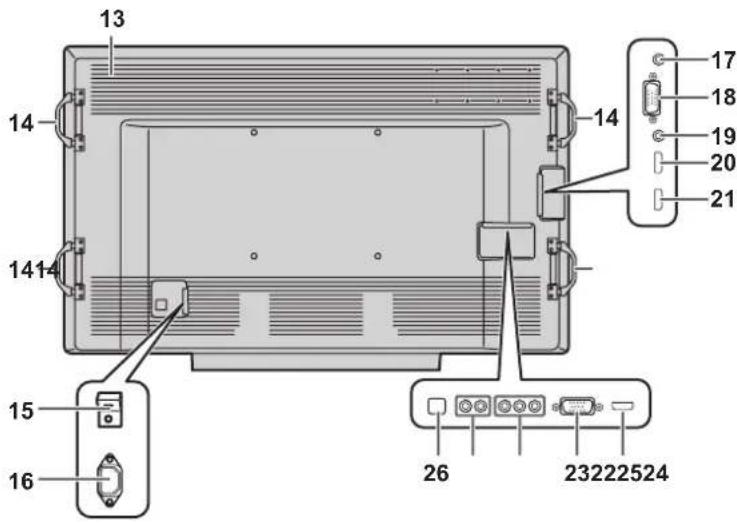
13. Vents 14. Handles (See page 17.) 15. Main power switch (See page 18.) 16. AC input terminal (See page 14.) 17. Audio output terminal (See page 13.) 18. D-sub input terminal (INPUT5) (See page 13.) 19. Audio input terminal (for INPUT2/INPUT5) (See page 13.) 20. HDMI1 input terminal (INPUT1) (See page 13.) 21. HDMI2 input terminal (INPUT2) (See page 13.) 22. HDMI3 input terminal (INPUT3) (See page 13.) 23. RS-232C input terminal (See page 13.) 24. AV component input terminals (INPUT4) (See page 13.) 25. Audio input terminals (for INPUT4) (See page 13.) 26. USB port (for touch panel) (See page 13.)
■ Remote control unit

- Signal transmitter
- Operation buttons (See pages 22 and 23.)
Connecting Peripheral Equipment

! Caution
- Be sure to turn off the main power switch and disconnect the plug from the power outlet before connecting/disconnecting cables. Also, read the manual of the equipment to be connected.
- Be careful not to confuse the input terminal with the output terminal when connecting cables. Accidentally reversing cables connected to the input and output terminals may cause malfunctions and other problems.
- Do not use any cable that has a damaged or deformed terminal. Using such cables may cause malfunctions.
TIPS
- When using the touch panel, connect the USB cable to the computer. When the USB cable is connected, the touch panel is enabled even when the main power switch is off.
- Images may not be displayed properly depending on the computer (video card) to be connected.
- Use the automatic screen adjustment when a computer screen is displayed for the first time using D-SUB (PC) (INPUT5), or when the setting of the computer is changed. The screen is adjusted automatically using AUTO SYNC. in SCREEN of the OTHERS menu.
- If the audio output from the playback device is connected directly to speakers or other devices, the video on the monitor may appear delayed from the audio portion. Audio should be played through this monitor by connecting the playback device to the monitor's audio input, and connecting the monitor's audio output to the speakers or other devices.
- HDMI1 input terminal (INPUT1)
- HDMI2 input terminal (INPUT2)
- HDMI3 input terminal (INPUT3)
- Use a commercially available HDMI cable (conforming to the HDMI standard).
- To input only video by HDMI and input audio by analog, connect to the HDMI2 input terminal and select HDMI+ANALOG in AUDIO SELECT of the OTHERS menu. When HDMI is selected, connection to the audio input terminal is unnecessary.
- D-sub input terminal (INPUT5)
- Audio input terminal (for INPUT2/INPUT5)
- Use an audio cable without resistance.
- When using for INPUT2, select HDMI+ANALOG in AUDIO SELECT of the OTHERS menu.
- AV component input terminals (INPUT4)
- This can be used as an AV video input terminal. Connect to the [VIDEO] input terminal, and change INPUT SELECT to VIDEO of the OTHERS menu.
- Audio input terminals (for INPUT4)
- USB port (for touch panel)
• To use the touch panel, connect to your computer with the provided USB cable.
- RS-232C input terminal
- You can control the monitor from a computer by connecting a commercially available RS-232 straight cable between this terminal and the computer.
- Audio output terminal
• The output sound varies depending on the input mode.
Connecting the Power Cord
! Caution
- Use only the power cord supplied with the monitor.
- When all connections are complete, connect the power cord.
- Turn off the main power switch.
- Plug the power cord (supplied) into the AC input terminal.
- Plug the power cord (supplied) into the AC power outlet.

TIPS
- Be sure to clamp the power cord (supplied) onto the cable clamp attachment using the supplied cable clamp (for power cord). When clamping the power cord, take care not to stress the terminal of the power cord. Do not bend the power cord excessively. For information on how to attach the cable clamp, see page 15.

Binding Cables
The cables connected to the terminals on the rear of the monitor can be fastened with the supplied cable clamp.
PN-C705B
PN-C805B
Affixing the Stand Hole Protection Covers

After installing the monitor, affix the stand hole protection covers.
- Peel off the backing sheet and affix the cover on the monitor.
Preparing the Remote Control Unit
Installing the batteries
- Place your finger on the part marked with the ▲, and then pull the cover off.
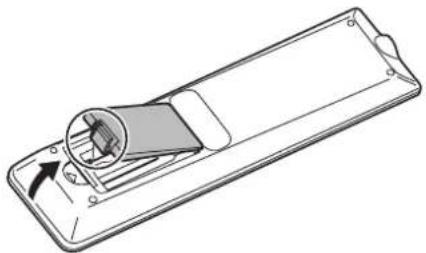
- See the instructions in the compartment and put in the batteries (R-03 ("AAA" size) x 2) with their plus (+) and minus (-) sides oriented correctly.
- Close the cover.
TIPS
- When the batteries become exhausted, replace them with new (commercially available) batteries.
- The supplied batteries (R-03 ("AAA" size) x 2) may become exhausted quickly depending on how they are stored.
- If you will not be using the remote control for a long time, remove the batteries. • Use manganese or alkaline batteries only.
Remote control operation range
The operation range of the remote control unit is approximately 16.4 feet (5 m) at an angle of about 10 degrees from the center to the top, bottom, right, and left of the remote control sensor.

TIPS
- Do not expose the remote control unit to shock by dropping or stepping on it. This could lead to a malfunction.
- Do not expose the remote control unit to liquids, and do not place it in an area with high humidity.
- The remote control unit may not work properly if the remote control sensor is under direct sunlight or strong lighting.
- Objects between the remote control unit and the remote control sensor may prevent proper operation.
- Replace the batteries when they run low as this may shorten the remote control's operation range.
- If a fluorescent light is illuminated near the remote control unit, it may interfere with proper operation.
- Do not use it with the remote control of other equipment such as air conditioner, stereo components, etc.
Removing the Handles
The handles can be removed.

!Caution
- The removable handles and handle screws are for use with this monitor. Do not use them for any other devices. To attach handles, be sure to use the handles and handle screws which were removed from this monitor.
- Be sure the handles are attached securely.
Mounting a web camera
It is possible to mount a commercially available web camera in the following positions:
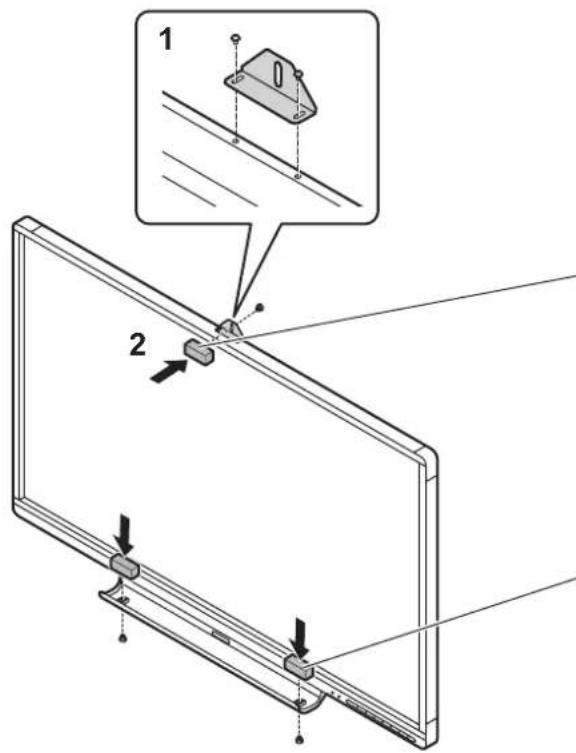
Mounting on the top of the monitor
(1) Attach the supplied camera mount with the supplied camera mount screw (x2). (2) Attach the web camera to the camera mount with the supplied camera screw (inch thread) (x1).
Mounting on the tray
Attach the web camera to the mounting hole on the right or left side of the tray with the supplied camera screw (inch thread) (x1).
Turning Power On/Off
!Caution
- When all connections are complete, turn on the power.
- Turn on the monitor first before turning on the computer or playback device.
- When switching the main power switch or the POWER button off and back on, always wait for at least 5 seconds. A short interval may result in a malfunction.
Turning on the main power
When the main power is turned on, the power LED lights. Wait until the screen is displayed.

!Caution
- The main power must be turned on/off with the main power switch. Do not connect/disconnect the power cord or turn the breaker on/off while the main power switch is on.
- For a complete electrical disconnection, pull out the main plug.
Turning power on/off
Press the remote control POWER button or the monitor POWER button to turn the power ON/OFF.
You can also turn the power ON/OFF by pressing the MONITOR ON button/MONITOR OFF button on the remote control unit.

| Status Status of the monitor | |
| Blue lit Power on | |
| Orange lit Power off (Standby mode) | |
| Blue flashing Input signal waiting mode | |
TIPS
- When the main power switch is off, the monitor cannot be turned on.
- If the monitor is in input signal waiting mode and you press the POWER button, the monitor enters power on.
Touch action
Touch action
Touch actions that can be used with this monitor differ according to operating system and application. The functions of touch actions are also different. For details, check Windows or Mac Help and the application's support documentation.
| OS Touch action | Windows 8.1 / 10 Windows 7 |
| Single-tap Yes Yes | |
| Double-tap Yes Yes | |
| Swipe Yes Yes | |
| Swipe from edge of screen | Yes No |
| Drag-and-drop Yes Yes | |
| Flicks Yes Yes | |
| Press-and-hold Yes Yes | |
| Slide to pan Yes Yes | |
| Zoom Yes Yes | |
| Press-and-tap No Yes | |
| Rotate | Yes Yes |
* On the Mac, the actions are the equivalent mouse actions.
TIPS
- In Windows 7, if the checkmark has been removed from "Enable multi-touch gestures and inking" in "Pen and touch" in Control Panel, select the checkbox.
- For the procedures for using the touch pen in the Pen Software, see the Pen Software Operation Manual.
■Common finger and touch pen actions
Single-tap
Same action as left-clicking a mouse. Touch with your finger/touch pen.

Double-tap
Same action as double-clicking a mouse. Quickly touch twice with your finger/touch pen.

When double-tapping with your finger, be sure to lift your finger sufficiently off the screen after the first tap. If there is insufficient distance between the screen and your finger, double-tap will not take place.
Swipe
Touch the screen with your finger/touch pen, move without lifting, and then stop.

Swipe from edge of screen
After touching the edge of the monitor with your finger/touch pen, move horizontally without releasing your finger/touch pen and then stop.
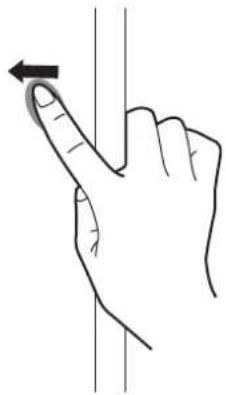
Touch action
Drag-and-drop
Same action as drag-and-drop with a mouse.
Touch the screen with your finger/touch pen and move without lifting. When you have finished the movement, lift your finger/touch pen.

Flicks
Flick your finger/touch pen in the direction of the function you want to use.
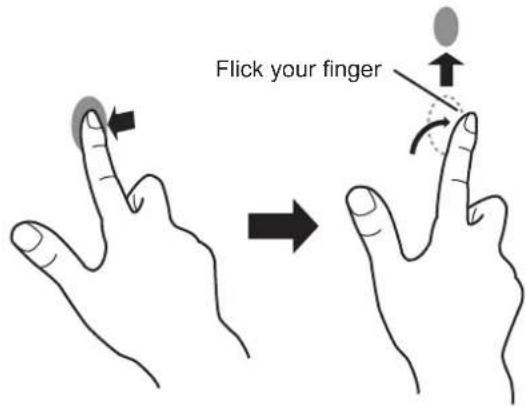
Press-and-hold
Same action as right-clicking a mouse.
Press briefly with your finger/touch pen, and then lift your finger/touch pen from the screen.

Slide to pan
With your finger/touch pen touching the screen, move it up and down to scroll the screen.

■Finger actions
Zoom
Use in a screen that is capable of enlargement/reduction. Touch the screen with two fingers and move your fingers closer together to reduce the view, or apart to enlarge the view.

Reduction

Enlargement
Press-and-tap
Same action as right-clicking a mouse.
With one finger touching the screen, tap once (single tap) with another finger.
Tap once (single tap) with another finger
With one finger touching
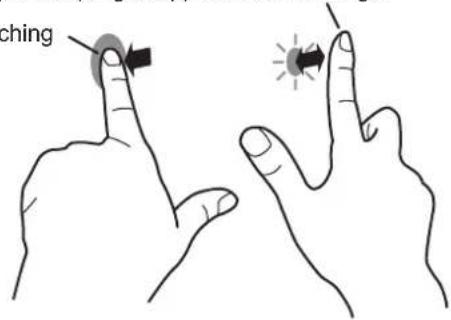
Rotate
Use this action in a screen that is capable of image rotation. Touch the center point of the rotation with one finger. While holding that finger still, move another finger in the desired direction of rotation.
Move another finger in the desired direction of rotation while keeping one finger touching.
TIPS
- The screen may not respond correctly in the following cases:
Touch gesture is too quick
The distance between the two points is too short
The two points intersect
• Operation with the touch pen is not possible.
Touch Pen

TIPS
- If the pen tip becomes worn or damaged, replace it. To purchase a new pen tip, consult your dealer.

Other functions
In Windows 8.1/10, input panel functions can be used.
In Windows 7, touch pointer and input panel functions can be used.
For information on these functions, see Windows Help.
Touch pointer:
A translucent image of a mouse appears near the point touched. The left/right buttons of the image can be clicked to perform the same actions as left/right clicking a mouse.
Input panel:
A software keyboard and an input panel with handwriting recognition appear on the screen.
In Windows 8.1/10 and Windows 7 (excluding Starter), the ink function of Microsoft Office can be used.
Handwritten comments can be written, and handwriting can be recognized.
For details, see Microsoft Office Help.
Cautionary points
- Do not use the touch pen for any purpose other than touch panel operation.
- Do not press hard on the pen tip.
- Operation will not take place correctly if there is an obstacle between the infrared transmitter/receiver and the touch pen or your finger. Operation will not take place correctly if your fingers or your sleeve is near the screen.
- If the touch pen is held too flat against the screen, the touch position may not be correctly detected.
- If the touch pen does not work at the edge of the screen, move it slowly.
- This may not operate correctly if there is an inverter fluorescent light nearby.
- If there is dirt or foreign matter on the tip of the touch pen, remove it. Foreign matter may damage the screen.
- The touch pen position may occasionally deviate in the login screen. In this case, use the keyboard or mouse.
- If the USB cable becomes disconnected, the touch panel may not operate correctly after the USB cable is reconnected. In this case, restart the computer.
- When removing the pen tip or your finger from the screen, remove a sufficient distance. If the distance is not sufficient, a touch may be detected even if the screen is not touched.
- Calibration (position alignment) is performed automatically.
Eraser
The eraser is used with the Pen Software. For the procedure for using the eraser, refer to the Pen Software Operation Manual.
!Caution
- When using the eraser, gently bring the cloth side into contact with the screen. Touching the screen with one of the non-cloth sides will damage the screen.
- If there is any dirt or foreign matter on the surface that contacts the screen, remove it. Foreign matter may damage the screen.
Basic Operation
Using the buttons on the remote control unit and monitor
Remote control unit
Buttons on the monitor
1. HDMI
Switch the input mode to HDMI1, HDMI2 or HDMI3.
2. Numeric input buttons
When HDMI CEC LINK is set to ON, use these buttons to operate the device connected through the HDMI interface.
3. MUTE
Turns off the volume temporarily.
Press the MUTE button again to turn the sound back to the previous level.
4. MODE (Picture mode selection)
Each time you press this button, the picture mode changes in the following order (see page 26):
PC* → DYNAMIC → DYNAMIC (FIXED) → STANDARD → MOVIE → PC*...
* For PC, switch only when the input mode is HDMI1, HDMI2, HDMI3, and D-SUB (PC).
5. VOLUME +/- (Volume adjustment)
When the menu does not appear, press + or - to display the volume menu and adjust the volume.
* If you do not press any buttons for about 3 seconds, the VOLUME menu automatically disappears.
6. INFORMATION
You can check the input signal and input terminal.
- The display automatically disappears after about 5 seconds.
7. FUNCTION
Use this to display the FUNCTION menu. (See page 30.)
8. ENTER
Confirms the setting.
9. FREEZE
Freezes the video shown on the monitor. The touch panel remains enabled while the video is frozen and touch actions can be reflected. To cancel, press any button other than the POWER button, the MUTE button, VOLUME + button or VOLUME - button. Freeze is also canceled when the input signal changes (switching to no signal, changing the resolution, etc.).
Freezing the video for a long period could cause a residual image.
10. Buttons for operating the HDMI-connected device
When HDMI CEC LINK is set to ON, use these buttons to operate the device connected through the HDMI interface.
11. ID SET
This is not used with this monitor.
12. OPTION
This is not used with this monitor.
This is not used with this monitor.
14. SIZE (Screen size selection)
The menu is displayed.
Press ▲ or ▼ buttons to select the screen size. (See page 24.)
15. PIP/PbyP
This is not used with this monitor.
16. BRIGHT +/- (Brightness adjustment)
When the menu does not appear, press + or - to display the brightness menu and adjust the brightness.
* If you do not press any buttons for about 3 seconds, the brightness menu automatically disappears.
17. INPUT (Input mode selection)
The menu is displayed. Press ▲ or ▼ buttons to select the input mode, and press ENTER button to enter.
* You can select the input mode by pressing the input button.
| Input mode Video | |
| HDMI1 HDMI1 input terminal | (INPUT1) |
| HDMI2 HDMI2 input terminal | (INPUT2) |
| HDMI3 HDMI3 input terminal | (INPUT3) |
| INPUT4 | AV component input terminals (INPUT4)* |
| D-SUB (PC) D-sub input terminal | (INPUT5) |
* INPUT4 can also be used as an AV video input terminal. (See page 13.) - For audio, an audio input terminal is selected that is compatible.
18. MENU
Displays and turns off the menu screen. (See page 26.)
19. Cursor
These buttons are used to perform operations such as selecting items, changing adjustment values, and moving the cursor.
20. RETURN
Returns to the previous screen.
21. HDMI1
Switch the input mode to HDMI1.
22. D-SUB
Switch the input mode to D-SUB (PC).
23. Backlight OFF
Turns off the backlight. The touch panel is enabled while the backlight is off and touch actions can be reflected. When off, the backlight turns on when you press any button (excluding ID SET) on the monitor or remote control.
■Switching the screen size
Even when the screen size is changed, the display may remain the same depending on the input signal.
| INPUT SIGNAL WIDE * | 1 | UNDERSCAN Dot by Dot NORMAL | ||
16:9 video 1920×1080, 1280×720 etc. 1920×1080, 1280×720 etc. | 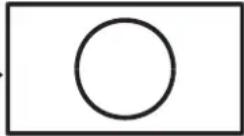 Displays image so it fills the entire screen. Displays image so it fills the entire screen. |  Displays the video according to the input signal. Display to the edge of the input signal is possible.*2 Displays the video according to the input signal. Display to the edge of the input signal is possible.*2 |  Displays the dots of the input signals as the corresponding dots on the screen. Displays the dots of the input signals as the corresponding dots on the screen. |  Displays image so it fills the entire screen without changing the aspect ratio of the input signal. Displays image so it fills the entire screen without changing the aspect ratio of the input signal. |
Video other than 16:9 640×480, 800×600, 1024×768, 1280×1024 etc. 640×480, 800×600, 1024×768, 1280×1024 etc. |  Displays image so it fills the entire screen. Displays image so it fills the entire screen. |  Displays the video according to the input signal. Display to the edge of the input signal is possible.*2 Displays the video according to the input signal. Display to the edge of the input signal is possible.*2 |  Displays the dots of the input signals as the corresponding dots on the screen. Displays the dots of the input signals as the corresponding dots on the screen. |  Displays image so it fills the entire screen without changing the aspect ratio of the input signal. Displays image so it fills the entire screen without changing the aspect ratio of the input signal. |
* For HDMI1/HDMI2/HDMI3/D-SUB (PC), WIDE produces the same display as UNDERSCAN.
*2 Some software may cause noise or distortion at the edges or top of the screen, however, this is not a failure. In this event, set the screen size to WIDE.
TIPS
- Using this monitor's screen-size switching to compress or expand the screen for commercial or public viewing in establishments like cafes or hotels may infringe on the rights of the creators, as protected by Copyright Law, so please be careful.
- The appearance of the original video may change if you select a screen size with a different aspect ratio than the original image (e.g. TV broadcast or video input from external equipment).
- When 4:3 video is viewed with the whole screen using the screen-size switching function of this monitor, the edge of the video may be lost or appear distorted. If you wish to respect the creator's intentions, set the screen size to "NORMAL".
- When playing commercial software, parts of the image (like subtitles) may be cropped. In this case select the optimal screen size using the screen-size switching function of this monitor. With some software, there may be noise or distortion at the edges of the screen. This is due to the characteristics of the software, and is not a malfunction.
- Depending on the original image size, black bands may remain at the edges of the screen.
Menu Items
Displaying the menu screen
Video and audio adjustment and settings of various functions are enabled. This section describes how to use the menu items. See pages 26 to 28 for details of each menu items.
Caution
- Do not turn the main power switch off while the menu items are being displayed. Doing so may initialize the settings.
■Example of operation
(Adjusting CONTRAST in the PICTURE menu)
- Press MENU button to display the menu screen.

- Press ◀or ▶button to select PICTURE.
- Press ▲ or ▼ button to select ADJUST PICTURE QUALITY, and press ENTER button.
- Press ▲ or ▼ button to select CONTRAST.

- Press ◀or ▶button to adjust the setting.

- Press MENU button to close the menu screen.
TIPS
- The menu will differ depending on the input mode.
Menu item details
The menu will differ depending on the input mode.
■ PICTURE
PICTURE MODE
Video and audio settings can be changed to match the scene, such as a movie or computer monitor image.
PC ...... Configure the settings for use with a computer.
DYNAMIC......Increase the contrast for action video such as sports.
DYNAMIC (FIXED)... This provides a clearer image than DYNAMIC. When this is selected, the settings cannot be changed.
STANDARD......Select settings for display in a bright room.
MOVIE...... Select settings for a movie.
ADJUST PICTURE QUALITY
BRIGHT
Adjusts the backlight brightness.
CONTRAST
Adjust the contrast of the picture.
BLACK LEVEL
Adjust the brightness of the picture.
COLORS
Adjusts the color intensity.
TINT
Adjust skin tones. Adjust to a redder tone with the ◀ button, or a greener tone with the ▶ button.
SHARPNESS
Adjusts the sharpness of the image.
FINE MOTION
Use this when showing a picture with fast movement.
DIGITAL NR (Noise Reduction)
This reduces noise on the screen to produce a clearer picture.
Setting a higher level reduces more noise. However, it may cause blurring on an image.
SIZE
This is the same setting as when the SIZE button is pressed. See page 24 for an explanation of the setting.
COLOR ADJUSTMENT
Configure advanced color tone settings.
▲ button....Adjust white to a green tone.
▼ button......Adjust white to a red tone.
◀ button ......Adjust white to a blue tone.
▶ button ....Adjust white to a yellow tone.
F1 button....Show or hide the settings screen.
F2 button......Color adjustment is performed based on the last saved settings.
F3 button......Close the settings screen.
ENTER button......Save the current settings and close the screen.
RGB INPUT RANGE (HDMI/D-SUB (PC))
Sets the RGB input signal range.
When using HDMI set to AUTO, the RGB input signal is detected automatically. Use AUTO normally.
If the RGB input signal range cannot be set appropriately even when using AUTO, set according to the image. When the setting is different, images will be displayed with washed out blacks and compressed gradients.
RESET
Resets the values of the PICTURE menu items to the factory default settings.
AUDIO
AUDIO SETTINGS
Set by the currently selected picture mode.
TREBLE
Adjusts the volume of treble-level sound.
BASS
Adjusts the volume of bass-level sound.
BALANCE
Adjusts the balance of the audio sound between right and left.
RESET
Resets the values of the AUDIO menu items of the currently selected picture mode to the factory default settings.
■ ECOLOGY
POWER SAVE MODE
When OFF is selected, startup time from standby mode is reduced. Note, however, that more power will be consumed in standby mode.
When ON is selected, current consumption is reduced while the monitor is in standby mode. Note, however, that the startup time from standby mode becomes longer.
POWER MANAGEMENT (HDMI/D-SUB (PC))
POWER MANAGEMENT determines whether or not to switch modes from no signal to the input signal waiting mode.
OFF IF NO SIGNAL
Determines whether or not the monitor will go into standby mode when a video signal is not received for 15 minutes. When 5 minutes remain until switching to standby mode, the remaining time will be shown by minute. The default setting for this function is DISABLE. If this function is set to ENABLE, the monitor will go into standby mode 15 minutes after a connected PC goes into sleep mode. Monitor power will not be restored automatically when the connected PC wakes up. The user will need to use the remote control unit to manually restore power to the monitor.
If OFF IF NO SIGNAL will be enabled for HDMI/D-SUB (PC), set POWER MANAGEMENT to NO. If set to YES, the monitor will not enter the standby mode.
OFF IF NO OPERATION
Determines whether or not to set the monitor to go into standby mode when there is no operation for a certain period of time. Set the standby mode entry time. The entry time can be set to a maximum of 12 hours in increments of 1 hour.
When 5 minutes remain until switching to standby mode, the remaining time will be shown by minute.
BACKLIGHT OFF
When set to ON, the backlight turns off. Audio does not turn off.
■ SETUP
HDMI AUTO WIDE
Set whether the picture size is automatically selected based on the signal received from the device that is connected to HDMI.
HDMI CEC LINK
When ON is selected, HDMI CEC LINK is enabled, and when operation starts on an external device, the monitor power automatically turns on and input switches to the connected HDMI input terminal. The power of the external device also turns off based on operation of the monitor. But operation by RS-232C command is not linked to this operation. In case of the unintended movement, select OFF.
LANGUAGE
Sets the display language for the menu screen.
SOFTWARE VERSION
Shows the software version, etc.
ALL RESET
Resets all the settings to the factory default settings. If the video is distorted after this is executed, turn on/off the main power.
Menu Items
OTHERS
AUDIO OUTPUT
For audio output that allows volume adjustment, select the internal speakers or the audio output terminal.
FIXED.....You can adjust the volume of the speakers. The volume of the audio output terminal is fixed and cannot be adjusted.
VARIABLE.....The speaker volume is muted and the volume of the audio output terminal can be adjusted.
INPUT SELECT (INPUT4)
When INPUT4 input is selected, set AV component input or AV video input.
MUTE WITH FREEZE
Set whether or not audio turns off during freeze.
AUDIO SELECT (HDMI2)
Change the audio input of the HDMI2 input terminal to analog or HDMI.
COLOR SYSTEM (INPUT4)
Select the color system of the AV equipment which is connected to AV video input terminal. (AUTO / PAL / PAL-60 / SECAM / NTSC3.58 / NTSC4.43)
When AUTO is selected, the color system is automatically set according to the input signal.
SCREEN (D-SUB (PC))
INPUT SIGNAL
When the D-sub input signal cannot be detected, manually set the resolution for the signal. Select 1280 x 768 or 1360 x 768.
AUTO SYNC.
CLOCK, PHASE, H-POS., and V-POS. are automatically adjusted using the currently input video signal.
Use this automatic adjustment when you use the D-sub to display a computer screen for the first time or when you change the setting of the computer. The automatically synchronized phase cannot be saved. If phase readjustment is needed, use this automatic adjustment again.
H-POS.
Adjust the horizontal position of the image.
V-POS.
Adjust the vertical position of the image.
CLOCK
Adjusts the frequency for the sampling clock for applicable video.
Adjust when there is flickering in the form of vertical stripes.
When using the adjustment pattern (see page 29), make adjustments so that no vertical stripe noise appears in it.
PHASE
Adjusts the sampling clock phase for applicable video. Useful when small characters appear with low contrast and/or there are flickers at corners. When using the adjustment pattern (see page 29), make adjustments so that no horizontal stripe noise appears in it.
RESET
Resets the values of the SCREEN menu items to the factory default settings.
Do not reset the settings of the INPUT SIGNAL and AUTO SYNC.
SYSTEM UPDATE (SERVICE ONLY)
Used when updating the software. (For service technicians.)
Adjustments for PC screen display
■Automatic adjustment
When you use D-SUB (PC) (INPUT5) to display a computer screen for the first time, or when you change the setting of the computer, use the automatic screen adjustment.
- Switch the input to D-SUB (PC) and display the adjustment pattern. (See the description below.)
- Press MENU button and use ◀ or ▶ button to display the OTHERS menu.
- Press ▲ or ▼ button to select SCREEN, and press ENTER button.
- Press ▲ or ▼ button to select AUTO SYNC.
- Press ◀ or ▶ button to select YES.
- Press ENTER button.
The automatic adjustment is complete in several seconds.
TIPS
- If the screen cannot be adjusted properly with one automatic adjustment, repeat the automatic adjustment two or three times. Try manual adjustment if necessary.
■Screen display for adjustment
Before adjusting the image quality or picture, display an image that brightens the entire screen. If you are using a Windows PC, use the adjustment pattern on the supplied CD-ROM.
Opening the adjustment pattern
The following example is performed in Windows 7.
- Load the supplied CD-ROM into the computer's CD-ROM drive.
- Open [CD Drive] in [Computer].
- Double-click [Adj_uty.exe] in the [Monitor] folder. The adjustment pattern will appear. Adjust the screen automatically or manually.

- When adjustment is finished, press the [Esc] on the computer's keyboard to quit the adjustment program.
- Eject the CD-ROM from the CD-ROM drive.
TIPS
- If the display mode on the computer you are using is 65000 colors, the color levels in the color pattern may appear differently or grayscale may appear to be colored. (This is due to the specifications of the input signal and is not a malfunction.)
Functional Restriction Setting (FUNCTION)
You can restrict operations.
- Press the FUNCTION button and then press the MENU button within 10 seconds.
| FUNCTION | ||
| POWER BUTTON LOCK | [OFF] | |
| RC LOCK | [OFF] | |
| MONITOR LOCK | [OFF] | |
| MENU LOCK | [OFF] | |
| EXECUTE | ||
- Press ▲ or ▼ button to select and set the items.
POWER BUTTON LOCK
You can disable the remote control POWER button or the monitor POWER button.
OFF Enables operation.
ALL LOCK ...... Disables the power buttons on the monitor and remote control unit.
MONITOR LOCK...Disables the power button on the monitor.
RC LOCK
You can disable the remote control buttons.
OFF ...... Enables operation.
ON 1 ...... Disables all remote control operations.
ON 2 ...... Disables all remote control operations other than POWER button (turning power on/off) and Cursor control buttons (volume adjustment).
MONITOR LOCK
You can disable the monitor buttons other than POWER button.
MENU LOCK
You can disable the remote control MENU button.
- Press ▲ or ▼ button to select EXECUTE, and press ENTER button.
Confirms the settings and returns to the normal screen.
Controlling the Monitor with a PC (RS-232C)
You can control this monitor from a PC via RS-232C (COM port) on the PC.
PC connection
Connect with RS-232 straight cable between the PC's COM port (RS-232C connector) and the RS-232C input terminal on the monitor.
![graph LR A["RS-232C input terminal"] --> B["RS-232 straight cable (commercially available)"] B <--> C["To COM port"] C --> D["PC"]](/content/2026/05/1073354/images/f875e6ef114c3429280c562a474d4d68e4535fb72ecd19a1d0aee528a2b54813.jpg)
Communication conditions
Set the RS-232C communication settings on the PC to match the monitor's communication settings as follows:
| Baud rate 9600bps | Stop bit | 1 bit |
| Data length 8 bits Flow control | None | |
| Parity bit None | ||
Communication procedure
■Command format
When a command is sent from the PC to the monitor, the monitor operates according to the received command and sends a response message to the PC.
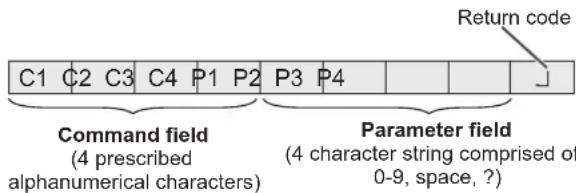
Example: VOLM030
* Be sure to input 4 characters for the parameter. Pad with spaces (“_”) if necessary. ("☐" is a return code (0DH)) Wrong : VOLM30 Right : VOLM030
The current value can be returned by using “????” as the parameter.
| Example: | |
| VOLM ? ? ? ? ← | From PC to monitor (How much is current volume setting?). |
| 30 ← | From monitor to PC (Current volume setting: 30). |
■Response code format
When a command has been executed correctly

A response is returned after a command is executed.
When a command has not been executed

TIPS
- ERR is returned when there is no relevant command or when the command cannot be used in the current state of the monitor.
- If communication has not been established for reasons such as a bad connection between the PC and monitor, nothing is returned (not even ERR).
- ERR may be returned when a command cannot be received correctly due to interference from the surrounding environment. Please ensure that the system or software retries the command if this occurs.
■Communication interval
- After OK or ERR is returned, you must send the following commands. To set a timeout for the command response, specify 10 seconds or longer.
- Provide an interval of 100 ms or more between the command response and the transmission of the next command.
RS-232C command table
How to read the command table
Command: Command field (See page 31.)
Parameter: Parameter field (See page 31.)
* : Enter the number in brackets in the settings
: Enter a space
TIPS
- In the standby mode, the only command that is used is POWER CONTROL.
The operation of commands not indicated in the table below is not guaranteed.
| Function Command Parameter Settings | |||||||||
| POWER CONTROL | P | O | W | R | 0 | Switches to standby mode. | |||
| P | O | W | R | 1 | Enters the power ON state. | ||||
| INPUT MODE SELECTION | I | T | G | D | Toggle change for input mode. | ||||
| I | A | V | D | Change to the INPUT1 to 5 terminal. (1 - 5) | |||||
| PICTURE MODE SELECTION | A | V | M | D | 0 | Toggle change for PICTURE MODE. | |||
| A | V | M | D | 1 | STANDARD | ||||
| A | V | M | D | 2 | MOVIE | ||||
| A | V | M | D | 5 | DYNAMIC | ||||
| A | V | M | D | 6 | DYNAMIC (FIXED) | ||||
| A | V | M | D | 7 | PC | ||||
| VOLUME | V | O | L | M | * | * | * | Set the volume. (0 - 100) | |
| SCREEN | H | P | O | S | * | * | * | Adjust the horizontal position of the image. (000 - 180) (D-SUB (PC)) | |
| V | P | O | S | * | * | Adjust the vertical position of the image. (000 - 120) (D-SUB (PC)) | |||
| C | L | C | K | Set the frequency of the sampling clock of the picture. (000 - 180) (D-SUB (PC)) | |||||
| P | H | S | E | Adjust the phase of the sampling clock of the picture. (000 - 015) (D-SUB (PC)) | |||||
| SCREEN SIZE* | W | I | D | E | 0 | Toggle change for screen size. | |||
| W | I | D | E | 7 | NORMAL | ||||
| W | I | D | E | 9 | WIDE | ||||
| W | I | D | E | 1 | 0 | Dot by Dot | |||
| W | I | D | E | 1 | 1 | UNDERSCAN | |||
| MUTE | M | U | T | E | 0 | Toggle between mute and unmute. | |||
| M | U | T | E | 1 | Mute. | ||||
| M | U | T | E | 2 | Unmute. | ||||
| MODEL | M | N | R | D | 0 | 0 | 0 | 1 | |
| SERIAL NO | S | R | N | O | ? | ? | ? | ? | |
| INPUT RESOLUTION CHECK (PC) | P | X | C | K | Returns current resolution in the form of hhh, vvv. | ||||
| INPUT RESOLUTION CHECK (AV) | R | E | S | O | 480i, 480p, 1080i, 720p, 1080p, VGA, etc. | ||||
* When the screen size is changed automatically using HDMI AUTO WIDE, the current value is not an auto sized value but a value set manually.
Troubleshooting
If you are experiencing any problem with your display, before calling for service, please review the following troubleshooting tips.
There is no picture or sound.
- Is the power cord disconnected? (See page 14.) • Is the main power switch off? (See page 18.) • Make sure correct input mode is selected. (See page 23.)
- If any external equipment is connected, make sure the equipment is operating (playing back).
Remote control does not work.
- Are the batteries inserted with polarity (+,-) aligned? (See page 16.) • Are the batteries exhausted?
- Point the remote control unit toward the monitor's remote control sensor. (See page 16.)
- Is the remote control operation in FUNCTION menu enabled? (See page 30.)
Sound from left and right speakers is reversed.
Sound is heard from only one side.
- Are audio cables connected properly? (See page 13.)
- Check the setting of BALANCE in AUDIO SETTINGS in the AUDIO menu. (See page 27.)
There is a picture but no sound.
• Is the sound muted? (See page 22.) - Make sure the volume is not set to minimum. (See page 22.) - Are audio cables connected properly? - When AUDIO OUTPUT is set to VARIABLE in the OTHERS menu, the speaker is muted. Check the setting. (See page 28.)
Unstable video.
- The signal may be incompatible. (See pages 37 to 38.)
- Try the automatic screen adjustment when D-SUB (PC) (INPUT5) is used. (See page 29.)
The video from the HDMI input terminal does not appear properly.
- Is the HDMI cable HDMI standard compliant? The monitor will not work with cables that are not standard compliant.
- Is the input signal compatible with this monitor? (See pages 37 to 38.)
The video from D-sub input terminal does not appear correctly.
- Is the input signal compatible with this monitor? (See page 37.)
Video color is strange.
- Is the PICTURE menu setting correct? You can execute RESET to return to the factory default settings. (See page 26.)
Control buttons do not work.
There is no picture.
- Load noises from outside may be interfering with normal operation. Turn off the power and turn it on after waiting at least 5 seconds, and then check the operation. (See page 18.)
- Turn on the monitor first before turning on the computer or playback device.
Computer resolution changes automatically.
- If you turn the power switch off and then back on again connecting the computer with a graphic card, the resolution may change to 640 x 480. The resolution changes back to 1920 x 1080 according to the following steps.
- Disconnect and connect the video cable.
- Press the DETECT button when the SCREEN RESOLUTION is displayed. (For Windows)
- Reboot the computer.
The touch panel does not respond.
• Is the USB cable connected properly? - If you want to position the monitor further away than the USB cable will allow, extend the cable using a USB cable with a repeater.
The response of the touch screen is slow.
Some parts of the screen do not respond.
A different place is touched
- Is the screen exposed to direct sunlight or other strong light? The touch panel uses infrared rays and thus may not operate correctly.
- Is there an obstacle between the infrared transmitter/receiver and the touch pen or your finger? An obstacle will prevent correct operation. If your fingers or a sleeve are too close to the screen, correct operation will not be possible.
- Is the infrared transmitter/receiver dirty? Gently wipe off any dirt with a soft cloth.
- If the touch panel is touched with a small tip less than about 5/16 inch (8 mm) x 5/16 inch (8 mm), the touch may not be detected by infrared and correct operation will not take place.
- When starting your computer or connecting the USB cable, do not touch the touch panel. If you touch the touch panel, this may be detected as an element failure in the infrared transmitter/receiver and incorrect operation will result.
- When two touch pens are used, it may not be possible to write correctly.
- When touch pens are moved near each other.
- When a pen is held at an angle while writing.
The Power LED lights blue and orange alternately. (Alternates rapidly at intervals of 0.5 seconds.)
- Hardware has a problem. Turn off the monitor and request repair from your SHARP dealer.
The Power LED lights blue and orange alternately. (At intervals of 1 second.)
• High temperature inside the monitor.
Remove the cause of the excessive temperature rise.
The monitor makes a cracking sound.
- You may occasionally hear a cracking sound from the monitor. This happens when the cabinet slightly expands and contracts according to change in temperature. This does not affect the monitor's performance.
Troubleshooting
The Power LED lights blue and orange alternately.
(At intervals of 1 second.)
When "TEMPERATURE" is displayed in the corner of the screen.
- To prevent high-temperature-related problems, "TEMPERATURE" is displayed on the screen when the internal temperature of the monitor rises excessively.
- If the internal temperature rises further, the monitor automatically enters standby mode. The Power LED lights blue and orange alternately. (At intervals of 1 second.)
- Remove the cause of the excessive temperature rise.
- If the monitor enters standby mode due to a rise in temperature, to return to normal display, turn the power switch off and then back on again. The monitor, however, will enter standby mode again if the cause of the temperature rise is not eliminated. (See page 8.)
- Check whether the monitor is placed at a location where a quick rise in temperature is likely. Internal temperature rises quickly if the vents on the monitor are blocked.
- Internal temperature rises quickly if dust accumulates inside the monitor or around the vents. Remove dust if possible. Ask SHARP dealer about removing internal dust.
Specifications
■Product Specifications
| Model | PN-C805B | PN-C705B | ||
| LCD component | 80" Class [80 inch (203.2cm) diagonal] TFT LCD | 70" Class [69-1/2 inch (176.6cm) diagonal] TFT LCD | ||
| Max. resolution (pixels) | 1920 x 1080 | |||
| Max. colors | Approx. 1.07 billion colors*1 | |||
| Pixel pitch | 0.923 mm (H) x 0.923 mm (V) 0.802 | mm (H) x 0.802 mm (V) | ||
| Max. brightness (typical)*2 | 350 cd/m2 | |||
| Contrast ratio (typical) 5,000 : 1 4,000 : 1 | ||||
| Viewing angle *3 | Right/left 176° / Up/down 176° (contrast ratio ≥ 10) | Right/left 176° / Up/down 176° (contrast ratio ≥ 10) | ||
| Screen active area inch (mm) | 69-3/4 (W) x 39-1/4 (H) (1771.2 x 996.3) | 60-9/16 (W) x 34-1/16 (H) (1538.9 x 865.6) | ||
| Computer input signal | Analog RGB (0.7 Vp-p) [75 Ω], HDMI | |||
| Sync signal | Horizontal/vertical separate (TTL: positive/negative) | |||
| Video color system | NTSC (3.58MHz)/NTSC (4.43MHz)/PAL/PAL-60/SECAM | |||
| Plug and play | VESA DDC2B | |||
| Input terminals | PC/AV HDMI x 3 | |||
| PC Mini D-sub 15 pin, 3 rows x | 1 | |||
| Audio | 3.5 mm mini stereo jack x 1 | |||
| AV Compo | site video RCA | *4 x 1 | ||
| Component | RCA (Y, Cb/Pb, Cr/Pr) *4 x 1 | |||
| Audio | RCA pin (L/R) x 1 | |||
| Serial (RS-232C) D-sub 9 pin x | 1 | |||
| Output terminals Audio | 3.5 mm mini stereo jack x 1 | |||
| Speaker output (internal/external) 10 W + 10 W/10 | W + 10 W 6Ω | |||
| Touch Panel | Detection method Infrared blocking detection method | |||
| PC connector USB (2.0 compliant) (type B) x 1 | ||||
| Power requirement | AC 100 V - 240 V, 3.1 A, 50/60 Hz | AC 100 V - 240 V, 2.2 A, 50/60 Hz | ||
| Operating temperature *5 | 41°F to 95°F (5°C to 35°C) | |||
| Operating humidity *5 | 20% to 80% (no condensation) | |||
| Power consumption (input signal waiting mode / standby mode *6 *7) | 270W (27W/0.5W) | 200W (16W/0.5W) | ||
| Dimensions (excluding protrusions) inch (mm) | Approx. 74-1/8 (W) x 5 (D) x 44-13/16 (H) (1882 x 127 x 1139) | Approx. 64-3/8 (W) x 3-3/4 (D) x 39-5/16 (H) (1635 x 96 x 998) | ||
| Weight | Ibs. (kg) | Approx. 174.2 (79) | Approx. 136.7 (62) | |
*1 Maximum colors of LCD panel. The number of colors that can be displayed simultaneously is 16.77 million arbitrary colors out of 1.07 billion colors.
*2 Brightness will depend on input mode and other picture settings. Brightness level will decrease over time. Due to the nature of the equipment, it is not possible to precisely maintain a constant level of brightness.
*3 Excluding the touch sensor part around the LCD panel.
*4 Composite video and component cannot be used simultaneously.
*5 In addition, check the requirements of the computer and other devices to be connected, and make sure that all requirements are satisfied.
*6 When a single input terminal is connected.
*7 When POWER SAVE MODE is set to ON. When POWER SAVE MODE is set to OFF: PN-C805B: 28W, PN-C705B: 17W.
As a part of our policy of continuous improvement, SHARP reserves the right to make design and specification changes for product improvement without prior notice. The performance specification figures indicated are nominal values of production units. There may be some deviations from these values in individual units.
■Dimensional Drawings
Note that the values shown are approximate values.

When mounting the monitor, be sure to use a wall-mount bracket that complies with the VESA-compatible mounting method. SHARP recommends using M6 screws and tighten the screws.
Note that screw hole depth of the monitor is 3/8 inch (10 mm). Loose mounting may cause the product to fall, resulting in serious personal injuries as well as damage to the product. The screw and hole should come together with over 5/16 inch (8 mm) length of thread. Use a bracket which has been approved for UL1678 standard, and which can endure at least 4 times or more the weight of the monitor.
■DDC (plug and play)
The monitor supports the VESA DDC (Display Data Channel) standard.
DDC is a signal standard for plug and play between monitors and computers. Information about resolution and other parameters is exchanged between the two. This function can be used if the computer supports DDC and it has been configured to detect plug-and-play monitors.
There are several types of DDC, depending on the communication method used. This monitor supports DDC2B.
■Compatible signal timing (PC)
| Screen resolution Hsync | Vsync Dot frequency | D | igital HDMI | Analog (D-sub) | ||
| VESA | 640 × 480 | 31.5kHz | 60Hz | 25.175MHz | Yes *1*2 | Yes |
| 37.9kHz | 72Hz | 31.5MHz | Yes | Yes | ||
| 37.5kHz | 75Hz | 31.5MHz | Yes | Yes | ||
| 800 × 600 | 35.1kHz | 56Hz | 36.0MHz | Yes | Yes | |
| 37.9kHz | 60Hz | 40.0MHz | Yes | Yes | ||
| 48.1kHz | 72Hz | 50.0MHz | Yes | Yes | ||
| 46.9kHz | 75Hz | 49.5MHz | Yes | Yes | ||
| 1024 × 768 | 48.4kHz | 60Hz | 65.0MHz | Yes | Yes | |
| 56.5kHz | 70Hz | 75.0MHz | Yes | Yes | ||
| 60.0kHz | 75Hz | 78.75MHz | Yes | Yes | ||
| 1152 × 864 | 67.5kHz | 75Hz | 108.0MHz | Yes | Yes | |
| 1280 × 768 | 47.8kHz | 60Hz | 79.5MHz | Yes | Yes | |
| 60.3kHz | 75Hz | 102.25MHz | Yes | Yes | ||
| 1280 × 960 | 60.0kHz | 60Hz | 108.0MHz | Yes | - | |
| 1280 × 1024 | 64.0kHz | 60Hz | 108.0MHz | Yes | Yes | |
| 80.0kHz | 75Hz | 135.0MHz | Yes | Yes | ||
| 1360 × 768 | 47.7kHz | 60Hz | 85.5MHz | Yes | Yes | |
| 1400 × 1050 | 65.3kHz | 60Hz | 121.75MHz | Yes | - | |
| 1600 × 1200 *3 | 75.0kHz | 60Hz | 162.0MHz | - | Yes | |
| 1920 × 1200 *3 | 74.0kHz | 60Hz | 154.0MHz | - | Yes | |
| Wide | 1280 × 720 | 44.7kHz | 60Hz | 74.4MHz | Yes | Yes |
| 1920 × 1080 | 67.5kHz | 60Hz | 148.5MHz | Yes | Yes | |
| Sun *4 | 1024 × 768 | 48.3kHz | 60Hz | 64.13MHz | Yes | Yes |
| 56.6kHz | 70Hz | 74.25MHz | Yes | Yes | ||
*1 Settings other than Dot by Dot/UNDERSCAN will result in partial display.
*2 When using this signal, use the remote control to operate the monitor. Operation using the buttons on the monitor is not possible.
*3 Dot by Dot produces the same display as WIDE.
*4 The frequency values for the Sun are reference values.
■Compatible signal timing (AV)
| Screen resolution Frequency HDMI Component | |||
| 1920 × 1080p 24Hz Yes - | |||
| 50Hz Yes Yes | |||
| 59.94Hz Yes Yes | |||
| 60Hz Yes Yes | |||
| 1920 × 1080i 50Hz Yes Yes | |||
| 59.94Hz Yes Yes | |||
| 60Hz Yes Yes | |||
| 1280 × 720p 50Hz Yes Yes | |||
| 59.94Hz Yes Yes | |||
| 60Hz Yes Yes | |||
| 720 × 576p 50Hz Yes | *1 | - | |
| 720 × 480p 59.94Hz Yes | *1 | - | |
| 60Hz Yes | *1 | - | |
| 640 × 480p(VGA) | 59.94Hz | Yes*1*2 | - |
| 60Hz | Yes*1*2 | - | |
| 720(1440) × 576i | 50Hz Yes - | ||
| 720(1440) × 480i | 59.94Hz Yes - | ||
| 60Hz Yes - | |||
*1 When using this signal, use the remote control to operate the monitor. Operation using the buttons on the monitor is not possible. *2 Settings other than Dot by Dot/UNDERSCAN will result in partial display.
■D-sub input terminal pins
(Mini D-sub 15 pin)

| No. | Function No. Function | ||
| 1 | Red video signal input 9 +5V | ||
| 2 | Green video signal input 10 GND | ||
| 3 | Blue video signal input 11 N.C. | ||
| 4 | N.C. 12 DDC data | ||
| 5 | GND 13 Hsync signal input | ||
| 6 | GND for red video signal 14 V | sync | signal input |
| 7 | GND for green video signal 15 | DDC | clock |
| 8 | GND for blue video signal | ||
■HDMI input terminal pins
(HDMI™ Connector)

| No. | Function No. | Function | ||
| 1 | TMDS data 2+ 11 TMDS clock | shield | ||
| 2 | TMDS data 2 shield 12 TMDS | clock- | ||
| 3 | TMDS data 2- 13 CEC | |||
| 4 | TMDS data 1+ 14 N.C. | |||
| 5 | TMDS data 1 shield 15 SCL | |||
| 6 | TMDS data 1- 16 SDA | |||
| 7 | TMDS data 0+ 17 DDC/CEC | GND | ||
| 8 | TMDS data 0 shield 18 +5V | |||
| 9 | TMDS data 0- 19 Hot-plug detection | |||
| 10 | TMDS clock+ | |||
Mounting Precautions (For SHARP dealers and service engineers)
- When installing, removing or moving the monitor, ensure that this is carried out by at least 4 people. (PN-C705B: at least 3 people.)
- Be sure to use a wall-mount bracket designed or designated for mounting the monitor.
- This monitor is designed to be installed on a concrete wall or pillar. Reinforced work might be necessary for some materials such as plaster / thin plastic board / wood before starting installation.
This monitor and bracket must be installed on a wall which can endure at least 4 times or more the weight of the monitor. Install by the most suitable method for the material and the structure.
- To attach a VESA-compliant mounting bracket, use M6 screws that are 5/16 inch (8 mm) to 3/8 inch (10 mm) longer than the thickness of the mounting bracket.

- Do not use an impact driver. • After mounting, please carefully ensure the monitor is secure, and not able to come loose from the wall or mount.
- Do not use any screw holes other than VESA holes for installation.
■Attaching the Tray
Secure the tray using 5 tray mounting screws (M3) (supplied).

SHARP®
SHARP CORPORATION
- CAUTION
- WARNING
- NOTE
- SAFETY PRECAUTIONS
- ESPECIALLY FOR CHILD SAFETY
- THE POWER CORD
- MANUAL SCOPE
- LED BACKLIGHT
- CONTENTS
- SUPPLIED COMPONENTS
- SYSTEM REQUIREMENTS
- PART NAMES
- REMOTE CONTROL UNIT
- CONNECTING PERIPHERAL EQUIPMENT
- TIPS
- CONNECTING THE POWER CORD
- BINDING CABLES
- AFFIXING THE STAND HOLE PROTECTION COVERS
- PREPARING THE REMOTE CONTROL UNIT
- INSTALLING THE BATTERIES
- REMOTE CONTROL OPERATION RANGE
- REMOVING THE HANDLES
- MOUNTING A WEB CAMERA
- MOUNTING ON THE TOP OF THE MONITOR
- MOUNTING ON THE TRAY
- TURNING POWER ON/OFF
- TURNING ON THE MAIN POWER
- TOUCH ACTION
- COMMON FINGER AND TOUCH PEN ACTIONS
- SINGLE-TAP
- DOUBLE-TAP
- SWIPE
- SWIPE FROM EDGE OF SCREEN
- DRAG-AND-DROP
- FLICKS
- PRESS-AND-HOLD
- SLIDE TO PAN
- FINGER ACTIONS
- ZOOM
- PRESS-AND-TAP
- ROTATE
- TOUCH PEN
- OTHER FUNCTIONS
- TOUCH POINTER
- INPUT PANEL
- CAUTIONARY POINTS
- ERASER
- BASIC OPERATION
- USING THE BUTTONS ON THE REMOTE CONTROL UNIT AND MONITOR
- HDMI
- NUMERIC INPUT BUTTONS
- MUTE
- MODE (PICTURE MODE SELECTION)
- VOLUME +/- (VOLUME ADJUSTMENT)
- INFORMATION
- FUNCTION
- ENTER
- FREEZE
- BUTTONS FOR OPERATING THE HDMI-CONNECTED DEVICE
- ID SET
- OPTION
- SIZE (SCREEN SIZE SELECTION)
- PIP/PBYP
- BRIGHT +/- (BRIGHTNESS ADJUSTMENT)
- INPUT (INPUT MODE SELECTION)
- MENU
- CURSOR
- RETURN
- D-SUB
- BACKLIGHT OFF
- SWITCHING THE SCREEN SIZE
- MENU ITEMS
- DISPLAYING THE MENU SCREEN
- EXAMPLE OF OPERATION
- MENU ITEM DETAILS
- PICTURE
- PICTURE MODE
- ADJUST PICTURE QUALITY
- BRIGHT
- CONTRAST
- BLACK LEVEL
- COLORS
- TINT
- SHARPNESS
- FINE MOTION
- DIGITAL NR (NOISE REDUCTION)
- SIZE
- COLOR ADJUSTMENT
- RGB INPUT RANGE (HDMI/D-SUB (PC))
- RESET
- AUDIO
- AUDIO SETTINGS
- TREBLE
- BASS
- BALANCE
- ECOLOGY
- POWER SAVE MODE
- POWER MANAGEMENT (HDMI/D-SUB (PC))
- OFF IF NO SIGNAL
- OFF IF NO OPERATION
- SETUP
- HDMI AUTO WIDE
- HDMI CEC LINK
- LANGUAGE
- SOFTWARE VERSION
- ALL RESET
- OTHERS
- AUDIO OUTPUT
- INPUT SELECT (INPUT4)
- MUTE WITH FREEZE
- AUDIO SELECT (HDMI2)
- COLOR SYSTEM (INPUT4)
- SCREEN (D-SUB (PC))
- INPUT SIGNAL
- AUTO SYNC
- H-POS
- V-POS
- CLOCK
- PHASE
- SYSTEM UPDATE (SERVICE ONLY)
- ADJUSTMENTS FOR PC SCREEN DISPLAY
- AUTOMATIC ADJUSTMENT
- SCREEN DISPLAY FOR ADJUSTMENT
- OPENING THE ADJUSTMENT PATTERN
- FUNCTIONAL RESTRICTION SETTING (FUNCTION)
- POWER BUTTON LOCK
- RC LOCK
- MONITOR LOCK
- MENU LOCK
- CONTROLLING THE MONITOR WITH A PC (RS-232C)
- PC CONNECTION
- COMMUNICATION CONDITIONS
- COMMUNICATION PROCEDURE
- COMMAND FORMAT
- RESPONSE CODE FORMAT
- COMMUNICATION INTERVAL
- RS-232C COMMAND TABLE
- HOW TO READ THE COMMAND TABLE
- TROUBLESHOOTING
- THERE IS NO PICTURE OR SOUND
- REMOTE CONTROL DOES NOT WORK
- SOUND FROM LEFT AND RIGHT SPEAKERS IS REVERSED
- SOUND IS HEARD FROM ONLY ONE SIDE
- THERE IS A PICTURE BUT NO SOUND
- UNSTABLE VIDEO
- THE VIDEO FROM THE HDMI INPUT TERMINAL DOES NOT APPEAR PROPERLY
- THE VIDEO FROM D-SUB INPUT TERMINAL DOES NOT APPEAR CORRECTLY
- VIDEO COLOR IS STRANGE
- CONTROL BUTTONS DO NOT WORK
- THERE IS NO PICTURE
- COMPUTER RESOLUTION CHANGES AUTOMATICALLY
- THE TOUCH PANEL DOES NOT RESPOND
- THE RESPONSE OF THE TOUCH SCREEN IS SLOW
- SOME PARTS OF THE SCREEN DO NOT RESPOND
- A DIFFERENT PLACE IS TOUCHED
- THE POWER LED LIGHTS BLUE AND ORANGE ALTERNATELY. (ALTERNATES RAPIDLY AT INTERVALS OF 0.5 SECONDS.)
- THE POWER LED LIGHTS BLUE AND ORANGE ALTERNATELY. (AT INTERVALS OF 1 SECOND.)
- THE MONITOR MAKES A CRACKING SOUND
- THE POWER LED LIGHTS BLUE AND ORANGE ALTERNATELY
- (AT INTERVALS OF 1 SECOND.)
- SPECIFICATIONS
- DIMENSIONAL DRAWINGS
- DDC (PLUG AND PLAY)
- D-SUB INPUT TERMINAL PINS
- HDMI INPUT TERMINAL PINS
- MOUNTING PRECAUTIONS (FOR SHARP DEALERS AND SERVICE ENGINEERS)
- ATTACHING THE TRAY
- SHARP®
- SHARP CORPORATION
Brand : SHARP
Model : PN-C705B
Category : Screen