
PSCS 10‑3 6V - Screwdriver TROTEC - Free user manual and instructions
Find the device manual for free PSCS 10‑3 6V TROTEC in PDF.


| Product Type | Cordless Screwdriver |
| Brand | Trotec |
| Model | PSCS 10-3 6V |
| Voltage | 6 V |
| Battery Type | Lithium-ion (built-in) |
| Chuck Type | 1/4 inch Hex |
| Max Speed | 300 RPM |
| Max Torque | 5 Nm |
| Weight | 0.6 kg |
| Dimensions (LxWxH) | 180 x 50 x 180 mm |
| Drive Size | 1/4 inch (6.35 mm) |
| Material | ABS plastic, metal gears |
| Color | Red and black |
| Forward/Reverse Switch | Yes |
| LED Work Light | Yes |
| Overload Protection | Electronic clutch |
| Charging Time | 3-5 hours |
| Main Uses | Screwing in light materials (wood, drywall, small assemblies) |
| Included Accessories | Bits set, charger, storage case |
| Safety Features | Insulated housing, lock button |
| Maintenance | Clean with dry cloth, avoid moisture |
| Repairability | Battery replacement by service center |
| Certifications | CE, RoHS |
Frequently Asked Questions - PSCS 10‑3 6V TROTEC
User questions about PSCS 10‑3 6V TROTEC
0 question about this device. Answer the ones you know or ask your own.
Ask a new question about this device
Download the instructions for your Screwdriver in PDF format for free! Find your manual PSCS 10‑3 6V - TROTEC and take your electronic device back in hand. On this page are published all the documents necessary for the use of your device. PSCS 10‑3 6V by TROTEC.
USER MANUAL PSCS 10‑3 6V TROTEC
table of contents
Notes regarding the operating manual.... 1
Safety 2
Information about the device....6
Transport and storage....8
Start-up....9
Operation 11
Available accessories.... 13
Errors and faults.... 13
Maintenance 14
Disposal 14
Notes regarding the operating manual
Symbols

Warning of electrical voltage
This symbol indicates dangers to the life and health of persons due to electrical voltage.

Warning of explosive substances
This symbol indicates dangers to the life and health of persons due to potentially explosive substances.

Warning!
This signal word indicates a hazard with an average risk level which, if not avoided, can result in serious injury or death.

Caution!
This signal word indicates a hazard with a low risk level which, if not avoided, can result in minor or moderate injury.
Note
This signal word indicates important information (e.g. material damage), but does not indicate hazards.

Info
Information marked with this symbol helps you to carry out your tasks quickly and safely.

Follow the manual
Information marked with this symbol indicates that the operating manual must be observed.

Wear safety glasses
Information marked with this symbol indicates that you should wear eye protection.

Wear a protective mask
Information marked with this symbol indicates that you should wear a protective mask.

Wear Ear Protection
Information marked with this symbol indicates that you should wear hearing protection.
The current version of the operating manual can be found at:

PSCS 10-3,6V

http://download.trotec.com/?sku=4410000005&id=1
Legal notice
This release replaces all previous versions. No part of this publication may be reproduced without written permission from Trotec GmbH & Co. KG. The same applies for electronically processing, duplicating or spreading the publication. Subject to technical changes. All rights reserved. Trademarks are used without guarantee that they may be used freely and primarily following the spelling of the manufacturer. Product names are registered.
Changes to construction in the interests of constant improvements to the product, as well as changes to the shape and colour are reserved.
The scope of delivery may vary from product images. This document was created with all due care. Trotec GmbH & Co. KG accepts no liability whatsoever for possible mistakes or omissions.
Warranty and liability
The device complies with the fundamental health and safety requirements of the applicable EU regulations and was tested at the factory for perfect functionality multiple times.
However, if faults in the functionality occur and cannot be remedied with the measures in the chapter Errors and faults, please get in touch with your dealer or distributor.
When making a warranty claim, supply the device number (see the side of the device).
When manufacturer's instructions or legal regulations have not been followed, or after unauthorised changes to the device are made, the manufacturer is not responsible for the resulting damages. Changes to the device or unauthorised replacement of individual parts can drastically impact the electrical safety of this product and will result in the loss of the warranty. Liability does not extend to damages to people or property caused by the device being used other than as described in the instructions in this operating manual. Subject to changes to technical design and model changes as part of constant development and product improvement without prior notice.
No liability is accepted for damages resulting from improper use. In such a case, any warranty claims will be voided also.
Safety
Read this manual carefully before starting or using the device. Always store the manual in the immediate vicinity of the device or its site of use!

Warning
Read all safety warnings and all instructions.
Failure to follow the warnings and instructions may result in electric shock, fire and/or serious injury.
Save all warnings and instructions for future reference.
This appliance can be used by children aged from 8 years and above and persons with reduced physical, sensory or mental capabilities or lack of experience and knowledge if they have been given supervision or instruction concerning use of the appliance in a safe way and understand the hazards involved.
Children shall not play with the appliance. Cleaning and user maintenance shall not be made by children without supervision.

General Power Tool Safety Warnings – Work area safety
- Keep work area clean and well lit. Cluttered or dark areas invite accidents.
- Do not operate power tools in explosive atmospheres, such as in the presence of flammable liquids, gases or dust. Power tools create sparks which may ignite the dust or fumes.
- Keep children and bystanders away while operating a power tool. Distractions can cause you to lose control.

General Safety Warnings – Electrical safety
- Power tool or power adapter plugs must match the outlet. Never modify the plug in any way. Do not use any adapter plugs with earthed (grounded) power tools. Unmodified plugs and matching outlets will reduce risk of electric shock.
- Avoid body contact with earthed or grounded surfaces, such as pipes, radiators, ranges and refrigerators. There is an increased risk of electric shock if your body is earthed or grounded.
- Do not expose power tools to rain or wet conditions. Water entering a power tool will increase the risk of electric shock.
- Do not abuse the cord. Never use the cord for carrying, pulling or unplugging the power tool. Keep cord away from heat, oil, sharp edges or moving parts. Damaged or entangled cords increase the risk of electric shock.
- When operating a power tool outdoors, use an extension cord suitable for outdoor use. Use of a cord suitable for outdoor use reduces the risk of electric shock.
- If operating a power tool in a damp location is unavoidable, use a residual current device (RCD) protected supply. Use of an RCD reduces the risk of electric shock.
- Hold power tool by insulated gripping surfaces when performing an operation where the cutting accessory may contact hidden wiring or its own cord. Cutting accessory contacting a "live" wire may make exposed metal parts of the power tool "live" and could give the operator an electric shock.

General Power Tool Safety Warnings – Personal safety
- Stay alert, watch what you are doing and use common sense when operating a power tool. Do not use a power tool while you are tired or under the influence of drugs, alcohol or medication. A moment of inattention while operating power tools may result in serious personal injury.

Use personal protective equipment. Always wear eye protection. Protective equipment such as dust mask, non-skid safety shoes, hard hat, or hearing protection used for appropriate conditions will reduce personal injuries.
- Prevent unintentional starting. Ensure the switch is in the off-position before connecting to power source and/or battery pack, picking up or carrying the tool. Carrying power tools with your finger on the switch or energising power tools that have the switch on invites accidents.
- Remove any adjusting key or wrench before turning the power tool on. A wrench or a key left attached to a rotating part of the power tool may result in personal injury.
- Do not overreach. Keep proper footing and balance at all times. This enables better control of the power tool in unexpected situations.
- Dress properly. Do not wear loose clothing or jewellery. Keep your hair, clothing and gloves away from moving parts. Loose clothes, jewellery or long hair can be caught in moving parts.
- If devices are provided for the connection of dust extraction and collection facilities, ensure these are connected and properly used. Use of dust collection can reduce dust-related hazards.

General Power Tool Safety Warnings – Power tool use and care
- Do not force the power tool. Use the correct power tool for your application. The correct power tool will do the job better and safer at the rate for which it was designed.
- Do not use the power tool if the switch does not turn it on and off. Any power tool that cannot be controlled with the switch is dangerous and must be repaired.
- Disconnect the plug from the power source and / or the battery pack from the power tool before making any adjustments, changing accessories, or storing power tools. Such preventive safety measures reduce the risk of starting the power tool accidentally.
- Store idle power tools out of the reach of children and do not allow persons unfamiliar with the power tool or these instructions to operate the power tool. Power tools are dangerous in the hands of untrained users.
- Maintain power tools. Check for misalignment or binding of moving parts, breakage of parts and any other condition that may affect the power tool's operation. If damaged, have the power tool repaired before use. Many accidents are caused by poorly maintained power tools.
- Keep cutting tools sharp and clean. Properly maintained cutting tools with sharp cutting edges are less likely to bind and are easier to control.
- Use the power tool, accessories and tool bits etc. in accordance with these instructions, taking into account the working conditions and the work to be performed. Use of the power tool for operations different from those intended could result in a hazardous situation.

General Power Tool Safety Warnings – Service
- Have your power tool serviced by a qualified repair person using only identical replacement parts. This will ensure that the safety of the power tool is maintained.

General Battery Pack / Charger Safety Warnings
- Use power tools only with specifically designated battery packs. Use of any other battery packs may create a risk of injury and fire.
- When battery pack is not in use, keep it away from other metal objects, like paper clips, coins, keys, nails, screws or other small metal objects, that can make a connection from one terminal to another. Shorting the battery terminals together may cause burns or a fire.
- Recharge only with the charger specified by the manufacturer. A charger that is suitable for one type of battery pack may create a risk of fire when used with another battery pack.
- Do not charge other battery packs. The charger is only suitable for use with the supplied battery pack and with the voltages specified in the technical data. Otherwise, there is a risk of fire and explosion.
- Under abusive conditions, liquid may be ejected from the battery; avoid contact. If contact accidentally occurs, flush with water. If liquid contacts eyes, additionally seek medical help. Liquid ejected from the battery may cause irritation or burns.
- In case of damage and improper use of the battery, vapours may be emitted. Provide for fresh air and seek medical help in case of complaints. The vapours can irritate the respiratory system.
- Do not open the battery. There is danger of a short circuit.
- Do not short-circuit the battery. There is danger of explosion.
- Batteries must not be exposed to mechanical impacts.
- Protect electrical parts against moisture. To prevent an electric shock, never immerse them in water or other liquids during cleaning or operation. Never hold the charger under running water. Please observe the instructions for cleaning and maintenance.
- The charger is only suited for indoor use.
-
Keep the charger clean. Contamination entails a risk of electric shock.
-
Do not operate the charger on highly combustible ground (e.g. paper, textiles etc.) or in an inflammable environment. The heat generated by the charger during charging entails a risk of fire.
- Only use the charger for charging the battery. The charger must not be used as power supply for the power tool.

Device-specific safety warnings for cordless screwdrivers

Wear eye and mouth protection when processing materials that may contain harmful substances (e.g. asbestos).

- Secure the workpiece with tensioning devices or a vice.
- Hold the power tool firmly. When tightening or loosening screws, high reaction torques can occur temporarily.
- Immediately switch off the power tool if the insertion tool blocks. Beware of high reaction torques causing a kickback.
- Hold power tool by insulated gripping surfaces when performing an operation where the cutting accessory may contact hidden wiring. Cutting accessory contacting a "live" wire may make exposed metal parts of the power tool "live" and could give the operator an electric shock.
- For any work on the device, as well as during transport or storage, set the switch for the rotational direction to centre position (locked). This prevents unintentional starting of the power tool.
Residual risks – cordless drill drivers

Warning of electrical voltage
Electric shock from insufficient insulation.
Check the device for damages and proper functioning before each use.
If you notice damages, no longer use the device.
Do not use the device when the device or your hands are damp or wet!

Warning of electrical voltage
Before any work on the device, remove the mains plug from the mains socket and the battery from the device! Hold onto the mains plug while pulling the power cable out of the mains socket.

Warning of electrical voltage
There is a risk of a short-circuit due to liquids penetrating the housing! Do not immerse the device and the accessories in water. Make sure that no water or other liquids can enter the housing.

Warning of electrical voltage
Work on the electrical components must only be carried out by an authorised specialist company!

Warning of explosive substances
Do not expose the battery to temperatures above 45 °C! Do not let the battery come into contact with water or fire! Avoid direct sunlight and moisture. There is a risk of explosion!

Warning!
Toxic dusts!

The harmful / toxic dusts produced during operation pose of risk to the health of the operator and persons in the vicinity.

Wear eye protection and a protective mask!

Warning!
Do not process materials containing asbestos.
Asbestos is considered carcinogenic.

Warning!
Make sure not to hit power, gas or water lines when working with a power tool. If necessary, use a pipe detector to check the wall you want to drill in or slit open.

Warning!
Risk of injuries caused by flying parts or bursting tool heads.

Warning!
Dangers can occur at the device when it is used by untrained people in an unprofessional or improper way! Observe the personnel qualifications!

Warning!
Do not leave the packaging lying around. Children may use it as a dangerous toy.

Warning!
The device is not a toy and does not belong in the hands of children.

Caution!
Vibration emissions can cause a health hazard if the device is used for an extended period of time or if it is not properly handled and maintained.

Caution!
Keep a sufficient distance from heat sources.

Caution!
While the battery is charging, the handle may become slightly warm. This is normal.
Note
To avoid damaging the gear, only change the rotational direction when the device is at a standstill.
Note
Set the torque and rotational direction according to the operating mode. A wrong selection may damage the device.
Note
If you store or transport the device improperly, the device may be damaged.
Note the information regarding transport and storage of the device.
Intended use
Only use the device PSCS 10-3.6V:
• for screwing in and loosening screws,
• for drilling in wood, plastic, ceramic and metal,
whilst adhering to the technical data.
Improper use
The device is not intended for drilling in concrete or natural stone.
Personnel qualifications
People who use this device must:
• have read and understood the operating manual, especially the Safety chapter.
Information about the device
Device description
The cordless baton screwdriver has an adjustable handle that can be positioned horizontally or vertically to the screw bit.
The integrated torque selection, including one drilling setting, allows you to use the optimum power for every application, adapted to the material and screw size.
The tool holder with locking mechanism further enables an easy and tool-free exchange of the insertion tools.
The integrated LED work lamp offers an improved illumination of the workpiece or working surface.
Device depiction

| No. Designation |
| 1 Tool holder with locking mechanism |
| 2 Torque selection |
| 3 3-stage battery level indication |
| 4 Handle position switch |
| 5 Clockwise / counter-clockwise rotation, lock |
| 6 Handle |
| 7 Charger connection |
| 8 25 mm bit |
| 9 50 mm bit |
| 10 Magnetic bit holder |
| 11 Charger |
| 12 On / off switch |
| 13 LED work lamp |
Scope of delivery
• 1x Cordless baton screwdriver
- 1x Charger
- 24x Bits 25 mm
- 2x Bits 50 mm
- 1x Magnetic bit holder
- 1x Transport case
- 1x Manual
Technical data
| Parameter Value | |
| Model PSCS 10-3.6V | |
| Nominal voltage 3.6 V | --- |
| Idle speed 200 rpm | |
| Torque settings 6 +1 | |
| Tool holder Hexagon tool holder with locking mechanism | |
| Max. drilling diameter | |
| Wood | 6 mm |
| Metal | 4 mm |
| Max. torque 4 Nm | |
| Weight 380 g | |
| Battery (integrated) | |
| Type Li-ion | |
| Nominal voltage 3.6 V | --- |
| Capacity 1500 mAh | |
| Charger PSCS 10-3.6V AC | |
| Input | |
| Nominal voltage 100 - 240 V ~ 50 - 60 Hz | |
| Power input 8 W | |
| Output | |
| Nominal voltage 5 V | --- |
| Charging current 600 mA | |
| Charging time 3 h | |
| Protection class | II / ☐ |
| Sound values according to EN 60745 | |
| Sound pressure level 63 dB(A) | |
| Sound power level 74.1 dB(A) | |
| Uncertainty K 3 dB(A) | |
| Vibration information according to EN 60745 | |
| Vibration emission value drilling in metal / screwing ah=in | 0.216 m/s 2 |
| Uncertainty K 1.5 m/s | 2 |
Information on noise and vibration:
- The vibration level specified in these instructions was determined by means of a measuring method standardized in EN 60745 and can be used for a device comparison. The specified vibration emission value may also be used for a preliminary assessment of the exposure.
Caution! Vibration
Vibration emissions can cause a health hazard if the device is used for an extended period of time or if it is not properly handled and maintained.
- The vibration level will change depending on the application of the power tool and may in some cases differ from the value specified in these instructions. The vibration load may be underestimated if the power tool is used regularly in such a way. For a precise estimation of the vibration load during a certain work period, it is also important to consider the periods during which the device is switched off, or is running but not actually employed. This can reduce the vibration load over the entire work period significantly.
Transport and storage
Note
If you store or transport the device improperly, the device may be damaged.
Note the information regarding transport and storage of the device.
Transport
For transporting the device, use the transport case included in the scope of delivery in order to protect the device from external influences.
Before transporting the device, proceed as follows:
- Switch off the device by setting the switch for clockwise / counter-clockwise rotation to centre position (lock).
- Allow the device to cool down.
The supplied Li-ion batteries are subjects to the requirements of dangerous goods legislation.
Observe the following when transporting or shipping Li-ion batteries:
- The user may transport the batteries by road without any additional requirements.
- If transport is carried out by third parties (e.g. air transport or forwarding company), special requirements as to packaging and labelling must be observed. This includes consulting a dangerous goods specialist when preparing the package.
- Only ship batteries if their housing is undamaged.
– Please also observe any other national regulations.
Storage
Before storing the device, proceed as follows:
- Set the switch for clockwise / counter-clockwise rotation to centre position (lock).
- Clean the device as described in the Maintenance chapter.
- For storing the device, use the transport case included in the scope of delivery in order to protect the device from external influences.
- Do not store Li-ion batteries which are completely discharged. Storing discharged batteries can lead to a deep discharge and thus damage the battery.
When the device is not being used, observe the following storage conditions:
- dry and protected from frost and heat
- ambient temperature below 40°C
- protected from dust and direct sunlight inside the transport case
Start-up
Unpacking the device
• Take the transport case out of the packaging.

Warning of electrical voltage
Electric shock from insufficient insulation.
Check the device for damages and proper functioning before each use.
If you notice damages, no longer use the device.
Do not use the device when the device or your hands are damp or wet!
- Check the contents of the transport case for completeness and look for damages.

Warning!
Do not leave the packaging lying around. Children may use it as a dangerous toy.
- Dispose of the packaging material according to the national regulations.
Charging the battery

Caution!
While the battery is charging, the handle may become slightly warm. This is normal.
Note
The battery can be damaged in case of improper charging.
Never charge the battery at ambient temperatures below 10 °C or above 40 °C.
The battery is partially charged upon delivery to avoid damage to the battery caused by a deep discharge.
Prior to initial start-up and when the battery is low (only the red LED in the battery level indication (3) is illuminated), the battery should be charged. To do so, please proceed as follows:
- Insert the barrel plug (14) of the charger into the charger connection (7).

- Insert the mains plug of the charger (11) into a properly fused mains socket.
⇒ Charging requires approx. 3 hours.

- Wait until the 3 LEDs of the battery level indication (3) are illuminated.
⇒ The battery is fully charged.
-
Unplug the charger (11) from the mains socket.
-
Pull the barrel plug (14) out of the device.
⇒ The device and the charger (11) may have become warm during charging.
Allow the device to cool down to room temperature.

Info
The device cannot be started when the charger is connected.
The on / off switch (12) can be pressed, but the motor will not start. The LED work lamp (13) and the battery level indication (3) light up.
Checking the battery status
The battery status is displayed as follows by the three LEDs of the battery level indication (3):
| LED colour Meaning | |
| Green – Orange – Red maximum charge / power | |
| Orange – Red medium charge / power | |
| Red weak charge – Recharge the battery. | |
- Press the on / off switch (12).
⇒ You can read the battery status from the battery level indication (3).
Changing tools
The device is equipped with a tool holder with locking mechanism for hexagon (drill) bits. Please proceed as follows to remove or insert tools:
- Set the switch for clockwise / counter-clockwise rotation (5) to centre position (lock).
- Pull the locking mechanism at the tool holder (1) back and hold it in place.
- If necessary, take the (drill) bit out of the tool holder (1).
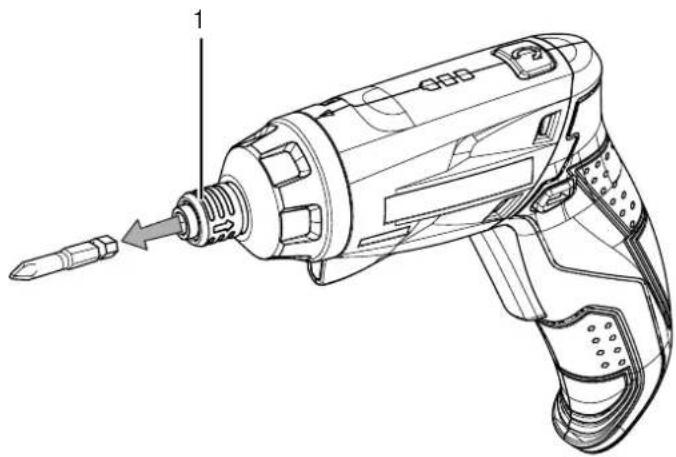
- Insert the appropriate (drill) bit into the tool holder (1).

- Let go of the locking mechanism at the tool holder (1).
Torque selection / drilling setting
Using the torque selection, you can choose the desired, optimal torque setting.
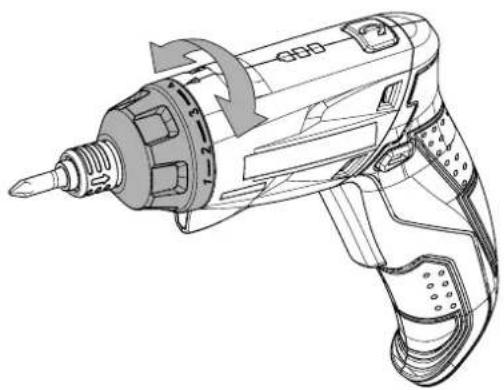
- Select a low torque for smooth-running screws or soft materials.
- Select a high torque for tight screws and hard materials as well as for unscrewing.
- For drilling, select the drilling setting indicated by the
symbol


Info
When unscrewing, note the setting of the rotational direction! On the clockwise / counter-clockwise rotation direction indicator (5) you can see in which direction the screws will be screwed.
Do not use the drilling setting ◀ for screwing!
Operation
Tips and notes on handling the cordless screwdriver
General information:
- Check the tool in the bit holder for correct fit before every application.
- The centre position of the clockwise / counter-clockwise rotation switch (lock) is suited for work breaks or (drill) bit exchange.
Screws:
- In case of soft wood, screws can be screwed in without pre-drilling.
- In case of hard wood or large screws, it is recommended to use a drill for pre-drilling.
- When using countersunk screws, the drill hole should be countersunk beforehand.
- Especially smaller screws and bits may be damaged when selecting an excessive torque and / or speed at the tool.
Drilling in general:
- Take short breaks regularly during drilling. When doing so, take the drill bit out of the drill hole so that the drill bit can cool down.
- Secure the workpiece in a tensioning device or vice.
- Use a suitable aid to mark the intended location of the drill hole.
Drilling in metal:
- Use suitable metal drill bits (e.g. drill bits made of high-speed steel (HSS)).
- For larger drilling diameters, use a smaller drill bit for pre-drilling.
• Metal drill bits may also be used for drilling in plastic.
Drilling in wood:
- Use drill bits suitable for wood.
- Place a block of wood under the workpiece or drill in from both sides so that the wood cannot break off when it is being drilled through.
- Use a wood drill bit with centring tip. For deep drill holes, use an auger bit; for large drilling diameters, use a Forstner bit.
Selecting the rotational direction
Note
To avoid damaging the gear, only change the rotational direction when the device is at a standstill.
The motor's rotational direction can be changed by means of the switch for clockwise / counter-clockwise rotation (5).
- Press in the switch for clockwise / counter-clockwise rotation (5) on the side to which the motor shall rotate.
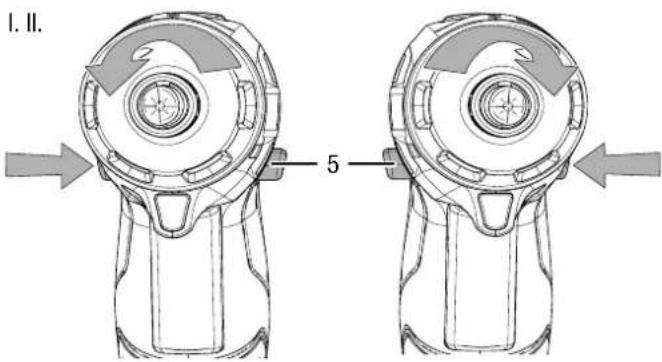
I. Screwing in II. Unscrewing
-
Carry out a short test run to see whether the rotational direction matches the intended application. A wrong rotational direction may damage the tool and / or workpiece.
-
If required, set the switch for clockwise / counter-clockwise rotation (5) to centre position (lock) to block the on / off switch (12).

Handle position
The handle position can be adjusted to either vertical or horizontal in order to reach poorly accessible locations more easily.
-
Set the switch for clockwise / counter-clockwise rotation (5) to centre position (lock).
-
Press and hold the handle position switch (4).
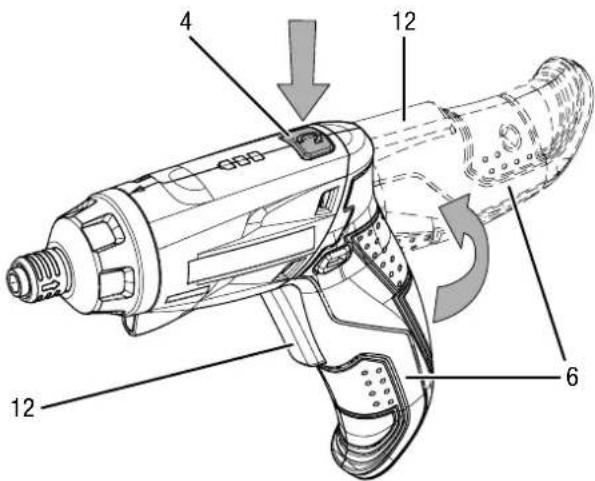
-
Carefully turn the handle (6) clockwise around the rotation axis until it reaches the horizontal position and locks in place.
-
Let go of the handle position switch (4).

- Check whether the handle (6) is firmly seated in the new position.

Info
When the handle is in horizontal position, the rotational direction must be selected contrary to the description in the chapter Selecting the rotational direction. Note the direction of the arrow on the clockwise / counterclockwise rotation switch (5).
Switching the device on and off
-
Check whether the tool and the selected torque setting are suitable for the intended application.
-
Check whether the workpiece is secured and the worktop prepared correspondingly.
-
Press and hold the on / off switch (12) during screwing or drilling.
→ The device operates with the previously selected settings.
→ The LED work lamp (13) is illuminated.

- Let go of the on / off switch (12) to stop the device.
⇒ The LED work lamp (13) turns off.

Info
The motor has an integrated brake that quickly stops the motor once you let go of the on / off switch (12).
Shutdown
-
Set the switch for clockwise / counter-clockwise rotation (5) to centre position (lock).
-
If required, allow the device to cool down.
-
Remove the tool from the device (see Start-up chapter).
-
Clean the device according to the Maintenance chapter.
-
Store the device according to the Storage chapter.
Available accessories

Warning!
Only use accessories and additional equipment specified in the operating manual.
Using insertion tools or accessories other than those specified in the operating manual may cause a risk of injury.
| Accessories Article number | |
| Screw bit set, 32-piece 6.200.001 | .001 |
Errors and faults
The device has been checked for proper functioning several times during production. If malfunctions occur nonetheless, check the device according to the following list.
Troubleshooting tasks which require the housing to be opened must only be carried out by a specialist dealer or by Trotec.
Slight smoke or odour are emitted during first use:
- This is not a fault. These phenomena disappear after a brief runtime.
The battery does not charge:
- Check whether the device is correctly connected to the charger and whether the charger is correctly connected to the power supply.
- Check the power connection.
- Check the power cable and mains plug for damages.
- Check the fuse (home).
- Check the charger for damages. Should the charger be damaged, stop using it. Contact the Trotec customer service.
- Check the charger connection for dirt. Remove any dirt.
- The battery might be defective. Contact the Trotec customer service.
The device does not start:
- The battery power might be too low. Recharge the battery.
- Check the position of the clockwise / counter-clockwise rotation switch. The switch must be pressed in all the way. If the clockwise / counter-clockwise rotation switch is in centre position (lock), the on / off switch is blocked.
- Check whether the charger is connected. If the charger is connected, the device will not start.

Info
Wait for at least 10 minutes before switching the device back on.
The drill bit does not penetrate / hardly penetrates the material:
- Check whether the correct torque setting is selected. The drilling setting ◀ should be selected.
- Check whether the device is set to counter-clockwise rotation. For drilling, it is necessary to switch over to clockwise rotation.
- Check whether the characteristics of the material require the use of a hammer drill or impact drill.
The on / off switch cannot be pressed:
- Check whether the clockwise / counter-clockwise rotation switch is in centre position (lock). Set the desired rotational direction to unlock the tool.
Note
Wait for at least 3 minutes after maintenance and repair work. Only then switch the device back on.
Your device still does not operate correctly after these checks?
Please contact the customer service. If necessary, bring the device to an authorized specialist electrical company or to Trotec for repair.
Maintenance
Activities required before starting maintenance

Warning of electrical voltage
Do not touch the mains plug or the battery with wet or damp hands.
- Switch off the device.
- Hold onto the mains plug while pulling the power cable out of the mains socket.
- Allow the device to cool down completely.

Warning of electrical voltage
Maintenance tasks which require the housing to be opened must only be carried out by authorised specialist companies or by Trotec.
Notes on maintenance
Inside the device, there are no parts that need to be maintained or lubricated by the user.
Cleaning
The device should be cleaned before and after each use.

Info
The device does not have to be lubricated after cleaning.

Warning of electrical voltage
There is a risk of a short-circuit due to liquids penetrating the housing! Do not immerse the device and the accessories in water. Make sure that no water or other liquids can enter the housing.
- Clean the device with a soft, damp and lint-free cloth. Ensure that no moisture enters the housing. Protect electrical components from moisture. Do not use any aggressive cleaning agents such as cleaning sprays, solvents, alcohol-based or abrasive cleaners to dampen the cloth.
- Dry the device and the bits with a soft cloth, lint-free cloth.
- Remove any drilling dust and, if applicable, wood chips from the tool holder.
- Keep the connecting terminals on the device and charger clean.
- Keep the ventilation openings free from dust deposits to prevent overheating of the motor.
Disposal

In the European Union, electronic equipment must not be treated as domestic waste, but must be disposed of professionally in accordance with Directive 2002/96/EC of the European Parliament and of the Council of 27 January 2003 on waste electrical and electronic equipment (WEEE). At the end of its life, please dispose of this device according to the valid legal requirements.

Li-Ion
In the European Union, batteries and accumulators must not be treated as domestic waste, but must be disposed of professionally in accordance with Directive 2006/66/EC of the European Parliament and of the Council of 6 September 2006 on batteries and accumulators. Please dispose of batteries and accumulators according to the relevant legal requirements.




- TABLE OF CONTENTS
- NOTES REGARDING THE OPERATING MANUAL
- SYMBOLS
- WARNING OF ELECTRICAL VOLTAGE
- WARNING OF EXPLOSIVE SUBSTANCES
- WARNING
- CAUTION
- NOTE
- INFO
- FOLLOW THE MANUAL
- WEAR SAFETY GLASSES
- WEAR A PROTECTIVE MASK
- WEAR EAR PROTECTION
- LEGAL NOTICE
- WARRANTY AND LIABILITY
- SAFETY
- SAVE ALL WARNINGS AND INSTRUCTIONS FOR FUTURE REFERENCE
- GENERAL POWER TOOL SAFETY WARNINGS – WORK AREA SAFETY
- GENERAL SAFETY WARNINGS – ELECTRICAL SAFETY
- GENERAL POWER TOOL SAFETY WARNINGS – PERSONAL SAFETY
- GENERAL POWER TOOL SAFETY WARNINGS – POWER TOOL USE AND CARE
- GENERAL POWER TOOL SAFETY WARNINGS – SERVICE
- GENERAL BATTERY PACK / CHARGER SAFETY WARNINGS
- DEVICE-SPECIFIC SAFETY WARNINGS FOR CORDLESS SCREWDRIVERS
- RESIDUAL RISKS – CORDLESS DRILL DRIVERS
- INTENDED USE
- IMPROPER USE
- PERSONNEL QUALIFICATIONS
- INFORMATION ABOUT THE DEVICE
- DEVICE DESCRIPTION
- DEVICE DEPICTION
- SCOPE OF DELIVERY
- INFORMATION ON NOISE AND VIBRATION
- CAUTION! VIBRATION
- TRANSPORT AND STORAGE
- TRANSPORT
- STORAGE
- START-UP
- UNPACKING THE DEVICE
- CHARGING THE BATTERY
- CHECKING THE BATTERY STATUS
- CHANGING TOOLS
- TORQUE SELECTION / DRILLING SETTING
- OPERATION
- TIPS AND NOTES ON HANDLING THE CORDLESS SCREWDRIVER
- GENERAL INFORMATION
- SCREWS
- DRILLING IN GENERAL
- DRILLING IN METAL
- DRILLING IN WOOD
- SELECTING THE ROTATIONAL DIRECTION
- HANDLE POSITION
- SWITCHING THE DEVICE ON AND OFF
- SHUTDOWN
- AVAILABLE ACCESSORIES
- ERRORS AND FAULTS
- SLIGHT SMOKE OR ODOUR ARE EMITTED DURING FIRST USE
- THE BATTERY DOES NOT CHARGE
- THE DEVICE DOES NOT START
- THE DRILL BIT DOES NOT PENETRATE / HARDLY PENETRATES THE MATERIAL
- THE ON / OFF SWITCH CANNOT BE PRESSED
- YOUR DEVICE STILL DOES NOT OPERATE CORRECTLY AFTER THESE CHECKS
- MAINTENANCE
- ACTIVITIES REQUIRED BEFORE STARTING MAINTENANCE
- NOTES ON MAINTENANCE
- CLEANING
- DISPOSAL
Brand : TROTEC
Model : PSCS 10‑3 6V
Category : Screwdriver