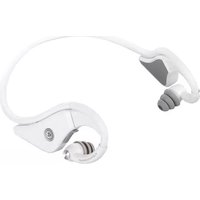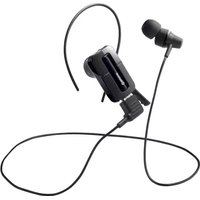
BUFFALO BSHSBE32 - Headphones

BSHSBE32 - Headphones BUFFALO - Free user manual and instructions

Find the device manual for free BSHSBE32 BUFFALO in PDF.

📄 2 pages English EN Download 💬 AI Question 10 questions ⚙️ Specs
Notice BUFFALO BSHSBE32 - page 1
Pick your language and provide your email: we'll send you a specifically translated version.
Product Type Wireless Bluetooth Headphones
Model BSHSBE32
Brand Buffalo
Connectivity Bluetooth 5.0
Driver Size 40 mm
Frequency Response 20 Hz - 20,000 Hz
Impedance 32 Ω
Sensitivity 105 dB ± 3 dB
Battery Life Up to 20 hours
Charging Time Approx. 2 hours
Battery Type Lithium-ion (rechargeable)
Charging Port USB-C
Microphone Built-in, noise-cancelling
Controls On-ear: power, volume, track, call
Weight Approx. 180 g
Dimensions (folded) 180 x 150 x 50 mm
Color Black
Material Plastic, leatherette ear pads
Compatibility Smartphones, tablets, PCs
Accessories Included USB-C charging cable, audio cable, pouch
Maintenance Wipe with dry cloth; avoid liquids
Safety Low volume to protect hearing
Repairability Spare parts available from Buffalo support

Frequently Asked Questions - BSHSBE32 BUFFALO

How do I pair my Buffalo BSHSBE32 headphones with a device?
Turn on the headphones by holding the power button until the LED flashes. On your device, enable Bluetooth and select 'BSHSBE32' from the list. If prompted, enter '0000' as the PIN.
How long does the battery last and how do I charge it?
The battery lasts up to 20 hours on a full charge. Use the included USB-C cable to charge. A full charge takes approximately 2 hours. The LED turns solid when fully charged.
Can I use the headphones while charging?
Yes, you can use the headphones in wired mode via the included audio cable while charging, or use them wirelessly while connected to power.
What should I do if the headphones are not connecting via Bluetooth?
First, ensure the headphones are in pairing mode (LED flashing). Turn off Bluetooth on your device, wait 10 seconds, then turn it on again and try pairing. If the issue persists, reset the headphones by turning them off and on again.
How do I clean and maintain my headphones?
Wipe the outer surfaces with a soft, dry cloth. For ear pads, use a slightly damp cloth if needed. Avoid using alcohol or abrasive cleaners. Store in the included pouch when not in use.
Are replacement ear pads available?
Yes, replacement ear pads can be ordered through Buffalo customer support or authorized dealers. Check the official website for compatible parts.
Can I use the headphones with a wired connection?
Yes, the headphones come with a 3.5mm audio cable. Simply plug it into the headphone jack and connect to your device. The headphones will automatically switch to wired mode.
How do I adjust the volume and skip tracks?
Use the on-ear controls: press the '+' button to increase volume, '-' to decrease. Press and hold '+' to skip to the next track, and press and hold '-' to go to the previous track.
The headphones are not turning on. What could be wrong?
Ensure the headphones are charged. Try pressing and holding the power button for 10 seconds. If still unresponsive, connect to a charger; if the LED lights up, the battery was depleted. If not, contact support.
What is the warranty period for Buffalo BSHSBE32 headphones?
Buffalo typically offers a 1-year warranty against manufacturing defects. Keep your proof of purchase. For warranty claims, contact Buffalo customer service or visit their website.

User questions about BSHSBE32 BUFFALO

0 question about this device. Answer the ones you know or ask your own.

Ask a new question about this device

The email remains private: it is only used to notify you if someone responds to your question.

No questions yet. Be the first to ask one.

Download the instructions for your Headphones in PDF format for free! Find your manual BSHSBE32 - BUFFALO and take your electronic device back in hand. On this page are published all the documents necessary for the use of your device. BSHSBE32 by BUFFALO.

USER MANUAL BSHSBE32 BUFFALO

The Ground Truth image displays a single, solid horizontal line, which is a stylistic or background element (like a rule line on paper). According to Rule 2, such lines must be ignored by the OCR result. The provided OCR content is "____", which consists of underscores. Underscores are not equivalent to a horizontal line in this context; they represent placeholder blanks, not stylistic lines. Since the OCR output incorrectly rendered a stylistic line as underscores (which should be ignored), this violates the rule that stylistic lines must be transcribed. Therefore, the OCR result is inconsistent with the Ground Truth.

-

ヘッドセットの信号について

∴ m = 3/11

∴ m = 3/11

-セットの偏訳(イヤ-

:

(7) 七歳入金を希望

1

パッファロー

:

886.jp/bi

[Non-Text]

w//tovun 不要)

[Non-Text]

(1) 本报告中,一个会计

∴ m = 3/11

(No text)

R

provide technical and customer support only in Japanese language

1

provide technical and customer support only for use in Japan.

Manual assistant
Powered by Anthropic
Waiting for your message
Product information

Brand : BUFFALO

Model : BSHSBE32

Category : Headphones