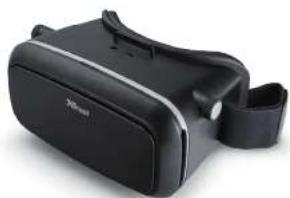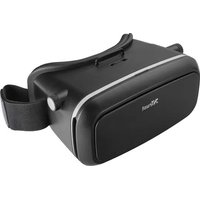
TRUST Exos 3D - Headphones

Exos 3D - Headphones TRUST - Free user manual and instructions

Find the device manual for free Exos 3D TRUST in PDF.

📄 2 pages English EN Download 💬 AI Question 10 questions ⚙️ Specs
Notice TRUST Exos 3D - page 1
Pick your language and provide your email: we'll send you a specifically translated version.
Product TypeVirtual Reality Headset with integrated headphones
BrandTrust
ModelExos 3D
ColorBlack
CompatibilitySmartphones (iOS/Android) via dedicated apps
ConnectivityWired (3.5mm audio jack) and Bluetooth (estimated)
Dimensions (approx.)20 x 15 x 10 cm (7.9 x 5.9 x 3.9 in)
Weight300 g (10.6 oz)
Power SourceBuilt-in rechargeable battery (USB-C charging)
Battery LifeUp to 4 hours of continuous use
Driver Size40 mm (estimated)
Frequency Response20 Hz - 20 kHz
Impedance32 Ω
MaterialPlastic frame with foam padding and fabric headband
Additional FeaturesAdjustable headband, smartphone holder, 3D VR support
Cleaning InstructionsWipe with a soft, dry cloth. Do not use liquids or solvents.
Safety PrecautionsDo not use while driving or walking. Keep away from children under 3 years.
Warranty2 years (subject to local regulations)
Spare Parts AvailabilityContact Trust support for replacement parts

Frequently Asked Questions - Exos 3D TRUST

How do I connect the Trust Exos 3D to my smartphone?
Ensure your smartphone is compatible with VR apps. Download the required apps from www.trust.com/virtualreality. Then insert your phone into the headset holder and adjust the straps for a comfortable fit.
Can I use the Exos 3D with iOS devices?
Yes, the Exos 3D is compatible with both iOS and Android smartphones. Make sure to install the VR apps recommended by Trust.
How do I clean the headset?
Use a soft, dry cloth to wipe the lenses and frame. Do not use alcohol or abrasive cleaners as they may damage the lenses.
What should I do if the audio is not working?
Check that the audio jack is fully inserted into your phone. If using Bluetooth, ensure pairing is successful. Also verify that the volume on your device is turned up.
How long does the battery last?
The built-in battery lasts up to 4 hours of continuous use. Charging time is approximately 2 hours via USB-C.
Can I adjust the headset for glasses wearers?
Yes, the headset has adjustable straps and foam padding to accommodate glasses. Ensure the glasses fit comfortably inside the headset.
What apps work with the Exos 3D?
Visit www.trust.com/virtualreality for a list of compatible VR apps. Popular apps include cardboard-based experiences.
Is the Exos 3D compatible with all smartphones?
It is compatible with most smartphones with screen sizes between 4.7 and 6.5 inches. Ensure your phone fits in the holder securely.
How do I charge the headset?
Connect the included USB-C cable to the headset and a power source. The LED indicator will show charging status.
What safety precautions should I take?
Do not use the headset while driving, walking, or operating machinery. Take frequent breaks to avoid eye strain. Keep away from children under 3 years due to small parts.

User questions about Exos 3D TRUST

0 question about this device. Answer the ones you know or ask your own.

Ask a new question about this device

The email remains private: it is only used to notify you if someone responds to your question.

No questions yet. Be the first to ask one.

Download the instructions for your Headphones in PDF format for free! Find your manual Exos 3D - TRUST and take your electronic device back in hand. On this page are published all the documents necessary for the use of your device. Exos 3D by TRUST.

USER MANUAL Exos 3D TRUST

4. PHONE BUTTON PROTECTION FAQ Frequently asked questions http://www.trust.com/21179/faq Trust International BV - Laan van Barcelona 600 - 331700, Dorectric, NL © 22-01-2016 Trust: All rights reserved.

Trust URBAN
TRUST Exos 3D - 2

natural_image Black 3G smart glasses with wrist strap (no visible text or symbols)

[USER GUIDE] EXOS VIRTUAL REALITY GLASSES

TRUST Exos 3D - 3

natural_image Line drawing of a closed bag with a handle and side panel (no text or symbols)

TRUST Exos 3D - 4

PLEASE READ INCLUDED SAFETY INSTRUCTIONS BEFORE USE

TRUST Exos 3D - 5

1. DOWNLOAD APPS

WWW.TRUST.COM/VIRTUALREALITY

  1. SETUP
    TRUST Exos 3D - WWW.TRUST.COM/VIRTUALREALITY - 1
natural_image Simple line drawing of a hand holding a rectangular object with green arrows indicating direction (no text or symbols)
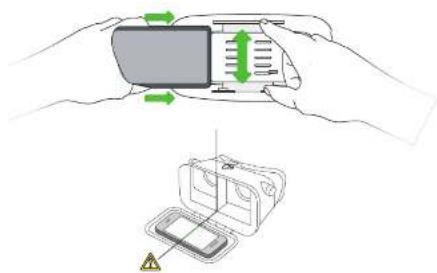
Diagram showing hand holding a device with green directional arrows and a 3D model of a device with warning symbol

Table of contents Click a title to access it
Manual assistant
Powered by Anthropic
Waiting for your message
Product information

Brand : TRUST

Model : Exos 3D

Category : Headphones