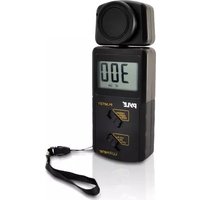
PLMT21 - Luxmeter Pyle - Free user manual and instructions
Find the device manual for free PLMT21 Pyle in PDF.


| Product Type | Digital Lux Meter (Light Meter) |
| Brand | Pyle |
| Model | PLMT21 |
| Measurement Range | 1 - 100,000 Lux |
| Accuracy | ±4%+10 digits (≤10,000 Lux), ±5%+10 digits (>10,000 Lux) |
| Sampling Rate | 2 times per second |
| Temperature Characteristic | ±0.1% of full scale |
| Repeatability | ±2% |
| Power Supply | 9V battery (not included) |
| Battery Low Indicator | Yes, LCD icon when voltage drops to 6.5-7.0V |
| Operating Temperature | 32°F - 104°F (0°C - 40°C) |
| Operating Humidity | 10% RH - 90% RH |
| Reading Hold Function | Yes, slide switch to HOLD position |
| Range Selection | Three ranges: 2000 Lux (x1), 20000 Lux (x10), 100000 Lux (x100) |
| Display Type | LCD display |
| Dimensions (Approx.) | 150 x 70 x 30 mm (estimated) |
| Weight (with battery) | Approx. 200 g |
| Cleaning Method | Clean sensor surface with moist cotton cloth |
| Overload Indication | LCD displays "1" - select higher range |
| Battery Replacement | User-replaceable 9V battery |
| Included Accessories | Light sensor cap, user manual |
Frequently Asked Questions - PLMT21 Pyle
User questions about PLMT21 Pyle
0 question about this device. Answer the ones you know or ask your own.
Ask a new question about this device
Download the instructions for your Luxmeter in PDF format for free! Find your manual PLMT21 - Pyle and take your electronic device back in hand. On this page are published all the documents necessary for the use of your device. PLMT21 by Pyle.
USER MANUAL PLMT21 Pyle
Precise and instant readout
Wide range of measurements
Reading hold function
Low battery indicator
Level range selection
Compact, light weight, with excellent operation
B. Operation instruction:
-
Install 9V battery into battery com-partment properly.
-
Push slide switch to turn on and select your desired measurement range:
2000 Lux LCD display: X1LUX 20000 Lux LCD display: X10 LUX 100000 Lux LCD display: X100 LUX
- Before removing the light sensor cap, The LCD display should read, "000" LUX. Remove the sensor cap and take measurement, digital reading shows out immediately.
If the LCD display "1 "that means over load, please select higher range for measurement.
-
Push the slide switch to HOLD to hold the reading, LCD display H icon.
-
When the battery's power drop into
6.5-7.0V, LCD display icon
indicates low battery, please replace the battery.
-
After measurement, cover the sensor cap and turn off the unit.
-
Clean the surface of the sensor with a moist cotton cloth.
Specification:
Range: 1\~10,0000 LUX
Accuracy:
≤slant 10000 LUX ± (4% + 10 dgt) ≥slant 10000 LUX ± (5% + 10 dgt)
Sampling rate: 2 times/sec
Temperature characteristic: ±0.1%°F
Repeatability: +/-2%
Power supply: 9V battery
Operation temperature: 32°F to 104°F
Operation humidity:
10RH% to 90RH%
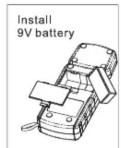
Figure A

Figure B


Brand : Pyle
Model : PLMT21
Category : Luxmeter