CD156 - CD Player CURTIS - Free user manual and instructions
Find the device manual for free CD156 CURTIS in PDF.


| Type of Product | CD Player |
| Brand | Curtis |
| Model | CD156 |
| Power Supply | 2 x AA (UM-3) alkaline batteries (not included) or AC adapter 4.5V DC, 500mA (not included) |
| Disc Compatibility | 8cm and 12cm compact discs without adapter |
| Playback Modes | Normal, Repeat Single, Repeat All, Intro Scan (first 10 sec of each track), Random, Program (up to 20 tracks) |
| Controls | Skip/Search Down, Skip/Search Up, Mode, Program, Play/Pause (power on), Stop (power off), Volume Down, Volume Up, Open |
| Display | LCD display showing track number, repeat indicators (REPEAT 1, REPEAT ALL), INTRO, RANDOM, PROG, battery low indicator |
| Auto Power Off | Player turns off automatically after 30 seconds in STOP mode |
| Audio Output | Headphone/earphone jack (PHONE JACK) |
| Battery Safety | Do not mix old/new or different types; remove exhausted batteries; store away from metal objects; do not dispose in fire; rechargeable batteries only under adult supervision |
| Cleaning the Lens | Use camera lens blower; avoid scratching |
| Cleaning the Cabinet | Soft dry cloth; use mild detergent if needed; never use benzene, alcohol or solvents |
| Warranty & Repair | Do not adjust or repair by anyone except qualified service personnel due to hazardous radiation exposure |
Frequently Asked Questions - CD156 CURTIS
User questions about CD156 CURTIS
0 question about this device. Answer the ones you know or ask your own.
Ask a new question about this device
Download the instructions for your CD Player in PDF format for free! Find your manual CD156 - CURTIS and take your electronic device back in hand. On this page are published all the documents necessary for the use of your device. CD156 by CURTIS.
USER MANUAL CD156 CURTIS
natural_image
Line drawing of a circular electronic device with an exclamation mark on the top surface (no text or symbols)INSTRUCTION MANUAL
Please read instructions carefully before use and retain for future reference.
LOCATION OF CONTROLS
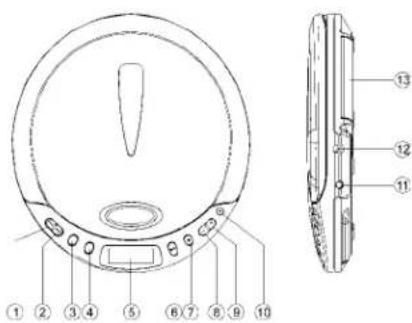
- SKIP / SEARCH DOWN BUTTON
- SKIP / SEARCH UP BUTTON
- MODE BUTTON
- PROG(PROGRAM) BUTTON
- LCD DISPLAY
- PLAY / PAUSE BUTTON (POWER ON)
- STOP BUTTON (POWER OFF)
- VOLUME DN BUTTON
- VOLUME UP BUTTON
- OPEN BUTTON
- PHONE JACK
- DC JACK
- BATTERY COMPARTMENT
CAUTION
USE OF CONTROLS OR ADJUSTMENTS OR PERFORMANCE OF PROCEDURES
OTHER THAN THOSE SPECIFIED HEREIN MAY RESULT IN HAZARDOUS RADIATION EXPOSURE.
THIS SHOULD NOT BE ADJUSTED OR REPAIRED BY ANYONE EXCEPT QUALIFIED SERVICE PERSONNEL.
POWER SOURCES
Using Battery
- Open the lid of the battery compartment.
- Insert 2 "AA" Size (UM-3) alkaline batteries by matching the (+ and -) to the diagram inside the battery compartment and close the lid. (batteries are not included)
Note: For battery operation the AC power adaptor must be disconnected from DC IN Jack. (adaptor is not included)
When to Change the Battery
When the battery is used up, " indicator flashes in the display. Replace all the batteries with new alkaline batteries.
Note: Do not mix new batteries with old one. Do not use different types of batteries together.
Using an AC Power Adapter (Not included)
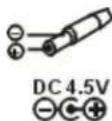
- Insert the adapter plug into the DC input jack on the unit.
- Plug the adapter into the AC wall outlet.
- Unplug from wall outlet when not in use.
Note: Use only a 4.5V DC, 500 mA Adapter.

PLAYING A CD
This CD player is designed to play the 8cm and 12cm CD's compact disc without using adaptor.
Getting Start
- Insert the headphone/earphone plug to PHONE JACK.
- Press the OPEN button, and then the door open, put a disc into the CD
compartment with label side upward. - Push the disc gently around the centre area until it clicks so that the disc fits into the pivot.
- Close the door and press the PLAY/PAUSE button once.
-
The Display will show the total number of tracks of the disc, then begin to play the first track.
-
Adjust the Volume control.
General Operation
Play/Pause Button ▶ II
- Press once to start playback in the original order.
Press again to stop the disc play temporarily.
- Press once to stop playback.
Press again to turn off power.
- Press once to skip to next track ▶ or back to previous ▶ track.
Press continuously to search forward ▶ or backward ▶.
Automatic Turn off (Auto Power Off)
If the player in STOP mode for 30 seconds, it will turn off automatically.
Various Playing Modes
MODE Button - There are 3 kinds of function:
A. Repeat Play
During PLAY mode
- Press the MODE button once to play single track repeatedly.
- The repeat indicator "REPEAT 1" will appear in display.
During PLAY mode
- Press the MODE button twice to play the entire disc repeatedly.
- The repeat indicator "REPEAT ALL" will appear in the display.
NOTE - To cancel REPEAT simply press the MODE button until the repeat indicator disappears.
B. Intro Scan
In STOP mode
- Press the MODE button three times.
- The INTRO indicator will appear in the display.
- Press the PLAY button to play the first 10 seconds of each track on the disc.
NOTE - To cancel INTRO SCAN simply press the MODE button until the INTRO indicator disappears.
C. Random Play
In STOP mode
- Press the MODE button four times.
- The RANDOM indicator will appear in the display.
- Press the PLAY button, all the tracks on a disc to be played in a random sequence.
NOTE - To cancel RANDOM PLAY simply press MODE button one time until the RONDOM indicator disappears.
Program Play
- During stop, press PROG button until "PROG" and track number flashes in Display.
- Press or SKIP/SEARCH button to choose a track.
- Press PROG button to program the track, up to 20 tracks can be programmed into memory.
- Repeat steps 2 and 3 to program tracks to start the program payback.
- Press ▶ II PLAY/PAUSE button.
- To erase the program, simply press the ■ STOP button to turn the power off.
MAINTENANCE
Cleaning the Lens
If the lens becomes dusty, clean it with camera lens blower. Be careful not to scratch the surface of the lens.
Cleaning the Cabinet
From time to time, clean the cabinet with a soft dry cloth. For more stubborn stains, slightly moisten the cloth with water or a mild detergent solution. Never use benzene, alcohol or other solvents as they may damage the finish of the cabinet.
Battery Safety
- Install batteries correctly observing the (+/-) polarity signs.
- Use only the recommended battery type or equivalent (voltage and size).
- Always replace a complete set of batteries at the same time.
- Do not mix batteries of different types.
- Never mix new and used batteries in the same compartment.
- Remove exhausted batteries immediately.
- Remove batteries when product is not in use.
- Do not dispose of batteries in fire as they may explode.
- Do not recharge non-rechargeable batteries.
- Rechargeable batteries are to be removed from the item before being charged.
- Rechargeable batteries are only to be charged under adult supervision.
- Do not short circuit the supply terminals.
- Ensure batteries are stored away from metal objects as contact may cause a short circuit.
GENERAL INFORMATION
| Troubleshooting Guide | ||
| SYMPTOM | CAUSE | SOLUTION |
| CD Player will not turn on | - Dead or weak batteries- AC adaptor not connected properly | - Replace batteries- Check AC adaptor connection |
| Disc will not play | - Disc inserted incorrectly | - Reinsert disc with label side facing up |
| No sound from earphones | - Earphone plug not inserted properly- Volume control set to minimum- Weak batteries | - Reinsert earphone cord into Earphone jack- Increase the volume- Replace with fresh batteries, or use AC power |
| Sound is skipping | - Defective compact disc- The compact disc or pickup lens is dirty- Strong vibrations | - Try another compact disc- Clean or replace the compact disc or clean the pickup lens- Place the CD player on a level surface that is stable (no vibrations) |
- CAUTION
- POWER SOURCES
- Using Battery
- When to Change the Battery
- Using an AC Power Adapter (Not included)
- PLAYING A CD
- Getting Start
- General Operation
- Automatic Turn off (Auto Power Off)
- Various Playing Modes
- Repeat Play
- Intro Scan
- Random Play
- Program Play
- MAINTENANCE
- Cleaning the Lens
- Cleaning the Cabinet
- Battery Safety
Brand : CURTIS
Model : CD156
Category : CD Player