CK-10B - Kit voiture Jay-Tech - Free user manual and instructions
Find the device manual for free CK-10B Jay-Tech in PDF.


User questions about CK-10B Jay-Tech
0 question about this device. Answer the ones you know or ask your own.
Ask a new question about this device
Download the instructions for your Kit voiture in PDF format for free! Find your manual CK-10B - Jay-Tech and take your electronic device back in hand. On this page are published all the documents necessary for the use of your device. CK-10B by Jay-Tech.
USER MANUAL CK-10B Jay-Tech
Bluetooth Car Kit CK-10B
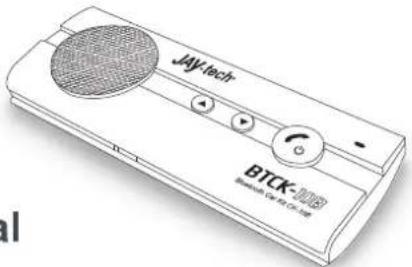
User's Manual
Before operating this unit, please read this manual thoroughly and retain it for future reference
2. Pairing / Connecting
Before first use you need to charge the Bluetooth Speakerphone for about 3 hours.
It is important to pair the speakerphone with your Bluetooth Mobile phone for the first time use.
Pairing procedure:
- Ensure the speakerphone is off
- Once turned on the speakerphone, if not detected any connection, it will automatically go to pairing mode, also you can put it go to pairing mode by pressing and holding the "MFB" button until LED blink blue and red alternatively.
- Search the device from your phone.
- Once found "BTCK-10B", follow the steps and enter pin code 0000 to pair.
- Connect the speakerphone to the device.
- Speakerphone is ready for use now.
Once paired and connected, the speakerphone will be automatically connected to the device whenever you turn the speakerphone on again, provided the device is in the range.
-2-
Transfer calls
Speakerphone to Mobile Phone: During a call, press both of "V+" and "V-" buttons, and the call is routed to your mobile phone.
Mobile Phone to Speakerphone: Press both "V+" and "V-" buttons to route the call to speakerphone.
4. Product Specification
Bluetooth Compliance: Bluetooth V2.1+EDR•
Operating Frequency Band: 2.4GHz \~ 2.48GHz unlicensed ISM band
Output Power: Class 2, up to 10 meters
Support Profiles: HSP and HFP Profiles•
Support Multiple Paired Device: Memorize paired data of 8 Bluetooth phones•
Stand-by Time: Up to 980 hours/ 40 days•
• Talk Time: Up to 10-12 hours
• Battery Charging Time: About 3 hours
- Charger Voltage: DC5.0V, 400mA
- Battery: 650mA, BL-5B (Rechargeable Lithium-Ion Battery)
The talk and standby times may vary when used with different mobile phones or other compatible Bluetooth devices, usage settings, usage styles and environments.
-4
6. WEEE Symbol Information
This product should not be disposed with other household wastes at the end of its working life. To prevent possible harm to the environment or human from uncontrolled waste disposed, please separate the battery from the unit before disposal.
7. Technical Support & Product Tutorial
More information about this product and other Jay-tech products, please refer to www.jay-tech.de
Bluetooth Hands free Car Kit:
- Bluetooth V2.1 + EDR
• One-touch answer, call rejection, last number redial - Voice dialling function (voice activation subject to voice activation enabled phones)
• Advanced Built-in Microphone and Speaker
• Full duplex sound quality - Up to 12 hrs talk time, 980 hrs standby time, 2-3 hrs charging time

-7-
1. Product Overview
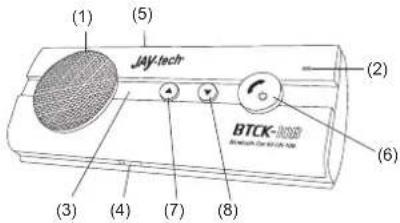
(1) Speaker (4) Charging Socket (5-pin USB) (7) Volume Increase (V+)
(2) Microphone (5) Mute Button (8) Volume Decrease (V-)
(3) LED (6) MFB Button (Multi-Function Button)
-1-
3. Basic Operations
Turn On / off
Turn On: From OFF, press and hold the "MFB" around 4 seconds until the indicator LED flash Blue.
Turn Off: From On, press and hold the "MFB" around 4 seconds until the indicator LED flash Red.
NOTE: 1. Once the unit is on, the LED indicator will flash blue every 10 seconds.
- When losing connection, the speakerphone will automatically switch itself off in 30 minutes.
Answer a call: Press "MFB" button once.
End a call: Press "MFB" button once.
Reject a call: Press and hold the "MFB" button for 2 seconds to reject the call.
Voice Dial: Press the "MFB" button once and say the name of person you wish to call.
Re-dialing: Under standby mode, short press the "MFB" button twice for last number redialing.
Adjust the volume: During a call, press the "V+" or "V-" buttons.
Mute & Un-mute
Mute: During a call, short press the "MUTE" button to mute the speakerphone. The LED will show red during mute mode.
Un-mute: Short press the "MUTE" button during mute mode to unmute the speakerphone.
-3-
5. Safety Information
• To avoid any damage or malfunction of the device do not drop device from high places.
- Keep device away form humidity, water and any other liquid. If the device is exposed to any liquid, do not operate it to avoid any electrical shock, explosion and damage to the device or yourself.
- Do not place or keep this device near any heat source, such as, direct sun light, radiators, stoves or other apparatus which produces heat. It may cause explosion, degrade the performance and/or reduce battery life.
- Do not modify, repair or disassemble device at discretion (Especially battery: It may cause an explosion). Doing this will avoid the warranty.
- Do not place heavy objects on the device.
Use only supplied and approved charger.
- Replacement or service must be done by qualified service center or manufacturer.
- Unplug this device when unused for long periods of time or during lightning storms.
CAUTIONS: ELECTRIC SHOCK HAZARD
The battery used in this device may present a risk of fire or chemical burn if mistreated.
-5-
Umweltschutz