
P150 - Keyboard KAWAI - Free user manual and instructions
Find the device manual for free P150 KAWAI in PDF.


| Product Type | Digital Piano |
| Brand | Kawai |
| Model | P150 |
| Keyboard | 76 wooden keys (full-weighted action) |
| Tone Colors | PIANO 1, PIANO 2, E. PIANO 1, E. PIANO 2, HARPSICHORD, VIBRAPHONE, FULL ORGAN, BRASS |
| Effects | Chorus |
| Temperaments | Equal, Mersenne pure, Pythagorean, Meantone, Werckmeister III, Kirnberger III |
| Pedals | Soft and Damper (via pedal jacks) |
| MIDI Interface | IN, OUT, THRU |
| Line Input | L(MONO)/R (bypasses volume control) |
| Line Output | L(MONO)/R with High/Low level switch |
| Headphone Jack | Yes (for private practice) |
| Output Power | 10W x 2 |
| Speakers | 16 cm x 2 |
| Power Consumption | 34W |
| Dimensions (W x D x H) | 1212 x 524 x 780 mm (including stand) |
| Weight | 49 kg (including stand) |
| Power Supply | Use voltage indicated on rear plate; unplug when not in use |
| Controls | Volume slider, Transpose slider, Tune (via programming mode) |
| Programming Mode | Accessible via CHORUS + first three tone selectors; for MIDI and tuning |
| Maintenance | Clean with dry cloth; avoid moisture and electrical noise sources |
| Safety | Do not open or modify; keep power cord from damage; avoid wet hands |
Frequently Asked Questions - P150 KAWAI
User questions about P150 KAWAI
0 question about this device. Answer the ones you know or ask your own.
Ask a new question about this device
Download the instructions for your Keyboard in PDF format for free! Find your manual P150 - KAWAI and take your electronic device back in hand. On this page are published all the documents necessary for the use of your device. P150 by KAWAI.
USER MANUAL P150 KAWAI
Thank you for purchasing a Kawai Digital Piano!
The Kawai digital pianos model 150 and 250 are revolutionary new keyboard instruments that combine the latest in electronic advances with traditional craftsmanship born of Kawai's long years of experience in building fine pianos. Alone, its wooden keys provide the touch response and full dynamic range required for a superb performance on the piano, harpsichord, organ, and other instruments available. Connected to the MIDI interface, a set of terminals conforming with an international standard, it allows you to play other electronic instruments at the same time — opening a whole new world of musical possibilities.
This Owner's Manual contains valuable information that will help you make full use of this instrument's many capabilities. Read it carefully and keep it handy for future reference.
IMPORTANT NOTES
- Power Supply
Use only the voltage appearing on the plate next to the power cord at the rear of the instrument. One that is too high represents a shock hazard and will also damage the instrument's delicate electronic circuitry.
- Electrical Noise
Keep the instrument away from electrical motors, neon signs, fluorescent light fixtures, and other sources of electrical noise.

- Power Cord
Do not touch the power plug with wet hands. There is a risk of electrical shock.
Treat the power cord with care as well. Stepping on or tripping over it can break or short-circuit the wire inside.

• Repairs and Alterations
Never attempt to remove or modify the piano's circuitry. There is a significant shock hazard. If you think something is broken, consult your nearest authorized Kawai dealer.

- After Use
Always turn the power off when the instrument is not in use. Leaving the piano energized for extended periods can lead to serious problems.
Table of Contents
■Basic Controls 1
■Basic Operation 3
■Temperaments 4
■MIDI Interface and Tuning 5
■Specifications 10
Basic Controls
■ Front Panel
Model 250

四口38芝片

POWER switch

2 VOLUME control
3 TRANSPOSE control
Model 150

POWER

(1) 本次股东大会的召集和召开程序

1 POWER
2 VOLUME
The instrument's output level increases as the slider moves to the right.
3 TRANSPOSE
Shifting the slider to the right raises the piano's key (C→ C#→ D→ Eb→ E→ F) ; shifting it to the left lowers the key (C→ B→ Bb→ A→ Ab→ G→ F#) . You can therefore play the music as written - in C major, for example - and have the instrument transpose the output to a higher or lower key to match your voice.
■ Rear Panel
(Same for both models)
SOFT

DAMP

PEDAL
1 Pedal control jacks
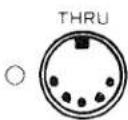


MIDI
2 MIDI interface jacks
1 PEDAL
These jacks accept cables from damper and soft pedals.
2 MIDI
These terminals enable properly equipped electronic instruments to communicate through the internationally recognized MIDI interface.
IN - Accepts MIDI data from other instruments.
OUT - Transmits MIDI data from the instrument to others.
THRU – Retransmits all incoming MIDI data.


4 TONE SELECTORS
There is a wide selection of piano, organ, harpsichord, and other tone colors available.
5 EFFECTS
These functions cause the output to swell outward (CHORUS) or fluctuate (TREMOLO).
Note: TREMOLO is only available on the model 250.

3 LINE IN
These jacks connect two channels of output from other electronic instruments to the piano's speaker.
Note: This output bypasses the piano's VOLUME control. To adjust the balance, you must use the output volume controls on the individual instruments.
4 LINE OUT
These jacks provide two channels of output for amplifiers, stereo systems, tape recorders, or similar equipment. The two-position switch to the right allows you to adjust the output level to High (H) or Low (L) to match the input impedance of the other equipment.
Basic Operation
1 Basic Operation
1 Turn on the power.
When the power is first applied, the LED next to the PIANO 1 switch in the tone selector section lights.

POWER
2 Adjust the volume.
Sound a note on the keyboard and adjust the volume. (Moving the slider to the right raises the volume; leftward motion lowers it).

3 Choose a tone color.
The piano uses one tone color at a time. Tone selector switches cannot be pressed simultaneously.

4 Play.
Experiment with the various tone colors to acquaint yourself with what is available.

5 (Optional) Add an effect!
Press an effect switch to cause the output to swell outward (CHORUS) or fluctuate (TREMOLO).
Note: TREMOLO is only available on the model 250. The way the effect acts on the tone color varies with organ-type sources and other sources. TREMOLO and CHORUS do not work on STRING ENSEMBLE or BRASS ENSEMBLE on the Model 250.

2 The NEXT Function
Pressing a tone selector switch does not necessarily produce an immediate change. If you are pressing any keys on the keyboard or holding down the damper pedal, the LED next to the switch will start flashing to indicate that the piano is ready to change. When you release all keys and the damper pedal, the tone color will instantly change and the LED will light steadily. By specifying in advance, you will therefore be able to make a smooth, natural transition without removing your hands from the keyboard.
Temperaments
Your Kawai digital piano offers not only equal temperament, the modern standard, but also immediate access to those popular during the Renaissance and Baroque period.
■ Procedure
Normally, when the power is first applied, the piano assumes the standard: equal temperament corrected according to the tuning curve. To change to a different temperament, apply the power while holding down the appropriate TONE SELECTOR switch:
PIANO 1 = Equal temperament without the tuning curve.
This, by far the most popular piano temperament, divides the scale into twelve equal semitones and has the advantage of producing the same chords for all transpositions.
- Mersenne pure temperament
This temperament, which eliminates consonances for thirds and fifths, is still popular for choral music.
● Pythagorean temperament
This temperament, which uses mathematical ratios to eliminate consonances for fifths, has problems with chords, but produces a very beautiful melodic line.
- Meantone temperament
This temperament, which uses a mean between a major and minor whole tone to eliminate consonances for thirds, was devised to eliminate the lack of consonance experienced with certain fifths for the Mersenne pure temperament. It produces chords that are more beautiful than those with the equal temperament.
- Werckmeister III temperament, Kirnberger III temperament
For keys with few key signatures, this temperament produces the beautiful chords of the mean tone, but, as the signatures increase, the tension increases, and the temperament produces the beautiful melodies of the Pythagorean temperament. It is used primarily for classical music written to take advantage of these characteristics.
■MIDI Interface and Tuning
1 Introduction
The letters MIDI stand for Musical Instrument Digital Interface, an international standard for connecting synthesizers, drum machines, and other electronic musical instruments so that they can exchange performance data. The Model 250/150 features three terminals — IN, OUT, and THRU — that allow it to both send and receive these kinds of data.
Note: The sending and receiving instruments must be assigned the same channel number before they can communicate.
2 Typical Applications
2.1 Ensemble playing with another keyboard instrument
Example: a Kawai K3 digital synthesizer

If you connect the MIDI OUT terminal on your electronic piano to the MIDI IN terminal on the synthesizer and the synthesizer's OUTPUT terminal to the piano's LINE IN terminal, you will be able to play both simultaneously from the piano keyboard. The interface transmits both the keys played and the strength with which you played them, so the synthesizer output is exactly the same as it would be if you were playing the keyboard directly. The only differences is that the synthesizer uses a different tone color, which blends with the digital piano's to create an ensemble effect. You can, for example, add the synthesizer's strings to your piano solo to give it more depth.
Note: If you reverse the MIDI IN and MIDI OUT connections, you can play the piano from the synthesizer just as easily.
2.2 Drum Machines
Example: a Kawai R-100 drum machine

Changing to a drum machine allows you to add a rhythm accompaniment to your playing or create special effects by adding notes from the percussion instrument to the piano output.
2.3 Sound Generator Modules
Example: a Kawai K3m synthesizer module

Connecting your piano to a Kawai K3m allows you to not only play the ensembles discussed in the first example above, but also split the keyboard into two sections, each of which uses a separate source. The illustration shows a piano-bass combination.
Note: You must set the LOCAL CONTROL parameter (described on a later page in this section) to OFF to use the split feature.
3 MIDI Implementation
The MIDI interface on your Kawai Electronic Piano allows you to:
(1) Receive and transmit keyboard data.
(2) Receive and transmit soft and damper pedal data (ON/OFF).
(3) Receive and transmit program numbers — codes for changing tone colors.
(4) Set MIDI channel numbers for sending and receiving to any number between 1 and 16.
(5) Turn LOCAL CONTROL on and off - either from the keyboard or another instrument.
4 Operation
To issue commands to the MIDI interface or use the tuning capability, you must first switch the piano to a special "programming" mode.
4.1 Entering the programming mode
Hold down the CHORUS switch and simultaneously press the first three tone selector switches (PIANO 1, PIANO 2, and E PIANO 1). The LEDs next to the CHORUS and PIANO 1 switches should then start flashing to indicate that the piano is in the programming mode. In this mode, striking the keyboard produces no output.

4.2 Sending a program number (tone color code)
In the programming mode, the flashing LED next to the PIANO 1 switch indicates that the interface is ready to transmit a program number. Select the program number by pressing the corresponding pair of black keys at the lower end of the keyboard. There are a total of 128 numbers possible: the first thirteen black keys give the first and second digits ("00" - "12") of this three-digit number; the next ten, the final digit ("0" - "9").

Note: You must press the two keys in order from left to right. Alternatively, you can press just the second one to change only the third digit.

- Examples:

(The examples above are procedures for the Model 150; however, they are applicable to the model 250 as well. Use the black keys starting from the left end.)
4.3 Setting the channel
With the piano in the programming mode, press the PIANO 2 switch so that it flashes to indicate that the interface is waiting for a channel specification.

Select the channel by pressing the one of the first 16 white keys at the lower end of the keyboard.

Note: You have 16 channels to choose from.
Channel No.
Pressing one of these keys automatically sets the instrument's sending and receiving channel to the number selected.
Note: When the power is first applied, the interface uses Channel 1 and has the OMNI parameter on. Changing to another channel automatically turns the OMNI parameter off.
4.4 Turning LOCAL CONTROL on and off
LOCAL CONTROL refers to the connection between the sound source and the keyboard. It is normally on. Turning it off turns off the keyboard; the instrument sounds only when it receives keyboard data through the MIDI interface.
■ Procedure
With the piano in the programming mode, press the E PIANO 1 switch so that it flashes to indicate that the interface is waiting for a LOCAL CONTROL specification. Press the highest black key to turn it off, the highest white one to turn it on.

Note: Momentarily turning off the power also turns LOCAL CONTROL on.
4.5 Tuning
With the piano in the programming mode, press the E PIANO 2 switch so that it flashes to indicate that the piano is ready to be tuned. Unlike the other functions in the programming mode, this one produces keyboard output so that you can compare the piano's pitch with another instrument. It uses the same keys as the LOCAL CONTROL function: Press the highest black key to lower the pitch, the highest white one to raise it.

Note: Momentarily turning off the power restores the original pitch.
4.6 Leaving the programming mode
To leave the programming mode, simply press the CHORUS switch. The flashing will stop, and you will return to the tone color in effect when you entered the programming mode.
Specifications
| Model | 250 | 150 |
| Keyboard | 88 keys (wood) | 76 keys (wood) |
| Tone colors | PIANO 1, PIANO 2, E. PIANO 1,E. PIANO 2, HARPSICHORD,VIBRAPHONE, FULL ORGAN,JAZZ ORGAN, BRASS ENSEMBLE,STRING ENSEMBLE | PIANO 1, PIANO 2, E. PIANO 1,E. PIANO 2, HARPSICHORD,VIBRAPHONE, FULL ORGAN,BRASS |
| Effects | Tremolo, Chorus | Chorus |
| Temperaments | Equal temperament, Mersenne pure temperament, Pythagorean temperament,Meantone temperament, Werckmeister III temperament, Kirnberger III temperament | |
| Controls | Volume, Transpose, Tune | |
| Other Fittings | Headphone jack, pedal jacks (soft and damper), line input jacks (L(MONO)/R),line output jacks (L(MONO)/R), output level switch (H/L), MIDI jacks (IN, OUT, THRU) | |
| Output power | 20W x 2 | 10W x 2 |
| Speakers | 16 cm x 2, 7 cm x 1 | 16 cm x 2 |
| Power consumption | 57W | 34W |
| Finish | Dark gray | |
| Dimensions(W x D x H) (mm) | 1377 x 524 x 780(Including stand) | 1212 x 524 x 780(Including stand) |
| Weight | 55.5 kg (Including stand) | 49 kg (Including stand) |
KAWAI
Kawai Musical Instruments Manufacturing Co., Ltd. 200 Terajima-cho, Hamamatsu, Japan
- THANK YOU FOR PURCHASING A KAWAI DIGITAL PIANO
- IMPORTANT NOTES
- POWER SUPPLY
- ELECTRICAL NOISE
- POWER CORD
- REPAIRS AND ALTERATIONS
- AFTER USE
- TABLE OF CONTENTS
- BASIC CONTROLS
- FRONT PANEL
- 1 POWER
- 2 VOLUME
- 3 TRANSPOSE
- REAR PANEL
- 1 PEDAL
- 2 MIDI
- 4 TONE SELECTORS
- 5 EFFECTS
- 3 LINE IN
- 4 LINE OUT
- BASIC OPERATION
- 1 BASIC OPERATION
- 1 TURN ON THE POWER
- 2 ADJUST THE VOLUME
- 3 CHOOSE A TONE COLOR
- 4 PLAY
- 5 (OPTIONAL) ADD AN EFFECT
- 2 THE NEXT FUNCTION
- TEMPERAMENTS
- PROCEDURE
- MERSENNE PURE TEMPERAMENT
- ● PYTHAGOREAN TEMPERAMENT
- MEANTONE TEMPERAMENT
- WERCKMEISTER III TEMPERAMENT, KIRNBERGER III TEMPERAMENT
- MIDI INTERFACE AND TUNING
- 1 INTRODUCTION
- 2 TYPICAL APPLICATIONS
- 2.1 ENSEMBLE PLAYING WITH ANOTHER KEYBOARD INSTRUMENT
- 2.2 DRUM MACHINES
- 2.3 SOUND GENERATOR MODULES
- 3 MIDI IMPLEMENTATION
- 4 OPERATION
- 4.1 ENTERING THE PROGRAMMING MODE
- 4.2 SENDING A PROGRAM NUMBER (TONE COLOR CODE)
- 4.3 SETTING THE CHANNEL
- 4.4 TURNING LOCAL CONTROL ON AND OFF
- 4.5 TUNING
- 4.6 LEAVING THE PROGRAMMING MODE
- SPECIFICATIONS
- KAWAI
Brand : KAWAI
Model : P150
Category : Keyboard