
ThinkPad X201s - Tablet LENOVO - Free user manual and instructions
Find the device manual for free ThinkPad X201s LENOVO in PDF.


| Product Type | Convertible tablet laptop |
| Model | ThinkPad X201s |
| Display | 12.1-inch WXGA or WXGA+ TFT LCD |
| Processor | Intel Core i7 (typical) or Intel Core i5 |
| Memory | Up to 8 GB DDR3 (two SODIMM slots) |
| Storage | 2.5-inch SATA hard disk drive or solid state drive |
| Dimensions (approx) | 295 mm x 210 mm x 30 mm (WxDxH) |
| Weight (approx) | 1.4 kg to 1.6 kg |
| AC Adapter | 20 V DC, output voltage 20 V at 3.25 A (65 W typical) |
| Battery | Rechargeable lithium-ion battery pack (removable) |
| Operating System | Windows 7 Professional (preinstalled), Vista, XP available |
| Wireless | Intel WiFi, Bluetooth, optional WWAN/WiMAX, Wireless USB |
| Security | Fingerprint reader, TPM, power-on password, hard disk password, supervisor password |
| Ports | USB 2.0, VGA, Ethernet (RJ-45), headphone/mic, ExpressCard slot, SD card reader |
| Keyboard | Full-size spill-resistant keyboard with TrackPoint |
| Maintenance | Hardware Maintenance Manual available; FRU replacement with nylon-coated screws |
| Repairability | User-removable battery, HDD, memory, keyboard; system board replaceable |
| Power Management | Sleep (standby), hibernation, screen blank modes |
| Diagnostics | PC-Doctor for DOS, Lenovo ThinkVantage Toolbox, hardware error codes |
| Recovery | Product Recovery discs or Recovery Disc Set to restore factory contents |
Frequently Asked Questions - ThinkPad X201s LENOVO
User questions about ThinkPad X201s LENOVO
0 question about this device. Answer the ones you know or ask your own.
Ask a new question about this device
Download the instructions for your Tablet in PDF format for free! Find your manual ThinkPad X201s - LENOVO and take your electronic device back in hand. On this page are published all the documents necessary for the use of your device. ThinkPad X201s by LENOVO.
USER MANUAL ThinkPad X201s LENOVO
ThinkPadX200,X200s,X200si,X201,X201i,andX201s HardwareMaintenanceManual
ThinkPadX200,X200s,X200si,X201,X201i,andX201s HardwareMaintenanceManual
Note
Before using this information and the product it supports, be sure to read the general information under "Notices" on page 311
SixthEdition(February2010)
©CopyrightLenovo2008,2010.
LENOVOproducts, data, computersoftware, and services have been developed exclusively at private expense and are sold to governmental entities as commercial items as defined by 48C.F.R.2.101 with limited and restricted right spouse, reproduction and disclosure.
LIMITEDANDRESTRICTEDRIGHTSNOTICE: If products, data, computersoftware, or services are delivered pursuant to a General Services Administration "GSA" contract, use, reproduction, or disclosure is subject to restrictions set forthinContractNo.GS-35F-05925.
©Lenovo2008,2010
Contents
Aboutthismanual. . . . . . . . . . v
Safetyinformation. 1
Generalsafety. 2
Electricalsafety. 3
Safetyinspectionguide. 5
Handling device sthat a resensitivetoelectrostatic
discharge. 6
Groundingrequirements. 6
Safetynotices(multilingualtranslations). . . . . 7
Lasercompliancestatement(multilingual
translations). 2 8
Importantserviceinformation. . . . . 3 9
StrategyforreplacingFRUs. 3 9
Strategyforreplacingaharddiskdrive. . . . 4 0
Importantnoticeforreplacingasystemboard.. 40
Howtouseerrormessage. 40
StrategyforreplacingFRUsforCTO,CMV,and
G AV. 4
Productdefinition. 4 1
FRUidentificationforCTO,CMV,andGAV
products. 4 1
Generalcheckout 4 3
Whattodofirst. 4 4
Checkoutguide . . . . . . . . . . . . . 4 5
DiagnosticsusingPC-DoctorforDOS ..... 4 5
LenovoThinkVantageToolbox(LenovoSystem
Toolbox). 4 8
PC-DoctorforWindows. 4 8
PC-DoctorforRescueandRecovery. . . . . 4 9
FRUtests. 50
Powersystemcheckout. 5 2
Checkingtheacadapter 5 2
Checkingoperationalcharging. . . . . . . 5 3
Checkingthebatterypack 53
Checkingthebackupbattery 5 4
Relatedserviceinformation. . . . . . 5 5
RestoringthefactorycontentsbyusingProduct
Recoverydiscs 5 5
Restoring the factory contents by using Recovery
DiscSet 5 6
Passwords. 57
Power-onpassword 57
Hard-diskpassword. 57
Supervisorpassword 5 8
Howtoremovethepower-onpassword. . . . 5 8
Howtoremovethehard-diskpassword. . . . 5 9
Powermanagement 60
Screenblankmode. 6 0
Sleep(Standby)mode . . . . . . . . . . 6 0
Hibernationmode . . . . . . . . . . 6 1
Symptom-to-FRUindex 6 2
Numericerrorcodes 6 2
Errormessages. 6 6
Beepsymptoms . . . . . . . . . . . . . 6 7
No-beepsymptoms. 6 7
LCD-relatedsymptoms 6 8
Intermittentproblems. 6 9
Undeterminedproblems. 6 9
Statusindicators. 71
Fnkeycombinations ..... 75
FRUreplacementnotices. . . . . . . 79
Screwnotices. 7 9
Retainingserialnumbers. 80
Restoring the serial number of the system unit 80
RetainingtheUUID 80
Reading or writing the ECA information . . . 81
RemovingandreplacingaFRU ..... 8 3
BeforeservicingThinkPadX200,X200s,X200si,
X201,X201i,andX201s 8 4
1010Batterypack. 8 5
1020Harddiskdrive(HDD)cover,HDD,andHDD
rubberrailsorsolidstatedrive(SSD)andstorage
converter 87
1030DIMM 9 1
1040Keyboard 9 4
1050Palmrestorpalmrestwithfingerprintreader 97
1060Backupbattery . . . . . . . . . . 1 0 0
1070PCIExpressMiniCardforwireless
LAN/WiMAX. 102
1080 PCI Express Mini Card for wireless WAN . . 105
1090IntelTurboMemoryMinicardorWireless
USBPCIExpressHalf-MiniCard. . . . . . 1 0 7
1100Keyboardbezel . . . . . . . . . . 1 09
1110 Monauralspeakerassembly(forX200,X200s,
X201s, and X201si). . . . . . . . . . . . 110
1120 I/O card assembly . . . . . . . . . . 111
1130LCDassembly. 114
1140Basecoverassemblyandstereospeaker
assembly for X201 and X201i . . . . . . . . 118
1150Systemboard, DC-inconnector, fan, and
ExpressCardslotassembly. 124
2010 LCD front bezel. . . . . . . . . . . . 138
2020InvertercardorLEDboard. . . . . . . 1 41
2030 Bluetooth daughter card (BDC-2.1) . . . . 143
2040Integratedcamera 14 4
2050LCDpanel,LCDbrackets,andLCDcable .. 145
2060Hingesandhingebrackets. . . . . . . 15 1
2070LCDrearcoverandwirelessantennacables 154
Locations 1 61
Frontview. 1 6 1
Rearview. 1 6 2
Bottomview. 1 6 3
Rearview(ThinkPadX200UltraBase). . . . . 1 6 4
Bottomview(ThinkPadX200UltraBase). . . . 1 6 5
Partslist. 1 6 7
Overall. 1 6 8
LCDFRUs. 2 5 3
12.1-in.WXGATFT. . . . . . . . . 2 5 4
12.1-in.WXGA+TFT. 2 8 1
Keyboard. 2 8
Miscellaneousparts. 287
ACadapters. 2 8
Powercords. 2 8
Recoverydiscs . . . . . . . . . . . . . 2 8 9
WindowsXPProfessional(32bit)DVDs... 289
Windows Vista Home Basic (32 bit) DVDs. . . 292
Windows Vista Home Premium (32 bit) DVDs 293
Windows Vista Business (32 bit) DVDs . . . . 294
Windows Vista Business (64 bit) DVDs . . . . 296
Windows Vista Ultimate (32 bit) DVDs . . . 297
Windows 7 Home Basic (32 bit) DVDs . . . . 298
Windows 7 Home Premium (32 bit) DVDs . . 300
Windows 7 Home Premium (64 bit) DVDs . . 302
Windows7Professional(32bit)DVDs. . . . 3 0 4
Windows7Professional(64bit)DVDs. . . . 3 0 8
6Commonservicetools. 3 1 0
7 Notices 3 1 1
8 Trademarks . . . . . . . . . . . . . 3 1 2
Aboutthismanual
Thismanualcontainsserviceandreferenceinformationforthefollowing ThinkPad ® products.
ThinkPadX200
MT7454,7455,7457,7458,7459,2023,and2024
ThinkPadX200sandX200si
MT7462,7465,7466,7469,7470,2046,and2047
ThinkPadX201andX201i
MT3249,3323,3357,3626,3680,3712,and4492
ThinkPadX201s
MT5129,5143,5385,5397,5413,5442,and5446
Use this manual along with the advanced diagnostic teststotroubleshoot problems.
Important:
Thismanualisintendedonlyfortrainedservicetechnicianswhoarefamiliar withThinkPadproducts. Use this manual along with the advanced diagnostic teststotroubleshootproblemseffectively.
BeforeservicingaThinkPadproduct,besuretoreadalltheinformationunder
"Safetyinformation" on page 1 and "Importantserviceinformation" on page 39.
Safetyinformation
Thischapterpresentsfollowingsafetyinformationthatyouneedtobefamiliar withbeforeyouserviceaThinkPadNotebook.
•“Generalsafety”onpage2
•“Electricalsafety”onpage3
•“Safetyinspectionguide”onpage5
•"Handlingdevicesthataresensitivetoelectrostaticdischarge"onpage6
• "Groundingrequirements" on page 6
• "Safetynotices(multilingualtranslations)" on page 7
• "Lasercompliancestatement(multilingualtranslations)" on page 28
Generalsafety
Followtheserulestoensuregeneralsafety:
- Observegoodhousekeepingintheareaofthemachinesduringandafter maintenance.
-
Whenliftinganyheavyobject:
-
Makesurethatyoucanstandsafelywithoutslipping.
- Distributetheweightoftheobjectequallybetweenyourfeet.
- Use as low lifting force. Never moves suddenly to twist when you attempt to lift.
-
Liftbystandingorbypushingupwithyourlegmuscles; thisaction removes thestrainfromthemusclesinyourback. Donotattempttoliftanyobjectthat weighsmorethan16kg(35lb)orthatyouthinkistooheavyforyou.
-
Donotperformanyactionthatcauseshazardstothecustomer,orthatmakes theequipmentunsafe.
- Before you start the machine, makes sure that others servicetechnicians and the customer's personnel are not in a hazardous position.
- Placeremovedcoversandotherpartsinasafeplace,awayfromallpersonnel, whileyouareservicingthemachine.
- Keepyourtoolcaseawayfromwalkareassothatotherpeoplewillnottripover it.
- Donotwearlooseclothingthatcanbetrappedinthemovingpartsofamachine.Makesurethatyoursleevesarefastenedorrolledupaboveyourelbows.Ifyourhairislong,fastenit.
- Inserttheendsofyournecktieorscarfinsideclothingorfastenitwitha nonconductiveclip,about8centimeters(3inches)fromtheend.
- Donotwearjewelry, chains, metal-frame eyeglasses, or metalfasteners for your clothing.
Attention: Metalobjectsaregoodelectricalconductors.
- Wearsafetyglasseswhenyouarehammering,drilling,soldering,cuttingwire, attachingsprings,usingsolvents,orworkinginanyotherconditionsthatmight behazardoustoyoureyes.
- Afterservice,reinstallallsafetyshields,guards,labels,andgroundwires. Replaceanysafetydevicethatiswornordefective.
- Reinstallallcoverscorrectlybeforereturningthemachinetothecustomer.
- Fanlouversonthemachinehelptopreventoverheatingofinternalcomponents. Donotobstructfanlouversorcoverthemwithlabelsorstickers.
Electricalsafety
Observethefollowingruleswhenworkingonelectricalequipment.
Important:
Useonlyapprovedtoolsandtestequipment.Somehandtoolshavehandles coveredwithasoftmaterialthatdoesnotinsulateyouwhenworkingwithlive electricalcurrents.
Manycustomershave, neartheirequipment, rubberfloormatsthatcontainsmall conductivefiberstodecreaseelectrostaticdischarges. Donotusethistypeofmat toprotectyourselfromelectricalshock.
- Findtheroomemergencypower-off(EPO)switch, disconnectingswitch, or electrical outlet. If an electrical accident occurs, you can then operate the switch or unplug the power cord quickly.
- Donotworkaloneunderhazardousconditionsornearequipmentthathas hazardousvoltages.
- Disconnectallpowerbefore: - Performingamechanicalinspection - Workingnearpowersupplies - Removingorinstallingmainunits
- Before you start to work on the machine, unplug the power cord. If you cannot unplug it, ask the custom top power-off the wall box that supplies power to the machine, and to lock the wall box in the off position.
- If you need to work on a machine that has exposed electrical circuits, observe the following precautions: - Ensure that another person, familiar with the power-off controls, is nearyou.
Attention: Another person must be theretoswitchoff the power, if necessary.
-Useonlyonehandwhenworkingwithpowered-onelectricalequipment; keeptheotherhandinyourpocketorbehindyourback.
Attention: Anelectricalshockcanoccuronlywhenthereisacomplete circuit. By observing the aboverule, you may prevent acurrent from passing through your body.
-Whenusingtesters, setthecontrolscorrectly and usetheapprovedprobe leadsandaccessoriesforthattester.
- Standonsuitablerubbermats(obtainedlocally,ifnecessary)toinsulateyou fromgroundssuchasmetalfloorstripsandmachineframes.
Observethespecialsafety precautions when you work with very high voltages; Instructions for these precautions are in the safety section of maintenance information. Use extreme care when measuring high voltages.
- Regularly inspect and maintain your electrical hand tools for safe operational condition.
•Donotusewornorbrokentoolsandtesters.
- Never assume that power has been disconnected from a circuit. First, check that it has been powered off.
•Alwayslookcarefullyforpossiblehazardsinyourworkarea.Examplesofthese hazardsaremoistfloors,nongroundedpowerextensioncables,powersurges, andmissingsafetygrounds.
- Donottouchliveelectricalcircuitswiththereflectivesurfaceofaplasticdental mirror.Thesurfaceisconductive;suchtouchingcancausepersonalinjuryand machinedamage.
- Do not service the following parts with the power on when they are removed from their normal operating places in a machine:
-Powersupplyunits
-Pumps
-Blowersandfans
-Motorgenerators
-Similarunitstolistedabove
Thispracticeensurescorrectgroundingoftheunits.
•Ifanelectricalaccidentoccurs:
-Usecaution;donotbecomeavictimyourself.
-Switchoffpower.
-Sendanotherpersontogetmedicalaid.
Safetyinspectionguide
The purpose of this inspection guide is to assist you in identifying potentially unsafe conditions. A each machine was designed and built, required safety items were installed top protect users and servic technicians from injury. This guide addresses only those items. You should use good judgment to identify potential safety hazards due to attachment of non-Think Pad features or options not covered by this inspection guide.
Ifanyunsafeconditionsarepresent,youmustdeterminehowseriousioustheapparent hazardcouldbeandwhetheryoucancontinuewithoutfirstcorrectingthe problem.
Considertheseconditionsandthesafetyhazardstheypresent:
- Electricalhazards,especiallyprimarypower(primaryvoltageontheframecan causeseriousorfatalelectricalshock)
•Explosivehazards,suchasadamagedCRTfaceorabulgingcapacitor
•Mechanicalhazards, such as loose or missing hardware
Todeterminewhetherthereareanypotentiallyunsafeconditions,usethe followingchecklistatthebeginningofeveryservicetask.Beginthecheckswith thepoweroff,andthepowercorddisconnected.
Checklist:
-
Check exterior covers for damage (loose, broken, or sharpedges).
-
Poweroffthecomputer.Disconnectthepowercord.
-
Check the power cord for:
a. Athird-wiregroundconnectorgoodcondition. Useametertomeasure third-wiregroundcontinuityfor0.1ohmorlessbetweentheexternal groundpinandtheframeground.
b. The powercord should be the types specified in the parts list.
c. Insulation must not be refractory or worn.
-
Check for cracked or bulging batteries.
-
Removethecover.
-
Check for any obvious non-Think Pad alterations. Use good judgment to the safety of any non-Think Pad alterations.
-
Checkinsidetheunitforanyobviousunsafeconditions, suchasmetalfilings, contamination, waterorotherliquids, orsignsoffireorsmokedamage.
-
Checkforworn, frayed, orpinchedcables.
-
Check that the power-supply cover fasteners (screws or rivets) haven not been removed to tampered with.
Handling device sthataresensitivetoelectrostaticdischarge
Anycomputerpartcontainingtransistorsorintegratedcircuits(ICs)shouldbe consideredsensitivetoelectrostaticdischarge(ESD.)ESDdamagecanoccurwhen thereisadifferenceinchargebetweenobjects.ProtectagainstESDdamageby equalizingthechargesothatthemachine,thepart,theworkmat,andtheperson handlingthepartareallatthesamecharge.
Notes:
- Useproduct-specificESDprocedureswhentheyexceedtherequirements notedhere.
- MakesurethattheESDprotectivedevicesyouusehavebeencertified(ISO 9000)asfullyeffective.
WhenhandlingESD-sensitiveparts:
- Keep the parts in protective packages until they are inserted into the product.
- Avoidcontactwithotherpeople.
- Wearagroundedwriststrapagainstyourskintoeliminatestaticonyourbody.
- Preventthepartfromtouchingyourclothing.Mostclothingisinsulativeand retainsachargeevenwhenyouarewearingawriststrap.
- Useagroundedworkmattoprovideastatic-freeworksurface. Thematis especially useful when handling ESD-sensitive devices.
- Selectagroundingsystem, such as those listed below, to provide protection that meets the specific servicerequirement.
Note:
The useofagroundingsystemtoguardagainstESDdamageisdesirablebutnot necessary.
-AttachtheESDgroundcliptoanyframeground,groundbraid,orgreen-wire ground.
-Whenworkingonadouble-insulatedorbattery-operatedsystem,useanESD commongroundorreferencepoint.Youcanusecoaxorconnector-outside shellsonthesesystems.
-Usetheroundgroundprongoftheacplugonac-operatedcomputers.
Groundingrequirements
Electricalgroundingofthecomputerisrequiredforoperatorsafetyandcorrect systemfunction.Propergroundingoftheelectricaloutletcanbeverifiedbya certifiedelectrician.
Safetynotices(multilingualtranslations)
Thesafetynoticesinthissectionareprovidedinthefollowinglanguages:
•English
•Arabic
•BrazilianPortuguese
•French
•German
•Hebrew
•Japanese
•Korean
•Spanish
•TraditionalChinese

DANGER
BeforethecomputerispoweredonafterFRUreplacement,makesureallscrews, springs,andothersmallpartsareinplaceandarenotleftlooseinsidethecomputer. Verifythisbyshakingthecomputerandlisteningforrattlingsounds.Metallicpartsor metalflakescancauseelectricalshorts.

DANGER
Somestandbybatteriescontainasmallamountofnickelandcadmium.Donot disassembleastandbybattery,rechargeit,throwitintofireorwater,orshort-circuitit. Disposeofthebatteryasrequiredbylocalordinancesorregulations.Useonlythe batteryintheappropriatepartslisting.Useofanincorrectbatterycanresultinignition orexplosionofthebattery.

DANGER
The batterypackcontainssmallamountsofnickel.Donotdisassembleit,throwitinto fireorwater,orshort-circuitit.Disposeofthebatterypackasrequiredbylocal ordinancesorregulations.Useonlythebatteryintheappropriatepartslistingwhen replacingthebatterypack.Useofanincorrectbatterycanresultinignitionorexplosion ofthebattery.

DANGER
Thelithium battery can cause a fire, an explosion, or a severe burn. Donotre chargeit, remove its polarized connector, disassemble it, heat above 100irc C ( 212irc F), incinerate it, orepose its cell content stowater. Dispose of the battery as required by local ordinances or regulations. Use only the battery in the appropriate parts listing. Use of an incorrect battery can result in ignition on explosion of the battery.

DANGER
If the LCD breaks and the fluid from inside the LCD gets into your yes or any your hands, immediately wash the affected areas with water for at least 15 minutes. Seek medical care if an symptoms from the fluid are present after washing.

DANGER
Toavoidshock, donotremovetheplasticcoverthatprotectsthelowerpartofthe invertercard.

DANGER
Thoughthemainbatterieshavelowvoltage,ashortedorgroundedbatterycanproduce enoughcurrenttoburnpersonnelorcombustiblematerials.

DANGER
UnlesshotswapisallowedfortheFRUbeingreplaced,doasfollowsbeforeremoving it:poweroffthecomputer,unplugallpowercordsfromelectricaloutlets,removethe batterypack,anddisconnectanyinterconnectingcables.
SomemodelsofThinkPadNotebookareequippedfromthefactorywithanoptical storagedevicesuchasaCD-ROMdriveoraDVD-ROMdrive.Suchdevicesare alsosoldseparatelyasoptions.Ifoneofthesedrivesisinstalled,itiscertifiedin theU.S.toconformtotherequirementsoftheDepartmentofHealthandHuman Services21CodeofFederalRegulations(DHHS21CFR)SubchapterJforClass1 laserproducts.Elsewhere,thedriveiscertifiedtoconformtotherequirementsof theInternationalElectrotechnicalCommission(IEC)60825-1andCENELECEN 60825-1forClass1laserproducts.
IfaCD-ROMdrive,aDVD-ROMdrive,oranotherlaserdeviceisinstalled,note the following:

CAUTION:
Useofcontrolsoradjustmentsorperformanceofproceduresotherthanthose specifiedhereinmightresultinhazardousradiationexposure.
Opening the CD-ROM drive, the DVD-ROM drive, or any other optical storage device could result in exposure to hazardous laser radiation. There are no serviceable parts in silidethosed drives. Donotopen.
ACD-ROMdrive,aDVD-ROMdrive,oranyotherstoragedeviceinstalledmay containanembeddedClass3AorClass3Blaserdiode.Notethefollowing:

DANGER
Emitsvisibleandinvisiblelaserradiationwhenopen.Donotstareintothe beam, donotviewdirectlywithopticalinstruments, and avoid direct exposure to the beam.
AdvisecustomerstocontacttheCustomerSupportCenterat800-426-7378iftheyneedassistanceinobtainingorinstallinganysoftwarefixes,drivers,andBIOS downloads.
CustomersinCanadashouldcalltheCustomerSupportCenterat800-565-3344 forassistanceordownloadinformation.
StrategyforreplacingFRUs
Beforereplacingparts:
Makesurethatallsoftwarefixes, drivers, and BIOSdownloads are installed before replacing any FRUs listed in this manual.
Afterasystemboarddisreplaced,ensurethatthelatestBIOSisloadedtothe systemboardbeforecompletingtheserviceaction.
Todownloadsoftwarefixes, drivers, and BIOS, doasfollows:
1.Gotohttp://www.lenovo.com/support
2. Enter the product number of the computer or press Auto-detect button on the screen.
3. SelectDownloadsanddrivers.
4. Followthedirectionsonthescreenandinstallthenecessarysoftware.
Use the following strategy to prevent unnecessary expense for replacing and servicing FRUs:
- If you are instructed to replace a FRU but there replacement does not correct the problem, reinstall the original FRU before you continue.
- Somecomputershavebothaprocessorboardandasystemboard. If you are instructed to replace either the processorboard or the system board, and replacing one of them does not correct the problem, reinstall that board, and then replace the other one.
- IfanadapteroradeviceconsistsofmorethanoneFRU,anyoftheFRUsmay bethecauseoftheerror.Beforereplacingtheadapterordevice,removethe FRUs,onebyone,toseefthesymptomschange.ReplaceonlytheFRUthat changedthesymptoms.
Attention: The setup configuration on the computer you a reservicing may have been customized. Running Automatic Configuration may alter the settings. Note the current configuration settings (using the View Configuration option); then, when service has been completed, verify that those settings remain ineffective.
Strategyforreplacingaharddiskdrive
Alwaystrytorunalow-levelformatbeforereplacingaharddiskdrive.Thiswill causeallcustomerdataontheharddisktobelost.Besurethatthecustomerhasa currentbackupofthedatabeforedoingthistask.
Attention: The drivestartupsequence in the computery you a reservicing may have been changed. Be extremely careful during write operations such as copying, saving, or formatting. If you select an incorrect drive, data or program scan be overwritten.
Importantnoticeforreplacingasystemboard
Some components mounted on asystem board are very sensitive. Improper handling of asystem board can cause damage to those components, and may cause asystem malfunction.
Attention: When handling asystemboard:
- Donotdropasystemboardorapplyanyexcessiveforcetoit.
- Avoidroughhandlingofanykind.
- Avoidbendingasystemboardandhardpushingtopreventcrackingateach BGA(BallGridArray)chipset.
Howtouseerrormessage
Use the error codes displayed on the screentodiagnose failures. If more than one error code is displayed, begin the diagnosis with the first error code. Whatever cause the first error code may also cause false error codes. If no error code is displayed, see whether the errors symptom is listed in the Symptom-to-FRU Index for the computer you are servicing.
StrategyforreplacingFRUsforCTO,CMV,andGAV
Productdefinition
DynamicConfigureToOrder(CTO)
ThisprovidestheabilityforacustomertoconfigureanIBM ® oraLenovosolution fromaneSite, and havethisconfigurationsenttofulfillment, whereitisbuiltand shippeddirectlytothecustomer. Themachinelabel, ProductEntitlement Warehouse(PEW), eSupport, and the HMMwillloadtheseproductsasthe4-digit MTand3-digitmodel, wheremodel="CTO"(Example:1829-CTO).
CustomModelVariant(CMV)
This is a unique configuration that has been negotiated between IBM or Lenovo and the customer. A unique 4-digit MT and 3-digit model is provided to the customertoplaceorders (Example: 1829-W15). ACM Visaspecial bid offering. Therefore, it is NOT generally announced.
•TheMTMportionofthemachinelabelisthe4-digitMTand3-digitmodel, wheremodel="CTO"(Example:1829-CTO).ThePRODUCTIDportionofthe machinelabelisthe4-digitMTand3-digitCMVmodel(Example:1829-W15).
•ThePEWrecordisthe4-digitMTand3-digitmodel,wheremodel="CTO" (Example:1829-CTO).
- eSupportwillshowboththeCTOandCMVmachinetypemodels(Example: 1829-CTOand1829-W15willbefoundontheeSupportsite.)
•TheHMMwillhavethe4-digitMTand3-digitCTOmodelonly(Example: 1829-CTO).Again,CMVsarecustommodelsandarenotfoundintheHMM.
GeneralAnnounceVariant(GAV)
Thisisastandardmodel(fixedconfiguration).GAVsareannouncedandofferedto allcustomers.TheMTMportionofthemachinelabelisa4-digitMTand3-digit model,wheremodel=a"fixedpartnumber",not"CTO"(Example:1829-F1U). Also,PEW,eSupport,andtheHMMwilllisttheseproductsunderthesamefixed modelnumber.
FRUidentificationforCTO,CMV,andGAVproducts
There are three information resource identifiers which FRUs are used to support CTO, CMV, and GAV products. Thesesources are PEW, eSupport, and the HMM.
UsingPEW
- PEWistheprimarysourceforidentifyingFRUpartnumbersandFRU descriptionsforthekeycommoditiesforCTO,CMVandGAVproductsataMT -serialnumberlevel.Anexampleofkeycommoditiesareharddiskdrives, systemboards,microprocessors,LiquidCrystalDisplays(LCDs),andmemory.
- Remember, all CTO and CMV products are loaded in PEW under the 4-digit MT and 3-digit model, where model = "CTO" (Example: 1829-CTO). GAVs are loaded in PEW under the 4-digit MT and 3-digit model, where model = a "fixed part number", not "CTO" (Example: 1829-F1U).
-
PEWcanbeaccessedatthefollowingWebsite: http://www.lenovo.com/support/site.wss/document.do?Indocid=LOOK-WARNTY SelectWarrantylookup.InputtheMTandtheSerialnumberandthelistofkey commoditieswillbereturnedinthePEWrecordunderCOMPONENT INFORMATION.
-
Business Partners using Eclaim will access PEW when performing Entitlement Lookup.BusinessPartnerswillenterLocID,MTandSerial,andthekey commoditieswillbereturnedintheEclaimrecordunderSYSTEMDETAILS.
- AuthorizedIBMBusinessPartnerscanaccessEclaimatthefollowingWebsite: https://wca.eclaim.com
UsingeSupport
ForKeyCommodities(Examples-harddiskdrive,systemboard, microprocessor,LCD,andmemory)
- eSupportcanbeusedtoviewthelistofkeycommoditiesbuiltinaparticular machineserial(thisisthesamerecordfoundinPEW).
- eSupport can be accessed at the following Web site: http://www.lenovo.com/support
•Toviewthekeycommodities,clickonPARTSINFORMATION,thenPARTS LOOKUP.Typeinthemodeltypeandserialnumber.Thekeycommoditieswill bereturnedintheeSupportrecordunderPARTSShipPEDWITHYOUR SYSTEM.
FortheRemainingFRUs(thecompletelistofFRUsattheMTModellevel)
•eSupportcanbeusedtoviewthecompletelistofFRUsforamachinetypeand model.
- ToviewthecompletelistofFRUs,typeinthemachinetypeandmodel (Example:1829-CTO)underQUICKPATH.Under"ViewbyDocumentType" selectPARTSINFORMATION.Under"FilterbyCategory"selectSERVICE PARTS.Under"PartsInformationbyDate"selectSYSTEMSERVICEPARTS.The listofservicepartsbydescription,withapplicablemachinetypemodelandFRU willbedisplayed.
UsingtheHMM
ForKeyCommodities(Examples-harddiskdrive,systemboard, microprocessor,LCD,andmemory)
Use the HMMasaback-up to PEWande Support to view the completelist of FRUs at the MT Model level.
Generalcheckout
Thischapterpresentsfollowinginformation:

The descriptions in this chapter apply to any ThinkPad model that supports the PC-Doctor ® for DOS diagnostics program. Somedescriptions might not apply to your particular computer.
Beforeyougotothecheckoutguide,besuretoreadthefollowingimportantnotes.
Importantnotes:
- Onlycertifiedtrainedpersonnelshouldservicethecomputer.
- BeforereplacinganyFRU,readtheentirepageonremovingandreplacing FRUs.
- WhenyoureplaceFRUs,usenewnylon-coatedscrews.
- Beextremely careful during such write operations as copying, saving, or formatting. Drives in the computer that you are servicing sequence might have been altered. If you select an incorrect drive, data or program might be overwritten.
- ReplaceaFRUonlywithanotherFRUofthecorrectmodel.Whenyou replaceaFRU,makesurethatthemodelofthemachineandtheFRUpart numberarecorrectbyreferringtotheFRUpartslist.
- AFRU should not bereplaced because of a single, unreproducible failure. Single failures can occur for a variety of reason that have nothing todow with a hardware defect, such as cosmic radiation, electrostatic discharge, or software errors. Consider replacing a FRU only when a problem recurs. If you suspect that a FRU is defective, clear the error log and run the test again. If the error does not recur, donot replace the FRU.
•BecarefulnottoreplaceanondefectiveFRU.
Whattodofirst
When youdoreturnaFRU, you must include the following information in the part exchange form or parts return form that you attach to it:
1.Nameandphonenumberofservicetechnician
2. Dateofservice
3. Dateonwhichthemachinefailed
4. Dateofpurchase
__5. Failuresymptoms, errorcodesappearingonthedisplay, and beep symptoms
__6.ProcedureindexandpagenumberinwhichthefailingFRUwasdetected
__7.FailingFRUnameandpartnumber
8.Machinetype,modelnumber,andserialnumber
9.Customer'snameandaddress
Noteforwarranty: During the warranty period, the customer may be responsible for repair costs if the computer damage was caused by misuse, accident, modification, unsuitable physical or operating environment, or improper maintenance by the customer.
Following isalistofsome common itemsthata re not covered under warranty and some symptom that might indicate that the system was subjected to stress beyond normal use.
Beforecheckingproblemswiththecomputer,determinewhetherthedamageis coveredunderthewarrantybyreferringtothefollowinglist:
The following are not covered under warranty:
• LCDpanelcracked from the application of excessive force or from being dropped
•Scratched(cosmetic)parts
•Distortion, deformation, or discoloration of the cosmetic parts
- Plasticparts, latches, pins, or connectorsthathavebeencrackedorbrokenby excessive force
•Damagecausedbyliquidspilledintothesystem
- DamagecausedbytheimproperinsertionofaPCCardortheinstallationofan incompatiblecard
- Improperdiscinsertionoruseofanopticaldrive
- Diskettedrivedamagecausedbypressureonthediskettedrivecover,foreign materialinthedrive,ortheinsertionofadiskettewithmultiplelabels
• Damagedorbentdisketteejectbutton
•Fusesblownbyattachmentofanonsupporteddevice
•Forgottencomputerpassword(makingthecomputerunusable)
•Stickykeyscausedbyspillingaliquidontothekeyboard
•Useofanincorrectacadapteronlaptopproducts
The following symptoms might indicate damage caused by nonwarranted activities:
- Missingpartsmightbeasymptomofunauthorizedserviceormodification.
- If the spindle of a hard disk drive becomes noisy, it may have been subjected to excessive force, or dropped.
Checkoutguide
Use the following procedures as a guide in identifying and correcting problems with the ThinkPad Notebook.
Note: Thediagnostictests are intended to test only ThinkPad products. The use of non-ThinkPad products, prototype cards, or modified options can lead to false indications of errors and invalid system responses.
-
Identify the failingsymptoms inasmuch detail as possible.
-
Verify the symptoms. Try to create the failure by running the diagnostic test or by repeating the operation.
DiagnosticsusingPC-DoctorforDOS
TheThinkPadNotebookhasatestprogramcalledPC-DoctorforDOS(hereafter calledPC-Doctor.)Youcandetecterrorsbyrunningthediagnosticstestincludedin PC-Doctor.
Note:
PC-DoctorforDOSisavailableatthefollowingWebsite:http://www.lenovo.com/support
TocreatethePC-DoctordiagnosticCD, follow the instructions on the Website.
Forsomepossibleconfigurationsofthecomputer,PC-Doctormightnotrun correctly.Toavoidthisproblem,youneedtoinitializethecomputersetupbyuse oftheBIOSSetupUtilitybeforeyourunPC-Doctor.
ToenterBIOSSetupUtility,doasfollows:
-
Turnonthecomputer.
-
When the Think Padlogocomesup, immediately press F1 to enter the BIOS Setup Utility.
Note: If asupervisor password has been set by the customer, BIOSSetup Utility men up appears after the password is entered. You can start the utility by pressing Enter instead of entering the supervisor password; however, you cannot change the parameter that are protected by the supervisor password.
OntheBIOSSetupUtilityscreen,pressF9,Enter,F10,andthenEnter.
Note: When you initialize the computer configuration, some devices are disabled, such as the serial port. If you test one of these devices, you will need to enable it by using Configuration utility for DOS. The utility is available on the following Website: http://www.lenovo.com/support
Testingthecomputer
Note: The PC-Doctor diagnostic CD does not support any optical drives connected through USB devices or any others. Its support only the internal optical drive of the ThinkPad Notebook.
Torunthetest,doasfollows:
- Turnoff the computer.
-
Makesurethattheinternalopticaldrivethatissupportedasastartupdevice is attachedtothecomputer.
-
Turnonthecomputer.
If the computer cannot be powered on, goto "Powersystemcheckout" on page 52, and check the powersources.
Ifanerrorcodeappears, goto "Symptom-to-FRUindex" on page 62.
-
WhentheThinkPadlogocomesup, immediatelypressF12toentertheBoot Menu.
-
Insert the PC-Doctor CD into the internal optical drive.
-
Press cursor keys to select ATAPI CDx (x: 0, 1, ...) and then press Enter.
-
Follow the instructions on the screen.
-
ThemainpanelofPC-Doctorappears.
-
Select Diagnostics with the arrow keys, and press Enter.
Note: You can select an item not only with the arrow keys, but also with the TrackPoint ® pointer. Instead of pressing Enter, click the left button.
Apull-downmenuappears.(Itsexactformdependsonthemodel.)
Note:PC-Doctormenudoesnotmeantheformalsupportdevicelist. Some unsupporteddevicenamesmayappearinthePC-Doctormenu.

Theoptionsonthetestmenuareasfollows:
| DiagnosticsInteractiveTests | |
| RunNormalTestRunQuickTestCPU/CoprocessorSystemboardVideoAdapterFixedDisksDisketteDrivesOtherDevicesThinkPadDevicesCommunicationWirelessLANAdvancedMemoryTests | KeyboardVideoInternalSpeakerMouseDisketteSystemLoadOpticalDriveTestIntelWLANRadioTest |
| Notes:In the Keyboard test in Interactive Tests, the Fn key should be held down for at least 2 seconds;otherwise,itcannotbesensed.Video Adapter test supports only the LCD display on the ThinkPad Notebook. If you haveanexternalmonitorattachedtoyourcomputer,detachitbeforerunningPC-Doctor forDOS.To test Digital Signature Chip, the security chip must be set to Active. | |
-
Runtheapplicablefunctiontest.
-
Follow the instructions on the screen. If there is a problem, PC-Doctor shows messages describing it.
-
Toexitthetest, select Quit—ExitDiag.
Tocancelthetest,pressEsc.
Note: After running PC-Doctor, check the time and date on the system and reset them if they are incorrect.
DetectingsysteminformationwithPC-Doctor
PC-Doctorcandetectthefollowingsysteminformation:
HardwareInfo
•SystemConfiguration
•MemoryContents
•PhysicalDiskDrives
•LogicalDiskDrives
•VGAInformation
•IDEDriveInfo
•PCIInformation
•PNPISAInfo
•SMBIOSInfo
•VESALCDInfo
•HardwareEventsLog
Utility
•RunExternalTests
•SurfaceScanHardDisk
•BenchmarkSystem
•DOSShell
•TechSupportForm
•BatteryRundown
•ViewTestLog
- PrintLog
- SaveLog
•FullEraseHardDrive
•QuickEraseHardDrive
LenovoThinkVantageToolbox(LenovoSystemToolbox)
LenovoThinkVantage ® Toolbox(LenovoSystemToolboxinWindowsVista ® and Windows ® XP)isadiagnosticprogramthatworksthroughtheWindowsoperating system.Itenablesyoutoviewsymptomsofcomputerproblemsandsolutionsfor them,andincludesautomaticnotificationwhenactionisrequired,computing assistance,advanceddiagnostics,anddiagnostichistory.
Note:
The latest Lenovo ThinkVantageToolbox (LenovoSystemToolbox) is available at the following Website: http://www.lenovo.com/support
ToinstallthelatestLenovoThinkVantageToolbox(LenovoSystemToolbox)on thecomputer,followtheinstructionsontheWebsite.
Torunthisprogram,doasfollows:
Windows7:
While the Windows operating system is running, press the Think Vantage button.
Youcanalsorunthisprogramaseitherofthefollowing:
- Click Start --> All Programs --> Lenovo ThinkVantage Tools --> System Health and Diagnostics.
- Click Start --> Control Panel --> System and Security --> Lenovo's System HealthandDiagnostics.
WindowsVistaandWindowsXP:
Click Start --> All Programs --> Lenovo Services --> Lenovo System Toolbox.
Followtheinstructionsonthescreen.LenovoThinkVantageToolbox(Lenovo SystemToolbox)alsohasproblemdeterminationaidsthatdeterminesoftwareand usageproblems.
For additional information about this program, seethe Help for the program.
PC-DoctorforWindows
InsomemodelsofThinkPadNotebook,PC-DoctorforWindowsenablesyoutotroublershootandresolveproblemsrelatedtothecomputer.
Selectoneofthecategorieslistedbelowtodisplaysymptomsandsolutions:
- CheckSystemHealth
•SystemandDeviceTests
•LenovoTroubleshootingCenter
•SystemReports - UpdatesandSupport
PC-DoctorforRescueandRecovery
InsomemodelsofThinkPadNotebook,theRescueandRecovery ® workspace enablesyoutorunthePC-Doctorprogramtotestthehardwarefeaturesofthe computer.
Torunthetest, click "RunDiagnostics" on the Rescue and Recovery mainscreen.
FRUtests
The followingtableshowsthetestforeachFRU.
Table1.FRUtests
| FRUApplicabletest | |
| System board | 1. Diagnostics --> CPU/Coprocessor2.Diagnostics-->Systemboard3.IftheThinkPadX200Ultrabase "" isattachedtotheThinkPad computer,detachit.Piacethecomputeronahorizontal surface, and run Diagnostics --> ThinkPad Devices --> HDD ActiveProtectionTest.Note:Donotapplyanyphysicalshocktothecomputerwhile thetestisrunning. |
| Power | Diagnostics --> ThinkPad Devices --> AC Adapter, Battery 1 (Battery2) |
| LCDunit1.Diagnostics-->VideoAdapter2.InteractiveTests-->Video | |
| AudioEntertheBIOSSetup | UtilityandchangeSerialATA(SATA)setting to Compatibility, and run Diagnostics --> Other Device --> ConexantAudio |
| SpeakerInteractiveTests-->InternalSpeakerNote:OnceModem/Audiotestisdone,thenosoundisheard thistest.Inthiscase,turnoffandturnonthecomputer.Then,run thistestagain. | |
| PC Card slot | Diagnostics --> Systemboard --> PCMCIA |
| ExpressCardslot1.Inserta | PCI-Express/USBWrapcardintotheExpressCardslot.2.Turnonthecomputer.3. Run Diagnostics --> ThinkPad Devices --> ExpressCard slot. |
| Keyboard | 1. Diagnostics --> Systemboard --> Keyboard2.InteractiveTests-->Keyboard |
| Harddiskdrive | EntertheBIOSSetupUtilityandchangeSerialATA(SATA)setting to Compatibility, and run Diagnostics --> Fixed Disks |
| Youcanalsodiagnosetheharddiskdrivewithoutstartingupthe operatingsystem.TodiagnosetheharddiskdrivefromtheBIOS SetupUtility,doasfollows:1.Removeanydiskettefromthediskettedrive,andthenturnoff thecomputer.2.Turnonthecomputer.3.Whilethemessage,"Tointerruptnormalstartup,pressthe blueThinkVangatebutton,"isdisplayedatthelowerleftofthe screen,pressF1toentertheBIOSSetupUtility.4.Usingcursorkeys,selectHDDdiagnosticprogram.Press enter.5.Usingcursorkeys,selectMainharddiskdriveor Ultrabay harddiskdrive.6.PressEntertostarthediagnosticprogram. | |
| Diskette drive | 1. Diagnostics --> Diskette Drives2.InteractiveTests-->Diskette |
| Optical drive | 1. Diagnostics --> Other Devices--> Optical Drive2. Interactive Tests --> Optical Drive Test |
| Memory | 1.IftwoDIMMsareinstalled,removeoneofthemandrun Diagnostics-->PMMemory.2.Iftheproblemdoesnotrecur,returntheDIMMtoitsplace, removetheotherone,andrunthetestagain. |
| TrackPointorpointing device | IftheTrackPointdoesnotwork,checktheconfigurationas specifiedintheBIOSSetupUtility.IftheTrackPointisdisabled,selectAutomatictoenableit.AfteryouusetheTrackPoint,thepointermaydriftonthescreen forashorttime.Thisdriftcanoccurwhenaslight,steady pressureisappliedtotheTrackPointpointer.Thissymptomisnot ahardwareproblem.Ifthepointerstopsafterashorttime,no serviceactionisnecessary.IfenablingtheTrackPointdoesnotcorrecttheproblem,continue withthefollowing:•InteractiveTests-->Mouse |
Powersystemcheckout
Toverifyasymptom, dothefollowing:
- Turnoff the computer.
- Removethebatterypack.
- Connecttheacadapter.
- Check that power is supplied when you turn on the computer.
- Turnoff the computer.
6.Disconnecttheacadapterandinstallthechargedbatterypack. - Check that the battery packs supplies power when you turn on the computer.
If you suspect a power problem, se the appropriate one of the following power supply checkouts:
- "Checkingtheacadapter"
- "Checkingoperationalcharging" onpage53
- "Checkingthebatterypack" on page 53
- "Checkingthebackupbattery" on page 54
Checkingtheacadapter
You are here because the computer fails only when the adapter is used.
- If the power problem occurs only when the ThinkPadX200 UltraBase is used, replace the UltraBase.
- If the power-on indicator does not turn on, check the power cord of the adapter for correct continuity and installation.
- If the computer does not charge during operation, goto "Checking operational charging" on page 53.
Tochecktheacadapter,dothefollowing:
- Unplugtheacadaptercablefromthecomputer.
- Measure the output voltage at the plug of the adapter cable. See the following figure:

| PinVoltage(Vdc) | |
| 1+20 | |
| 2 | 0 |
| 3Ground | |
Note: Output voltage of pinno.2 of the acadapter may different from the one you are servicing.
- If the voltage is not correct, replace the acadapter.
- If the voltage is acceptable, do the following:
•Replacethesystemboard.
- If the problempersists, goto "FRU tests" on page 50.
Note: Noise from the acadapter does not always indicate a defect.
Checkingoperationalcharging
To check whether the battery charges properly during operation, use discharged battery pack or abattery pack that has less than 50% of the total power remaining when installed in the computer.
Performoperationalcharging.Ifthebatterystatusindicatororicondoesnotturn on,removethebatterypackandletitreturntoroomtemperature.Reinstallthe batterypack.Ifthechargeindicatororiconstilldoesnotturnon,replacethe batterypack.
If the charge indicator still does not turn on, replacethesystem board. Then reinstall the battery pack. If it is still not charged, goto then next section.
Checkingthebatterypack
BatterychargingdoesnotstartuntilthePowerManagerBatteryGaugeshowsthat lessthan96%ofthetotalpowerremains;underthisconditionthebatterypackcan chargeto100%ofitscapacity.Thisprotectsthebatterypackfrombeing overchargedorfromhavingashortenedlife.
Tocheckyourbattery,moveyourcursortothePowerManagerBatteryGaugeicon intheicontrayoftheWindowstaskbarandwaitforamoment(butdonotclick), andthepercentageofbatterypowerremainingisdisplayed.Togetdetailed informationaboutthebattery,double-clickthePowerManagerBatteryGaugeicon.
Note: If the battery pack becomes shot, it may not be able to charge. Remove it from the computer and leave at room temperature for awhile. After it could down, reinstall and recharge it.
Tocheckthebatterypack,dothefollowing:
- Poweroffthecomputer.
- Removethebatterypack and measure the voltage between battery terminals 1 (+) and 7 (-). Seethefollowing figure:

| TerminalVoltage(Vdc) | |
| 1+0to+12.6 | |
| 7Ground(-) | |
- If the voltage is less than +11.0 Vdc, the battery pack has been discharged.
Note: Recharging will take at least 3 hours, even if the indicator does not turn on.
If the voltage is still less than +11.0 Vd cafter recharging, replace the battery.
- If the voltage is more than +11.0 Vdc, measure the resistance between battery terminals 5 and 7. There is a must be 4 to 30 KΩ.
Iftheresistanceisnotcorrect,replacethebatterypack.Iftheresistanceis correct,replacethesystemboard.
Checkingthebackupbattery
Dothefollowing:
- Poweroffthecomputer, and unplugtheacadapterfromit.
- Turnthecomputerupsidedown.
- Removethebatterypack(see "1010Batterypack" on page 85).
- Removethebackupbattery(see "1060 Backupbattery" on page 100).
- Measure the voltage of the backup battery. Seethefollowing figure.
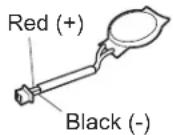
| WireVoltage(Vdc) |
| Red+2.5to+3.2 |
| BlackGround |
- If the voltage is correct, replacethesystemboard.
- If the voltage is not correct, replace the backup battery.
- If the backup battery discharges quickly after replacement, replacethesystem board.
Relatedserviceinformation
Thischapterpresentsfollowinginformation:
• "RestoringthefactorycontentsbyusingProductRecoverydiscs"
• "RestoringthefactorycontentsbyusingRecoveryDiscSet" onpage56
- "Passwords" on page 57
• "Powermanagement" on page 60
•“Symptom-to-FRUindex”onpage62
ServiceWebsite:
Whenthelatestmaintenancedisketteandthesystemprogramservicediskette becomeavailable,theywillbepostedonhttp://www.lenovo.com/spm
RestoringthefactorycontentsbyusingProductRecoverydiscs
When the hard disk drive (HDD) or solid stated drive (SSD) is replaced because of a failure, no Product Recovery program is thenew drive. In this case, you must use the recovery discs for the computer. Order there recovery discs and the drive at the sometimes that you can recover thenew drivewith the pre-installed software when they arrive. For information on which discsto order, see "Recover discs" on page 289.
ToinstallthefactorycontentsbyusingProductRecoverydiscs,dothefollowing:
Note: Recovery takes several hours. Thelengthoftimedependson themethod you use. If you user recovery discs, recovery takes at least five hours.
- Insert the bootable Start Recovery Disc into the DVD drive.
- Select your language and click Next.
- Read the license. If you agree with the terms, select I accept these terms and conditionsandthenclickNext.
- Insert the Operating System Recovery Disc when prompted and click Yes to begin the operating system recovery process.
- Insert the Product Recovery Disc when prompted and click OK.
- If you have a Supplemental Recovery Disc, insert it when prompted and click Yes. If you do not have a Supplemental Recovery Disc, click No.
Note: Not all recovery disc sets come with a Supplemental Recovery Disc. If thereisa Supplemental Recovery Disc, it will be clearly marked as such.
- When allofthedatahas been copied from the last discintheset, am message is displayed prompting out to restart the computer. Removethediscand then click Yes.
Note: Theremainderoftherecoveryprocessisfullyautomatedandnoaction isrequiredbyyou. ThecomputerwillrestartintotheWindowsdesktopseveral timesandyoumightexperienceperiodswhennoactivityisapparentonthe screenforseveralminutesatatime.Thisisnormal.
- Whentherecoveryprocessiscomplete, the Welcometo Microsoft Windows screenisdisplayed. Follow the instructions on the screent ocomplete the Windows setup.
RestoringthefactorycontentsbyusingRecoveryDiscSet
When the hard disk drive (HDD) or solid stated drive (SSD) is replaced because of a failure, no product recovery program is on thenew drive. In this case, you must use the Recovery Disc Set for the computer. Order the Recovery Disc Set and the drive at the same times that you can recover thenew drivewith the pre-installed software when they arrive. For information on which discsto order, see "Recovery discs" on page 289.
Therecoverydiscsetconsistsoftheuserinstructionsandthefollowingsetof DVDstorestorethecomputertotheoriginalfactoryconfiguration.
OperatingSystemRecoveryDisc(onedisc)
ThisdiscrestorestheMicrosoft ® Windowsoperatingsystem. Use this disc to start therecovery process.
ApplicationsandDriversRecoveryDisc(oneormorediscs)
Thisdiscrestoresthepreinstalledapplicationsanddriversonthe computer.
SupplementalRecoveryDisc
This discontains additional content, such as update to the software that was preinstalled on the computer. Not all recovery discsets comewith a Supplemental Recovery Disc.
Notes:
- YoumusthaveaDVDdrivetousetherecoverydiscs. If you donothavean internal DVD drive, you can use an external USB DVD drive.
- Duringtherecoveryprocess, alldataonthedrivewillbedeleted. If possible, copy any important data or personal file that you want to keep on to remove media or an network drive before you start there recovery process.
Torestorethecomputertotheoriginalfactoryconfigurationusingtherecovery discset,dothefollowing:
Note: Recovery takes several hours. Thelengthoftimedependson themethod you use. If you user recovery discs, recovery takes at least five hours.
- MaketheCD/DVDdrivethefirststartupdeviceinthestartupsequence using the following procedure:
a. PressandholldowntheF1key, and then turn the computer. When the logoscreen is displayed or if you hear repeating beeps, release the F1key. The Setup Utility program opens.
b. Use the arrow keys to select Startup → Boot.
c.SelecttheCD/DVDdriveasthe1stBootDevice.
-
Insert the Operating System Recovery Disc into the DVD drive.
-
PressF10tosavetheSetupUtilityconfigurationchanges.Followthe instructionsonthescreentobegintherecoveryprocess.
-
Select your language and click Next.
-
Read the license. If you agree with the terms and conditions, select I accept these terms and conditions and then click Next. If you do not agree with the terms and conditions, follow the instructions on the screen.
- Click Yes in the displayed window to begin the operating system recovery process.
- Insert the Applications and Drivers Recovery Disc when prompted and then click OKtobegintheapplicationsanddriversrecoveryprocess.
- If you have a Supplemental Recovery Disc, insert it when prompted and click Yes. If you do not have a Supplemental Recovery Disc, click No.
- When allofthedatahasbeencopiedfromthelastdiscinthesetandhas beenprocessed, removethediscandrestartthecomputer.
Note: Therestoftherecoveryprocessisfullyautomatedandnoactionis requiredbyyou. ThecomputerwillrestartintotheMicrosoftWindows desktopseveraltimesandyoumightexperienceperiodswhennoactivityis apparentonthescreenforseveralminutesatatime.Thisisnormal.
-
Whentherecoveryprocessiscomplete, theSetUpWindowsscreenis displayed. Follow the instructions on the screent ocomplet the Windows setup.
-
After you have completed the Windows setup, you might want to restore the original startup sequence. Start the Setup Utility program and then press F9 to restore the default settings. Press F10 to save and exit the Setup Utility.
Note: Afterrestoringadrivetothefactorydefaultsettings, you might need to reinstallsomedevicedrivers.
Passwords
AsmanyasthreepasswordsmaybeneededforanyThinkPadNotebook:the power-onpassword(POP),thehard-diskpassword(HDP),andthesupervisor password(SVP).
Ifanyofthesepasswordshasbeenset,apromptforitappearsonthescreen wheneverthecomputeristurnedon.Thecomputerdoesnotstartuntilthe passwordisentered.
Exception: If only an SVP is installed, the password prompt does not appear when the operating system is booted.
Power-onpassword
Apower-onpassword(POP)protectsthesystemfrombeingpoweredonbyan unauthorizedperson.Thepasswordmustbeenteredbeforeanoperatingsystem canbebooted.ForhowtoremovethePOP,see"Howtoremovethepower-on
password"onpage58.
Hard-diskpassword
Therearetwohard-diskpasswords(HDPs):
-UserHDP-fortheuser
- MasterHDP—forthesystemadministrator,whocanuseittogetaccesstothe harddiskeveniftheuserhaschangedtheuserHDP
Note: There are two modes for the HDP: User only and Master + User. The Master+UsermoderequirestwoHDPs;thesystemadministratorentersbothin thesameoperation.ThesystemadministratorthenprovidestheuserHDPtothe systemuser.
Attention: If the user HDPhas been forgotten, check whether a master HDPhas be enset. Ifithas, it can be used for access to the hard disk drive. If nomaster HDP is available, neither Lenovonor Lenovo authorized servic technicians provide any service stores either the user or the master HDP, ortorecover data from the hard disk drive. The hard disk drive can be replaced for as scheduled fee.
ForhowtoremovethePOP, see "Howtoremovethehard-diskpassword" on page59.
Supervisorpassword
Asupervisor password(SVP) protect the system information stored in the BIOS Setup Utility. The user must enter the SVP in order to get access to the BIOS Setup Utility and change the system configuration.
Attention: If the SVPhasbeenforgottenandcannotbemadeavailabletothe servicetechnician, there is noserviceproceduretoresetthepassword. Thesystem board must bereplaced for as scheduled fee.
Howtoremovethepower-onpassword
ToremoveaPOPthatyouhaveforgotten,dothefollowing:
(A) If no SV Phasbeenset:
- Turnoff the computer.
2.Removethebatterypack.
Forhowtoremovethebatterypack,see"1010Batterypack"onpage85.
- Removethebackupbattery.
Forhowtoremovethebackupbattery,see"1060Backupbattery"onpage100. - TurnonthecomputerandwaituntilthePOSTends.
AfterthePOSTends, thepasswordpromptdoesnotappear. ThePOPhasbeen removed.
-
Reinstall the backup battery and the battery pack.
(B)IfanSVPhasbeensetandisknownbytheservicetechnician: -
Turnonthecomputer.
- When the ThinkPadlogocomesup, immediately press F1 to enter BIOS Setup Utility.
FormodelssupportingthePassphrasefunction,pressF1whilethePOPiconis appearingonthescreen;thenenterthePOP.Fortheothermodels,enterthePOP.
Note: To check whether the ThinkPad Notebook you are servicing supports the Passphrasefunction, entertheBIOSSetupUtilityandgotoSecurity-->
Password. If the Using Passphrase item is displayed in the menu, this function is available on the ThinkPadNotebook.
- Select Security, using the cursor directional keys to move down the menu.
-
SelectPassword.
-
SelectPower-OnPassword.
- Type the current SVP in the Enter Current Password field. then leave the Enter NewPasswordfieldblank, and pressEntertwice.
- In the Changeshavebeensaved window, pressEnter.
- PressF10; then, in the Setup confirmation window, select Yes.
Howtoremovethehard-diskpassword
Attention: If User only mode is selected and the user HDP has been forgotten and cannot be made available to the servicetechnician, neither Lenovo or Lenovo authorized servicetechnicians provide any service store the user HDP sorto recover data from the hard disk drive. The hard disk drive can be replaced for a scheduled fee.
ToremoveauserHDPthathasbeenforgotten,whentheSVPandthemasterHDP areknown,dothefollowing:
- Turnonthecomputer.
- When the ThinkPadlogocomesup, immediately press F1 to enter BIOS Setup Utility.
FormodelssupportingthePassphrasefunction,pressF1whileHDPiconis appearingonthescreen;thenenterthemasterHDP.Fortheothermodels, enterthemasterHDP.
Note: To check whether the ThinkPad Notebook you are servicing supports the Passphrase function, enter the BIOSSetup Utility and goto Security --> Password. If Using Passphrase item is displayed in the menu, this function is available on the ThinkPad Notebook.
- Select Security, using the cursor directional keys to move down the menu.
- SelectPassword.
- Select Hard-disk x password, where x is the letter of the hard disk drive. A pop-upwindowopens.
6.SelectMasterHDP. - Type the current master HDP in the Enter Current Password field. then leave the EnterNewPasswordfieldblank, and press Entertwice.
- PressF10.
- SelectYesintheSetupConfigurationwindow.
BothuserHDPandmasterHDPwillhavebeenremoved.
Powermanagement
Toreducepowerconsumption, thecomputerhasthreepowermanagementmodes: screenblank, sleep(standbyinWindowsXP), and hibernation.
Screenblankmode
If the timeset on the "Turnoffmonitor" timer in the operating system expires, the LCDbacklightturnsoff.
Toputthecomputerintoscreenblankmode,doasfollows:
-
PressFn+F3. Apanelforselectingapowerplan(inWindowsXP, power scheme) appears.
-
Select Power off display (keep current power plan) (in Windows XP, keep currentpowerscheme).
Youcanalsoputthecomputerintoscreenblankmode,pressThinkVantagebutton andusetheThinkVantageProductivityCenter.
Note: If the computerisa Windows7 model, it does not support ThinkVantage Productivity Center.
Toendscreenblankmodeandresumenormaloperation,pressanykey.
Sleep(Standby)mode
Whenthecomputerentersleep(standby)mode, the following events occur in addition to what occurs in screen blank mode:
•TheLCDispoweredoff.
•Theharddiskdriveorthesolidstatedriveispoweredoff.
•TheCPUstops.
Toentersleep(standby)mode,pressFn+F4.
Note: You can change the action of the Fn+F4 key combination by changing the settings in PowerManager.
Incertaincircumstances, the computer goes into sleep (standby) mode automatically:
- Ifa "suspendtime" has been set on the timer, and the user does not do any operation with the keyboard, the TrackPoint, the hard disk, the parallel connector, orthedisketted rivewith in that time.
- If the battery indicator blinks orange, indicating that the battery power is slow.
Note: Evenifyoudonotsetthelow-batteryalarm, thechargeindicatornotifies youwhenthebatteryislow, and thenthecomputerentersthepower-savingmode automatically.
Tocausethecomputertoreturnfromsleep(standby)modeandresumeoperation, dooneofthefollowing:
•PresstheFnkey.
- OpentheLCDcover.
•Turnonthepowerswitch.
Also, ineitherofthefollowingevents, thecomputerautomaticallyreturnsfrom sleep(standby)modeandresumesoperation:
•Theringindicator(RI)issignaledbyaserialdeviceoraPCCarddevice.
• Thetimesetontheresumetimerelapses.
Note: The computer does not accept any input immediately after it enters sleep (standby) mode. Waitafewseconds before taking any action to reenter operation mode.
Hibernationmode
Inhibernationmode, the following occurs:
- Thesystemstatus,RAM,VRAM,andsetupdataarestoredontheharddisk.
•Thesystemispoweredoff.
Tocausethecomputertoenterhibernationmode,doanyofthefollowing:
•PresstheFn+F12keys.
- If you have defined one of the following actions as the event that cause the system to go into hibernation mode, perform that action.
-Closingthelid.
-Pressingthepowerbutton.
-PressingFn+F4keys.
Also, the computer goes into hibernation mode automatically either of the following conditions:
- Ifa"hibernationtime"hasbeensetonthetimer,andiftheuserdoesnotdo anyoperationwiththekeyboard,theTrackPoint,theharddiskdrive,the parallelconnector,orthediskettedrivewithinthattime.
- If the timer conditions are satisfied in suspend mode.
Whenthepoweristurnedon, thecomputerreturnsfromhibernationmodeand resumesoperation. Thehibernationfileinthebootrecordontheharddiskdriveis read, andsystemstatusisrestoredfromtheharddiskdrive.
Symptom-to-FRUindex
Thissectioncontainsfollowinginformation:
• "Numericerrorcodes"
- "Errormessages" on page 66
• "Beepsymptoms" on page 67
• "No-beepsymptoms" on page 67
•"LCD-relatedsymptoms"onpage68
- "Intermittentproblems" on page 69
• "Undeterminedproblems" on page 69
Thesymptom-to-FRUindexinthissectionlistsymptomsanderrorsandtheir possiblecauses. Themostlikelycauseislistedfirst, inboldfacetype.
Note: DotheFRU replacementorotheractionsinthesequenceshowninthe columnheaded "FRUoraction,insequence." IfreplacingaFRUdoesnotsolve theproblem,puttheoriginalpartbackinthecomputer.Donotreplacea nondefectiveFRU.
This index can also help you determine, during regular servicing, what FRUs are likely to be to be replaced next.
AnumericerrorisdisplayedforeacherrordetectedinPOSTorsystemoperation. Inthedisplays, ncanbeanynumber.
If nonumericcode is displayed, check then narrative descriptions of symptoms. If the symptom is not described there, goto "Intermittent problems" on page 69.
Note:
ForadevicenotsupportedbydiagnosticcodesintheThinkPadNotebooks,see themanualforthatdevice.
Numericerrorcodes
Table2.Numericerrorcodes
| SymptomorerrorFRUoration,insequence | |
| 0175BadCRC1,stopPOSTtask—TheEEPROM checksumisnotcorrect. | Systemboard. |
| 0176SystemSecurity—Thesystemhasbeen tamperedwith. | 1.RunBIOSSetupUtility,andsavethe currentsettingbypassingF10.2.Systemboard. |
| 0177BadSVPdata,stopPOSTtask—The checksumofthesupervisorpasswordinthe EEPROMisnotcorrect. | Systemboard. |
| 0182BadCRC2.EnterBIOSSetupandloadSetup defaults.—ThechecksumoftheCRS2setting intheEEPROMisnotcorrect. | 1.RunBIOSSetupUtility.PressF9,and Entertoloadthedefaultsetting.Then savethecurrentsettingbypassingF10.2.Systemboard. |
| 0185Badstartupsequencesettings.EnterBIOS SetupandloadSetupdefaults. | 1.RunBIOSSetupUtility.PressF9,and Entertoloadthedefaultsetting.Then savethecurrentsettingbypassingF10. |
| 0187EAIDataaccesserror—TheaccesstoEEPROMisfailed. | Systemboard. |
| 0188InvalidRFIDSerilizationInformationArea. | Systemboard. |
| 0189InvalidRFIDconfigurationinformationarea—TheEEPROMchecksumisnotcorrect. | Systemboard. |
| 0190Criticalallow-batteryerror | 1.Chargethebatterypack.2.Batterypack. |
| 0191SystemSecurity—InvalidRemoteChangerequested. | 1.RunBIOSSetupUtility,andthensavecurrentsettingbypassingF10.2.Systemboard. |
| 0192SystemSecurity—EmbeddedSecurityhardwaretamperdetected. | Systemboard. |
| 0199SystemSecurity—Securitypasswordretrycountexceeded. | 1.RunBIOSSetupUtility,andthensavethecurrentsettingbypassingF10.2.Systemboard. |
| 01C8Twoormoremodemdevicesarefound.Removeallbutoneofthem.Presstocontinue. | 1.RemoveeitheraMini-PCICardoramodemdaughtercard.Otherwise,pressEsctoignorethewarningmessage.2.Systemboard. |
| 01C9MorethanoneEthernetdevicesarefound.Removeoneofthem.Presstocontinue. | 1.RemovetheEthernetdevicethatyouinstalled;orpressEsctoignorethewarningmessage.2.Systemboard. |
| 01CAMorethanoneWirelessLANdevicesarefound.Removeoneofthem. | 1.RemovethewirelessLANdevicethatyouinstalled.2.Systemboard. |
| 0200Harddiskerror—Theharddiskisnotworking. | 1.Reseattheharddiskdrive.2.LoadSetupDefaultsinBIOSSetupUtility.3.Harddiskdrive.4.Systemboard. |
| 021xKeyboarderror. | Runinteractivetestsofthekeyboardandtheauxiliaryinputdevice. |
| 0220Monitortypeerror—MonitortypedoesnotmatchtheonespecifiedinCMOS. | LoadSetupDefaultsinBIOSSetupUtility. |
| 0230ShadowRAMerror—ShadowRAMfailsatoffsetnnnn. | Systemboard. |
| 0231SystemRAMerror—SystemRAMfailsatoffsetnnnn. | 1.DIMM.2.Systemboard. |
| 0232ExtendedRAMerror—ExtendedRAMfailsatoffsetnnnn. | 1.DIMM.2.Systemboard. |
| 0250Systembatteryerror—Systembatteryis dead. | 1.Chargethebackupbatteryformore than8hoursbyconnectingtheac adapter.2.ReplacethebackupbatteryandrunBIOS SetupUtilitytoresetthetimeanddate. |
| 0251SystemCMOSchecksumbad—Default configurationused. | 1.Chargethebackupbatteryformore than8hoursbyconnectingtheac adapter.2.ReplacethebackupbatteryandrunBIOS SetupUtilitytoresetthetimeanddate. |
| 0252Passwordchecksumbad—Thepasswordis cleared. | ResetthepasswordbyrunningBIOSSetup Utility. |
| 0260Systemtimererror. | 1.Chargethebackupbatteryformore than8hoursbyconnectingtheac adapter.2.ReplacethebackupbatteryandrunBIOS SetupUtilitytoresetthetimeanddate.3.Systemboard. |
| 0270Real-timeclockerror. | 1.Chargethebackupbatteryformore than8hoursbyconnectingtheac adapter.2.ReplacethebackupbatteryandrunBIOS SetupUtilitytoresetthetimeanddate.3.Systemboard. |
| 0271Dateandtimeerror—Neitherthedatenor thetimeissetinthecomputer. | RunBIOSSetupUtilitytoresetthetime anddate. |
| 0280Previousbootincomplete—Default configurationused. | 1.Load“SetupDefault”inBIOSSetup Utility.2.DIMM.3.Systemboard. |
| 02F0CPUID:xxFailed. | 1.CPU.2.Systemboard. |
| 02F4EISACMOSnotwritable. | 1.LoadSetupDefaultsinBIOSSetup Utility.2.Replacethebackupbattery.3.Systemboard. |
| 02F5DMAtestfailed. | 1.DIMM.2.Systemboard. |
| 02F6SoftwareNMIfailed | 1.DIMM.2.Systemboard. |
| 02F7Fail-safetimerNMIfailed | 1.DIMM.2.Systemboard. |
| 1802Unauthorizednetworkcardisplugged in—TurnoffandremovetheminiPCI networkcard. | 1.RemoveMiniPCInetworkcard.2.Systemboard. |
| 1803Unauthorizeddaughtercardisplugged in—Turnoffandremovethedaughtercard. | 1.Removethedaughtercardthatyou installed.2.Systemboard. |
| 1804 UnauthorizedWANcardisplugged in-PoweroffandremovetheWANcard. | 1.RemovetheWANcardthatyou installed.2.Systemboard. |
| 1805 UnauthorizedWirelessUSBcardisplugged in-PoweroffandremovetheWirelessUSB card. | 1.RemovetheWirelessUSBcardthatyou installed.2.Systemboard. |
| 1820 Morethanoneexternalfingerprintreaderis attached.Poweroffandremoveallbutthe readerthatyousetupwithinyourmain operatingsystem. | Removeallbutthereaderthatyousetup fortheauthentication. |
| 1830 Invalidmemoryconfiguration-Poweroff andinstallamemorymoduletoSlot-0or thelowerslot. | InstallDIMMinSlot-0,butnotinSlot-1.Note:FortheconstructionoftheDIMM slot,see“T030DIMM”onpage91. |
| 2000 HardDriveActiveProtectionsensor diagnosticsfailed.Pressto continue.PresstoenterSETUP | 1.PlacetheThinkPadNotebookona horizontalsurface.Donotapplyany physicalshocktothecomputer.2.RunDiagnostics-->ThinkPadDevices-->HDDActiveProtectionTest. |
| 2010 Warning:Yourinternalharddiskdrive (HDD)maynotfunctioncorrectlyonthis system.EnsurethatyourHDDissupported onthissystemandthatthelatestHDD firmwareisinstalled. | Informthefollowinginformationtothe customer:Ifintheprimarybaythecustomer isusinganon-IBMornon-Lenovoharddisk drive(HDD),oranoldgenerationIBM HDDwhichisnotsupportedbythissystem, withtheriskinmind,thecustomercanstill useitbypassingESC.Ifintheprimary drivebaythecustomerisusingasupported IBM/LenovoHDDwithanoldfirmware, thecustomerneedstoupdateitsfirmwareto thelatest.Thelatestversionisavailableat http://www.lenovo.com/support |
| 2100 InitializationerroronHDD0(Mainhard diskdrive) | 1.Reseattheharddiskdrive.2.Mainharddiskdrive.3.Systemboard. |
| 2102 InitializationerroronHDD1(Ultrabayhard diskdrive) | 1.Reseattheharddiskdrive.2.UltrabayTM harddiskdrive.3.Systemboard. |
| 2110 ReaderoronHDD0(Mainharddiskdrive) | 1.Reseattheharddiskdrive.2.Mainharddiskdrive.3.Systemboard. |
| 2112 ReaderoronHDD1(Ultrabayharddisk drive) | 1.Reseattheharddiskdrive.2.Ultrabayharddiskdrive.3.Systemboard. |
Errormessages
Table3. Errormessages
| SymptomorerrorFRUoration,insequence | |
| Deviceaddressconflict.1.Load“SetupDefaults” | intheBIOS SetupUtility.2.Backupbattery.3.Systemboard. |
| Allocationerrorfordevice.1.Load“SetupDefaults” | intheBIOS SetupUtility.2.Backupbattery.3.Systemboard. |
| Failingbits:nnnn.1.DIMM. | 2.Systemboard. |
| Invalidsystemconfigurationdata.1.DIMM. | 2.Systemboard. |
| I/OdeviceIRQconflict.1.Load“SetupDefaults” | intheBIOS SetupUtility.2.Backupbattery.3.Systemboard. |
| Hibernationerror.1.Restorethesystemconfigurationto | whatitwasbeforethecomputer enteredhibernationmode.2.Ifmemorysizehasbeenchanged,re-createthehibernationfile. |
| Fanerror.1.Fan. | 2.Thermalgrease.3.Systemboard. |
| Thermalsensingerror.Systemboard. | |
| Cannotbootfromanydevice.Checkthestatusofde | devicewhichyouwant tobootfrom.Devicenotfound.1.Thedeviceyouwanttobootfrom.2.Systemboard.DeviceError.1.Thedeviceyouwanttobootfrom.2.Systemboard.Novalidoperatingsystem.1.Checkthattheoperatingsystemhasno failureandisinstalledcorrectly.2.Reinstalltheoperationsystem.Excludedfrombootorder.•EntertheBIOSSetupUtilityandaddthe deviceinbootorder. |
Beepsymptoms
Table4.Beepsymptoms
| SymptomorerrorFRUoration,insequence | |
| Onebeepandablank,unreadable,or flashingLCD. | 1.ReseattheLCDconnector.2.LCDassembly.3.ExternalCRT.4.Systemboard. |
| Onelongandtwoshortbeeps,andablank orunreadableLCD. | 1.Systemboard.2.LCDassembly.3.DIMM. |
| Twoshortbeepswitherrorcodes.POSTerror.See"Numericerrorcodes"onpage62. | |
| Twoshortbeepsandablankscreen.1.Systemboard. | 2.DIMM. |
| Threeshortbeeps,pause,threemoreshort beeps,andoneshortbeep. | 1.DIMM.2.Systemboard |
| Oneshortbeep,pause,threeshortbeeps, pause,threemoreshortbeeps,andoneshort beep. | |
| Onlythecursorappears.Reinstalltheoperatingsystem. | |
| Fourcyclesoffourshortbeepsandablank screen. | Systemboard(securitychip) |
| Fiveshortbeepsandablankscreen.Systemboard | |
No-beepsymptoms
Table5.No-beepsymptoms
| SymptomorerrorFRUoration,insequence | |
| Nobeep,power-onindicatoron,LCDblank,andnoPOST. | 1.Makesurethateveryconnectoris connectedtightlyandcorrectly.2.DIMM.3.Systemboard. |
| Nobeep,power-onindicatoron,andLCDblankduringPOST. | 1.ReseatDIMM.2.Systemboard. |
| Thepower-onpasswordpromptappears.Apower | onpasswordorasupervisor passwordisset.Typethepasswordand pressEnter. |
| Thehard-diskpasswordpromptappears.Ahard- | diskpasswordisset.Typethe passwordandpressEnter. |
LCD-relatedsymptoms
Important: The TFTLCD forthenotebookcomputercontainsmanythin-film transistors(TFTs). The presence of a small number of dots that are missing, discolored, or always lighted discharacteristic of TFTLCD technology, but excessive pixel problemscan cause viewing concerns.
IftheLCDyouareservicinghastwoorlessvisibledefectivepixels,itshouldnot beconsideredfaulty.However,iftheLCDhasthreeormorevisibledefective pixels,itwillbedeemedasdefectivebyLenovoanditshouldbereplaced.
Notes:
- ThispolicyappliestoallThinkPadNotebookspurchasedon1January, 2008orlater.
- LenovowillnotprovidereplacementiftheLCDiswithinspecificationas we cannot guarantee that any replacement LCD will have zero pixel defects.
• OnepixelconsistsofR,G,Bsub-pixels.
Table6.LCD-relatedsymptoms
| SymptomorerrorFRUoration,insequence | |
| Nobeep,power-onindicatoron,anda blankLCDduringPOST. | Systemboard. |
| •LCDbacklightnotworking.•LCDtoodark.•LCDbrightnesscannotbeadjusted.•LCDcontrastcannotbeadjusted. | 1.ReseattheLCDconnectors.2.LCDassembly.3.Systemboard. |
| •LCDscreenunreadable.•Charactersmissingpixels.•Screenabnormal.•Wrongcolordisplayed. | 1.Seeimportantnotefor“LCD-related symptoms.”2.ReseatallLCDconnectors.3.LCDassembly.4.Systemboard. |
| Horizontalorverticallinesdisplayedon LCD. | LCDassembly. |
Intermittentproblems
Intermittentsystemhangproblemscanbeduetovarietyofcausesthathave nothingtodowithahardwaredefect,suchascosmicradiation,electrostatic discharge,orsoftwareerrors.FRUreplacementsshouldbeconsideredonlywhena problemrecurs.
When analyzing an intermittent problem, dothefollowing:
- Run the diagnostic test for the system board in loop mode at least 10 times.
- If no error is detected, donot replace any FRUs.
- If any error is detected, replace the FRU shown by the FRU code. Rerunthe test to verify that nomore error sexist.
Undeterminedproblems
If the diagnostic tests did not identify the adapter or device that has failed, if wrong devices are installed, or if the system simply is not operating, follow these procedure to isolate the failing FRU (donotisolate FRU sthathavenodefects).
Verify that all attached devices are supported by the computer.
Verify that the powersupply being used at the time of the failure is operating correctly. (See "Powersystemcheckout" on page 52.)
- Turnoff the computer.
- VisuallycheckeachFRUfordamage.ReplaceanydamagedFRU.
- Removeordisconnectallofthefollowingdevices:
a.Non-ThinkPaddevices
b.Printer,mouse,andotherexternaldevices
c.Batterypack
d. Harddiskdrive
e.Externaldiskettedriveoropticaldrive
f.DIMM
g. Opticaldiskordisketteintheinternaldrive
h.PCCards
-
Turnonthecomputer.
-
Determinewhethertheproblemhasbeensolved.
-
If the problem does not recur, reconnect theremoved devices one at a time until you find the failing FRU.
-
If the problem remains, replace the following FRUs one at a time (donot replace an on defective FRU):
a. Systemboard
b.LCDassembly
Statusindicators
Thischapterpresentsthesystemstatusindicatorthatshowthestatusofthe computer.

Table7.Statusindicators
| IndicatorMeaning | |
| Sleep(standby) status | Green:Thecomputerisinsleep(standby)mode.Blinkinggreen:Thecomputerisenteringsleep(standby)modeor hibernationmode,orisresumingnormaloperation. |
| 2 ACpower status[13TS] | Green:Thecomputerisconnectedtotheacpowersupply. |
| 3 Batterystatus[2HDD] | Green:Thebatteryischargedbetween80%to100%ofthecapacity,andbeingdischargedbetween0%to80%ofthecapacity.Blinkinggreen:Thebatteryischargedbetween20%to80%ofthecapacity,andbeingcharged.Orange:Thebatteryischargedbetween5%and20%ofthecapacity,andbeingdischarged.Blinkingorange(slow):Thebatteryischargedbetween5%to20%ofthecapacity,andbeingcharged.Blinkingorange(rapid):Thebatteryischargedbetween0%to5%ofthecapacity. |
| 4 Poweron[80YH] | Green:Thecomputerisonandreadytouse.Thisindicatorstayslitwheneverthecomputerisonandisnotinsleep(standby)mode. |
5 Drive in use | Green:Data is being read from or written to the hard diskdrive,thediskettedrive,orthedriveintheSerialUltrabaySlimdevice.Whenthisindicatorison,donotputthecomputerintosleep(standby)modeorturnoffthecomputer.Note:Donotmovethesystemwhilethegreendrive-in-uselightison.Suddenphysicalshockcouldcausedriveerrors. |
| 6 Capslock[AOKS] | Green:CapsLockmodeisenabled.ToenableordisableCapsLockmode,presstheCapsLockkey. |
7 Numlock | Green:Thenumerickeypadonthekeyboardisenabled.Toenableordisablethekeypad,pressandholdtheShiftkey,andpresstheNumLk(ScrLk)key. |
| 8 WirelessWANstatus[KSBY] | Green:ThewirelessWANison,andtheradiolinkisreadyforuse,orthedataisbeingtransmitted.Blinkinggreen:Dataisbeingtransmitted(forsomemodels). |
9 WirelessPANstatus[DYBK]or | Green:WirelessPAN(BluetoothwirelessorWirelessUSB)isoperational.ThisindicatorisonwhenWirelessPANisonandnotinsuspendmode,orthedataisbeingtransmitted.Blinkinggreen:Dataisbeingtransmitted(forsomemodels). |
10 WirelessLANstatus | Green:ThewirelessLANfeatureison,andtheradiolinkisreadyforuse,orthedataisbeingtransmitted.Blinkinggreen:Dataisbeingtransmitted(forsomodels). |
| 11 FingerprintreaderstatusonlyforX201,X201iandX201s | Green:Thefingerprintreaderisreadytoswipe.Blinkinggreen:Thefingerprintisbeingauthenticatedorhasbeenauthenticated.Blinkingamber:Thefingerprintcouldnotbeauthenticated. |
Fnkeycombinations
The following tables show the function of each combination of Fn with a function key.
Table8.Fnkeycombinations
| KeycombinationDescription | ||
| Fn+F1Reserved. | ||
| Fn+F2Lockthecomputer. | ||
| Fn+F3Selectapowerplan(inWindowsXP,powerscheme)thathasbeencreatedbyPowerManager,oradjustthepowerlevelbyusingtheslidercontrol.Whenyoupressthiscombination,apanelforselectingapowerplan(powerscheme)appears.Notes:1.TousetheFn+F3keycombination,youmusthavetheThinkPadPMdevicedriverinstalledonthecomputer.2.IfyouhavelloggedonwithanadministratoruserID,andyoupressFn+F3,thepanelforselectingapowerplan(powerscheme)appears.IfyouhavelloggedonwithanotheruserID,andyoupressFn+F3,thepaneldoesnotappear.3.YoucannotturnoffthecomputerdisplaybypassingFn+F3. | ||
| Fn+F4Putthecomputerinsleep(standby)mode.Toreturntonormaloperation,presstheFnkeyonly,withoutpressingafunctionkey.Notes:1.TousetheFn+F4keycombination,youmusthavetheThinkPadPMdevicedriverinstalledonthecomputer.2.Ifyouwanttousethecombinationtoputthecomputerintohibernationmodeordo-nothingmode(inWindowsXP,shutthecomputerdownorshowthepanelforturningoffthecomputer),changethesettingsinthePowerManager. | ||
| Fn+F5Enableordisablethebuilt-inwirelessnetworkingfeaturesandtheBluetoothfeatures.IfyoupressFn+F5,alistofwirelessfeaturesisdisplayed.Youcanquicklychangethepowerstateofeachfeatureinthelist.Note:IfyouwanttouseFn+F5toenablethewirelessfeature,thefollowingdevicedriversmustbeinstalledonthecomputerbeforehand:ThinkPadPowerManagementdriverOnScreenDisplayUtilityWirelessdevicedrivers | ||
| Fn+F6Changethecameraandaudiosettings. | ||
| Fn+F7Applyapresentationschemedirectly,withnoneedtostartPresentationDirector.TodisablethisfunctionandusetheFn+F7keycombinationforswitchingadisplayoutputlocation,startPresentationDirector,andchangethesettings.Note:IfthecomputerisaWindows7model,itdoesnotsupportpresentationschemes,buttheFn+F7combinationisavailableforswitchingadisplayoutputlocation. | ||
| Fn+F10Reserved. | ||
| Fn+F11Reserved. | ||
| Fn+F12Putthecomputerintohibernationmode.Toreturntonormaloperation, pressthepowerbuttonforlessthanfourseconds.Note:TouseFn+F12forhibernation,youmusthavetheThinkPadPM devicedriverinstalledonthecomputer. | ||
| Fn+PgUpTurntheThinkLight® onoroff.Note:ThisfunctionissupportedonlyontheThinkPadcomputersthat havetheThinkLight.TheonoroffstatusoftheThinkLighttisshown onthescreenforafewsecondswhenyoupressFn+PgUp. | ||
| Fn+HomeThecomputerdisplaybecomesbrighter. | ||
| Fn+EndThecomputerdisplaybecomesdimmer. | ||
| Fn+SpacebarEnabletheFullScreenMagnifierfunction. | ||
| Fn+PrtScHasthesamefunctionastheSysRqkey. | ||
| Fn+ScrLkEnableordisablethenumerickeypad. | ||
| Fn+PauseHasthesamefunctionastheBreakkey. | ||
| Fn+cursorkeysThesekeycombinationsworkwithWindowsMediaPlayer.Fn+down arrowkeyworksforthePlayerPausebutton,Fn+uparrowkeyforthe Stopbutton,Fn+rightarrowkeyfortheNextTrackbutton,andFn+left arrowkeyforthePreviousTrackbutton. | ||
FRUreplacementnotices
Thischapterpresentsnoticesrelatedtoremovingandreplacingparts.Readthis chaptercarefullybeforereplacinganyFRU.
Screwnotices
Loosescrewscancauseareliabilityproblem.IntheThinkPadNotebook,this problemisaddressedwithspecialnylon-coatedscrewsthathavethefollowing characteristics:
• They maintain tight connections.
•Theydonoteasilycomeloose,evenwithshockorvibration.
•Theyarehardertotighten.
•Eachoneshouldbeusedonlyonce.
Dothefollowingwhenyouservicethismachine:
- Keepthescrewkit(fortheP/N,see"Miscelaneousparts" onpage287)inyour toolbox.
•Alwaysusenewscrews.
- Useatorquescrewdriverifyyouhaveone.
Tightenscrewsasfollows:
•Plastictoplastic
Turnanadditional90degreesafterthescrewheadtouchesthesurfaceofthe plasticpart:

•Logiccardtoplastic
Turnanadditional180degreesafterthescrewheadtouchesthesurfaceofthe logiccard:

•Torquedriver
If you have a torquedriver, referto the "Torque" columnforeachstep.
- Makesurethatyouusethecorrectscrew.Ifyouhaveatorquescrewdriver, tightenallscrewsfirmlytothetorqueshowninthetable.Neveruseascrew thatyouremoved.Useanewone.Makesurethatallofthescrewsare tightenedfirmly.
- Ensuretorquescrewdriversarecalibratedcorrectlyfollowingcountry specifications.
Retainingserialnumbers
Thissectionincludes the following descriptions:
• "Restoring the serial number of the system unit"
•“RetainingtheUUID”
• "ReadingorwritingtheECAinformation" on page 81
Restoring the serial number of the system unit
Whenthecomputerwasmanufactured,theEEPROMonthesystemboardwas loaded with the serial numbers of the system and all major components. These numbers need to remain the same throughout the life of the computer.
If youreplacethesystemboard, you must restore the serial number of the system unit to its original value.
Before replacing the system board, save the original serial number by doing the following:
-
InstalltheThinkPadHardwareMaintenanceDisketteVersion1.73orlater, and restartthecomputer.
-
From the main menu, select 1. Set System Identification.
-
Select2. ReadS/NdatafromEEPROM.
The serial number of each device in your computer is displayed; the serial number of the system unit lists as follows:
•20:Serialnumber
Writedownthatnumber.
Note: Theserialnumberofthesystemunitisalsowrittenonthelabelattachedto thebottomofthecomputer.
Afteryouhavereplacedthesystemboard,restoretheserialnumberbydoingthe following:
-
InstalltheThinkPadHardwareMaintenanceDisketteVersion1.73orlaterand restartthecomputer.
-
From themainmenu, select 1. Set System Identification.
-
Select1.AddS/NdatafromEEPROM.
Followtheinstructionsonthescreen.
If the MT Mand Product ID numbers differ from each other on there are label, use what is shown for the Product ID field. See example below:
MTMonrearlabel:
TTTT-CTOS/NSSSSSSS
ProductIDonrearlabel:
TTTT-MMM(UsethisnumberwhensettingSerialNumber)
Intheexample,theSerialNumbertobeinputis'1STTTTMMMSSSSSSS'.
RetainingtheUUID
The Universally Unique Identifier (UUID) is a 128-bit number uniquely assigned to your computer at production and stored in the EEPROM of your system board.
The algorithm that generates the number of designed to provide unique IDs until the year A.D.3400. Not wocomputers in the world have the same number.
Whenyoureplacethesystemboard,youmustsettheUUIDonthenewsystem boardasfollows:
-
InstalltheThinkPadHardwareMaintenanceDisketteVersion1.73orlater,and restartthecomputer.
-
From themainmenu, select 4. Assign UUID.
AnewUUIDiscreatedandwritten. If a valid UUIDal ready exists, it is not overwritten.
ReadingorwritingtheECAinformation
InformationonEngineeringChangeAnnouncements(ECA)arestoredinthe EEPROMofthesystemboard.Theelectronicstorageofthisinformationsimplifies theproceduretocheckiftheECAhasbeenpreviouslyappliedtoamachine.The machinedoesnotneedtobedisassembledtocheckfortheECAapplication.
TocheckwhatECAshavebeenpreviouslyappliedtothemachine,usetheECA InformationRead/WritefunctionontheThinkPadHardwareMaintenanceDiskette Version1.73orlater.
-
Insert the ThinkPad Hardware Maintenance Diskette Version 1.73 or later, and restart the computer.
-
From themainmenu, select6. SetECAInformation.
-
To read ECA information, select 2. Read ECA/rework number from EEPROM and follow the instruction.
-
To read box build date, select 5. Read box build date from EEPROM, and followtheinstructiononthescreen.
AfteranECAhasbeenappliedtothemachine,theEEPROMmustbeupdatedto reflecttheECA'sapplication.UsetheThinkPadHardwareMaintenanceDiskette Version1.73orlatertoupdatetheEEPROM.
Note: Only the ECAnumberisstored in the EEPROM. Themachinetype of the ECA is assumed by the same asthemachinetype of themachinethathad the ECA applied to it.
- Insert the ThinkPad Hardware Maintenance Diskette Version 1.73 or later, and restart the computer.
2.Fromthemainmenu,select6.SetECAInformation.
-
To write ECA information, select 1. Write ECA/rework number from EEPROM, and follow the instruction.
-
To write box build date, select 4. Write box build date from EEPROM, and followtheinstructiononthescreen.
If the system board is being replaced, try to read the ECA information from the old system board and transfer the information to then ewsystem. If the system board is inoperable, this will not be possible.
RemovingandreplacingaFRU
Thischapterpresentsdirectionsanddrawingsforuseinremovingandreplacinga FRU.Besuretoobservethefollowinggeneralrules:
- Donottrytoserviceanycomputerunlessyouhavebeentrainedandcertified. Anuntrainedpersonrunstheriskofdamagingparts.
2.BeforereplacinganyFRU,review"FRUreplacementnotices"onpage79. - Begin by removing any FRU sthathavetoberemoved before the failing FRU. An such FRUs are listed at the top of the page. Removethemin the order in which they are listed.
- Follow the correct sequence in the steps for removing the FRU, as given in the drawings by then numbers in square callouts.
- Whenturning as screwtoreplaceaFRU, turnitinthedirectionas given by the arrowinthedrawing.
- When removing the FRU, move it in the direction as given by the arrow in the drawing.
- ToputthenewFRUinplace, reversetheremovalprocedure and follow any notesthatpertaintoreplacement. For information about connecting and arranging internalcables, see "Locations" on page 161.
- When replacing a FRU, use the correctscrew as shown in the procedures.

DANGER
BeforeeremovinganyFRU,turnoffthecomputer,unplugallpowercords fromelectricaloutlets,removethebatterypack,andthendisconnectany interconnectingcables.
Attention: AfterreplacingaFRU, donotturnonthecomputeruntilyouhave madesurethatallscrews, springs, and othersmallpartsareinplaceandnoneare looseinsidethecomputer. Verify this by shaking the computer gently and listening for rattlingsounds. Metallic partsormetalflakescan cause electrical shortcircuits.
Attention: Thesystemboardissensitiveto, and can be damaged by electrostatic discharge. Before touching it, establish personal grounding by touching a ground point with one hand or by using an electrostatic discharge (ESD) strap (P/N 6405959).
BeforeservicingThinkPadX200,X200s,X200si,X201,X201i,and X201s
RemovingtheSIMcard:
SomemodelsoftheThinkPadX200,X200s,X200si,X201,X201i,andX201syouare servicingmighthavetheSIMcardthatthecustomerhasbeeninstalled.
If the computery you a reservicing has the SIM card, remove it before you start the servicing.
ToremovetheSIMcard,youneedtoremovethebatterypackfirst.(See"1010 Batterypack"onpage85.)

Afteryoufinishtheservicing, makesurethatyouinsertthecardbackintotheslot firmly.

natural_image
Diagram of a computer chassis showing internal components and an inset view of the internal space (no text or symbols present)Notice on disconnecting the cable from flip-lock ZIF connector:
SomecablesusedintheThinkPadX200,X200s,X200si,X201,X201i,andX201sare connectedtotheflip-lockZIFconnectors.
Whendisconnectingthecablefromthoseconnectors,doasshowninthisfigure.

1010Batterypack
Importantnoticeforreplacingabatterypack:
LenovoThinkVantageToolbox(inWindows7)andLenovoSystemToolbox(in Windows Vista and Windows XP)have an automatic battery diagnostic that determines if the battery pack is defective. Abatterypack FRU should not be replaced unless this diagnostic show that the battery is defective.
The only exception to this is if the battery pack is physically damaged, customer is reporting a possible safety issue.
IfThinkVantageToolboxorLenovoSystemToolboxisnotinstalledinthe computer,thecustomershoulddownloadthisprogrambeforeanon-physically damagedbatterypackisreplaced.Notethataphysicallydamagedbatterypack isnon-warrantyreplacement.
Table9. Removalstepsofbatterypack

DANGER
Useonlythebatteryspecifiedinthepartslistforyourcomputer.Anyother batterycouldigniteorexplode.
Unlockthebatteryreleaselever 1 .Holdingthebatteryreleaseleverinthe unlockedposition 2 ,removethebatterypackinthedirectionsshownbyarrow 3 .

Wheninstalling:Installthebatterypackalongthesliderailsoftheslot.Then makesurethatthebatteryreleaseleverisinthelockedposition.
1020Harddiskdrive(HDD)cover,HDD,andHDDrubberrailsorsolid statedrive(SSD)andstorageconverter
Foraccess,removethisFRU:
•"1010Batterypack"onpage85
Attention:
- Do not drop the hard disk drive or apply any physical shock to it. The hard disk drive is sensitivetophysicalshock. Improperhandling can caused damage and permanent loss of data.
- Beforeeremovingthedrive,havetheusermakeabackupcopyofallthe informationonitifpossible.
- Neverremovethedrivewhilethesystemisoperatingorisinsuspendmode.
Table10. RemovalstepsofHDDcover,HDD,andHDDdriverubberrailsorSSDand storageconverter

| StepScrew(quantity)ColorTorque | |||
| 1 | Hardiskdrivescrew,M3×3mm,wafer-head,nylon-coated(1) | Black0.392Nm(4kgfcm) | |
Table10. RemovalstepsofHDDcover, HDD, and HDDdriverubberrailsorSSDand storageconverter(continued)

Wheninstalling: MakesurethattheHDDconnectororSSDconnectoris attachedfirmly.
Table10. RemovalstepsofHDDcover, HDD, and HDDdriverubberrailsorSSDand storageconverter(continued)
HDDandHDDrubberrails:

natural_image
Diagram of a device with circular components and directional arrows indicating movement or assembly (no text or symbols present)Wheninstalling:Therubberrailsontheharddiskdrivemustbeattachedtothereplacementdrive.Otherwisethedrivecannotbeinstalledproperly.
SSDandstorageconverter:

natural_image
Technical diagram of a mechanical component with arrows indicating direction (no text or symbols)Table10. RemovalstepsofHDDcover, HDD, and HDDdriverubberrailsorSSDand storageconverter(continued)
Wheninstalling: WhenyouinstalltheSSDinthestorageconverter,doas follows.
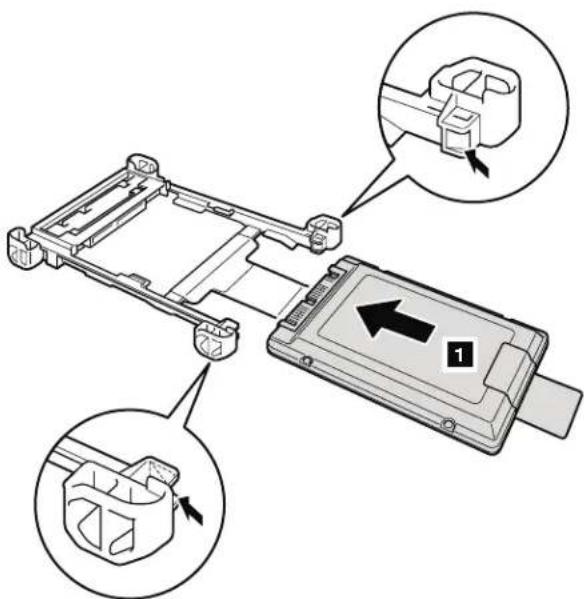
1030DIMM
Foraccess,removethisFRUinorder: "1010Batterypack"onpage85
Table11. Removalstepsofdimm
RemovetheDIMMslotcoverasshowninthisfigure.
Note:Loosenthescrews 1, butdonotremovethem.

Table11. Removalstepsofdimm(continued)
Note: For ThinkPadX200, X200s, and X200si, if only one DIMMisused on the computery ou a reservicing, the card must be installed in SLOT-0( a ), but not in SLOT-1( b ).
ForThinkPadX200,X200s,andX200si:

Table11. Removalstepsofdimm(continued)
ForThinkPadX201,X201i,andX201s:

Wheninstalling:InsertthenotchedendoftheDIMMintothesocket.Pressthe DIMMfirmly,andpivotituntilitsnapsintotheplace.Makesurethatitis firmlyfixedintheslotanddoesnotmoveeasily.
1040Keyboard
Foraccess,removethisFRUinorder:
"1010Batterypack" on page 85
Table12. Removalstepsofkeyboard

| StepIcon | Screw(quantity) | ColorTorque | ||
| 1 | M2×5mm,wafer-head,nylon-coated(4) | Black0.181 | Nm(1.85kgfcm) |

Table12. Removalstepsofkeyboard(continued)
Liftthekeyboardalittleinthedirectionshownbyarrow 4, andthendetach theconnector 5.
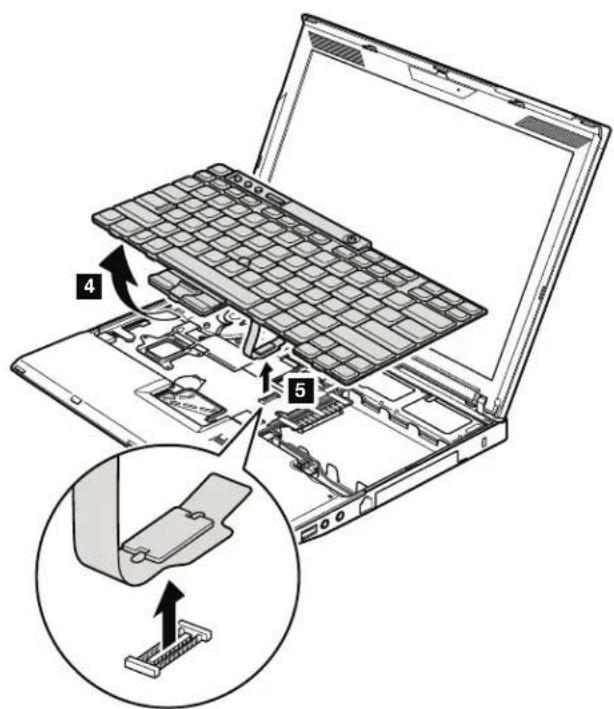
Table12. Removalstepsofkeyboard(continued)
Wheninstalling:
-
Attachthekeyboardconnectorfirmly.
-
Makesure that the keyboardedges are under the frame as shown in this figure. Then press the keystolatch the keyboard firmly in place.

3.Tomakesurethatthefrontsideofthekeyboarddishousedfirmly,gentlypress thekeyswithyourthumbsandtrytoslidethekeyboardtowardyou.

natural_image
Line drawing of hands typing on a laptop keyboard with a double-headed arrow indicating the typing process (no text or symbols present)- Secure the keyboard by tightening the screws from the bottom side of the computer.
1050Palmrestorpalmrestwithfingerprintreader
Foraccess,removethisFRUinorder:
• "1010Batterypack" onpage85
•"1040Keyboard"onpage94
Note:
Inmodelswiththefingerprintreader,thesensorisattachedtothepalmrest FRU.Ifthefingerprintreaderhasanydefects,youcanreplaceitbythe proceduresgiveninthissection,whicharethesameforapalmrestwithor withoutafingerprintreader.
Table13. Removalstepsofpalmrest

| StepIcon | Screw(quantity) | ColorTorque | ||
| 1 | M2×5mm,wafer-head,nylon-coated(5) | Black0.181N | Nm(1.85kgfcm) |
Table13. Removal stepsof palmrest(continued)
Note: Step 2 is only for models with the fingerprint reader. For models without the fingerprintreader, skipstep 2.

Table13. Removal stepsof palmrest(continued)
Wheninstalling:
- In models with the fingerprint reader, attach the fingerprint reader connector firmly to the system board.
2.Presstheleftandrighttopedgesofthepalmresttofitintoplace.
3.Pushthefrontsideofthepalmrestuntilitclicksintoplace.

- ClosetheLCDcoverandturnthecomputerover. Thenfastenthefivescrews tosecurethepalmrest.
1060Backupbattery

DANGER
Useonlythebatteryspecifiedinthepartslistforyourcomputer.Anyother batterycouldigniteorexplode.
Foraccess,removetheseFRUsinorder:
• "1010Batterypack" onpage85
• "1040Keyboard" onpage94
•"1050Palmrestorpalmrestwithfingerprintreader"onpage97
Table14. Removalstepsofbackupbattery
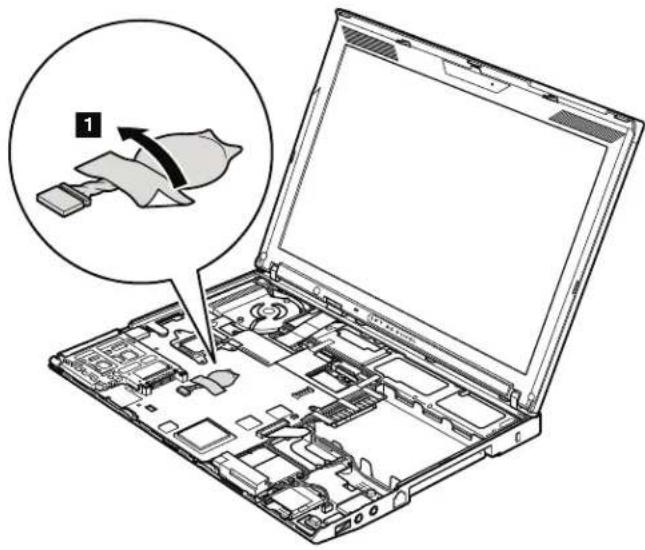
natural_image
Laptop interior showing internal circuitry and a magnified view of a device with a labeled component (no text or symbols present)Table14. Removalstepsofbackupbattery(continued)

Wheninstalling: Makesurethatthebatteryconnectorisattachedfirmly.
1070PCIExpressMiniCardforwirelessLAN/WiMAX
Foraccess,removetheseFRUsinorder:
• "1010Batterypack" onpage85
• "1040Keyboard" onpage94
"1050Palmrestorpalmrestwithfingerprintreader" on page 97
Table15. RemovalstepsofPCIExpressMiniCardforwirelessLAN/WiMAX
FullsizePCIExpressMiniCard:
Instep 1, unplugthejacksbyusingtheremovaltoolantennaRFconnector (P/N:08K7159)orpicktheconnectorswithyourfingersandgentlyunplug themindirectionofthearrow.
Note: Somemodelsmighthavetwoantennacablesinstep 1.
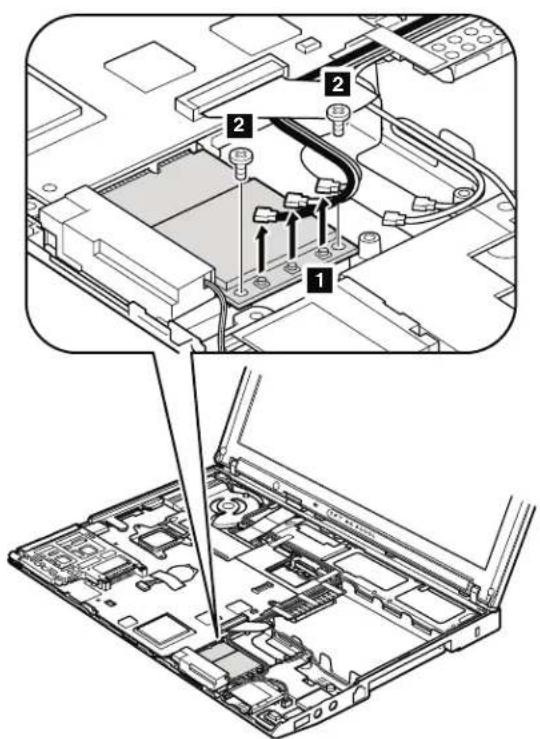
| StepScrew(quantity)ColorTorque | |||
| 2 M2×3mm,wafer-head,nylon-coated(2)Black0.181Nm | (1.85kgfcm) | ||
Table15. RemovalstepsofPCIExpressMiniCardforwirelessLAN/WiMAX(continued)

natural_image
Technical diagram of an electronic device with labeled components and wiring (no readable text or symbols)Wheninstalling:
•InmodelswithwirelessLANcardthathastwoantennaconnectors,plugthe gray cable into the jack labeled MAIN or M on the card, and the black cable into the jack labeled AUX or A. If the computer you are servicing has three cables,putthewhitecableinthecableprotectiontube.
•InmodelswithwirelessLANcardthathasthreeantennaconnector,plugthe graycable(MAIN)intothejacklabeledTR1,thewhitecable(3rd)intojack labeled RO or TR3, and the black cable (AUX) into jack labeled TR2 on the card.
Table15. RemovalstepsofPCIExpressMiniCardforwirelessLAN/WiMAX(continued)
HarfsizePCIExpressMiniCard:
Instep 1, unplugthejacksbyusingtheremovaltoolantennaRFconnector (P/N:08K7159)orpicktheconnectorswithyourfingersandgentlyunplug themindirectionofthearrow.

| StepScrew(quantity)ColorTorque | |||
| 2 | M2×3mm,wafer-head,nylon-coated(2)Black0.181Nm | (1.85kgfcm) | |

When installing: Plug the gray cable into the jack labeled MAIN on the card, and the black cable into the jack labeled AUX.
1080PCIExpressMiniCardforwirelessWAN
Foraccess,removetheseFRUsinorder:

Table16. RemovalstepsofPCIExpressMiniCardforwirelessWAN
Instep 1, unplugthejacksbyusingtheremovaltoolantennaRFconnector (P/N:08K7159)orpicktheconnectorswithyourfingersandgentlyunplug themindirectionofthearrow.

| StepScrew(quantity)ColorTorque | |||
| 3 | M2×3mm,wafer-head,nylon-coated(2)Black0.181Nm | (1.85kgfcm) | |
Table16. RemovalstepsofPCIExpressMiniCardforwirelessWAN(continued)

natural_image
Diagram of an electronic device with cables and connectors, no visible text or symbolsWhen installing: Plug the red cable into the jack labeled MAIN on the card, and the blue cable into the jack labeled AUX.
1090IntelTurboMemoryMinicardorWirelessUSBPCIExpress Half-MiniCard
Foraccess,removetheseFRUsinorder:

Table17. RemovalstepsofIntelTurboMemoryMinicardorWirelessUSBPCIExpress Half-MiniCard
Note: Step 1 is only for models with the Wireless USB PCI Express Half-Mini Card.FormodelswiththeIntel TurboMemoryMinicard,skipstep 1.
Instep 1, unplugthejacksbyusingtheremovaltoolantennaRFconnector (P/N:08K7159)orpicktheconnectorswithyourfingersandgentlyunplug themindirectionofthearrow.

| StepScrew(quantity)ColorTorque | |||
| 2 | M2×3mm,wafer-head,nylon-coated(2)Black0.181Nm | (1.85kgfcm) | |
Table17. RemovalstepsofIntelTurboMemoryMinicardorWirelessUSBPCIExpress Half-MiniCard(continued)

Wheninstalling:InmodelswiththeWirelessUSBPCIExpressHalf-MiniCard, plugtheyellowcableintothejackonthecard.
1100Keyboardbezel
Foraccess,removetheseFRUsinorder:

Table18. Removalstepsofkeyboardbezel

natural_image
Technical line drawing of a laptop chassis showing internal components and labeled parts (no text or symbols present)| StepScrew(quantity)ColorTorque | |||
| 1 M2×5mm,wafer-head,nylon-coated(1)Black0.181Nm | (1.85kgfcm) | ||
Instep 2, detachtheclaws. Thenremove the keyboard bezelinthedirection shown by arrow 3.
Attention: When you servicethekeyboard bezel, avoid any kind of rough handling.

Wheninstalling: Makesurethatalltheclawsareattachedfirmly.
1110Monauralspeakerassembly(forX200,X200s,X201s,andX201si)
Foraccess,removetheseFRUsinorder:
• "1010Batterypack" onpage85
• "1040Keyboard" onpage94
"1050Palmrestorpalmrestwithfingerprintreader" on page 97
Table19. Removalstepsofmonauralspeakerassembly(forX200,X200s,X201s,and X201si)

Wheninstalling: Makesurethatthespeakerconnectorisattachedfirmly.
1120I/Ocardassembly
Foraccess,removetheseFRUsinorder:
•"1010Batterypack"onpage85
•"1040Keyboard"onpage94
"1050Palmrestorpalmrestwithfingerprintreader"onpage97
"110Monauralspeakerassembly(forX200,X200s,X201s,andX201si)" on page 110
Table20. RemovalstepsofI/Ocardassembly
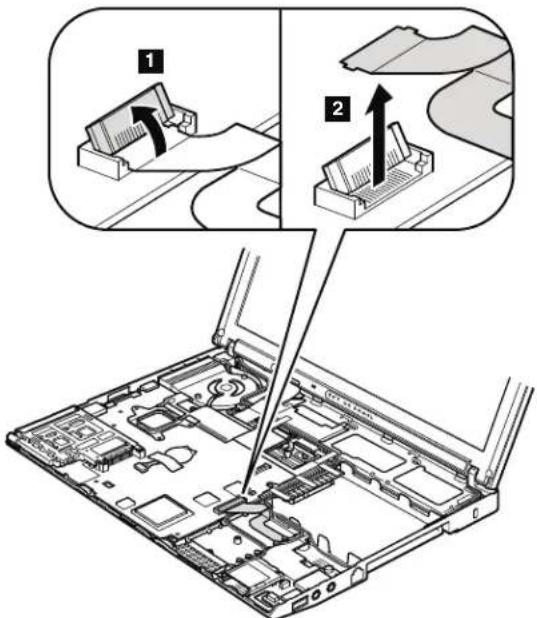
Table20. Removalstepsofl/Ocardassembly(continued)
Note: The cable is secured with a double-faced adhesiv etape.

Note: Step a is only for ThinkPad X201. For the other models, skip the step a.
| StepScrew(quantity)ColorTorque | |||
| 2 | M2×3.5mm,wafer-head,nylon-coated(1)Silver0.181Nm | (1.85kgfcm) | |
Table20. Removalstepsofl/Ocardassembly(continued)
TurntheI/Ocardover, and thendisconnect thecable from the flip-lock ZIF connector.

1130LCDassembly
Foraccess,removetheseFRUsinorder:
• "1010Batterypack" onpage85
• "1040Keyboard" onpage94
•"1050Palmrestorpalmrestwithfingerprintreader"onpage97
•"1070PCIExpressMiniCardforwirelessLAN/WiMAX"onpage102
• "1080PCIExpressMiniCardforwirelessWAN" on page 105
"1090IntelTurboMemoryMinicardorWirelessUSBPCIExpressHalf-Mini Card" onpage107
•"1100Keyboardbezel"onpage109
Table21. RemovalstepsofLCDassembly
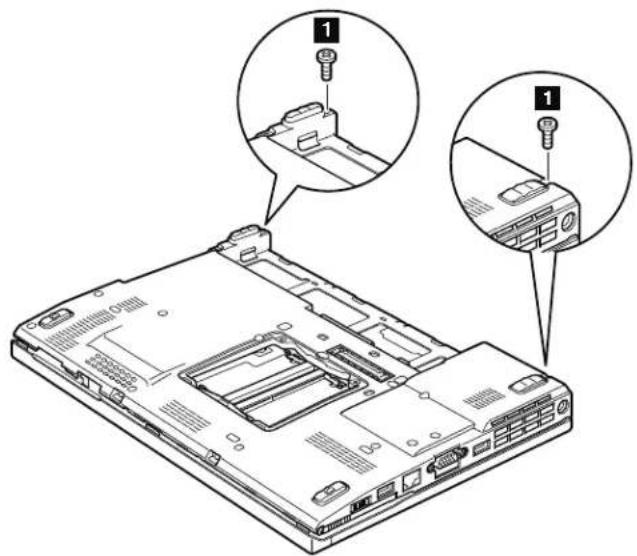
| StepScrew(quantity)ColorTorque | |||
| 1 M2×5mm,wafer-head,nylon-coated(2)Black0.181Nm | (1.85kgfcm) | ||
Table21. RemovalstepsofLCDassembly(continued)

| StepScrew(quantity)ColorTorque | |||
| 2 M2×5mm,wafer-head,nylon-coated(2)Black0.181Nm | (1.85kgfcm) | ||
Beforestep 3, stripoffthetapessecuringtheantennacables, and releasethe cablesfromthecableguidesoftheframe.
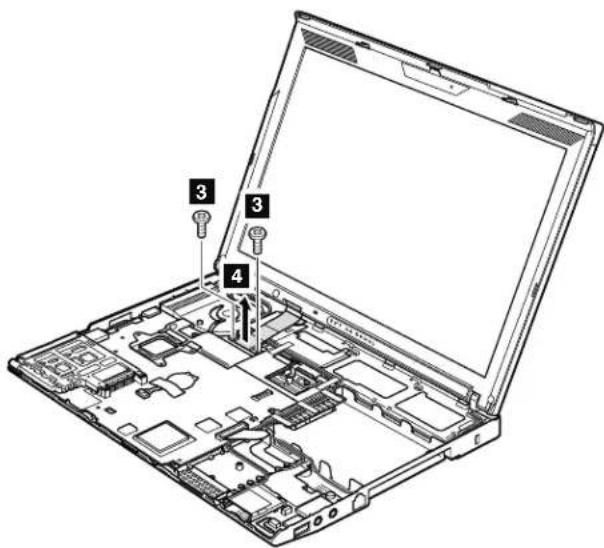
| StepScrew(quantity)ColorTorque | |||
| 3 | M2×5mm,wafer-head,nylon-coated(2)Black0.181Nm | (1.85kgfcm) | |
Table21. RemovalstepsofLCDassembly(continued)
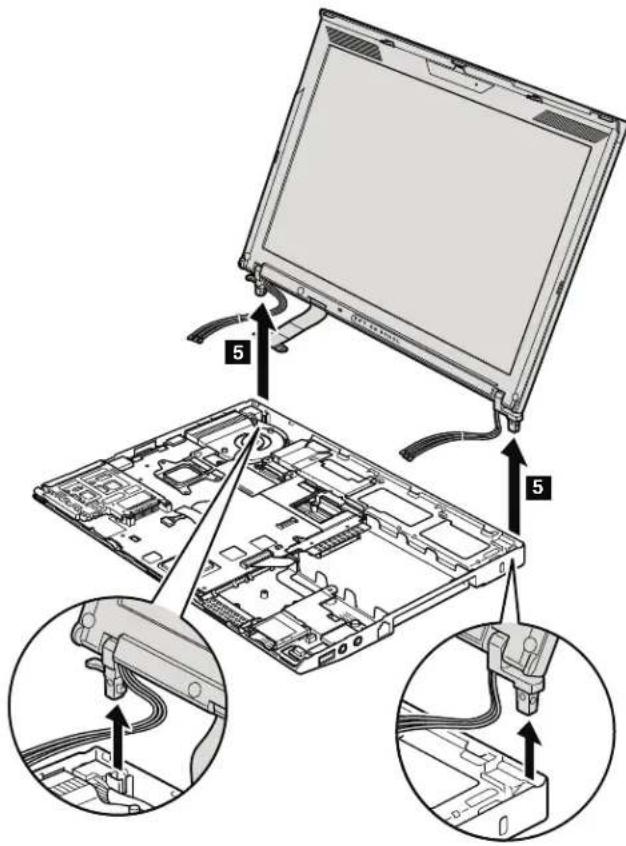
Table21. RemovalstepsofLCDassembly(continued)
Wheninstalling:
- Routetheantennacablesalongthecableguidesandsecurethemwiththe tapes.Asyouroutethecables,makesurethattheyarenotsubjectedtoany tension.Tensioncouldcausethecablestobedamagedbythecableguides, orawiretobebroken.
2.MakesurethattheLCDconnectorisattachedfirmly.
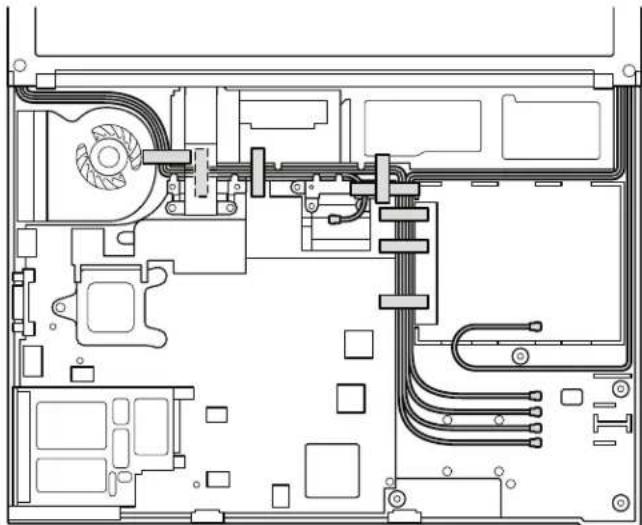
natural_image
Technical line drawing of an electronic device interior with circuitry and components (no text or symbols)1140BasecoverassemblyandstereospeakerassemblyforX201and X201i
Foraccess,removetheseFRUsinorder:
•"1010Batterypack"onpage85
"1020Harddiskdrive(HDD)cover,HDD,andHDDrubberrailsorsolidstate drive(SSD)andstorageconverter"onpage87
•"1030DIMM"onpage91
•"1040Keyboard"onpage94
•"1050Palmrestorpalmrestwithfingerprintreader"onpage97
• "1060Backupbattery" onpage100
•"1070PCIExpressMiniCardforwirelessLAN/WiMAX"onpage102
• "1080PCIExpressMiniCardforwirelessWAN" onpage105
"1090IntelTurboMemoryMinicardorWirelessUSBPCIExpressHalf-Mini
Card"onpage107
•"1100Keyboardbezel"onpage109
"110Monauralspeakerassembly(forX200,X200s,X201s,andX201si)"onpage
110
•"11201/Ocardassembly"onpage111
• "1130LCDassembly" onpage114
Table22. RemovalstepsofbasecoverassemblyforThinkPadX200,X201,andX201i
ThinkPadX200,X201,andX201i:
Removethetopshieldingassemblyatfirst.

| StepScrew(quantity)ColorTorque | |||
| 1 M2×3mm,wafer-head,nylon-coated(1)Black0.181Nm | (1.85kgfcm) | ||
Table22. RemovalstepsofbasecoverassemblyforThinkPadX200, X201, and X201i(continued)
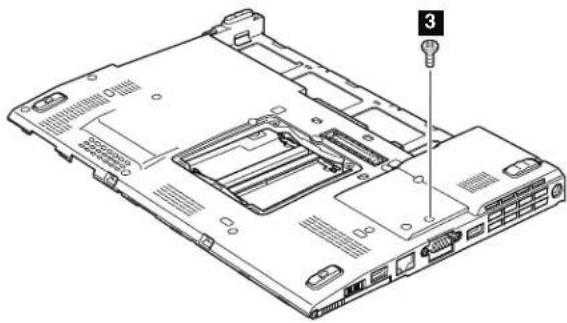
| StepScrew(quantity)ColorTorque | |||
| 3 | M2×3.5mm,wafer-head,nylon-coated(1)Black0.181 | Nm | (1.85kgfcm) |

Note:Step 4a isonlyforX201andX201i.
| StepScrew(quantity)ColorTorque | |||
| 4 | M2×3.5mm,wafer-head,nylon-coated(3)Silver0.181Nm | (1.85kgfcm) | |
| 4a | M2×3.5mm,wafer-head,nylon-coated(1)Silver0.181Nm | (1.85kgfcm) | |
Table22. RemovalstepsofbasecoverassemblyforThinkPadX200, X201, and X201i(continued)
In step 5 and 6, remove the system board, the DC-in connector, and the fan assembly together from the basecover assembly.
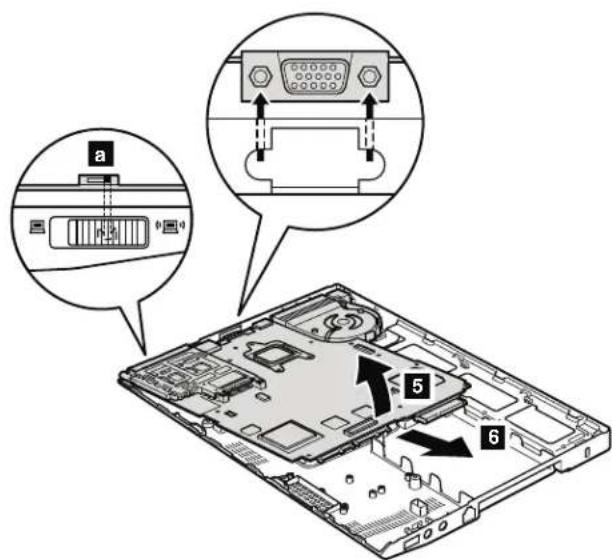
When installing: Check the position of the wireless switch a, and firmly fit thesystemboardintothebasecoverassembly.
Note: Following step is only for ThinkPadX201 and X201i.
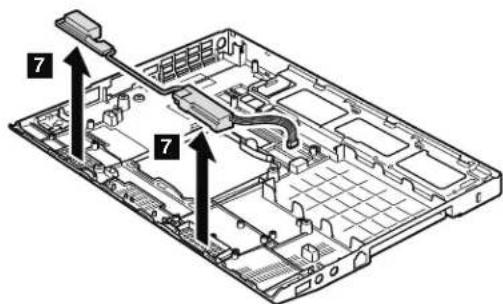
Cablerouting: Routethespeakercableasshowninthisfigure.

natural_image
Technical schematic of a mechanical or electrical component assembly (no visible text or labels)Table23. RemovalstepsofbasecoverassemblyforThinkPadX200s, X200si, and X201s
ThinkPadX200s,X200siandX201s:
Removethetopshieldingassemblyatfirst.

| StepScrew(quantity)ColorTorque | |||
| 1 M2×3mm,wafer-head,nylon-coated(1)Black0.181Nm | (1.85kgfcm) | ||

natural_image
Laptop back panel diagram showing internal components and a numbered component (no text or labels)| StepScrew(quantity)ColorTorque | |||
| 3 | M2×3.5mm,wafer-head,nylon-coated(1)Black0.181 | Nm | (1.85kgfcm) |
Table23. RemovalstepsofbasecoverassemblyforThinkPadX200s, X200si, and X201s(continued)
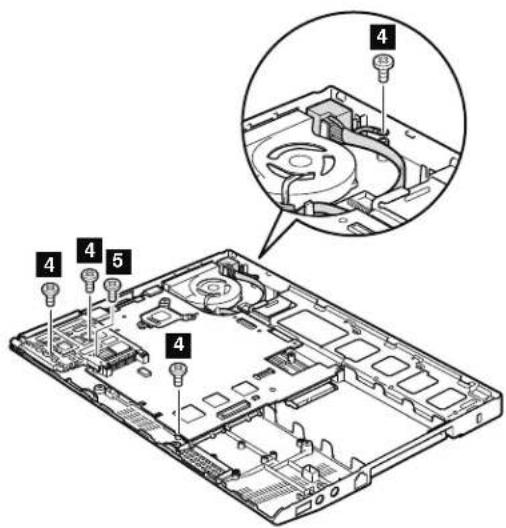
| StepScrew(quantity)ColorTorque | |||
| 4 | M2×3.5mm,wafer-head,nylon-coated(4)Silver0.181Nm | (1.85kgfcm) | |
| 5 | M2×3mm,large-head,nylon-coated(1)Silver0.181Nm | (1.85kgfcm) | |
In step 6 and 7, remove the system board, the DC-in connector, and the fan assembly together from the basecover assembly.
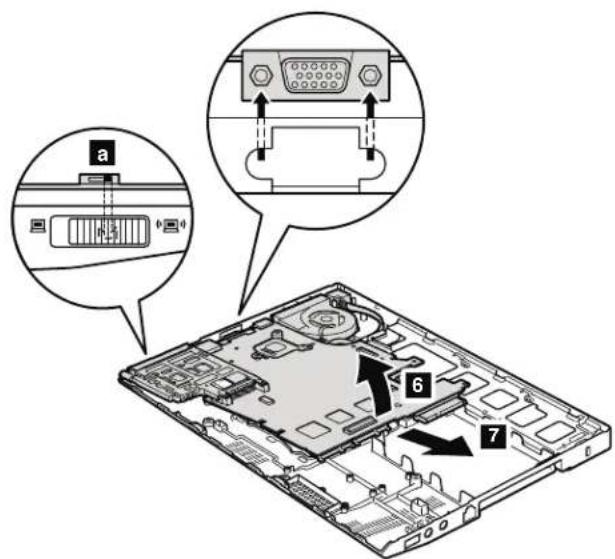
When installing: Attach the wireless radio switch as shown in the figure a.
Applyinglabelstothebasecover:
ThenewbasecoverFRUisshippedwithakitcontaininglabelsofseveralkinds.
Whenyoureplacethebasecover,youneedtoapplythefollowinglabels:
1 Productlabel
2 Homologationlabel
2a Non-mercurylabel
Note: If the computery you are servicing is an LED-backlight LCD model, you need top a past this label so that then notice former mercury discovered.
Followinglabelsneedtobepeeledofffromtheoldbasecover,andneedtobe putonthenewbasecover.
3 Windowslicenselabel(COA)
4 Serialnumberlabel
5 MACaddresslabel
6 IMEIlabel
7 FCC-IDlabelforWirelessLAN
8 FCC-IDlabelforWirelessWAN
9 Chinamodemlabel
10 SIRIMlabel
For some models, you need to apply one or two FCC labels, 7 or 8. Check theoldbasecover;ifithasoneortwoFCClabels,findduplicatesoftheminthe labelkitandapplythemtothenewbasecover.
Forthelocationofeachlabel, refertothefollowingfigure:

1150Systemboard, DC-inconnector, fan, and ExpressCardslot assembly
Note: When you replace any of the following system boards, besure that then new one has the same ROM size as the original alone.
60Y3787
SystemboardwithIntel Core TM 2DuomobileprocessorP8600(2.4GHz), non-AMT,TPM,8-MBROM
60Y3839
SystemboardwithIntelCore2DuomobileprocessorP8600(2.4GHz), non-AMT, TPM, 4-MBROM
60Y3790
SystemboardwithIntelCore2DuomobileprocessorP8600(2.4GHz), non-AMT,non-TPM,8-MBROM
60Y3840
SystemboardwithIntelCore2DuomobileprocessorP8600(2.4GHz), non-AMT,non-TPM,4-MBROM
- Toidentifythesystemboardoriginallyinstalledinyourcomputer,gotoPEWat thefollowingwebsite:http://www.lenovo.com/support/site.wss/ document.do?lndocid=LOOK-WARNTY
SelectWarrantyLookup.Inputthemachinetypeandtheserialnumber.Usethe systemboardlistedonPEW.
- BusinessPartnersusingEclaimcanaccessPEWatthefollowingwebsite: https://wca.eclaim.com SelectEntitlementLookup.InputtheLocID,themachinetype,andtheserial number.UsethesystemboardlistedonPEW.
Importantnoticesforhandlingthesystemboard:
Whenhandlingthesystemboard,bearthefollowinginmind.
- Thesystemboardhasanaccelerometer,whichcanbebrokenbyapplying severalthousandsofG-forces.
Note: Droppingasystemboard from a height of slittle as 6 inch, chesso that it falls flatonahard bench cans subject the accelerometer toasmuch as 6,000 G's of shock.
- Becarefulnottodropthesystemboardonabenchtopthathasahard surface,suchasmetal,wood,orcomposite.
- Ifasystemboardisdropped, you must test it, using PC-Doctor for DOS, to make sure that the HDD Active Protection still functions (see below).
Note: If the test shows that HDDActiveProtection is not functioning, besure to document the drop in any reject report, and replace the system board.
- Avoidroughhandlingofanykind.
- Ateverypointintheprocess,besurenottodroporstackthesystemboard.
- If youputasystemboarddown, besuretoputitonlyonapaddedsurface suchasanESDmatorconductivecorrugatedmaterial.
Afterreplacingthesystemboard,runPC-DoctorforDOStomakesurethat HDDActiveProtectionstillfunctions.Theprocedureisasfollows:
-
Placethecomputeronahorizontalsurface.
-
Run Diagnostics --> ThinkPad Devices --> HDD Active Protection Test.
Attention: Donotapplyphysicalshocktothecomputerwhilethetestis running.
Foraccess,removetheseFRUsinorder:
•"1010Batterypack"onpage85
"1020Harddiskdrive(HDD)cover,HDD,andHDDrubberrailsorsolidstate drive(SSD)andstorageconverter"onpage87
•"1030DIMM"onpage91
•"1040Keyboard"onpage94
•"1050Palmrestorpalmrestwithfingerprintreader"onpage97
•"1060Backupbattery"onpage100
•"1070PCIExpressMiniCardforwirelessLAN/WiMAX"onpage102
•"1080PCIExpressMiniCardforwirelessWAN"onpage105
•"1090IntelTurboMemoryMinicardorWirelessUSBPCIExpressHalf-Mini Card"onpage107
•"1100Keyboardbezel"onpage109
"110Monauralspeakerassembly(forX200,X200s,X201s,andX201si)"onpage 110
•"1120I/Ocardassembly"onpage111
•"1130LCDassembly"onpage114
- "140BasecoverassemblyandstereospeakerassemblyforX201andX201i" on page118
Table24. Removalstepsofsystemboard, DC-inconnector, fan, and ExpressCardslot assembly for ThinkPadX200, X201, and X201i
Followingcomponentssolderedonthesystemboardareextremelysensitive. Whenyouservicethesystemboard, avoidanykindofroughhandling.
ThinkPadX200:
a AccelerometerchipfortheHDDActiveProtectionSystem
b ICH(I/OControllerHub)
c CPU
d MCH(MemoryControllerHub)
Top
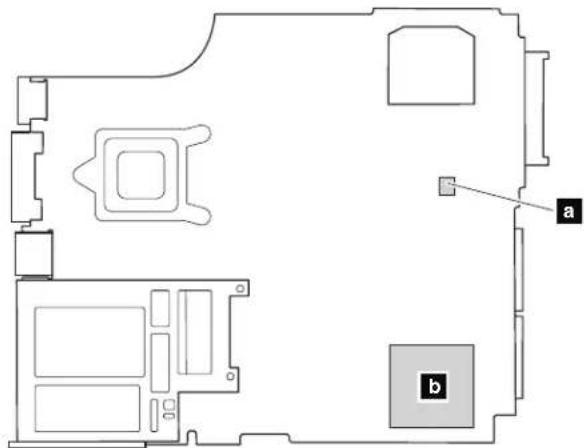
Bottom
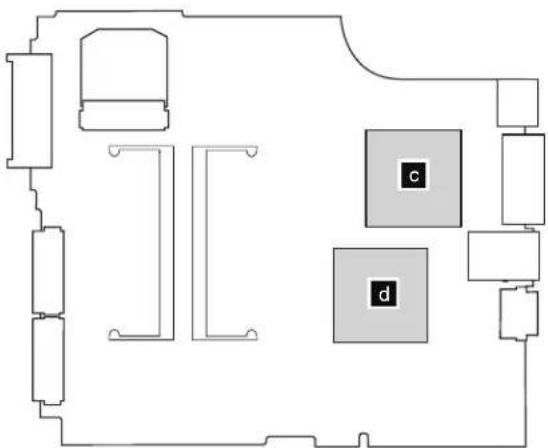
Table24. Removalstepsofsystemboard, DC-inconnector, fan, and ExpressCardslot assembly for ThinkPadX200, X201, and X201i (continued)
ThinkPadX201andX201i:

CPU

PCH(PlatformControllerHub)

AccelerometerchipfortheHDDActiveProtectionSystem
Bottom

flowchart
graph TD
    A["Room 1"] --> B["Room 2"]
    B --> C["Room 3"]
    C --> D["Room 4"]
    D --> E["Room 5"]
    E --> F["Room 6"]
    F --> G["Room 7"]
    G --> H["Room 8"]
    H --> I["Room 9"]
    I --> J["Room 10"]
    J --> K["Room 11"]
    K --> L["Room 12"]
    L --> M["Room 13"]
    M --> N["Room 14"]
    N --> O["Room 15"]
    O --> P["Room 16"]
    P --> Q["Room 17"]
    Q --> R["Room 18"]
    R --> S["Room 19"]
    S --> T["Room 20"]
    T --> U["Room 21"]
    U --> V["Room 22"]
    V --> W["Room 23"]
    W --> X["Room 24"]
    X --> Y["Room 25"]
    Y --> Z["Room 26"]
    Z --> AA["Room 27"]
    AA --> AB["Room 28"]
    AB --> AC["Room 29"]
    AC --> AD["Room 30"]
    AD --> AE["Room 31"]
    AE --> AF["Room 32"]
    AF --> AG["Room 33"]
    AG --> AH["Room 34"]
    AH --> AI["Room 35"]
    AI --> AJ["Room 36"]
    AJ --> AK["Room 37"]
    AK --> AL["Room 38"]
    AL --> AM["Room 39"]
    AM --> AN["Room 40"]
    AN --> AO["Room 41"]
    AO --> AP["Room 42"]
    AP --> AQ["Room 43"]
    AQ --> AR["Room 44"]
    AR --> AS["Room 45"]
    AS --> AT["Room 46"]
    AT --> AU["Room 47"]
    AU --> AV["Room 48"]
    AV --> AW["Room 49"]
    AW --> AX["Room 50"]
Note: The DC-in connector and the fan assembly are attached to the underside of the system board.

Note:Step 1 isonlyforThinkPadX200.
| StepScrew(quantity)ColorTorque | |||
| 1 M2×3.5mm,wafer-head,nylon-coated(1)Silver0.181Nm | Nm | (1.85kgfcm) | |
Table24. Removalstepsofsystemboard, DC-inconnector, fan, and ExpressCardslot assembly for ThinkPadX200, X201, and X201i (continued)
Turnthesystemboardover, and thendisconnecttheDC-inconnectorand the fanconnectorfromthesystemboard.
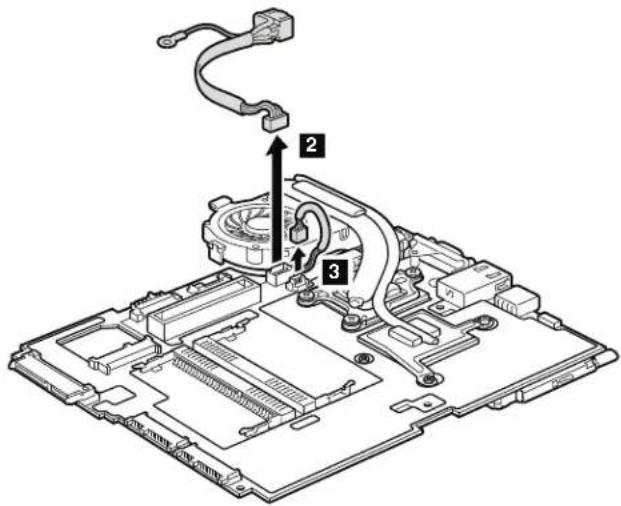
Wheninstalling: MakesurethattheDC-inconnectorandthefanconnectorare attachedtothesystemboardfirmly.

| StepScrew(quantity)ColorTorque | |||
| 5 | M2×3.5mm,flat-head,nylon-coated(1)Silver0.181Nm | (1.85kgfcm) | |
Table24. Removalstepsofsystemboard, DC-inconnector, fan, and Express Cardslot assembly for ThinkPadX200, X201, and X201i (continued)
Wheninstalling:
• Before you attach the fan assembly to the computer, apply thermal grease, at an amount of 0.2 grams, on the part marked a as in the following figure. Either to much to less application of grease can cause thermal problem due to imperfect contact with a component. You need to peel the thin film off from the rubber b.
ForThinkPadX200:

ForThinkPadX201andX201i:

•Makesurethatthefanconnectorisattachedfirmly.
Table24. Removalstepsofsystemboard, DC-inconnector, fan, and ExpressCardslot assembly for ThinkPadX200, X201, and X201i (continued)
Note: The Express Cardslotassembly is attached to the system board.
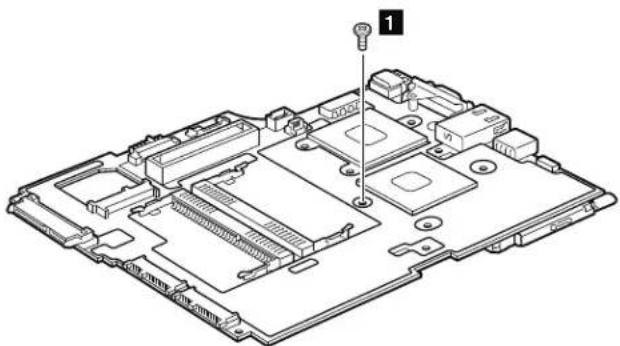
natural_image
Exploded view diagram of a computer motherboard showing internal components and a labeled component (no text or symbols present)| StepScrew(quantity)ColorTorque | |||
| 1 | M2×3.5mm,flat-head,nylon-coated(1)Silver0.181Nm | (1.85kgfcm) | |
Turnthesystemboardover, and then remove the Express Cardslot assembly from the system board.

Table25. Removalstepsofsystemboard, DC-inconnector, fan, and ExpressCardslot assembly for ThinkPadX200sandX201s
ThinkPadX200s:
Followingcomponentssolderedonthesystemboardareextremelysensitive. Whenyouservicethesystemboard, avoidanykindofroughhandling.
a ICH(I/OControllerHub)
b CPU
c MCH(MemoryControllerHub)
d AccelerometerchipfortheHDDActiveProtectionSystem
Top

natural_image
Pure architectural floor plan outline without any text, numbers, or symbolsBottom

Table25. Removalstepsofsystemboard, DC-inconnector, fan, and ExpressCardslot assembly for ThinkPadX200sandX201s (continued)
ThinkPadX201s:
a CPU
b PCH(PlatformControllerHub)
c AccelerometerchipfortheHDDActiveProtectionSystem
Bottom

flowchart
graph TD
    A["Room 1"] --> B["Room 2"]
    B --> C["Room 3"]
    C --> D["Room 4"]
    D --> E["Room 5"]
    E --> F["Room 6"]
    F --> G["Room 7"]
    G --> H["Room 8"]
    H --> I["Room 9"]
    I --> J["Room 10"]
    J --> K["Room 11"]
    K --> L["Room 12"]
    L --> M["Room 13"]
    M --> N["Room 14"]
    N --> O["Room 15"]
    O --> P["Room 16"]
    P --> Q["Room 17"]
    Q --> R["Room 18"]
    R --> S["Room 19"]
    S --> T["Room 20"]
    T --> U["Room 21"]
    U --> V["Room 22"]
    V --> W["Room 23"]
    W --> X["Room 24"]
    X --> Y["Room 25"]
    Y --> Z["Room 26"]
    Z --> AA["Room 27"]
    AA --> AB["Room 28"]
    AB --> AC["Room 29"]
    AC --> AD["Room 30"]
    AD --> AE["Room 31"]
    AE --> AF["Room 32"]
    AF --> AG["Room 33"]
    AG --> AH["Room 34"]
    AH --> AI["Room 35"]
    AI --> AJ["Room 36"]
    AJ --> AK["Room 37"]
    AK --> AL["Room 38"]
    AL --> AM["Room 39"]
    AM --> AN["Room 40"]
    AN --> AO["Room 41"]
    AO --> AP["Room 42"]
    AP --> AQ["Room 43"]
    AQ --> AR["Room 44"]
    AR --> AS["Room 45"]
    AS --> AT["Room 46"]
    AT --> AU["Room 47"]
    AU --> AV["Room 48"]
    AV --> AW["Room 49"]
    AW --> AX["Room 50"]
Table25. Removalstepsofsystemboard, DC-inconnector, fan, and Express Cardslot assembly for ThinkPadX200sandX201s (continued)

Note:Step 1 inonlyforThinkPadX201s.
| StepScrew(quantity)ColorTorque | |||
| 1 M2×3.5mm,wafer-head,nylon-coated(1)Silver0.181Nm | (1.85kgfcm) | ||
Note: The DC-in connector and the fan assembly are attached to the underside of the system board.

Wheninstalling: MakesurethattheDC-inconnectorandthefanconnectorare attachedtothesystemboardfirmly.
Table25. Removalstepsofsystemboard, DC-inconnector, fan, and ExpressCardslot assembly for ThinkPadX200sandX201s (continued)

| StepScrew(quantity)ColorTorque | |||
| 7 M2×3.5mm,wafer-head,nylon-coated(1)Silver0.181Nm | (1.85kgfcm) | ||
Table25. Removalstepsofsystemboard, DC-inconnector, fan, and Express Cardslot assembly for ThinkPadX200sandX201s (continued)
Wheninstalling:
• Before you attach the fan assembly to the computer, apply thermal grease, at an amount of 0.2 grams, on the part marked a as in the following figure. Either to much to less application of grease can cause thermal problem due to imperfect contact with a component. You need to peel the thin film off from the rubber b.
ForThinkPadX200s:

ForThinkPadX201s:

•Makesurethatthefanconnectorisattachedfirmly.
Table25. Removalstepsofsystemboard, DC-inconnector, fan, and ExpressCardslot assembly for ThinkPadX200sandX201s (continued)
Note: The Express Cardslotassembly is attached to the system board.
ForThinkPadX200s:

natural_image
Isometric technical diagram of a computer motherboard with labeled component (no text or symbols present)ForThinkPadX201s:
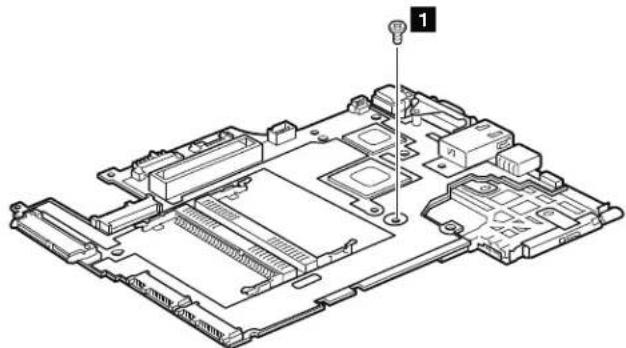
natural_image
Technical line drawing of an electronic circuit board with labeled component (no text or symbols present)| StepScrew(quantity)ColorTorque | |||
| 1 | M2×3.5mm,wafer-head,nylon-coated(1)Silver0.181Nm | (1.85kgfcm) | |
Table25. Removalstepsofsystemboard, DC-inconnector, fan, and Express Cardslot assembly for ThinkPadX200sandX201s (continued)
Turnthesystemboardover, and then remove the Express Cards slot assembly from the system board.
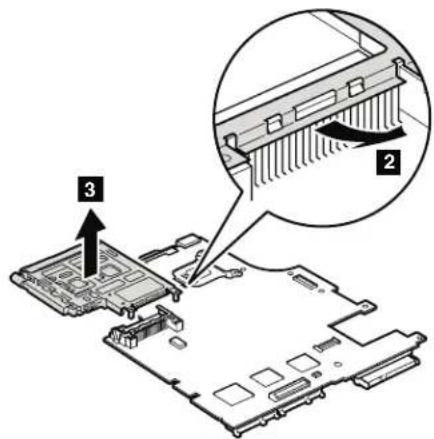
2010LCDfrontbezel
Foraccess,removethisFRU:
• "1010Batterypack" onpage85
Table26. RemovalstepsofLCDfrontbezelfor12.1-in.WXGALCDmodel
12.1-in.WXGALCDmodel:

| StepScrewcapScrew | (quantity)ColorTorque | |||
| 1 | ○ | M2.5×4mm,wafer-head,nylon-coated(3) | Black0.392 | Nm(4kgfcm) |
Instep 2, detachtheclaws. Thenremove the LCDfrontbezel.

Wheninstalling: Makesurethatalltheclawsareattachedfirmly.
Table27. RemovalstepsofLCDfrontbezelfor12.1-in.WXGA+LCDmodel
12.1-in.WXGA+LCDmodel:
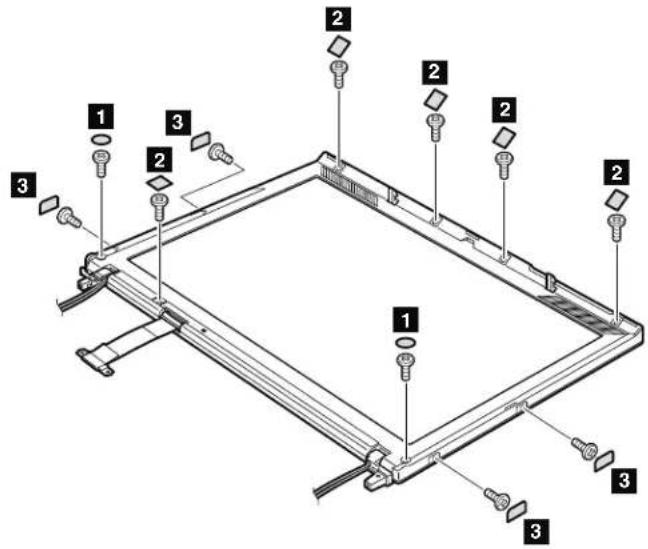
| StepScrewcapScrew(quantity)ColorTorque | ||||
| 1 | ○ | M2.5×4mm,wafer-head,nylon-coated(2) | Black0.392Nm(4kgfcm) | |
| 2 | □ | M2.5×4mm,wafer-head,nylon-coated(5) | Black0.392Nm(4kgfcm) | |
| 3 | □ | M2×3.5mm,wafer-head,nylon-coated(4) | Silver0.181Nm(1.85kgfcm) | |
Table27. RemovalstepsofLCDfrontbezelfor12.1-in.WXGA+LCDmodel(continued)
In step 4 and 5, detach the claws. Then remove the LCD front bezel.
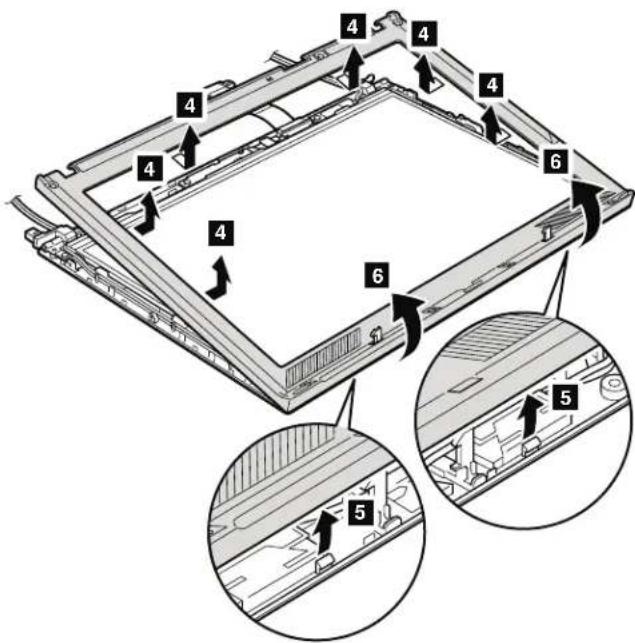
Wheninstalling: Makesurethatalltheclawsareattachedfirmly.
2020InvertercardorLEDboard
Foraccess,removetheseFRUsinorder:
• "1010Batterypack" onpage85
•"2010LCDfrontbezel"onpage138
Table28. RemovalstepsofinvertercardorLEDboard
ForThinkPadX200,X200s,andX200si:
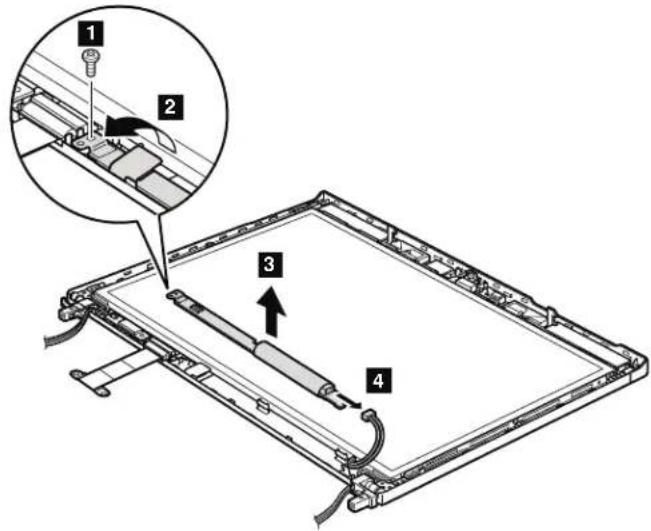
| StepScrew(quantity)ColorTorque | |||
| 1 M2×3.5mm,wafer-head,nylon-coated(1)Silver0.181Nm | Nm | (1.85kgfcm) | |
When installing: Make sure that the connector 2 and 4 are attached firmly.
Cabling: When replacing the invertercard or the LED board, route the connector cable as in this figure.

natural_image
Technical line drawing of a mechanical assembly with wires and connectors (no text or symbols)Table28. RemovalstepsofinvertercardorLEDboard(continued)
ForThinkPadX201,X201i,andX201s:

| StepScrew(quantity)ColorTorque | |||
| 1 M2×3.5mm,wafer-head,nylon-coated(1)Silver0.181Nm | (1.85kgfcm) | ||
Wheninstalling: Makesurethattheconnector 2 isattached firmly.
2030Bluetoothdaughtercard(BDC-2.1)
Foraccess,removetheseFRUsinorder:
• "1010Batterypack" onpage85
•"2010LCDfrontbezel"onpage138
Table29. RemovalstepsofBluetoothdaughtercard

natural_image
Technical line drawing of a mechanical assembly with a magnified inset showing a component detail (no text or symbols)Wheninstalling: Makesurethattheconnector 1 isattachedfirmly.
2040Integratedcamera
Foraccess,removetheseFRUsinorder:
• "1010Batterypack" onpage85
•"2010LCDfrontbezel"onpage138
Table30. Removalstepsof Integrated camera
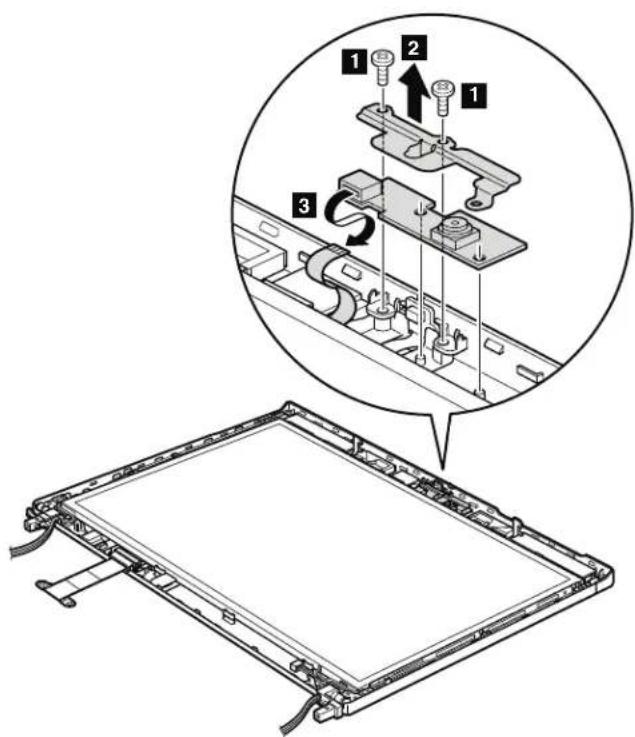
| StepScrew(quantity)ColorTorque | |||
| 1 | M2×3.5mm,wafer-head,nylon-coated(2)Silver0.181Nm | (1.85kgfcm) | |
2050LCDpanel,LCDbrackets,andLCDcable
Foraccess,removetheseFRUsinorder:
•"1010Batterypack"onpage85
•"1040Keyboard"onpage94
•"1050Palmrestorpalmrestwithfingerprintreader"onpage97
•"1070PCIExpressMiniCardforwirelessLAN/WiMAX"onpage102
"1080PCIExpressMiniCardforwirelessWAN"onpage105
"1090IntelTurboMemoryMinicardorWirelessUSBPCIExpressHalf-Mini Card" onpage107
•"1100Keyboardbezel"onpage109
•"1130LCDassembly"onpage114
•"2010LCDfrontbezel"onpage138
•“2020InvertercardorLEDboard”onpage141
•"2030Bluetoothdaughtercard(BDC-2.1)"onpage143
•"2040Integratedcamera"onpage144
Table31. RemovalstepsofLCDpanel,LCDbrackets,andLCDcablefor12.1-in.WXGA LCDmodel
12.1-in.WXGALCDmodel:

| StepScrew(quantity)ColorTorque | |||
| 1 | M2.5×4mm,wafer-head,nylon-coated(2)Black0.392Nm | Nm | (4kgfcm) |
| 2 | M2×3.5mm,wafer-head,nylon-coated(4)Silver0.181Nm | Nm | (1.85kgfcm) |
Table31. RemovalstepsofLCDpanel,LCDbrackets,andLCDcablefor12.1-in.WXGA LCDmodel(continued)
Note: Step 3 is only for models without the integrated camera. For models with the integrated camera, skipstep 3.

| StepScrew(quantity)ColorTorque | |||
| 3 | M2×3.5mm,wafer-head,nylon-coated(2)Silver0.181Nm | (1.85kgfcm) | |
Instep 5, releasetheantennacablesfromthecableguides, and then remove theLCDpanel.

Table31. RemovalstepsofLCDpanel,LCDbrackets,andLCDcablefor12.1-in.WXGA LCDmodel(continued)

RemovetheLCDbracket a.

| StepScrew(quantity)ColorTorque | |||
| 7 M2×2mm,wafer-head,nylon-coated(4)Black0.181Nm | (1.85kgfcm) | ||
Table31. RemovalstepsofLCDpanel,LCDbrackets,andLCDcablefor12.1-in.WXGA LCDmodel(continued)
TurntheLCDpanelover, and then remove the LCD cable b from the LCD panel.

Wheninstalling: MakesurethattheLCDcableconnectorisattachedfirmly.
Table32. RemovalstepsofLCDpanel,LCDbrackets,andLCDcablefor12.1-in.WXGA+ LCDmodel
12.1-in.WXGA+LCDmodel:

| StepScrew(quantity)ColorTorque | |||
| 1 | M2x2mm,wafer-head,nylon-coated(1)Silver0.181Nm | (1.85kgfcm) | |

Table32. RemovalstepsofLCDpanel, LCDbrackets, and LCDcablefor12.1-in.WXGA+ LCDmodel(continued)
TurntheLCDpanelover, and then remove the LCD cable c from the LCD panel.

Wheninstalling: MakesurethattheLCDcableconnectorisattachedfirmly.
2060Hingesandhingebrackets
Foraccess,removetheseFRUsinorder:
•"1010Batterypack"onpage85
•"1040Keyboard"onpage94
"1050Palmrestorpalmrestwithfingerprintreader"onpage97
"1070PCIExpressMiniCardforwirelessLAN/WiMAX"onpage102
•"1080PCIExpressMiniCardforwirelessWAN"onpage105
1090IntelTurboMemoryMinicardorWirelessUSBPCIExpressHalf-Mini Card"onpage107
•"1100Keyboardbezel"onpage109
•"1130LCDassembly"onpage114
•"2010LCDfrontbezel"onpage138
•"2020InvertercardorLEDboard"onpage141
•"2030Bluetoothdaughtercard(BDC-2.1)"onpage143
•“2040Integratedcamera”onpage144
• "2050LCDpanel,LCDbrackets,andLCDcable" onpage145
Table33. Removalstepsofhingesfor12.1-in.WXGALCDmodel
12.1-in.WXGALCDmodel:
Removethehinges.
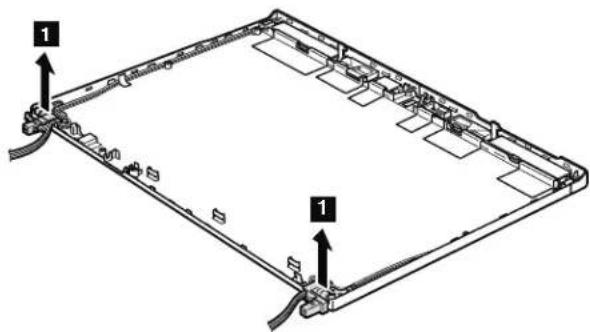
Table34. Removalstepsofhingesandhingebracketsfor12.1-in.WXGA+LCDmodel
12.1-in.WXGA+LCDmodel:
Instep 1, releasetheantennacablesfromthecableguides.

Table34. Removalstepsofhingesandhingebracketsfor12.1-in.WXGA+LCD model(continued)
Removethehinges a andthehingebrackets b.

| StepScrew(quantity)ColorTorque | |||
| 2 M2 | 5x4mm,wafer-head,nylon-coated(2)Black0.392 | Nm | (4kgfcm) |
2070LCDrearcoverandwirelessantennacables
Foraccess,removetheseFRUsinorder:
• "1010Batterypack" onpage85
• "1040Keyboard" onpage94
•"1050Palmrestorpalmrestwithfingerprintreader"onpage97
•"1070PCIExpressMiniCardforwirelessLAN/WiMAX"onpage102
•"1080PCIExpressMiniCardforwirelessWAN"onpage105
"1090IntelTurboMemoryMinicardorWirelessUSBPCIExpressHalf-Mini Card" onpage107
•"1100Keyboardbezel"onpage109
•"1130LCDassembly"onpage114
•"2010LCDfrontbezel"onpage138
• "2020InvertercardorLEDboard" onpage141
• "2030Bluetoothdaughtercard(BDC-2.1)"onpage143
• "2040Integratedcamera" on page 144
•"2050LCDpanel,LCDbrackets,andLCDcable"onpage145
•"2060Hingesandhingebrackets"onpage151
Table35. RemovalstepsofLCDrearcoverandwirelessantennacablesfor12.1-in.WXGA LCDmodel
12.1-in.WXGALCDmodel:
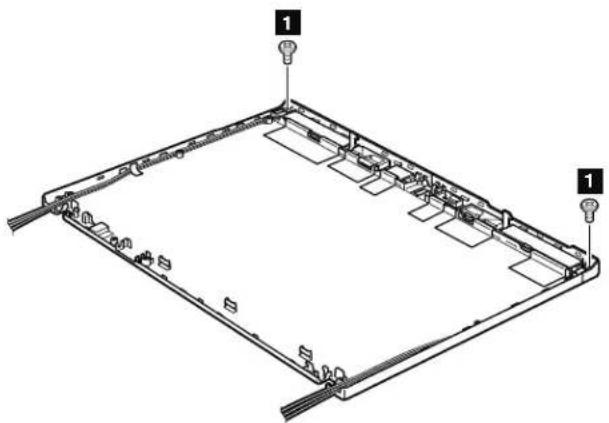
natural_image
Technical line drawing of a rectangular frame with mounting holes and internal compartments (no text or symbols)| StepScrew(quantity)ColorTorque | |||
| 1 M2×3.5mm,wafer-head,nylon-coated(2)Silver0.181Nm | (1.85kgfcm) | ||
Table35. RemovalstepsofLCDrearcoverandwirelessantennacablesfor12.1-in.WXGA LCDmodel(continued)
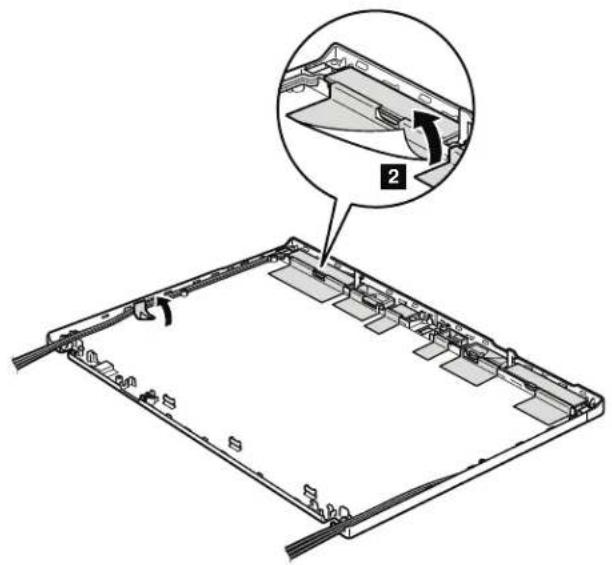
Instep 3, releasetheantennacablesfromthecableguidesoftherearcover.

Table35. RemovalstepsofLCDrearcoverandwirelessantennacablesfor12.1-in.WXGA LCDmodel(continued)

Note: Wirelessantennasaresecured with double-faced adhesivetapes.
Wheninstalling: Whenyouattachetheantennacables, doasfollows.

Table35. RemovalstepsofLCDrearcoverandwirelessantennacablesfor12.1-in.WXGA LCDmodel(continued)
Cablerouting:Placetheantennaassemblyasshowninthisfigure.
a WirelessWANantenna,AUX(blue)
b WirelessLANantenna,AUX(black)
c WirelessUSBantenna(yellow)
d MIMOantenna(white)
e WirelessLANantenna,MAIN(gray)
f WirelessWANantenna,MAIN(red)

Attention: As your out the antennacables, makes sure that they are not subjected to any tension. Tension could cause the cable stobe damaged by the cable guides, or a wiretobebroken.
Table36. RemovalstepsofLCDrearcoverandwirelessantennacablesfor12.1-in.WXGA+ LCDmodel
12.1-in.WXGA+LCDmodel:
Instep 1 , releasetheantennacablesfromthecableguidesoftherearcover.

Note: Wirelessantennasaresecured with double-faced adhesivetapes.
Table36. RemovalstepsofLCDrearcoverandwirelessantennacablesfor12.1-in.WXGA+ LCDmodel(continued)
Cablerouting:Placetheantennaassemblyasshowninthisfigure.
a WirelessLANantenna,AUX(black)
b WirelessUSBantenna(yellow)
c MIMOantenna(white)
d WirelessLANantenna,MAIN(gray)

Attention: As your out the antennacables, makes sure that they are not subjected to any tension. Tension could cause the cable stobe damaged by the cable guides, or a wiretobebroken.
Locations
ThischapterpresentsthelocationofThinkPadX200,X200s,X200si,X201,X201i, andX201sfeaturesandhardware.
Frontview
1 ThinkLight
2 Integratedcamera(forsomemodels)
3 Statusindicators
Note: For the description of each indicator, see "Status indicators" on page
71
4 Powerswitch
5 Securitykeyhole
6 Harddiskdrive(HDD)orsolidstatedrive(SSD)
7 RJ-11(modem)connector
8 Microphonejack
9 Stereoheadphonejack
10 Universalserialbus(USB)connector
11 TrackPointpointingstick
12 Fingerprintreader(forsomemodels)
13 TrackPointbuttons
14 Touchpadbuttons(forsomemodels)
15 Touchpad(forsomemodels)
16 UltraNav (forsomemodels)
17 Volumecontrolbuttons
18 ThinkVantagebutton
19 Built-inmicrophone

Rearview
1 ExpressCardslot
2 Wirelessradioswitch
3 UniversalSerialBus(USB)connector
4 RJ-45(Ethernet)connector
5 Externalmonitorconnector
6 Universalserialbus(USB)connector
7 ACpowerconnector
8 Bluetoothantenna
(forsomemodels)
9 Statusindicators
Note: For the description of each indicator, see "Status indicators" on page
71

Bottomview
1 Batterypack
2 Batterypacklatch
3 Dockingconnector
4 DIMMslots
5 LCDcoverlatch
6 Built-inspeaker
7 5-in-1MediaCardReaderor3-in-1MediaCardReaderslot
8 Harddiskdrive(HDD)orsolidstatedrive(SSD)
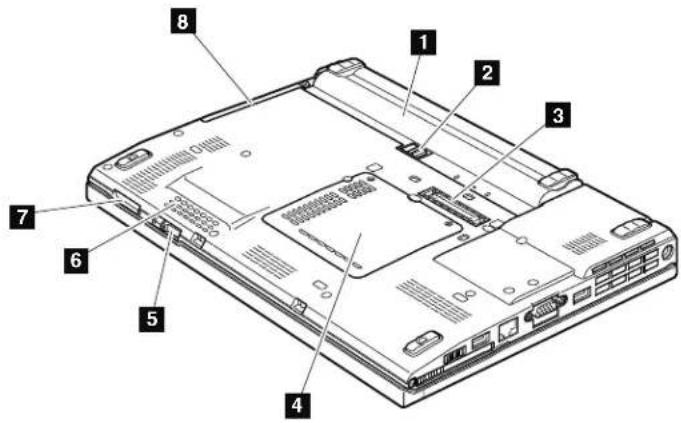
Rearview(ThinkPadX200UltraBase)
1 ACpowerconnector
2 Universalserialbus(USB)connectors
3 Externalmonitorconnector
4 DisplayPortconnector
5 Headphonejack
6 Microphonejack
7 RJ-45(Ethernet)connector
8 Securitykeyhole
9 Securitylockkey
10 Universalserialbus(USB)connector
11 SerialUltrabaySlimdevicereleaselatch
12 SerialUltrabaySlimdeviceejectlever
13 SerialUltrabaySlimdevice
14 Dockingconnector

Bottomview(ThinkPadX200UltraBase)
1 Batterycharger(behindtheflip-downdoor)
2 UltraBaseejectrequestbutton
3 UltraBaseejectlever
4 Powerbuttonsecuritylatch
5 Powerbutton
6 Built-instereospeakers

Partslist
Thissectioncontainsfollowinglistsoftheserviceparts.
• "Overall" on page 168
•“LCDFRUs”onpage253
•“Keyboard”onpage286
•"Miscellaneousparts"onpage287
•“ACadapters”onpage287
•"Powercords"onpage288
•“Recoverydiscs”onpage289
•"Commonservicetools"onpage310
Notes:
•EachFRUisavailableforalltypesormodels,unlessspecifictypesormodels arespecified.
- FRUwithspecificmodelslistedanddescribedasxxU(whereUisanexample ofacountrydesignator)shouldbeusedforallmodelsendinginU.
- FRUwithspecificmodelslistedanddescribedas3Dx(where3Disan exampleofauniqueconfiguration)shouldbeusedforallofthesemodels, unlessspecificcountryorregiondesignatorisspecified.
- ACRU(customerreplaceableunit)isidentifiedbyasingleasterisk(*)ortwo asterisks(**)intheCRUIDcolumn.AnNintheCRUIDcolumnmeansthat thepartisnotaCRU.Asingleasterisk(*)meansthatthepartisaSelf-service CRU;twoasterisks(**)meansthatthepartisanOptional-serviceCRU.
ThinkPadcomputerscontainthefollowingtypesofCRUs:
Self-serviceCRUs
TheseCRUsunplugorareheldbynomorethantwoscrews.
ExamplesofthesetypesofCRUsincludeanacadapter,apowercord,abattery,andaharddiskdrive.OtherSelf-serviceCRUsdepending onproductdesignmayincludeamemory,awirelesscard,akeyboard,andapalmrestwithfingerprintreaderandtouchpad.
Optional-serviceCRUs
TheseCRUsareisolatedpartswithinthecomputerthatareconcealed byanaccesspanelthatistypicallysecuredbymorethantwoscrews.
Oncetheaccesspanelisremoved,thespecificCRUvisible.
•FRUsmarkedwith OP areavailableasoptions.
Overall

Table37.Partslist—Overall
| No.FR | UFRUno.CRU | ID | |
| aSee | "Miscellaneousparts"onpage287. | ||
| 1LCDunit(see“LCDFRUs”onpage253.) | |||
| 2Keyboardbezelassembly44C9542N | |||
| 3Backupbattery92P1210N | |||
| 4IntelTurboMemory2-GBMinicard•7454-CTO,23x,25x,28x,2Jx,2Lx,2Qx,GEx•7455-CTO,33x,35x,3Ax,3Hx,3Jx,3Sx,3Tx,3Vx,3Wx,3Xx,3Yx,4Ex,4Fx,4Gx,8Xx,8Yx,D6x,D7x,D8x,DLx,DMx,FBx,FCx•7457-CTO,43x,44x,47x,49x,4Dx•7458-CTO,29x,2Ax,2Bx,2Mx,2Nx,2Px,53x,54x,56x,57x,58x,5Ax,5Bx,5Cx,5Dx,5Lx,5Mx,5Sx,69x,6Cx,6Dx,6Mx,6Nx,6Px,6Qx,6Rx,6Tx,6Vx,6Yx,6Zx,7Bx,7Dx,7Jx,7Kx,7Zx,8Cx,8Fx,8Wx,8Xx,8Yx,F3x,F4x,F7x,FDx,FEx,FFx,FHx,FKx,FLx,FXx,G3x,G6x,G7x,G8x•7459-CTO,63x,64x,65x,66x,68x,69x,6Bx,6Dx,6Nx,6Px,6Qx,6Tx,6Ux,6Vx,6Xx,H2x•2023-CTO•2024-CTO•7462-CTO,46x,47x,48x,49x,4Ax,4Bx,4Dx,4Ex,4Fx•7465-CTO,25x,26x,27x,28x,29x,2Ex,2Fx•7466-CTO,34x,35x,38x,39x,3Ax,3Fx,3Gx,3Rx,3Sx,3Tx,3Ux,3Vx,3Zx,92x,9Dx,FQx,FSx,FTx,FZx,N2x•7469-CTO,54x,55x,56x,57x,58x,59x,5Ax,5Lx,5Mx,5Px,5Qx,5Zx,6Bx,6Ex,72x,73x,78x,79x,7Bx,7Ux,8Cx,8Dx,8Ex,8Gx,8Kx,8Nx,8Qx•7470-CTO,64x,65x,68x,69x,6Ax•2046-CTO•2047-CTO•3249-CTO•3323-CTO•3357-CTO•3626-CTO•3680-CTO•3712-CTO•4492-CTO•5129-CTO•5143-CTO•5385-CTO•5397-CTO•5413-CTO•5442-CTO•5446-CTO | 43Y6523** | ||
| No.FRUFRUno.CRU | ID | ||
| 4IntelTurboMemory4-GBMinicard•7454-CTO•7455-CTO•7457-CTO•7458-CTO,2Cx,2Tx,6Ex,F8x,F9x,FJx,FYx,GBx•7459-CTO•2023-CTO•2024-CTO•7462-CTO•7465-CTO•7466-CTO,5Yx•7469-CTO,8Fx,8Hx,8Px•7470-CTO•2046-CTO•2047-CTO•3249-CTO•3323-CTO•3357-CTO•3626-CTO•3680-CTO•3712-CTO•4492-CTO•5129-CTO•5143-CTO•5385-CTO•5397-CTO•5413-CTO•5442-CTO•5446-CTO | 43Y6525** | ||
| 4WirelessUSBPCIExpressHalf-MiniCard•7454-CTO•7455-CTO•7457-CTO•7458-CTO•7459-CTO•2023-CTO•2024-CTO•7462-CTO,44x,45x,4Cx•7465-CTO,2Dx•7466-CTO•7469-CTO•7470-CTO•2046-CTO•2047-CTO | US43Y6501** | ||
| JP43Y6503** | |||
| 5SystemboardwithIntelCore2DuomobileprocessorP8400(2.26GHz),AMT,TPM•7454-CTO,26x,29x,2Jx,2Kx,2Nx,2Px,2Rx,2Wx,2Xx,2Yx,92x•7455-CTO,36x,38x,39x,3Dx,3Jx,3Kx,3Px,3Sx,3Tx•7457-CTO,45x,48x,4Ax,4Bx,4Cx,4Dx,4Gx,4Hx,4Jx,4Nx,4Px,4Qx,4Ux,4Vx,4Wx•7458-CTO,55x,57x,5Ax,5Bx,5Lx,5Mx,5Nx,5Px,72x,73x,78x,7Ex,7Fx,7Gx,7Hx,7Lx,7Mx,7Nx,7Px,7Rx,7Tx,7Xx,7Zx,82x,86x,F5x,X5x•7459-CTO,62x,63x,68x,6Cx,6Ex,6Fx,6Lx,6Rx,6Tx•2023-CTO•2024-CTO | 60Y3792N | ||
| No.FR | UFRUno.CRU | ID | |
| 5SystemboardwithIntelCore2DuomobileprocessorP8400(2.26GHz),AMT,non-TPM•7454-CTO•7455-CTO,3Wx•7457-CTO•7458-CTO,7Vx,7Wx,8Cx,8Dx,8Hx,8Kx,8Lx,8Nx•7459-CTO•2023-CTO•2024-CTO | 60Y3795N | ||
| 5SystemboardwithIntelCore2DuomobileprocessorP8400(2.26GHz),non-AMT,TPM•7454-CTO•7455-CTO•7457-CTO•7458-CTO•7459-CTO•2023-CTO•2024-CTO | 60Y3786N | ||
| 5SystemboardwithIntelCore2DuomobileprocessorP8400(2.26GHz),non-AMT,non-TPM•7454-CTO•7455-CTO•7457-CTO•7458-CTO•7459-CTO•2023-CTO•2024-CTO | 60Y3789N | ||
| 5SystemboardwithIntelCore2DuomobileprocessorP8600(2.4GHz),AMT,TPM•7454-CTO,3Yx,3Zx,G2x,G3x,G4x,G5x,G6x,G7x,G8x,G9x,GFx,GGx,GHx,GJx,CKx,GLx,GMx,GPx•7455-CTO,3Mx,3Xx,3Yx,85x,86x,87x,88x,89x,8Ax,8Bx,8Cx,8Dx,8Ex,8Jx,8Tx,8Ux,8Vx,8Wx,FTx,FUx,FVx,FWx,FXx,FYx,P9x,PGx,PHx,PJx•7457-CTO,42x,43x,44x,46x,47x,49x,4Ex,4Fx,4Kx,4Lx,4Mx•7458-CTO,52x,53x,54x,56x,58x,59x,5Cx,5Dx,5Ex,5Fx,5Hx,5Jx,5Qx,5Rx,5Sx,5Tx,69x,74x,76x,77x,79x,7Bx,7Cx,7Dx,7Jx,7Kx,7Qx,7Sx,7Ux,7Yx,83x,84x,85x,87x,88x,89x,8Ax,8Px,8Qx,8Rx,8Sx,8Zx,E2x,F2x,F6x,F7x,F8x,FDx,FMx,FNx,FPx,FQx,FSx,FTx,M2x,M3x,X4x•7459-CTO,5Ex,5Fx,64x,65x,66x,67x,69x,6Ax,6Bx,6Dx,6Gx,6Jx,6Kx,6Mx,6Nx,6Px,6Qx,6Sx,6Ux,6Vx,6Wx,6Xx,E3x,H3x,M2x,M3x,M4x•2023-CTO•2024-CTO | 60Y3793N | ||
| 5SystemboardwithIntelCore2DuomobileprocessorP8600(2.4GHz),AMT,non-TPM•7454-CTO•7455-CTO•7457-CTO•7458-CTO,8Bx,8Ex,8Fx,8Gx,8Jx,8Mx•7459-CTO,6Yx,6Zx,H2x•2023-CTO•2024-CTO | 60Y3796N | ||
| 5 | Note: When you replace the system board listed below, be sure that the new one has the same ROM size as theoriginalone.To identify the system board originally installed in your computer, go to PEW at the following web site:http://www.lenovo.com/support/site.wss/document.do?Indocid=LOOK-WARNTYSelectWarrantyLookup.Inputthemachinetypeandtheserialnumber.UsethesystemboardlistedonPEW.Business Partners using Eclaim can access PEW at the following web site:https://wca.eclaim.comSelectEntitlementLookup.InputtheLocID,themachinetype,andtheserialnumber.UsethesystemboardlistedonPEW. | ||
| SystemboardwithIntelCore2DuomobileprocessorP8600(2.4GHz),non-AMT,TPM,8-MBROM7454-CTO,22x,23x,24x,25x,27x,28x,2Gx,2Hx,2Jx,2Mx,2Qx,2Sx,2Tx,2Ux,2Vx,2Zx,3Tx,93x,95x,96x,97x,98x,9Fx,9Gx,9Hx,9Lx,GBx,GCx,GDx,GEx,GNx7455-CTO,32x,33x,34x,35x,3Ax,3Bx,3Cx,3Ex,3Fx,3Gx,3Hx,3Lx,3Nx,3Qx,3Rx,3Zx,4Wx,82x,83x,8Gx,8Kx,8Lx,8Mx,8Nx,8Px,8Qx,8Rx,8Sx,8Zx,D5x,D9x,DCx,DPx,DQx,FRx,FSx,FZx,N3x,N4x,N5x,P2x,P3x,P4x,P5x,P6x,P7x,PAx,PBx,PCx7457-CTO7458-CTO7459-CTO,73x2023-CTO2024-CTO | 60Y3787N | ||
| 5 | Note: When you replace the system board listed below, be sure that the new one has the same ROM size as theoriginalone.To identify the system board originally installed in your computer, go to PEW at the following web site:http://www.lenovo.com/support/site.wss/document.do?Indocid=LOOK-WARNTYSelectWarrantyLookup.Inputthemachinetypeandtheserialnumber.UsethesystemboardlistedonPEW.Business Partners using E claim can access PEW at the following web site:https://wca.eclaim.comSelectEntitlementLookup.InputtheLocID,themachinetype,andtheserialnumber.UsethesystemboardlistedonPEW. | ||
| SystemboardwithIntelCore2DuomobileprocessorP8600(2.4GHz),non-AMT,TPM,4-MBROM7454-CTO,22x,23x,24x,25x,27x,28x,2Gx,2Hx,2Jx,2Mx,2Qx,2Sx,2Tx,2Ux,2Vx,2Zx,3Tx,93x,95x,96x,97x,98x,9Fx,y9Gx,9Hx,9Lx,GBx,GCx,GDx,GEx,GNx7455-CTO,32x,33x,34x,35x,3Ax,3Bx,3Cx,3Ex,3Fx,3Gx,3Hx,3Lx,3Nx,3Qx,3Rx,3Zx,4Wx,82x, 83x,8Gx,8Kx,8Lx,8Mx,8Nx,8Px,8Qx,8Rx,8Sx,8Zx,D5x,D9x,DCx,DPx,DQx,FRx,FSx,FZx,N3x,N4x,N5x,P2x,P3x,P4x,P5x,P6x,P7x,PAx,PBx,PCX7457-CTO7458-CTO7459-CTO,73x2023-CTO2024-CTO | 60Y3839N | ||
| 5 | Note: When you replace the system board listed below, be sure that the new one has the same ROM size as theoriginalone.To identify the system board originally installed in your computer, go to PEW at the following web site:http://www.lenovo.com/support/site.wss/document.do?Indocid=LOOK-WARNTSelectWarrantyLookup.Inputthemachinetypeandtheserialnumber.UsethesystemboardlistedonPEW.Business Partners using Eclaim can access PEW at the following web site:https://wca.eclaim.comSelectEntitlementLookup.InputtheLocID,themachinetype,andtheserialnumber.UsethesystemboardlistedonPEW. | ||
| SystemboardwithIntelCore2DuomobileprocessorP8600(2.4GHz),non-AMT, non-TPM,8-MBROM7454-CTO7455-CTO,3Ux,3Vx,84x,DAx,DEx,DGx,DHx,F3x,PDx,PEx,PFx7457-CTO7458-CTO7459-CTO2023-CTO2024-CTO | 60Y3790N | ||
| 5 | Note: When you replace the system board listed below, be sure that the new one has the same ROM size as theoriginalone.To identify the system board originally installed in your computer, go to PEW at the following web site:http://www.lenovo.com/support/site.wss/document.do?Indocid=LOOK-WARNTSelectWarrantyLookup.Inputthemachinetypeandtheserialnumber.UsethesystemboardlistedonPEW.Business Partners using E claim can access PEW at the following web site:https://wca.eclaim.comSelectEntitlementLookup.InputtheLocID,themachinetype,andtheserialnumber.UsethesystemboardlistedonPEW. | ||
| SystemboardwithIntelCore2DuomobileprocessorP8600(2.4GHz),non-AMT, non-TPM,4-MBROM7454-CTO7455-CTO,3Ux,3Vx,84x,DAx,DEx,DGx,DHx,F3x,PDx,PEx,PFx7457-CTO7458-CTO7459-CTO2023-CTO2024-CTO | 60Y3840N | ||
| 5SystemboardwithIntelCore2DuomobileprocessorP8700(2.53GHz),AMT,TPM7454-CTO7455-CTO,4Cx,4Dx,4Kx,4Lx,4Mx,4Tx,FHx,FQx7457-CTO,4Rx,4Sx,4Tx,53x,54x,56x,57x,58x7458-CTO,24x,25x,26x,27x,28x,29x,2Kx,2Lx,4Xx,4Yx,66x,6Bx,6Kx,6Lx,6Nx,6Px,6Qx,6Rx,6Vx,6Xx,8Tx,8Wx,8Xx,F3x,F4x,F9x,FAx,FCx,FEx,FFx,FGx,FHx,FJx,FKx,FLx,FUx,FVx,FWx,G5x,G6x,GBx,GCx7459-CTO,H4x,H6x,H7x2023-CTO2024-CTO | SystemboardwithIntelCore2DuomobileprocessorP8700(2.53GHz),AMT,TPM7454-CTO7455-CTO,4Cx,4Dx,4Kx,4Lx,4Mx,4Tx,FHx,FQx7457-CTO,4Rx,4Sx,4Tx,53x,54x,56x, 57x,58x7458-CTO,24x,25x,26x,27x,28x,29x,2Kx,2Lx,4Xx,4Yx,66x,6Bx,6Kx,6Lx,6Nx,6Px,6Qx,6Rx,6Vx,6Xx,8Tx,8Wx, 8Xx,8Xx,F3x,F4x,F9x,FAx,FCx,FEx,FFx,FGx,FHx,FJx,FKx,FLx,FUx,FVx,FVx,G5x,G6x,GBx,GCx7459-CTO,H4x,H6x,H7x2023-CTO2024-CTO | 60Y3825N | |
| No.FRUFRUno.CRU | ID | ||
| 5SystemboardwithIntelCore2DuomobileprocessorP8700(2.53GHz),AMT,non-TPM•7454-CTO•7455-CTO,D6x•7457-CTO•7458-CTO,8Yx•7459-CTO•2023-CTO•2024-CTO | 60Y3827N | ||
| 5SystemboardwithIntelCore2DuomobileprocessorP8700(2.53GHz),non-AMT,TPM•7454-CTO,32x,33x,34x,36x,38x,3Px,3Rx,3Vx,3Wx,3Xx,9Bx,9Cx,9Jx•7455-CTO,42x,43x,44x,49x,4Bx,4Xx,4Zx,D2x,D3x,D7x,D8x,DDx,DJx,DKx,DLx,DMx,DNx,DRx,DSx,DTx,DXx,F5x,F6x,FEx,FJx,FMx•7457-CTO,52x,55x•7458-CTO,62x,65x,6Jx•7459-CTO,74x•2023-CTO•2024-CTO | 60Y3841N | ||
| 5SystemboardwithIntelCore2DuomobileprocessorP8700(2.53GHz),non-AMT,non-TPM•7454-CTO,3Hx,3Jx,3Kx,3Lx,3Mx,3Nx•7455-CTO,47x,DBx,DFx,F4x,FNx,FPx•7457-CTO•7458-CTO•7459-CTO•2023-CTO•2024-CTO | 60Y3842N | ||
| 5SystemboardwithIntelCore2DuomobileprocessorP8800(2.4GHz),AMT,TPM•7454-CTO,3Qx,3Sx•7455-CTO,45x,46x,4Ax,4Ex,4Fx,4Gx,4Hx,4Jx,4Nx,4Px,4Qx,4Rx,4Sx,4Ux,4Vx,4Yx,8Fx,8Hx,8Xx,8Yx,DUx,DVx,DYx,DZx,F2x,F7x,F9x,FDx,FFx,FGx,FKx,FLx,N2x•7457-CTO•7458-CTO,22x,2Ax,2Bx,2Cx,2Dx,2Ex,2Fx,2Mx,2Nx,2Px,2Qx,2Rx,2Sx,2Tx,2Vx,63x,64x,67x,68x,6Ax,6Cx,6Dx,6Ex,6Mx,6Sx,6Tx,6Ux,6Wx,6Yx,6Zx,FXx,FYx,G3x,G4x,G7x,G8x,G9x,GDx,GEx,GFx•7459-CTO,72x,75x,H5x•2023-CTO•2024-CTO | 43Y9982N | ||
| 5SystemboardwithIntelCore2DuomobileprocessorP8800(2.4GHz),AMT,non-TPM•7454-CTO•7455-CTO,48x,DWx•7457-CTO•7458-CTO•7459-CTO•2023-CTO•2024-CTO | 43Y9984N | ||
| 5SystemboardwithIntelCore2DuomobileprocessorP8800(2.4GHz),non-AMT,TPM•7454-CTO•7455-CTO•7457-CTO•7458-CTO•7459-CTO•2023-CTO•2024-CTONo.FR | 45M2839NUFRUno.CRU | ID | |
| 5SystemboardwithIntelCore2DuomobileprocessorP8800(2.4GHz),non-AMT, non-TPM•7454-CTO•7455-CTO•7454-CTO•7455-CTO•7457-CTO•7458-CTO•7459-CTO•2023-CTO•2024-CTO | 45M2840N | ||
| 5SystemboardwithIntelCore2DuomobileprocessorT9400(2.53GHz),AMT,TPM•7454-CTO•7455-CTO•7457-CTO•7458-CTO•7459-CTO•2023-CTO•2024-CTO | 60Y3794N | ||
| 5SystemboardwithIntelCore2DuomobileprocessorT9400(2.53GHz),AMT,non-TPM•7454-CTO•7455-CTO•7457-CTO•7458-CTO•7459-CTO•2023-CTO•2024-CTO | 60Y3797N | ||
| 5SystemboardwithIntelCore2DuomobileprocessorT9400(2.53GHz),non-AMT,TPM•7454-CTO•7455-CTO•7457-CTO•7458-CTO•7459-CTO•2023-CTO•2024-CTO | 60Y3788N | ||
| 5SystemboardwithIntelCore2DuomobileprocessorT9400(2.53GHz),non-AMT, non-TPM•7454-CTO•7455-CTO•7457-CTO•7458-CTO•7459-CTO•2023-CTO•2024-CTO | 60Y3791N | ||
| 5SystemboardwithIntelCore2DuomobileprocessorT9550(2.66GHz),AMT,TPM•7454-CTO•7455-CTO•7457-CTO•7458-CTO•7459-CTO•2023-CTO•2024-CTO | 60Y3826N | ||
| 5SystemboardwithIntelCore2DuomobileprocessorT9550(2.66GHz),AMT,non-TPM | 60Y3828N | ||
| 7454-CTO7455-CTO7457-CTO7458-CTO7459-CTO2023-CTO2024-CTO | |||
| 5SystemboardwithIntelCore2DuomobileprocessorT9600(2.8GHz),AMT,TPM | 43Y9983N | ||
| 7454-CTO7455-CTO7457-CTO7458-CTO7459-CTO2023-CTO2024-CTO | |||
| 5SystemboardwithIntelCore2DuomobileprocessorT9600(2.8GHz),AMT,non-TPM | 43Y9985N | ||
| 7454-CTO7455-CTO7457-CTO7458-CTO7459-CTO2023-CTO2024-CTO | |||
| 5SystemboardwithIntelCore2DuomobileprocessorSU9300(1.2GHz),AMT,TPM | 60Y3847N | ||
| 7462-CTO,4Dx,4Gx7465-CTO,2Ex,2Hx7466-CTO,38x,3Bx7469-CTO,58x,5Bx7470-CTO,68x,6Bx2046-CTO2047-CTO | |||
| 5SystemboardwithIntelCore2DuomobileprocessorSU9300(1.2GHz),AMT,non-TPM | 60Y3850N | ||
| 7462-CTO7465-CTO7466-CTO7469-CTO7470-CTO2046-CTO2047-CTO | |||
| 5SystemboardwithIntelCore2DuomobileprocessorSU9400(1.4GHz),AMT,TPM | 60Y3867N | ||
| 7462-CTO7465-CTO,3Mx7466-CTO,4Kx,4Lx,4Mx,58x7469-CTO,65x,66x7470-CTO2046-CTO2047-CTO | |||
| 5SystemboardwithIntelCore2DuomobileprocessorSU9400(1.4GHz),AMT,non-TPM•7462-CTO•7465-CTO,3Lx•7466-CTO,46x•7469-CTO•7470-CTO•2046-CTO•2047-CTO | 60Y3870N | ||
| 5SystemboardwithIntelCore2DuomobileprocessorSU9600(1.6GHz),AMT,TPM•7462-CTO•7465-CTO,3Kx•7466-CTO,9Gx•7469-CTO,6Px•7470-CTO•2046-CTO•2047-CTO | 60Y3868N | ||
| 5SystemboardwithIntelCore2DuomobileprocessorSU9600(1.6GHz),AMT,non-TPM•7462-CTO•7465-CTO•7466-CTO•7469-CTO•7470-CTO•2046-CTO•2047-CTO | 60Y3871N | ||
| 5SystemboardwithIntelCore2DuomobileprocessorSL9300(1.6GHz),AMT,TPM•7462-CTO,42x,43x,44x,45x,46x,4Ex,4Hx,4Kx,4Lx,4Nx,4Qx,4Sx•7465-CTO,23x,24x,25x,26x,27x,2Fx,2Jx,2Mx,2Px,2Rx,2Tx,2Vx,2Wx,2Xx•7466-CTO,32x,33x,34x,39x,3Cx,3Kx,3Lx,3Mx,3Nx,3Px,3Qx,3Xx,3Yx,9Vx,9Wx,9Xx•7469-CTO,52x,53x,54x,56x,59x,5Cx,5Ex,5Lx,5Mx,5Nx,5Px,5Xx,5Yx,5Zx,72x,75x,78x,7Ax,7Dx,7Ex,7Gx,7Hx,7Jx,7Kx,7Yx,7Zx,82x,8Ax,8Bx•7470-CTO,62x,63x,64x,69x,6Cx•2046-CTO•2047-CTO | 60Y3848N | ||
| 5SystemboardwithIntelCore2DuomobileprocessorSL9300(1.6GHz),AMT,non-TPM•7462-CTO•7465-CTO•7466-CTO•7469-CTO,7Qx•7470-CTO•2046-CTO•2047-CTO | 60Y3851N | ||
| 5SystemboardwithIntelCore2DuomobileprocessorSL9400(1.86GHz),AMT,TPM•7462-CTO,47x,48x,49x,4Ax,4Bx,4Cx,4Fx,4Jx,4Mx,4Px,4Rx,4Tx,F2x,F3x•7465-CTO,28x,29x,2Dx,2Kx,2Lx,2Nx,2Qx,2Sx,2Ux,2Zx,3Jx•7466-CTO,35x,3Ax,3Dx,3Ex,3Fx,3Gx,3Hx,3Jx,3Rx,3Sx,45x,4Nx,4Px,4Qx,4Rx,4Sx,4Tx,4Ux,54x,56x,5Hx,93x,94x,96x,97x,98x,99x,9Ax•7469-CTO,55x,57x,5Ax,5Dx,5Gx,5Hx,5Jx,5Kx,5Qx,5Rx,5Sx,5Tx,5Ux,5Vx,5Wx,67x,68x,69x,6Ax,6Cx,6Dx,6Hx,6Kx,6Lx,6Mx,6Nx,6Tx,6Ux,6Vx,6Wx,73x,74x,76x,77x,79x,7Bx,7Cx,7Fx,86x,89x,8Lx,8Mx,8Tx,95x,9Ex,9Gx,GCx•7470-CTO,5Gx,5Hx,65x,6Ax,6Dx,6Ex,6Fx,6Gx,6Hx,6Lx,72x,74x,8Tx•2046-CTO•2047-CTO | 60Y3849N | ||
| 5SystemboardwithIntelCore2DuomobileprocessorSL9400(1.86GHz),AMT,non-TPM•7462-CTO•7465-CTO•7466-CTO,3Tx,3Ux,3Zx,5Bx,5Cx,5Dx,5Ex,5Yx,92x,9Ex,9Fx,HDx,HEx•7469-CTO,5Fx,7Lx,7Mx,7Nx,7Px,7Rx,7Sx,7Tx,7Ux,7Vx,7Xx,8Gx,GBx•7470-CTO,6Jx,6Kx•2046-CTO•2047-CTO | 60Y3852N | ||
| 5SystemboardwithIntelCore2DuomobileprocessorSL9600(2.13GHz),AMT,TPM•7462-CTO,4Zx•7465-CTO,2Yx,D2x,D3x•7466-CTO,3Vx,3Wx,43x,44x,55x,5Xx,9Bx,9Cx,9Dx,DMx•7469-CTO,6Bx,6Ex,6Fx,6Gx,6Jx,6Px,6Qx,6Rx,6Xx,6Zx,87x,88x,8Cx,8Dx,8Ex,8Fx,8Kx,8Nx,8Px,8Rx,8Sx,96x,9Dx,GAX•7470-CTO,75x•2046-CTO•2047-CTO | 60Y3869N | ||
| 5SystemboardwithIntelCore2DuomobileprocessorSL9600(2.13GHz),AMT,non-TPM•7462-CTO•7465-CTO•7466-CTO,4Wx,4Xx,FZx,N2x•7469-CTO,8Hx,8Jx,8Qx,98x,99x•7470-CTO•2046-CTO•2047-CTO | 60Y3872N | ||
| 5SystemboardwithIntel® CoreTM 2SolomobileprocessorSU3500(1.4GHz),AMT,TPM•7462-CTO,24x,25x,26x,29x,2Ax,2Bx,2Gx,2Hx,FBx,FCx,FDx,FFx,FGx,FLx,FMx,FNx,FPx,FQx,FRx,FUx,FVx•7465-CTO,3Vx•7466-CTO,4Ex,4Fx,4Yx,4Zx,52x,53x,57x,5Gx,5Zx,9Kx,9Lx,9Mx,9Nx,9Rx,9Sx,9Tx,9Ux,H2x,H3x,H4x•7469-CTO,93x,94x,G2x,G3x,G4x,G5x,G6x•7470-CTO,6Qx,6Rx,73x•2046-CTO•2047-CTO | 60Y5691N | ||
| 5SystemboardwithIntelCore2SolomobileprocessorSU3500(1.4GHz),AMT,non-TPM•7462-CTO•7465-CTO,D6x,D7x,D8x,D9x,DAx,3Ux•7466-CTO,59x,5Ax,9Px,9Qx,9Yx,9Zx,HCx•7469-CTO•7470-CTO•2046-CTO•2047-CTO | 60Y5692N | ||
| 5SystemboardwithIntelCore2SolomobileprocessorSU3500(1.4GHz),non-AMT,TPM•7462-CTO•7465-CTO•7466-CTO•7469-CTO•7470-CTO•2046-CTO•2047-CTO | 45M2841N | ||
| 5SystemboardwithIntelCore2SolomobileprocessorSU3500(1.4GHz),non-AMT, non-TPM•7462-CTO•7465-CTO•7466-CTO•7469-CTO•7470-CTO•2046-CTO•2047-CTO | 45M2842N | ||
| 5SystemboardwithIntel ® Celeron ® Mprocessor723(1.2GHz),AMT,TPM•7462-CTO,22x,23x,27x,28x,4Ux,4Vx,4Wx,4Xx,4Yx,F4x,F5x,F6x,F7x,F8x,F9x,FAx•7465-CTO,3Nx,3Px,3Rx,3Wx,DFx,G5x,G6x•7466-CTO,47x,48x,49x,4Ax,4Bx,4Cx,4Dx,4Hx,4Jx,5Wx,9Jx,DLx•7469-CTO,62x,63x,64x,83x,84x,85x,8Ux,8Vx,8Wx,8Xx,8Yx,8Zx,9Cx,E2x,G9x•7470-CTO,6Mx,6Nx,8Ux,8Zx,E2x•2046-CTO•2047-CTO | 60Y5689N | ||
| 5SystemboardwithIntelCeleronMprocessor723(1.2GHz),AMT,non-TPM•7462-CTO,FHx,FJx,FKx•7465-CTO,D4x,DBx,DCx,DDx,DEx•7466-CTO,4Vx,95x,9Hx•7469-CTO,97x•7470-CTO•2046-CTO•2047-CTO | 60Y5690N | ||
| 5SystemboardwithIntelCeleronMprocessor723(1.2GHz),non-AMT,TPM•7462-CTO•7465-CTO•7466-CTO•7469-CTO•7470-CTO•2046-CTO•2047-CTO | 45M2848N | ||
| 5SystemboardwithIntelCeleronMprocessor723(1.2GHz),non-AMT,non-TPM•7462-CTO•7465-CTO•7466-CTO•7469-CTO•7470-CTO•2046-CTO•2047-CTO | 45M2849N | ||
| 5SystemboardwithIntelCeleronMprocessor743(1.3GHz),non-AMT,TPM•7462-CTO•7465-CTO•7466-CTO•7469-CTO•7470-CTO•2046-CTO•2047-CTO | 63Y2034N | ||
| 5SystemboardwithIntelCeleronMprocessor743(1.3GHz),non-AMT,non-TPM | 63Y2035N | ||
| •7462-CTO•7465-CTO•7466-CTO•7469-CTO•7470-CTO•2046-CTO•2047-CTO | |||
| 5SystemboardwithIntel® Celeron® processorSU2300(1.2GHz),non-AMT,TPM | 63Y2036N | ||
| •7462-CTO,2Cx,2Dx,2Ex,2Fx,FSx,FTx•7465-CTO,G7x,G8x,G9x•7466-CTO,5Fx,5Jx,5Kx,5Lx,5Mx,5Nx,5Px,5Qx,5Rx,5Sx,5Tx,5Ux,H5x,H6x,H7x,H8x,H9x•7469-CTO,9Ax,9Bx,G7x,G8x•7470-CTO,6Sx,6Tx,6Ux,6Vx,76x,77x•2046-CTO•2047-CTO | |||
| 5SystemboardwithIntelCeleronprocessorSU2300(1.2GHz),non-AMT,non-TPM | 63Y2037N | ||
| •7462-CTO•7465-CTO,3Sx,3Tx,DGx,DHx,DJx,DKx•7466-CTO,5Vx,HAx,HBx•7469-CTO•7470-CTO•2046-CTO•2047-CTO | |||
| 5SystemboardwithIntelCore2DuoprocessorSU7300(1.3GHz),non-AMT,TPM | 63Y2110N | ||
| •7462-CTO•7465-CTO,3Xx,3Yx,3Zx,G2x,G3x,G4x,GAx,GBx•7466-CTO,F2x,F3x,F4x,F5x,F6x,F7x,F8x,FBx,FCx,FDx,FEx,FFx,FGx,FHx,FJx,FKx,FLx,FMx,FNx,FPx,FQx,FRx,FSx,FTx,FUx,FVx,FWx•7469-CTO•7470-CTO•2046-CTO•2047-CTO | |||
| 5SystemboardwithIntelCore2DuoprocessorSU7300(1.3GHz),non-AMT,non-TPM | 63Y2111N | ||
| •7462-CTO•7465-CTO•7466-CTO,F9x,FAx,FXx,FYx•7469-CTO•7470-CTO•2046-CTO•2047-CTO | |||
| 5SystemboardwithIntelPentiumprocessorSU4100(1.3GHz),non-AMT,TPM | 63Y2112N | ||
| •7462-CTO•7465-CTO•7466-CTO•7469-CTO•7470-CTO•2046-CTO•2047-CTO5SystemboardwithIntelPentiumprocessorSU4100(1.3GHz),non-AMT,non-TPM | |||
| 63Y2113N | |||
| •7462-CTO | |||
| •7465-CTO | |||
| •7466-CTO | |||
| •7469-CTO | |||
| •7470-CTO | |||
| •2046-CTO | |||
| •2047-CTO | |||
| 5SystemboardwithIntelCorei3-330Mprocessor,NV,AMT,TPM | 75Y4027N | ||
| •3249-CTO,J2x | |||
| •3323-CTO,K2x,KAx,KCx,KDx,KJx,KLx,KPx,KRx,KWx,KYx,KZx,L2x,L7x,LAx, LDx,LEx,LFx | |||
| •3357-CTO | |||
| •3626-CTO | |||
| •3680-CTO | |||
| •3712-CTO | |||
| •4492-CTO | |||
| 5SystemboardwithIntelCorei3-330Mprocessor,NV,AMT,non-TPM | 75Y4028N | ||
| •3249-CTO,J3x,J4x,J6x,J7x,JAx | |||
| •3323-CTO,K5x,K6x,K7x,K8x,KVx | |||
| •3357-CTO | |||
| •3626-CTO | |||
| •3680-CTO | |||
| •3712-CTO | |||
| •4492-CTO | |||
| 5SystemboardwithIntelCorei3-330Mprocessor,NV,non-AMT,TPM | 63Y2160N | ||
| •3249-CTO | |||
| •3323-CTO | |||
| •3357-CTO | |||
| •3626-CTO | |||
| •3680-CTO | |||
| •3712-CTO | |||
| •4492-CTO | |||
| 5SystemboardwithIntelCorei3-330Mprocessor,NV,non-AMT,non-TPM | 63Y2161N | ||
| •3249-CTO | |||
| •3323-CTO | |||
| •3357-CTO | |||
| •3626-CTO | |||
| •3680-CTO | |||
| •3712-CTO | |||
| •4492-CTO | |||
| 5SystemboardwithIntelCorei5-430Mprocessor,NV,AMT,TPM | 75Y4029N | ||
| •3249-CTO | |||
| •3323-CTO,K3x,K4x,KEx,KFx,KGx,KHx,KMx,KNx,KSx,KTx,L3x,L4x,L5x,L6x, L8x,LBx,LCx | |||
| •3357-CTO | |||
| •3626-CTO | |||
| •3680-CTO | |||
| •3712-CTO | |||
| •4492-CTO | |||
| No.FRUFRUno.CRU | ID | ||
| 5SystemboardwithIntelCorei5-430Mprocessor, NV, AMT, non-TPM•3249-CTO,J5x,J8x,J9x•3323-CTO,K9x,KUx•3357-CTO•3626-CTO•3680-CTO•3712-CTO•4492-CTO | 75Y4030N | ||
| 5SystemboardwithIntelCorei5-430Mprocessor, NV, non-AMT, TPM•3249-CTO•3323-CTO•3357-CTO•3626-CTO•3680-CTO•3712-CTO•4492-CTO | 63Y2164N | ||
| 5SystemboardwithIntelCorei5-430Mprocessor, NV, non-AMT, non-TPM•3249-CTO•3323-CTO•3357-CTO•3626-CTO•3680-CTO•3712-CTO•4492-CTO | 63Y2165N | ||
| 5SystemboardwithIntelCorei5-520Mprocessor, NV, AMT, TPM•3249-CTO,22x,23x,24x,25x,26x,27x,29x,2Hx,2Jx,2Kx,2Lx•3323-CTO,42x,44x,49x,4Ex,4Gx,4Kx,4Lx,4Mx,4Nx,53x,54x,55x,56x,57x,5Bx,5Cx,5Dx,5Ex,5Fx,5Gx,5Hx,5Jx,5Kx,5Lx,5Mx,5Nx,5Px,5Rx,5Sx,5Tx,6Dx,6Ex,6Fx,6Gx,6Hx,6Jx,6Kx,6Lx,6Mx,6Nx,6Px,6Rx,6Sx,6Tx,6Ux,6Vx,7Yx,82x,85x,86x,87x,8Bx,8Cx,8Dx,8Gx,8Jx,8Kx,8Rx,8Sx,8Vx,8Wx,92x,93x,95x,98x,99x,9Ax,9Cx,9Ex,9Gx,9Hx•3357-CTO,D2x,D4x,D6x,D7x•3626-CTO,FBx,FLx,FMx,FNx,FPx,FTx,FXx,FYx,G2x,G4x,G5x,G9x,GAx,GBx,GEx,GFx,GHx,GJx,GKx,GLx,GMx,GNx,GPx,GRx,GXx,H2x,H3x,H4x,H5x,H6x,H7x•3680-CTO,P2x,FBx,P7x,P8x,P9x,PDx,PEx,PFx,PGx,PHx,PJx•3712-CTO•4492-CTO | 63Y2062N | ||
| 5SystemboardwithIntelCorei5-520Mprocessor, NV, AMT, non-TPM•3249-CTO,2Ax,2Bx,2Cx,2Dx,2Mx•3323-CTO,4Ux,4Wx,4Yx,4Zx,52x,8Zx•3357-CTO•3626-CTO•3680-CTO•3712-CTO•4492-CTO | 63Y2063N | ||
| 5SystemboardwithIntelCorei5-520Mprocessor, NV, non-AMT, TPM•3249-CTO•3323-CTO•3357-CTO•3626-CTO•3680-CTO•3712-CTO•4492-CTONo.FR | 63Y2068NUFRUno.CRU | ID | |
| 5SystemboardwithIntelCorei5-520Mprocessor, NV, non-AMT, non-TPM | 63Y2069N | ||
| •3249-CTO | |||
| •3323-CTO | |||
| •3357-CTO | |||
| •3626-CTO | |||
| •3680-CTO | |||
| •3712-CTO | |||
| •4492-CTO | |||
| 5SystemboardwithIntelCorei5-540Mprocessor, NV, AMT, TPM | 63Y2064N | ||
| •3249-CTO, 28x, 2Ex, 2Fx, 2Gx, 2Lx | |||
| •3323-CTO, 43x, 45x, 46x, 48x, 4Ax, 4Bx, 4Cx, 4Dx, 4Fx, 4Hx, 4Jx, 4Px, 4Rx, 4Sx, 4Tx, 58x, 59x, 5Ax, 5Ux, 5Vx, 5Wx, 5Yx, 5Zx, 62x, 63x, 64x, 65x, 66x, 67x, 68x, 69x, 6Ax, 6Bx, 6Cx, 6Wx, 6Yx, 6Zx, 72x, 73x, 74x, 75x, 76x, 77x, 78x, 79x, 7Ax, 7Bx, 7Cx, 7Dx, 7Ex, 7Fx, 7Gx, 7Hx, 7Jx, 7Kx, 7Lx, 7Mx, 7Nx, 7Px, 7Rx, 7Sx, 7Tx, 7Ux, 7Vx, 7Wx, 7Xx, 7Zx, 83x, 84x, 88x, 89x, 8Ax, 8Ex, 8Fx, 8Lx, 8Nx, 8Px, 8Tx, 8Ux, 8Xx, 8Yx, 94x, 96x, 97x, 9Bx, 9Dx, 9Fx, R2x | |||
| •3357-CTO, D3x, D5x | |||
| •3626-CTO, 11x, F2x, F3x, F4x, F5x, F6x, F7x, F8x, F9x, FAX, FCx, FDx, FEx, FFx, FGx, FHx, FJx, FKx, FRx, FSx, FUx, FVx, FWx, FZx, G3x, G6x, G7x, G8x, GCx, GDx, GHx, GJx, GSx, GTx, GUx, GVx, GWx, GYx, GZx, R3x, N2x | |||
| •3680-CTO, 11x, F7x, F8x, F9x, FAX, P3x, P4x, P5x, P6x, PAX, PBx, PCx, N2x | |||
| •3712-CTO | |||
| •4492-CTO | |||
| 5SystemboardwithIntelCorei5-540Mprocessor, NV, AMT, non-TPM | 63Y2065N | ||
| •3249-CTO | |||
| •3323-CTO, 4Vx | |||
| •3357-CTO | |||
| •3626-CTO | |||
| •3680-CTO | |||
| •3712-CTO | |||
| •4492-CTO | |||
| 5SystemboardwithIntelCorei5-540Mprocessor, NV, non-AMT, TPM | 63Y2070N | ||
| •3249-CTO | |||
| •3323-CTO | |||
| •3357-CTO | |||
| •3626-CTO | |||
| •3680-CTO | |||
| •3712-CTO | |||
| •4492-CTO | |||
| 5SystemboardwithIntelCorei5-540Mprocessor, NV, non-AMT, non-TPM | 63Y2071N | ||
| •3249-CTO | |||
| •3323-CTO | |||
| •3357-CTO | |||
| •3626-CTO | |||
| •3680-CTO | |||
| •3712-CTO | |||
| •4492-CTO | 63Y2071N | ||
| 5SystemboardwithIntelCorei7-620Mprocessor,NV,AMT,TPM | 63Y2066N | ||
| •3249-CTO | |||
| •3323-CTO | |||
| •3357-CTO | |||
| •3626-CTO | |||
| •3680-CTO | |||
| •3712-CTO | |||
| •4492-CTO | |||
| 5SystemboardwithIntelCorei7-620Mprocessor,NV,AMT,non_TPM | 63Y2067N | ||
| •3249-CTO | |||
| •3323-CTO | |||
| •3357-CTO | |||
| •3626-CTO | |||
| •3680-CTO | |||
| •3712-CTO | |||
| •4492-CTO | |||
| 5SystemboardwithIntelCorei7-620LMprocessor,LV,AMT,TPM | 63Y2072N | ||
| •5129-CTO,72x,73x | |||
| •5143-CTO,29x,2Ax,2Bx,2Cx,2Dx,2Ex,2Fx,2Gx,2Hx,2Jx,2Kx,2Lx,2Mx,2Nx,2Px,2Rx,3Wx,3Yx,43x,44x,45x,48x,49x,4Cx,4Dx,4Gx,4Hx | |||
| •5385-CTO,D4x | |||
| •5397-CTO,F4x,F5x,F6x,F7x,F8x,FKx,FMx,FNx,G4x,G5x,G6x,G7x,GAx | |||
| •5413-CTO,L2x,L3x | |||
| •5442-CTO | |||
| •5446-CTO | |||
| 5SystemboardwithIntelCorei7-620LMprocessor,LV,AMT,non-TPM | 63Y2073N | ||
| •5129-CTO | |||
| •5143-CTO,43x,4Gx | |||
| •5385-CTO | |||
| •5397-CTO | |||
| •5413-CTO | |||
| •5442-CTO | |||
| •5446-CTO | |||
| 5SystemboardwithIntelCorei7-640LMprocessor,LV,AMT,TPM | 63Y2074N | ||
| •5129-CTO,R1x | |||
| •5143-CTO,22x,23x,24x,25x,28x,2Sx,2Tx,2Ux,2Vx,2Wx,2Yx,2Zx,32x,33x,34x,35x,36x,37x,38x,39x,3Ax,3Ux,3Vx,3Zx,42x,46x,47x,4Ax,4Bx,4Ex,4Jx | |||
| •5385-CTO,D2x,D3x | |||
| •5397-CTO,F2x,F3x,F9x,FAx,FBx,FCx,FDx,FFx,FGx,FHx,FJx,FPx,FRx,FSx,FTx,FUx,FVx,FWx,FXx,FYx,FZx,G2x,G3x,G8x,G9x | |||
| •5413-CTO,FDx,FFx,FGx,L4x,L5x | |||
| •5442-CTO | |||
| •5446-CTO | |||
| 5SystemboardwithIntelCorei7-640LMprocessor,LV,AMT,non-TPM | 63Y2075N | ||
| •5129-CTO | |||
| •5143-CTO,26x,27x | |||
| •5385-CTO | |||
| •5397-CTO | |||
| •5413-CTO | |||
| •5442-CTO | |||
| •5446-CTO | |||
| 6512-MBDDR3-1066SDRAMSO-DIMM(PC3-8500)card | 43R1775** | ||
| •7454-CTO•7455-CTO•7457-CTO,4Bx,4Hx•7458-CTO•7459-CTO•2023-CTO•2024-CTO•7462-CTO•7465-CTO•7466-CTO•7469-CTO•7470-CTO•2046-CTO•2047-CTO | |||
| 61-GBDDR3-1066SDRAMSO-DIMM(PC3-8500)card | 43R1989** | ||
| •7454-CTO,23x,24x,25x,26x,28x,29x,2Gx,2Hx,2Jx,2Nx,2Px,2Rx,2Sx,2Tx,2Ux,2Vx,2Wx,2Xx,2Yx,3Mx,3Nx,3Px,3Qx,3Yx,92x,93x,97x,98x,9Gx,GEx,GFx•7455-CTO,33x,36x,39x,3Ax,3Dx,3Ex,3Fx,3Kx,3Lx,3Px,3Qx,3Rx,42x,43x,48x,49x,4Ax,8Ex,DAx,DBx,DCx,DDx,DDx,DFx,F3x,FXx,FYx,P6x,P7x,P9x,PDx,PFx•7457-CTO,44x,45x,47x,48x,49x,4Ax,4Ex,4Gx,4Jx,4Kx,4Lx,4Mx,4Nx,4Px,4Qx,4Vx,4Wx,54x,57x,58x•7458-CTO,26x,2Ex,2Kx,2Tx,54x,55x,56x,5Ax,5Ex,5Px,5Qx,5Rx,5Sx,68x,69x,6Px,6Qx,73x,74x,76x,78x,7Cx,7Ex,7Fx,7Gx,7Hx,7Lx,7Mx,7Qx,7Rx,7Sx,7Ux,7Vx,7Wx,7Xx,7Yx,84x,85x,87x,8Bx,8Ex,8Fx,8Gx,8Jx,8Fx,8Fx,8Fx,8Fx,8Fx,8Fx,8Fx,8Fx,8Fx,8Fx,8Fx,8Fx,8Fx,8Fx,8Fx,8Fx,8Fx,8Fx,8Fx,8Fx,8Fx,8Fx,8Fx,8Fx,8Fx,8Fx,8Fx,8Fx,8Fx,8Fx,8Fx,8Fx,8Fx,8Fx | •7459-CTO,5Ex,62x,63x,66x,67x,68x,6Ax,6Cx,6Dx,6Fx,6Kx,6Lx,6Qx,6Rx,6Tx,6Wx,6Xx,6Yx,6Zx,H2x,H4x,M3x•2023-CTO•2024-CTO•7462-CTO,22x,27x,42x,4Kx,4Lx,4Nx,4Px,4Qx,4Sx,4Tx,4Ux,4Vx,F2x,F3x,F6x,F7x,FAX,FBx,FDx,FHX,FJx,FLx,FNX•7465-CTO,23x,2Lx,2Mx,2Px,2Qx,2Rx,2Tx,2Ux,2Vx,2Wx,2Zx,3Jx,3Lx,3Mx,3Nx,3Px,3Rx,3Sx,3Tx,3Wx,DGx,DHx,DJx,DKx,G5x,G6x•7466-CTO,32x,3Kx,3Mx,3Px,3Qx,46x,4Hx,4Jx,95x,9Vx,9Wx,9Xx,FXx,FZx,H2x,H3x,H4x,N2x•7469-CTO,52x,63x,64x,6Lx,6Mx,6Px,6Qx,6Ux,6Vx,6Xx,6Yx,75x,76x,77x,7Ax,7Bx,7Dx,7Ex,7Fx,7Hx,7Kx,7Xx,83x,84x,85x,8Hx,8Tx,9Gx,GCx•7470-CTO,62x,6Nx,6Ux,6Vx,8Tx,8Ux•2046-CTO•2047-CTO | ||
| 61-GBDDR3-1066SDRAMSO-DIMM(PC3-8500)card•3249-CTO,22x,23x,24x,25x,26x,27x,29x,2Ax,2Bx,2Cx,2Dx,2Jx,2Kx,2Lx,J3x,J4x,J6x,J7x,J8x•3323-CTO,42x,44x,49x,4Cx,4Ex,4Gx,4Kx,4Lx,4Mx,4Nx,4Px,4Rx,4Ux,4Vx,4Wx,4Yx,4Zx,52x,53x,54x,55x,58x,59x,7Yx,82x,85x,86x,87x,88x,89x,8Fx,8Bx,8Cx,8Dx,8Nx,8Px,8Zx,98x,99x,9Ax,9Cx,9Fx,K5x,K6x,K7x,K8x,K9x,KUx,KVx,KYx,KZx,L2x,L4x,L5x,L7x,LBx,LCx,LEx,LFx,R2x•3357-CTO,D2x,D4x,D5x,D6x•3626-CTO,F7x,G2x,G4x,G5x,G6x,G7x,G8x,G9x,GAx,GBx,GDx,GHx•3680-CTO•3712-CTO•4492-CTO•5129-CTO•5143-CTO,22x,24x,26x,3Ux,3Wx,3Zx,42x,43x,4Gx•5385-CTO,D2x,D3x•5397-CTO,F2x,F3x,FEx,FHx,FJx,G2x,G4x•5413-CTO,FEx•5442-CTO•5446-CTO | 55Y3712** | ||
| 62-GBDDR3-1066SDRAMSO-DIMM(PC3-8500)card•7454-CTO,22x,27x,29x,2Gx,2Jx,2Kx,2Lx,2Mx,2Nx,2Px,2Qx,2Zx,32x,33x,34x,36x,38x,3Hx,3Jx,3Kx,3Lx,3Nx,3Qx,3Rx,3Sx,3Tx,3Vx,3Wx,3Xx,3Zx,95x,96x,97x,98x,9Bx,9Cx,9Fx,9Gx,9Hx,9Jx,9Lx,G2x,G3x,G4x,G5x,G6x,G7x,G8x,G9x,GBx,GCx,GDx,GEx,GGx,GHx,GJx,GKx,GLx,GMx,GNx,GPx•7455-CTO,32x,33x,34x,35x,38x,3Bx,3Cx,3Ex,3Gx,3Hx,3Jx,3Lx,3Mx,3Nx,3Qx,3Sx,3Tx,3Ux,3Vx,3Wx,3Xx,3Yx,3Zx,42x,43x,4Ax,44x,45x,46x,47x,48x,4Bx,4Cx,4Dx,4Ex,4Fx,4Gx,4Hx,4Jx,4Kx,4Lx,4Mx,4Nx,4Px,4Qx,4Rx,4Sx,4Tx,4Ux,4Vx,4Wx,4Xx,4Yx,4Zx,82x,83x,84x,85x,86x,87x,88x,89x,8Ax,8Bx,8Cx,8Dx,8Ex,8Fx,8Cx,8Hx,8Jx,8Kx,8Lx,8Mx,8Nx,8Px,8Qx,8Rx,8Sx,8Tx,8Ux,8Vx,8Wx,8Xx,8Yx,8Zx,D2x,D3x,D5x,D6x,D7x,D8x,D9x,DAx,DBx,DCx,DDx,DFx,DGx,DHx,DJx,DKx,DLx,DMx,DNx,DPx,DQx,DRx,DSx,DTx,DUx,DVx,DWx,DXx,DYx,DZx,F2x,F3x,F4x,F5x,F6x,F7x,F9x,FBx,FCx,FDx,FEx,FFx,FGx,FHx,FJx,FKx,FLx,FMx,FNx,FPx,FQx,FRx,FSx,FTx,FUx,FVx,FWx,FXx,FYx,FZx,N2x,N3x,N4x,N5x,P2x,P3x,P4x,P5x,P6x,P7x,P9x,PAx,PBx,PCx,PDx,PEx,PFx,PGx,PHx,PJx•7457-CTO,42x,43x,46x,4Cx,4Dx,4Fx,4Rx,4Sx,4Tx,4Ux,52x,53x,54x,55x,56x,57x,58x•7458-CTO,22x,24x,25x,26x,27x,28x,29x,2Ax,2Bx,2Cx,2Dx,2Ex,2Fx,2Kx,2Lx,2Mx,2Nx,2Px,2Qx,2Rx,2Sx,2Tx,2Vx,4Xx,4Yx,52x,53x,57x,58x,59x,5Bx,5Cx,5Dx,5Fx,5Hx,5Jx,5Lx,5Mx,5Nx,5Tx,62x,63x,64x,65x,66x,67x,68x,6Ax,6Bx,6Cx,6Dx,6Ex,6Jx,6Kx,6Lx,6Mx,6Nx,6Px,6Qx,6Rx,6Sx,6Tx,6Ux,6Vx,6Wx,6Xx,6Yx,6Zx,72x,77x,79x,7Bx,7Dx,7Jx,7Kx,7Nx,7Px,7Tx,7Zx,82x,83x,86x,88x,89x,8Ax,8Cx,8Dx,8Hx,8Kx,8Lx,8Mx,8Nx,8Px,8Qx,8Rx,8Sx,8Tx,8Wx,8Xx,8Yx,8Zx,E2x,F2x,F3x,F4x,F5x,F6x,F7x,F8x,F9x,FAx,FCx,FDx,FEx,FFx,FGx,FHx,FJx,FKx,FLx,FMx,FQx,FSx,FUx,FVx,FWx,FXx,G3x,G4x,G5x,G6x,G7x,G8x,G9x,GBx,GCx,GDx,GEx,GFx,M2x,M3x,X4x,X5x•7459-CTO,5Fx,64x,65x,69x,6Bx,6Ex,6Gx,6Jx,6Mx,6Nx,6Px,6Sx,6Ux,6Vx,72x,73x,74x,75x,E3x,H3x,H5x,H6x,H7x,M2x,M4x•2023-CTO•2024-CTO(continued) | 43R1969** | ||
| 6(continued)2-GBDDR3-1066SDRAMSO-DIMM(PC3-8500)card•7462-CTO,23x,24x,25x,26x,28x,29x,2Ax,2Bx,2Cx,2Dx,2Ex,2Fx,2Gx,2Hx,43x,44x,45x,46x,47x,48x,49x,4Ax,4Bx,4Cx,4Dx,4Ex,4Fx,4Gx,4Hx,4Jx,4Mx,4Rx,4Wx,4Xx,4Yx,4Zx,F4x,F5x,F8x,F9x,FAx,FBx,FCx,FEx,FFx,FGx,FJx,FKx,FMx,FPx,FQx,FRx,FSx,FTx,FUx,FVx•7465-CTO,24x,25x,26x,27x,28x,29x,2Dx,2Ex,2Fx,2Hx,2Jx,2Kx,2Nx,2Sx,2Yx,3Kx,3Lx,3Sx,3Tx,3Ux,3Vx,3Xx,3Yx,3Zx,D2x,D3x,D4x,D6x,D7x,D8x,D9x,DAx,DBx,DCx,DDx,DEx,DFx,DGx,DHx,DJx,DKx,G2x,G3x,G4x,G7x,G8x,G9x,GAX,GBx•7466-CTO,33x,34x,35x,38x,39x,3Ax,3Bx,3Cx,3Dx,3Ex,3Fx,3Gx,3Hx,3Jx,3Lx,3Nx,3Rx,3Sx,3Tx,3Ux,3Vx,3Wx,3Xx,3Yx,3Zx,43x,44x,45x,46x,47x,48x,49x,4Ax,4Bx,4Cx,4Dx,4Ex,4Fx,4Kx,4Lx,4Mx,4Nx,4Px,4Qx,4Rx,4Sx,4Tx,4Ux,4Vx,4Wx,4Xx,4Yx,4Zx,52x,53x,54x,55x,56x,57x,58x,59x,5Ax,5Bx,5Cx,5Dx,5Ex,5Fx,5Gx,5Hx,5Jx,5Kx,5Lx,5Mx,5Nx,5Px,5Qx,5Rx,5Sx,5Tx,5Ux,5Vx,5Wx,5Xx,5Yx,5Zx,92x,93x,94x,96x,97x,98x,99x,9Ax,9Bx,9Cx,9Dx,9Ex,9Fx,9Gx,9Hx,9Jx,9Kx,9Lx,9Mx,9Nx,9Px,9Qx,9Rx,9Sx,9Tx,9Ux,9Yx,9Zx,DLx,DMx,F2x,F3x,F4x,F5x,F6x,F7x,F8x,F9x,FAx,FBx,FCx,FDx,FEx,FFx,FGx,FHx,FJx,FKx,FLx,FMx,FNX,FPx,FQx,FRx,FSx,FTx,FUx,FVx,FWx,FXx,FYx,FZx,H3x,H4x,H5x,H6x,H7x,H8x,H9x,HAX,HBx,HCx,HDx,HEx,N2x•7469-CTO,53x,54x,55x,56x,57x,58x,59x,5Ax,5Bx,5Cx,5Dx,5Ex,5Fx,5Gx,5Hx,5Jx,5Kx,5Lx,5Mx,5Nx,5Px,5Qx,5Rx,5Sx,5Tx,5Ux,5VX,5Wx,5Xx,5Yx,5Zx,62x,65x,66x,67x,68x,69x,6Ax,6Bx,6Cx,6Dx,6Ex,6Fx,6Gx,6Hx,6Jx,6Kx,6Lx,6Mx,6Nx,6Px,6Qx,6Rx,6Tx,6Ux,6VX,6Xx,6Yx,6Zx,72x,73x,74x,78x,79x,7Cx,7Gx,7Jx,7Lx,7Mx,7Nx,7Px,7Qx,7Rx,7Sx,7Tx,7Ux,7VX,7Zx,82x,86x,87x,88x,89x,8AX,8Bx,8Cx,8Dx,8Ex,8Fx,8Gx,8Hx,8Jx,8Kx,8Lx,8Mx,8Nx,8Px,8Qx,8Rx,8Sx,8Tx,8Ux,8VX,8WX,8Xy,8Yx,8Zx,93x,94x,95x,96x,97x,98x,99x,9AX,9Bx,9Cx,9Dx,9Ex,9Gx,E2x,G2x,G3x,G4x,G5x,G6x,G7x,G8x,G9x,GAX,GBx•7470-CTO,5Gx,5Hx,63x,64x,65x,68x,69x,6AX,6Bx,6Cx,6Dx,6Ex,6Fx,6Gx,6Hx,6Jx,6Kx,6Lx,6Px,6Qx,6Rx,6Sx,6Tx,72x,73x,74x,75x,76x,77x,8Zx,E2x•2046-CTO•2047-CTO | 43R1969** | ||
Table37. Partslist—Overall(continued)
| No.FRUFRUno.CRU | ID | |
| 62-GBDDR3-1066SDRAMSO-DIMM(PC3-8500)card•3249-CTO,28x,2Ex,2Fx,2Gx,2Hx,2Kx,2Lx,2Lx,2Mx,J2x,J5x,J7x,J8x,J9x,JAx•3323-CTO,43x,45x,46x,48x,4Ax,4Bx,4Dx,4Fx,4Hx,4Jx,4Sx,4Tx,56x,57x,5Ax,5Bx,5Cx,5Dx,5Ex,5Fx,5Gx,5Hx,5Jx,5Kx,5Lx,5Mx,5Nx,5Px,5Rx,5Sx,5Tx,5Ux,5Vx,5Wx,5Yx,5Zx,62x,63x,64x,65x,66x,67x,68x,69x,6Ax,6Bx,6Cx,6Dx,6Ex,6Fx,6Gx,6Hx,6Jx,6Kx,6Lx,6Mx,6Nx,6Px,6Rx,6Sx,6Tx,6Ux,6Vx,6Wx,6Yx,6Zx,72x,73x,74x,75x,76x,77x,78x,79x,7Ax,7Bx,7Cx,7Dx,7Ex,7Fx,7Gx,7Hx,7Jx,7Kx,7Lx,7Mx,7Nx,7Px,7Rx,7Sx,7Tx,7Ux,7Vx,7Wx,7Xx,7Zx,83x,84x,8Ax,8Bx,8Cx,8Dx,8Ex,8Gx,8Jx,8Kx,8Lx,8Nx,8Px,8Rx,8Sx,8Tx,8Ux,8Vx,8Wx,8Xx,8Yx,8Zx,92x,93x,94x,95x,96x,97x,9Bx,9Dx,9Ex,9Gx,9Hx,K2x,K3x,K4x,K5x,K6x,K9x,KAx,KCx,KDx,KEx,KFx,KGx,KHx,KJx,KLx,KMx,KNx,KPx,KRx,KSx,KTx,KUx,KVx,KWx,L3x,L6x,L8x,LAx,LDx•3357-CTO,D3x,D5x,D6x,D7x•3626-CTO,11x,F2x,F3x,F4x,F5x,F6x,F7x,F8x,F9x,FAx,FBx,FCx,FDx,FEx,FFx,FGx, FHx, FJx, FKx, FLx, FMx, FNx, FPx, FRx, FSx, FTx, FUx, FWx, FXx, FYx, FZx, G3x, GAx, GBx, GCx, GDx, GEx, GFx, GHx, GHx, GJx, GJx, GKx, GLx, GMx, GNx, GPx, GRx, GSx, GTx, GUx, GVx, GWx, GXx, GYx, GZx, H2x, H3x, H4x, H5x, H6x, H7x, R3x, N2x•3680-CTO, P2x, P3x, P4x, P5x, P6x, F7x, F8x, F9x, FAx, FBx, 11x, P7x, P8x, P9x, PAx, PBx, PCx, PDx, PEx, PFx, PGx, PHx, PJx, N2x•3712-CTO•4492-CTO•5129-CTO, R1x, 72x, 73x•5143-CTO, 23x, 25x, 27x, 28x, 29x, 2Ax, 2Bx, 2Cx, 2Dx, 2Ex, 2Fx, 2Gx, 2Hx, 2Jx, 2Kx, 2Lx, 2Mx, 2Nx, 2Px, 2Rx, 2Sx, 2Tx, 2Ux, 2Vx, 2Wx, 2Zx, 32x, 33x, 34x, 35x, 36x, 37x, 38x, 39x, 3Ax, 3Vx, 3Yx, 43x, 44x, 45x, 46x, 47x, 48x, 49x, 4Ax, 4Bx, 4Cx, 4Dx, 4Ex, 4Gx, 4Hx, 4Jx•5385-CTO, D4x•5397-CTO, F4x, F5x, F6x, F7x, F8x, F9x, FAx, FBx, FCx, FDx, FEx, FFx, FGx, FKx, FMx, FNx, FPx, FRx, FSx, FTx, FUx, FWx, FXx, FYx, FZx, G3x, G5x, G6x, G7x, G8x, G9x, GAx•5413-CTO, FDx, FEx, FFx, FGx, L2x, L3x, L4x, L5x•5442-CTO•5446-CTO | 55Y3713** | |
| 64-GBDDR3-1066SDRAMSO-DIMM(PC3-8500)card•3249-CTO•3323-CTO•3357-CTO•3626-CTO•3680-CTO•3712-CTO•4492-CTO•5129-CTO•5143-CTO•5385-CTO•5397-CTO•5413-CTO•5442-CTO•5446-CTO | 55Y3714** |
Table37. Partslist—Overall(continued)
| No.FR | UFRUno.CRU | ID | |
| 61-GBDDR3-1333SDRAMSO-DIMM(PC3-10600)card | 55Y3715** | ||
| 62-GBDDR3-1333SDRAMSO-DIMM(PC3-10600)card | 55Y3716** | ||
| 64-GBDDR3-1333SDRAMSO-DIMM(PC3-10600)card | 55Y3717** | ||
| 7QualcommUNDP1-WirelessWANcard•7454-CTO,3Vx•7455-CTO•7457-CTO•7458-CTO,5Fx,8Ax•7459-CTO•2023-CTO•2024-CTO•7462-CTO•7465-CTO•7466-CTO•7469-CTO•7470-CTO•2046-CTO•2047-CTO | 42T0961** | ||
| 7IntegratedMobileBroadband(Gobi20003GwithGPS)•3249-CTO,2Hx•3323-CTO,48x,4Ax,4Dx,4Fx,4Jx,4Kx,4Lx,4Px,4Rx,4Sx,4Tx,4Yx,56x,5Cx,5Dx,5Ex,5Fx,5Gx,9Fx,K2x,K4x,K6x,K7x,KAx,KDx,KFx,KHx,KLx,KUx,KVx,LAx,LDx•3357-CTO•3626-CTO,F4x,FRx,FSx,FTx,FVx,FWx,FXx,FYx,GJx,GNx,GRx,GSx,GWx,GXx,GYx,H4x,H5x,H7x,R3x•3680-CTO,P2x,P3x,P4x,P5x,P6x,P7x,P9x,PBx,PFx,PGx,PJx•3712-CTO•4492-CTO•5129-CTO•5143-CTO•5385-CTO•5397-CTO•5413-CTO•5442-CTO•5446-CTO | 60Y3183** | ||
| 7IntegratedChinaMobileMobileBroadband(LeadcoreLC5370D)•3249-CTO•3323-CTO•3357-CTO•3626-CTO•3680-CTO•3712-CTO•4492-CTO•5129-CTO•5143-CTO•5385-CTO•5397-CTO•5413-CTO•5442-CTO•5446-CTO | 60Y3225** | ||
| No.FRUFRUno.CRU | ID | ||
| 7IntegratedChinaTelecomMobileBroadband(HuaweiEM660)•3249-CTO•3323-CTO,85x,86x,88x,89x,8Dx,8Ex,8Gx,8Kx,8Lx,8Nx•3357-CTO•3626-CTO,GAx•3680-CTO•3712-CTO•4492-CTO•5129-CTO•5143-CTO•5385-CTO•5397-CTO•5413-CTO•5442-CTO•5446-CTO | 60Y3227** | ||
| 7KDDIWirelessWANModemAdapter•7454-CTO•7455-CTO•7457-CTO,49x•7458-CTO•7459-CTO•2023-CTO•2024-CTO•7462-CTO,49x,4Ax•7465-CTO•7466-CTO•7469-CTO•7470-CTO•2046-CTO•2047-CTO | 43Y6476** | ||
| 7EricssonF3507gUSA-WirelessWANcard•7454-CTO,2Gx,2Mx,2Nx,2Zx,36x,3Xx•7455-CTO•7457-CTO•7458-CTO,5Hx,6Bx,6Cx,6Yx,7Dx,89x,GEx,GFx•7459-CTO•2023-CTO•2024-CTO•7462-CTO,FDx,FRx,FSx•7465-CTO•7466-CTO•7469-CTO,6Jx,9Gx,GAx•7470-CTO•2046-CTO•2047-CTO | 43Y6537** | ||
Table37. Partslist—Overall(continued)
| No.FR | UFRUno.CRU | ID | ||||
| 7EricssonF3507gOther-WirelessWANcard•7454-CTO•7455-CTO,3Sx,3Xx,46x,4Rx,4Ux,4Vx,88x,8Ax,8Ex,D7x,DKx,DLx,DZx,FFx,FGx,FHx,FMx,FNx•7457-CTO•7458-CTO,2Qx,2Tx,5Lx,5Nx,5Px,5Sx,65x,6Vx,7Zx,83x,FDx,FEx,FMx,GDx•7459-CTO•2023-CTO•2024-CTO•7462-CTO•7465-CTO•7466-CTO,3Tx,3Xx,4Xx,5Dx,5Ex,96x,9Cx,9Ex,FVx,HEx•7469-CTO,5Lx,5Mx,5Nx,5Px,5Rx,5Sx,5Tx,5Xx,5Yx,5Zx,6Bx,6Cx,6Fx,72x,73x,8Sx,96x,99x•7470-CTO•2046-CTO•2047-CTO | 43Y6513** | |||||
| 8ThinkPad11b/gWirelessLANMiniPCIExpressAdapterIII•7454-CTO,2Hx,92x•7455-CTO,3Dx,3Px•7457-CTO•7458-CTO,53x,5Ax,78x,FGx,FPx,FTx•7459-CTO,6Lx,6Tx•2023-CTO•2024-CTO•7462-CTO,42x,4Xx,4Yx,F3x,F6x,F7x•7465-CTO,2Lx,2Wx,2Xx•7466-CTO,3Kx,3Mx•7469-CTO,7Ax•7470-CTO,6Ux•2046-CTO•2047-CTO | 43Y6511** | |||||
| 8IntelCentrinoWireless-N1000•7454-CTO•7455-CTO,F9x,FCx,FEx•7457-CTO•7458-CTO•7459-CTO•2023-CTO•2024-CTO•7462-CTO•7465-CTO,GAx,GBx•7466-CTO,FJx,FKx,FLx,FMx,FXx,FYx•7469-CTO,93x,94x•7470-CTO•2046-CTO•2047-CTO•3249-CTO,26x,2Fx,2Jx,2Lx,2Mx,J2x,J3x,J4x,J5x,J6x,J8x,J9x•3323-CTO,46x,4Dx,4Fx,4Kx,4Nx,4Ux,4Vx,53x,5Ax,5Bx,7Yx,82x,85x,87x,8Fx,8Jx,8Px,8Rx,8Sx,8Tx,98x,99x,9Cx,K8x,KMx,KNx,KPx,KSx,KYx,L3x•3357-CTO,D2x•3626-CTO,G2x,G4x,G5x,G6x,G7x,G8x,G9x,GBx,GCx,GDx,GEx•3680-CTO,P3x•3712-CTO•4492-CTO•5129-CTO•5143-CTO,43x,4Gx•5385-CTO•5397-CTO•5413-CTO•5442-CTO•5446-CTO | 60Y3203** | |||||
| 8IntelWiFiLink5100•7454-CTO,26x,29x,2Gx,2Mx,2Nx,2Px,2Rx,2Sx,2Wx,2Xx,2Yx,2Zx,32x,33x,34x,36x,38x,3Jx,3Lx,3Mx,3Nx,3Rx,3Sx,3Vx,3Xx,3Yx,3Zx,93x,95x,97x,98x,9Gx,9Hx,9Jx,9Lx,G2x,G3x,G4x,G5x,G6x,G7x,G8x,G9x,GBx,GCx,GDx,GEx,GFx,GGx,GHx,GJx,GKx,GLx,GMx,GNx,GPx•7455-CTO,36x,39x,3Ex,3Fx,3Kx,3Qx,3Rx,3Ux,3Vx,3Wx,42x,43x,44x,45x,46x,47x,48x,4Bx,4Cx,4Dx,4Ex,4Fx,4Gx,4Nx,4Px,4Tx,4Ux,4Vx,4Zx,82x,85x,86x,8Cx,8Fx,8Gx,8Hx,8Jx,8Kx,8Lx,8Mx,8Px,8Qx,8Rx,8Sx,8Tx,8Ux,8Vx,8Wx,8Xx,8Yx,8Zx,D5x,D6x,D9x,DAx,DBx,DGx,DJx,DNx,DPx,DQx,DRx,DVx,DXx,F2x,F3x,F4x,F5x,F6x,F7x,FBx,FDx,FFx,FGx,FJx,FKx,FLx,FMx,FNx,FPx,FRx,FSx,FTx,FUX,FVx,FWx,FXx,FYx,FZx,P2x,P3x,P4x,P5x,P6x,P7x,P9x,PAx,PBX,PCx,PDx,PEx,PFX,PGx,PHx,PJx•7457-CTO,45x,48x,4Ax,4Bx,4Gx,4Hx,4Jx,4Nx,4Px,4Qx,4Ux,4Vx,4Wx,53x,54x,56x,57x,58x•7458-CTO,24x,25x,26x,28x,2Bx,2Cx,2Fx,2Kx,2Lx,2Mx,2Nx,2Px,55x,57x,5Dx,5Ex,68x,6Ax,6Bx,6Cx,6Dx,6Ex,6Qx,6Rx,6Sx,6Xx,6Zx,73x,74x,76x,7Cx,7Ex,7Fx,7Gx,7Hx,7Qx,7Rx,7Ux,7Wx,7Xx,7Yx,88x,8Bx,8Cx,8Ex,8Fx,8Gx,8Hx,8Jx,8Kx,8Lx,8Mx,8Nx,8Px,8Qx,8Wx,8Yx,E2x,F2x,F3x,F4x,F5x,F6x,F7x,FHX,FKx,FLx,FNX,FQx,FSx,FUX,FVx,FVx,FVX,FYx,G7x,G8x,G9x,M2x,X4x,X5x•7459-CTO,5Ex,67x,68x,6Ax,6Dx,6Ex,6Kx,6Qx,6Rx,6Yx,6Zx,H2x,H7x,M2x,M4x•2023-CTO•2024-CTO•7462-CTO,43x,4Dx,4Gx,4Kx,4Lx,4Mx,4Nx,4Px,4Qx,4Rx,4Sx,4Tx,4Ux,4Vx,4Wx,F2x,F4x,F5x,FAx,FBx,FCx,FDx,FEx,FHX,FLx,FRx,FUX,FVx•7465-CTO,23x,24x,2Ex,2Hx,2Mx,2Nx,2Px,2Qx,2Rx,2Sx,2Tx,2Ux,2Vx,2Zx,3Mx,3Vx,D4x,D6x,D7x,D8x,D9x,DBx,DCx,DEx,DFx,DHx,DJx,G9x•7466-CTO,32x,33x,34x,35x,3Ax,3Dx,3Gx,3Hx,3Jx,3Lx,3Nx,3Px,3Qx,3Rx,3Sx,3Vx,3Wx,3Zx,43x,44x,45x,4Nx,4Px,4Qx,4Rx,4Sx,4Tx,4Ux,54x,57x,59x,5Ax,5Fx,5Gx,5Jx,5Rx,5Sx,5Ux,5Vx,5Wx,5Xy,5Zx,93x,94x,95x,98x,9Ax,9Bx,9Gx,9Mx,9Nx,9Px,9Qx,9Rx,9Wx,9Xx,F8x,F9x,FAx,FBx,FPx,FQx,FRx,FVx,FWx,FZx,H3x,H4x,H6x,H7x,H8x,H9x,HAX,HBX,HCx,N2x•7469-CTO,52x,53x,58x,5Bx,5Ex,5Fx,5Gx,5Jx,67x,68x,69x,6Ax,6Hx,6Jx,6Kx,6Lx,6Mx,6Nx,6Tx,6Ux,6Vx,6Wx,75x,76x,77x,78x,7Dx,7Ex,7Gx,7Jx,7Lx,7Mx,7Nx,7Qx,7Rx,7Sx,7Tx,7Ux,7Vx,7Zx,83x,84x,86x,8Ax,8Gx,8Lx,8Nx,8Qx,8Tx,8Ux,8Vx,8Wx,95x,9Cx,9Dx,9Ex,9Gx,G3x,G7x,G8x,G9x,GAx,GBx,GCx•7470-CTO,5Gx,62x,64x,69x,6Dx,6Gx,6Jx,6Kx,6Mx,6Nx,6Rx,6Tx,6Vx,72x,74x,76x,77x,8Ux,8Zx,E2x•2046-CTO•2047-CTO | 43Y6493** | |||||
| No.FRUFRUno.CRU | ID | |||||
| 8IntelWiFiLink5300•7454-CTO,22x,23x,24x,25x,27x,28x,2Jx,2Kx,2Lx,2Qx,2Tx,2Ux,2Vx,3Qx,96x,9Bx,9Cx•7455-CTO,32x,33x,34x,35x,38x,3Ax,3Bx,3Cx,3Gx,3Hx,3Jx,3Lx,3Mx,3Nx,3Sx,3Tx,3Xx,3Yx,3Zx,4Ax,4Hx,4Jx,4Kx,4Mx,4Qx,4Rx,4Sx,4Yx,87x,88x,89x,8Ax,8Bx,8Dx,8Ex,D2x,D3x,D7x,D8x,DCx,DDx,DKx,DLx,DMx,DYx,DZx,FHx,FQx,N5x•7457-CTO,42x,43x,44x,46x,47x,49x,4Cx,4Dx,4Ex,4Fx,4Kx,4Lx,4Mx,4Rx,4Sx,4Tx•7458-CTO,27x,29x,2Ax,2Dx,2Ex,2Qx,2Rx,2Sx,2Tx,2Vx,4Xx,4Yx,52x,54x,56x,58x,59x,5Bx,5Cx,5Fx,5Hx,5Jx,5Lx,5Mx,5Nx,5Px,5Qx,5Rx,5Sx,5Tx,62x,63x,64x,65x,66x,67x,69x,6Jx,6Kx,6Lx,6Mx,6Nx,6Px,6Tx,6Ux,6Vx,6Wx,6Yx,72x,77x,79x,7Dx,7Jx,7Kx,7Lx,7Mx,7Nx,7Px,7Sx,7Tx,7Vx,7Zx,82x,83x,84x,85x,86x,87x,89x,8Ax,8Dx,8Tx,8Xx,8Zx,F8x,F9x,FAx,FCx,FDx,FEx,FFx,FJx,FMx,G4x,G5x,G6x,GBx,GCx,GDx,GEx,GFx,M3x•7459-CTO,5Fx,62x,63x,64x,65x,66x,69x,6Cx,6Fx,6Gx,6Jx,6Mx,6Nx,6Px,6Sx,6Ux,6Vx,6Wx,6Xx,72x,75x,E3x,H3x,H4x,H5x,H6x,M3x•2023-CTO•2024-CTO•7462-CTO,44x,45x,46x,47x,48x,49x,4Ax,4Bx,4Cx,4Ex,4Fx,4Hx,4Jx,4Zx,FSx,FTx•7465-CTO,25x,26x,27x,28x,29x,2Dx,2Fx,2Jx,2Kx,2Yx,3Kx,D2x,D3x•7466-CTO,38x,39x,3Bx,3Cx,3Ex,3Fx,3Tx,3Ux,3Xx,3Yx,4Vx,4Wx,4Xx,55x,56x,58x,5Bx,5Cx,5Dx,5Ex,5Hx,92x,96x,97x,99x,9Cx,9Dx,9Ex,9Fx,9Jx,9Lx,9Vx,FSx,FTx,HDx,HEx•7469-CTO,54x,55x,56x,57x,59x,5Ax,5Cx,5Dx,5Hx,5Kx,5Lx,5Mx,5Nx,5Px,5Qx,5Rx,5Sx,5Tx,5Ux,5Vx,5Wx,5Xx,5Yx,5Zx,6Bx,6Cx,6Dx,6Ex,6Fx,6Gx,6Px,6Qx,6Rx,6Xx,6Yx,6Zx,72x,73x,74x,79x,7Cx,7Px,82x,85x,87x,88x,89x,8Bx,8Cx,8Dx,8Ex,8Fx,8Hx,8Jx,8Kx,8Mx,8Px,8Rx,8Sx,96x,97x,98x,99x•7470-CTO,5Hx,63x,65x,68x,6Ax,6Bx,6Cx,6Ex,6Fx,6Hx,6Lx,6Qx,75x,8Tx•2046-CTO•2047-CTO | 43Y6495** | |||||
| 8IntelWiMAX/WiFiLink5150•7454-CTO,3Hx,3Kx,3Wx•7455-CTO,4Lx,8Nx,DSx,DTx•7457-CTO•7458-CTO,FXx,G3x•7459-CTO•2023-CTO•2024-CTO•7462-CTO•7465-CTO,3Lx•7466-CTO,46x•7469-CTO•7470-CTO•2046-CTO•2047-CTO | ||||||
| Japan60Y3197** | ||||||
| OtherthanJapan43Y6539**No.FR | UFRUno.CRU | ID | ||||
| 8IntelWiMAX/WiFiLink5350•7454-CTO,9Fx•7455-CTO•7457-CTO•7458-CTO,7Bx,8Rx,8Sx•7459-CTO,6Bx•2023-CTO•2024-CTO•7462-CTO•7465-CTO•7466-CTO•7469-CTO,7Yx•7470-CTO•2046-CTO•2047-CTO | 43Y6533** | |||||
| 8ThinkPad11b/g/nWirelessLANMini-PCIExpressAdapterII•7454-CTO,3Px,3Tx•7455-CTO,49x,4Wx,4Xx,83x,84x,DEx,DFx,DHx,DUx,DWx,N2x,N3x,N4x•7457-CTO,52x,55x•7458-CTO,22x•7459-CTO,73x,74x•2023-CTO•2024-CTO•7462-CTO,22x,23x,24x,25x,26x,27x,28x,29x,2Ax,2Bx,2Cx,2Dx,2Ex,2Fx,2Gx,2Hx,F8x,F9x,FFx,FCx,FJx,FKx,FMx,FNx,FPx,FQx•7465-CTO,3Jx,3Nx,3Px,3Rx,3Sx,3Tx,3Ux,3Wx,3Xx,3Yx,3Zx,DAx,DDx,DGx,DKx,G2x,G3x,G4x,G5x,G6x,G7x,G8x•7466-CTO,47x,48x,49x,4Ax,4Bx,4Cx,4Dx,4Ex,4Fx,4Hx,4Jx,4Kx,4Lx,4Mx,4Yx,4Zx,52x,53x,5Kx,5Lx,5Mx,5Nx,5Px,5Qx,5Tx,9Hx,9Kx,9Sx,9Tx,9Ux,9Yx,9Zx,DLx,DMx,F2x,F3x,F4x,F5x,F6x,F7x,FCx,FDx,FEx,FFx,FGx,FHx,FNx,FUx,H2x,H5x•7469-CTO,62x,63x,64x,65x,66x,7Bx,7Fx,7Hx,7Kx,7Xx,8Xx,8Yx,8Zx,9Ax,9Bx,E2x,G2x,G4x,G5x,G6x•7470-CTO,6Px,6Sx,73x•2046-CTO•2047-CTO•3249-CTO,23x,24x,27x,2Bx,2Cx,JAx•3323-CTO,42x,44x,49x,4Cx,4Ex,4Gx,4Mx,4Wx,52x,5Cx,5Dx,9Ax,KRx,KWx,KZx,L2x,L4x,L7x,L8x,LBx,LCx,LEx,LFx,R2x•3357-CTO•3626-CTO•3680-CTO,P2x•3712-CTO•4492-CTO•5129-CTO•5143-CTO,42x•5385-CTO•5397-CTO•5413-CTO•5442-CTO•5446-CTO | 43Y6553N | |||||
| 8ThinkPad11b/g/nWirelessLANMini-PCIExpressAdapterII | 60Y3177N | |||||
| •7454-CTO,3Px,3Tx•7455-CTO,49x,4Wx,4Xx,83x,84x,DEx,DFx,DHx,DUx,DWx,N2x,N3x,N4x•7457-CTO,52x,55x•7458-CTO,22x•7459-CTO,73x,74x•2023-CTO•2024-CTO•7462-CTO,22x,23x,24x,25x,26x,27x,28x,29x,2Ax,2Bx,2Cx,2Dx,2Ex,2Fx,2Gx,2Hx,F8x,F9x,FFx,FGx,FJx,FKx,FMx,FNx,FPx,FQx•7465-CTO,3Jx,3Nx,3Px,3Rx,3Sx,3Tx,3Ux,3Wx,3Xx,3Yx,3Zx,DAx,DDx,DGx,DKx,G2x,G3x,G4x,G5x,G6x,G7x,G8x•7466-CTO,47x,48x,49x,4Ax,4Bx,4Cx,4Dx,4Ex,4Fx,4Hx,4Jx,4Kx,4Lx,4Mx,4Yx,4Zx,52x,53x,5Kx,5Lx,5Mx,5Nx,5Px,5Qx,5Tx,9Hx,9Kx,9Sx,9Tx,9Ux,9Yx,9Zx,DLx,DMx,F2x,F3x,F4x,F5x,F6x,F7x,FCx,FDx,FEx,FFx,FGx,FHx,FNx,FUx,H2x,H5x•7469-CTO,62x,63x,64x,65x,66x,7Bx,7Fx,7Hx,7Kx,7Xx,8Xx,8Yx,8Zx,9Ax,9Bx,E2x,G2x,G4x,G5x,G6x•7470-CTO,6Px,6Sx,73x•2046-CTO•2047-CTO•3249-CTO,23x,24x,27x,2Bx,2Cx,JAx•3323-CTO,42x,44x,49x,4Cx,4Ex,4Gx,4Mx,4Wx,52x,5Cx,5Dx,9Ax,KRx,KWx,KZx,L2x,L4x,L7x,L8x,LBx,LCx,LEx,LFx,R2x•3357-CTO•3626-CTO•3680-CTO,P2x•3712-CTO•4492-CTO•5129-CTO•5143-CTO,42x•5385-CTO•5397-CTO•5413-CTO•5442-CTO•5446-CTO | ||||||
| 8IntelCentrinoAdvanced-N6200•3249-CTO,22x,25x,29x,2Ax,2Dx,2Ex,2Gx,2Hx,2Kx,J7x•3323-CTO,45x,48x,4Ax,4Bx,4Lx,4Px,4Rx,4Zx,54x,55x,56x,58x,59x,5Ex,5Fx,5Gx,5Hx,5Jx,5Mx,5Nx,5Sx,5Tx,5Wx,5Yx,63x,64x,67x,68x,6Bx,6Cx,6Fx,6Gx,6Kx,6Lx,6Px,6Rx,6Ux,6Vx,6Zx,72x,75x,76x,79x,7Ax,7Dx,7Ex,7Hx,7Jx,86x,88x,89x,8Kx,8Ux,8Vx,8Wx,8Xx,8Yx,8Zx,92x,93x,94x,95x,96x,97x,9Bx,9Dx,9Ex,9Fx,9Gx,9Hx,K2x,K3x,K4x,K5x,K6x,K7x,K9x,KAx,KCx,KDx,KEx,KFx,KGx,KHx,KJx,KTx,L5x,L6x,LAx•3357-CTO•3626-CTO,11x,F2x,F3x,F4x,F5x,F6x,F7x,F9x,FAx,FBx,FCx,FDx,FFx,FHx,FKx,FMx,FNx,FPx,FRx,FSx,FTx,FUx,FVx,FWx,FXx,FYx,GFx,GHx,GHx,GKx,GLx,GMx,GNx,GPx,GTx,H2x,H3x,N2x•3680-CTO,P4x,P5x,F8x,F9x,FAx,FBx,11x,P7x,P8x,P9x,PAx,PDx,PEx,N2x•3712-CTO•4492-CTO•5129-CTO,72x,73x•5143-CTO,22x,24x,26x,28x,29x,2Ax,2Dx,2Ex,2Hx,2Jx,2Mx,2Nx,2Sx,2Tx,2Wx,2Yx,33x,34x,37x,38x,3Ux,3Wx,3Zx,4Cx,4Dx,4Ex,4Hx•5385-CTO,D4x•5397-CTO,F4x,F5x,F9x,FAx,FDx,FEx,FFx,FGx,FKx,FMx,FNx,FSx,FUx,FWx,FYx,G2x,G4x,G6x,G7x,GAx•5413-CTO,FDx,FEx,FFx,FGx,L2x,L4x•5442-CTO•5446-CTO | 60Y3231N | |||||
| 8IntelCentrinoUltimate-N6300•3249-CTO,28x,2Lx•3323-CTO,4Hx,4Jx,4Sx,4Tx,4Yx,7Mx,7Nx,7Sx,7Tx,7Wx,7Xx,84x,8Ax,8Dx,8Ex,8Gx,8Lx,8Nx,KLx,KUx,KVx,LDx•3357-CTO,D3x,D4x,D5x,D6x,D7x•3626-CTO,F8x,FZx,G3x,GAx,GJx,GJx,GRx,GSx,GUx,GVx,GWx,GXx,GYx,GZx,H4x,H5x,H6x,H7x,R3x•3680-CTO,P6x,F7x,PBx,PCx,PFx,PGx,PHx,PJx•3712-CTO•4492-CTO•5129-CTO•5143-CTO,23x,25x,27x,3Vx,3Yx,44x,45x,46x,47x,48x,49x,4Ax,4Bx,4Jx•5385-CTO•5397-CTO,F6x,F7x,F8x,FBx,FCx,FPx,FRx,G3x,G5x,G8x,G9x•5413-CTO,L3x,L5x•5442-CTO•5446-CTO | 60Y3233N | |||||
| No.FRUFRUno.CRU | ID | |||||
| 8IntelCentrinoAdvanced-N+WiMAX6250•3249-CTO•3323-CTO, 43x, 5Kx, 5Lx, 5Px, 5Rx, 5Ux, 5Vx, 5Zx, 62x, 65x, 66x, 69x, 6Ax, 6Dx, 6Ex, 6Hx, 6Jx, 6Mx, 6Nx, 6Sx,6Tx,6Wx,6Yx,73x,74x,77x,78x,7Bx,7Cx,7Fx,7Gx,7Kx,7Lx,7Px,7Rx,7Ux,7Vx,7Zx,83x,8Bx, 8Cx•3357-CTO•3626-CTO,FEx,FGx,FJx,FLx•3680-CTO•3712-CTO•4492-CTO•5129-CTO,R1x•5143-CTO,2Bx,2Cx,2Fx,2Gx,2Kx,2Lx,2Px,2Rx,2Ux,2Vx,2Zx,32x,35x,36x,39x,3Ax•5385-CTO,D2x,D3x•5397-CTO,F2x,F3x,FHx,FJx,FTx,FVx,FXx,FZx•5413-CTO•5442-CTO•5446-CTO | ||||||
| Russia60Y3209N | ||||||
| OtherthanRussia60Y3195N | ||||||
| 91/Ocardassemblywithmodemconnector,with5-in-1MediaCardReaderslot•7454-CTO,22x,23x,24x,25x,26x,27x,28x,29x,2Gx,2Jx,2Kx,2Lx,2Mx,2Nx,2Px, 2Qx,2Rx,2Sx,2Tx,2Ux,2Vx,2Wx,2Xx,2Yx,2Zx,32x,33x,34x,36x,38x,3Lx,3Mx, 3Nx,3Px,3Qx,3Rx,3Sx,3Vx,3Wx,3Xx,93x,95x,96x,97x,98x,9Bx,9Cx,9Fx,9Gx, 9Hx,9Jx,G4x,G5x,G6x,G7x,G8x,G9x,GBx,GEx,GKx,GLx,GMx•7455-CTO,32x,33x,34x,35x,36x,38x,39x,3Ax,3Bx,3Cx,3Ex,3Fx,3Gx,3Hx,3Jx, 3Kx,3Lx,3Mx,3Nx,3Qx,3Rx,3Sx,3Tx,3Ux,3Vx,3Wx,3Xx,3Yx,3Zx,42x,43x,44x, 45x,46x,47x,48x,49x,4Ax,4Bx,4Cx,4Dx,4Ex,4Fx,4Gx,4Hx,4Jx,4Kx,4Lx,4Mx, 4Nx,4Px,4Qx,4Rx,4Sx,4Tx,4Ux,4Vx,4Wx,4Xx,4Yx,4Zx,82x,83x,84x,85x,86x, 87x,88x,89x,8Ax,8Bx,8Cx,8Dx,8Ex,8Fx,8Gx,8Hx,8Jx,8Kx,8Lx,8Mx,8Nx,8Px, 8Qx,8Rx,8Sx,8Tx,8Ux,8Vx,8Wx,8Xx,8Yx,8Zx,D2x,D3x,D5x,D6x,D7x,D8x,D9x, DBx,DCx,DDx,DFx,DHx,DJx,DKx,DLx,DMx,DNx,DPx,DQx,DRx,DSx,DTx, DUx,DVx,DWx,DXx,DYx,DZx,F2x,F7x,F9x,FBx,FCx,FDx,FEx,FFx,FGx,FHx, FJx,FKx,FLx,FMx,FNx,FPx,FQx,FRx,FSx,FYx,FZx,N2x,N3x,N4x,N5x,P2x,P3x, P4x,P5x,P6x,P7x,PAx,PBx,PCx,PDx,PEx,PFx,PGx,PHx,PJx•7457-CTO,42x,43x,44x,45x,46x,47x,48x,49x,4Cx,4Dx,4Ex,4Fx,4Kx,4Lx,4Mx, 4Nx,4Px,4Qx,4Rx,4Sx,4Tx•7458-CTO,22x,24x,25x,26x,27x,28x,29x,2Ax,2Bx,2Cx,2Dx,2Ex,2Fx,2Kx,2Lx, 2Mx,2Nx,2Px,2Qx,2Rx,2Sx,2Tx,2Vx,4Xx,4Yx,52x,53x,54x,55x,56x,57x,58x,59x, 5Ax,5Bx,5Cx,5Dx,5Ex,5Fx,5Hx,5Jx,5Lx,5Mx,5Nx,5Px,5Qx,5Rx,5Sx,5Tx,62x, 63x,64x,65x,66x,67x,68x,69x,6Ax,6Bx,6Cx,6Dx,6Ex,6Jx,6Kx,6Lx,6Mx,6Nx,6Px, 6Qx,6Rx,6Sx,6Tx,6Ux,6Vx,6Wx,6Xx,6Zx,72x,73x,74x,76x,77x,79x,7Bx, 7Cx,7Dx,7Ex,7Fx,7Gx,7Hx,7Jx,7Kx,7Lx,7Mx,7Nx,7Px,7Qx,7Sx,7Tx,7Ux,7Vx, 7Zx,82x,83x,84x,85x,86x,87x,88x,89x,8Ax,8Bx,8Cx,8Ex,8Fx,8Gx,8Hx,8Jx,8Kx, 8Lx,8Mx,8Nx,8Px,8Rx,8Sx,8Tx,8Wx,8Xx,8Yx,8Zx,E2x,F2x,F3x,F4x,F5x,F8x, F9x,FAx,FCx,FDx,FEx,FFx,FGx,FHx,FJx,FKx,FLx,FMx,FNx,FPx,FQx,FSx,FTx, FUx,FVx,FWx,FXx,FYx,G3x,G4x,G5x,G6x,G7x,G8x,G9x,GBx,GCx,GDx,GEx, GFx,M2x,M3x,X4x,X5x•7459-CTO,5Fx,63x,64x,66x,67x,68x,6Ax,6Bx,6Cx,6Dx,6Ex,6Fx,6Gx,6Jx,6Kx, 6Mx,6Nx,6Px,6Qx,6Rx,6Sx,6Tx,6Vx,6Wx,6Yx,6Zx,72x,73x,74x,75x,E3x,H2x, H3x,H4x,H5x,H6x,H7x,M2x,M3x,M4x•2023-CTO•2024-CTO(continued) | 42W8011N | |||||
| No.FR | UFRUno.CRU | ID | ||||
| 9(continued)I/Ocardassemblywithmodemconnector,with5-in-1MediaCardReaderslot•7462-CTO,22x,23x,24x,25x,26x,27x,28x,29x,2Ax,2Bx,2Gx,2Hx,43x,44x,45x,46x,47x,48x,49x,4Ax,4Bx,4Cx,4Dx,4Ex,4Fx,4Gx,4Hx,4Jx,4Kx,4Lx,4Mx,4Nx,4Px,4Qx,4Rx,4Sx,4Tx,4Ux,4Vx,4Xx,4Yx,4Zx,F2x,F3x,F4x,F6x,F7x,F8x,F9x,FHx,FLx,FQx,FRx,FSx,FTx,FUx,FVx•7465-CTO,23x,24x,25x,26x,27x,28x,29x,2Dx,2Ex,2Fx,2Hx,2Jx,2Kx,2Lx,2Mx,2Nx,2Px,2Qx,2Rx,2Sx,2Tx,2Ux,2Vx,2Yx,2Zx,3Jx,3Kx,3Lx,3Mx,3Nx,3Px,3Rx,3Ux,3Vx,3Wx,3Xx,3Yx,3Zx,D2x,D3x,D6x,D7x,D8x,D9x,DAx,DBx,DCx,DDx,DEx,DFx,G2x,G3x,G4x,G5x,G6x,G7x,G8x,G9x,GAx,GBx•7466-CTO,32x,33x,34x,35x,38x,39x,3Ax,3Bx,3Cx,3Dx,3Ex,3Fx,3Gx,3Hx,3Jx,3Lx,3Nx,3Px,3Qx,3Rx,3Sx,3Tx,3Ux,3Vx,3Wx,3Xx,3Yx,3Zx,43x,44x,45x,46x,47x,48x,49x,4Ax,4Bx,4Cx,4Dx,4Ex,4Fx,4Hx,4Jx,4Kx,4Lx,4Mx,4Nx,4Px,4Qx,4Rx,4Sx,4Tx,4Ux,4Vx,4Wx,4Xy,4Zx,52x,53x,54x,55x,56x,57x,58x,59x,5Ax,5Bx,5Cx,5Dx,5Ex,5Fx,5Gx,5Hx,5Jx,5Kx,5Lx,5Mx,5Nx,5Px,5Qx,5Rx,5Sx,5Tx,5Ux,5Vx,5Wx,5Xx,5Yx,5Zx,92x,93x,94x,95x,96x,97x,98x,99x,9Ax,9Cx,9Dx,9Ex,9Fx,9Cx,9Jx,9Lx,9Mx,9Nx,9Px,9Qx,9Rx,9Tx,9Ux,9Vx,9Wx,9Xx,9Yx,9Zx,DLx,F2x,F3x,F4x,F5x,F6x,F7x,F8x,F9x,FAx,FBx,FCx,FDx,FFx,FGx,FHx,FJx,FKx,FLx,FMx,FNx,FPx,FQx,FRx,FSx,FTx,FUx,FVx,FWx,FXx,FYx,FZx,H2x,H3x,H4x,H5x,H6x,H7x,H8x,H9x,HBx,HCx,HDx,HEx,N2x•7469-CTO,52x,53x,54x,55x,56x,57x,59x,5Ax,5Bx,5Cx,5Dx,5Gx,5Hx,5Jx,5Kx,5Lx,5Mx,5Nx,5Px,5Qx,5Rx,5Sx,5Tx,5Ux,5Vx,5Wx,5Xy,5Zx,62x,63x,64x,65x,66x,67x,68x,69x,6Ax,6Bx,6Cx,6Dx,6Ex,6Fx,6Gx,6Hx,6Jx,6Kx,6Lx,6Mx,6Nx,6Px,6Qx,6Rx,6Tx,6Ux,6Vx,6Wx,6Xy,6Zx,72x,73x,74x,75x,76x,77x,78x,79x,7Ax,7Bx,7Cx,7Dx,7Ex,7Gx,7Jx,7Lx,7Mx,7Nx,7Qx,7Rx,7Sx,7Tx,7Ux,7Vx,7Yx,7Zx,82x,83x,84x,85x,86x,87x,88x,89x,8Aa,8Bx,8Cx,8Dx,8Ex,8Fx,8Gx,8Hx,8Jx,8Kx,8Mx,8Nx,8Px,8Qx,8Rx,8Sx,8Tx,8Ux,8Vx,8Wx,8Xy,8Zx,93x,94x,95x,96x,97x,98x,99x,9Ax,9Bx,9Cx,9Dx,9Ex,9Gx,E2x,G2x,G3x,G4x,G5x,G6x,G7x,G8x,G9x,GAx,GBx,GCx•7470-CTO,5Gx,5Hx,62x,63x,65x,68x,6Ax,6Bx,6Cx,6Dx,6Ex,6Fx,6Gx,6Hx,6Jx,6Kx,6Lx,6Mx,6Nx,6Px,6Qx,6Rx,6Sx,6Tx,6Vx,72x,73x,74x,75x,76x,77x,8Tx,8Ux,8Zx,E2x•2046-CTO•2047-CTO | 42W8011N | |||||
| 91/Ocardassemblywithoutmodemconnector,with3-in-1MediaCardReaderslot•7454-CTO,2Hx,3Hx,3Jx,3Kx,3Tx,3Yx,3Zx,92x,9Lx,G2x,G3x,GCx,GDx,GFx,GGx,GHx,GJx,GNx,GPx•7455-CTO,3Dx,3Px,DAx,DEx,DGx,F3x,F4x,F5x,F6x,FTx,FUx,FVx,FWx,FXx,P9x•7457-CTO,4Ax,4Bx,4Gx,4Hx,4Ux,4Vx,4Wx,52x,53x,54x,55x,56x,57x,58x•7458-CTO,78x,7Rx,7Wx,7Xx,7Yx,8Dx,8Qx,F6x,F7x•7459-CTO,5Ex,62x,65x,69x,6Lx,6Ux•2023-CTO•2024-CTO•7462-CTO,2Cx,2Dx,2Ex,2Fx,42x,4Wx,F5x,FAx,FBx,FCx,FDx,FEx,FFx,FGx,FJx,FKx,FMx,FNx,FPx•7465-CTO,2Wx,2Xx,3Sx,3Tx,D4x,DGx,DHx,DJx,DKx•7466-CTO,3Kx,3Mx,9Bx,9Hx,9Kx,9Sx,DMx,HAx•7469-CTO,58x,5Ex,5Fx,7Fx,7Hx,7Kx,7Px,7Xx,8Lx•7470-CTO,64x,69x,6Ux•2046-CTO•2047-CTO | 42W8012N | |||||
Table37. Partslist—Overall(continued)
| No.FRUFRUno.CRU | ID | |
| 9I/Ocardassemblywithmodemconnector,with5-in-1MediaCardReaderslot•3249-CTO,22x,23x,24x,25x,26x,27x,28x,29x,2Ax,2Bx,2Cx,2Dx,2Ex,2Fx,2Gx,2Hx,2Jx,2Kx,2Lx,2Lx,2Mx,J2x,J3x,J4x,J5x,J6x,J7x,J8x,J9x,JAx•3323-CTO,42x,43x,44x,45x,46x,48x,49x,4Ax,4Bx,4Cx,4Dx,4Ex,4Fx,4Gx,4Hx,4Jx,4Kx,4Lx,4Mx,4Nx,4Px,4Rx,4Sx,4Tx,4Ux,4Vx,4Wx,4Yx,4Zx,52x,53x,54x,55x,56x,57x,58x,59x,5Ax,5Bx,5Cx,5Dx,5Ex,5Fx,5Gx,5Hx,5Jx,5Kx,5Lx,5Mx,5Nx,5Px,5Rx,5Sx,5Tx,5Ux,5Vx,5Wx,5Yx,5Zx,62x,63x,64x,65x,66x,67x,68x,69x,6Ax,6Bx,6Cx,6Dx,6Ex,6Fx,6Gx,6Hx,6Jx,6Kx,6Lx,6Mx,6Nx,6Px,6Rx,6Sx,6Tx,6Ux,6Vx,6Wx,6Yx,6Zx,72x,73x,74x,75x,76x,77x,78x,79x,7Ax,7Bx,7Cx,7Dx,7Ex,7Fx,7Gx,7Hx,7Jx,7Kx,7Lx,7Mx,7Nx,7Px,7Rx,7Sx,7Tx,7Ux,7Vx,7Wx,7Xx,7Yx,7Zx,82x,83x,84x,85x,86x,87x,88x,89x,8Ax,8Bx,8Cx,8Dx,8Ex,8Fx,8Gx,8Jx,8Kx,8Lx,8Nx,8Px,8Rx,8Sx,8Tx,8Ux,8Vx,8Wx,8Xx,8Yx,8Zx,92x,93x,94x,95x,96x,97x,98x,99x,9Ax,9Bx,9Cx,9Dx,9Ex,9Fx,9Gx,9Hx,K2x,K3x,K4x,K5x,K6x,K7x,K8x,K9x,KAx,KCx,KDx,KEx,KFx,KGx,KHx,KJx,KLx,KMx,KNx,KPx,KRx,KSx,KTx,KUx,KVx,KWx,KYx,KZx,L2x,L3x,L4x,L5x,L6x,L7x,L8x,LAx,LBx,LCx,LDx,LEx,LFx,R2x•3357-CTO,D2x,D3x,D4x,D5x,D6x,D7x•3626-CTO,11x,F2x,F3x,F4x,F5x,F6x,F7x,F8x,F9x,FAx,FBx,FCx,FDx,FEx,FFx,FGx,FHx,FJx,FKx,FLx,FNx,FPx,FRx,FSx,FTx,FVx,FWx,FXx,FZx,G2x,G3x,G4x,G5x,G6x,G7x,G8x,G9x,GAx,GBx,GCx,GDx,GEx,GFx,GHx,GHx,GJx,GJx,GKx,GLx,GMx,GNx,GPx,GRx,GSx,GTx,GUx,GVx,GWx,GXx,GYx,GZx,H2x,H3x,H4x,H5x,H6x,H7x,R3x,N2x•3680-CTO,11x,P2x,P3x,P4x,P5x,P6x,F7x,F8x,F9x,FAx,FBx,P7x,P8x,P9x,PAx,PBx,PCx,PDx,PEx,PFx,PGx,PHx,PJx,N2x•3712-CTO•4492-CTO•5129-CTO,72x,73x,R1x•5143-CTO,22x,23x,24x,25x,26x,27x,28x,29x,2Ax,2Bx,2Cx,2Dx,2Ex,2Fx,2Gx,2Hx,2Jx,2Kx,2Lx,2Mx,2Nx,2Px,2Rx,2Sx,2Tx,2Ux,2Vx,2Wx,2Yx,2Zx,32x,33x,34x,35x,36x,37x,38x,39x,3Ax,3Ux,3Vx,3Wx,3Yx,3Zx,42x,43x,44x,45x,46x,47x,48x,49x,4Ax,4Bx,4Cx,4Dx,4Ex,4Gx,4Hx,4Jx•5385-CTO,D2x,D3x,D4x•5397-CTO,F2x,F3x,F4x,F5x,F6x,F7x,F8x,F9x,FAx,FBx,FCx,FDx,FEx,FFx,FGx,FHx,FJx,FNx,FSx,FTx,FUx,FVx,FWx,FXx,FYx,FZx,G2x,G3x,G4x,G5x,G6x,G7x,G8x,G9x,GAx•5413-CTO,FDx,FEx,FFx,FGx,L2x,L3x,L4x,L5x•5442-CTO•5446-CTO | 60Y5407N | |
| 9I/Ocardassemblywithoutmodemconnector,with3-in-1MediaCardReaderslot•3249-CTO•3323-CTO•3357-CTO•3626-CTO•3680-CTO•3712-CTO•4492-CTO•5129-CTO•5143-CTO•5385-CTO•5397-CTO•5413-CTO•5442-CTO•5446-CTO | 60Y5408N | |
| 10DC-incableassembly44C5396N |
Table37. Partslist—Overall(continued)
| No.FR | UFRUno.CRU | ID | |
| 11Batterypack,4cell,47•7454-CTO,26x,29x,2Lx,2Qx,2Wx,2Xx,2Yx,3Rx,95x,97x,9Bx,9Cx,9Fx,G4x,G5x,G6x,G7x,G8x,G9x,GLx,GMx•7455-CTO,36x,3Kx,4Bx,4Cx,4Dx,4Ex,4Fx,4Gx,4Hx,4Jx,4Kx,4Lx,4Mx,4Nx,4Px,8Nx,8Vx,8Wx,8Xx,8Yx,8Zx,D6x,DSx,DTx,FZx,P2x,P3x,P4x,P5x•7457-CTO,45x,48x,4Ax,4Bx,4Gx,4Hx,4Jx,4Nx,4Px,4Qx,4Rx,4Sx,4Tx,4Ux,4Vx,4Wx•7458-CTO,24x,25x,2Fx,2Kx,2Lx,2Mx,2Nx,2Px,54x,59x,5Ax,5Bx,5Cx,5Jx,69x,7Fx,7Gx,7Hx,7Jx,7Kx,7Lx,7Mx,7Sx,7Wx,7Xx,7Yx,7Zx,8Ex,F2x,F3x,F4x,F5x,F6x,F7x,F8x,F9x,FLx,FMx,FPx,FPx,FYx,G3x•7459-CTO,5Ex,62x,67x,69x,6Gx,6Vx,6Xx,H3x•2023-CTO•2024-CTO•7462-CTO,42x,46x,47x,48x,4Jx,4Mx,4Qx,4Rx,4Sx,4Tx,4Ux,4Vx,4Wx,4Xy,4Yx,F2x,F3x,F4x,F5x,F6x,F7x,F8x,F9x,FAx,FBx,FCx,FDx,FEx,FFx,FGx,FHx,FJx,FLx,FNx,FPx,FRx,FSx•7465-CTO,23x,24x,2Ex,2Hx,2Mx,2Nx,2Px,2Qx,2Rx,2Sx,2Tx,2Ux,2Vx,2Zx,3Mx,3Nx,3Px,3Rx,3Vx,3Wx,D4x,G5x,G6x,G7x•7466-CTO,34x,35x,3Ax,3Dx,3Tx,3Ux,45x,47x,48x,49x,4Ax,4Bx,4Cx,4Dx,4Ex,4Fx,4Hx,4Jx,4Kx,4Lx,4Mx,4Nx,4Px,4Qx,4Rx,4Sx,4Tx,4Ux,4Yx,4Zx,52x,59x,5Ax,5Bx,5Cx,5Dx,5Ex,5Fx,5Gx,5Hx,5Jx,5Kx,5Lx,5Mx,5Nx,5Px,5Qx,5Vx,5Zx,93x,94x,95x,96x,9Bx,9Hx,9Jx,9Yx,F2x,F3x,F4x,F5x,F6x,F9x,FAx,FBx,FCx,FDx,FEx,FFx,FGx,FHx,FVx,H5x,H6x,H7x,H8x,H9x,HAx,HBx•7469-CTO,52x,53x,54x,55x,56x,57x,58x,59x,5Ex,5Fx,5Gx,5Kx,5Rx,62x,63x,64x,65x,66x,67x,68x,69x,7Dx,7Ex,7Fx,7Gx,7Hx,7Jx,7Kx,7Lx,7Px,7Xx,7Zx,86x,89x,8Ex,8Fx,8Gx,8Hx,8Lx,8Px,8Sx,E2x,G2x,G4x•7470-CTO,5Gx,5Hx,62x,63x,64x,69x,6Ax,6Dx,6Jx,6Kx,6Mx,6Px,6Ux,72x•2046-CTO•2047-CTO•3249-CTO,J7x,JAx•3323-CTO,42x,56x,57x,58x,5Hx,5Jx,5Kx,5Lx,5Mx,5Nx,5Px,5Rx,5Sx,5Tx,5Ux,5Vx,5Wx,5Yx,5Zx,62x,63x,64x,65x,66x,67x,68x,69x,6Ax,6Bx,6Cx,6Dx,6Ex,6Fx,6Gx,6Hx,6Jx,6Kx,6Lx,6Mx,6Nx,6Px,6Rx,6Sx,6Tx,6Ux,6Vx,6Wx,6Yx,6Zx,72x,73x,74x,75x,76x,77x,78x,79x,7Ax,7Bx,7Cx,7Dx,7Ex,7Fx,7Gx,7Hx,7Jx,7Kx,7Lx,7Mx,7Nx,7Px,7Rx,7Sx,7Tx,7Ux,7Vx,7Wx,7Xx,7Yx,7Zx,82x,83x,84x,85x,8Wx,8Xx,8Yx,8Zx,92x,93x,94x,95x,96x,97x,98x,99x,9Ax,9Bx,9Cx,9Dx•3357-CTO,D7x•3626-CTO,F9x,FDx,FEx,FFx,FGx,FHx,FJx,FKx,FLx,GKx,H2x•3680-CTO,F8x,PDx•3712-CTO•4492-CTO•5129-CTO,73x,R1x•5143-CTO,29x,2Ax,2Bx,2Cx,2Dx,2Ex,2Fx,2Gx,2Hx,2Jx,2Kx,2Lx,2Mx,2Nx,2Px,2Rx,2Sx,2Tx,2Ux,2Vx,2Wx,2Yx,2Zx,32x,33x,34x,35x,36x,37x,38x,39x,3Ax,44x,45x,46x,47x,48x,49x,4Ax,4Bx,4Cx,4Dx,4Ex,4Hx•5385-CTO,D2x,D3x,D4x•5397-CTO,F2x,F3x,FDx,FHx,FJx,FMx,FSx,FTx,FUx,FVx,FWx,FXx,FYx,FZx,GAx•5413-CTO,FDx•5442-CTO•5446-CTO | 42T4646* | ||
| 11Batterypack,6cell,47+•7454-CTO,22x,23x,24x,25x,27x,28x,2Gx,2Hx,2Jx,2Kx,2Mx,2Nx,2Px,2Rx,2Sx,2Tx,2Ux,2Vx,2Zx,32x,33x,34x,36x,38x,3Hx,3Jx,3Kx,3Lx,3Mx,3Nx,3Px,3Qx,3Sx,3Tx,3Vx,3Wx,3Xx,3Yx,3Zx,92x,93x,96x,98x,9Gx,9Hx,9Jx,9Lx,G2x,G3x,GBx,GCx,GDx,GEx,GFx,GGx,GHx,GJx,GKx,GNx,GPx•7455-CTO,32x,33x,34x,35x,38x,39x,3Ax,3Bx,3Cx,3Dx,3Fx,3Gx,3Hx,3Jx,3Lx,3Mx,3Nx,3Px,3Rx,3Sx,3Tx,3Ux,3Vx,3Wx,3Xx,3Yx,3Zx,42x,43x,44x,45x,46x,47x,48x,49x,4Ax,4Qx,4Rx,4Sx,4Tx,4Ux,4Vx,4Wx,4Xx,4Yx,4Zx,82x,83x,84x,85x,86x,87x,88x,89x,8Ax,8Bx,8Cx,8Dx,8Ex,8Fx,8Gx,8Hx,8Jx,8Kx,8Lx,8Mx,8Px,8Qx,8Rx,8Sx,8Tx,8Ux,D2x,D3x,D7x,D8x,D9x,DAx,DBx,DCx,DDx,DEx,DFx,DGx,DHx,DJx,DKx,DLx,DMx,DNx,DPx,DQx,DRx,DUx,DVx,DWx,DXx,DYx,DZx,F2x,F3x,F4x,F5x,F6x,F7x,F9x,FBx,FCx,FDx,FEx,FFx,FGx,FHx,FJx,FLx,FMx,FNx,FPx,FQx,FRx,FSx,FTx,FUx,FVx,FWx,FXx,FYx,N2x,N3x,N4x,N5x,P6x,P7x,P9x,PAx,PBx,PCx,PDx,PEx,PFx,PGx,PHx,PJx•7457-CTO,42x,43x,44x,46x,47x,49x,4Cx,4Dx,4Ex,4Fx,4Kx,4Lx,4Mx,52x,53x,54x,55x,56x,57x,58x•7458-CTO,22x,26x,27x,28x,29x,2Ax,2Bx,2Cx,2Dx,2Qx,2Rx,2Sx,2Tx,2Vx,4Xx,4Yx,52x,53x,55x,56x,57x,5Dx,5Ex,5Lx,5Mx,5Nx,5Qx,5Rx,5Sx,5Tx,62x,63x,64x,65x,66x,67x,68x,6Ax,6Bx,6Cx,6Dx,6Ex,6Jx,6Kx,6Mx,6Qx,6Rx,6Sx,6Tx,6Ux,6Vx,6Wx,6Xx,6Zx,72x,73x,74x,76x,77x,78x,79x,7Bx,7Ex,7Nx,7Px,7Qx,7Rx,7Tx,7Ux,7Vx,82x,83x,85x,86x,87x,88x,8Bx,8Cx,8Dx,8Fx,8Gx,8Hx,8Jx,8Kx,8Lx,8Mx,8Nx,8Px,8Qx,8Rx,8Sx,8Tx,8Wx,8Xx,8Yx,8Zx,E2x,FAx,FCx,FDx,FEx,FFx,FGx,FJx,FKx,FQx,FSx,FTx,FUx,FVx,FWx,FXx,G4x,G6x,G7x,G8x,G9x,GBx,GCx,GDx,GEx,GFx,M2x,M3x,X4x,X5x•7459-CTO,5Fx,63x,68x,6Bx,6Cx,6Dx,6Ex,6Fx,6Jx,6Kx,6Lx,6Mx,6Nx,6Px,6Qx,6Rx,6Yx,72x,73x,74x,75x,H4x,H5x,H6x,H7x,M2x,M3x,M4x•2023-CTO•2024-CTO•7462-CTO,22x,23x,24x,25x,26x,27x,28x,29x,2Ax,2Bx,2Cx,2Dx,2Ex,2Fx,2Gx,2Hx,43x,44x,45x,49x,4Ax,4Bx,4Cx,4Dx,4Ex,4Fx,4Gx,4Hx,4Kx,4Lx,4Nx,4Px,4Zx,FKx,FMx,FQx,FTx,FUx,FVx•7465-CTO,25x,26x,27x,28x,29x,2Dx,2Fx,2Jx,2Kx,2Lx,2Wx,2Xx,2Yx,3Jx,3Kx,3Lx,3Sx,3Tx,3Ux,3Xx,3Yx,3Zx,G2x,G3x,G4x,G8x,G9x,GAx,GBx,D2x,D3x,D6x,D7x,D8x,D9x,DAx,DBx,DCx,DDx,DEx,DFx,DGx,DHx,DJx,DKx•7466-CTO,32x,33x,38x,39x,3Bx,3Cx,3Ex,3Fx,3Gx,3Kx,3Lx,3Mx,3Wx,3Xx,3Yx,43x,46x,4Vx,4Wx,4Xx,53x,54x,55x,56x,57x,58x,5Rx,5Sx,5Tx,5Ux,5Wx,5Xx,5Yx,99x,9Aa,9Dx,9Fx,9Gx,9Kx,9Lx,9Mx,9Nx,9Px,9Qx,9Rx,9Sx,9Tx,9Ux,9Vx,9Wx,9Xx,9Zx,DLx,DMx,F7x,F8x,FJx,FKx,FLx,FMx,FNx,FPx,FQx,FRx,FSx,FTx,FUx,FWx,FXx,FYx,FZx,N2x,H2x,H3x,H4x,HEx•7469-CTO,5Ax,5Bx,5Cx,5Dx,5Hx,5Jx,5Lx,5Mx,5Qx,5Sx,5Ux,5Wx,5Xx,5Yx,6Bx,6Ex,6Fx,6Gx,6Hx,6Jx,6Kx,6Lx,6Mx,6Nx,6Rx,6Tx,6Ux,6Vx,6Wx,6Zx,72x,73x,74x,77x,79x,7Ax,7Bx,7Sx,7Tx,7Yx,83x,85x,87x,88x,8Bx,8Kx,8Rx,8Tx,8Ux,8Vx,8Wx,8Xx,8Yx,8Zx,93x,94x,95x,96x,97x,98x,99x,9Ax,9Bx,9Cx,9Dx,9Ex,9Gx,G3x,G5x,G6x,G7x,G8x,G9x,GBx,GCx•7470-CTO,65x,68x,6Bx,6Cx,6Ex,6Fx,6Hx,6Lx,6Rx,6Sx,6Tx,6Vx,73x,74x,75x,76x,77x,8Tx,8Ux,8Zx,E2x•2046-CTO•2047-CTO(continued) | 42T4647* | ||
| 11(continued) | Batterypack,6cell,47+•3249-CTO,22x,23x,24x,25x,26x,27x,28x,29x,2Ax,2Bx,2Cx,2Dx,2Ex,2Fx,2Gx,2Hx,2Jx,2Kx,2Lx,2Lx,2Mx,J2x,J3x,J4x,J5x,J6x,J8x,J9x•3323-CTO,43x,44x,45x,46x,48x,49x,4Ax,4Bx,4Cx,4Dx,4Ex,4Fx,4Gx,4Hx,4Jx,4Kx,4Lx,4Mx,4Nx,4Px,4Rx,4Sx,4Tx,4Ux,4Vx,4Wx,4Yx,4Zx,52x,53x,54x,55x,59x,5Ax,5Bx,5Cx,5Dx,5Ex,5Fx,5Gx,86x,87x,88x,89x,8Ax,8Bx,8Cx,8Dx,8Ex,8Fx,8Gx,8Jx,8Kx,8Lx,8Nx,8Px,8Rx,8Sx,8Tx,8Ux,8Vx,9Ex,9Fx,9Gx,9Hx,K2x,K3x,K4x,K5x,K6x,K7x,K8x,K9x,KAx,KCx,KDx,KEx,KFx,KGx,KHx,KJx,KLx,KMx,KNx,KPx,KRx,KSx,KTx,KUx,KVx,KWx,KYx,KZx,L2x,L3x,L4x,L5x,L6x,L7x,L8x,LAX,LBX,LCx,LDx,LEX,LFx,R2x•3357-CTO,D2x,D3x,D4x,D5x,D6x•3626-CTO,11x,F2x,F3x,F4x,F6x,F7x,FAx,FCx,FMx,FNx,FPx,FRx,FSx,FTx,FVx,FWx,FXx,FYx,FZx,G2x,G3x,G4x,G5x,G6x,G7x,G8x,G9x,GAx,GBx,GCx,GDX,GEx,GFx,GHx,GHx,GJx,GJx,GLx,GMx,GNx,GPx,GTx,GUx,GVx,GYx,GZx,H3x,H6x,R3x,N2x•3680-CTO,P2x,P3x,P4x,P5x,P6x,F9x,FBx,11x,P7x,P8x,P9x,PAx,PBx,PCx,PEx,PGx,PHx,N2x•3712-CTO•4492-CTO•5129-CTO•5143-CTO,22x,23x,24x,25x,26x,27x,28x,3Ux,3Vx,3Wx,3Yx,3Zx,42x,43x,4Gx,4Jx•5385-CTO•5397-CTO,F4x,F5x,F6x,F7x,F9x,FAx,FBx,FFx,FGx,FKx,FNx,FPx,FRx,G2x,G3x,G4x,G5x,G6x,G7x,G8x,G9x•5413-CTO,FFx,FGx,L2x,L3x,L4x•5442-CTO•5446-CTO | 42T4647* | |
| 11Batterypack,6cell,47+•7454-CTO,22x,23x,24x,25x,27x,28x,2Gx,2Hx,2Jx,2Kx,2Mx,2Nx,2Px,2Rx,2Sx,2Tx,2Ux,2Vx,2Zx,32x,33x,34x,36x,38x,3Hx,3Jx,3Kx,3Lx,3Mx,3Nx,3Px,3Qx,3Sx,3Tx,3Vx,3Wx,3Xx,3Yx,3Zx,92x,93x,96x,98x,9Gx,9Hx,9Jx,9Lx,G2x,G3x,GBx,GCx,GDx,GEx,GFx,GGx,GHx,GJx,GKx,GNx,GPx•7455-CTO,32x,33x,34x,35x,38x,39x,3Ax,3Bx,3Cx,3Dx,3Fx,3Gx,3Hx,3Jx,3Lx,3Mx,3Nx,3Px,3Rx,3Sx,3Tx,3Ux,3Vx,3Wx,3Xx,3Yx,3Zx,42x,43x,44x,45x,46x,47x,48x,49x,4Ax,4Qx,4Rx,4Sx,4Tx,4Ux,4Vx,4Wx,4Xx,4Yx,4Zx,82x,83x,84x,85x,86x,87x,88x,89x,8Ax,8Bx,8Cx,8Dx,8Ex,8Fx,8Gx,8Hx,8Jx,8Kx,8Lx,8Mx,8Px,8Qx,8Rx,8Sx,8Tx,8Ux,D2x,D3x,D7x,D8x,D9x,DAx,DBx,DCx,DDx,DEx,DFx,DGx,DHx,DJx,DKx,DLx,DMx,DNx,DPx,DQx,DRx,DUx,DVx,DWx,DXx,DYx,DZx,F2x,F3x,F4x,F5x,F6x,F7x,F9x,FBx,FCx,FDx,FEx,FFx,FGx,FHx,FJx,FLx,FMx,FNx,FPx,FQx,FRx,FSx,FTx,FUx,FVx,FWx,FXx,FYx,N2x,N3x,N4x,N5x,P6x,P7x,P9x,PAx,PBx,PCx,PDx,PEx,PFx,PGx,PHx,PJx•7457-CTO,42x,43x,44x,46x,47x,49x,4Cx,4Dx,4Ex,4Fx,4Kx,4Lx,4Mx,52x,53x,54x,55x,56x,57x,58x•7458-CTO,22x,26x,27x,28x,29x,2Ax,2Bx,2Cx,2Dx,2Qx,2Rx,2Sx,2Tx,2Vx,4Xx,4Yx,52x,53x,55x,56x,57x,5Dx,5Ex,5Lx,5Mx,5Nx,5Qx,5Rx,5Sx,5Tx,62x,63x,64x,65x,66x,67x,68x,6Ax,6Bx,6Cx,6Dx,6Ex,6Jx,6Kx,6Mx,6Qx,6Rx,6Sx,6Tx,6Ux,6Vx,6Wx,6Xx,6Zx,72x,73x,74x,76x,77x,78x,79x,7Bx,7Ex,7Nx,7Px,7Qx,7Rx,7Tx,7Ux,7Vx,82x,83x,85x,86x,87x,88x,8Bx,8Cx,8Dx,8Fx,8Gx,8Hx,8Jx,8Kx,8Lx,8Mx,8Nx,8Px,8Qx,8Rx,8Sx,8Tx,8Wx,8Xx,8Yx,8Zx,E2x,FAx,FCx,FDx,FEx,FFx,FGx,FJx,FKx,FQx,FSx,FTx,FUx,FVx,FWx,FXx,G4x,G6x,G7x,G8x,G9x,GBx,GCx,GDx,GEx,GFx,M2x,M3x,X4x,X5x•7459-CTO,5Fx,63x,68x,6Bx,6Cx,6Dx,6Ex,6Fx,6Jx,6Kx,6Lx,6Mx,6Nx,6Px,6Qx,6Rx,6Yx,72x,73x,74x,75x,H4x,H5x,H6x,H7x,M2x,M3x,M4x•2023-CTO•2024-CTO•7462-CTO,22x,23x,24x,25x,26x,27x,28x,29x,2Ax,2Bx,2Cx,2Dx,2Ex,2Fx,2Gx,2Hx,43x,44x,45x,49x,4Ax,4Bx,4Cx,4Dx,4Ex,4Fx,4Gx,4Hx,4Kx,4Lx,4Nx,4Px,4Zx,FKx,FMx,FQx,FTx,FUx,FVx•7465-CTO,25x,26x,27x,28x,29x,2Dx,2Fx,2Jx,2Kx,2Lx,2Wx,2Xx,2Yx,3Jx,3Kx,3Lx,3Sx,3Tx,3Ux,3Xx,3Yx,3Zx,G2x,G3x,G4x,G8x,G9x,GAx,GBx,D2x,D3x,D6x,D7x,D8x,D9x,DAx,DBx,DCx,DDx,DEx,DFx,DGx,DHx,DJx,DKx•7466-CTO,32x,33x,38x,39x,3Bx,3Cx,3Ex,3Fx,3Gx,3Kx,3Lx,3Mx,3Wx,3Xx,3Yx,43x,46x,4Vx,4Wx,4Xx,53x,54x,55x,56x,57x,58x,5Rx,5Sx,5Tx,5Ux,5Wx,5Xx,5Yx,99x,9Aa,9Dx,9Fx,9Gx,9Kx,9Lx,9Mx,9Nx,9Px,9Qx,9Rx,9Sx,9Tx,9Ux,9Vx,9Wx,9Xx,9Zx,DLx,DMx,F7x,F8x,FJx,FKx,FLx,FMx,FNx,FPx,FQx,FRx,FSx,FTx,FUx,FWx,FXx,FYx,FZx,N2x,H2x,H3x,H4x,HEx•7469-CTO,5Ax,5Bx,5Cx,5Dx,5Hx,5Jx,5Lx,5Mx,5Qx,5Sx,5Ux,5Wx,5Xx,5Yx,6Bx,6Ex,6Fx,6Gx,6Hx,6Jx,6Kx,6Lx,6Mx,6Nx,6Rx,6Tx,6Ux,6Vx,6Wx,6Zx,72x,73x,74x,77x,79x,7Ax,7Bx,7Sx,7Tx,7Yx,83x,85x,87x,88x,8Bx,8Kx,8Rx,8Tx,8Ux,8Vx,8Wx,8Xx,8Yx,8Zx,93x,94x,95x,96x,97x,98x,99x,9Ax,9Bx,9Cx,9Dx,9Ex,9Gx,G3x,G5x,G6x,G7x,G8x,G9x,GBx,GCx•7470-CTO,65x,68x,6Bx,6Cx,6Ex,6Fx,6Hx,6Lx,6Rx,6Sx,6Tx,6Vx,73x,74x,75x,76x,77x,8Tx,8Ux,8Zx,E2x•2046-CTO•2047-CTO(continued) | 42T4648* | ||
| 11(continued) | Batterypack,6cell,47+•3249-CTO,22x,23x,24x,25x,26x,27x,28x,29x,2Ax,2Bx,2Cx,2Dx,2Ex,2Fx,2Gx,2Hx,2Jx,2Kx,2Lx,2Lx,2Mx,J2x,J3x,J4x,J5x,J6x,J8x,J9x•3323-CTO,43x,44x,45x,46x,48x,49x,4Ax,4Bx,4Cx,4Dx,4Ex,4Fx,4Gx,4Hx,4Jx,4Kx,4Lx,4Mx,4Nx,4Px,4Rx,4Sx,4Tx,4Ux,4Vx,4Wx,4Yx,4Zx,52x,53x,54x,55x,59x,5Ax,5Bx,5Cx,5Dx,5Ex,5Fx,5Gx,86x,87x,88x,89x,8Ax,8Bx,8Cx,8Dx,8Ex,8Fx,8Gx,8Jx,8Kx,8Lx,8Nx,8Px,8Rx,8Sx,8Tx,8Ux,8Vx,9Ex,9Fx,9Gx,9Hx,K2x,K3x,K4x,K5x,K6x,K7x,K8x,K9x,KAx,KCx,KDx,KEx,KFx,KGx,KHx,KJx,KLx,KMx,KNx,KPx,KRx,KSx,KTx,KUx,KVx,KWx,KYx,KZx,L2x,L3x,L4x,L5x,L6x,L7x,L8x,LAx,LBx,LCx,LDx,LEx,LFx,R2x•3357-CTO,D2x,D3x,D4x,D5x,D6x•3626-CTO,11x,F2x,F3x,F4x,F6x,F7x,FAx,FCx,FMx,FNx,FPx,FRx,FSx,FTx,FVx,FWx,FXx,FYx,FZx,G2x,G3x,G4x,G5x,G6x,G7x,G8x,G9x,GAx,GBx,GCx,GDx,GEx,GFx,GHx,GHx,GJx,GJx,GLx,GMx,GNx,GPx,GTx,GUx,GVx,GYx,GZx,H3x,H6x,R3x,N2x•3680-CTO,P2x,P3x,P4x,P5x,P6x,F9x,FBx,11x,P7x,P8x,P9x,PAx,PBx,PCx,PEx,PGx,PHx,N2x•3712-CTO•4492-CTO•5129-CTO•5143-CTO,22x,23x,24x,25x,26x,27x,28x,3Ux,3Vx,3Wx,3Yx,3Zx,42x,43x,4Gx,4Jx•5385-CTO•5397-CTO,F4x,F5x,F6x,F7x,F9x,FAx,FBx,FFx,FGx,FKx,FNx,FPx,FRx,G2x,G3x,G4x,G5x,G6x,G7x,G8x,G9x•5413-CTO,FFx,FGx,L2x,L3x,L4x•5442-CTO•5446-CTO | 42T4648* | |
| 11Batterypack,9cell,47++•7454-CTO•7455-CTO,3Ex,3Qx,D5x,FKx•7457-CTO•7458-CTO,2Ex,58x,5Fx,5Hx,5Px,6Lx,6Px,6Yx,7Cx,7Dx,84x,89x,8Ax,G5x•7459-CTO,64x,65x,66x,6Ax,6Sx,6Tx,6Ux,6Wx,6Zx,E3x,H2x•2023-CTO•2024-CTO•7462-CTO•7465-CTO•7466-CTO,3Hx,3Jx,3Nx,3Px,3Qx,3Rx,3Sx,3Zx,44x,92x,97x,98x,9Cx,9Ex,HCx,HDx•7469-CTO,5Nx,5Px,5Tx,5Vx,5Zx,6Px,6Qx,6Xy,75x,76x,78x,7Mx,7Nx,7Qx,7Rx,7Ux,7Vx,82x,84x,8Ax,8Cx,8Dx,8Jx,8Mx,8Nx,8Qx,GAX•7470-CTO,6Gx,6Nx,6Qx••2046-CTO•2047-CTO | 42T4649* | ||
| 11Batterypack,9cell,47++•7454-CTO•7455-CTO,3Ex,3Qx,D5x,FKx•7457-CTO•7458-CTO,2Ex,58x,5Fx,5Hx,5Px,6Lx,6Px,6Yx,7Cx,7Dx,84x,89x,8Ax,G5x•7459-CTO,64x,65x,66x,6Ax,6Sx,6Tx,6Ux,6Wx,6Zx,E3x,H2x•2023-CTO•2024-CTO•7462-CTO•7465-CTO•7466-CTO,3Hx,3Jx,3Nx,3Px,3Qx,3Rx,3Sx,3Zx,44x,92x,97x,98x,9Cx,9Ex,HCx, HDx•7469-CTO,5Nx,5Px,5Tx,5Vx,5Zx,6Px,6Qx,6Xx,6Yx,75x,76x,78x,7Mx,7Nx,7Qx, 7Rx,7Ux,7Vx,82x,84x,8Ax,8Cx,8Dx,8Jx,8Mx,8Nx,8Qx,GAx•7470-CTO,6Gx,6Nx,6Qx••2046-CTO•2047-CTO | 42T4650* | ||
| 11Batterypack,9cell,47++•3249-CTO•3323-CTO•3357-CTO•3626-CTO,F5x,F8x,FBx,FUx,GRx,GXx,H4x,H7x•3680-CTO,F7x,FAx,PFx•3712-CTO•4492-CTO•5129-CTO,72x•5143-CTO•5385-CTO•5397-CTO,F8x,FEx•5413-CTO,FEx•5442-CTO•5446-CTO | 42T4694* | ||
| 11Batterypack,9cell,47++•3249-CTO•3323-CTO•3357-CTO•3626-CTO,F5x,F8x,FBx,FUx,GRx,GXx,H4x,H7x•3680-CTO,F7x,FAx,PFx•3712-CTO•4482-CTO•5129-CTO,72x•5143-CTO•5385-CTO•5397-CTO,F8x,FEx•5413-CTO,FEx•5442-CTO•5446-CTO | 42T4696* | ||
| 11Batterypack,9cell,•3249-CTO•3323-CTO•3357-CTO•3626-CTO,GSx,GWx,H5x•3680-CTO,PJx•3712-CTO•4492-CTO•5129-CTO•5143-CTO,L5x•5385-CTO•5397-CTO,FCx•5413-CTO•5442-CTO•5446-CTO | 42T4823* | ||
| 11Batterypack,9cell,•3249-CTO•3323-CTO•3357-CTO•3626-CTO,GSx,GWx,H5x•3680-CTO,PJx•3712-CTO•4492-CTO•5129-CTO•5143-CTO,L5x• 5385-CTO•5397-CTO,FCx•5413-CTO•5442-CTO•5446-CTO | 42T4825* | ||
| 12Harddiskdriverubberrails41V9756* | |||
| 13SATAharddiskdrive,80GB,5,400rpm OP•7454-CTO•7455-CTO•7457-CTO,4Gx•7458-CTO•7459-CTO•2023-CTO•2024-CTO•7462-CTO•7465-CTO•7466-CTO•7469-CTO•7470-CTO,6Kx•2046-CTO•2047-CTO | 39T2885** | ||
| 13SATAharddiskdrive,80GB,5,400rpmOP | 42T1491** | ||
| 13SATAharddiskdrive,80GB,5,400rpm | 42T1305** | ||
| 13SATAharddiskdrive,80GB,5,400rpm | 42T1575** | ||
| No.FRUFRUno.CRU | ID | ||
| 13SATAharddiskdrive,160GB,5,400rpmOP•7454-CTO,25x,26x,29x,2Lx,2Nx,2Qx,2Rx,2Ux,2Vx,2Xx,2Yx,32x,33x,92x,95x,97x,98x,9Fx,9Hx,9Lx,G6x,G7x,GDx•7455-CTO,35x,36x,39x,3Ax,3Dx,3Jx,3Kx,3Px,3Wx,D9x,DHx,F7x,F9x•7457-CTO,45x,48x,49x,4Ax,4Bx,4Hx,4Lx,4Mx,4Px,4Qx,4Vx•7458-CTO,2Rx,52x,54x,55x,56x,59x,5Dx,5Jx,5Px,5Tx,69x,72x,74x,79x,7Fx,7Mx,7Nx,7Qx,7Sx,7Wx,7x,x,84x,87x,8Ax,8Bx,8Cx,8Dx,8Ex,8Hx,8Jx,8Kx,8Nx,8Qx,FGx,FNx,FSx,X4x,X5x•7459-CTO,5Ex,67x,68x,69x,6Bx,6Dx,6Fx,6Gx,6Jx,6Lx,6Qx,6Wx,H3x,H4x,H5x,M4x•2023-CTO•2024-CTO•7462-CTO,42x,46x,47x,48x,49x,4Ax,4Bx,4Jx,4Kx,4Qx,4Tx,4Ux,4Xx,4Yx,F6x,FBx,FJx,FLx,FNx,FQx,FSx,FTx,FUx,FVx•7465-CTO,23x,24x,25x,26x,27x,2Ex,2Fx,2Lx,2Mx,2Qx,2Rx,2Ux,2Vx,2Wx,2Xx,3Nx,3Px,3Rx,3Wx,D8x,D9x,DCx,DDx,DFx,DGx,DKx,G5x,G6x•7466-CTO,34x,35x,38x,3Ax,3Bx,3Hx,3Px,3Qx,3Rx,3Sx,99x,9Kx,9Rx,9Xx,HCx,HDx,HEx•7469-CTO,55x,56x,57x,58x,5Ax,5Cx,5Ex,5Gx,5Hx,5Qx,5Rx,5Ux,5Vx,77x,78x,7Cx,7Dx,7Nx,7Qx,7Yx,8Ux,8Zx,GBx,GCx•7470-CTO,5Gx,5Hx,62x,65x,69x,6Ax,6Bx,6Dx,6Hx,6Lx,6Rx,6Sx,E2x•2046-CTO•2047-CTO | 39T2899** | ||
| 13SATAharddiskdrive,160GB,5,400rpmOP•7454-CTO,25x,26x,29x,2Lx,2Nx,2Qx,2Rx,2Ux,2Vx,2Xx,2Yx,32x,33x,92x,95x,97x,98x,9Fx,9Hx,9Lx,G6x,G7x,GDx•7455-CTO,35x,36x,39x,3Ax,3Dx,3Jx,3Kx,3Px,3Wx,D9x,DHx,F7x,F9x•7457-CTO,45x,48x,49x,4Ax,4Bx, 4Hx,4Lx,4Mx,4Px,4Qx,4Vx•7458-CTO,2Rx,52x,54x,55x,56x,59x,5Dx,5Jx,5Px,5Tx,69x,72x,74x,79x,7Fx,7Mx,7Nx,7Qx,7Sw,7Xw,7x,x,84x,87x,8Ax,8Bx,8Cx,8Dx,8Ex,8Hx,8Jx,8Kx,8Nx,8Qx,FGx,FNx,FSx,X4x,X5x•7459-CTO,5Ex,67x,68x,69x,6Bx,6Dx,6Fx,6Gy,6Jx,6Lx,6Qx,6Wx,H3x,H4x,H5x,M4x•2023-CTO•2024-CTO•7462-CTO,42x,46x,47x,48x,49x,4Ax,4Bx,4Jx,4Kx,4Qx,4Tx,4Ux, 4Xx,4Yx,F6x,FBx,FJx,FLx,FNx,FQx,FSx,FTx,FUx,FVx•7465-CTO,23x,24x,25x,26x,27x,2Ex,2Fx,2Lx,2Mx,2Qx,2Rx,2Ux,2Vx,2Wx,2Zx,3Nx,3Px,3Rx,3Wx,D8x,D9x,DCx,DDx,DFx,DGx,DKx,G5x,G6x•7466-CTO,34x,35x,38x,3Ax,3Bx,3Hx,3Px,3Qx,3Rx,3Sx,99x,9Kx,9Rx,9 Xx,HCx,HDx,HEx•7469-CTO,55x,56x,57x,58x,5Ax,5Cx,5Ex,5Gx,5Hx,5Qx,5Rx,5Ux,5Vx,77x,78x,7Cx,7Dx,7Nx,7Qx,7Yx,8Ux,8Zx,GBx,GCx•7470-CTO,5Gx,5Hx,62x,65x,69x,6Ax,6Bx,6Dx,6Hx,6Lx,6Rx,6Sx,E2x•2046-CTO•2047-CTO | 42T1501** | ||
Table37. Partslist—Overall(continued)
| No.FR | UFRUno.CRU | ID | |
| 13SATAharddiskdrive,160GB,5,400rpm•7454-CTO,25x,26x,29x,2Lx,2Nx,2Qx,2Rx,2Ux,2Vx,2Xx,2Yx,32x,33x,92x,95x,97x,98x,9Fx,9Hx,9Lx,G6x,G7x,GDx•7455-CTO,35x,36x,39x,3Ax,3Dx,3Jx,3Kx,3Px,3Wx,D9x,DHx,F7x,F9x•7457-CTO,45x,48x,49x,4Ax,4Bx,4Hx,4Lx,4Mx,4Px,4Qx,4Vx•7458-CTO,2Rx,52x,54x,55x,56x,59x,5Dx,5Jx,5Px,5Tx,69x,72x,74x,79x,7Fx,7Mx,7Nx,7Qx,7Sx,7Wx,7x,x,84x,87x,8Ax,8Bx,8Cx,8Dx,8Ex,8Hx,8Jx,8Kx,8Nx,8Qx,FGx,FNx,FSx,X4x,X5x•7459-CTO,5Ex,67x,68x,69x,6Bx,6Dx,6Fx,6Gx,6Jx,6Lx,6Qx,6Wx,H3x,H4x,H5x,M4x•2023-CTO•2024-CTO•7462-CTO,42x,46x,47x,48x,49x,4Ax,4Bx,4Jx,4Kx,4Qx,4Tx,4Ux,4Xx,4Yx,F6x,FBx,FJx,FLx,FNx,FQx,FSx,FTx,FUx,FVx•7465-CTO,23x,24x,25x,26x,27x,2Ex,2Fx,2Lx,2Mx,2Qx,2Rx,2Ux,2Vx,2Wx,2Xx,3Nx,3Px,3Rx,3Wx,D8x,D9x,DCx,DDx,DFx,DGx,DKx,G5x,G6x•7466-CTO,34x,35x,38x,3Ax,3Bx,3Hx,3Px,3Qx,3Rx,3Sx,99x,9Kx,9Rx,9Xx,HCx,HDx,HEx•7469-CTO,55x,56x,57x,58x,5Ax,5Cx,5Ex,5Gx,5Hx,5Qx,5Rx,5Ux,5Vx,77x,78x,7Cx,7Dx,7Nx,7Qx,7Yx,8Ux,8Zx,GBx,GCx•7470-CTO,5Gx,5Hx,62x,65x,69x,6Ax,6Bx,6Dx,6Hx,6Lx,6Rx,6Sx,E2x•2046-CTO•2047-CTO | 42T1309** | ||
| 13SATAharddiskdrive,160GB,5,400rpm•7454-CTO,25x,26x,29x,2Lx,2Nx,2Qx,2Rx,2Ux,2Vx,2Xx,32x,33x,92x,95x,97x,98x,9Fx,9Hx,9Lx,G6x,G7x,GDx•7455-CTO,35x,36x,39x,3Ax,3Dx,3Jx,3Kx,3Px,3Wx,D9x,DHx,F7x,F9x·7457-CTO,45x,48x,49x,4Ax,4Bx,4Hx,4Lx,4Mx,4Px,4Qx,4Vx•7458-CTO,2Rx,52x,54x,55x,56x,59x,5Dx,5Jx,5Px,5Tx,69x,69x,72x,74x,79x,7Fx,7Mx,7Nx,7Qx,7Sx,7Wx,7x,x,84x,87x,8Ax,8Bx,8Cx,8Dx,8Ex,8Hx,8Jx,8Kx,8Nx,8Qx,FGx,FNx,FSx,X4x,X5ו7459-CTO,5Ex,67x,68x,69x,6Bx,6Dx,6Fx,6Gx,6Jx,6Lx,6Qx,6Wx,H3x,H4x,H5x,M4x•2023-CTO•2024-CTO•7462-CTO,42x,46x,57x,48x,49x,4Ax,4Bx,4Jx,4Kx,4Qx,4Tx,4Ux,4Xx,4Yx,F6x,FBx,FJx,FLx,FNx,FQx,FSx,FTx,FUx,FVx•7465-CTO,23x,24x,25x,26x,26x,27x,2Ex,2Fx,2Lx,2Mx,2Qx,2Rx,2Ux,2Vx,2Xx,3Nx,3Px,3Rx,3Wx,D8x,D9x,DCx,DDx,DFx,DGx,DKx,G5x,G6x•7466-CTO,34x,35x,38x,3Ax,3Bx,3Hx,3Px,3Qx,3Rx,3Sx,99x,9Kx,9Rx,9Xx,HCx,HDx,HEx·7469-CTO,55x,56x,57x,58x,5Ax,5Cx,5Ex,5Gx,5Hx,5Qx,5Rx,5Ux,5Vx,77x,78x,7Cx,7Dx,7Nx,7Qx,7Yx,8Ux,8Zx,GBx,GCx•7470-CTO,5Gx,5Hx,62x,65x,69x,6Ax,6Bx,6Dx,6Hx,6Lx,6Rx,6Sx,E2x•2046-CTO•2047-CTO | 42T 1579** | ||
| 13SATAharddiskdrive,160GB,5,400rpm•7454-CTO,25x,26x,29x,2Lx,2Nx,2Qx,2Rx,2Ux,2Vx,2Xx,2Yx,32x,33x,92x,95x,97x,98x,9Fx,9Hx,9Lx,G6x,G7x,GDx•7455-CTO,35x,36x,39x,3Ax,3Dx,3Jx,3Kx,3Px,3Wx,D9x,DHx,F7x,F9x•7457-CTO,45x,48x,49x,4Ax,4Bx,4Hx,4Lx,4Mx,4Px,4Qx,4Vx•7458-CTO,2Rx,52x,54x,55x,56x,59x,5Dx,5Jx,5Px,5Tx,69x,72x,74x,79x,7Fx,7Mx,7Nx,7Qx,7Sx,7Wx,7x,x,84x,87x,8Ax,8Bx,8Cx,8Dx,8Ex,8Hx,8Jx,8Kx,8Nx,8Qx,FGx,FNx,FSx,X4x,X5x•7459-CTO,5Ex,67x,68x,69x,6Bx,6Dx,6Fx,6Gx,6Jx,6Lx,6Qx,6Wx,H3x,H4x,H5x,M4x•2023-CTO•2024-CTO•7462-CTO,42x,46x,47x,48x,49x,4Ax,4Bx,4Jx,4Kx,4Qx,4Tx,4Ux,4Xx,4Yx,F6x,FBx,FJx,FLx,FNx,FQx,FSx,FTx,FUx,FVx•7465-CTO,23x,24x,25x,26x,27x,2Ex,2Fx,2Lx,2Mx,2Qx,2Rx,2Ux,2Vx,2Wx,2Xx,3Nx,3Px,3Rx,3Wx,D8x,D9x,DCx,DDx,DFx,DGx,DKx,G5x,G6x•7466-CTO,34x,35x,38x,3Ax,3Bx,3Hx,3Px,3Qx,3Rx,3Sx,99x,9Kx,9Rx,9Xx,HCx,HDx,HEx•7469-CTO,55x,56x,57x,58x,5Ax,5Cx,5Ex,5Gx,5Hx,5Qx,5Rx,5Ux,5Vx,77x,78x,7Cx,7Dx,7Nx,7Qx,7Yx,8Ux,8Zx,GBx,GCx•7470-CTO,5Gx,5Hx,62x,65x,69x,6Ax,6Bx,6Dx,6Hx,6Lx,6Rx,6Sx,E2x•2046-CTO•2047-CTO•3249-CTO•3323-CTO,56x•3357-CTO•3626-CTO,GLx,H2x•3680-CTO,PDx•3712-CTO•4492-CTO•5129-CTO•5143-CTO•5385-CTO•5397-CTO,F4x,F9x•5413-CTO•5442-CTO•5446-CTO | 45N7215** | ||
| 13SA | ATAharddiskdrive,160GB,5,400rpm•7454-CTO,25x,26x,29x,2Lx,2Nx,2Qx,2Rx,2Ux,2Vx,2Xx,2Yx,32x,33x,92x,95x,97x,98x,9Fx,9Hx,9Lx,G6x,G7x,GDx•7455-CTO,35x,36x,39x,3Ax,3Dx,3Jx,3Kx,3Px,3Wx,D9x,DHx,F7x,F9x•7457-CTO,45x,48x,49x,4Ax,4Bx,4Hx,4Lx,4Mx,4Px,4Qx,4Vx•7458-CTO,2Rx,52x,54x,55x,56x,59x,5Dx,5Jx,5Px,5Tx,69x,72x,74x,79x,7Fx,7Mx,7Nx,7Qx,7Sx,7Wx,7x,x,84x,87x,8Ax,8Bx,8Cx,8Dx,8Ex,8Hx,8Jx,8Kx,8Nx,8Qx,FGx,FNx,FSx,X4x,X5x•7459-CTO,5Ex,67x,68x,69x,6Bx,6Dx,6Fx,6Gx,6Jx,6Lx,6Qx,6Wx,H3x,H4x,H5x,M4x•2023-CTO•2024-CTO•7462-CTO,42x,46x,47x,48x,49x,4Ax,4Bx,4Jx,4Kx,4Qx,4Tx,4Ux,4Xx,4Yx,F6x,FBx,FJx,FLx,FNx,FQx,FSx,FTx,FUx,FVx•7465-CTO,23x,24x,25x,26x,27x,2Ex,2Fx,2Lx,2Mx,2Qx,2Rx,2Ux,2Vx,2Wx,2Xx,3Nx,3Px,3Rx,3Wx,D8x,D9x,DCx,DDx,DFx,DGx,DKx,G5x,G6x•7466-CTO,34x,35x,38x,3Ax,3Bx,3Hx,3Px,3Qx,3Rx,3Sx,99x,9Kx,9Rx,9Xx,HCx,HDx,HEx•7469-CTO,55x,56x,57x,58x,5Ax,5Cx,5Ex,5Gx,5Hx,5Qx,5Rx,5Ux,5Vx,77x,78x,7Cx,7Dx,7Nx,7Qx,7Yx,8Ux,8Zx,GBx,GCx•7470-CTO,5Gx,5Hx,62x,65x,69x,6Ax,6Bx,6Dx,6Hx,6Lx,6Rx,6Sx,E2x•2046-CTO•2047-CTO•3249-CTO•3323-CTO,56x•3357-CTO•3626-CTO,GLx,H2x•3680-CTO,PDx•3712-CTO•4492-CTO•5129-CTO•5143-CTO•5385-CTO•5397-CTO,F4x,F9x•5413-CTO•5442-CTO•5446-CTO | 45N7205** | |
| 13SATAharddiskdrive,160GB,5,400rpm•7454-CTO,25x,26x,29x,2Lx,2Nx,2Qx,2Rx,2Ux,2Vx,2Xx,2Yx,32x,33x,92x,95x,97x,98x,9Fx,9Hx,9Lx,G6x,G7x,GDx•7455-CTO,35x,36x,39x,3Ax,3Dx,3Jx,3Kx,3Px,3Wx,D9x,DHx,F7x,F9x•7457-CTO,45x,48x,49x,4Ax,4Bx,4Hx,4Lx,4Mx,4Px,4Qx,4Vx•7458-CTO,2Rx,52x,54x,55x,56x,59x,5Dx,5Jx,5Px,5Tx,69x,72x,74x,79x,7Fx,7Mx,7Nx,7Qx,7Sx,7Wx,7x,x,84x,87x,8Ax,8Bx,8Cx,8Dx,8Ex,8Hx,8Jx,8Kx,8Nx,8Qx,FGx,FNx,FSx,X4x,X5x•7459-CTO,5Ex,67x,68x,69x,6Bx,6Dx,6Fx,6Gx,6Jx,6Lx,6Qx,6Wx,H3x,H4x,H5x,M4x•2023-CTO•2024-CTO•7462-CTO,42x,46x,47x,48x,49x,4Ax,4Bx,4Jx,4Kx,4Qx,4Tx,4Ux,4Xx,4Yx,F6x,FBx,FJx,FLx,FNx,FQx,FSx,FTx,FUx,FVx•7465-CTO,23x,24x,25x,26x,27x,2Ex,2Fx,2Lx,2Mx,2Qx,2Rx,2Ux,2Vx,2Wx,2Xx,3Nx,3Px,3Rx,3Wx,D8x,D9x,DCx,DDx,DFx,DGx,DKx,G5x,G6x•7466-CTO,34x,35x,38x,3Ax,3Bx,3Hx,3Px,3Qx,3Rx,3Sx,99x,9Kx,9Rx,9Xx,HCx,HDx,HEx•7469-CTO,55x,56x,57x,58x,5Ax,5Cx,5Ex,5Gx,5Hx,5Qx,5Rx,5Ux,5Vx,77x,78x,7Cx,7Dx,7Nx,7Qx,7Yx,8Ux,8Zx,GBx,GCx•7470-CTO,5Gx,5Hx,62x,65x,69x,6Ax,6Bx,6Dx,6Hx,6Lx,6Rx,6Sx,E2x•2046-CTO•2047-CTO•3249-CTO•3323-CTO,56x•3357-CTO•3626-CTO,GLx,H2x•3680-CTO,PDx•3712-CTO•4492-CTO•5129-CTO•5143-CTO•5385-CTO•5397-CTO,F4x,F9x•5413-CTO•5442-CTO•5446-CTO | 45N7227** |
Table37. Partslist—Overall(continued)
| No.FRUFRUno.CRU | ID | |
| 13SATAharddiskdrive,250GB,5,400rpmOP•7454-CTO,23x,28x,2Hx,2Tx,2Wx,3Hx,3Jx,3Kx,3Mx,3Px,3Tx,3Yx,3Zx,9Bx,9Cx,G4x,G5x,G8x,G9x,GFx,GGx,GHx,GKx,GLx,GMx•7455-CTO,33x,3Cx,3Lx,3Mx,3Sx,3Tx,3Zx,44x,47x,48x,49x,4Kx,4Lx,4Mx,4Tx,4Wx,4Xx,83x,8Fx,8Hx,8Kx,8Nx,D5x,D6x,DAx,DCx,DDx,DEx,DGx,DNx,DPx,DRx,DSx,DTx,DUx,F2x,F3x,F4x,FBx,FCx,FDx,FEx,FPx,FQx,FTx,P6x,P7x,PDx•7457-CTO,44x,47x,4Dx,4Jx,4Kx,4Nx,4Rx,4Sx,4Tx,4Ux,4Wx,52x,55x•7458-CTO,26x,28x,53x,57x,5Ax,5Bx,5Lx,5Qx,5Rx,78x,7Gx,7Jx,7Px,7Tx,7Ux,7Yx,7Zx,82x,85x,8Gx,F2x,F6x,F7x,FEx,FMx,FPx,FTx,FVx,FVx,G3x•7459-CTO,62x,63x,6Px,6Vx,6Xx,6Yx,73x,74x,H6x,H7x,M2x•2023-CTO•2024-CTO•7462-CTO,22x,23x,24x,25x,27x,28x,29x,2Ax,2Cx,2Ex,2Gx,43x,44x,45x,4Cx,4Dx,4Ex,4Fx,4Gx,4Hx,4Lx,4Rx,4Sx,4Vx,4Wx,F2x,F3x,F4x,F5x,F7x,F8x,FAx,FCx,FDx,FFx,FKx•7465-CTO,28x,29x,2Dx,2Nx,2Px,2Sx,2Tx,2Zx,3Jx,3Lx,3Sx,3Ux,3Vx,3Xx,3Yx,D4x,D6x,D7x,DAx,DBx,DEx,G2x,G3x,G8x•7466-CTO,32x,33x,39x,3Cx,3Tx,3Ux,3Vx,3Wx,46x,4Hx,4Jx,4Kx,4Lx,4Mx,4Nx,4Px,4Qx,4Sx,4Vx,53x,54x,57x,59x,5Ax,5Bx,5Cx,5Dx,5Ex,5Fx,5Gx,5Hx,5Kx,5Rx,5Tx,5Vx,5Wx,5Xx,5Yx,5Zx,95x,96x,9Bx,9Hx,9Jx,9Lx,9Mx,9Px,9Qx,9Sx,9Tx,9Vx,9Wx,9Yx,9Zx,DLx,DMx,F7x,F8x,F9x,FAx,FBx,FNx,FUx,FVx,FVx,FXx,H5x,H6x,H7x,H8x,H9x,HAx,N2x•7469-CTO,52x,53x,54x,59x,5Fx,5Kx,5Bx,5Dx,5Jx,5Nx,5Tx,5Xx,62x,63x,64x,65x,66x,67x,68x,6Cx,6Dx,6Gx,7Ax,7Lx,7Xx,7Vx,82x,8Lx,8Rx,8Sx,8Tx,8Vx,8Xx,97x,9Cx,9Dx,9Ex,E2x,G2x,G3x,G4x,G5x,G8x,G9x•7470-CTO,63x,68x,6Cx,6Vx,73x,74x,76x,8Tx•2046-CTO•2047-CTO | 42T1471** | |
| 13SATAharddiskdrive,250GB,5,400rpmOP•7454-CTO,23x,28x,2Hx,2Tx,2Wx,3Hx,3Jx,3Kx,3Mx,3Px,3Tx,3Yx,3Zx,9Bx,9Cx,G4x,G5x,G8x,G9x,GFx,GGx,GHx,GKx,GLx,GMx•7455-CTO,33x,3Cx,3Lx,3Mx,3Sx,3Tx,3Zx,44x,47x,48x,49x,4Kx,4Lx,4Mx,4Tx,4Wx,4Xx,83x,8Fx,8Hx、8Kx、8Nx、D5x、D6x、DAx、DCx、DDx、DEx、DGx、DNx、DPx、DRx、DSx、DTx、DUx、F2x、F3x、F4x、FBx、FCx、FDx、FEx、FPx、FQx、FTx、P6x、P7x、PDx•7457-CTO,44x,47x,4Dx,4Jx,4Kx,4Nx,4Rx,4Sx,4Tx,4Ux,4Wx,52x,55x•7458-CTO,26x,28x,53x,57x,5Ax,5Bx、5Lx、5Qx、5Rx、78x、7Gx、7Jx、7Px、7Tx、7Ux、7Yx、7Zx、82x、85x、8Gx、F2x、F6x、F7x、FEx、FMx、FPx、FTx、FVx、FVx,G3x•7459-CTO,62x,63x,6Px、6Vx、6Xx、6Yx、73x、74x、H6x、H7x,M2x•2023-CTO•2024-CTO•7462-CTO,22x,23x,24x,25x,27x,28x,29x,2Ax,2Cx,2Ex,2Gx,43x,44x,45x,4Cx,4Dx,4Ex,4Fx,4Gx、4Hx、4Lx、4Rx、4Sx、4Vx、4Wx、F2x、F3x、F4x、F5x、F7x、F8x、FAx、FCx、FDx、FFx、FKx•7465-CTO,28x,29x,2Dx、2Nx、2Px、2Sx、2Tx、2Zx、3Jx、3Lx、3Sx、3Ux、3Vx、3Xx、3Yx、D4x、D6x、D7x、DAx、DBx、DEx、G2x、G3x、G8x•7466-CTO,32x、33x、39x、3Cx、3Tx、3Ux、3Vx、3Wx、46x、4Hx、4Jx、4Kx、4Lx、4Mx、4Nx、4Px、4Qx、4Sx、4Vx、53x、54x、57x、59x、5Ax、5Bx、5Cx、5Dx、5Ex、5Fx、5Gx、5Hx、5Kx、5Rx、5Tx、5Vx、5Wx、5Xx、5Yx、5Zx、95x、96x、9Bx、9Hx、9Jx、9Lx、9Mx、9Px、9Qx、9Sx、9Tx、9Vx、9Wx、9Yx、9Zx、DLx、DMx、F7x、F8x、F9x、FAx、FBx、FNx、FUx、FVx、FWx、FXx、H5x、H6x、H7x、H8x、H9x、HAx、N2x•7469-CTO,52x、53x、54x、59x、5Fx、5Kx、5Bx、5Dx、5Jx、5Nx、5Tx、5Xx、62x、63x、64x、65x、66x、67x、68x、6Cx、6Dx、6Gx、7Ax、7Lx、7Xx、7Vx、82x、8Lx、8Rx、8Sx、8Tx、8Vx、8Xx、97x、9Cx、9Dx、9Ex、E2x、G2x、G3x、G4x、G5x、G8x、G9x•7470-CTO,63x、68x、6Cx、6Vx、73x、74x、76x、8Tx•2046-CTO•2047-CTO | 42T1481** |
Table37. Partslist—Overall(continued)
| No.FRUFRUno.CRU | ID | ||
| 13SATAharddiskdrive,250GB,5,400rpm•7454-CTO,23x,28x,2Hx,2Tx,2Wx,3Hx,3Jx,3Kx,3Mx,3Px,3Tx,3Yx,3Zx,9Bx,9Cx,G4x,G5x,G8x,G9x,GFx,GGx,GHx,GKx,GLx,GMx•7455-CTO,33x,3Cx,3Lx,3Mx,3Sx,3Tx,3Zx,44x,47x,48x,49x,4Kx,4Lx,4Mx,4Tx,4Wx,4Xx,83x,8Fx,8Hx,8Kx,8Nx,D5x,D6x,DAx,DCx,DDx,DEx,DGx,DNx,DPx,DRx,DSx,DTx,DUx,F2x,F3x,F4x,FBx,FCx,FDx,FEx,FPx,FQx,FTx,P6x,P7x,PDx•7457-CTO,44x,47x,4Dx,4Jx,4Kx,4Nx,4Rx,4Sx,4Tx,4Ux,4Wx,52x,55x•7458-CTO,26x,28x,53x,57x,5Ax,5Bx,5Lx,5Qx,5Rx,78x,7Gx,7Jx,7Px,7Tx,7Ux,7Yx,7Zx,82x,85x,8Gx,F2x,F6x,F7x,FEx,FMx,FPx,FTx,FFx,FFy,G3x•7459-CTO,62x,63x,6Px,6Vx,6Xx,6Yx,73x,74x,H6x,H7x,M2x•2023-CTO•2024-CTO•7462-CTO,22x,23x,24x,25x,27x,28x,29x,2Ax,2Cx,2Ex,2Gx,43x,44x,45x,4Cx,4Dx,4Ex,4Fx,4Gx,4Hx,4Lx,4Rx,4Sx,4Vx,4Wx,F2x,F3x,F4x,F5x,F7x,F8x,FAx,FCx,FDx,FFx,FKx•7465-CTO,28x,29x,2Dx,2Nx,2Px,2Sx,2Tx,2Zx,3Jx,3Lx,3Sx,3Ux,3Vx,3Xx,3Yx,D4x,D6x,D7x,DAx,DBx,DEx,G2x,G3x,G8x•7466-CTO,32x,33x,39x,3Cx,3Tx,3Ux,3Vx,3Wx,46x,4Hx,4Jx,4Kx,4Lx,4Mx,4Nx,4Px,4Qx,4Sx,4Vx,53x,54x,57x,59x,5Ax,5Bx,5Cx,5Dx,5Ex,5Fx,5Gx,5Hx,5Kx,5Rx,5Tx,5Vx,5Wx,5Xx,5Yx,5Zx,95x,96x,9Bx,9Hx,9Jx,9Lx,9Mx,9Px,9Qx,9Sx,9Tx,9Vx,9Wx,9Yx,9Zx,DLx,DMx,F7x,F8x,F9x,FAx,FBx,FNx,FFy,VFX,FWX,FXx,H5x,H6x,H7x,H8x,H9x,HAX,N2x•7469-CTO,52x,53x,54x,59x,5Fx,5Kx,5Bx,5Dx,5Jx,5Nx,5Tx,5Xx,62x,63x,64x,65x,66x,67x,68x,6Cx,6Dx,6Gx,7Ax,7Lx,7Xx,7Yx,82x,8Lx,8Rx,8Sx,8Tx,8Vx,8Xx,97x,9Cx,9Dx,9Ex,E2x,G2x,G3x,G4x,G5x,G8x,G9x•7470-CTO,63x,68x,6Cx,6Vx,73x,74x,76x,8Tx•2046-CTO•2047-CTO | 42T1517** | ||
| 13SATAharddiskdrive,250GB,5,400rpm•7454-CTO,23x,28x,2Hx,2Tx,2Wx,3Hx,3Jx,3Kx,3Mx,3Px,3Tx,3Yx,3Zx,9Bx,9Cx,G4x,G5x,G8x,G9x,CFx,GGx,GGx,GHx,GKx,GLx,GMx•7455-CTO,33x,3Cx,3Lx,3Mx,3Sx,3Tx,3Zx,44x,47x,48x,49x,4Kx,4Lx,4Mx,4Tx,4Wx,4Xx,83x,8Fx,8Hx,BKx,8Nx,D5x,D6x,DAx,DCx,DDx,DEx,DGx,DNx,DPx,DRx,DSx,DTx,DUx,F2x,F3x,F4x,FBx,FCx,FDx,FEx,FPx,FQx,FTx,P6x,P7x,PDx•7457-CTO,44x,47x,4Dz,4Jx,4Kx,4Nx,4Rx,4Sx,4Tx,4Ux,4Wx,52x,55x•7458-CTO,26x,28x,53x,57x,5Ax,5Bx,5Lx,5Qx,5Rx,78x,7Gx,7Jx,7Px,7Tx,7UX,7Yx,7Zx,82x,85x,8Gx,F2x,F6x,F7x,FEx,FMx,FFy,FFy,FVX,G3x•7459-CTO,62x,63x,6Px,6Vx,6Xx,6Yx,73x,74x,H6x,H7x,M2x•2023-CTO•2024-CTO•7462-CTO,22x,23x,24x,25x,27x,28x.29x,2Ax,2Cx,2Ex,2Gx,43x,44x,45x,4Cx,4Dx,4Ex,4Fx,4Gx,4Hx,4Lx,4Rx,4Sx,4Vx,4Wx,F2x,F3x,F4x,F5x,F7x,F8x,FAx,FCx,FDx,FFx,FFk•7465-CTO,28x,29x,2Dx,2Nx,2Px,2Sx,2Tx,2Zx,3Jx,3Lx,3Sx,3Ux,3Vx,3Xx,3Yx,D4x,D6x,D7x,DAx,DBx,DEx,G2x,G3x,G8x•7466-CTO,22x,23x,24x,25x,27x,28x,29x,2Ax,2Cx,2Ex,2Gx,43x,44x,45x,4Cx,4Dx,4Ex,4Fx,4Gx,4Hx,4Lx,4Rx,4Sx,4Sx,4Vx,4Wx,4Xy,4Xy,4Kx,4Lx,4Mx,4Nx,4Px,4Qx,4Sx,4Vx,53x,54x,57x,59x,5Ax,5Bx,5Cx,5Dx,5Ex,5Fx,5Gx,5Hx,5Kx,5Rx,5Tx,5Vx,5Wx,5Xx,5Yy,5Zx,95x,96x,9Bx,9Hx,9Jx,9Lx,9Mx,9Px,9Qx,9Sx,9Tx,9Vx,9Wx,9Yx,9Zx,DLx,DMx,F7x,F8x,F9x,FAx,FBx,FFy,FXu,FVX,FFw,FXh,H5x,H6x,H7x,H8x,H9x,HAX,N2x•7469-CTO,52x,53x,54x,59x,5Fx,5Kx,5Bx,5Dx,5Jx,5Nx,5Tx,5Xx,62x,63x,64x,65x,66x,67x,6Bx,6Cx,6Dx,6Gx,7Ax,7Lx,7Xx,7Yx,82x,8Lx,8Rx,8Sx,8Tx,8Vx,8Xx,97x,9Cx,9Dx,9Ex,E2x,G2x,G3x,G4x,G5x,G8x,G9x•7470-CTO,63X,68X,6Cx,6Vx,73X,74X,76X,8Tx•2046-CTO•2047-CTO | 42T1581** | ||
| No.FR | UFRUno.CRU | ID | |
| 13S | ATAharddiskdrive,250GB,5,400rpm•7454-CTO,23x,28x,2Hx,2Tx,2Wx,3Hx,3Jx,3Kx,3Mx,3Px,3Tx,3Yx,3Zx,9Bx,9Cx,G4x,G5x,G8x,G9x,GFx,GGx,GHx,GKx,GLx,GMx•7455-CTO,33x,3Cx,3Lx,3Mx,3Sx,3Tx,3Zx,44x,47x,48x,49x,4Kx,4Lx,4Mx,4Tx,4Wx,4Xx,83x,8Fx,8Hx,8Kx,8Nx,D5x,D6x,DAx,DCx,DDx,DEx,DGx,DNx,DPx,DRx,DSx,DTx,DUx,F2x,F3x,F4x,FBx,FCx,FDx,FEx,FPx,FQx,FTx,P6x,P7x,PDx•7457-CTO,44x,47x,4Dx,4Jx,4Kx,4Nx,4Rx,4Sx,4Tx,4Ux,4Wx,52x,55x•7458-CTO,26x,28x,53x,57x,5Ax,5Bx,5Lx,5Qx,5Rx,78x,7Gx,7Jx,7Px,7Tx,7Ux,7Yx,7Zx,82x,85x,8Gx,F2x,F6x,F7x,FEx,FMx,FPx,FTx,FVx,FYx,G3x•7459-CTO,62x,63x,6Px,6Vx,6Xx,6Yx,73x,74x,H6x,H7x,M2x•2023-CTO•2024-CTO•7462-CTO,22x,23x,24x,25x,27x,28x,29x,2Ax,2Cx,2Ex,2Gx,43x,44x,45x,4Cx,4Dx,4Ex,4Fx,4Gx,4Hx,4Lx,4Rx,4Sx,4Vx,4Wx,F2x,F3x,F4x,F5x,F7x,F8x,FAx,FCx,FDx,FFx,FKx•7465-CTO,28x,29x,2Dx,2Nx,2Px,2Sx,2Tx,2Zx,3Jx,3Lx,3Sx,3Ux,3Vx,3Xx,3Yx,D4x,D6x,D7x,DAx,DBx,DEx,G2x,G3x,G8x•7466-CTO,32x,33x,39x,3Cx,3Tx,3Ux,3Vx,3Wx,46x,4Hx,4Jx,4Kx,4Lx,4Mx,4Nx,4Px,4Qx,4Sx,4Vx,53x,54x,57x,59x,5Ax,5Bx,5Cx,5Dx,5Ex,5Fx,5Gx,5Hx,5Kx,5Rx,5Tx,5Vx,5Wx,5Xx,5Yx,5Zx,95x,96x,9Bx,9Hx,9Jx,9Lx,9Mx,9Px,9Qx,9Sx,9Tx,9Vx,9Wx,9Yx,9Zx,DLx,DMx,F7x,F8x,F9x,FAx,FBx,FNx,FUx,FVx,FWx,FXx,H5x,H6x,H7x,H8x,H9x,HAx,N2x•7469-CTO,52x,53x,54x,59x,5Fx,5Kx,5Bx,5Dx,5Jx,5Nx,5Tx,5Xx,62x,63x,64x,65x,66x,67x,68x,6Cx,6Dx,6Gx,7Ax,7Lx,7Xx,7Vx,82x,8Lx,8Rx,8Sx,8Tx,8Vx,8Xx,97x,9Cx,9Dx,9Ex,E2x,G2x,G3x,G4x,G5x,G8x,G9x•7470-CTO,63x,68x,6Cx,6Vx,73x,74x,76x,8Tx•2046-CTO•2047-CTO•3249-CTO,2Ex,2Fx,J2x,J4x,J5x,J8x,J9x•3323-CTO,59x,5Ax,5Bx,5Hx,5Jx,5Kx,5Lx,5Sx,5Tx,5Ux,5Vx,63x,64x,65x,66x,6Bx,6Cx,6Dx,6Ex,6Kx,6Lx,6Mx,6Nx,6Ux,6Vx,6Wx,6Yx,75x,76x,77x,78x,7Dx,7Ex,7Fx,7Gx,8Rx,LFx•3357-CTO•3626-CTO,F9x,FCx,FDx,FEx,FHx,FJx,FMx,FNx,FPx,FZx,GMx,GNx,CPx,GRx,GSx,CTx,H3x,H4x,H5x,H6x,H7x,N2x•3680-CTO,F8x,FBx,P8x,P9x,PAx,PFx,PHx,PJx,N2x•3712-CTO•4492-CTO•5129-CTO•5143-CTO,29x,2Ax,2Bx,2Cx,2Hx,2Jx,2Kx,2Lx,2Sx,2Tx,2Ux,2Vx,33x,34x,35x,36x,4Hx,4Jx•5385-CTO•5397-CTO,F5x,FAx,FDx,FGx,FMx,FSx,FTx,FUx,FVx•5413-CTO,FDx,FGx,L2x,L4x•5442-CTO•5446-CTO | 45N7217** |
Table37. Partslist—Overall(continued)
| No.FRUFRUno.CRU | ID | |
| 13SATAharddiskdrive,250GB,5,400rpm•7454-CTO,23x,28x,2Hx,2Tx,2Wx,3Hx,3Jx,3Kx,3Mx,3Px,3Tx,3Yx,3Zx,9Bx,9Cx,G4x,G5x,G8x,G9x,GFx,GGx,GHx,CKx,GLx,GMx•7455-CTO,33x,3Cx,3Lx,3Mx,3Sx,3Tx,3Zx,44x,47x,48x,49x,4Kx,4Lx,4Mx,4Tx,4Wx,4Xx,83x,8Fx,8Hx,8Kx,8Nx,D5x,D6x,DAx,DCx,DDx,DEx,DGx,DNx,DPx,DRx,DSx,DTx,DUx,F2x,F3x,F4x,FBx,FCx,FDx,FEx,FPx,FQx,FTx,P6x,P7x,PDx•7457-CTO,44x,47x,4Dx,4Jx,4Kx,4Nx,4Rx,4Sx,4Tx,4Ux,4Wx,52x,55x•7458-CTO,26x,28x,53x,57x,5Ax,5Bx,5Lx,5Qx,5Rx,78x,7Gx,7Jx,7Px,7Tx,7Ux,7Yx,7Zx,82x,85x,8Gx,F2x,F6x,F7x,FEx,FMx,FPx,FTx,FVx,FYx,G3x•7459-CTO,62x,63x,6Px,6Vx,6Xx,6Yx,73x,74x,H6x,H7x,M2x•2023-CTO•2024-CTO•7462-CTO,22x,23x,24x,25x,27x,28x,29x,2Ax,2Cx,2Ex,2Gx,43x,44x,45x,4Cx,4Dx,4Ex,4Fx,4Gx,4Hx,4Lx,4Rx,4Sx,4Vx,4Wx,F2x,F3x,F4x,F5x,F7x,F8x,FAx,FCx,FDx,FFx,FKx•7465-CTO,28x,29x,2Dx,2Nx,2Px,2Sx,2Tx,2Zx,3Jx,3Lx,3Sx,3Ux,3Vx,3Xx,3Yx,D4x,D6x,D7x,DAx,DBx,DEx,G2x,G3x,G8x•7466-CTO,32x,33x,39x,3Cx,3Tx,3Ux,3Vx,3Wx,46x,4Hx,4Jx,4Kx,4Lx,4Mx,4Nx,4Px,4Qx,4Sx,4Vx,53x,54x,57x,59x,5Ax,5Bx,5Cx,5Dx,5Ex,5Fx,5Gx,5Hx,5Kx,5Rx,5Tx,5Vx,5Wx,5Xx,5Yx,5Zx,95x,96x,9Bx,9Hx,9Jx,9Lx,9Mx,9Px,9Qx,9Sx,9Tx,9Vx,9Wx,9Yx,9Zx,DLx,DMx,F7x,F8x,F9x,FAx,FBx,FNx,FUx,FVx,FWx,FXx,H5x,H6x,H7x,H8x,H9x,HAx,N2x•7469-CTO,52x,53x,54x,59x,5Fx,5Kx,5Bx,5Dx,5Jx,5Nx,5Tx,5Xx,62x,63x,64x,65x,66x,67x,68x,6Cx,6Dx,6Gx,7Ax,7Lx,7Xx,7Vx,82x,8Lx,8Rx,8Sx,8Tx,8Vx,8Xx,97x,9Cx,9Dx,9Ex,E2x,G2x,G3x,G4x,G5x,G8x,G9x•7470-CTO,63x,68x,6Cx,6Vx,73x,74x,76x,8Tx•2046-CTO•2047-CTO•3249-CTO,2Ex,2Fx,J2x,J4x,J5x,J8x,J9x•3323-CTO,59x,5Ax,5Bx,5Hx,5Jx,5Kx,5Lx,5Sx,5Tx,5Ux,5Vx,63x,64x,65x,66x,6Bx,6Cx,6Dx,6Ex,6Kx,6Lx,6Mx,6Nx,6Ux,6Vx,6Wx,6Yx,75x,76x,77x,78x,7Dx,7Ex,7Fx,7Gx,8Rx,LFx•3357-CTO•3626-CTO,F9x,FCx,FDx,FEx,FHx,FJx,FMx,FNx,FPx,FZx,GMx,GNx,GPx,GRx,GSx,GTx,H3x,H4x,H5x,H6x,H7x,N2x•3680-CTO,F8x,FBx,P8x,P9x,PAx,PFx,PHx,PJx,N2x•3712-CTO•4492-CTO•5129-CTO•5143-CTO,29x,2Ax,2Bx,2Cx,2Hx,2Jx,2Kx,2Lx,2Sx,2Tx,2Ux,2Vx,33x,34x,35x,36x,4Hx,4Jx•5385-CTO•5397-CTO,F5x,FAx,FDx,FGx,FMx,FSx,FTx,FUx,FVx•5413-CTO,FDx,FGx,L2x,L4x•5442-CTO•5446-CTO | 45N7207** |
Table37. Partslist—Overall(continued)
| No.FR | UFRUno.CRU | ID | |
| 13S | ATAharddiskdrive,250GB,5,400rpm•7454-CTO,23x,28x,2Hx,2Tx,2Wx,3Hx,3Jx,3Kx,3Mx,3Px,3Tx,3Yx,3Zx,9Bx,9Cx,G4x,G5x,G8x,G9x,GFx,GGx,GHx,GKx,GLx,GMx•7455-CTO,33x,3Cx,3Lx,3Mx,3Sx,3Tx,3Zx,44x,47x,48x,49x,4Kx,4Lx,4Mx,4Tx,4Wx,4Xx,83x,8Fx,8Hx,8Kx,8Nx,D5x,D6x,DAx,DCx,DDx,DEx,DGx,DNx,DPx,DRx,DSx,DTx,DUx,F2x,F3x,F4x,FBx,FCx,FDx,FEx,FPx,FQx,FTx,P6x,P7x,PDx•7457-CTO,44x,47x,4Dx,4Jx,4Kx,4Nx,4Rx,4Sx,4Tx,4Ux,4Wx,52x,55x•7458-CTO,26x,28x,53x,57x,5Ax,5Bx,5Lx,5Qx,5Rx,78x,7Gx,7Jx,7Px,7Tx,7Ux,7Yx,7Zx,82x,85x,8Gx,F2x,F6x,F7x,FEx,FMx,FPx,FTx,FVx,FYx,G3x•7459-CTO,62x,63x,6Px,6Vx,6Xx,6Yx,73x,74x,H6x,H7x,M2x•2023-CTO•2024-CTO•7462-CTO,22x,23x,24x,25x,27x,28x,29x,2Ax,2Cx,2Ex,2Gx,43x,44x,45x,4Cx,4Dx,4Ex,4Fx,4Gx,4Hx,4Lx,4Rx,4Sx,4Vx,4Wx,F2x,F3x,F4x,F5x,F7x,F8x,FAx,FCx,FDx,FFx,FKx•7465-CTO,28x,29x,2Dx,2Nx,2Px,2Sx,2Tx,2Zx,3Jx,3Lx,3Sx,3Ux,3Vx,3Xx,3Yx,D4x,D6x,D7x,DAx,DBx,DEx,G2x,G3x,G8x•7466-CTO,32x,33x,39x,3Cx,3Tx,3Ux,3Vx,3Wx,46x,4Hx,4Jx,4Kx,4Lx,4Mx,4Nx,4Px,4Qx,4Sx,4Vx,53x,54x,57x,59x,5Ax,5Bx,5Cx,5Dx,5Ex,5Fx,5Gx,5Hx,5Kx,5Rx,5Tx,5Vx,5Wx,5Xx,5Yx,5Zx,95x,96x,9Bx,9Hx,9Jx,9Lx,9Mx,9Px,9Qx,9Sx,9Tx,9Vx,9Wx,9Yx,9Zx,DLx,DMx,F7x,F8x,F9x,FAx,FBx,FNx,FUx,FVx,FWx,FXx,H5x,H6x,H7x,H8x,H9x,HAx,N2x•7469-CTO,52x,53x,54x,59x,5Fx,5Kx,5Bx,5Dx,5Jx,5Nx,5Tx,5Xx,62x,63x,64x,65x,66x,67x,68x,6Cx,6Dx,6Gx,7Ax,7Lx,7Xx,7Vx,82x,8Lx,8Rx,8Sx,8Tx,8Vx,8Xx,97x,9Cx,9Dx,9Ex,E2x,G2x,G3x,G4x,G5x,G8x,G9x•7470-CTO,63x,68x,6Cx,6Vx,73x,74x,76x,8Tx•2046-CTO•2047-CTO•3249-CTO,2Ex,2Fx,J2x,J4x,J5x,J8x,J9x•3323-CTO,59x,5Ax,5Bx,5Hx,5Jx,5Kx,5Lx,5Sx,5Tx,5Ux,5Vx,63x,64x,65x,66x,6Bx,6Cx,6Dx,6Ex,6Kx,6Lx,6Mx,6Nx,6Ux,6Vx,6Wx,6Yx,75x,76x,77x,78x,7Dx,7Ex,7Fx,7Gx,8Rx,LFx•3357-CTO•3626-CTO,F9x,FCx,FDx,FEx,FHx,FJx,FMx,FNx,FPx,FZx,GMx,GNx,CPx,GRx,GSx,CTx,H3x,H4x,H5x,H6x,H7x,N2x•3680-CTO,F8x,FBx,P8x,P9x,PAx,PFx,PHx,PJx,N2x•3712-CTO•4492-CTO•5129-CTO•5143-CTO,29x,2Ax,2Bx,2Cx,2Hx,2Jx,2Kx,2Lx,2Sx,2Tx,2Ux,2Vx,33x,34x,35x,36x,4Hx,4Jx•5385-CTO•5397-CTO,F5x,FAx,FDx,FGx,FMx,FSx,FTx,FUx,FVx•5413-CTO,FDx,FGx,L2x,L4x•5442-CTO•5446-CTO | 45N7229** | |
| 13SATAharddiskdrive,320GB,5,400rpm OP•7454-CTO,3Lx,3Rx,9Kx,G4x•7455-CTO,3Hx,3Nx,3Vx,3Xx,3Yx,45x,4Bx,4Cx,4Hx,4Jx,4Nx,4Px,4Ux,4Vx,4Yx,4Zx,82x,84x,8Bx,8Gx,8Jx,8Lx,8Mx,8Px,8Qx,8Rx,8Sx,8Tx,8Vx,D2x,D3x,D7x,D8x,DBx,DFx,DJx,DKx,DQx,DVx,DWx,F5x,FFx,FGx,FKx,FLx,FMx,FNx,FRx,FUx,FVx,FZx,N3x,N4x,N5x,P3x,P4x,PAx,PEx•7457-CTO,53x,56x•7458-CTO,24x,25x,2Fx,2Kx,4Xx,62x,63x,66x,6Qx,6Rx,6Sx,6Zx,7Lx,7Vx,8Xx,8Yx,8Zx,E2x,F4x,F9x,FAx,FHx,FJx,G7x,G8x,G9x,GEx•7459-CTO,5Fx,6Tx,6Ux,75x,H2x,M3x•2023-CTO•2024-CTO•7462-CTO,26x,2Bx,2Dx,2Fx,2Hx,F9x,FEx,FGx,FIHx,FMx,FPx,FRx•7465-CTO,3Tx,3Zx,DHx,DJx,G4x,G7x,G9x,GAx,GBx•7466-CTO,3Xx,3Yx,3Zx,47x,4Bx,4Rx,4Tx,4Ux,4Wx,4Xx,55x,56x,58x,5Jx,5Lx,5Mx,5Nx,5Px,5Qx,5Sx,5Ux,92x,97x,98x,9Cx,9Dx,9Ex,9Fx,9Gx,9Nx,9Ux,FFx,FGx,FHx,FJx,FKx,FLx,FMx,FPx,FRx,FYx,FZx,H2x,H3x,H4x,HBx•7469-CTO,69x,6Ax,6Bx,6Ex,6Kx,6Tx,7Bx,7Px,88x,8Ax,8Cx,8Dx,8Ex,8Fx,8Kx,8Mx,8Nx,8Px,8Wx,8Yx,93x,94x,98x,99x,9Ax,9Bx,G6x,G7x•7470-CTO,64x,6Gx,6Nx,6Qx,6Tx,75x,77x,8Ux,8Zx•2046-CTO•2047-CTO | 42T1507** | ||
| 13SATAharddiskdrive,320GB,5,400rpm OP•7454-CTO,3Lx,3Rx,9Kx,G4x•7455-CTO,3Hx,3Nx,3Vx,3Xx,3Yx,45x,4Bx,4Cx,4Hx,4Jx,4Nx,4Px,4Vx,4Yx,4Zx,82x,84x,8Bx,8Gx,8Jx,8Lx,8Mx,8Px,8Qx,8Rx,8Sx,8Tx,8Vx,D2x,D3x,D7x,D8x,DBx,DFx,DJx,DKx,DQx,DVx,DWx,F5x,FFx,FGx,FKx,FLx,FMx,FNx,FRx,FUx,FVx,FZx,N3x,N4x,N5x,P3x,P4x,PAx,PEx•7457-CTO,53x,56x•7458-CTO,24x,25x,2Fx,2Kx,4Xx,62x,63x,66X,6Qx,6Rx,6Sx,6Zx,7Lx,7Vx,8Xx,8Yx,8Zx,E2x,F4x,F9x,FAx,FHx,FJx,G7x,G8x,G9x,GEx•7459-CTO,5Fx,6Tx,6Ux,75x,H2x,M3x•2023-CTOP•2024-CTOP•7462-CTO,26x,2Bx,2Dx,2Fx,2Hx,F9x,FEx,FGx,FHx,FMx,FPx,FRx•7465-CTO,3Tx,3Zx,DHx,DJx,G4x,G7x,G9x,GAx,GBx•7466-CTO,3Xx,3Yx,3Zx,47x,4Bx,4Rx,4Tx,4Ux,4Wx,4Xx,55x,58x,5Jx,5Lx,5Mx,5Nx,5Px,5Qx,5Sx,5Ux,92x,97x,98x,9Cx,9Dx,9Ex,9Fx,9Gx,9Nx,9Ux,FFx,FGx,FHx,FJx,FKx,FLx,FMx,FPx,FRx,FVx,FZx,H2x,H3x,H4x,HBx•7469-CTO,69x,6Ax,6Bx,6Ex,6Kx,6Tx,7Bx,7Px,88x,8Ax,8Cx,8Dx,8Ex,8Fx,8Kx,8Mx,8Nx,8Px,8Wx,8Yx,93x, 94x,98x,99x,9Ax,9Bx,G6x,G7x•7470-CTO,64x,6Gx,6Nx,6Qx,6Tx,75x,77x,8Ux,8Zx•2046-CTOP•2047-CTO | 42T1535** | ||
| 13SATAharddiskdrive,320GB,5,400rpm•7454-CTO,3Lx,3Rx,9Kx,G4x•7455-CTO,3Hx,3Nx,3Vx,3Xx,3Yx,45x,4Bx,4Cx,4Hx,4Jx,4Nx,4Px,4Ux,4Vx,4Yx,4Zx,82x,84x,8Bx,8Gx,8Jx,8Lx,8Mx,8Px,8Qx,8Rx,85x,8Tx,8Vx,D2x,D3x,D7x,D8x,DBx,DFx,DJx,DKx,DQx,DVx,DWx,F5x,FFx,FGx,FKx,FLx,FMx,FNx,FRx,FUx,FVx,FZx,N3x,N4x,N5x,P3x,P4x,PAx,PEx•7457-CTO,53x,56x•7458-CTO,24x,25x,2Fx,2Kx,4Xx,62x,63x,66x,6Qx,6Rx,6Sx,6Zx,7Lx,7Vx,8Xx,8Yx,8Zx,E2x,F4x,F9x,FAx,FHx,FJx,G7x,G8x,G9x,GEx•7459-CTO,5Fx,6Tx,6Ux,75x,H2x,M3x•2023-CTO•2024-CTO•7462-CTO,26x,2Bx,2Dx,2Fx,2Hx,F9x,FEx,FGx,FHx,FMx,FPx,FRx•7465-CTO,3Tx,3Zx,DHx,DJx,G4x,G7x,G9x,GAx,GBx•7466-CTO,3Xx,3Yx,3Zx,47x,4Bx,4Rx,4Tx,4Ux,4Wx,4Xx,55x,56x,58x,5Jx,5Lx,5Mx,5Nx,5Px,5Qx,5Sx,5Ux,92x,97x,98x,9Cx,9Dx,9Ex,9Fx,9Gx,9Nx,9Ux,FFx,FGx,FHx,FJx,FKx,FLx,FMx,FPx,FRx,FYx,FZx,H2x,H3x,H4x,HBx•7469-CTO,69x,6Ax,6Bx,6Ex,6Kx,6Tx,7Bx,7Px,88x,8Ax,8Cx,8Dx,8Ex,8Fx,8Kx,8Mx,8Nx,8Px,8Wx,8Yx,93x,94x,98x,99x,9Ax,9Bx,G6x,G7x•7470-CTO,64x,6Gx,6Nx,6Qx,6Tx,75x,77x,8Ux,8Zx•2046-CTO•2047-CTO | 42T1583** | ||
| 13SATAharddiskdrive,320GB,5,400rpm•7454-CTO,3Lx,3Rx,9Kx,G4x•7455-CTO,3Hx,3Nx,3Vx,3Xx,3Yx,45x,4Bx,4Cx,4Hx,4Jx,4Nx,4Px,4Ux,4Vx,4Yx,4Zx,82x,84x,8Bx,8Gx,8Jx,8Lx,8Mx,8Px,8Qx,8Rx,8Sx,8Tx,8Vx,D2x,D3x,D7x,D8x,DBx,DFx,DJx,DKx,DQx,DVx,DWx,F5x,FFx,FGx,FKx,FLx,FMx,FMx,FRx,FUx,FVx,FZx,N3x,N4x,N5x,P3x,P4x,PAx,PEx•7457-CTO,53x,56x•7458-CTO,24x,25x,2Fx,2Kx,4Xx,62x,63x,66x,6Qx,6Rx,6Sx,6Zx,7Lx,7Vx,8Xx,8Yx,8Zx,E2x,F4x,F9x,FAx,FHx,FJx,G7x,G8x,G9x,GEx•7459-CTO,5Fx,6Tx,6Ux,75x,H2x,M3x•2023-CTO•2024-CTO•7462-CTO,26x,2Bx,2Dx,2Fx,2Hx,F9x,FEx,FGx,FHx,FMx,FPx,FRx•7465-CTO,3Tx,3Zx,DHx,DJx,G4x,G7x,G9x,GAx,GBx•7466-CTO,3Xx,3Yx,3Zx,47x,4Bx,4Rx,4Tx,4Ux,4Wx,4Xx,55x,56x,58x,5Jx,5Lx,5Mx,5Nx,5Px,5Qx,5Sx,5Ux,92x,97x,98x,9Cx,9Dx,9Ex,9Fx,9Gx,9Nx,9Ux,FFx,FGx,FHx,FJx,FKx,FLx,FMx,FPx,FRx,FYx,FZx,H2x,H3x,H4x,HBx•7469-CTO,69x,6Ax,6Bx,6Ex,6Kx,6Tx,7Bx,7Px,88x,8Ax,8Cx,8Dx,8Ex,8Fx,8Kx,8Mx,8Nx,8Px,8Wx,8Yx,93x,94x,98x,99x,9Ax,9Bx,G6x,G7x•7470-CTO,64x,6Gx,6Nx,6Qx,6Tx,75x,77x,8Ux,8Zx•2046-CTO•2047-CTO•3249-CTO,23x,24x,27x,29x,2Bx,2Cx,2Kx,2Lx,2Mx,J3x,J6x•3323-CTO,42x,43x,45x,4Bx,4Hx,4Jx,4Kx,4Nx,4Px,4Rx,4Sx,4Yx,53x,54x,57x,58x,5Cx,5Dx,5Mx,5Nx,5Px,5Rx,5Wx,5Yx,5Zx,62x,67x,68x,69x,6Ax,6Fx,6Gx,6Hx,6Jx,6Px,6Rx,6Sx,6Tx,6Zx,72x,73x,74x,79x,7Ax,7Bx,7Cx,7Hx,7Jx,7Kx,7Lx,7Mx,7Nx,7Px,7Rx,7Sx,7Tx,7Ux,7Vx,7Wx,7Xy,7Zx,82x,83x,84x,85x,86x,87x,88x,8Bx,8Cx,8Dx,8Jx,8Kx,8Lx,8Sx,8Tx,8Ux,8Vx,KFx,KGx,KHx,KJx,KNx,KPx,KRx,KSx,KYx,L3x,L4x,L5x,L6x,L7x,L8x,LAX,LBX,LCx,R2x•3357-CTO,D4x,D6x•3626-CTO,F5x,FFx,FGx,FKx,FLx,G3x,G4x,G5x,G6x,GAx,GBx,GCx,GUx•3680-CTO,P2x,P3x,P4x,P7x,PEx•3712-CTO•4492-CTO•5129-CTO,72x•5143-CTO,2Dx,2Ex,2Fx,2Gx,2Mx,2Nx,2Px,2Rx,2Wx,2Yx,2Zx,32x,37x,38x,39x,3Ax,3Zx,42x,43x,4Gx•5385-CTO,D2x,D3x•5397-CTO,F2x,F3x,F6x,F8x,FCx,FHx,FJx,FWx,FXx,FYx,FZx•5413-CTO,L3x,L5x•5442-CTO•5446-CTO | 45N7219** | ||
| 13SA | ATAharddiskdrive,320GB,5,400rpm•7454-CTO,3Lx,3Rx,9Kx,G4x•7455-CTO,3Hx,3Nx,3Vx,3Xx,3Yx,45x,4Bx,4Cx,4Hx,4Jx,4Nx,4Px,4Ux,4Vx,4Yx,4Zx,82x,84x,8Bx,8Gx,8Jx,8Lx,8Mx,8Px,8Qx,8Rx,8Sx,8Tx,8Vx,D2x,D3x,D7x,D8x,DBx,DFx,DJx,DKx,DQx,DVx,DWx,F5x,FFx,FGx,FKx,FLx,FMx,FNx,FRx,FUx,FVx,FZx,N3x,N4x,N5x,P3x,P4x,PAx,PEx•7457-CTO,53x,56x•7458-CTO,24x,25x,2Fx,2Kx,4Xx,62x,63x,66x,6Qx,6Rx,6Sx,6Zx,7Lx,7Vx,8Xx,8Yx,8Zx,E2x,F4x,F9x,FAx,FHx,FJx,G7x,G8x,G9x,GEx•7459-CTO,5Fx,6Tx,6Ux,75x,H2x,M3x•2023-CTO•2024-CTO•7462-CTO,26x,2Bx,2Dx,2Fx,2Hx,F9x,FEx,FGx,FHx,FMx,FPx,FRx•7465-CTO,3Tx,3Zx,DHx,DJx,G4x,G7x,G9x,GAx,GBx•7466-CTO,3Xx,3Yx,3Zx,47x,4Bx,4Rx,4Tx,4Ux,4Wx,4X,55x,56x,58x,5Jx,5Lx,5Mx,5Nx,5Px,5Qx,5Sx,5Ux,92x,97x,98x,9Cx,9Dx,9Ex,9Fx,9Gx,9Nx,9Ux,FFx,FGx,FHx,FJx,FKx,FLx,FMx,FPx,FRx,FYx,FZx,H2x,H3x,H4x,HBx•7469-CTO,69x,6Ax,6Bx,6Ex,6Kx,6Tx,7Bx,7Px,88x,8Ax,8Cx,8Dx,8Ex,8Fx,8Kx,8Mx,8Nx,8Px,8Wx,8Yx,93x,94x,98x,99x,9Ax,9Bx,G6x,G7x•7470-CTO,64x,6Gx,6Nx,6Qx,6Tx,75x,77x,8Ux,8Zx•2046-CTO•2047-CTO•3249-CTO,23x,24x,27x,29x,2Bx,2Cx,2Kx,2Lx,2Mx,J3x,J6x•3323-CTO,42x,43x,45x,4Bx,4Hx,4Jx,4Kx,4Nx,4Px,4Rx,4Sx,4Yx,53x,54x,57x,58x,5Cx,5Dx,5Mx,5Nx,5Px,5Rx,5Wx,5Yx,5Zx,62x,67x,68x,69x,6Ax,6Fx,6Gx,6Hx,6Jx,6Px,6Rx,6Sx,6Tx,6Zx,72x,73x,74x,79x,7Ax,7Bx,7Cx,7Hx,7Jx,7Kx,7Lx,7Mx,7Nx,7Px,7Rx,7Sx,7Tx,7Ux,7Vx,7Wx,7Xx,7Yx,7Zx,82x,83x,84x,85x,86x,87x,88x,8Bx,8Cx,8Dx,8Jx,8Kx,8Lx,8Sx,8Tx,8Ux,8Vx,KFx,KGx,KHx,KJx,KNx,KPx,KRx,KSx,KYx,L3x,L4x,L5x,L6x,L7x,L8x,LAx,LBx,LCx,R2x•3357-CTO,D4x,D6x•3626-CTO,F5x,FFx,FGx,FKx,FLx,G3x,G4x,G5x,G6x,GAx,GBx,GCx,GUx•3680-CTO,P2x,P3x,P4x,P7x,PEx•3712-CTO•4492-CTO•5129-CTO,72x•5143-CTO,2Dx,2Ex,2Fx,2Gx,2Mx,2Nx,2Px,2Rx,2Wx,2Yx,2Zx,32x,37x,38x,39x,3Ax,3Zx,42x,43x,4Gx•5385-CTO,D2x,D3x•5397-CTO,F2x,F3x,F6x,F8x,FCx,FHx,FJx,FWx,FXx,FYx,FZx•5413-CTO,L3x,L5x•5442-CTO•5446-CTO | 45N7209** | |
| 13S | ATAharddiskdrive,320GB,5,400rpm•3249-CTO,23x,24x,27x,29x,2Bx,2Cx,2Kx,2Lx,2Mx,J3x,J6x•3323-CTO,42x,43x,45x,4Bx,4Hx,4Jx,4Kx,4Nx,4Px,4Rx,4Sx,4Yx,53x,54x,57x,58x,5Cx,5Dx,5Mx,5Nx,5Px,5Rx,5Wx,5Yx,5Zx,62x,67x,68x,69x,6Ax,6Fx,6Gx,6Hx,6Jx,6Px,6Rx,6Sx,6Tx,6Zx,72x,73x,74x,79x,7Ax,7Bx,7Cx,7Hx,7Jx,7Kx,7Lx,7Mx,7Nx,7Px,7Rx,7Sx,7Tx,7Ux,7Vx,7Xx,7Yx,7Zx,82x,83x,84x,85x,86x,87x,88x,8Bx,8Cx,8Dx,8Jx,8Kx,8Lx,8Sx,8Tx,8Ux,8Vx,KFx,KGx,KHx,KJx,KNx,KPx,KRx,KSx,KYx,L3x,L4x,L5x,L6x,L7x,L8x,LAx,LBx,LCx,R2x•3357-CTO,D4x,D6x•3626-CTO,F5x,FFx,FGx,FKx,FLx,G3x,G4x,G5x,G6x,GAx,GBx,GCx,GUx•3680-CTO,P2x,P3x,P4x,P7x,PEx•3712-CTO•4492-CTO•5129-CTO,72x•5143-CTO,2Dx,2Ex,2Fx,2Gx,2Mx,2Nx,2Px,2Rx,2Wx,2Yx,2Zx,32x,37x,38x,39x,3Ax,3Zx,42x,43x,4Gx•5385-CTO,D2x,D3x•5397-CTO,F2x,F3x,F6x,F8x,FCx,FHx,FJx,FWx,FXx,FYx,FZx•5413-CTO,L3x,L5x•5442-CTO•5446-CTO | 45N7231** | |
| 13S | ATAharddiskdrive,500GB,5,400rpm•7454-CTO,G3x,GEx•7455-CTO,4Ex,8Zx,F6x,FSx,FWx,FYx,PBx,PCx,PFx,PGx,PHx,PJx,N2x•7457-CTO,54x,58x•7458-CTO,2Dx,2Mx,6Ex,6Kx,FXx,G4x,G6x•7459-CTO•2023-CTO•2024-CTO•7462-CTO•7465-CTO•7466-CTO,48x,4Cx,4Ex,4Yx,F2x,F4x,F5x,F6x,FQx,FSx,FTx•7469-CTO,6Lx,6Qx,6Ux,6Yx,8Qx•7470-CTO•2046-CTO•2047-CTO•3249-CTO•3323-CTO•3357-CTO•3626-CTO•3680-CTO•3712-CTO•4492-CTO•5129-CTO•5143-CTO•5385-CTO•5397-CTO•5413-CTO•5442-CTO•5446-CTO | 45N7211** | |
| 13SATAharddiskdrive,500GB,5,400rpm•7454-CTO,G3x,GEx•7455-CTO,4Ex,8Zx,F6x,FSx,FWx,FYx,PBx,PCx,PFx,PGx,PHx,PJx,N2x•7457-CTO,54x,58x•7458-CTO,2Dx,2Mx,6Ex,6Kx,FXx,G4x,G6x•7459-CTO•2023-CTO•2024-CTO•7462-CTO•7465-CTO•7466-CTO,48x,4Cx,4Ex,4Yx,F2x,F4x,F5x,F6x,FQx,FSx,FTx•7469-CTO,6Lx,6Qx,6Ux,6Yx,8Qx•7470-CTO•2046-CTO•2047-CTO•3249-CTO•3323-CTO•3357-CTO•3626-CTO•3680-CTO•3712-CTO•4492-CTO•5129-CTO•5143-CTO•5385-CTO•5397-CTO•5413-CTO•5442-CTO•5446-CTO | 45N7221** | ||
| 13SATAharddiskdrive,500GB,5,400rpm•3249-CTO•3323-CTO•3357-CTO•3626-CTO•3680-CTO•3712-CTO•4492-CTO•5129-CTO•5385-CTO•5413-CTO•5442-CTO•5446-CTO | 45N7233** | ||
| 13SAT | Aharddiskdrive,100GB,7,200rpmOP•7454-CTO,2Px,93x•7455-CTO,3Fx,3Rx•7457-CTO•7458-CTO,7Hx•7459-CTO•2023-CTO•2024-CTO•7462-CTO•7465-CTO•7466-CTO,3Lx,3Mx•7469-CTO•7470-CTO•2046-CTO•2047-CTO | 42T1485** | |
| 13SAT | Aharddiskdrive,100GB,7,200rpm•7454-CTO,2Px,93x•7455-CTO,3Fx,3Rx•7457-CTO•7458-CTO,7Hx•7459-CTO•2023-CTO•2024-CTO•7462-CTO•7465-CTO•7466-CTO,3X,3Mx•7469-CTO•7470-CTO•2046-CTO•2047-CTO | 39T2799** | |
| 13SAT | Aharddiskdrive,160GB,7,200rpmOP•7454-CTO,2Kx,2Mx,2Sx,2Zx,34x,36x,38x,3Sx,3Vx,3Wx,3Xx,96x•7455-CTO,3Ex,3Qx,42x,43x,85x,86x,8Cx,DXx•7457-CTO,43x•7458-CTO,22x,27x,29x,2Sx,5Cx,5Ex,5Fx,5Hx,5Mx,64x,67x,68x,6Ax,6Xx,7Bx,7Cx,7Dx,7Ex,7Kx,7Rx,83x,88x,89x,8Fx,8Lx,8Mx,8Px,F3x,F5x,F8x,FDx,FQx,M2x•7459-CTO,64x,65x,6Ax,6Cx,6Rx,6Sx,6Zx•2023-CTO•2024-CTO•7462-CTO•7465-CTO•7466-CTO,3Gx,3Jx,3Kx,3Nx,43x,45x,9Ax•7469-CTO,5Wx,5Yx,6Hx,74x,76x,79x,7Fx,7Hx,7Jx,7Tx,7Zx,83x•7470-CTO,6Px,72x•2046-CTO•2047-CTO | 42T1461** | |
| 13SATAharddiskdrive,160GB,7,200rpm•7454-CTO,2Kx,2Mx,2Sx,2Zx,34x,36x,38x,3Sx,3Vx,3Wx,3Xx,96x•7455-CTO,3Ex,3Qx,42x,43x,85x,86x,8Cx,DXx•7457-CTO,43x•7458-CTO,22x,27x,29x,2Sx,5Cx,5Ex,5Fx,5Hx,5Mx,64x,67x,68x,6Ax,6Xx,7Bx,7Cx,7Dx,7Ex,7Kx,7Rx,83x,88x,89x,8Fx,8Lx,8Mx,8Px,F3x,F5x,F8x,FDx,FQx,M2x•7459-CTO,64x,65x,6Ax,6Cx,6Rx,6Sx,6Zx•2023-CTO•2024-CTO•7462-CTO•7465-CTO•7466-CTO,3Gx,3Jx,3Kx,3Nx,43x,45x,9Ax•7469-CTO,5Wx,5Yx,6Hx,74x,76x,79x,7Fx,7Hx,7Jx,7Tx,7Zx,83x•7470-CTO,6Px,72x•2046-CTO•2047-CTO | 42T1439** | ||
| 13SATAharddiskdrive,160GB,7,200rpm•7454-CTO,2Kx,2Mx,2Sx,2Zx,34x,36x,38x,3Sx,3Vx,3Wx,3Xx,96x•7455-CTO,3Ex,3Qx,42x,45x,85x,86x,8Cx,DXx•7457-CTO,43x•7458-CTO,22x,27x,29x,2Sx,5Cx,5Ex,5Fx,5Hx,5Mx,64x,67x,68x,6Ax,6Xx,7Bx,7Cx,7Dx, 7Ex,7Kx,7Rx,83x,88x,89x,8Fx,8Lx,8Mx,8Px,F3x,F5x,F8x,FDx,FQx,M2x•7459-CTO,64x,65x,6Ax,6Cx,6Rx,6Sx,6Zx•2023-CTO•2024-CTO•7462-CTO•7465-CTO•7466-CTO,3Gx,3Jx,3Kx,3Nx,43x,45x,9Ax•7469-CTO,5Wx,5Yx,6Hx,74x,76x,79x,7Fx,7Hx,7Jx,7Tx,7ZX,83x•7470-CTO,6Px,72x•2046-CTO•2047-CTO | 42T1465** | ||
| 13SATAharddiskdrive,160GB,7,200rpm•7454-CTO,2Kx,2Mx,2Sx,2Zx,34x,36x,38x,3Sx,3Vx,3Wx,3Xx,96x•7455-CTO,3Ex,3Qx,42x.43x,85x,86x,8Cx,DXx•7457-CTO,43x•7458-CTO,22x,27x,29x,2Sx,5Cx,5Ex,5Fx,5Hx,5Mx,64x,67x,68x,6Ax,6Xx,7Bx,7Cx,7Dy,7Ex,7Kx,7Rx,83x,88x,89x,8Fx,8Lx,8Mx,8Px,F3x,F5x,F8x,FDx,FQx,M2x•7459-CTO,64x,65x,6Ax,6Cx,6Rx,6Sx,6Zx•2023-CTO•2023-CTO•7462-CTO•7465-CTO•7466-CTO,3Gx,3Jx,3Kx,3Nx,43x,45x,9Ax•7469-CTO,5Wx,5Yx,6Hx,74x,76x,79x,7Fx,7Hx,7Jx,7Tx.7Zx,83x•7470-CTO,6Px,72x•2046-CTO•2047-CTO | 45N7261** | ||
| 13SATAharddiskdrive,200GB,FDE,7,200rpm OP•7454-CTO,22x,27x•7455-CTO,32x•7457-CTO,42x,46x•7458-CTO,4Yx,5Nx,5Sx,86x•7459-CTO,6Ex•2023-CTO•2024-CTO•7462-CTO•7465-CTO•7466-CTO•7469-CTO,5Zx,7Rx•7470-CTO•2046-CTO•2047-CTO | 42T1463** | ||
| 13SATAharddiskdrive,200GB,FDE,7,200rpm•7454-CTO,22x,27x•7455-CTO,32x•7457-CTO,42x,46x•7458-CTO,4Yx,5Nx,5Sx,86x•7459-CTO,6Ex•2023-CTO•2024-CTO•7462-CTO•7465-CTO•7466-CTO•7469-CTO,5Zx,7Rx•7470-CTO•2046-CTO•2047-CTO | 42T1561** | ||
| 13SATAharddiskdrive,250GB,FDE,7,200rpm•7454-CTO•7455-CTO•7457-CTO•7458-CTO,FFx•7459-CTO•2023-CTO•2024-CTO•7462-CTO•7465-CTO•7466-CTO•7469-CTO•7470-CTO•2046-CTO•2047-CTO | 42T1563** | ||
| 13SATAharddiskdrive,250GB,FDE,7,200rpm•7454-CTO•7455-CTO•7457-CTO•7458-CTO,FFx•7459-CTO•2023-CTO•2024-CTO•7462-CTO•7465-CTO•7466-CTO•7469-CTO•7470-CTO•2046-CTO•2047-CTO | 42T1573** | ||
| 13SATAharddiskdrive,250GB,FDE,7,200rpm•7454-CTO•7455-CTO•7457-CTO•7458-CTO,FFx•7459-CTO•2023-CTO•2024-CTO•7462-CTO•7465-CTO·7466-CTO•7469-CTO•7470-CTO•2046-CTO•2047-CTO | 42T1527** | ||
| 13SATAharddiskdrive,250GB,FDE,7,200rpm•7454-CTO•7455-CTO•7457-CTO•7458-CTO,FFx•7459-CTO•2023-CTO•2024-CTO•7462-CTO•7465-CTO•7466-CTO•7469-CTO•7470-CTO•2046-CTO•2047-CTO•3249-CTO•3323-CTO•3357-CTO•3626-CTO•3680-CTO•3712-CTO•4492-CTO•5129-CTO•5143-CTO•5385-CTO•5397-CTO•5413-CTO•5442-CTO•5446-CTO | 45N7279** | ||
| 13SATAharddiskdrive,250GB,FDE,7,200rpm•7454-CTO•7455-CTO•7457-CTO•7458-CTO,FFx•7459-CTO•2023-CTO•2024-CTO•7462-CTO•7465-CTO•7466-CTO•7469-CTO•7470-CTO•2046-CTO•2047-CTO•3249-CTO•3323-CTO•3357-CTO•3626-CTO•3680-CTO•3712-CTO•4492-CTO•5129-CTO•5143-CTO•5385-CTO•5397-CTO•5413-CTO•5442-CTO•5446-CTO | 45N7259** | ||
| 13SATAharddiskdrive,320GB,7,200rpm•7454-CTO•7455-CTO,46x,4Dx,4Fx,4Qx,4Rx,4Sx,87x,88x,89x,8Ax,8Dx,8Ex,8Ux,8Wx,8Xx,8Yx,DLx,DMx,DYx,DZx,FHx,P2x,P5x•7457-CTO,57x•7458-CTO,2Bx,2Lx,2Nx,2Qx,2Tx,2Vx,65x,6Bx,6Cx,6Dx,6Tx,6Wx,FKx,FLx,FUx,FWx,GBx,M3x•7459-CTO•2023-CTO•2024-CTO•7462-CTO•7465-CTO•7466-CTO,44x,49x,4Dx,4Fx,F3x,FCx,FDx,FEx•7469-CTO,6Jx,6Px,6Xx,89x,8Gx,8Hx,95x•7470-CTO•2046-CTO•2047-CTO | 42T1559** | ||
| 13SATAharddiskdrive,320GB,7,200rpm•7454-CTO•7455-CTO,46x,4Dx,4Fx,4Qx,4Rx,4Sx,87x,88x,89x,8Ax,8Dx,8Ex,8Ux,8Wx,8Xx,8Yx,DLx,DMx,DYx,DZx,FHx,P2x,P5x•7457-CTO,57x•7458-CTO,2Bx,2Lx,2Nx,2Qx,2Tx,2Vx,65x,6Bx,6Cx,6Dx,6Tx,6Wx,FKx,FLx,FUx,FWx,GBx,M3x•7459-CTO•2023-CTO•2024-CTO•7462-CTO•7465-CTO•7466-CTO,44x,49x,4Dx,4Fx,F3x,FCx,FDx,FEx•7469-CTO,6Jx,6Px,6Xx,89x,8Gx,8Hx,95x•7470-CTO•2046-CTO•2047-CTO | 42T1571** | ||
| 13SATAharddiskdrive,320GB,7,200rpm•7454-CTO•7455-CTO,46x,4Dx,4Fx,4Qx,4Rx,4Sx,87x,88x,89x,8Ax,8Dx,8Ex,8Ux,8Wx,8Xx,8Yx, DLx, DMx, DYx, DZx, FHx, P2x, P5x•7457-CTO,57x•7458-CTO,2Bx,2Lx,2Nx,2Qx,2Tx,2Vx,65x,6Bx,6Cx,6Dx,6Tx,6Wx,FKx,FLx, FUx,FWx, GBx, M3x•7459-CTO•2023-CTO•2024-CTO•7462-CTO•7465-CTO•7466-CTO,44x,49x,4Dx,4Fx,F3x,FCx,FDx,FEx•7469-CTO,6Jx,6Px,6Xx,89x.8Gx,8Hx,95x•7470-CTO•2046-CTO•2047-CTO | 42T1525** | ||
Table37. Partslist—Overall(continued)
| No.FRUFRUno.CRU | ID | |
| 13SATAharddiskdrive,320GB,7,200rpm•7454-CTO•7455-CTO,46x,4Dx,4Fx,4Qx,4Rx,4Sx,87x,88x,89x,8Ax,8Dx,8Ex,8Ux,8Wx,8Xx,8Yx,DLx,DMx,DYx,DZx,FHx,P2x,P5x•7457-CTO,57x•7458-CTO,2Bx,2Lx,2Nx,2Qx,2Tx,2Vx,65x,6Bx,6Cx,6Dx,6Tx,6Wx,FKx,FLx,FUx,FWx,GBx,M3x•7459-CTO•2023-CTO•2024-CTO•7462-CTO•7465-CTO•7466-CTO,44x,49x,4Dx,4Fx,F3x,FCx,FDx,FEx•7469-CTO,6Jx,6Px,6Xx,89x,8Gx,8Hx,95x•7470-CTO•2046-CTO•2047-CTO•3249-CTO,2Gx,2Hx,2Jx,J7x,JAx•3323-CTO,5Ex,5Fx,5Gx,8Wx,8Xx,8Yx,8Zx,92x,93x,94x,95x,96x,97x,98x,99x,9Ax,9Bx,9Cx,9Dx,9Ex,9Fx,9Gx,9Hx,K2x,K3x,K4x,K5x,K6x,K7x,K8x,K9x,KAx,KCx,KDx,KEx•3357-CTO,D7x•3626-CTO,11x,F2x,F3x,F4x,F6x,F8x,FAx,FBx,FRx,FSx,FTx,FVx,FWx,FXx,G2x,GFx,GHx,GHx,GKx,GVx,GWx,GXx•3680-CTO,F7x,F9x,FAx,11x,PBx•3712-CTO•4492-CTO•5129-CTO,73x,R1x•5143-CTO,28x,44x,45x,46x,47x,48x,49x,4Ax,4Bx,4Cx,4Dx,4Ex•5385-CTO,D4x•5397-CTO,FEx,FFx,FNx,FPx,FRx,G6x,G7x,GAx•5413-CTO,FEx,FFx•5442-CTO•5446-CTO | 42N7255** | |
| 13SATAharddiskdrive,320GB,7,200rpm•3249-CTO,2Gx,2Hx,2Jx,J7x,JAx•3323-CTO,5Ex,5Fx,5Gx,8Wx,8Xx,8Yx,8Zx,92x,93x,94x,95x,96x,97x,98x,99x,9Ax,9Bx, 9Cx,9Dx,9Ex,9Fx,9Gx,9Hx,K2x,K3x,K4x,K5x,K6x,K7x,K8x,K9x,KAx,KCx,KDx,KEx•3357-CTO,D7x•3626-CTO,11x,F2x,F3x,F4x,F6x,F8x,FAx,FBx,FRs,FSx,FTx,FVx,FWx,FXx,G2x,GFx,GHx,GHx,GKx,GVx,GWx,GXx•3680-CTO,F7x,F9x,FAx,11x,PBx•3712-CTO•4492-CTO•5129-CTO,73x,R1x•5143 - CTO,28x,44x,45x,46x,47x,48x,49x,4Ax,4Bx,4Cx,4Dx,4Ex•5385-CTO,D4x•5397-CTO,FEx,FFx,FNx,FPx,FRx,G6x,G7x,GAx•5413-CTO,FEx,FFx5442-CTO•5446-CTO | 42N7275** |
Table37. Partslist—Overall(continued)
| No.FR | UFRUno.CRU | ID | |
| 13S | ATAharddiskdrive,500GB,7,200rpm•7454-CTO•7455-CTO,4Gx,FXx,P9x•7457-CTO•7458-CTO,2Cx,2Ex,2Px,6Jx,6Lx,6Ux,6Vx,6Yx,G5x,GCx,GDx•7459-CTO•2023-CTO•2024-CTO•7462-CTO•7465-CTO•7466-CTO,4Ax,4Zx,52x•7469-CTO,6Mx,6Vx,96x,9Gx•7470-CTO•2046-CTO•2047-CTO•3249-CTO,22x,25x,26x,28x,2Ax,2Dx,2Lx•3323-CTO,44x,46x,48x,49x,4Ax,4Cx,4Dx,4Ex,4Fx,4Lx,4Mx,4Tx,4Ux,4Vx,4Zx,52x,55x,89x,8Ax,8Ex,8Fx,8Nx,8Px,KLx,KMx,KTx,KUx,KVx,KZx,L2x,LDx,LEx•3357-CTO,D2x,D3x,D5x•3626-CTO,G7x,G8x,GDx,GEx,GJx,GJx•3680-CTO,P5x•3712-CTO•4492-CTO•5129-CTO•5143-CTO,22x,24x,26x,3Ux,3Wx•5385-CTO•5397-CTO,G2x,G4x,G8x,G9x•5413-CTO•5442-CTO•5446-CTO | 45N7257** | |
| 13S | ATAharddiskdrive,500GB,7,200rpm•3249-CTO,22x,25x,26x,28x,2Ax,2Dx,2Lx•3323-CTO,44x,46x,48x,49x,4Ax,4Cx,4Dx,4Ex,4Fx,4Lx,4Mx,4Tx,4Ux,4Vx,4Zx, 52x,55x,89x,8Ax,8Ex,8Fx,8Nx,8Px,KLx,KMx,KTx,KUx,KVx,KZx,L2x,LDx,LEx•3357-CTO,D2x,D3x,D5x•3626-CTO,G7x,G8x,GDx,GEx,GJx,GJx•368O-CTO,P5x•3712-CTO•4492-CTO•5129-CTO•5143-CTO,22x,24x,26x,3Ux,3Wx•5385-CTO•5397-CTO,G2x,G4x,G8x,G9x•5413-CTO•5442-CTO•5446-CTO | 45N7277** | |
| 14H | Harddiskdrivecoverassembly44C9553* | ||
| 151.8-inch-2.5-inchstorageconverter•7454-CTO,24x,2Gx,2Jx,3Nx,3Qx,9Gx,9Jx•7455-CTO,34x,38x,3Bx,3Gx,3Ux,4Ax,FJx•7457-CTO,4Cx,4Ex,4Fx•7458-CTO,2Ax,58x,6Mx,6Nx,6Px,73x,76x,77x,8Rx,8Sx,8Tx,8Wx,FCx,GFx•7459-CTO,66x,6Kx,6Mx,6Nx,72x,E3x•2023-CTO•2024-CTO•7462-CTO,4Mx,4Nx,4Px,4Zx•7465-CTO,2Hx,2Jx,2Kx,2Yx,3Mx,D2x,D3x•7466-CTO,3Dx,3Ex,3Fx,93x,94x•7469-CTO,5Lx,5Mx,5Px,5Sx,6Fx,6Nx,6Rx,6Wx,6Zx,72x,73x,75x,7Ex,7Gx,7Kx,7Mx,7Sx,7Ux,84x,85x,86x,87x,8Bx,8Jx,GAX•7470-CTO,6Ex,6Fx,6Jx,6Mx,6Ux••2046-CTO•2047-CTO•3249-CTO•3323-CTO,4Gx,4Wx,8Gx,KWx•3357-CTO•3626-CTO,F7x,FUx,FYx,G9x,GYx,GZx,R3x•3680-CTO,P6x,PCx,PGx•3712-CTO•4492-CTO•5129-CTO•5143-CTO,23x,25x,27x,3Vx,3Yx•5385-CTO•5397-CTO,F7x,FBx,FKx,G3x,G5x•5413-CTO•5442-CTO•5446-CTO | 42W8019* | ||
| 16SATAsolidstatedrive,64GB OP•7454-CTO,24x,2Gx,3Nx•7455-CTO,34x,38x•7457-CTO,4Cx,4Ex•7458-CTO,73x,76x•7459-CTO,6Kx,6Mx•2023-CTO•2024-CTO•7462-CTO,4Mx,4Nx,4Px,4Zx•7465-CTO,2Hx,2Jx,2Kx,2Yx,3Mx,D2x,D3x•7466-CTO,3Dx,3Ex,3Fx•7469-CTO,5Lx,5Mx,5Px,6Fx,73x,7Ex,7Sx,84x,8Bx•7470-CTO,6Ex,6Fx,6Jx•2046-CTO•2047-CTO | 42T1898** | ||
| 16SAT | ASolidstatedrive,64GB•7454-CTO,24x,2Gx,3Nx•7455-CTO,34x,38x•7457-CTO,4Cx,4Ex•7458-CTO,73x,76x•7459-CTO,6Kx,6Mx•2023-CTO•2024-CTO•7462-CTO,4Mx,4Nx,4Px,4Zx•7465-CTO,2Hx,2Jx,2Kx,2Yx,3Mx,D2x,D3x•7466-CTO,3Dx,3Ex,3Fx•7469-CTO,5Lx,5Mx,5Px,6Fx,73x,7Ex,7Sx,84x,8Bx•7470-CTO,6Ex,6Fx,6Jx•2046-CTO•2047-CTO | 41W0520** | |
| 16SAT | ASolidstatedrive,64GB•7454-CTO,24x,2Gx,3Nx•7455-CTO,34x,38x•7457-CTO,4Cx,4Ex•7458-CTO,73x,76x•7459-CTO,6Kx,6Mx•223-CTO•2024-CTO•7462-CTO,4Mx,4Nx,4Px,4Zx•7465-CTO,2Hx,2Jx,2Kx,2Yx,3Mx,D2x,D3x•7466-CTO,3Dx,3Ex,3Fx•7469-CTO,5Lx.5Mx,5Px,6Fx,73x,7Ex,7Sx,84x,8Bx•7470-CTO,6Ex,6Fx,6Jx•2046-CTO•2047-CTO | 45N8201** | |
| 16SAT | ASolidstatedrive,80GB•7454-CTO,9Jx•7455-CTO•7457-CTO•7458-CTO•7459-CTO,66x,E3x•2023-CTO•2024-CTO•7462-CTO•7465-CTO•7466-CTO,93x,94x•7469-CTO,72x,7Gx,7Kx,7Mx,7Ux•7470-CTO,6Mx,6Ux•2046-CTO•2047-CTO | 41W0516** | |
| 16SATAsolidstatedrive,80GB•7454-CTO,9Jx•7455-CTO•7457-CTO•7458-CTO•7459-CTO,66x,E3x•2023-CTO•2024-CTO•7462-CTO•7465-CTO•7466-CTO,93x,94x•7469-CTO,72x,7Gx,7Kx,7Mx,7Ux•7470-CTO,6Mx,6Ux•2046-CTO•2047-CTO•3249-CTO•3323-CTO•3357-CTO•3626-CTO,GZx•3680-CTO,PCx•3712-CTO•4492-CTO•5129-CTO•5143-CTO•5385-CTO•5397-CTO,FBx•5413-CTO•5442-CTO•5446-CTO | 41W0524** | ||
| 16SATAsolidstatedrive,128GB•7454-CTO,2Jx,9Gx•7455-CTO,3Bx,3Gx,3Ux,FJx•7457-CTO,4Fx•7458-CTO,2Ax,58x,6Mx,6Nx,6Px,77x,8Rx,8Sx,8Tx,8Wx,FCx,GFx•7459-CTO,6Nx,72x•2023-CTO•2024-CTO•7462-CTO•7465-CTO•7466-CTO•7469-CTO,6Nx,6Rx,6Wx,6Zx,75x,85x,86x,87x,8Jx,GAx•7470-CTO•2046-CTO•2047-CTO | 41W0519* | ||
| 16SATAsolidstatedrive,128GB•7454-CTO,2Jx,9Gx•7455-CTO,3Bx,3Gx,3Ux,FJx•7457-CTO,4Fx•7458-CTO,2Ax,58x,6Mx,6Nx,6Px,77x,8Rx,8Sx,8Tx,8Wx,FCx,GFx•7459-CTO,6Nx,72x•2023-CTO•2024-CTO•7462-CTO•7465-CTO•7466-CTO•7469-CTO,6Nx,6Rx,6Wx,6Zx,75x,85x,86x,87x,8Jx,GAx•7470-CTO•2046-CTO•2047-CTO•3249-CTO•3323-CTO,4Gx,4Wx,8Gx,KWx•3357-CTO•3626-CTO,F7x,FUx,FYx,G9x,GYx,R3x•3680-CTO,P6x,PGx•3712-CTO•4492-CTO•5129-CTO•5143-CTO,23x,25x,27x,3Vx,3Yx•5385-CTO•5397-CTO,F7x,FKx,G3x,G5x•5413-CTO•5442-CTO•5446-CTO | 45N8203** | ||
| 16SATAsolidstatedrive,128GB•7454-CTO,2Jx,9Gx•7455-CTO,3Bx,3Gx,3Ux,FJx•7457-CTO,4Fx•7458-CTO,2Ax,58x,6Mx,6Nx,6Px,77x,8Rx,8Sx,8Tx,8Wx,FCx,GFx•7459-CTO,6Nx,72x•2023-CTO•2024-CTO•7462-CTO•7465-CTO•7466-CTO•7469-CTO,6Nx,6Rx,6Wx,6Zx,75x,85x,86x,87x,8Jx,GAx•7470-CTO•2046-CTO•2047-CTO•3249-CTO•3323-CTO,4Gx,4Wx,8Gx,KWx•3357-CTO•3626-CTO,F7x,FUx,FYx,G9x,GYx,R3x•3680-CTO,P6x,PGx•3712-CTO•4492-CTO•5129-CTO•5143-CTO,23x,25x,27x,3Vx,3Yx•5385-CTO•5397-CTO,F7x,FKx,G3x,G5x•5413-CTO•5442-CTO•5446-CTO | 45N7953** | ||
| 16SATAsolidstatedrive,FDE,128GB,•7454-CTO•7455-CTO•7457-CTO•7458-CTO•7459-CTO•2023-CTO•2024-CTO•7462-CTO•7465-CTO•7466-CTO•7469-CTO•7470-CTO•2046-CTO•2047-CTO | 45N8205** | ||
| 16SATAsolidstatedrive,FDE,128GB•7454-CTO•7455-CTO•7457-CTO•7458-CTO•7459-CTO•2023-CTO•2024-CTO•7462-CTO•7465-CTO•7466-CTO•7469-CTO•7470-CTO•2046-CTO•2047-CTO | 45N7955** | ||
| 16SATAsolidstatedrive,160GB•7454-CTO•7455-CTO•7457-CTO•7458-CTO•7459-CTO•2023-CTO•2024-CTO•7462-CTO•7465-CTO•7466-CTO•7469-CTO•7470-CTO•24046-CTO•2047-CTO | 41W0522** | ||
| No.FRUFRUno.CRU | ID | ||
| 16SATAsolidstatedrive,FDE,256GB•7454-CTO,3Qx•7455-CTO,4Ax•7457-CTO•7458-CTO•7459-CTO•2023-CTO•2024-CTO•7462-CTO•7465-CTO,3Kx•7466-CTO•7469-CTO•7470-CTO•2046-CTO•2047-CTO•3249-CTO•3323-CTO•3357-CTO•3626-CTO•3680-CTO•3712-CTO•4492-CTO•5129-CTO•5143-CTO•5385-CTO•5397-CTO•5413-CTO•5442-CTO•5446-CTO | 45N8207** | ||
| 16SATAsolidstatedrive,FDE,256GB•7454-CTO,3Qx•7455-CTO,4Ax•7457-CTO•7458-CTO•7459-CTO•2023-CTO•2024-CTO•7462-CTO•7465-CTO,3Xk•7466-CTO•7469-CTO•7470-CTO•2046-CTO•2047-CTO•3249-CTO•3323-CTO•3357-CTO•3626-CTO•3680-CTO•3712-CTO•4492-CTO•5119-CTO | 45N7959** | ||
Table37. Partslist—Overall(continued)
| No.FR | UFRUno.CRU | ID | |
| 17DV | Ddrive•7454-CTO•7455-CTO•7457-CTO•7458-CTO•7459-CTO•2023-CTO•2024-CTO•7462-CTO•7465-CTO•7466-CTO•7469-CTO•7470-CTO•2046-CTO•2047-CTO | 42T2541* | |
| 17DV | Ddrive•7454-CTO•7455-CTO•7457-CTO•7458-CTO•7459-CTO•2023-CTO•2024-CTO•7462-CTO•7465-CTO•7466-CTO•7469-CTO•770-CTO•2046-CTO•2047-CTO | 42T2553* | |
| 17DV | VD/CD-RWcombodrive•7454-CTO•7455-CTO,DBx,DFx•7457-CTO•7458-CTO,7Cx•7459-CTO,6Ax•2023-CTO•2024-CTO•7462-CTO•7465-CTO•7466-CTO•7469-CTO,72x,79x•7470-CTO•2046-CTO•2047-CTO | 42T2543* | |
| 17DVD/CD-RWcombodrive•7454-CTO•7455-CTO,DBx,DFx•7457-CTO•7458-CTO,7Cx•7459-CTO,6Ax•2023-CTO•2024-CTO•7462-CTO•7465-CTO•7466-CTO•7469-CTO,72x,79x•7470-CTO•2046-CTO•2047-CTO | 42T2555* | ||
| 17DVD-RAM/RWdrive•7454-CTO,2Kx,2Mx,2Rx,2Sx,2Zx,34x,36x,3Lx,3Mx,3Nx,3Sx,3Vx,3Wx,3Xx,96x,98x,9Gx,9Jx•7455-CTO,3Sx,3Tx,3Xx,3Yx,43x,4Rx,87x,88x,8Ax,8Dx,8Ex,8Px,D7x,D8x,DLx,DMx,DYx,DZx,FHx•7457-CTO•7458-CTO,2Tx,2Vx,5Nx,5Qx,5Rx,67x,6Nx,7Bx,7Qx,85x,87x,8Gx,8Kx,8Nx,M3x•7459-CTO,65x,6Rx,6Sx,6Ux•2023-CTO•2024-CTO•7462-CTO,46x•7465-CTO•7466-CTO,3Hx,3Jx,3Nx,43x,44x,9Yx,9Zx•7469-CTO,5Sx,5Xx,6Gx,77x,7Bx,7Ex,84x,GAx•7470-CTO,6Gx,6Nx•2046-CTO•2047-CTO | 42T2545* | ||
| 17DVD-RAM/RWdrive•7454-CTO,2Kx,2Mx,2Rx,2Sx,2Zx,34x,36x,3Lx,3Mx,3Nx,3Sx,3Vx,3Wx,3Xx,96x,98x,9Gx,9Jx•7455-CHO,3Sx,3Tx,3Xx,3Yx,43x,4Rx,87x,88x,8Ax,8Dx,8Ex,8Px,D7x,D8x,DLx,DMx,DYx,DZx,FHx•7457-CTO•7458-CTO,2Tx,2Vx,5Nx,5Qx,5Rx, 67x,6Nx,7Bx,7Qx,85x,87x,8Gx,8Kx,8Nx,M3x•7459-CTO,65x,6Rx,6Sx,6Ux•2023-CTO•2024-CTO•7462-CTO,46x•7465-CTO•7465-CTO•7466-CTO,3Hx,3Jx,3Nx,43x,44x,9Yx,9Zx•7469-CTO,5Sx,5Xx,6Gx,77x,7Bx,7Ex,84x,GAx•7470-CTO,6Gx,6Nx•2045-CTO•2046-CTO•2047-CTO | 42T2557* | ||
| 17DVD-RAM/RWdrive•7454-CTO,2Kx,2Mx,2Rx,2Sx,2Zx,34x,36x,3Lx,3Mx,3Nx,3Sx,3Vx,3Wx,3Xx,96x,98x,9Gx,9Jx•7455-CTO,3Sx,3Tx,3Xx,3Yx,43x,4Rx,87x,88x,8Ax,8Dx,8Ex,8Px,D7x,D8x,DLx,DMx,DYx,DZx,FHx•7457-CTO•7458-CTO,2Tx,2Vx,5Nx,5Qx,5Rx,67x,6Nx,7Bx,7Qx,85x,87x,8Gx,8Kx,8Nx,M3x•7459-CTO,65x,6Rx,6Sx,6Ux•2023-CTO•2024-CTO•7462-CTO,46x•7465-CTO•7466-CTO,3Hx,3Jx,3Nx,43x,44x,9Yx,9Zx•7469-CTO,5Sx,5Xx,6Gx,77x,7Bx,7Ex,84x,GAX•7470-CTO,6Gx,6Nx•2046-CTO•2047-CTO | 42T2551* | ||
| 17DVD-RAM/RWdrive•3249-CTO,2Gx,2Hx,2Jx•3323-CTO,9Gx,9Hx,K4x,K5x,K8x,K9x,KDx,KEx•3357-CTO•3626-CTO,F5x,F6x,FAx,GNx•3680-CTO,F9x,P9x,PBx•3712-CTO•4492-CTO•5129-CTO•5143-CTO,46x,47x,4Ax,4Bx•5385-CTO•5397-CTO,FEx•5413-CTO,FEx•5442-CTO•5446-CTO | 45N7457* | ||
| 17DVD-RAM/RWdrive•3249-CTO,2Gx,2Hx,2Jx•3323-CTO,9Gx,9Hx,K4x,K5x,K8x,K9x,KDx,KEx•3357-CTO•3626-CTO,F5x,F6x,FAx,GNx•3680-CTO,F9x,P9x,PBx•3712-CTO•4492-CTO•5129-CTO•5143-CTO,46x,47x,4Ax,4Bx•5385-CTO•5397-CTO,FEx•5413-CTO,FEx•5442-CTO•5446-CTo | 45N7453* | ||
| 17DVD-RAM/RWdrive•3249-CTO,2Gx,2Hx,2Jx•3323-CTO,9Gx,9Hx,K4x,K5x,K8x,K9x,KDx,KEx•3357-CTO•3626-CTO,F5x,F6x,FAx,GNx•3680-CTO,F9x,P9x,PBx•3712-CTO•4492-CTO•5129-CTO•5143-CTO,46x,47x,4Ax,4Bx•5385-CTO•5397-CTO,FEx•5413-CTO,FEx•5442-CTO•5446-CTO | 45N7451* | ||
| 17Blu-raydiskdrive•7454-CTO•7455-CTO•7457-CTO•7458-CTO,6Px•7459-CTO,66x,6Tx,E3x,H2x•2023-CTO•2024-CTO•7462-CTO•7465-CTO•7466-CTO•7469-CTO,8Qx•7470-CTO•2046-CTO•2047-CTO | 42T2559* | ||
| 17Blu-raydiskdrive•3249-CTO•3323-CTO•3357-CTO•3626-CTO•3680-CTO•3712-CTO•4492-CTO•5129-CTO•5143-CTO•5385-CTO•5397-CTO•5413-CTO•5442-CTO•5446-CTO | 45N7459* | ||
| 18ThinkPadX200UltraBase•7454-CTO,2Kx,2Mx,2Rx,2Sx,2Zx,34x,36x,3Lx,3Mx,3Nx,3Sx,3Vx,3Wx,3Xx,96x,98x,9Gx,9Jx•7455-CTO,3Sx,3Tx,3Xx,3Yx,43x,4Rx,87x,88x,8Ax,8Dx,8Ex,8Px,D7x,D8x,DBx,DFx,DLx,DMx,DYx,DZx,FHx•7457-CTO•7458-CTO,2Tx,2Vx,5Nx,5Qx,5Rx,67x,6Nx,6Px,7Bx,7Cx,7Qx,85x,87x,8Gx,8Kx,8Nx,M3x•7459-CTO,65x,66x,6Ax,6Rx,6Sx,6Tx,6Ux,E3x,H2x•2023-CTO•2024-CTO•7462-CTO•7465-CTO•7466-CTO,3Fx,3Gx,3Jx,43x,44x,H2x,H3x,H4x•7469-CTO,5Fx,5Jx,5Lx,5Px,5Vx,5Wx,6Gx,73x,7Vx,8Px,GBx•7470-CTO,6Ex,6Jx•2046-CTO•2047-CTO•3249-CTO,2Gx,2Hx,2Jx•3323-CTO,9Gx,9Hx,K4x,K5x,K8x,K9x,KDx,KEx•3357-CTO•3626-CTO,F5x,F6x,FAx,GNx•3680-CTO,F9x,P9x,PBx•3712-CTO•4492-CTO•5129-CTO•5143-CTO,46x,47x,4Ax,4Bx•5385-CTO•5397-CTO,FEx•5413-CTO,FEx•5442-CTO•5446-CTO | 42X4963* | ||
| 19DIMMdoorkit44C9555N | |||
| 20Basecoverassemblyfor745444C9559N | |||
| 20Basecoverassemblyfor745544C9560N | |||
| 20Basecoverassemblyfor745744C9561N | |||
| 20Basecoverassemblyfor745844C9562N | |||
| 20Basecoverassemblyfor745942X5178N | |||
| 20Basecoverassemblyfor202342X5180N | |||
| 20Basecoverassemblyfor202442X5182N | |||
| 20Basecoverassemblyfor746245N3240N | |||
| 20Basecoverassemblyfor746545N3237N | |||
| 20Basecoverassemblyfor746645N3238N | |||
| 20Basecoverassemblyfor746945N3241N | |||
| 20Basecoverassemblyfor747045N3242N | |||
| 20Basecoverassemblyfor204645N3243N | |||
| 20Basecoverassemblyfor204745N3244N | |||
| 20BasecoverassemblyforX201andX201i75Y4455 | |||
| 20BasecoverassemblyforX201s75Y4652 | |||
| 21Fanassembly,NV,25WforX200•7454-all•7455-all•7457-all•7458-all•7459-all•2023-CTO•2024-CTO | 45N4782N | ||
| 21Fanassembly,NV,35WforX200•7454-CTO•7455-CTO•7457-CTO•7458-CTO•7459-CTO•2023-CTO•2024-CTO | 44C9550N | ||
| 21Fanassembly,LVforX200s•7462-CTO,43x,44x,45x,47x,48x,49x,4Ax,4Bx,4Cx,4Dx,4Ex,4Fx,4Gx,4Hx,4Kx,4Lx,4Nx,4Px,4Qx,4Rx,4Sx,4Tx,4Ux,4Vx,4Zx,FMx,FPx,FQx,FRx,FSx,FTx•7465-CTO,23x,24x,25x,26x,27x,28x,29x,2Dx,2Fx,2Jx,2Kx,2Lx,2Mx,2Nx,2Px,2Qx,2Rx,2Sx,2Tx,2Ux,2Vx,2Wx,2Xx,2Yx,2Zx,3Jx,D2x,D3x•7466-CTO,33x,34x,35x,38x,39x,3Bx,3Cx,3Ex,3Fx,3Gx,3Hx,3Jx,3Kx,3Lx,3Mx,3Nx,3Px,3Qx,3Rx,3Sx,3Tx,3Ux,3Vx,3Wx,3Xx,3Yx,3Zx,43x,44x,45x,4Nx,4Px,4Qx,4Rx,4Sx,4Tx,4Ux,4Wx,4Xx,54x,55x,56x,5Bx,5Cx,5Dx,5Ex,5Hx,5Xx,5Yx,92x,93x,94x,95x,96x,97x,98x,99x,9Aa,9Bx,9Cx,9Dx,9Ex,9Fx,9Hx,FZx,H8x,H9x,HAx,HBx,HCx,HDx,N2x•7469-CTO,52x,53x,54x,5Bx,5Dx,5Ex,5Gx,5Hx,5Jx,5Mx,5Nx,5Px,5Qx,5Sx,5Tx,5Ux,5Vx,5Wx,5Xx,5Yx,5Zx,67x,68x,69x,6Ax,6Bx,6Cx,6Dx,6Ex,6Fx,6Gx,6Hx,6Jx,6Kx,6Lx,6Mx,6Nx,6Px,6Qx,6Rx,6Tx,6Ux,6Vx,6Wx,6Xx,6Yx,6Zx,72x,73x,74x,75x,76x,77x,78x,79x,7Ax,7Bx,7Cx,7Dx,7Ex,7Fx,7Gx,7Hx,7Jx,7Kx,7Lx,7Mx,7Nx,7Px,7Qx,7Rx,7Sx,7Tx,7Ux,7Vx,7Xx,7Yx,7Zx,82x,83x,84x,85x,86x,87x,88x,89x,8Ax,8Bx,8Cx,8Dx,8Ex,8Fx,8Gx,8Hx,8Jx,8Kx,8Lx,8Mx,8Nx,8Px,8Qx,8Rx,8Sx,8Tx,95x,96x,98x,99x,9Dx,9Ex,9Gx,G9x,GAx•7470-CTO,5Gx,5Hx,64x,65x,68x,69x,6Ax,6Cx,6Dx,6Fx,6Gx,6Hx,6Jx,6Kx,6Lx,6Mx,6Nx,6Px,6Qx,6Ux,72x,74x,75x•2046-CTO•2047-CTO | 45N3235N | ||
| 21Fanassembly,ULVforX200s•7462-CTO,22x,23x,24x,25x,26x,27x,28x,29x,2Ax,2Bx,2Cx,2Dx,2Ex,2Fx,2Gx,2Hx,42x,46x,4Jx,4Mx,4Wx,4Xx,4Yx,F2x,F3x,F4x,F5x,F6x,F7x,F8x,F9x,FAx,FBx,FCx,FDx,FEx,FFx,FGx,FHx,FJx,FKx,FLx,FNx,FUx,FVx•7465-CTO,2Ex,2Hx,3Kx,3Lx,3Mx,3Nx,3Px,3Rx,3Sx,3Tx,3Ux,3Vx,3Wx,3Sx,3Yx,3Zx,D4x,D6x,D7x,D8x,D9x,DAx,DBx,DCx,DDx,DFx,DFx,DGx,DHx,DJx,DKx,G2x,G3x,G4x,G5x,G6x,G7x,G8x,G9x,GAx,GBx•7466-CTO,32x,3Ax,3Dx,46x,47x,48x,49x,4Ax,4Bx,4Cx,4Dx,4Ex,4Fx,4Hx,4Jx,4Kx,4Lx,4Mx,4Vx,4Yx,4Zx,52x,53x,57x,58x,59x,5Ax,5Fx,5Gx,5Jx,5Kx,5Lx,5Mx,5Nx,5Px,5Qx,5Rx,5Sx,5Tx,5Ux,5Vx,5Wx,5Zx,9Gx,9Jx,9Kx,9Lx,9Mx,9Nx,9Px,9Qx,9Rx,9Sx,9Tx,9Ux,9Vx,9Wx,9Xx,9Yx,9Zx,DLx,DMx,F2x,F3x,F4x,F5x,F6x,F7x,F8x,F9x,FAx,FBx,FCx,FDx,FEx,FFx,FGx,FHx,FJx,FKx,FLx,FMx,FNx,FPx,FQx,FRx,FSx,FTx,FUx,FVx,FWx,FXx,FYx,H2x,H3x,H4x,H5x,H6x,H7x,HEx•7469-CTO,55x,56x,57x,58x,59x,5Ax,5Cx,5Fx,5Kx,5Lx,5Rx,62x,63x,64x,65x,66x,8Ux,8Vx,8Wx,8Xx,8Yx,8Zx,93x,94x,97x,9Ax,9Bx,9Cx,E2x,G2x,G3x,G4x,G5x,G6x,G7x,G8x,GBx,GCx•7470-CTO,62x,63x,6Bx,6Ex,6Rx,6Sx,6Tx,6Vx,73x,76x,77x,8Tx,8Ux,8Zx,E2x•2046-CTO•2047-CTO | 45N3236N | ||
| 21Fanassembly,NVforX201andX201i60Y5422N | |||
| 21Fanassembly,LVforX201s60Y5423N | |||
| 22aSpeakerkitforX200andX200s44C9551N | |||
| 22aSpeakerkitforX201s75Y4690N | |||
| 22bSpeakerkitforX201andX201i | 60Y5409N | ||
| 23ExpressCardslot | 44C9552N | ||
| 24Palmrestassemblywithoutfingerprintreader,withLogoplate,35WforX200•7454-CTO,2Nx,3Hx,3Kx,3Rx,3Tx,3Yx,3Zx,92x,9Lx,G2x,G8x,G9x,GCx,GDx,GFx,GGx,GHx,GNx,GPx•7455-CTO,39x,3Cx,4Bx,4Cx,4Dx,85x,86x,8Cx,D5x,D6x,DAx,DEx,DGx,DHx,DXx,F2x,F3x,F4x,FTx,FYx•7457-CTO,4Ax,4Gx,4Hx,4Jx,4Ux,4Vx,4Wx,52x,53x,55x,56x,57x•7458-CTO,22x,2Fx,2Kx,2Lx,5Dx,63x,69x,74x,78x,7Fx,7Gx,7Hx,7Jx,7Mx,7Nx,7Wx,8Bx,8Cx,8Dx,8Qx,8Wx,F2x,F3x,FNx,FPx,FTx,X5x•7459-CTO,5Fx,68x,6Bx,6Lx,6Px,6Vx,H3x,M4x•2023-CTO•2024-CTO | 45N4361** | ||
| 24Palmrestassemblywithfingerprintreader,withLogoplate,35WforX200•7454-CTO,22x,23x,24x,25x,26x,27x,28x,29x,2Gx,2Hx,2Jx,2Kx,2Lx,2Mx,2Px,2Qx,2Rx,2Sx,2Tx,2Ux,2Vx,2Wx,2Xx,2Yx,2Zx,32x,33x,34x,36x,38x,3Jx,3Lx,3Mx,3Nx,3Px,3Qx,3Sx,3Vx,3Wx,3Xx,95x,96x,97x,98x,9Bx,9Cx,9Fx,9Gx,9Hx,9Jx,G3x,G4x,G5x,G6x,G7x,GBx,GEx,GJx,GKx,GLx,GMx•7455-CTO,32x,33x,34x,35x,36x,38x,3Ax,3Bx,3Dx,3Ex,3Fx,3Gx,3Hx,3Jx,3Kx,3Lx,3Mx,3Nx,3Px,3Qx,3Rx,3Sx,3Tx,3Ux,3Vx,3Wx,3Xx,3Yx,3Zx,42x,43x,44x,45x,46x,47x,48x,49x,4Ax,4Ex,4Fx,4Gx,4Hx,4Jx,4Kx,4Lx,4Mx,4Nx,4Px,4Qx,4Rx,4Sx,4Tx,4Ux,4Vx,4Wx,4Xx,4Yx,4Zx,82x,83x,84x,87x,88x,89x,8Ax,8Bx,8Dx,8Ex,8Fx,8Gx,8Hx,8Jx,8Kx,8Lx,8Mx,8Nx,8Px,8Qx,8Rx,8Sx,8Tx,8Ux,8Vx,8Wx,8Xx,8Yx,8Zx,D2x,D3x,D7x,D8x,D9x,DBx,DCx,DDx,DFx,DJx,DKx,DLx,DMx,DNx,DPx,DQx,DRx,DSx,DTx,DUx,DVx,DWx,DYx,DZx,F5x,F6x,F7x,F9x,FBx,FCx,FDx,FEx,FFx,FGx,FIx,FJx,FKx,FLx,FMx,FNx,FPx,FPx,FRx,FSx,FUx, FVx,FWx,FXx,FZx,N2x,N3x,N4x,N5x,P2x,P3x,P4x,P5x,P6x,P7x,P9x,PAx,PBx,PCx,PDx,PEx,PFx,PGx,PHx,PJx•7457-CTO,42x,43x,44x,45x,46x,47x,48x,49x,4Bx,4Cx,4Dx,4Ex,4Fx,4Kx,4Lx,4Mx,4Nx,4Px,4Qx,4Rx,4Sx,4Tx,54x,58x•7458-CTO,24x,25x,26x,27x,28x,29x,2Ax,2Bx,2Cx,2Dx,2Ex,2Mx,2Nx,2Px,2Qx,2Rx,2Sx,2Tx,2Vx,4Xx,4Yx,52x,53x,54x,55x,56x,57x,58x,59x,5Ax,5Bx,5Cx,5Ex,5Fx,5Hx,5Jx,5Lx,5Mx,5Nx,5Px,5Qx,5Rx,5Sx,5Tx,62x,64x,65x,66x,67x,68x,6Ax,6Bx,6Cx,6Dx,6Ex,6Jx,6Kx,6Lx,6Mx,6Nx,6Px,6Qx,6Rx,6Sx,6Tx,6Ux,6Vx,6Wx,6Xx,6Yx,6Zx,72x,73x,76x,77x,79x,7Bx,7Cx,7Dx,7Ex,7Kx,7Lx,7Px,7Qx,7Rx,7Sx,7Tx,7Ux,7Vx,7Xx,7Yx,7Zx,82x,83x,84x,85x,86x,87x,88x,89x,8Ax,8Ex,8Fx,8Gx,8Hx,8Jx,8Kx,8Lx,8Mx,8Nx,8Px,8Rx,8Sx,8Tx,8Xx,8Yx,8Zx,E2x,F4x,F5x,F6x,F7x,F8x,F9x,FAx,FCx,FDx,FFx,FGx,FHx,FJx,FKx,FLx,FMx,FQx,FSx,FUx, FVx,FWx,FXx,FYx,G3x,G4x,G5x,G6x,G7x,G8x,G9x,GBx,GCx,GDx,GEx,GFx,M2x,M3x,X4x•7459-CTO,5Ex,62x,63x,64x,65x,66x,67x,69x,6Ax,6Cx,6Dx,6Ex,6Fx,6Gx,6Jx,6Kx,6Mx,6Nx,6Qx,6Rx,6Sx,6Tx,6Ux,6Wx,6Xx,6Yx,6Zx,72x,73x,74x,75x,E3x,H2x,H4x,H5x,H6x,H7x,M2x,M3x•2023-CTO•2024-CTO | 45N4362** | ||
| 24Palmrestassemblywithoutfingerprintreader,withouttouchpad,withLogoplate,35W forX201andX201i•3249-CTO,27x,29x•3323-CTO,4Hx,4Jx,4Nx,LFx,R2x•3357-CTO•3626-CTO,GTx,H2x,H6x•3680-CTO,P7x,PAx,PDx,PHx•3712-CTO•4492-CTO | 60Y5414** | ||
| 24Palmrestassemblywithoutfingerprintreader,withtouchpad,withLogoplate,35Wfor X201andX201i•3249-CTO,24x,2Cx,2Fx,2Kx,2Lx,J2x,J4x,J5x,J8x,J9x•3323-CTO,43x,44x,45x,46x,4Bx,4Cx,54x,86x,87x,8Bx,8Tx,KFx,KGx,KNx•3357-CTO,D4x,D6x•3626-CTO,F3x,F9x,G3x,G4x,G5x,GAx,GBx•3680-CTO,P2x,F8x•3712-CTO•4492-CTO | 60Y5415** | ||
| 24Pal | lmrestassemblywithfingerprintreader,withouttouchpad,withLogoplate,35WforX201andX201i•3249-CTO,26x,28x•3323-CTO,42x,4Kx,4Lx,4Mx,4Px,4Rx,4Sx,4Tx,4Ux,4Vx,4Wx,56x,57x,58x,5Hx,5Jx,5Kx,5Lx,5Mx,5Nx,5Px,5Rx,5Sx,5Tx,5Ux,5Vx,5Wx,5Yx,5Zx,62x,63x,64x,65x,66x,67x,68x,69x,6Ax,6Bx,6Cx,6Dx,6Ex,6Fx,6Gx,6Hx,6Jx,6Kx,6Lx,6Mx,6Nx,6Px,6Rx,6Sx,6Tx,6Ux,6Vx,6Wx,6Yx,6Zx,72x,73x,74x,75x,76x,77x,78x,79x,7Ax,7Bx,7Cx,7Dx,7Ex,7Fx,7Gx,7Hx,7Jx,7Kx,7Lx,7Mx,7Nx,7Px,7Rx,7Sx,7Tx,7Ux,7Vx,7Wx,7Xx,7Yx,7Zx,82x,83x,84x,85x•3357-CTO•3626-CTO,FDx,FEx,FHx,FJx,FMx,FUx,FYx•3680-CTO•3712-CTO•4492-CTO | 60Y5416** | |
| 24Pal | lmrestassemblywithfingerprintreader,withtouchpad,withLogoplate,35WforX201andX201i•3249-CTO,22x,23x,25x,2Ax,2Bx,2Dx,2Ex,2Gx,2Hx,2Jx,2Lx,2Mx,J3x,J6x,J7x,JAx•3323-CTO,48x,49x,4Ax,4Dx,4Ex,4Fx,4Gx,4Yx,4Zx,52x,53x,55x,59x,5Ax,5Bx,5Cx,5Dx,5Ex,5Fx,5Gx,88x,89x,8Ax,8Cx,8Dx,8Ex,8Fx,8Gx,8Jx,8Kx,8Lx,8Nx,8Px,8Rx,8Sx,8Ux,8Vx,8Wx,8Yx,8Zx,92x,93x,94x,95x,96x,97x,98x,99x,9Ax,9Bx,9Cx,9Dx,9Ex,9Fx,9Gx,9Hx,K2x,K3x,K4x,K5x,K6x,K7x,K8x,K9x,KAx,KCx,KDx,KEx,KHx,KJx,KLx,KMx,KPx,KRx,KSx,KTx,KUx,KVx,KWx,KYx,KZx,L2x,L3x,L4x,L5x,L6x,L7x,L8x,LAx,LBx,LCx,LDx,LEx•3357-CTO,D2x,D3x,D5x,D7x•3626-CTO,11x,F2x,F4x,F5x,F6x,F7x,F8x,FBx,FCx,FFx,FGx,FKx,FLx,FNx,FPx,FRx,FSx,FTx,FVx,FWx,FXx,FZx,G2x,G6x,G7x,G8x,G9x,GCx,GDx,GEx,GFx,GHx,GHx,GJx,GJx,GKx,GLx,GMx,GNx,GPx,GRx,GSx,GUx,GVx,GWx,GXx,GYx,GZx,H3x,H4x,H5x,H7x,R3x,N2x•3680-CTO,11x,F7x,F9x,FAx,FBx,P3x,P4x,P5x,P6x,P8x,P9x,PBx,PCx,PEx,PFx,PGx,PJx,N2x•3712-CTO•4492-CTO | 60Y5417** | |
| 24Pal | lmrestassemblywithoutfingerprintreader,25WforX200s•7462-CTO,22x,23x,24x,25x,27x,28x,29x,2Ax,2Cx,2Dx,2Ex,2Fx,2Gx,42x,4Wx,4x,x,F2x,F3x,F4x,F5x,F6x,F7x,F8x,FAx,FBx,FCx,FDx,FFx,FGx,FHx,FKx,FLx,FNx•7465-CTO,2Wx,2Xx,2Zx,3Mx,3Nx,3Px,3Rx,3Sx,3Tx,3Ux,3Wx,3Xx,3Yx,D2x,D3x,D4x,D6x,D7x,D8x,D9x,DAx,DBx,DCx,DDx,DEx,DGx,DHx,DJx,DKx,G2x,G3x,G5x,G6x,G7x,G8x,G9x•7466-CTO,3Mx,3Nx,47x,48x,49x,4Ax,4Bx,4Cx,4Dx,4Ex,4Fx,4Hx,4Jx,4Yx,4Zx,52x,59x,5Ax,5Fx,5Gx,5Jx,5Kx,5Lx,5Mx,5Nx,5Px,5Qx,5Tx,5Ux,5Vx,9Jx,9Rx,9Xx,DLx,F2x,F3x,F4x,F5x,F6x,F9x,FAx,FBx,FCx,FDx,FFx,FGx,FHx,FNx,FVx,H3x,H5x,H6x,H7x•7469-CTO,58x,59x,5Ax,5Cx,5Fx,5Kx,62x,63x,64x,6Fx,7Mx,86x,8Ux,8Vx,8Xx,9Ax,9Bx,G6x,G7x,GCx•7470-CTO,62x,63x,65x,6Rx,6Sx,E2x•2046-CTO•2047-CTO | 45N4363** | |
| 24Pal | lmrestassemblywithfingerprintreader,25WforX200s•7462-CTO,26x,2Bx,2Hx,43x,44x,45x,46x,47x,48x,49x,4Ax,4Bx,4Cx,4Dx,4Ex,4Fx,4Gx,4Hx,4Jx,4Kx,4Lx,4Mx,4Nx,4Px,4Qx,4Rx,4Sx,4Tx,4Ux,4Vx,4Yx,4Zx,F9x,FEx,FJx,FMx,FPx,FQx,FRx,FSx,FTx,FUx,FVx•7465-CTO,23x,24x,25x,26x,27x,28x,29x,2Dx,2Ex,2Fx,2Hx,2Jx,2Kx,2Lx,2Mx,2Nx,2Px,2Qx,2Rx,2Sx,2Tx,2Ux,2Vx,2Yx,3Jx,3Kx,3Lx,3Vx,3Zx,DFx,G4x,GAx,GBx•7466-CTO,32x,33x,34x,35x,38x,39x,3Ax,3Bx,3Cx,3Dx,3Ex,3Fx,3Gx,3Hx,3Jx,3Kx,3Lx,3Px,3Qx,3Rx,3Sx,3Tx,3Ux,3Vx,3Wx,3Xx,3Yx,3Zx,43x,44x,45x,46x,4Kx,4Lx,4Mx,4Nx,4Px,4Qx,4Rx,4Sx,4Tx,4Ux,4Vx,4Wx,4Xx,53x,54x,55x,56x,57x,58x,5Bx,5Cx,5Dx,5Ex,5Hx,5Rx,5Sx,5Wx,5Xx,5Yx,5Zx,92x,93x,94x,95x,96x,97x,98x,99x,9Ax,9Bx,9Cx,9Dx,9Ex,9Fx,9Gx,9Hx,9Kx,9Lx,9Mx,9Nx,9Px,9Qx,9Sx,9Tx,9Ux,9Vx,9Wx,9Yx,9Zx,DMx,F7x,F8x,FJx,FKx,FLx,FMx,FPx,FQx,FRx,FSx,FTx,FUx,FWx,FXx,FYx,FZx,H2x,H4x,H8x,H9x,HAx,HBx,HCx,HDx,HEx,N2x•7469-CTO,52x,53x,54x,55x,56x,57x,5Bx,5Dx,5Ex,5Gx,5Hx,5Jx,5Lx,5Mx,5Nx,5Px,5Qx,5Rx,5Sx,5Tx,5Ux,5Vx,5Wx,5Xx,5Yx,5Zx,65x,66x,67x,68x,69x,6Ax,6Bx,6Cx,6Dx,6Ex,6Gx,6Hx,6Jx,6Kx,6Lx,6Mx,6Nx,6Px,6Qx,6Rx,6Tx,6Ux,6Vx,6Wx,6Xx,6Yx,6Zx,72x,73x,74x,75x,76x,77x,78x,79x,7Ax,7Bx,7Cx,7Dx,7Ex,7Fx,7Gx,7Hx,7Jx,7Kx,7Lx,7Nx,7Px,7Qx,7Rx,7Sx,7Tx,7Ux,7Vx,7Xx,7Yx,7Zx,82x,83x,84x,85x,87x,88x,89x,8Ax,8Bx,8Cx,8Dx,8Ex,8Fx,8Gx,8Hx,8Jx,8Kx,8Lx,8Mx,8Nx,8Px,8Qx,8Rx,8Sx,8Tx,8Wx,8Yx,8Zx,93x,94x,95x,96x,97x,98x,99x,9Cx,9Dx,9Ex,9Gx,E2x,G2x,G3x,G4x,G5x,G8x,G9x,GAx,GBx•7470-CTO,5Gx,5Hx,64x,68x,69x,6Ax,6Bx,6Cx,6Dx,6Ex,6Fx,6Gx,6Hx,6Jx,6Kx,6Lx,6Mx,6Nx,6Px,6Qx,6Tx,6Ux,6Vx,72x,73x,74x,75x,76x,77x,8Tx,8Ux,8Zx•2046-CTO•2047-CTO | 45N4364** | |
| 24Pal | lmrestassemblywithoutfingerprintreader,withouttouchpad,withLogoplate,25WforX201s•5129-CTO•5143-CTO•5385-CTO•5397-CTO,F4x,F9x•5413-CTO•5442-CTO•5446-CTO | 60Y5418** | |
| 24Pal | lmrestassemblywithoutfingerprintreader,withtouchpad,withLogoplate,25WforX201s•5129-CTO•5143-CTO,4Hx,4Jx•5385-CTO•5397-CTO•5413-CTO•5442-CTO•5446-CTO | 60Y5419** | |
| 24Palmrestassemblywithfingerprintreader,withouttouchpad,withLogoplate,25Wfor X201s•5129-CTO,72x•5143-CTO,22x,23x,29x,2Ax,2Bx,2Cx,2Dx,2Ex,2Fx,2Gx,2Hx,2Jx,2Kx,2Lx,2Mx, 2Nx,2Px,2Rx,2Sx,2Tx,2Ux,2Vx,2Wx,2Yx,2Zx,32x,33x,34x,35x,36x,37x,38x,39x, 3Ax•5385-CTO,D2x•5397-CTO,F2xFHxFKxFsFTxFUxFVx•5413-CTO•5442-CTO•5446-CTO | 60Y5420** | ||
| 24Palmrestassemblywithfingerprintreader,withtouchpad,withLogoplate,25Wfor X201s•5129-CTO,73x,R1x•5143-CTO,24x,25x,26x,27x,28x,3Ux,3Vx,3Wx,3Yx,3Zx,42x,43x,44x,45x,46x, 47x,48x,49x,4Ax,4Bx,4Cx,4Dx,4Ex,4Gx•5385-CTO,D3x,D4x•5397-CTO,F3x,F5x,F6x,F7x,F8x,FAx,FCx,FDx,FEx,FFx,FGx,FJx,FMx,FNx, FPx,FRx,FWx,FXx,FYx,FZx,G2x,G3x,G4x,G5x,G6x,G7x,G8x,G9x,GAX•5413-CTO,FDx,FEx,FFx,FGx,L2x,L3x,L4x,L5x•5442-CTO•5446-CTO | 60Y5421** | ||
| 25Keyboard(see“Keyboard”onpage286.) | |||
| 26TrackPointstickcaps91P9642* | |||
| —Non-mercurylabel(coverthenoticeformercuryforLED-backlightLCDmodels)45N5784* | |||
| —ACadapter(see“ACadapters”onpage287.) | |||
LCDFRUs
InThinkPadX200,X200s,X200si,X201,X201i,andX201s,therearefollowingtypes of LCDs.
•"12.1-in.WXGATFT"onpage254
•"12.1-in.WXGA+TFT"onpage281
12.1-in.WXGATFT
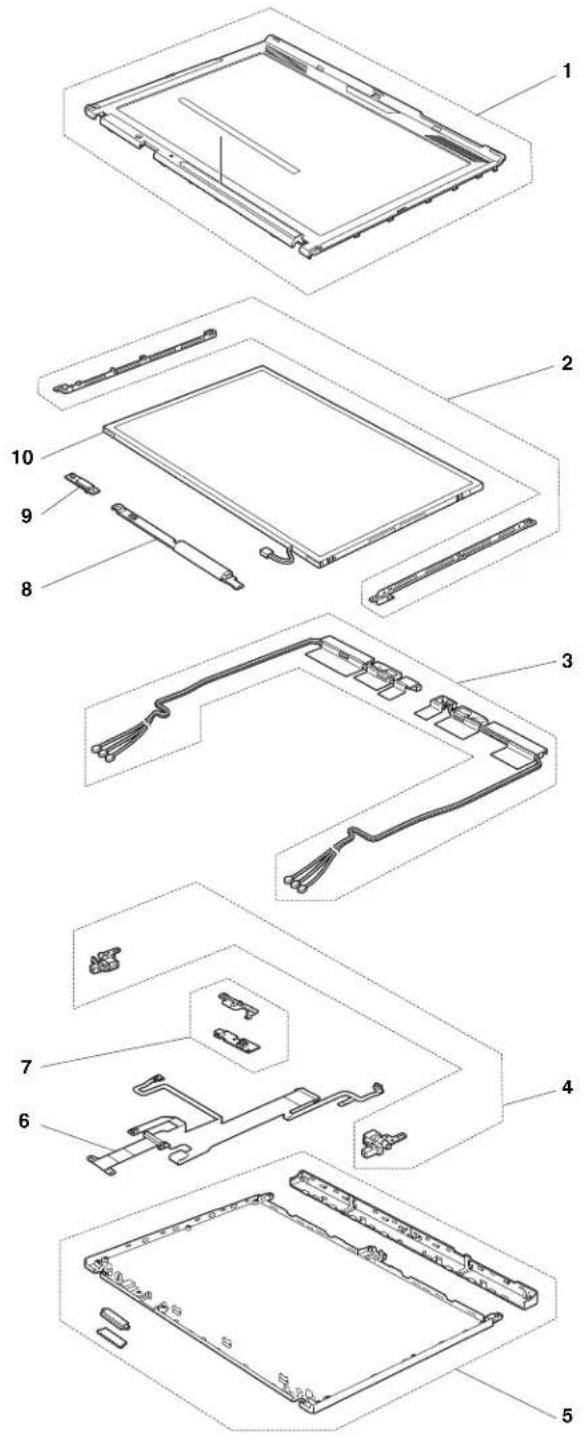
Table38.Partslist—12.1-in.WXGATFT
| No.FR | UFRUno.CRU | ID | |
| 1LC | Dbezelassembly•7454-all•7455-all•7457-all•7458-all•7459-all•2023-CTO•2024-CTO•7462-CTO,22x,23x,24x,25x,26x,27x,28x,29x,2Ax,2Bx,2Cx,2Dx,2Ex,2Fx,2Gx,2Hx,42x,43x,44x,45x,46x,47x,48x,49x,4Ax,4Bx,4Cx,4Dx,4Ex,4Fx,4Gx,4Hx,4Qx,4Rx,4Sx,4Tx,4Ux,4Vx,4Wx,4Xx,4Yx,F2x,F3x,F4x,F5x,F6x,F7x,F8x,F9x,FAx,FBx,FCx,FDx,FEx,FFx,FGx,FHx,FJx,FKx,FLx,FMx,FRx,FSx,FUx,FVx•7465-CTO,23x,24x,25x,26x,27x,28x,29x,2Dx,2Lx,2Mx,2Nx,2Px,2Qx,2Rx,2Sx,2Tx,2Ux,2Vx,2Wx,2Xx,2Zx,3Jx,3Lx,3Nx,3Px,3Rx,3Sx,3Tx,3Ux,3Vx,3Wx,3Xx,3Yx,3Zx,D4x,D6x,D7x,D8x,D9x,DAx,DBx,DCx,DDx,DEx,DFx,DGx,DHx,DJx,DKx,G2x,G3x,G4x,G5x,G6x,G7x,G8x,G9x,GAX,GBx•7466-CTO,32x,33x,34x,35x,38x,39x,3Px,3Qx,3Rx,3Sx,3Tx,3Ux,3Vx,3Xx,3Yx,3Zx,43x,45x,46x,47x,48x,49x,4Ax,4Bx,4Cx,4Dx,4Ex,4Fx,4Hx,4Jx,4Kx,4Lx,4Mx,4Nx,4Px,4Qx,4Sx,4Vx,4Wx,4Xx,4Yx,4Zx,52x,53x,54x,55x,56x,57x,58x,59x,5Ax,5Bx,5Cx,5Dx,5Ex,5Fx,5Gx,5Hx,5Jx,5Kx,5Lx,5Mx,5Nx,5Px,5Qx,5Rx,5Sx,5Tx,5Ux,5Vx,5Wx,5Xx,5Yx,5Zx,92x,93x,95x,96x,97x,98x,99x,9Ax,9Bx,9Cx,9Dx,9Ex,9Fx,9Gx,9Hx,9Jx,9Kx,9Lx,9Mx,9Nx,9Px,9Qx,9Rx,9Sx,9Tx,9Ux,9Vx,9Wx,9Xx,9Yx,9Zx,DLx,DMx,F2x,F3x,F4x,F5x,F6x,F7x,F8x,F9x,FAx,FBx,FCx,FDx,FEx,FFx,FGx,FHx,FJx,FKx,FLx,FMx,FPx,FPx,FRx,FSx,FTx,FUx,FVx,FWx,FXx,FYx,FZx,H2x,H3x,H4x,H5x,H6x,H7x,H8x,H9x,HAx,HBx,HCx,HDx,HEx,N2x•7469-CTO,52x,53x,55x,56x,57x,58x,59x,5Ax,5Bx,5Cx,5Dx,5Ex,5Fx,5Gx,5Hx,5Jx,5Kx,5Sx,5Tx,5Yx,5Zx,62x,63x,64x,65x,66x,67x,68x,6Bx,6Cx,6Dx,6Ex,6Fx,6Gx,6Hx,6Jx,6Kx,6Lx,6Mx,6Nx,6Px,6Qx,6Rx,6Tx,6Ux,6Vx,6Wx,6Xx,6Zx,72x,73x,74x,75x,76x,77x,79x,7Bx,7Cx,7Dx,7Ex,7Fx,7Hx,7Jx,7Kx,7Lx,7Qx,7Rx,7Sx,7Tx,7Xx,83x,84x,8Bx,8Cx,8Dx,8Ex,8Fx,8Lx,8Mx,8Nx,8Rx,8Sx,8Tx,8Ux,8Vx,8Wx,8Xx,8Yx,8Zx,93x,94x,95x,96x,97x,98x,99x,9Ax,9Bx,9Cx,9Dx,9Ex,9Gx,E2x,G2x,G3x,G4x,G5x,G6x,G7x,G8x,G9x,GAX,GBx,GCx•7470-CTO,5Gx,5Hx,62x,63x,65x,68x,69x,6Ax,6Hx,6Px,6Rx,6Sx,6Tx,6Ux,6Vx,72x,73x,74x,75x,76x,77x,8Tx,8Ux,8Zx,E2x•2046-CTO•2047-CTO•3249-all•3323-all•3357-all•3626-all•3680-all•3712-all•4492-all | 44C9541N | |
| 2LC | DbracketL/R•7454-all•7455-all•7457-all•7458-all•7459-all•2023-CTO•2024-CTO•7462-CTO,22x,23x,24x,25x,26x,27x,28x,29x,2Ax,2Bx,2Cx,2Dx,2Ex,2Fx,2Gx,2Hx,42x,43x,44x,45x,46x,47x,48x,49x,4Ax,4Bx,4Cx,4Dx,4Ex,4Fx,4Gx,4Hx,4Qx,4Rx,4Sx,4Tx,4Ux,4Vx,4Wx,4Xx,4Yx,F2x,F3x,F4x,F5x,F6x,F7x,F8x,F9x,FAx,FBx,FCx,FDx,FFx,FGx,FHx,FJx,FKx,FLx,FMx,FNx,FRx,FSx,FUx,FVx•7465-CTO,23x,24x,25x,26x,27x,28x,29x,2Dx,2Lx,2Mx,2Nx,2Px,2Qx,2Rx,2Sx,2Tx,2Ux,2Vx,2Wx,2Xx,2Zx,3Jx,3Lx,3Nx,3Px,3Rx,3Sx,3Tx,3Ux,3Vx,3Wx,3Xx,3Yx,3Zx,D4x,D6x,D7x,D8x,D9x,DAx,DBx,DCx,DDx,DDx,DFx,DGx,DHx,DJx,DKx,G2x,G3x,G4x,G5x,G6x,G7x,G8x,G9x,GAX,GBx•7466-CTO,32x,33x,34x,35x,38x,39x,3Px,3Qx,3Rx,3Sx,3Tx,3Ux,3Vx,3Xx,3Yx,3Zx,43x,45x,46x,47x,48x,49x,4Ax,4Bx,4Cx,4Dx,4Ex,4Fx,4Hx,4Jx,4Kx,4Lx,4Mx,4Nx,4Px,4Qx,4Sx,4Vx,4Wx,4Xx,4Yx,4Zx,52x,53x,54x,55x,56x,57x,58x,59x,5Ax,5Bx,5Cx,5Dx,5Ex,5Fx,5Gx,5Hx,5Jx,5Kx,5Lx,5Mx,5Nx,5Px,5Qx,5Rx,5Sx,5Tx,5Ux,5Vx,5Wx,5Xx,5Yx,5Zx,92x,93x,95x,96x,97x,98x,99x,9Ax,9Bx,9Cx,9Dx,9Ex,9Fx,9Gx,9Hx,9Jx,9Kx,9Lx,9Mx,9Nx,9Px,9Qx,9Rx,9Sx,9Tx,9Ux,9Vx,9Wx,9Xx,9Yx,9Zx,DLx,DMx,F2x,F3x,F4x,F5x,F6x,F7x,F8x,F9x,FAx,FBx,FCx,FDx,FEx,FFx,FGx,FHx,FJx,FKx,FLx,FMx,FPx,FPx,FRx,FSx,FTx,FUx,FVx,FWx,FXx,FYx,FZx,H2x,H3x,H4x,H5x,H6x,H7x,H8x,H9x,HAX,HBx,HCx,HDx,HEx,N2x•7469-CTO,52x,53x,55x,56x,57x,58x,59x,5Ax,5Bx,5Cx,5Dx,5Ex,5Fx,5Gx,5Hx,5Jx,5Kx,5Sx,5Tx,5Yx,5Zx,62x,63x,64x,65x,66x,67x,68x,6Bx,6Cx,6Dx,6Ex,6Fx,6Gx,6Hx,6Jx,6Kx,6Lx,6Mx,6Nx,6Px,6Qx,6Rx,6Tx,6Ux,6Vx,6Wx,6Xx,6Zx,72x,73x,74x,75x,76x,77x,79x,7Bx,7Cx,7Dx,7Ex,7Fx,7Hx,7Jx,7Kx,7Lx,7Qx,7Rx,7Sx,7Tx,7Xx,83x,84x,8Bx,8Cx,8Dx,8Ex,8Fx,8Lx,8Mx,8Nx,8Rx,8Sx,8Tx,8Ux,8Vx,8Wx,8Xx,8Yx,8Zx,93x,94x,95x,96x,97x,98x,99x,9Ax,9Bx,9Cx,9Dx,9Ex,9Gx,E2x,G2x,G3x,G4x,G5x,G6x,G7x,G8x,G9x,GAX,GBx,GCx•7470-CTO,5Gx,5Hx,62x,63x,65x,68x,69x,6Ax,6Hx,6Px,6Rx,6Sx,6Tx,6Ux,6Vx,72x,73x,74x,75x,76x,77x,8Tx,8Ux,8Zx,E2x•2046-CTO•2047-CTO•3249-all•3323-all•3357-all•3626-all•3680-all•3712-all•4492-all | 44C9545N | |
| 3WirelessLANantennakit•7454-CTO,26x,29x,2Gx,2Hx,2Nx,2Qx,2Rx,2Wx,2Xx,2Yx,3Lx,3Mx,3Nx,3Px,3Yx,3Zx,92x,95x,97x,98x,G4x,G5x,G6x,G7x,G8x,G9x,GFx,GGx,GLx,GMx•7455-CTO,36x,38x,39x,3Cx,3Fx,3Gx,3Hx,3Jx,3Kx,3Rx,3Ux,3Vx,3Wx,49x,4Hx,4Jx,4Kx,4Lx,4Mx,4Nx,4Px,85x,86x,8Nx,D5x,D6x,DAx,DCx,DDx,DEx,DGx,DHx,DMx,DSx,DTx,DXx,N3x,N4x•7457-CTO,45x,48x,4Ax,4Cx,4Dx,4Gx,4Hx,4Nx,4Px,4Qx,4Ux,4Vx,52x,55x•7458-CTO,22x,24x,25x,27x,29x,2Ax,2Sx,54x,56x,57x,5Dx,5Ex,64x,69x,6Qx,6Xx,72x,73x,74x,78x,7Mx,7Nx,7Sx,7Wx,88x,8Bx,8Cx,8Dx,8Jx,8Px,8Qx,8Yx,F2x,F3x,F4x,FDx,FHx,FJx,FNx,FPx,FTx,FUx,FYx,G3x,G7x,M2x•7459-CTO,68x,69x,6Bx,6Cx,6Gx,6Kx,6Lx,6Px,72x,H3x,H4x,H6x,H7x•2023-CTO•2024-CTO•7462-CTO,22x,23x,24x,27x,28x,29x,2Cx,2Dx,42x,47x,48x,4Qx,4Rx,4Sx,4Tx,4Ux,4Vx,4Wx,4Xx,4Yx,F2x,F4x,F6x,F7x,FAx,FBx,FCx,FFx,FGx,FLx,FMx,FNx,FSx•7465-CTO,23x,24x,2Mx,2Nx,2Px,2Qx,2Rx,2Sx,2Tx,2Ux,2Vx,2Wx,2Xx,2Zx,3Lx,3Nx,3Px,3Rx,3Vx,3Wx,3Xx,D4x,DCx,DDx,DEx,DFx,G2x,G5x,G6x,G7x•7466-CTO,32x,34x,35x,45x,46x,47x,48x,49x,4Ax,4Bx,4Cx,4Dx,4Hx,4Jx,4Kx,4Lx,4Mx,4Nx,4Px,4Qx,4Sx,4Vx,58x,59x,5Ax,5Kx,5Lx,5Mx,5Nx,5Rx,5Vx,5Wx,5Zx,9Fx,9Gx,9Hx,9Jx,9Kx,9Rx,9x,x,DLx,DMx,F9x,FAx,FNx,FPx,FQx,H5x,H6x,H7x•7469-CTO,52x,53x,58x,59x,5Ax,5Bx,5Cx,5Dx,5Ex,5Fx,5Sx,62x,63x,64x,65x,66x,67x,68x,7Lx,7Xx,8Ex,8Vx,8Wx,8Xx,8Yx,97x,9Bx,9Cx,G2x,G6x,G7x,G8x•7470-CTO,5Gx,5Hx,62x,63x,65x,68x,6Ux,72x,76x,8Ux•2046-CTO•2047-CTO•3249-CTO,24x,25x,27x,2Cx,2Kx,2Lx,J2x,J5x,JAx•3323-CTO,4Bx,4Cx,4Fx,4Hx,4Jx,4Yx,54x,56x,57x,58x,5Hx,5Jx,5Kx,5Lx,5Mx,5Nx,5Px,5Rx,5Sx,5Tx,5Ux,5Vx,5Wx,5Yx,5Zx,62x,63x,64x,65x,66x,67x,68x,69x,6Ax,6Bx,6Cx,6Dx,6Ex,6Fx,6Gx,6Hx,6Jx,6Kx,6Lx,6Mx,6Nx,6Px,6Rx,6Sx,6Tx,6Ux,6Vx,6Wx,6Yx,6Zx,72x,73x,74x,75x,76x,77x,78x,79x,7Ax,7Bx,7Cx,7Dx,7Ex,7Fx,7Gx,7Hx,7Jx,7Kx,7Lx,7Wx,7Xx,7Yx,7Zx,82x,83x,84x,85x,86x,87x•3357-CTO•3626-CTO,F9x,FDx,FEx,FFx,FGx,FHx,FJx,FKx,FLx,FZx,G2x,G3x,G4x,GAx•3680-CTO,F8x•3712-CTO•4492-CTO | 44C5393N |
Table38.Partslist—12.1-in.WXGATFT(continued)
| No.FRUFRUno.CRU | ID | |
| 3WirelessLAN/WANantennakit•7454-CTO,23x,24x,25x,28x,2Jx,2Mx,2Px,2Sx,2Tx,2Ux,2Vx,2Zx,32x,33x,34x,36x,38x,3Hx,3Jx,3Kx,3Qx,3Rx,3Sx,3Tx,3Vx,3Wx,3Xx,93x,96x,9Bx,9Cx,9Gx,9Hx,9Jx,9Lx,G2x,G3x,GBx,GCx,GDx,GEx,GHx,GJx,GKx,GNx,GPx•7455-CTO,33x,34x,35x,3Ax,3Bx,3Dx,3Ex,3Lx,3Mx,3Nx,3Px,3Qx,3Sx,3Tx,3Xx,3Yx,3Zx,42x,43x,44x,45x,46x,47x,48x,4Ax,4Bx,4Cx,4Dx,4Ex,4Fx,4Gx,4Qx,4Rx,4Sx,4Tx,4Ux,4Vx,4Wx,4Xx,4Yx,4Zx,82x,83x,84x,87x,88x,89x,8Ax,8Bx,8Cx,8Dx,8Ex,8Fx,8Gx,8Hx,8Jx,8Kx,8Lx,8Mx,8Px,8Qx,8Rx,8Sx,8Tx,8Ux,8Vx,8Wx,8Xx,8Yx,8Zx,D2x,D3x,D7x,D8x,D9x,DBx,DFx,DJx,DKx,DLx,DNx,DPx,DQx,DRx,DUx,DVx,DWx,DYx,DZx,F2x,F3x,F4x,F5x,F6x,F7x,F9x,FBx,FCx,FDx,FEx,FFx,FGx,FHx,FJx,FKx,FLx,FMx,FNx,FPx,FQx,FRx,FSx,FTx,FUx,FVx,FWx,FXx,FYx,FZx,N2x,N5x,P2x,P3x,P4x,P5x,P6x,P7x,P9x,PAx,PBx,PCx,PDx,PEx,PFx,PGx,PHx,PJx•7457-CTO,43x,44x,47x,49x,4Bx,4Ex,4Fx,4Jx,4Kx,4Lx,4Mx,4Rx,4Sx,4Tx,4Wx,53x,54x,56x,57x,58x•7458-CTO,26x,28x,2Bx,2Cx,2Dx,2Ex,2Fx,2Kx,2Lx,2Mx,2Nx,2Px,2Qx,2Rx,2Tx,2Vx,4Xx,4Yx,52x,53x,55x,58x,59x,5Ax,5Bx,5Cx,5Lx,5Mx,5Nx,5Px,5Qx,5Rx,5Sx,5Tx,62x,63x,65x,66x,67x,68x,6Ax,6Bx,6Cx,6Dx,6Ex,6Jx,6Kx,6Lx,6Mx,6Nx,6Px,6Rx,6Sx,6Tx,6Ux,6Vx,6Wx,6Yx,6Zx,76x,77x,79x,7Bx,7Cx,7Ex,7Fx,7Gx,7Hx,7Jx,7Kx,7Lx,7Px,7Qx,7Rx,7Tx,7Ux,7Vx,7Xx,7Yx,7Zx,82x,83x,84x,85x,86x,87x,8Ax,8Fx,8Gx,8Hx,8Kx,8Lx,8Mx,8Nx,8Sx,8Wx,8Xx,8Zx,E2x,F5x,F6x,F7x,F8x,F9x,FAx,FCx,FEx,FFx,FGx,FKx,FLx,FMx,FQx,FSx,FVx,FWx,FXx,G4x,G5x,G6x,G8x,G9x,GBx,GCx,GDx,GEx,GFx,M3x,X4x•7459-CTO,5Ex,5Fx,62x,63x,64x,65x,66x,67x,6Ax,6Dx,6Ex,6Fx,6Jx,6Mx,6Nx,6Qx,6Rx,6Sx,6Tx,6Ux,6Vx,6Wx,6Xx,6Yx,6Zx,73x,74x,75x,E3x,H2x,H5x,M2x,M3x,M4x•2023-CTO•2024-CTO•7462-CTO,25x,26x,2Ax,2Bx,2Ex,2Fx,2Gx,2Hx,43x,44x,45x,46x,4Bx,4Gx,F3x,F5x,F8x,F9x,FDx,FEx,FHx,FJx,FKx,FRx,FUx,FVx•7465-CTO,2Lx,3Jx,3Sx,3Tx,3Ux,3Yx,3Zx,D6x,D8x,DAx,DBx,DJx,G3x,G4x,G8x,G9x,GAx,GBx•7466-CTO,33x,38x,39x,3Px,3Qx,3Rx,3Sx,3Tx,3Ux,3Vx,3Xx,3Yx,3Zx,43x,4Ex,4Fx,4Wx,4Xy,4Yx,4Zx,52x,53x,54x,55x,56x,57x,5Bx,5Cx,5Dx,5Ex,5Fx,5Gx,5Hx,5Jx,5Px,5Qx,5Sx,5Tx,5Ux,5Xy,92x,93x,95x,96x,97x,98x,99x,9Ax,9Bx,9Cx,9Dx,9Ex,9Lx,9Mx,9Nx,9Qx,9Sx,9Tx,9Ux,9Wx,9Yx,9Zx,F2x,F3x,F4x,F5x,F6x,F7x,F8x,FBx,FCx,FDx,FEx,FFx,FGx,FHx,FJx,FKx,FLx,FMx,FRx,FSx,FTx,FUx,FVx,FWx,FXx,FYx,FZx,H2x,H4x,H8x,H9x,HAx,HBx,HCx,HDx,HEx,N2x•7469-CTO,55x,56x,57x,5Gx,5Hx,5Jx,5Kx,5Tx,5Yx,5Zx,6Bx,6Cx,6Dx,6Ex,6Fx,6Gx,6Hx,6Jx,6Kx,6Lx,6Mx,6Nx,6Px,6Qx,6Rx,6Tx,6Ux,6Vx,6Wx,6Xx,6Yx,6Zx,72x,73x,74x,75x,76x,77x,79x,7Bx,7Cx,7Dx,7Ex,7Fx,7Hx,7Jx,7Kx,7Qx,7Rx,7Sx,7Tx,83x,84x,8Bx,8Cx,8Dx,8Fx,8Lx,8Mx,8Nx,8Rx,8Sx,8Tx,8Ux,8Zx,93x,94x,95x,96x,98x,99x,9Ax,9Dx,9Ex,9Gx,E2x,G3x,G4x,G5x,G9x,GAx,GBx,GCx•7470-CTO,69x,6Ax,6Hx,6Px,6Rx,6Sx,6Tx,6Vx,73x,74x,75x,77x,8Tx,8Zx,E2x•2046-CTO•2047-CTO(continued) | 44C5395N |
Table38. Partslist—12.1-in.WXGATFT(continued)
| No.FR | UFRUno.CRU | ID | |
| 3(continued)WirelessLAN/WANantennakit•3249-CTO,22x,23x,26x,28x,29x,2Ax,2Bx,2Dx,2Ex,2Fx,2Gx,2Hx,2Jx,2Lx,2Mx,J3x,J4x,J6x,J7x,J8x,J9x•3323-CTO,42x,43x,44x,45x,46x,48x,49x,4Ax,4Dx,4Ex,4Gx,4Kx,4Lx,4Mx,4Nx,4Px,4Rx,4Sx,4Tx,4Ux,4Vx,4Wx,4Zx,52x,53x,55x,59x,5Ax,5Bx,5Cx,5Dx,5Ex,5Fx,5Gx,7Mx,7Nx,7Px,7Rx,7Sx,7Tx,7Ux,7Vx,88x,89x,8Ax,8Bx,8Cx,8Dx,8Ex,8Fx,8Gx,8Jx,8Kx,8Lx,8Nx,8Px,8Rx,8Sx,8Tx,8Ux,8Vx,8Wx,8Xx,8Yx,8Zx,92x,93x,94x,95x,96x,97x,98x,99x,9Ax,9Bx,9Cx,9Dx,9Ex,9Fx,9Gx,9Hx,K2x,K3x,K4x,K5x,K6x,K7x,K8x,K9x,KAx,KCx,KDx,KEx,KFx,KGx,KHx,KJx,KLx,KMx,KNx,KPx,KRx,KSx,KTx,KUx,KVx,KWx,KYx,KZx,L2x,L3x,L4x,L5x,L6x,L7x,L8x,LAx,LBx,LCx,LDx,LEX,LFx,R2x•3357-CTO,D2x,D3x,D4x,D5x,D6x,D7x•3626-CTO,11x,F2x,F3x,F4x,F5x,F6x,F7x,F8x,FAx,FBx,FCx,FMx,FNx,FPx,FRx,FSx,FTx,FUx,FVx,FWx,FXx,FYx,G5x,G6x,G7x,G8x,G9x,GBx,GCx,GDx,GEx,GFx,GHx,GHx,GJx,GJx,GKx,GLx,GMx,GNx,GPx,GRx,GSx,GTx,GUx,GVx,GWx,GXx,GYx,GZx,H2x,H3x,H4x,H5x,H6x,H7x,R3x,N2x•3680-CTO,11x,F7x,F9x,FAx,FBx,P2x,P3x,P4x,P5x,P6x,P7x,P8x,P9x,PAx,PBx,PCx,PDx,PEx,PFx,PGx,PHx,PJx,N2x•3712-CTO•4492-CTO | 44C5395N | ||
| 3WirelessLAN/WAN/USBantennakit•7454-CTO,22x,27x,2Kx,2Lx,9Fx•7455-CTO,32x•7457-CTO,42x,46x•7458-CTO,5Fx,5Hx,5Jx,7Dx,89x,8Ex,8Rx,8Tx,X5x•7459-CTO•2023-CTO•2024-CTO•7462-CTO,49x,4Ax,4Cx,4Dx,4Ex,4Fx,4Hx•7465-CTO,25x,26x,28x,29x,2Dx,D7x,D9x,DGx,DHx,DKx•7466-CTO,9Px,9Vx,H3x•7469-CTO•7470-CTO•2046-CTO•2047-CTO•3249-CTO•3323-CTO•3357-CTO•3626-CTO•3680-CTO•3712-CTO•4492-CTO | 44C5394N | ||
| 4HingeL/R•7454-all•7455-all•7457-all•7458-all•7459-all•2023-CTO•2024-CTO•7462-CTO,22x,23x,24x,25x,26x,27x,28x,29x,2Ax,2Bx,2Cx,2Dx,2Ex,2Fx,2Gx,2Hx,42x,43x,44x,45x,46x,47x,48x,49x,4Ax,4Bx,4Cx,4Dx,4Ex,4Fx,4Gx,4Hx,4Qx,4Rx,4Sx,4Tx,4Ux,4Vx,4Wx,4Xx,4Yx,F2x,F3x,F4x,F5x,F6x,F7x,F8x,F9x,FAx,FBx,FCx,FDx,FFx,FGx,FHx,FJx,FKx,FLx,FMx,FNx,FRx,FSx,FUx,FVx•7465-CTO,23x,24x,25x,26x,27x,28x,29x,2Dx,2Lx,2Mx,2Nx,2Px,2Qx,2Rx,2Sx,2Tx,2Ux,2Vx,2Wx,2Xx,2Zx,3Jx,3Lx,3Nx,3Px,3Rx,3Sx,3Tx,3Ux,3Vx,3Wx,3Xx,3Yx,3Zx,D4x,D6x,D7x,D8x,D9x,DAx,DBx,DCx,DDx,DDx,DFx,DGx,DHx,DJx,DKx,G2x,G3x,G4x,G5x,G6x,G7x,G8x,G9x,GAX,GBx•7466-CTO,32x,33x,34x,35x,38x,39x,3Px,3Qx,3Rx,3Sx,3Tx,3Ux,3Vx,3Xx,3Yx,3Zx,43x,45x,46x,47x,48x,49x,4Ax,4Bx,4Cx,4Dx,4Ex,4Fx,4Hx,4Jx,4Kx,4Lx,4Mx,4Nx,4Px,4Qx,4Sx,4Vx,4Wx,4Xx,4Yx,4Zx,52x,53x,54x,55x,56x,57x,58x,59x,5Ax,5Bx,5Cx,5Dx,5Ex,5Fx,5Gx,5Hx,5Jx,5Kx,5Lx,5Mx,5Nx,5Px,5Qx,5Rx,5Sx,5Tx,5Ux,5Vx,5Wx,5Xx,5Yx,5Zx,92x,93x,95x,96x,97x,98x,99x,9Ax,9Bx,9Cx,9Dx,9Ex,9Fx,9Gx,9Hx,9Jx,9Kx,9Lx,9Mx,9Nx,9Px,9Qx,9Rx,9Sx,9Tx,9Ux,9Vx,9Wx,9Xx,9Yx,9Zx,DLx,DMx,F2x,F3x,F4x,F5x,F6x,F7x,F8x,F9x,FAx,FBx,FCx,FDx,FEx,FFx,FGx,FHx,FJx,FKx,FLx,FMx,FPx,FPx,FRx,FSx,FTx,FUx,FVx,FWx,FXx,FYx,FZx,H2x,H3x,H4x,H5x,H6x,H7x,H8x,H9x,HAX,HBx,HCx,HDx,HEx,N2x•7469-CTO,52x,53x,55x,56x,57x,58x,59x,5Ax,5Bx,5Cx,5Dx,5Ex,5Fx,5Gx,5Hx,5Jx,5Kx,5Sx,5Tx,5Yx,5Zx,62x,63x,64x,65x,66x,67x,68x,6Bx,6Cx,6Dx,6Ex,6Fx,6Gx,6Hx,6Jx,6Kx,6Lx,6Mx,6Nx,6Px,6Qx,6Rx,6Tx,6Ux,6Vx,6Wx,6Xx,6Zx,72x,73x,74x,75x,76x,77x,79x,7Bx,7Cx,7Dx,7Ex,7Fx,7Hx,7Jx,7Kx,7Lx,7Qx,7Rx,7Sx,7Tx,7Xx,83x,84x,8Bx,8Cx,8Dx,8Ex,8Fx,8Lx,8Mx,8Nx,8Rx,8Sx,8Tx,8Ux,8Vx,8Wx,8Xx,8Yx,8Zx,93x,94x,95x,96x,97x,98x,99x,9Ax,9Bx,9Cx,9Dx,9Ex,9Gx,E2x,G2x,G3x,G4x,G5x,G6x,G7x,G8x,G9x,GAX,GBx,GCx•7470-CTO,5Gx,5Hx,62x,63x,65x,68x,69x,6Ax,6Hx,6Px,6Rx,6Sx,6Tx,6Ux,6Vx,72x,73x,74x,75x,76x,77x,8Tx,8Ux,8Zx,E2x•2046-CTO•2047-CTO•3249-all•3323-all•3357-all•3626-all•3680-all•3712-all•4492-all | 44C9544N | ||
| 5LC | Drearcoverassembly•7454-all•7455-all•7457-all•7458-all•7459-all•2023-CTO•2024-CTO•7462-CTO,22x,23x,24x,25x,26x,27x,28x,29x,2Ax,2Bx,2Cx,2Dx,2Ex,2Fx,2Gx,2Hx,42x,43x,44x,45x,46x,47x,48x,49x,4Ax,4Bx,4Cx,4Dx,4Ex,4Fx,4Gx,4Hx,4Qx,4Rx,4Sx,4Tx,4Ux,4Vx,4Wx,4Xx,4Yx,F2x,F3x,F4x,F5x,F6x,F7x,F8x,F9x,FAx,FBx,FCx,FDx,FEx,FFx,FGx,FHx,FJx,FKx,FLx,FMx,FNx,FRx,FSx,FUx,FVx•7465-CTO,23x,24x,25x,26x,27x,28x,29x,2Dx,2Lx,2Mx,2Nx,2Px,2Qx,2Rx,2Sx,2Tx,2Ux,2Vx,2Wx,2Xx,2Zx,3Jx,3Lx,3Nx,3Px,3Rx,3Sx,3Tx,3Ux,3Vx,3Wx,3Xx,3Yx,3Zx,D4x,D6x,D7x,D8x,D9x,DAx,DBx,DCx,DDx,DFx,DGx,DHx,DJx,DKx,G2x,G3x,G4x,G5x,G6x,G7x,G8x,G9x,GAX,GBx•7466-CTO,32x,33x,34x,35x,38x,39x,3Px,3Qx,3Rx,3Sx,3Tx,3Ux,3Vx,3Xx,3Yx,3Zx,43x,45x,46x,47x,48x,49x,4Ax,4Bx,4Cx,4Dx,4Ex,4Fx,4Hx,4Jx,4Kx,4Lx,4Mx,4Nx,4Px,4Qx,4Sx,4Vx,4Wx,4Xx,4Yx,4Zx,52x,53x,54x,55x,56x,57x,58x,59x,5Ax,5Bx,5Cx,5Dx,5Ex,5Fx,5Gx,5Hx,5Jx,5Kx,5Lx,5Mx,5Nx,5Px,5Rx,5Sx,5Tx,5Ux,5Vx,5Wx,5Xx,5Yx,5Zx,92x,93x,95x,96x,97x,98x,99x,9Ax,9Bx,9Cx,9Dx,9Ex,9Fx,9Gx,9Hx,9Jx,9Kx,9Lx,9Mx,9Nx,9Px,9Qx,9Rx,9Sx,9Tx,9Ux,9Vx,9Wx,9Xx,9Yx,9Zx,DLx,DMx,F2x,F3x,F4x,F5x,F6x,F7x,F8x,F9x,FAx,FBx,FCx,FDx,FEx,FFx,FGx,FHx,FJx,FKx,FLx,FMx,FNx,FPx,FQx,FRx,FSx,FTx,FUx,FVx,FWx,FXx,FYx,FZx,H2x,H3x,H4x,H5x,H6x,H7x,H8x,H9x,HAX,HBx,HCx,HDx,HEx,N2x•7469-CTO,52x,53x,55x,56x,57x,58x,59x,5Ax,5Bx,5Cx,5Dx,5Ex,5Fx,5Gx,5Hx,5Jx,5Kx,5Sx,5Tx,5Yx,5Zx,62x,63x,64x,65x,66x,67x,68x,6Bx,6Cx,6Dx,6Ex,6Fx,6Gx,6Hx,6Jx,6Kx,6Lx,6Mx,6Nx,6Px,6Qx,6Rx,6Tx,6Ux,6Vx,6Wx,6Xx,6Zx,72x,73x,74x,75x,76x,77x,79x,7Bx,7Cx,7Dx,7Ex,7Fx,7Hx,7Jx,7Kx,7Lx,7Qx,7Rx,7Sx,7Tx,7Xx,83x,84x,8Bx,8Cx,8Dx,8Ex,8Fx,8Lx,8Mx,8Nx,8Rx,8Sx,8Tx,8Ux,8Vx,8Wx,8Xx,8Yx,8Zx,93x,94x,95x,96x,97x,98x,99x,9Ax,9Bx,9Cx,9Dx,9Ex,9Gx,E2x,G2x,G3x,G4x,G5x,G6x,G7x,G8x,G9x,GAX,GBx,GCx•7470-CTO,5Gx,5Hx,62x,63x,65x,68x,69x,6Ax,6Hx,6Px,6Rx,6Sx,6Tx,6Ux,6Vx,72x,73x,74x,75x,76x,77x,8Tx,8Ux,8Zx,E2x•2046-CTO•2047-CTO | 44C9543N | |
| 5LC | DrearcoverassemblyforX201andX201i75Y4590N | ||
| 6CC | FL-backlightLCDcableassemblywithBluetoothconnector,withcameraconnector•7454-CTO,22x,23x,24x,25x,26x,27x,28x,29x,2Gx,2Hx,2Jx,2Kx,2Lx,2Mx,2Nx,2Px,2Qx,2Rx,2Sx,2Tx,2Ux,2Vx,2Wx,2Xy,2Zx,92x,93x,95x,96x,97x,98x,9Bx,9Cx,9Fx,9Gx,9Hx,9Jx,9Lx•7455-CTO,32x,33x,34x,35x,36x,38x,39x,3Ax,3Bx,3Cx,3Dx,3Ex,3Fx,3Gx,3Hx,3Jx,3Kx,3Lx,3Mx,3Nx,3Px,3Qx,3Rx,3Sx,3Tx,3Ux,3Vx,3Wx,3Xx,3Yx,3Zx,D2x,D3x,D5x,D6x,D7x,D8x,D9x,DAx,DBx,DCx,DDx,DFx,DFx,DGx,DHx,DJx,DKx,DLx,DMx,DNx,DPx,DQx,DRx,DSx,DTx,DUx,DVx,DWx,Dx,x,DYx,DZx,N2x,N3x,N4x,N5x•7457-CTO,42x,43x,44x,45x,46x,47x,48x,49x,4Ax,4Bx,4Cx,4Dx,4Ex,4Fx,4Gx,4Hx,4Jx,4Kx,4Lx,4Mx,4Nx,4Px,4Qx,4Rx,4Sx,4Tx,4Ux,4Vx,4Wx•7458-CTO,4Xx,4Yx,52x,53x,54x,55x,56x,57x,58x,59x,5Ax,5Bx,5Cx,5Dx,5Ex,5Fx,5Hx,5Jx,5Lx,5Mx,5Nx,5Px,5Qx,5Rx,5Sx,5Tx,69x,72x,73x,74x,76x,77x,78x,79x,7Bx,7Cx,7Dx,7Ex,7Fx,7Gx,7Hx,7Jx,7Kx,7Lx,7Mx,7Nx,7Px,7Qx,7Rx,7Sx,7Tx,7Ux,7Vx,7Wx,7Xx,7Yx,7Zx,82x,83x,84x,85x,86x,87x,88x,89x,8Aa,8Bx,8Cx,8Dx,8Ex,8Fx,8Gx,8Hx,8Jx,8Kx,8Lx,8Mx,8Nx,8Px,8Qx,8Rx,8Sx,8Tx,8Wx,8Xx,8Yx,8Zx,E2x,F2x,F3x,F4x,F5x,F6x,F7x,F8x,F9x,FAX,FCx,FDx,FEx,FFx,FGx,FHX,FJx,FKx,FLx,FMx,FNX,FPx,FQx,FSx,FTx,FUX,FVx,FWX,FXx,FYx,G3x,G4x,G5x,G6x,G7x,G8x,G9x,GBx,GCx,GDX,GEx,GFX,M2x,M3x,X4x,X5x•7459-CTO,5Ex,5Fx,62x,63x,64x,65x,66x,67x,68x,69x,6Ax,6Bx,6Cx,6Dx,6Ex,6Fx,6Gx,6Jx,6Kx,6Lx,6Mx,6Nx,6Px,6Qx,6Rx,6Sx,6Tx,6Ux,6Vx,6Wx,6Xx,6Yx,6Zx,E3x,H2x,H3x,H4x,H5x,H6x,H7x,M2x,M3x,M4x•2023-CTO•2024-CTO•7462-CTO,42x,43x,44x,45x,46x,47x,48x,49x,4Ax,4Bx,4Cx,4Dx,4Ex,4Fx,4Gx,4Hx,4Qx,4Rx,4Sx,4Tx,4Ux,4Vx,4Wx,4Xy,4Fx,F2x,F3x,F4x,F5x,F6x,F7x,F8x,F9x,FAX,FBx,FCx,FDx,FEx,FFx,FGx,FHX,FJx,FKx,FLx,FMx,FNX,FRx,FSx,FUX,FVx•7465-CTO,23x,24x,25x,26x,27x,28x,29x,2Dx,2Lx,2Mx,2Nx,2Px,2Qx,2Rx,2Sx,2Tx,2Ux,2Vx,2Wx,2Xy,2Zx,D4x,D6x,D7x,D8x,D9x,DAX,DBx,DCx,DDx,DEx,DFx,DGx,DHX,DJx,DKx•7466-CTO,32x,33x,34x,35x,38x,39x,3Px,3Qx,3Rx,3Sx,3Tx,3Ux,3Vx,3Xx,3Yx,3Zx,92x,93x,95x,96x,97x,98x,99x,9Ax,9Bx,9Cx,9Dx,9Ex,9Fx,9Gx,9Hx,9Jx,9Kx,9Lx,9Mx,9Nx,9Px,9Qx,9Rx,9Sx,9Tx,9Ux,9Vx,9Wx,9Xy,9Zx,DLx,DMx,H2x,H3x,H4x,H5x,H6x,H7x,H8x,H9x,HAX,HBX,HCX,HDX,HEx•7469-CTO,52x,53x,55x,56x,57x,58x,59x,5Ax,5Bx,5Cx,5Dx,5Ex,5Fx,5Gx,5Hx,5Jx,5Kx,5Sx,5Tx,5Yx,5Zx,72x,73x,74x,75x,76x,77x,79x,7Bx,7Cx,7Dx,7Ex,7Fx,7Hx,7Jx,7Kx,7Lx,7Qx,7Rx,7Sx,7Tx,7Xx,83x,84x,8Bx,8Cx,8Dx,8Ex,8Fx,8Lx,8Mx,8Nx,8Rx,8Sx,8Tx,8Ux,8Vx,8Wx,8Xy,8Zx,E2x,G2x,G3x,G4x,G5x,G6x,G7x,G8x,G9x,GAX,GBx,GCx•7470-CTO,5Gx,5Hx,62x,63x,65x,68x,69x,6Ax,6Hx,6Px,6Rx,6Sx,6Tx,6Ux,6Vx,8Tx,8Ux,8Zx,E2x•2046-CTO•2047-CTO | 44C9909N | |
| 7LED-backlightLCDcableassemblywithBluetoothconnector,withcameraconnector•7454-CTO,32x,33x,34x,36x,38x,3Hx,3Jx,3Kx,3Lx,3Mx,3Nx,3Px,3Qx,3Rx,3Sx,3Tx,3Vx,3Wx,3Xx,3Yx,3Zx,G2x,G3x,G4x,G5x,G6x,G7x,G8x,G9x,GBx,GCx,GDx,GEx,GFx,GGx,GHx,GJx,GKx,GLx,GMx,GNx,GPx•7455-CTO,42x,43x,44x,45x,46x,47x,48x,49x,4Ax,4Bx,4Cx,4Dx,4Ex,4Fx,4Gx,4Hx,4Jx,4Kx,4Lx,4Mx,4Nx,4Px,4Qx,4Rx,4Sx,4Tx,4Ux,4Vx,4Wx,4Xx,4Zx,82x,83x,84x,85x,86x,87x,88x,89x,8Ax,8Bx,8Cx,8Dx,8Ex,8Fx,8Gx,8Hx,8Jx,8Kx,8Lx,8Mx,8Nx,8Px,8Qx,8Rx,8Sx,8Tx,8Ux,8Vx,8Wx,8Xx,8Yx,8Zx,F2x,F3x,F4x,F5x,F6x,F7x,F9x,FBx,FCx,FDx,FEx,FFx,FGx,FHx,FJx,FKx,FLx,FMx,FNx,FPx,FQx,FRx,FSx,FTx,FUx,FVx,FWx,FXx,FYx,FZx,P2x,P3x,P4x,P5x,P6x,P7x,P9x,PAx,PBx,PCx,PDx,PEx,PFx,PGx,PHx,PJx•7457-CTO,52x,53x,54x,55x,56x,57x,58x•7458-CTO,22x,24x,25x,26x,27x,28x,29x,2Ax,2Bx,2Cx,2Dx,2Ex,2Fx,2Kx,2Lx,2Mx,2Nx,2Px,2Qx,2Rx,2Sx,2Tx,2Vx,62x,63x,64x,65x,66x,67x,68x,6Ax,6Bx,6Cx,6Dx,6Ex,6Jx,6Kx,6Lx,6Mx,6Nx,6Px,6Qx,6Rx,6Sx,6Tx,6Ux,6Vx,6Wx,6Xx,6Yx,6Zx•7459-CTO,72x,73x,74x,75x•2023-CTO•2024-CTO•7462-CTO,22x,23x,24x,25x,26x,27x,28x,29x,2Ax,2Bx,2Cx,2Dx,2Ex,2Fx,2Gx,2Hx•7465-CTO,3Jx,3Lx,3Nx,3Px,3Rx,3Sx,3Tx,3Ux,3Vx,3Wx,3Xx,3Yx,3Zx,G2x,G3x,G4x,G5x,G6x,G7x,G8x,G9x,GAX,GBx•7466-CTO,43x,45x,46x,47x,48x,49x,4Ax,4Bx,4Cx,4Dx,4Ex,4Fx,4Hx,4Jx,4Kx,4Lx,4Mx,4Nx,4Px,4Qx,4Sx,4Vx,4Wx,4Xy,4Zx,52x,53x,54x,55x,56x,57x,58x,59x,5Ax,5Bx,5Cx,5Dx,5Ex,5Fx,5Gx,5Hx,5Jx,5Kx,5Lx,5Mx,5Nx,5Px,5Qx,5Rx,5Sx,5Tx,5Ux,5Vx,5Wx,5Xy,5Zx,F2x,F3x,F4x,F5x,F6x,F7x,F8x,F9x,FAx,FBx,FCx,FDx,FEx,FGx,FHx,FJx,FKx,FLx,FMx,FNx,FPx,FQx,FRx,FSx,FTx,FUx,FVx,FWx,FXx,FYx,FZx,N2x•7469-CTO,62x,63x,64x,65x,66x,67x,68x,6Bx,6Cx,6Dx,6Ex,6Fx,6Gx,6Hx,6Jx,6Kx,6Lx,6Mx,6Nx,6Px,6Qx,6Rx,6Tx,6Ux,6Vx,6Wx,6Xx,6Yx,6Zx,93x,94x,95x,96x,97x,98x,99x,9Ax,9Bx,9Cx,9Dx,9Ex,9Gx•7470-CTO,72x,73x,74x,75x,76x,77x•2046-CTO•2047-CTO | 44C9991N | ||
| 7(continued)LED-backlightLCDcableassemblywithBluetoothconnector,withcameraconnector•3249-CTO,22x,23x,24x,25x,26x,27x,28x,29x,2Ax,2Bx,2Cx,2Dx,2Ex,2Fx,2Gx,2Hx,2Jx,2Kx,2Lx,2Lx,2Mx,J2x,J3x,J4x,J5x,J6x,J7x,J8x,J9x,JAx•3323-CTO,42x,43x,44x,45x,46x,48x,49x,4Ax,4Bx,4Cx,4Dx,4Ex,4Fx,4Gx,4Hx,4Jx,4Kx,4Lx,4Mx,4Nx,4Px,4Rx,4Sx,4Tx,4Ux,4Vx,4Wx,4Yx,4Zx,52x,53x,54x,55x,56x,57x,58x,59x,5Ax,5Bx,5Cx,5Dx,5Ex,5Fx,5Gx,5Hx,5Jx,5Kx,5Lx,5Mx,5Nx,5Px,5Rx,5Sx,5Tx,5Ux,5Vx,5Wx,5Yx,5Zx,62x,63x,64x,65x,66x,67x,68x,69x,6Ax,6Bx,6Cx,6Dx,6Ex,6Fx,6Gx,6Hx,6Jx,6Kx,6Lx,6Mx,6Nx,6Px,6Rx,6Sx,6Tx,6Ux,6Vx,6Wx,6Yx,6Zx,72x,73x,74x,75x,76x,77x,78x,79x,7Ax,7Bx,7Cx,7Dx,7Ex,7Fx,7Gx,7Hx,7Jx,7Kx,7Lx,7Mx,7Nx,7Px,7Rx,7Sx,7Tx,7Ux,7Vx,7Wx,7Xx,7Yx,7Zx,82x,83x,84x,85x,86x,87x,88x,89x,8Ax,8Bx,8Cx,8Dx,8Ex,8Fx,8Gx,8Jx,8Kx,8Lx,8Nx,8Px,8Rx,8Sx,8Tx,8Ux,8Vx,8Wx,8Xx,8Yx,8Zx,92x,93x,94x,95x,96x,97x,98x,99x,9Ax,9Bx,9Cx,9Dx,9Ex,9Fx,9Gx,9Hx,K2x,K3x,K4x,K5x,K6x,K7x,K8x,K9x,KAx,KCx,KDx,KEx,KFx,KGx,KHx,KJx,KLx,KMx,KNx,KPx,KRx,KSx,KTx,KUx,KVx,KWx,KYx,KZx,L2x,L3x,L4x,L5x,L6x,L7x,L8x,LAx,LBx,LCx,LDx,LEx,LFx,R2x•3357-CTO,D2x,D3x,D4x,D5x,D6x,D7x•3626-CTO,11x,F2x,F3x,F4x,F5x,F6x,F7x,F8x,F9x,FAx,FBx,FCx,FDx,FEx,FFx,FGx,FHx,FJx,FKx,FLx,FMx,FNx,FPx,FRx,FSx,FTx,FUx,FVx,FWx,FXx,FYx,FZx,G2x,G3x,G4x,G5x,G6x,G7x,G8x,G9x,GAX,GBx,GCx,GDx,GEx,GFx,GHx,GHx,GJx,GJx,GKx,GLx,GMx,GNx,GPx,GRx,GSx,GTx,GUx,GVx,GWx,GXx,GYx,GZx,H2x,H3x,H4x,H5x,H6x,H7x,R3x,N2x•3680-CTO,11x,F7x,F8x,F9x,FAx,FBx,P2x,P3x,P4x,P5x,P6x,P7x,P8x,P9x,PAx,PBx,PCx,PDx,PEx,PFx,PGx,PHx,PJx,N2x•3712-CTO•4492-CTO | 44C9991N |
Table38. Partslist—12.1-in.WXGATFT(continued)
| No.FRUFRUno.CRU | ID | |
| 7Integratedcamera•7454-CTO,23x,24x,25x,28x,2Jx,2Mx,2Px,2Sx,2Tx,2Ux,2Vx,2Zx,34x,36x,38x,3Hx,3Jx,3Kx,3Qx,3Rx,3Sx,3Tx,3Vx,3Wx,3Xx,93x,96x,9Bx,9Cx,9Gx,9Hx,9Jx,9Lx,G2x,G3x,GBx,GCx,GDx,GEx,GHx,GJx,GNx,GPx•7455-CTO,33x,34x,35x,3Ax,3Bx,3Dx,3Ex,3Lx,3Mx,3Nx,3Px,3Qx,3Sx,3Tx,3Xx,3Yx,3Zx,42x,43x,44x,45x,46x,47x,48x,4Ax,4Bx,4Cx,4Dx,4Ex,4Fx,4Gx,4Qx,4Rx,4Sx,4Tx,4Ux,4Vx,4Wx,4Xx,4Yx,4Zx,82x,83x,84x,87x,88x,89x,8Ax,8Bx,8Cx,8Dx,8Ex,8Fx,8Gx,8Hx,8Jx,8Kx,8Lx,8Mx,8Px,8Qx,8Rx,8Tx,8Ux,8Vx,8Wx,8Xx,8Yx,8Zx,D2x,D3x,D7x,D8x,D9x,DBx,DFx,DJx,DKx,DLx,DNx,DPx,DQx,DRx,DUx,DVx,DWx,DYx,DZx,F2x,F3x,F4x,F5x,F6x,F7x,F9x,FBx,FCx,FDx,FEx,FFx,FGx,FHx,FJx,FKx,FLx,FMx,FNx,FPx,FQx,FRx,FSx,FTx,FUx,FVx,FWx,FXx,FYx,FZx,N2x,N5x,P2x,P3x,P4x,P5x,P6x,P7x,P9x,PAx,PBx,PCx,PDx,PEx,PFx,PGx,PHx,PJx•7457-CTO,43x,44x,47x,49x,4Bx,4Ex,4Fx,4Jx,4Kx,4Lx,4Mx,4Rx,4Sx,4Tx,4Wx,53x,54x,56x,57x,58x•7458-CTO,26x,28x,2Bx,2Cx,2Dx,2Ex,2Fx,2Kx,2Lx,2Mx,2Nx,2Px,2Qx,2Rx,2Tx,2Vx,4Xx,4Yx,52x,53x,55x,58x,59x,5Ax,5Bx,5Cx,5Lx,5Mx,5Nx,5Px,5Qx,5Rx,5Sx,5Tx,62x,63x,65x,66x,67x,68x,6Ax,6Bx,6Cx,6Dx,6Ex,6Jx,6Kx,6Lx,6Mx,6Nx,6Px,6Rx,6Sx,6Tx,6Ux,6Vx,6Wx,6Yx,6Zx,76x,77x,79x,7Bx,7Cx,7Ex,7Fx,7Gx,7Hx,7Jx,7Kx,7Lx,7Px,7Qx,7Rx,7Tx,7Ux,7Vx,7Xx,7Yx,7Zx,82x,83x,84x,85x,86x,87x,8Ax,8Fx,8Gx,8Hx,8Kx,8Lx,8Mx,8Nx,8Sx,8Wx,8Xx,8Zx,E2x,F5x,F6x,F7x,F8x,F9x,FAx,FCx,FEx,FFx,FGx,FKx,FLx,FMx,FQx,FSx,FVx,FWx,FXx,G4x,G5x,G6x,G8x,G9x,GBx,GCx,GDx,GEx,GFx,M3x,X4x•7459-CTO,5Ex,5Fx,62x,63x,64x,65x,66x,67x,6Ax,6Dx,6Ex,6Fx,6Jx,6Mx,6Nx,6Qx,6Rx,6Sx,6Tx,6Ux,6Vx,6Wx,6Xx,6Zx,73x,74x,75x,E3x,H2x,H5x,M2x,M3x,M4x•2023-CTO•2024-CTO•7462-CTO,25x,26x,2Ax,2Bx,2Ex,2Fx,2Gx,2Hx,43x,44x,45x,46x,4Bx,4Gx,F3x,F5x,F8x,F9x,FDx,FEx,FHx,FJx,FKx,FRx,FUx,FVx•7465-CTO,27x,2Lx,3Jx,3Sx,3Tx,3Ux,3Yx,3Zx,D6x,D8x,DAx,DBx,DJx,G3x,G4x,G8x,G9x,GAx,GBx•7466-CTO,33x,38x,39x,3Px,3Qx,3Rx,3Sx,3Tx,3Ux,3Vx,3Xy,3Zx,43x,4Ex,4Fx,4Wx,4Xy,4Yx,4Zx,52x,53x,54x,55x,56x,57x,5Bx,5Cx,5Dx,5Ex,5Fx,5Gx,5Hx,5Jx,5Px,5Qx,5Sx,5Tx,5Ux,5Xy,92x,93x,95x,96x,97x,98x,99x,9Ax,9Bx,9Cx,9Dx,9Ex,9Lx,9Mx,9Nx,9Qx,9Sx,9Tx,9Ux,9Wx,9Yx,9Zx,F2x,F3x,F4x,F5x,F6x,F7x,F8x,FBx,FCx,FDx,FEx,FFx,FGx,FHx,FJx,FKx,FLx,FMx,FRx,FSx,FTx,FUx,FVx,FWx,FXx,FYx,FZx,H2x,H4x,H8x,H9x,HAx,HBx,HCx,HDx,HEx,N2x•7469-CTO,55x,56x,57x,5Gx,5Hx,5Jx,5Kx,5Tx,5Yx,5Zx,6Bx,6Cx,6Dx,6Ex,6Fx,6Gx,6Hx,6Jx,6Kx,6Lx,6Mx,6Nx,6Px,6Qx,6Rx,6Tx,6Ux,6Vx,6Wx,6Xy,6Zx,72x,73x,74x,75x,76x,77x,79x,7Bx,7Cx,7Dx,7Ex,7Fx,7Hx,7Jx,7Kx,7Qx,7Rx,7Sx,7Tx,83x,84x,8Bx,8Cx,8Dx,8Fx,8Lx,8Mx,8Nx,8Rx,8Sx,8Tx,8Ux,8Zx,93x,94x,95x,96x,98x,99x,9Ax,9Dx,9Ex,9Gx,E2x,G3x,G4x,G5x,G9x,GAx,GBx,GCx•7470-CTO,69x,6Ax,6Hx,6Px,6Rx,6Sx,6Tx,6Vx,73x,74x,75x,77x,8Tx,8Zx,E2x•2046-CTO•2047-CTO | 42W8015N |
Table38.Partslist—12.1-in.WXGATFT(continued)
| No.FR | UFRUno.CRU | ID | |
| 7Integratedcamera(Unit2M)•3249-CTO,22x,23x,26x,28x,29x,2Ax,2Bx,2Gx,2Hx,2Jx,2Lx,2Mx,J3x,J4x,J6x,J7x,J8x,J9x•3323-CTO,42x,44x,45x,46x,48x,49x,4Ax,4Nx,4Px,4Rx,4Sx,4Tx,4Ux,4Vx,4Wx,52x,53x,59x,5Ax,5Bx,5Cx,5Dx,5Ex,5Fx,5Gx,7Mx,7Nx,7Px,7Rx,7Sx,7Tx,7Ux,7Vx,8Bx,8Cx,8Dx,8Ex,8Fx,8Gx,8Jx,8Kx,8Lx,8Nx,8Px,8Rx,8Sx,8Tx,8Ux,8Vx,8Wx,8Xx,8Yx,8Zx,92x,93x,94x,95x,96x,97x,98x,99x,9Ax,9Bx,9Cx,9Dx,9Ex,9Fx,9Gx,9Hx,K2x,K3x,K4x,K5x,K6x,K7x,K8x,K9x,KAx,KCx,KDx,KEx,KFx,KGx,KHx,KJx,KLx,KMx,KNx,KPx,KRx,KSx,KTx,KUx,KVx,KWx,KYx,KZx,L2x,L3x,L4x,L5x,L6x,L7x,L8x,LAx,LBx,LCx,LDx,LEx,LFx,R2x•3357-CTO,D2x,D3x,D4x,D5x,D6x,D7x•3626-CTO,F6x,F7x,FBx,FCx,FMx,FNx,FPx,FRx,FSx,FTx,FUx,G5x,G6x,G7x,G8x,G9x,GBx,GCx,GDx,GEx,GFx,GHx,GJx,GJx,GKx,GNx,GPx,GRx,GSx,GVx,GWx,GXx,GYx,GZx,H3x,H4x,H5x,H7x,R3x,N2x•3680-CTO,P2x,P3x,P4x,P5x,P6x,FAx,FBx,P7x,P9x,PBx,PCx,PDx,PEx,PFx,PGx,PJx,N2x•3712-CTO•4492-CTO | 45N2795N | ||
| 8Invertercard•7454-CTO,22x,23x,24x,25x,26x,27x,28x,29x,2Gx,2Hx,2Jx,2Kx,2Lx,2Mx,2Nx,2Px,2Qx,2Rx,2Sx,2Tx,2Ux,2Vx,2Wx,2Xx,2Yx,2Zx,92x,93x,95x,96x,97x,98x,9Bx,9Cx,9Fx,9Gx,9Hx,9Jx,9Lx•7455-CTO,32x,33x,34x,35x,36x,38x,39x,3Ax,3Bx,3Cx,3Dx,3Ex,3Fx,3Gx,3Hx,3Jx,3Kx,3Lx,3Mx,3Nx,3Px,3Qx,3Rx,3Sx,3Tx,3Ux,3Vx,3Wx,3Xx,3Yx,3Zx,D2x,D3x,D5x,D6x,D7x,D8x,D9x,DAx,DBx,DCx,DDx,DFx,DFx,DGx,DHx,DJx,DKx,DLx,DMx,DNx,DPx,DQx,DRx,DSx,DTx,DUx,DVx,DWx,Dx,x,DYx,DZx,N2x,N3x,N4x,N5x•7457-CTO,42x,43x,44x,45x,46x,47x,48x,49x,4Ax,4Bx,4Cx,4Dx,4Ex,4Fx,4Gx,4Hx,4Jx,4Kx,4Lx,4Mx,4Nx,4Px,4Qx,4Rx,4Sx,4Tx,4Ux,4Vx,4Wx•7458-CTO,4Xx,4Yx,52x,53x,54x,55x,56x,57x,58x,59x,5Ax,5Bx,5Cx,5Dx,5Ex,5Fx,5Hx,5Jx,5Lx,5Mx,5Nx,5Px,5Qx,5Rx,5Sx,5Tx,69x,72x,73x,74x,76x,77x,78x,79x,7Bx,7Cx,7Dx,7Ex,7Fx,7Gx,7Hx,7Jx,7Kx,7Lx,7Mx,7Nx,7Px,7Qx,7Rx,7Sx,7Tx,7Ux,7Vx,7Wx,7Xx,7Yx,7Zx,82x,83x,84x,85x,86x,87x,88x,89x,8Ax,8Bx,8Cx,8Dx,8Ex,8Fx,8Gx,8Hx,8Jx,8Kx,8Lx,8Mx,8Nx,8Px,8Qx,8Rx,8Sx,8Tx,8Wx,8Xx,8Yx,8Zx,E2x,F2x,F3x,F4x,F5x,F6x,F7x,F8x,F9x,FAX,FCx,FDx,FEX,FFx,FGx,FHX,FJx,FKx,FLx,FMx,FNX,FPx,FQx,FSx,FTx,FUX,FVX,FWX,FXx,FYx,G3x,G4x,G5x,G6x,G7x,G8x,G9x,GBx,GCx,GDX,GEX,GFx,M2x,M3x,X4x,X5x•7459-CTO,5Ex,5Fx,62x,63x,64x,65x,66x,67x,68x,69x,6Ax,6Bx,6Cx,6Dx,6Ex,6Fx,6Gx,6Jx,6Kx,6Lx,6Mx,6Nx,6Px,6Qx,6Rx,6Sx,6Tx,6Ux,6Vx,6Wx,6Xx,6Yx,6Zx,E3x,H2x,H3x,H4x,H5x,H6x,H7x,M2x,M3x,M4x•2023-CTO•2024-CTO•7462-CTO,42x,43x,44x,45x,46x,47x,48x,49x,4Ax,4Bx,4Cx,4Dx,4Ex,4Fx,4Gx,4Hx,4Qx,4Rx,4Sx,4Tx,4Ux,4Vx,4Wx,4Xy,4Fy,F2x,F3x,F4x,F5x,F6x,F7x,F8x,F9x,FAX,FBx,FCx,FDx,FEX,FFx,FGx,FHX,FJx,FKx,FLx,FMx,FNX,FRx,FSx,FUX,FVx•7465-CTO,23x,24x,25x,26x,27x,28x,29x,2Dx,2Lx,2Mx,2Nx,2Px,2Qx,2Rx,2Sx,2Tx,2Ux,2Vx,2Wx,2Xx,2Zx,D4x,D6x,D7x,D8x,D9x,DAX,DBx,DCx,DDx,DFx,DGx,DHX,DJx,DKx•7466-CTO,32x,33x,34x,35x,38x,39x,3Px,3Qx,3Rx,3Sx,3Tx,3Ux,3Vx,3Xx,3Yx,3Zx,92x,93x,95x,96x,97x,98x,99x,9Ax,9Bx,9Cx,9Dx,9Ex,9Fx,9Gx,9Hx,9Jx,9Kx,9Lx,9Mx,9Nx,9Px,9Qx,9Rx,9Sx,9Tx,9Ux,9Vx,9Wx,9Xy,9Zx,DLx,DMx,H2x,H3x,H4x,H5x,H6x,H7x,H8x,H9x,HAX,HBX,HCX,HDX,HEX•7469-CTO,52x,53x,55x,56x,57x,58x,59x,5Ax,5Bx,5Cx,5Dx,5Ex,5Fx,5Gx,5Hx,5Jx,5Kx,5Sx,5Tx,5Yx,5Zx,72x,73x,74x,75x,76x,77x,79x,7Bx,7Cx,7Dx,7Ex,7Fx,7Hx,7Jx,7Kx,7Lx,7Qx,7Rx,7Sx,7Tx,7Xx,83x,84x,8Bx,8Cx,8Dx,8Ex,8Fx,8Lx,8Mx,8Nx,8Rx,8Sx,8Tx,8Ux,8Vx,8Wx,8Xy,8Zx,E2x,G2x,G3x,G4x,G5x,G6x,G7x,G8x,G9x,GAX,GBx,GCx•7470-CTO,5Gx,5Hx,62x,63x,65x,68x,69x,6Ax,6Hx,6Px,6Rx,6Sx,6Tx,6Ux,6Vx,8Tx,8Ux,8Zx,E2x•2046-CTO•2047-CTO | 42W8009N | ||
| 8Invertercard•7454-CTO,22x,23x,24x,25x,26x,27x,28x,29x,2Gx,2Hx,2Jx,2Kx,2Lx,2Mx,2Nx,2Px,2Qx,2Rx,2Sx,2Tx,2Ux,2Vx,2Wx,2Xx,2Yx,2Zx,92x,93x,95x,96x,97x,98x,9Bx,9Cx,9Fx,9Gx,9Hx,9Jx,9Lx•7455-CTO,32x,33x,34x,35x,36x,38x,39x,3Ax,3Bx,3Cx,3Dx,3Ex,3Fx,3Gx,3Hx,3Jx,3Kx,3Lx,3Mx,3Nx,3Px,3Qx,3Rx,3Sx,3Tx,3Ux,3Vx,3Wx,3Xx,3Yx,3Zx,D2x,D3x,D5x,D6x,D7x,D8x,D9x,DAx,DBx,DCx,DDx,DFx,DFx,DGx,DHx,DJx,DKx,DLx,DMx,DNx,DPx,DQx,DRx,DSx,DTx,DUx,DVx,DWx,Dx,x,DYx,DZx,N2x,N3x,N4x,N5x•7457-CTO,42x,43x,44x,45x,46x,47x,48x,49x,4Ax,4Bx,4Cx,4Dx,4Ex,4Fx,4Gx,4Hx,4Jx,4Kx,4Lx,4Mx,4Nx,4Px,4Qx,4Rx,4Sx,4Tx,4Ux,4Vx,4Wx•7458-CTO,4Xx,4Yx,52x,53x,54x,55x,56x,57x,58x,59x,5Ax,5Bx,5Cx,5Dx,5Ex,5Fx,5Hx,5Jx,5Lx,5Mx,5Nx,5Px,5Qx,5Rx,5Sx,5Tx,69x,72x,73x,74x,76x,77x,78x,79x,7Bx,7Cx,7Dx,7Ex,7Fx,7Gx,7Hx,7Jx,7Kx,7Lx,7Mx,7Nx,7Px,7Qx,7Rx,7Sx,7Tx,7Ux,7Vx,7Wx,7Xx,7Yx,7Zx,82x,83x,84x,85x,86x,87x,88x,89x,8Aa,8Bx,8Cx,8Dx,8Ex,8Fx,8Gx,8Hx,8Jx,8Kx,8Lx,8Mx,8Nx,8Px,8Qx,8Rx,8Sx,8Tx,8Wx,8Xx,8Yx,8Zx,E2x,F2x,F3x,F4x,F5x,F6x,F7x,F8x,F9x,FAX,FCx,FDx,FEx,FFx,FGx,FHX,FJx,FKx,FLx,FMx,FNX,FPx,FQx,FSx,FTx,FUX,FVx,FWX,FXx,FYx,G3x,G4x,G5x,G6x,G7x,G8x,G9x,GBx,GCx,GDX,GEx,GFx,M2x,M3x,X4x,X5x•7459-CTO,5Ex,5Fx,62x,63x,64x,65x,66x,67x,68x,69x,6Ax,6Bx,6Cx,6Dx,6Ex,6Fx,6Gx,6Jx,6Kx,6Lx,6Mx,6Nx,6Px,6Qx,6Rx,6Sx,6Tx,6Ux,6Vx,6Wx,6Xx,6Yx,6Zx,E3x,H2x,H3x,H4x,H5x,H6x,H7x,M2x,M3x,M4x•2023-CTO•2024-CTO•7462-CTO,42x,43x,44x,45x,46x,47x,48x,49x,4Ax,4Bx,4Cx,4Dx,4Ex,4Fx,4Gx,4Hx,4Qx,4Rx,4Sx,4Tx,4Ux,4Vx,4Wx,4Xy,F2x,F3x,F4x,F5x,F6x,F7x,F8x,F9x,FAX,FBx,FCx,FDx,FEx,FFx,FGx,FHX,FJx,FKx,FLx,FMx,FNX,FRx,FSx,FUX,FVx•7465-CTO,23x,24x,25x,26x,27x,28x,29x,2Dx,2Lx,2Mx,2Nx,2Px,2Qx,2Rx,2Sx,2Tx,2Ux,2Vx,2Wx,2Xx,2Zx,D4x,D6x,D7x,D8x,D9x,DAx,DBx,DCx,DDx,DEx,DFx,DGx,DHx,DJx,DKx•7466-CTO,32x,33x,34x,35x,38x,39x,3Px,3Qx,3Rx,3Sx,3Tx,3Ux,3Vx,3Xx,3Yx,3Zx,92x,93x,95x,96x,97x,98x,99x,9Ax,9Bx,9Cx,9Dx,9Ex,9Fx,9Gx,9Hx,9Jx,9Kx,9Lx,9Mx,9Nx,9Px,9Qx,9Rx,9Sx,9Tx,9Ux,9Vx,9Wx,9Xy,9Zx,DLx,DMx,H2x,H3x,H4x,H5x,H6x,H7x,H8x,H9x,HAX,HBX,HCX,HDX,HEx•7469-CTO,52x,53x,55x,56x,57x,58x,59x,5Ax,5Bx,5Cx,5Dx,5Ex,5Fx,5Gx,5Hx,5Jx,5Kx,5Sx,5Tx,5Yx,5Zx,72x,73x,74x,75x,76x,77x,79x,7Bx,7Cx,7Dx,7Ex,7Fx,7Hx,7Jx,7Kx,7Lx,7Qx,7Rx,7Sx,7Tx,7Xx,83x,84x,8Bx,8Cx,8Dx,8Ex,8Fx,8Lx,8Mx,8Nx,8Rx,8Sx,8Tx,8Ux,8Vx,8Wx,8Xy,8Zx,E2x,G2x,G3x,G4x,G5x,G6x,G7x,G8x,G9x,GAX,GBx,GCx•7470-CTO,5Gx,5Hx,62x,63x,65x,68x,69x,6Ax,6Hx,6Px,6Rx,6Sx,6Tx,6Ux,6Vx,8Tx,8Ux,8Zx,E2x•2046-CTO•2047-CTO8LEDboard•7454-CTO,32x,33x,34x,36x,38x,3Hx,3Jx,3Kx,3Lx,3Mx,3Nx,3Px,3Qx,3Rx,3Sx,3Tx,3Vx,3Wx,3Xx,3Yx,3Zx,G2x,G3x,G4x,G5x,G6x,G7x,G8x,G9x,GBx,GCx,GDx,GEx,GFx,GGx,GHx,GJx,GKx,GLx,GMx,GNx,GPx•7455-CTO,42x,43x,44x,45x,46x,47x,48x,49x,4Ax,4Bx,4Cx,4Dx,4Ex,4Fx,4Gx,4Hx,4Jx,4Kx,4Lx,4Mx,4Nx,4Px,4Qx,4Rx,4Sx,4Tx,4Ux,4Vx,4Wx,4Xx,4Zx,82x,83x,84x,85x,86x,87x,88x,89x,8Ax,8Bx,8Cx,8Dx,8Ex,8Fx,8Gx,8Hx,8Jx,8Kx,8Lx,8Mx,8Nx,8Px,8Qx,8Rx,8Sx,8Tx,8Ux,8Vx,8Wx,8Xx,8Yx,8Zx,F2x,F3x,F4x,F5x,F6x,F7x,F9x,FBx,FCx,FDx,FEx,FFx,FGx,FHx,FJx,FKx,FLx,FMx,FNx,FPx,FQx,FRx,FSx,FTx,FUx,FVx,FWx,FXx,FYx,FZx,P2x,P3x,P4x,P5x,P6x,P7x,P9x,PAx,PBx,PCx,PDx,PEx,PFx,PGx,PHx,PJx•7457-CTO,52x,53x,54x,55x,56x,57x,58x•7458-CTO,22x,24x,25x,26x,27x,28x,29x,2Ax,2Bx,2Cx,2Dx,2Ex,2Fx,2Kx,2Lx,2Mx,2Nx,2Px,2Qx,2Rx,2Sx,2Tx,2Vx,62x,63x,64x,65x,66x,67x,68x,6Ax,6Bx,6Cx,6Dx,6Ex,6Jx,6Kx,6Lx,6Mx,6Nx,6Px,6Qx,6Rx,6Sx,6Tx,6Ux,6Vx,6Wx,6Xx,6Yx,6Zx•7459-CTO,72x,73x,74x,75x•2023-CTO•2024-CTO•7462-CTO,22x,23x,24x,25x,26x,27x,28x,29x,2Ax,2Bx,2Cx,2Dx,2Ex,2Fx,2Gx,2Hx•7465-CTO,3Jx,3Lx,3Nx,3Px,3Rx,3Sx,3Tx,3Ux,3Vx,3Wx,3Xx,3Yx,3Zx,G2x,G3x,G4x,G5x,G6x,G7x,G8x,G9x,GAX,GBx•7466-CTO,43x,45x,46x,47x,48x,49x,4Ax,4Bx,4Cx,4Dx,4Ex,4Fx,4Hx,4Jx,4Kx,4Lx,4Mx,4Nx,4Px,4Qx,4Sx,4Vx,4Wx,4Xy,4Zx,52x,53x,54x,55x,56x,57x,58x,59x,5Ax,5Bx,5Cx,5Dx,5Ex,5Fx,5Gx,5Hx,5Jx,5Kx,5Lx,5Mx,5Nx,5Px,5Qx,5Rx,5Sx,5Tx,5Ux,5Vx,5Wx,5Xy,5Zx,F2x,F3x,F4x,F5x,F6x,F7x,F8x,F9x,FAx,FBx,FCx,FDx,FEx,FFx,FGx,FHx,FJx,FKx,FLx,FMx,FNx,FPx,FQx,FRx,FSx,FTx,FUx,FVx,FWx,FXx,FYx,FZx,N2x•7469-CTO,62x,63x,64x,65x,66x,67x,68x,6Bx,6Cx,6Dx,6Ex,6Fx,6Gx,6Hx,6Jx,6Kx,6Lx,6Mx,6Nx,6Px,6Qx,6Rx,6Tx,6Ux,6Vx,6Wx,6Xx,6Yx,6Zx,93x,94x,95x,96x,97x,98x,99x,9Ax,9Bx,9Cx,9Dx,9Ex,9Gx•7470-CTO,72x,73x,74x,75x,76x,77x•2046-CTO•2047-CTO | 42W8010N45M2812N | ||
| 8(continued)LEDboard•3249-CTO,22x,23x,24x,25x,26x,27x,28x,29x,2Ax,2Bx,2Cx,2Dx,2Ex,2Fx,2Gx,2Hx,2Jx,2Kx,2Lx,2Lx,2Mx,J2x,J3x,J4x,J5x,J6x,J7x,J8x,J9x,JAx•3323-CTO,42x,43x,44x,45x,46x,48x,49x,4Ax,4Bx,4Cx,4Dx,4Ex,4Fx,4Gx,4Hx,4Jx,4Kx,4Lx,4Mx,4Nx,4Px,4Rx,4Sx,4Tx,4Ux,4Vx,4Wx,4Yx,4Zx,52x,53x,54x,55x,56x,57x,58x,59x,5Ax,5Bx,5Cx,5Dx,5Ex,5Fx,5Gx,5Hx,5Jx,5Kx,5Lx,5Mx,5Nx,5Px,5Rx,5Sx,5Tx,5Ux,5Vx,5Wx,5Yx,5Zx,62x,63x,64x,65x,66x,67x,68x,69x,6Ax,6Bx,6Cx,6Dx,6Ex,6Fx,6Gx,6Hx,6Jx,6Kx,6Lx,6Mx,6Nx,6Px,6Rx,6Sx,6Tx,6Ux,6Vx,6Wx,6Yx,6Zx,72x,73x,74x,75x,76x,77x,78x,79x,7Ax,7Bx,7Cx,7Dx,7Ex,7Fx,7Gx,7Hx,7Jx,7Kx,7Lx,7Mx,7Nx,7Px,7Rx,7Sx,7Tx,7Ux,7Vx,7Wx,7Xx,7Yx,7Zx,82x,83x,84x,85x,86x,87x,88x,89x,8Ax,8Bx,8Cx,8Dx,8Ex,8Fx,8Gx,8Jx,8Kx,8Lx,8Nx,8Px,8Rx,8Sx,8Tx,8Ux,8Vx,8Wx,8Xx,8Yx,8Zx,92x,93x,94x,95x,96x,97x,98x,99x,9Ax,9Bx,9Cx,9Dx,9Ex,9Fx,9Gx,9Hx,K2x,K3x,K4x,K5x,K6x,K7x,K8x,K9x,KAx,KCx,KDx,KEx,KFx,KGx,KHx,KJx,KLx,KMx,KNx,KPx,KRx,KSx,KTx,KUx,KVx,KWx,KYx,KZx,L2x,L3x,L4x,L5x,L6x,L7x,L8x,LAx,LBx,LCx,LDx,LEx,LFx,R2x•3357-CTO,D2x,D3x,D4x,D5x,D6x,D7x•3626-CTO,11x,F2x,F3x,F4x,F5x,F6x,F7x,F8x,F9x,FAx,FBx,FCx,FDx,FEx,FFx,FGx,FHx,FJx,FKx,FLx,FMx,FNx,FPx,FRx,FSx,FTx,FUx,FVx,FWx,FXx,FYx,FZx,G2x,G3x,G4x,G5x,G6x,G7x,G8x,G9x,GAX,GBx,GCx,GDx,GEx,GFx,GHx,GHx,GJx,GJx,GKx,GLx,GMx,GNx,GPx,GRx,GSx,GTx,GUx,GVx,GWx,GXx,GYx,GZx,H2x,H3x,H4x,H5x,H6x,H7x,R3x,N2x•3680-CTO,11x,F7x,F8x,F9x,FAx,FBx,P2x,P3x,P4x,P5x,P6x,P7x,P8x,P9x,PAx,PBx,PCx,PDx,PEx,PFx,PGx,PHx,PJx,N2x•3712-CTO•4492-CTO | 45M2812N | ||
| 9Bluetoothdaughtercard(BDC-2.1)•7454-CTO,22x,23x,24x,25x,26x,27x,28x,29x,2Gx,2Hx,2Jx,2Kx,2Lx,2Mx,2Nx,2Px,2Qx,2Rx,2Sx,2Tx,2Ux,2Vx,2Wx,2Xx,2Yx,2Zx,32x,33x,34x,36x,38x,3Hx,3Jx,3Kx,3Lx,3Mx,3Nx,3Px,3Qx,3Rx,3Sx,3Tx,3Vx,3Wx,3Xx,92x,93x,95x,96x,97x,98x,9Bx,9Cx,9Fx,9Gx,9Hx,9Jx,G3x,G4x,G5x,G6x,G7x,GBx,GCx,GEx,GJx,GKx,GNx•7455-CTO,32x,33x,34x,35x,36x,38x,39x,3Ax,3Bx,3Cx,3Dx,3Ex,3Fx,3Gx,3Hx,3Jx,3Kx,3Lx,3Mx,3Nx,3Px,3Qx,3Rx,3Sx,3Tx,3Ux,3Vx,3Wx,3Xx,3Yx,3Zx,42x,43x,44x,45x,46x,47x,48x,49x,4Ax,4Bx,4Cx,4Dx,4Ex,4Fx,4Gx,4Hx,4Jx,4Kx,4Lx,4Mx,4Nx,4Px,4Qx,4Rx,4Sx,4Tx,4Ux,4Vx,4Wx,4Xx,4Yx,4Zx,82x,83x,84x,85x,86x,87x,88x,89x,8Ax,8Bx,8Cx,8Dx,8Ex,8Fx,8Gx,8Hx,8Jx,8Kx,8Lx,8Mx,8Nx,8Px,8Qx,8Rx,8Sx,8Tx,8Ux,8Vx,8Wx,8Xx,8Yx,8Zx,D2x,D3x,D5x,D6x,D7x,D8x,D9x,DAx,DBx,DCx,DDx,DEx,DFx,DGx,DHx,DJx,DKx,DLx,DMx,DNx,DPx,DQx,DRx,DSx,DTx,DUx,DVx,DWx,DXx,DYx,DZx,F2x,F4x,F5x,F6x,F7x,F9x,FBx,FCx,FDx,FFx,FGx,FHx,FJx,FKx,FLx,FMx,FPx,FQx,FRx,FSx,FUx,FVx,FWx,FXx,FYx,FZx,N2x,N3x,N4x,N5x,P2x,P3x,P4x,P5x,P6x,P7x,P9x,PAx,PBx,PCx,PDx,PEx,PFx,PGx,PHx,PJx•7457-CTO,42x,43x,44x,45x,46x,47x,48x,49x,4Bx,4Cx,4Dx,4Ex,4Fx,4Kx,4Lx,4Mx,4Nx,4Px,4Qx,4Rx,4Sx,4Tx,4Wx,53x,54x,56x,57x,58x•7458-CTO,22x,24x,25x,26x,27x,28x,29x,2Ax,2Bx,2Cx,2Dx,2Ex,2Fx,2Kx,2Lx,2Mx,2Nx,2Px,2Qx,2Rx,2Sx,2Tx,2Vx,4Xx,4Yx,52x,53x,54x,55x,56x,57x,58x,59x,5Ax,5Bx,5Cx,5Dx,5Ex,5Fx,5Hx,5Jx,5Lx,5Mx,5Nx,5Px,5Qx,5Rx,5Sx,5Tx,62x,63x,64x,65x,66x,67x,68x,69x,6Ax,6Bx,6Cx,6Dx,6Ex,6Jx,6Kx,6Lx,6Mx,6Nx,6Px,6Qx,6Rx,6Sx,6Tx,6Ux,6Vx,6Wx,6Xx,6Yx,6Zx,72x,73x,74x,76x,77x,78x,79x,7Bx,7Cx,7Dx,7Ex,7Fx,7Gx,7Hx,7Jx,7Kx,7Lx,7Px,7Qx,7Rx,7Sx,7Tx,7Ux,7Vx,7Xx,7Yx,7Zx,82x,83x,84x,85x,86x,87x,88x,89x,8Ax,8Bx,8Dx,8Ex,8Fx,8Gx,8Hx,8Jx,8Kx,8Lx,8Mx,8Nx,8Px,8Rx,8Sx,8Tx,8Xx,8Yx,8Zx,E2x,F2x,F3x,F4x,F5x,F6x,F7x,F8x,F9x,FAx,FCx,FDx,FEx,FFx,FGx,FHx,FJx,FKx,FLx,FMx,FNx,FPx,FQx,FSx,FTx,FUx,FVx,FWx,FXx,FYx,G3x,G4x,G5x,G6x,G7x,G8x,G9x,GBx,CCx,GDx,GEx,GFx,M2x,M3x,X4x•7459-CTO,5Ex,5Fx,62x,63x,64x,65x,66x,67x,68x,69x,6Ax,6Bx,6Cx,6Dx,6Ex,6Fx,6Gx,6Jx,6Kx,6Lx,6Mx,6Nx,6Px,6Qx,6Rx,6Sx,6Tx,6Ux,6Vx,6Wx,6Xx,6Yx,6Zx,72x,73x,74x,75x,E3x,H2x,H3x,H4x,H5x,H6x,H7x,M2x,M3x,M4x•2023-CTO•2024-CTO(continued) | 42T0969N |
Table38.Partslist—12.1-in.WXGATFT(continued)
| No.FRUFRUno.CRU | ID | |
| 9(continued)Bluetoothdaughtercard(BDC-2.1)7462-CTO,25x,26x,2Ax,2Bx,2Gx,2Hx,43x,44x,45x,46x,47x,48x,49x,4Ax,4Bx,4Cx,4Dx,4Ex,4Fx,4Gx,4Hx,4Qx,4Rx,4Sx,4Tx,4Ux,4Vx,4Xx,4Yx,F2x,F3x,F4x,F5x,F8x,F9x,FDx,FEx,FHx,FJx,FKx,FLx,FMx,FNx,FRx,FSx,FUx,FVx7465-CTO,23x,24x,25x,26x,27x,28x,29x,2Dx,2Lx,2Mx,2Nx,2Px,2Qx,2Rx,2Sx,2Tx,2Ux,2Vx,2Wx,2Xx,2Zx,3Jx,3Lx,3Sx,3Tx,3Ux,3Yx,3Zx,D4x,D6x,D7x,D8x,D9x,DAx,DBx,DCx,DDx,DEx,DFx,G3x,G4x,G7x,G8x,G9x,GAx,GBx7466-CTO,32x,33x,34x,35x,38x,39x,3Px,3Qx,3Rx,3Sx,3Tx,3Ux,3Vx,3Xx,3Yx,3Zx,43x,45x,46x,47x,48x,49x,4Ax,4Bx,4Cx,4Dx,4Ex,4Fx,4Kx,4Lx,4Mx,4Nx,4Px,4Qx,4Sx,4Vx,4Wx,4Xx,4Yx,4Zx,52x,53x,54x,55x,56x,57x,58x,59x,5Ax,5Bx,5Cx,5Dx,5Ex,5Fx,5Gx,5Hx,5Jx,5Kx,5Lx,5Mx,5Nx,5Px,5Qx,5Rx,5Sx,5Tx,5Ux,5Vx,5Wx,5Xx,5Yx,92x,93x,95x,96x,97x,98x,99x,9Ax,9Bx,9Cx,9Dx,9Ex,9Fx,9Gx,9Hx,9Jx,9Kx,9Lx,9Mx,9Nx,9Px,9Qx,9Rx,9Sx,9Tx,9Ux,9Vx,9Wx,9Xx,9Yx,9Zx,DMx,F2x,F3x,F4x,F5x,F6x,F7x,F8x,F9x,FAx,FBx,FCx,FDx,FEx,FFx,FGx,FHx,FJx,FKx,FLx,FMx,FNx,FPx,FQx,FRx,FSx,FTx,FUx,FVx,FWx,FXx,FYx,FZx,H2x,H4x,H5x,H6x,H7x,H8x,H9x,HAx,HBx,HCx,HDx,HEx,N2x7469-CTO,52x,53x,55x,56x,57x,5Ex,5Fx,5Gx,5Hx,5Jx,5Kx,5Sx,5Tx,5Yx,5Zx,62x,65x,66x,67x,68x,6Bx,6Cx,6Dx,6Ex,6Fx,6Gx,6Hx,6Jx,6Kx,6Lx,6Mx,6Nx,6Px,6Qx,6Rx,6Tx,6Ux,6Vx,6Wx,6Xy,6Zx,72x,73x,74x,75x,76x,77x,79x,7Bx,7Cx,7Dx,7Ex,7Fx,7Hx,7Jx,7Kx,7Lx,7Qx,7Rx,7Sx,7Tx,7Xx,83x,84x,8Bx,8Cx,8Dx,8Ex,8Fx,8Lx,8Mx,8Nx,8Rx,8Sx,8Tx,8Ux,8Vx,8Wx,8Xx,8Yx,8Zx,93x,94x,95x,96x,97x,98x,99x,9Ax,9Bx,9Cx,9Dx,9Ex,9Gx,E2x,G2x,G3x,G4x,G5x,G6x,G7x,G8x,G9x,GAx,GBx7470-CTO,5Gx,5Hx,68x,69x,6Ax,6Hx,6Px,6Rx,6Sx,6Tx,6Ux,6Vx,72x,73x,74x,75x,76x,77x,8Tx,8Ux,8Zx2046-CTO2047-CTO | 42T0969N | |
| 9Bluetoothdaughtercard(BDC-2.1)3249-CTO,22x,23x,24x,25x,26x,27x,28x,29x,2Ax,2Bx,2Cx,2Dx,2Ex,2Gx,2Hx,2Jx,2Kx,2Lx,2Lx,2Mx,J2x,J3x,J4x,J5x,J6x,J7x,J8x,J9x,JAx3323-CTO,42x,43x,44x,45x,46x,48x,49x,4Ax,4Bx,4Cx,4Dx,4Ex,4Fx,4Gx,4Hx,4Jx,4Kx,4Lx,4Mx,4Nx,4Px,4Rx,4Sx,4Tx,4Ux,4Vx,4Wx,4Yx,4Zx,52x,53x,54x,55x,57x,58x,59x,5Ax,5Bx,5Cx,5Dx,5Ex,5Fx,5Gx,5Hx,5Jx,5Kx,5Lx,5Nx,5Px,5Rx,5Sx,5Tx,5Ux,5Vx,5Wx,5Yx,5Zx,62x,63x,64x,65x,66x,67x,68x,69x,6Ax,6Bx,6Cx,6Dx,6Ex,6Fx,6Gx,6Hx,6Jx,6Kx,6Lx,6Mx,6Nx,6Px,6Rx,6Sx,6Tx,6Ux,6Vx,6Wx,6Yx,6Zx,72x,73x,74x,75x,76x,77x,78x,79x,7Ax,7Bx,7Cx,7Dx,7Ex,7Fx,7Gx,7Hx,7Jx,7Kx,7Lx,7Mx,7Nx,7Px,7Rx,7Sx,7Tx,7Ux,7Vx,7Wx,7Xx,7Yx,7Zx,82x,83x,84x,85x,86x,87x,88x,89x,8Ax,8Bx,8Cx,8Dx,8Ex,8Fx,8Gx,8Jx,8Kx,8Lx,8Nx,8Px,8Rx,8Sx,8Tx,8Ux,8Vx,8Wx,8Xy,8Zx,92x,93x,94x,95x,96x,97x,98x,99x,9Ax,9Bx,9Cx,9Dx,9Ex,9Fx,9Gx,9Hx,K2x,K3x,K4x,K5x,K6x,K7x,K8x,K9x,KAx,KCx,KDx,KEx,KFx,KGx,KHx,KJx,KLx,KMx,KNx,KPx,KRx,KSx,KTx,KUx,KVx,KWx,KYx,KZx,L2x,L3x,L4x,L5x,L6x,L7x,L8x,LAx,LBx,LCx,LDx,LEx,LFx,R2x3357-CTO,D2x,D3x,D4x,D5x,D6x,D7x3626-CTO,11x,F2x,F3x,F4x,F5x,F6x,F7x,F8x,FAx,FBx,FCx,FDx,FEx,FFx,FGx,FHx,FJx,FKx,FLx,FMx,FNx,FPx,FRx,FSx,FTx,FUx,FVx,FWx,FXx,FYx,FZx,G2x,G3x,G4x,G5x,G6x,G7x,G8x,G9x,GAx,GBx,GCx,GDx,GEx,GFx,GHx,GHx,GJx,GJx,GKx,GLx,GMx,GNx,GPx,GRx,GSx,GTx,GUx,GVx,GWx,GXx,GYx,GZx,H2x,H3x,H4x,H5x,H6x,H7x,R3x,N2x3680-CTO,11x,F7x,F9x,FAx,FBx,P2x,P3x,P4x,P5x,P6x,P7x,P8x,P9x,PAx,PBx,PCx,PDx,PEx,PFx,PGx,PHx,PJx,N2x3712-CTO4492-CTO | 60Y3211N |
Table38. Partslist—12.1-in.WXGATFT(continued)
| No.FR | UFRUno.CRU | ID | |
| 9Bluetoothdaughtercard(BDC-2.1)•3249-CTO,22x,23x,24x,25x,26x,27x,28x,29x,2Ax,2Bx,2Cx,2Dx,2Ex,2Gx,2Hx,2Jx,2Kx,2Lx,2Lx,2Mx,J2x,J3x,J4x,J5x,J6x,J7x,J8x,J9x,JAx•3323-CTO,42x,43x,44x,45x,46x,48x,49x,4Ax,4Bx,4Cx,4Dx,4Ex,4Fx,4Gx,4Hx,4Jx,4Kx,4Lx,4Mx,4Nx,4Px,4Rx,4Sx,4Tx,4Ux,4Vx,4Wx,4Yx,4Zx,52x,53x,54x,55x,57x,58x,59x,5Ax,5Bx,5Cx,5Dx,5Ex,5Fx,5Gx,5Hx,5Jx,5Kx,5Lx,5Mx,5Nx,5Px,5Rx,5Sx,5Tx,5Ux,5Vx,5Wx,5Yx,5Zx,62x,63x,64x,65x,66x,67x,68x,69x,6Ax,6Bx,6Cx,6Dx,6Ex,6Fx,6Gx,6Hx,6Jx,6Kx,6Lx,6Mx,6Nx,6Px,6Rx,6Sx,6Tx,6Ux,6Vx,6Wx,6Yx,6Zx,72x,73x,74x,75x,76x,77x,78x,79x,7Ax,7Bx,7Cx,7Dx,7Ex,7Fx,7Gx,7Hx,7Jx,7Kx,7Lx,7Mx,7Nx,7Px,7Rx,7Sx,7Tx,7Ux,7Vx,7Wx,7Xx,7Yx,7Zx,82x,83x,84x,85x,86x,87x,88x,89x,8Ax,8Bx,8Cx,8Dx,8Ex,8Fx,8Gx,8Jx,8Kx,8Lx,8Nx,8Px,8Rx,8Sx,8Tx,8Ux,8Vx,8Wx,8Xx,8Yx,8Zx,92x,93x,94x,95x,96x,97x,98x,99x,9Ax,9Bx,9Cx,9Dx,9Ex,9Fx,9Gx,9Hx,K2x,K3x,K4x,K5x,K6x,K7x,K8x,K9x,KAx,KCx,KDx,KEx,KFx,KGx,KHx,KJx,KLx,KMx,KNx,KPx,KRx,KSx,KTx,KUx,KVx,KWx,KYx,KZx,L2x,L3x,L4x,L5x,L6x,L7x,L8x,LAX,LBX,LCx,LDx,LEx,LFx,R2x•3357-CTO,D2x,D3x,D4x,D5x,D6x,D7x•3626-CTO,11x,F2x,F3x,F4x,F5x,F6x,F7x,F8x,FAx,FBx,FCx,FDx,FEx,FFx,FGx,FHx,FJx,FKx,FLx,FMx,FNx,FPx,FRx,FSx,FTx,FUx,FVx,FWx,FXx,FYx,FZx,G2x,G3x,G4x,G5x,G6x,G7x,G8x,G9x,GAX,GBx,GCx,GDX,GEx,GFx,GHX,GJx,GJx,GKx,GLx,GMx,GNx,GPx,GRx,GSx,GTx,GUX,GVx,GWx,GXx,GYx,GZx,H2x,H3x,H4x,H5x,H6x,H7x,R3x,N2x•3680-CTO,11x,F7x,F9x,FAx,FBx,P2x,P3x,P4x,P5x,P6x,P7x,P8x,P9x,PAx,PBx,PCx,PDx,PEx,PFx,PGx,PHx,PJx,N2x•3712-CTO•4492-CTO | 60Y3215N | ||
| 10LC | Dpanel,12.1-in.WXGA,CCFLbacklight•7454-CTO,22x,23x,24x,25x,26x,27x,28x,29x,2Gx,2Hx,2Jx,2Kx,2Lx,2Mx,2Nx,2Px,2Qx,2Rx,2Sx,2Tx,2Ux,2Vx,2Wx,2Xy,2Zx,92x,93x,95x,96x,97x,98x,9Bx,9Cx,9Fx,9Gx,9Hx,9Jx,9Kx,9Lx•7455-CTO,32x,33x,34x,35x,36x,38x,39x,3Ax,3Bx,3Cx,3Dx,3Ex,3Fx,3Gx,3Hx,3Jx,3Kx,3Lx,3Mx,3Nx,3Px,3Qx,3Rx,3Sx,3Tx,3Ux,3Vx,3Wx,3Xx,3Yx,3Zx,D2x,D3x,D5x,D6x,D7x,D8x,D9x,DAx,DBx,DCx,DDx,DFx,DFx,DGx,DHx,DJx,DKx,DLx,DMx,DNx,DPx,DQx,DRx,DSx,DTx,DUx,DVx,DWx,DXx,DYx,DZx,N2x,N3x,N4x,N5x•7457-CTO,42x,43x,44x,45x,46x,47x,48x,49x,4Ax,4Bx,4Cx,4Dx,4Ex,4Fx,4Gx,4Hx,4Jx,4Kx,4Lx,4Mx,4Nx,4Px,4Qx,4Rx,4Sx,4Tx,4Ux,4Vx,4Wx•7458-CTO,4Xx,4Yx,52x,53x,54x,55x,56x,57x,58x,59x,5Ax,5Bx,5Cx,5Dx,5Ex,5Fx,5Hx,5Jx,5Lx,5Mx,5Nx,5Px,5Qx,5Rx,5Sx,5Tx,69x,72x,73x,74x,76x,77x,78x,79x,7Bx,7Cx,7Dx,7Ex,7Fx,7Gx,7Hx,7Jx,7Kx,7Lx,7Mx,7Nx,7Px,7Qx,7Rx,7Sx,7Tx,7Ux,7Vx,7Wx,7Xx,7Yx,7Zx,82x,83x,84x,85x,86x,87x,88x,89x,8Aa,8Bx,8Cx,8Dx,8Ex,8Fx,8Gx,8Hx,8Jx,8Kx,8Lx,8Mx,8Nx,8Px,8Qx,8Rx,8Sx,8Tx,8Wx,8Xx,8Yx,8Zx,E2x,F2x,F3x,F4x,F5x,F6x,F7x,F8x,F9x,FAX,FCx,FDx,FEx,FFx,FGx,FHX,FJx,FKx,FLx,FMx,FNX,FPx,FQx,FSx,FTx,FUX,FVx,FWX,FXx,FYx,G3x,G4x,G5x,G6x,G7x,G8x,G9x,GBx,GCx,GDX,GEx,GFX,M2x,M3x,X4x,X5x•7459-CTO,5Ex,5Fx,62x,63x,64x,65x,66x,67x,68x,69x,6Ax,6Bx,6Cx,6Dx,6Ex,6Fx,6Gx,6Jx,6Kx,6Lx,6Mx,6Nx,6Px,6Qx,6Rx,6Sx,6Tx,6Ux,6Vx,6Wx,6Xx,6Yx,6Zx,E3x,H2x,H3x,H4x,H5x,H6x,H7x,M2x,M3x,M4x•2023-CTO•2024-CTO•7462-CTO,42x,43x,44x,45x,46x,47x,48x,49x,4Ax,4Bx,4Cx,4Dx,4Ex,4Fx,4Gx,4Hx,4Qx,4Rx,4Sx,4Tx,4Ux,4Vx,4Wx,4Xy,4Fy,F2x,F3x,F4x,F5x,F6x,F7x,F8x,F9x,FAX,FBx,FCx,FDx,FEx,FFx,FGx,FHX,FJx,FKx,FLx,FMx,FNX,FRx,FSx,FUX,FVx•7465-CTO,23x,24x,25x,26x,27x,28x,29x,2Dx,2Lx,2Mx,2Nx,2Px,2Qx,2Rx,2Sx,2Tx,2Ux,2Vx,2Wx,2Xy,2Zx,D4x,D6x,D7x,D8x,D9x,DAX,DBx,DCx,DDx,DFx,DGx,DHX,DJx,DKx•7466-CTO,32x,33x,34x,35x,38x,39x,3Px,3Qx,3Rx,3Sx,3Tx,3Ux,3Vx,3Xx,3Yx,3Zx,92x,93x,95x,96x,97x,98x,99x,9Ax,9Bx,9Cx,9Dx,9Ex,9Fx,9Gx,9Hx,9Jx,9Kx,9Lx,9Mx,9Nx,9Px,9Qx,9Rx,9Sx,9Tx,9Ux,9Vx,9Wx,9Xy,9Zx,DLx,DMx,H2x,H3x,H4x,H5x,H6x,H7x,H8x,H9x,HAX,HBX,HCX,HDX,HEx•7469-CTO,52x,53x,55x,56x,57x,58x,59x,5Ax,5Bx,5Cx,5Dx,5Ex,5Fx,5Gx,5Hx,5Jx,5Kx,5Sx,5Tx,5Yx,5Zx,72x,73x,74x,75x,76x,77x,79x,7Bx,7Cx,7Dx,7Ex,7Fx,7Hx,7Jx,7Kx,7Lx,7Qx,7Rx,7Sx,7Tx,7Xx,83x,84x,8Bx,8Cx,8Dx,8Ex,8Fx,8Lx,8Mx,8Nx,8Rx,8Sx,8Tx,8Ux,8Vx,8Wx,8Xy,8Zx,E2x,G2x,G3x,G4x,G5x,G6x,G7x,G8x,G9x,GAX,GBx,GCx•7470-CTO,5Gx,5Hx,62x,63x,65x,68x,69x,6Ax,6Hx,6Px,6Rx,6Sx,6Tx,6Ux,6Vx,8Tx,8Ux,8Zx,E2x•2046-CTO•2047-CTO | 42T0510N | |
| 10LCDpanel,12.1-in.WXGA,CCFLbacklight•7454-CTO,22x,23x,24x,25x,26x,27x,28x,29x,2Gx,2Hx,2Jx,2Kx,2Lx,2Mx,2Nx,2Px,2Qx,2Rx,2Sx,2Tx,2Ux,2Vx,2Wx,2Xx,2Yx,2Zx,92x,93x,95x,96x,97x,98x,9Bx,9Cx,9Fx,9Gx,9Hx,9Jx,9Kx,9Lx•7455-CTO,32x,33x,34x,35x,36x,38x,39x,3Ax,3Bx,3Cx,3Dx,3Ex,3Fx,3Gx,3Hx,3Jx,3Kx,3Lx,3Mx,3Nx,3Px,3Qx,3Rx,3Sx,3Tx,3Ux,3Vx,3Wx,3Xx,3Yx,3Zx,D2x,D3x,D5x,D6x,D7x,D8x,D9x,DAx,DBx,DCx,DDx,DFx,DFx,DGx,DHx,DJx,DKx,DLx,DMx,DNx,DPx,DQx,DRx,DSx,DTx,DUx,DVx,DWx,DXx,DYx,DZx,N2x,N3x,N4x,N5x•7457-CTO,42x,43x,44x,45x,46x,47x,48x,49x,4Ax,4Bx,4Cx,4Dx,4Ex,4Fx,4Gx,4Hx,4Jx,4Kx,4Lx,4Mx,4Nx,4Px,4Qx,4Rx,4Sx,4Tx,4Ux,4Vx,4Wx•7458-CTO,4Xx,4Yx,52x,53x,54x,55x,56x,57x,58x,59x,5Ax,5Bx,5Cx,5Dx,5Ex,5Fx,5Hx,5Jx,5Lx,5Mx,5Nx,5Px,5Qx,5Rx,5Sx,5Tx,69x,72x,73x,74x,76x,77x,78x,79x,7Bx,7Cx,7Dx,7Ex,7Fx,7Gx,7Hx,7Jx,7Kx,7Lx,7Mx,7Nx,7Px,7Qx,7Rx,7Sx,7Tx,7Ux,7Vx,7Wx,7Xx,7Yx,7Zx,82x,83x,84x,85x,86x,87x,88x,89x,8Ax,8Bx,8Cx,8Dx,8Ex,8Fx,8Gx,8Hx,8Jx,8Kx,8Lx,8Mx,8Nx,8Px,8Qx,8Rx,8Sx,8Tx,8Wx,8Xx,8Yx,8Zx,E2x,F2x,F3x,F4x,F5x,F6x,F7x,F8x,F9x,FAX,FCx,FDx,FEX,FFx,FGx,FHX,FJx,FKx,FLx,FMx,FNX,FPx,FQx,FSx,FTx,FUX,FVX,FWX,FXx,FYx,G3x,G4x,G5x,G6x,G7x,G8x,G9x,GBx,GCx,GDX,GEX,GFx,M2x,M3x,X4x,X5x•7459-CTO,5Ex,5Fx,62x,63x,64x,65x,66x,67x,68x,69x,6Ax,6Bx,6Cx,6Dx,6Ex,6Fx,6Gx,6Jx,6Kx,6Lx,6Mx,6Nx,6Px,6Qx,6Rx,6Sx,6Tx,6Ux,6Vx,6Wx,6Xx,6Yx,6Zx,E3x,H2x,H3x,H4x,H5x,H6x,H7x,M2x,M3x,M4x•2023-CTO•2024-CTO•7462-CTO,42x,43x,44x,45x,46x,47x,48x,49x,4Ax,4Bx,4Cx,4Dx,4Ex,4Fx,4Gx,4Hx,4Qx,4Rx,4Sx,4Tx,4Ux,4Vx,4Wx,4Xx,4Yx,F2x,F3x,F4x,F5x,F6x,F7x,F8x,F9x,FAx,FBx,FCx,FDx,FEX,FFx,FGx,FHX,FJx,FKx,FLx,FMx,FNX,FRx,FSx,FUX,FVx•7465-CTO,23x,24x,25x,26x,27x,28x,29x,2Dx,2Lx,2Mx,2Nx,2Px,2Qx,2Rx,2Sx,2Tx,2Ux,2Vx,2Wx,2Xx,2Zx,D4x,D6x,D7x,D8x,D9x,DAx,DBx,DCx,DDx,DEX,DFx,DGx,DHx,DJx,DKx•7466-CTO,32x,33x,34x,35x,38x,39x,3Px,3Qx,3Rx,3Sx,3Tx,3Ux,3Vx,3Xx,3Yx,3Zx,92x,93x,95x,96x,97x,98x,99x,9Ax,9Bx,9Cx,9Dx,9Ex,9Fx,9Gx,9Hx,9Jx,9Kx,9Lx,9Mx,9Nx,9Px,9Qx,9Rx,9Sx,9Tx,9Ux,9Vx,9Wx,9Xx,9Yx,9Zx,DLx,DMx,H2x,H3x,H4x,H5x,H6x,H7x,H8x,H9x,HAX,HBX,HCX,HDX,HEX•7469-CTO,52x,53x,55x,56x,57x,58x,59x,5Ax,5Bx,5Cx,5Dx,5Ex,5Fx,5Gx,5Hx,5Jx,5Kx,5Sx,5Tx,5Yx,5Zx,72x,73x,74x,75x,76x,77x,79x,7Bx,7Cx,7Dx,7Ex,7Fx,7Hx,7Jx,7Kx,7Lx,7Qx,7Rx,7Sx,7Tx,7Xx,83x,84x,8Bx,8Cx,8Dx,8Ex,8Fx,8Lx,8Mx,8Nx,8Rx,8Sx,8Tx,8Ux,8Vx,8Wx,8Xx,8Yx,8Zx,E2x,G2x,G3x,G4x,G5x,G6x,G7x,G8x,G9x,GAX,GBx,GCx•7470-CTO,5Gx,5Hx,62x,63x,65x,68x,69x,6Ax,6Hx,6Px,6Rx,6Sx,6Tx,6Ux,6Vx,8Tx,8Ux,8Zx,E2x•2046-CTO•2047-CTO | 42T0478N | ||
| 10LC | Dpanel,12.1-in.WXGA,CCFLbacklight•7454-CTO,22x,23x,24x,25x,26x,27x,28x,29x,2Gx,2Hx,2Jx,2Kx,2Lx,2Mx,2Nx,2Px,2Qx,2Rx,2Sx,2Tx,2Ux,2Vx,2Wx,2Xy,2Zx,92x,93x,95x,96x,97x,98x,9Bx,9Cx,9Fx,9Gx,9Hx,9Jx,9Kx,9Lx•7455-CTO,32x,33x,34x,35x,36x,38x,39x,3Ax,3Bx,3Cx,3Dx,3Ex,3Fx,3Gx,3Hx,3Jx,3Kx,3Lx,3Mx,3Nx,3Px,3Qx,3Rx,3Sx,3Tx,3Ux,3Vx,3Wx,3Xx,3Yx,3Zx,D2x,D3x,D5x,D6x,D7x,D8x,D9x,DAx,DBx,DCx,DDx,DFx,DFx,DGx,DHx,DJx,DKx,DLx,DMx,DNx,DPx,DQx,DRx,DSx,DTx,DUx,DVx,DWx,DXx,DYx,DZx,N2x,N3x,N4x,N5x•7457-CTO,42x,43x,44x,45x,46x,47x,48x,49x,4Ax,4Bx,4Cx,4Dx,4Ex,4Fx,4Gx,4Hx,4Jx,4Kx,4Lx,4Mx,4Nx,4Px,4Qx,4Rx,4Sx,4Tx,4Ux,4Vx,4Wx•7458-CTO,4Xx,4Yx,52x,53x,54x,55x,56x,57x,58x,59x,5Ax,5Bx,5Cx,5Dx,5Ex,5Fx,5Hx,5Jx,5Lx,5Mx,5Nx,5Px,5Qx,5Rx,5Sx,5Tx,69x,72x,73x,74x,76x,77x,78x,79x,7Bx,7Cx,7Dx,7Ex,7Fx,7Gx,7Hx,7Jx,7Kx,7Lx,7Mx,7Nx,7Px,7Qx,7Rx,7Sx,7Tx,7Ux,7Vx,7Wx,7Xx,7Yx,7Zx,82x,83x,84x,85x,86x,87x,88x,89x,8Aa,8Bx,8Cx,8Dx,8Ex,8Fx,8Gx,8Hx,8Jx,8Kx,8Lx,8Mx,8Nx,8Px,8Qx,8Rx,8Sx,8Tx,8Wx,8Xx,8Yx,8Zx,E2x,F2x,F3x,F4x,F5x,F6x,F7x,F8x,F9x,FAX,FCx,FDx,FEx,FFx,FGx,FHX,FJx,FKx,FLx,FMx,FNX,FPx,FQx,FSx,FTx,FUX,FVx,FWX,FXx,FYx,G3x,G4x,G5x,G6x,G7x,G8x,G9x,GBx,GCx,GDX,GEx,GFX,M2x,M3x,X4x,X5x•7459-CTO,5Ex,5Fx,62x,63x,64x,65x,66x,67x,68x,69x,6Ax,6Bx,6Cx,6Dx,6Ex,6Fx,6Gx,6Jx,6Kx,6Lx,6Mx,6Nx,6Px,6Qx,6Rx,6Sx,6Tx,6Ux,6Vx,6Wx,6Xx,6Yx,6Zx,E3x,H2x,H3x,H4x,H5x,H6x,H7x,M2x,M3x,M4x•2023-CTO•2024-CTO•7462-CTO,42x,43x,44x,45x,46x,47x,48x,49x,4Ax,4Bx,4Cx,4Dx,4Ex,4Fx,4Gx,4Hx,4Qx,4Rx,4Sx,4Tx,4Ux,4Vx,4Wx,4Xy,4Fx,F3x,F4x,F5x,F6x,F7x,F8x,F9x,FAX,FBx,FCx,FDx,FEx,FFx,FGx,FHX,FJx,FKx,FLx,FMx,FNX,FRx,FSx,FUX,FVx•7465-CTO,23x,24x,25x,26x,27x,28x,29x,2Dx,2Lx,2Mx,2Nx,2Px,2Qx,2Rx,2Sx,2Tx,2Ux,2Vx,2Wx,2Xy,2Zx,D4x,D6x,D7x,D8x,D9x,DAX,DBx,DCx,DDx,DFx,DGx,DHX,DJx,DKx•7466-CTO,32x,33x,34x,35x,38x,39x,3Px,3Qx,3Rx,3Sx,3Tx,3Ux,3Vx,3Xx,3Yx,3Zx,92x,93x,95x,96x,97x,98x,99x,9Ax,9Bx,9Cx,9Dx,9Ex,9Fx,9Gx,9Hx,9Jx,9Kx,9Lx,9Mx,9Nx,9Px,9Qx,9Rx,9Sx,9Tx,9Ux,9Vx,9Wx,9Xy,9Zx,DLx,DMx,H2x,H3x,H4x,H5x,H6x,H7x,H8x,H9x,HAX,HBX,HCX,HDX,HEx•7469-CTO,52x,53x,55x,56x,57x,58x,59x,5Ax,5Bx,5Cx,5Dx,5Ex,5Fx,5Gx,5Hx,5Jx,5Kx,5Sx,5Tx,5Yx,5Zx,72x,73x,74x,75x,76x,77x,79x,7Bx,7Cx,7Dx,7Ex,7Fx,7Hx,7Jx,7Kx,7Lx,7Qx,7Rx,7Sx,7Tx,7Xx,83x,84x,8Bx,8Cx,8Dx,8Ex,8Fx,8Lx,8Mx,8Nx,8Rx,8Sx,8Tx,8Ux,8Vx,8Wx,8Xy,8Zx,E2x,G2x,G3x,G4x,G5x,G6x,G7x,G8x,G9x,GAX,GBx,GCx•7470-CTO,5Gx,5Hx,62x,63x,65x,68x,69x,6Ax,6Hx,6Px,6Rx,6Sx,6Tx,6Ux,6Vx,8Tx,8Ux,8Zx,E2x•2046-CTO•2047-CTO | 42T0482N | |
| 10LC | Dpanel,12.1-in.WXGA,LEDbacklight•7454-CTO,32x,33x,34x,36x,38x,3Hx,3Jx,3Kx,3Lx,3Mx,3Nx,3Px,3Qx,3Rx,3Sx,3Tx,3Vx,3Wx,3Xx,3Yx,3Zx,G2x,G3x,G4x,G5x,G6x,G7x,G8x,G9x,GBx,GCx,GDx,GEx,GFx,GGx,GHx,GJx,GKx,GLx,GMx,GNx,GPx•7455-CTO,42x,43x,44x,45x,46x,47x,48x,49x,4Ax,4Bx,4Cx,4Dx,4Ex,4Fx,4Gx,4Hx,4Jx,4Kx,4Lx,4Mx,4Nx,4Px,4Qx,4Rx,4Sx,4Tx,4Ux,4Vx,4Wx,4Xx,4Zx,82x,83x,84x,85x,86x,87x,88x,89x,8Ax,8Bx,8Cx,8Dx,8Ex,8Fx,8Gx,8Hx,8Jx,8Kx,8Lx,8Mx,8Nx,8Px,8Qx,8Rx,8Sx,8Tx,8Ux,8Vx,8Wx,8Xx,8Yx,8Zx,F2x,F3x,F4x,F5x,F6x,F7x,F9x,FBx,FCx,FDx,FEx,FFx,FGx,FHx,FJx,FKx,FLx,FMx,FNx,FPx,FQx,FRx,FSx,FTx,FUx,FVx,FVx,FXx,FYx,FZx,P2x,P3x,P4x,P5x,P6x,P7x,P9x,PAx,PBx,PCx,PDx,PEx,PFx,PGx,PHx,PJx•7457-CTO,52x,53x,54x,55x,56x,57x,58x•7458-CTO,22x,22x,24x,25x,26x,27x,28x,29x,2Ax,2Bx,2Cx,2Dx,2Ex,2Fx,2Kx,2Lx,2Mx,2Nx,2Px,2Qx,2Rx,2Sx,2Tx,2Vx,62x,63x,64x,65x,66x,67x,68x,6Ax,6Bx,6Cx,6Dx,6Ex,6Jx,6Kx,6Lx,6Mx,6Nx,6Px,6Qx,6Rx,6Sx,6Tx,6Ux,6Vx,6Wx,6Xx,6Yx,6Zx•7459-CTO,72x,73x,74x,75x•2023-CTO•2024-CTO•7462-CTO,22x,23x,24x,25x,26x,27x,28x,29x,2Ax,2Bx,2Cx,2Dx,2Ex,2Fx,2Gx,2Hx•7465-CTO,3Jx,3Lx,3Nx,3Px,3Rx,3Sx,3Tx,3Ux,3Vx,3Wx,3Xx,3Yx,3Zx,G2x,G3x,G4x,G5x,G6x,G7x,G8x,G9x,GAX,GBx•7466-CTO,43x,45x,46x,47x,48x,49x,4Ax,4Bx,4Cx,4Dx,4Ex,4Fx,4Hx,4Jx,4Kx,4Lx,4Mx,4Nx,4Px,4Qx,4Sx,4Vx,4Wx,4Xy,4Zx,52x,53x,54x,55x,56x,57x,58x,59x,5Ax,5Bx,5Cx,5Dx,5Ex,5Fx,5Gx,5Hx,5Jx,5Kx,5Lx,5Mx,5Nx,5Px,5Qx,5Rx,5Sx,5Tx,5Ux,5Vx,5Wx,5Xy,5Zx,F2x,F3x,F4x,F5x,F6x,F7x,F8x,F9x,FAx,FBx,FCx,FDx,FEx,FFx,FGx,FHx,FJx,FKx,FLx,FMx,FNx,FPx,FQx,FRx,FSx,FTx,FUx,FVx,FVx,FXx,FYx,FZx,N2x•7469-CTO,62x,63x,64x,65x,66x,67x,68x,6Bx,6Cx,6Dx,6Ex,6Fx,6Gx,6Hx,6Jx,6Kx,6Lx,6Mx,6Nx,6Px,6Qx,6Rx,6Tx,6Ux,6Vx,6Wx,6Xx,6Yx,6Zx,93x,94x,95x,96x,97x,98x,99x,9Ax,9Bx,9Cx,9Dx,9Ex,9Gx•7470-CTO,72x,73x,74x,75x,76x,77x•2046-CTO•2047-CTO•3249-all•3323-all•3357-all•3626-all•3680-all•3712-all•4492-all | 42T0709N | |
| 10LCDpanel,12.1-in.WXGA,LEDbacklight•7454-CTO,32x,33x,34x,36x,38x,3Hx,3Jx,3Kx,3Lx,3Mx,3Nx,3Px,3Qx,3Rx,3Sx,3Tx,3Vx,3Wx,3Xx,3Yx,3Zx,G2x,G3x,G4x,G5x,G6x,G7x,G8x,G9x,GBx,GCx,GDx,GEx,GFx,GGx,GHx,GJx,GKx,GLx,GMx,GNx,GPx•7455-CTO,42x,43x,44x,45x,46x,47x,48x,49x,4Ax,4Bx,4Cx,4Dx,4Ex,4Fx,4Gx,4Hx,4Jx,4Kx,4Lx,4Mx,4Nx,4Px,4Qx,4Rx,4Sx,4Tx,4Ux,4Vx,4Wx,4Xx,4Yx,4Zx,82x,83x,84x,85x,86x,87x,88x,89x,8Ax,8Bx,8Cx,8Dx,8Ex,8Fx,8Gx,8Hx,8Jx,8Kx,8Lx,8Mx,8Nx,8Px,8Qx,8Rx,8Sx,8Tx,8Ux,8Vx,8Wx,8Xx,8Yx,8Zx,F2x,F3x,F4x,F5x,F6x,F7x,F9x,FBx,FCx,FDx,FEx,FFx,FGx,FHx,FJx,FKx,FLx,FMx,FNx,FPx,FQx,FRx,FSx,FTx,FUx,FVx,FWx,FXx,FYx,FZx,P2x,P3x,P4x,P5x,P6x,P7x,P9x,PAx,PBx,PCx,PDx,PEx,PFx,PGx,PHx,PJx•7457-CTO,52x,53x,54x,55x,56x,57x,58x•7458-CTO,22x,22x,24x,25x,26x,27x,28x,29x,2Ax,2Bx,2Cx,2Dx,2Ex,2Fx,2Kx,2Lx,2Mx,2Nx,2Px,2Qx,2Rx,2Sx,2Tx,2Vx,62x,63x,64x,65x,66x,67x,68x,6Ax,6Bx,6Cx,6Dx,6Ex,6Jx,6Kx,6Lx,6Mx,6Nx,6Px,6Qx,6Rx,6Sx,6Tx,6Ux,6Vx,6Wx,6Xx,6Yx,6Zx•7459-CTO,72x,73x,74x,75x•2023-CTO•2024-CTO•7462-CTO,22x,23x,24x,25x,26x,27x,28x,29x,2Ax,2Bx,2Cx,2Dx,2Ex,2Fx,2Gx,2Hx•7465-CTO,3Jx,3Lx,3Nx,3Px,3Rx,3Sx,3Tx,3Ux,3Vx,3Wx,3Xx,3Yx,3Zx,G2x,G3x,G4x,G5x,G6x,G7x,G8x,G9x,GAX,GBx•7466-CTO,43x,45x,46x,47x,48x,49x,4Ax,4Bx,4Cx,4Dx,4Ex,4Fx,4Hx,4Jx,4Kx,4Lx,4Mx,4Nx,4Px,4Qx,4Sx,4Vx,4Wx,4Xy,4Zx,52x,53x,54x,55x,56x,57x,58x,59x,5Ax,5Bx,5Cx,5Dx,5Ex,5Fx,5Gx,5Hx,5Jx,5Kx,5Lx,5Mx,5Nx,5Px,5Qx,5Rx,5Sx,5Tx,5Ux,5Vx,5Wx,5Xy,5Zx,F2x,F3x,F4x,F5x,F6x,F7x,F8x,F9x,FAx,FBx,FCx,FDx,FEx,FFx,FGx,FHx,FJx,FKx,FLx,FMx,FNx,FPx,FQx,FRx,FSx,FTx,FUX,FVX,FWX,FXX,FYX,FZX,N2x•7469-CTO,62x,63x,64x,65x,66x,67x,68x,6Bx,6Cx,6Dx,6Ex,6Fx,6Gx,6Hx,6Jx,6Kx,6Lx,6Mx,6Nx,6Px,6Qx,6Rx,6Tx,6Ux,6Vx,6Wx,6Xx,6Yx,6Zx,93x,94x,95x,96x,97x,98x,99x,9Ax,9Bx,9Cx,9Dx,9Ex,9Gx•7470-CTO,72x,73x,74x,75x,76x,77x•2046-CTO•2047-CTO | 42T0715N | ||
| 10LC | Dpanel,12.1-in.WXGA,LEDbacklight•7454-CTO,32x,33x,34x,36x,38x,3Hx,3Jx,3Kx,3Lx,3Mx,3Nx,3Px,3Qx,3Rx,3Sx,3Tx,3Vx,3Wx,3Xx,3Yx,3Zx,G2x,G3x,G4x,G5x,G6x,G7x,G8x,G9x,GBx,GCx,GDx,GEx,GFx,GGx,GHx,GJx,GKx,GLx,GMx,GNx,GPx•7455-CTO,42x,43x,44x,45x,46x,47x,48x,49x,4Ax,4Bx,4Cx,4Dx,4Ex,4Fx,4Gx,4Hx,4Jx,4Kx,4Lx,4Mx,4Nx,4Px,4Qx,4Rx,4Sx,4Tx,4Ux,4Vx,4Wx,4Xx,4Zx,82x,83x,84x,85x,86x,87x,88x,89x,8Ax,8Bx,8Cx,8Dx,8Ex,8Fx,8Gx,8Hx,8Jx,8Kx,8Lx,8Mx,8Nx,8Px,8Qx,8Rx,8Sx,8Tx,8Ux,8Vx,8Wx,8Xx,8Yx,8Zx,F2x,F3x,F4x,F5x,F6x,F7x,F9x,FBx,FCx,FDx,FEx,FFx,FGx,FHx,FJx,FKx,FLx,FMx,FNx,FPx,FQx,FRx,FSx,FTx,FUx,FVx,FVx,FXx,FYx,FZx,P2x,P3x,P4x,P5x,P6x,P7x,P9x,PAx,PBx,PCx,PDx,PEx,PFx,PGx,PHx,PJx•7457-CTO,52x,53x,54x,55x,56x,57x,58x•7458-CTO,22x,22x,24x,25x,26x,27x,28x,29x,2Ax,2Bx,2Cx,2Dx,2Ex,2Fx,2Kx,2Lx,2Mx,2Nx,2Px,2Qx,2Rx,2Sx,2Tx,2Vx,62x,63x,64x,65x,66x,67x,68x,6Ax,6Bx,6Cx,6Dx,6Ex,6Jx,6Kx,6Lx,6Mx,6Nx,6Px,6Qx,6Rx,6Sx,6Tx,6Ux,6Vx,6Wx,6Xx,6Yx,6Zx•7459-CTO,72x,73x,74x,75x•2023-CTO•2024-CTO•7462-CTO,22x,23x,24x,25x,26x,27x,28x,29x,2Ax,2Bx,2Cx,2Dx,2Ex,2Fx,2Gx,2Hx•7465-CTO,3Jx,3Lx,3Nx,3Px,3Rx,3Sx,3Tx,3Ux,3Vx,3Wx,3Xx,3Yx,3Zx,G2x,G3x,G4x,G5x,G6x,G7x,G8x,G9x,GAX,GBx•7466-CTO,43x,45x,46x,47x,48x,49x,4Ax,4Bx,4Cx,4Dx,4Ex,4Fx,4Hx,4Jx,4Kx,4Lx,4Mx,4Nx,4Px,4Qx,4Sx,4Vx,4Wx,4Xy,4Zx,52x,53x,54x,55x,56x,57x,58x,59x,5Ax,5Bx,5Cx,5Dx,5Ex,5Fx,5Gx,5Hx,5Jx,5Kx,5Lx,5Mx,5Nx,5Px,5Qx,5Rx,5Sx,5Tx,5Ux,5Vx,5Wx,5Xy,5Zx,F2x,F3x,F4x,F5x,F6x,F7x,F8x,F9x,FAx,FBx,FCx,FDx,FEx,FFx,FGx,FHx,FJx,FKx,FLx,FMx,FNx,FPx,FQx,FRx,FSx,FTx,FUx,FVx,FVx,FXx,FYx,FZx,N2x•7469-CTO,62x,63x,64x,65x,66x,67x,68x,6Bx,6Cx,6Dx,6Ex,6Fx,6Gx,6Hx,6Jx,6Kx,6Lx,6Mx,6Nx,6Px,6Qx,6Rx,6Tx,6Ux,6Vx,6Wx,6Xx,6Yx,6Zx,93x,94x,95x,96x,97x,98x,99x,9Ax,9Bx,9Cx,9Dx,9Ex,9Gx•7470-CTO,72x,73x,74x,75x,76x,77x•2046-CTO•2047-CTO•3249-all•3323-all•3357-all•3626-all•3680-all•3712-all•4492-all | 42T0711N | |
| 10LCDpanel,12.1-in.WXGA,LEDbacklight•7454-CTO,32x,33x,34x,36x,38x,3Hx,3Jx,3Kx,3Lx,3Mx,3Nx,3Px,3Qx,3Rx,3Sx,3Tx,3Vx,3Wx,3Xx,3Yx,3Zx,G2x,G3x,G4x,G5x,G6x,G7x,G8x,G9x,GBx,GCx,GDx,GEx,GFx,GGx,GHx,GJx,GKx,GLx,GMx,GNx,GPx•7455-CTO,42x,43x,44x,45x,46x,47x,48x,49x,4Ax,4Bx,4Cx,4Dx,4Ex,4Fx,4Gx,4Hx,4Jx,4Kx,4Lx,4Mx,4Nx,4Px,4Qx,4Rx,4Sx,4Tx,4Ux,4Vx,4Wx,4Xx,4Yx,4Zx,82x,83x,84x,85x,86x,87x,88x,89x,8Ax,8Bx,8Cx,8Dx,8Ex,8Fx,8Gx,8Hx,8Jx,8Kx,8Lx,8Mx,8Nx,8Px,8Qx,8Rx,8Sx,8Tx,8Ux,8Vx,8Wx,8Xx,8Yx,8Zx,F2x,F3x,F4x,F5x,F6x,F7x,F9x,FBx,FCx,FDx,FEx,FFx,FGx,FHx,FJx,FKx,FLx,FMx,FNx,FPx,FQx,FRx,FSx,FTx,FUx,FVx,FWx,FXx,FYx,FZx,P2x,P3x,P4x,P5x,P6x,P7x,P9x,PAx,PBx,PCx,PDx,PEx,PFx,PGx,PHx,PJx•7457-CTO,52x,53x,54x,55x,56x,57x,58x•7458-CTO,22x,22x,24x,25x,26x,27x,28x,29x,2Ax,2Bx,2Cx,2Dx,2Ex,2Fx,2Kx,2Lx,2Mx,2Nx,2Px,2Qx,2Rx,2Sx,2Tx,2Vx,62x,63x,64x,65x,66x,67x,68x,6Ax,6Bx,6Cx,6Dx,6Ex,6Jx,6Kx,6Lx,6Mx,6Nx,6Px,6Qx,6Rx,6Sx,6Tx,6Ux,6Vx,6Wx,6Xx,6Yx,6Zx•7459-CTO,72x,73x,74x,75x•2023-CTO•2024-CTO•7462-CTO,22x,23x,24x,25x,26x,27x,28x,29x,2Ax,2Bx,2Cx,2Dx,2Ex,2Fx,2Gx,2Hx•7465-CTO,3Jx,3Lx,3Nx,3Px,3Rx,3Sx,3Tx,3Ux,3Vx,3Wx,3Xx,3Yx,3Zx,G2x,G3x,G4x,G5x,G6x,G7x,G8x,G9x,GAx,GBx•7466-CTO,43x,45x,46x,47x,48x,49x,4Ax,4Bx,4Cx,4Dx,4Ex,4Fx,4Hx,4Jx,4Kx,4Lx,4Mx,4Nx,4Px,4Qx,4Sx,4Vx,4Wx,4Xx,4Yx,4Zx,52x,53x,54x,55x,56x,57x,58x,59x,5Ax,5Bx,5Cx,5Dx,5Ex,5Fx,5Gx,5Hx,5Jx,5Kx,5Lx,5Mx,5Nx,5Px,5Qx,5Rx,5Sx,5Tx,5Ux,5Vx,5Wx,5Xx,5Yx,5Zx,F2x,F3x,F4x,F5x,F6x,F7x,F8x,F9x,FAX,BFX,FCx,FDx,FEx,FFx,FGx,FHx,FJx,FKx,FLx,FMx,FNx,FPx,FQx,FRx,FSx,FTx,FUX,FVX,FWX,FXX,FYX,FZX,N2x•7469-CTO,62x,63x,64x,65x,66x,67x,68x,6Bx,6Cx,6Dx,6Ex,6Fx,6Gx,6Hx,6Jx,6Kx,6Lx,6Mx,6Nx,6Px,6Qx,6Rx,6Tx,6Ux,6Vx,6Wx,6Xx,6Yx,6Zx,93x,94x,95x,96x,97x,98x,99x,9Ax,9Bx,9Cx,9Dx,9Ex,9Gx•7470-CTO,72x,73x,74x,75x,76x,77x•2046-CTO•2047-CTO•3249-all•3323-all•3357-all•3626-all•3680-all•3712-all•4492-all | 42T0713N |
12.1-in.WXGA+TFT

Table39.Partslist—12.1-in.WXGA+TFT
| No.FR | UFRUno.CRU | ID | |
| 1LCDbezelassembly•7462-CTO,4Jx,4Kx,4Lx,4Mx,4Nx,4Px,4Zx,FPx,FQx,FTx•7465-CTO,2Ex,2Fx,2Hx,2Jx,2Kx,2Yx,3Kx,3Mx,D2x,D3x•7466-CTO,3Ax,3Bx,3Cx,3Dx,3Ex,3Fx,3Gx,3Hx,3Jx,3Kx,3Lx,3Mx,3Nx,3Wx,44x,4Rx,4Tx,4Ux,94x•7469-CTO,54x,5Lx,5Mx,5Nx,5Px,5Qx,5Rx,5Ux,5Vx,5Wx,5Xx,69x,6Ax,78x,7Ax,7Gx,7Mx,7Nx,7Px,7Ux,7Vx,7Yx,7Zx,82x,85x,86x,87x,88x,89x,8Ax,8Gx,8Hx,8Jx,8Kx,8Px,8Qx•7470-CTO,64x,6Bx,6Cx,6Dx,6Ex,6Fx,6Gx,6Jx,6Kx,6Lx,6Mx,6Nx,6Qx•2046-CTO•2047-CTO•5129-all•5143-all•5385-all•5397-all•5413-all•5442-all•5446-all | 45N3232N | ||
| 2LCDpanel,12.1-in.WXGA+,LEDbacklight•7462-CTO,4Jx,4Kx,4Lx,4Mx,4Nx,4Px,4Zx,FPx,FQx,FTx•7465-CTO,2Ex,2Fx,2Hx,2Jx,2Kx,2Yx,3Kx,3Mx,D2x,D3x•7466-CTO,3Ax, 3Bx,3Cx,3Dx,3Ex,3Fx,3Gx,3Hx,3Jx,3Kx,3Lx,3Mx,3Nx,3Wx,44x,4Rx,4Tx,4Ux,94x•7469-CTO,54x,5Lx,5Mx,5Nx,5Px,5Qx,5Rx, 5Ux,5Vx,5Wx,5Xx,69x,6Ax,78x,7Ax,7Gx,7Mx,7Nx,7Px,7Ux,7Vx,7Yx,7Zx,82x,85x,86x,87x,88x,89x,8Ax,8Gx,8Hx,8Jx, 8Kx,8Px,8Qx•7470-CTO,64x,6Bx,6Cx,6Dx,6Ex,6Fx,6Gx,6Jx,6Kx,6Lx,6Mx,6Nx,6Qx•2046-CTO•2047-CTO•5129-all•5143-all•5385 all•5397-all•5413-all•5442-all•5446-all | 42T0480N | ||
| 3WirelessLAN/USBantennakit•7462-CTO•7465-CTO•7469-CTO•7470-CTO•7470-CTO•2046-CTO•2047-CTO | 43Y9841N | ||
| 3WirelessLANantennakit•7462-CTO,4Jx,4Kx,4Lx,4Mx,4Nx,4Px,4Zx,FPx,FQx,FTx•7465-CTO,2Ex,2Fx,2Hx,2Jx,2Kx,2Yx,3Kx,3Mx,D2x,D3x•7466-CTO,3Ax,3Bx,3Cx,3Dx,3Ex,3Fx,3Gx,3Hx,3Jx,3Kx,3Lx,3Mx,3Nx,3Wx,44x,4Rx,4Tx,4Ux,94x•7469-CTO,54x,5Lx,5Mx,5Nx,5Px,5Qx,5Rx,5Ux,5Vx,5Wx,5Xx,69x,6Ax,78x,7Ax,7Gx,7Mx,7Nx,7Px,7Ux,7Vx,7Yx,7Zx,82x,85x,86x,87x,88x,89x,8Ax,8Gx,8Hx,8Jx,8Kx,8Px,8Qx•7470-CTO,64x,6Bx,6Cx,6Dx,6Ex,6Fx,6Gx,6Jx,6Kx,6Lx,6Mx,6Nx,6Qx•2046-CTO•2047-CTO•5129-all•5143-all•5385-all•5397-all•5413-all•5442-all•5446-all | 44C9997N | ||
| 4HingebracketL/R•7462-CTO,4Jx,4Kx,4Lx,4Mx,4Nx,4Px,4Zx,FPx,FQx,FTx•7465-CTO,2Ex,2Fx,2Hx,2Jx,2Kx,2Yx,3Kx,3Mx,D2x,D3x•7466-CTO,3Ax, 3Bx,3Cx,3Dx,3Ex,3Fx,3Gx,3Hx,3Jx,3Kx,3Lx,3Mx,3Nx,3Wx,44x,4Rx,4Tx,4Ux,94x•7469-CTO,54x,5Lx,5Mx,5Nx,5Px,5Qx,5Rx, 5Ux,5Vx,5Wx,5Xx,69x,6Ax,78x,7Ax,7Gx,7Mx,7Nx,7Px,7Ux,7Vx,7Yx,7Zx,82x,85x,86x,87x,88x,89x,8Ax,8Gx,8Hx,8Jx, 8Kx,8Px,8Qx•7470-CTO,64x,6Bx,6Cx,6Dx,6Ex,6Fx,6Gx,6Jx,6Kx,6Lx,6Mx,6Nx,6Qx•2046-CTO•2047-CTO•5129-all•5143-all•5385 all•5397-all•5413-all•5442-all•5446-all | 45N3234N | ||
| 5HingeL/R•7462-CTO,4Jx,4Kx,4Lx,4Mx,4Nx,4Px,4Zx,FPx,FQx,FTx•7465-CTO,2Ex,2Fx,2Hx,2Jx,2Kx,2Yx,3Kx,3Mx,D2x,D3x•7466-CTO,3Aa,3Bx,3Cx,3Dx,3Ex,3Fx,3Gx,3Hx,3Jx,3Kx,3Lx,3Mx,3Nx,3Wx,44x,4Rx,4Tx,4Ux,94x•7469-CTO,54x,5Lx,5Mx,5Nx,5Px,5Qx,5Rx.5Ux,5Vx,5Wx,5Xx,69x,6Ax,78x,7Ax,7Gx,7Mx,7Nx,7Px,7Ux,7Vx,7Yx,7Zx,82x,85x,86x,87x,88x,89x,8Ax,8Gx,8Hx,8Jx, 8Kx,8Px,8Qx •7470-CTO,64x,6Bx,6Cx,6Dx,6Ex,6Fx,6Gx,6Jx,6Kx,6Lx,6Mx,6Nx,6Qx•2046-CTO•2047-CTO | 45N3233N | ||
| 5HingeL/R•7462-CTO,4Jx,4Kx,4Lx,4Mx,4Nx,4Px,4Zx,FPx,FQx,FTx•7465-CTO,2Ex,2Fx,2Hx,2Jx,2Kx,2Yx,3Kx,3Mx,D2x,D3x•7466-CTO,3Ax,3Bx,3Cx,3Dx,3Ex,3Fx,3Gx,3Hx,3Jx,3Kx,3Lx,3Mx,3Nx,3Wx,44x,4Rx,4Tx,4Ux,94x•7469-CTO,54x,5Lx,5Mx,5Nx,5Px,5Qx,5Rx,5Ux,5Vx,5Wx,5Xx,69x,6Ax,78x,7Ax,7Gx,7Mx,7Nx,7Px,7Ux,7Vx,7Yx,7Zx,82x,85x,86x,87x,88x,89x,8Ax,8Gx,8Hx,8Jx,8Kx,8Px,8Qx•7470-CTO,64x,6Bx,6Cx,6Dx,6Ex,6Fx,6Gx,6Jx,6Kx,6Lx,6Mx,6Nx,6Qx•2046-CTO•2047-CTO•5129-all•5143-all•5385-all•5397-all•5413-all•5442-all•5446-all | 60Y4174N | ||
| 6LCDrearcoverassembly•7462-CTO,4Jx,4Kx,4Lx,4Mx,4Nx,4Px,4Zx,FPx,FQx,FTx•7465-CTO,2Ex,2Fx,2Hx,2Jx,2Kx,2Yx,3Kx,3Mx,D2x,D3x•7466-CTO,3Ax, 3Bx,3Cx,3Dx,3Ex,3Fx,3Gx,3Hx,3Jx,3Kx,3Lx,3Mx,3Nx,3Wx,44x,4Rx,4Tx,4Ux,94x•7469-CTO,54x,5Lx,5Mx,5Nx,5Px,5Qx,5Rx, 5Ux,5Vx,5Wx,5Xx,69x,6Ax,78x,7Ax,7Gx,7Mx,7Nx,7Px,7Ux,7Vx,7Yx,7Zx,82x,85x,86x,87x,88x,89x,8Ax,8Gx,8Hx,8Jx, 8Kx, 8Px, 8Qx•7470-CTO,64x,6Bx,6Cx,6Dx,6Ex,6Fx,6Gx,6Jx,6Kx,6Lx,6Mx,6Nx,6Qx•2046-CTO•2047-CTO | 45N3201N | ||
| 6LCDrearcoverassemblyforX201s75Y4591N | |||
| 7LCDcableassemblywithBluetoothconnector•7462-CTO,4Jx,4Kx,4Lx,4Mx,4Nx,4Px,4Zx,FPx,FQx,FTx•7465-CTO,2Ex,2Fx,2Hx,2Jx,2Kx,2Yx,3Kx,3Mx,D2x,D3x•7466-CTO,3Ax, ,3Bx,3Cx,3Dx,3Ex,3Fx,3Gx,3Hx,3Jx,3Kx,3Lx,3Mx,3Nx,3Wx,44x,4Rx,4Tx,4Ux,94x•7469-CTO,54x,5Lx,5Mx,5Nx,5Px,5Qx,5Rx,15Ux,5Vx,5Wx,5Xx,69x,6Ax,78x,7Ax,7Gx,7Mx,7Nx,7Px,7Ux,7Vx,7Yx,7Zx,82x,85x,86x,87x,88x,89x,8Ax,8Gx,8Hx,8Jx, &Kx, 8Px, 8Qx•7470-CTO,64x,6Bx,6Cx,6Dx,6Ex,6Fx,6Gx,6Jx,6Kx,6Lx,6Mx,6Nx,6Qx•2046-CTO•2047-CTO•5129-all•5143-all•5385-all•5397-all·5413-all·5442-all·5446-all | 44C9919N | ||
| 8Bluetoothdaughtercard(BDC-2.1)•7462-CTO,4Jx,4Kx,4Lx,4Mx,4Nx,4Px,4Zx,FPx,FQx,FTx•7465-CTO,2Ex,2Fx,2Hx,2Jx,2Kx,2Yx,3Kx,D2x,D3x•7466-CTO,3Ax,3Bx,3Cx,3Dx,3Ex,3Fx,3Gx,3Hx,3Jx,3Kx,3Lx,3Mx,3Nx,3Wx,44x,4Rx,4Tx,4Ux,94x•7469-CTO,54x,5Lx,5Mx,5Nx,5Px,5Qx,5Rx,5Ux,5Vx,5Wx,5Xx,69x,6Ax,78x,7Ax,7Gx,7Mx,7Nx,7Px,7Ux,7Vx,7Yx,7Zx,82x,85x,87x,88x,89x,8Ax,8Gx,8Hx,8Jx,8Kx,8Px,8Qx•7470-CTO,64x,6Bx,6Cx,6Dx,6Ex,6Fx,6Gx,6Jx,6Kx,6Lx,6Mx,6Nx,6Qx•2046-CTO•2047-CTO | 42T0969N | ||
| 8Bluetoothdaughtercard(BDC-2.1)•5129-all•5143-all•5385-all•5397-all•5413-all•5442-all•5446-all | 60Y3211N | ||
| 8Bluetoothdaughtercard(BDC-2.1)•5129-all•5143-all•5385-all•5397-all•5413-all•5442-all•5446-all | 60Y3215N |
Keyboard
Table40.Partslist—Keyboard
| LanguageP/NCRU | ID | ||
| Arabic42T375242T3686** | |||
| Belgian42T374942T3683 | |||
| BrazilianPortuguese42T376842T3702 | |||
| Bulgarian42T414342T4139 | |||
| CanadianFrench(058)42T373942T3673 | |||
| CanadianFrench(Acnor)42T373842T3672 | |||
| Czech42T375742T3691 | |||
| Danish42T374642T3680 | |||
| Dutch42T374342T3677 | |||
| Finnish,Swedish42T374442T3678 | |||
| French42T374242T3676 | |||
| German | 42T374042T3674 | ||
| Greek(U.S.EnglishandGreeklayout) 42T375942T3693 | |||
| Hebrew | 42T375442T3688 | ||
| Hungarian | 42T375842T3692 | ||
| Icelandic | 42T376942T3703 | ||
| Italian | 42T374742T3681 | ||
| Japanese | 42T376242T3696 | ||
| Kazakhstan | 42T413642T4133 | ||
| Korean | 42T376442T3698 | ||
| LatinAmericanSpanish | 42T376542T3699 | ||
| Norwegian | 42T374542T3679 | ||
| Polish42T375542T3689 | |||
| Portuguese | 42T375142T3685 | ||
| Russian | 42T375342T3687 | ||
| Slovak42T376142T3695 | |||
| Slovenian | 42T376042T3694 | ||
| Spanish | 42T374842T3682 | ||
| Swiss | 42T375042T3684 | ||
| Thai | 42T376642T3700 | ||
| TraditionalChinese | 42T376342T3697 | ||
| Turkish | 42T375642T3690 | ||
| U.K.English | 42T374142T3675 | ||
| U.S.English | 42T373742T3671 | ||
| U.S.English(International,withaEurosymbol) 42T376742T3701 | |||
Miscellaneousparts
Table41. Partslist—Miscellaneousparts
| FRUP/NCRU | ID | |
| ScrewkitforX200,X200s,andX200si44C9558N | ||
| ScrewkitforX201,X201i,andX201s75Y4454N | ||
| BasecovermiscellaneouspartskitSDcoverDummycover,RJ-11connectorKnob,WirelessWANKnobscrew,WirelessWANLatch,batteryLatchspring,battery | 44C9556N | |
| Systemmiscellaneouspartskit(a)TopshieldingassemblyHolder,HeatsinkI/Obracket,VGAInverterbracket,CCFLNote:Italicized letters in parentheses are references to the exploded view in "Overall" on page 168. | 44C9557N | |
| RubberkitforX200,X200s,andX200siRubberfoot,frontRubberfoot,rearLeftRubberfoot,rearRightRubberfoot,battery | 44C9554N | |
| RubberkitforX201,X201i,andX201sRubberfoot,frontRubberfoot,rearLeftRubberfoot,rearRightRubberfoot,battery | 75Y4453N |
ACadapters
Table42. Partslist—acadapters
| FRUP/NCRU | ID | |
| 2-pin(65W,20V)adapter(modelsCTO,xxE,xxF,xxJ,xxL,xxP,xxS,xxY,xxU)42T5282* | ||
| 2-pin(65W,20V)adapter(modelsCTO,xxE,xxF,xxJ,xxL,xxP,xxS,xxY,xxU)42T4423* | ||
| 2-pin(65W,20V)adapter(modelsCTO,xxE,xxF,xxJ,xxL,xxP,xxS,xxY,xxU)42T4419* | ||
| 3-pin (65W, 20 V) adapter (models CTO, xxA, xxB, xxC, xxG, xxH, xxK, xxM, xxT, xxV) OP | 42T5283 | * |
| 3-pin (65W, 20 V) adapter (models CTO, xxA, xxB, xxC, xxG, xxH, xxK, xxM, xxT, xxV) OP | 42T4421 | * |
| 3-pin (65W, 20 V) adapter (models CTO, xxA, xxB, xxC, xxG, xxH, xxK, xxM, xxT, xxV) OP | 42T4417 | * |
Powercords
AThinkPadpowercordforaspecificcountryorregionisusuallyavailableonlyin thatcountryorregion:
Table43.Partslist—2-pinpowercords
| CountryorregionFRUno.CRU | ID | ||
| Argentina•models-CTO,xxY | 42T502042 | T5105* | |
| Brazil•models-CTO,xxP | 42T518042 | T5183 | |
| Canada,U.S.•models-CTO,xxF,xxL,xxS,xxU | 42T500842 | T5093 | |
| Japan•models-CTO,xxE,xxJ | 42T501442 | T5099 | |
Table44.Partslist—3-pinpowercords
| CountryorregionFRUno.CRU | ID | ||
| Australia,NewZealand•models-CTO,xxM | 42T505042 | T5135* | |
| Bangladesh,SriLanka,SouthAfrica•models-CTO,xxG | 42T505642 | T5141 | |
| Canada,U.S.•models-CTO,xxG,xxT | 42T500442 | T5089 | |
| China(P.R.C.)(otherthanHongKongS.A.R.)•models-CTO,xxC | 42T506542 | T5150 | |
| Denmark•models-CTO,xxG | 42T504142 | T5126 | |
| Europeancountries•models-CTO,xxG | 42T502942 | T5114 | |
| India•models-CTO,xxQ | 42T508342 | T5168 | |
| Israel•models-CTO,xxG | 42T506242 | T5147 | |
| Italy•models-CTO,xxG | 42T504742 | T5132 | |
| Korea•models-CTO,xxK | 42T507742 | T5162 | |
| Switzerland•models-CTO,xxG | 42T504442 | T5129 | |
| Taiwan•models-CTO,xxV | 42T507142 | T5156 | |
| U.K.,China(HongKongS.A.R.)•models-CTO,xxB,xxG,xxH | 42T503542 | T5120 | |
Recoverydiscs
WindowsXPProfessional(32bit)DVDs
WindowsXPProfessional(32bit)ispreinstalledastheoperatingsysteminthe followingmodels:
•7454-CTO,2Qx,2Rx,2Tx,2Ux,2Vx,2Wx,2Xx,2Yx,2Zx,32x,34x,36x,3Sx,92x,93x,95x,96x,9Bx,9Cx,9Gx,9Jx,G4x,G5x,G6x,G7x,G8x,G9x,GKx
•7455-CTO,3Kx,3Lx,3Mx,3Nx,3Px,3Qx,3Rx,4Jx,4Lx,4Mx,4Px,4Tx,4Ux,8Bx,DSx,DTx,F7x,F9x,FBx,FCx,N4x,PJx
•7457-CTO,4Kx,4Lx,4Mx,4Nx,4Px,4Qx,4Sx,4Tx
•7458-CTO,4Xx,63x,68x,6Bx,7Sx,7Tx,7Ux,7Vx,7Wx,7Xx,7Yx,7Zx,82x,83x,84x,85x,86x,87x,88x,89x,8Ax,8Mx,8Nx,8Px,8Wx,FVx,FYx,G3x,M3x
•7459-CTO,5Ex,72x
•2023-CTO
•2024-CTO
•7462-CTO,4Vx
-7465-CTO,2Sx,2Tx,2Ux,2Vx,2Xx,2Zx,3Nx,3Px,3Vx,G5x,DFx
•7466-CTO,32x,33x,3Kx,3Lx,3Nx,3Rx,3Sx,43x,45x,4Jx,4Mx,4Qx,4Sx,4Ux,5Wx,5Xx,5Zx,FNx,HDx
•7469-CTO,52x,53x,5Wx,62x,64x,66x,68x,6Ax,7Gx,7Rx,87x,9Cx,9Dx,G8x, G9x
•7470-CTO,5Gx,5Hx,6Lx,6Qx,72x
•2046-CTO
•2047-CTO
Table45. Partslist—WindowsXPProfessional(32bit)recoveryDVDs
| LanguageP/NCRU | ID | |
| Arabic58Y2662* | ||
| BrazilianPortuguese58Y2663 | ||
| Czech58Y2666 | ||
| Danish58Y2667 | ||
| Dutch58Y2678 | ||
| English58Y2688 | ||
| English(modem-disabled)58Y2687 | ||
| Finnish58Y2668 | ||
| French58Y2669 | ||
| German58Y2671 | ||
| Greek58Y2670 | ||
| Hebrew | 58Y2672 | |
| Hungarian | 58Y2674 | |
| Italian | 58Y2675 | |
| Japanese | 58Y2676 | |
| Korean | 58Y2677 | |
| Norwegian | 58Y2679 | |
| Polish58Y2680 | ||
| Russian | 58Y2682 | |
| Russian(English-enabled) | 58Y2681 | |
| SimplifiedChinese | 58Y2664 | |
| Slovenian | 58Y2683 | |
| Spanish | 58Y2684 | |
| Swedish | 58Y2685 | |
| TraditionalChinese | 58Y2665 | |
| TraditionalChinese(HongKongS.A.R.) | 58Y2673 | |
| Turkish | 58Y2686 |
•3249-CTO
•3323-CTO,43x,4Hx,4Jx,4Kx,4Yx,4Zx,59x,5Ax,5Cx,5Ex,5Sx,5Tx,5Ux,5Vx,5Wx,5Yx,5Zx,62x,6Bx,6Cx,6Dx,6Ex,6Fx,6Gx,6Hx,6Jx,6Ux,6Vx,6Wx,6Yx,6Zx,72x,73x,74x,7Dx,7Ex,7Fx,7Gx,7Hx,7Jx,7Kx,7Lx,86x,87x,88x
•3357-CTO
•3626-CTO,FHx,FJx,FKx,FLx,FNx,FVx,G3x,G4x
•3680-CTO
•3712-CTO
•4492-CTO
•5129-CTO
•5143-CTO,2Hx,2Jx,2Kx,2Lx,2Mx,2Nx,2Px,2Rx,33x,34x,35x,36x,37x,38x,39x,3Ax
•5385-CTO
•5397-CTO,FUx,FVx,FYx,FZx
•5413-CTO
•5442-CTO
•5446-CTO
Table46. Partslist—WindowsXPProfessional(32bit)recoveryDVDs
| LanguageP/NCRU | ID | |
| English76Y1275* | ||
| French76Y1265 | ||
| German76Y1266 | ||
| Italian76Y1268 | ||
| Japanese76Y1269 | ||
| Korean76Y1270 | ||
| Russian76Y1272 | ||
| Russian(English-enabled) | 76Y1271 | |
| SimplifiedChinese | 76Y1263 | |
| Spanish76Y1273 | ||
| Swedish | 76Y1274 | |
| TraditionalChinese | 76Y1264 | |
| TraditionalChinese(HongKongS.A.R.) | 76Y1267 |
WindowsVistaHomeBasic(32bit)DVDs
WindowsVistaHomeBasic(32bit)ispreinstalledastheoperatingsysteminthe followingmodels:
•7454-CTO,9Lx
•7455-CTO,DGx,DHx
•7457-CTO,4Ax,4Gx,4Ux,4Vx,52x,53x
•7458-CTO,7Fx,7Gx,F2x
•7459-CTO,6Wx
•2023-CTO
•2024-CTO
•7462-CTO,22x,23x,24x,25x,26x,47x,4Qx,4Wx,F6x,F7x,F8x,F9x,FAx,FBx,FCx,FDx,FEx,FFx,FGx,FHx,FJx,FMx,FSx
•7465-CTO,23x,2Mx,3Xx,3Yx,3Zx,D4x,D6x,D7x,D8x,D9x,DAx,DBx,DCx,DDx,DEx,DJx,DKx
•7466-CTO,34x,9Jx,9Mx,9Rx,9Tx,9Xx
•7469-CTO,54x,58x,59x,5Ax,5Bx,5Cx,5Dx,5Ex
•7470-CTO,65x
•2046-CTO
•2047-CTO
Table47. Partslist—Windows VistaHomeBasic(32bit)DVDs
| LanguageP/NCRU | ID | |
| English58Y2826* | ||
| Japanese58Y2822 | ||
| Korean58Y2823 | ||
| Russian58Y2825 | ||
| Russian(English-enabled) | 58Y2824 | |
| SimplifiedChinese | 58Y2819 | |
| TraditionalChinese | 58Y2820 | |
| TraditionalChinese(HongKongS.A.R.) | 58Y2821 |
WindowsVistaHomePremium(32bit)DVDs
WindowsVistaHomePremium(32bit)ispreinstalledastheoperatingsystemin thefollowingmodels:
•7454-CTO,29x,3Hx,3Jx,3Rx
•7455-CTO,4Bx,DAx,DEx
•7457-CTO,48x,4Bx,4Hx,4Wx,54x
•7458-CTO,2Fx,FHx
•7459-CTO
•2023-CTO
•2024-CTO
•7462-CTO,42x,4Xx,4Yx,F2x,F3x,F4x,F5x
•7465-CTO
•7466-CTO,3Hx,47x,48x,49x,4Ax,4Ex,4Fx,9Zx,F2x,F3x
•7469-CTO,55x,56x,57x,E2x,G4x,G6x,G7x
•7470-CTO
•2046-CTO
•2047-CTO
Table48. Partslist—Windows Vista Home Premium (32bit) DVDs
| LanguageP/NCRU | ID | |
| Danish58Y2802* | ||
| English58Y2815 | ||
| English(modem-disabled)58Y2814 | ||
| English,Finnish,andSwedish(inSweden)58Y2817 | ||
| English,French,German,andDutch(inBelgiumandLuxemburg) 58Y2816 | ||
| English,French,German,andItalian(inSwitzerland) 58Y2818 | ||
| French | 58Y2803 | |
| German | 58Y2804 | |
| Hebrew | 58Y2805 | |
| Italian | 58Y2807 | |
| Japanese | 58Y2808 | |
| Korean | 58Y2809 | |
| Norwegian | 58Y2810 | |
| Russian | 58Y2812 | |
| Russian(English-enabled) | 58Y2811 | |
| SimplifiedChinese | 58Y2800 | |
| Spanish | 58Y2813 | |
| TraditionalChinese | 58Y2801 | |
| TraditionalChinese(HongKongS.A.R.) 58Y2806 | ||
WindowsVistaBusiness(32bit)DVDs
Windows Vista Business(32bit) is preinstalled as the operating system in the following models:
•7454-CTO,22x,23x,24x,25x,26x,27x,28x,2Gx,2Hx,2Jx,2Kx,2Lx,2Mx,2Nx,2Px,2Sx,38x,97x,98x,9Fx
•7455-CTO,32x,33x,34x,35x,36x,38x,3Ax,3Bx,3Dx,3Ex,3Fx,3Gx,3Hx,3Jx,3Sx,3Tx,3Ux,3Vx,3Wx,3Xx,3Yx,3Zx,42x,43x,47x,4Cx,4Dx,4Ex,4Fx,4Gx,85x,87x,88x,8Fx,8Gx,8Hx,8Jx,8Kx,D2x,D5x,D6x,D7x,D8x,DBx,DCx,DDx,DFx,DJx,DKx,DLx,DMx,DNx,DRx,DUx,DVx,DWx,DXx,DYx,DZx,N5x
•7457-CTO,42x,43x,44x,45x,46x,47x,49x,4Cx,4Dx,4Ex,4Fx,4Jx,4Rx
•7458-CTO,26x,28x,2Bx,2Cx,2Dx,2Kx,2Lx,2Mx,2Nx,2Px,2Rx,2Sx,4Yx,52x,53x,54x,55x,56x,57x,58x,59x,5Ax,5Bx,5Cx,5Dx,5Ex,5Fx,5Jx,5Lx,5Mx,5Px,5Qx,5Rx,5Tx,69x,6Xx,6Zx,72x,73x,76x,77x,79x,7Bx,7Dx,7Ex,7Hx,7Jx,7Kx,7Lx,7Mx,7Nx,7Px,7Qx,7Rx,8Bx,8Cx,8Dx,8Ex,8Fx,8Gx,8Hx,8Jx,8Kx,8Lx,8Qx,8Rx,8Sx,8Tx,8Xx,8Yx,8Zx,E2x,F3x,F4x,F5x,F6x,F7x,F8x,F9x,FCx,FDx,FEx,FGx,FJx,FKx,FLx,FMx,FQx,FSx,FUx,FWx,FXx,G4x,G6x,G7x,G8x,G9x,GBx,GCx,GDx,GFx,M2x,X4x,X5x
•7459-CTO,5Fx,62x,63x,64x,66x,67x,68x,69x,6Bx,6Cx,6Dx,6Ex,6Fx,6Gx,6Jx,6Kx,6Mx,6Nx,6Qx,6Rx,6Sx,6Tx,6Ux,6Vx,H3x,H4x,H5x,H6x,H7x,M2x,M3x,M4x
•2023-CTO
•2024-CTO
•7462-CTO,45x,48x,49x,4Ax,4Bx,4Cx,4Dx,4Ex,4Fx,4Gx,4Hx,4Jx,4Kx,4Lx,4Mx,4Nx,4Px,4Rx,4Sx,4Tx,4Ux,4Zx,FKx,FNx,FQx,FRx,FTx,FUx,FVx
•7465-CTO,24x,25x,26x,27x,28x,29x,2Dx,2Ex,2Fx,2Hx,2Jx,2Kx,2Lx,2Nx,2Px,2Qx,2Rx,2Wx,2Yx,D2x,D3x
•7466-CTO,35x,38x,39x,3Ax,3Bx,3Cx,3Dx,3Ex,3Fx,3Gx,3Jx,3Mx,3Px,3Qx,3Tx,3Ux,3Vx,3Wx,3Xx,3Yx,3Zx,4Bx,4Cx,4Dx,59x,5Bx,5Dx,F9x,92x,93x,94x,95x,96x,97x,98x,99x,9Ax,9Bx,9Cx,9Dx,9Ex,9Fx,9Gx,9Hx,9Kx,9Lx,9Nx,9Qx,9Sx,9Ux,9Wx,DMx,H2x,H5x,H6x,H7x,H8x,H9x,HAx,HBx,HCx,HEx
•7469-CTO,5Fx,5Gx,5Hx,5Jx,5Kx,5Lx,5Mx,5Nx,5Px,5Qx,5Rx,5Sx,5Tx,5Ux,5Vx,5Xx,5Yx,5Zx,6Kx,6Lx,6Mx,6Px,6Qx,72x,73x,74x,75x,76x,77x,78x,79x,7Bx,7Cx,7Dx,7Ex,7Fx,7Hx,7Jx,7Kx,7Lx,7Mx,7Nx,7Px,7Qx,7Sx,7Tx,7Ux,7Xx,7Yx,7Zx,82x,83x,84x,85x,86x,88x,89x,8Ax,8Bx,8Cx,8Dx,8Ex,8Fx,8Gx,8Hx,8Jx,8Lx,8Mx,8Nx,8Px,8Rx,8Sx,8Tx,8Ux,8Wx,8Yx,8Zx,G2x,G3x,G5x,GAx,GBx,GCx
•7470-CTO,64x,68x,69x,6Ax,6Bx,6Cx,6Dx,6Ex,6Fx,6Gx,6Hx,6Jx,6Kx,6Mx,6Nx,6Px,6Rx,6Sx,6Tx,6Ux,6Vx,8Tx,8Ux,8Zx,E2x
•2046-CTO
•2047-CTO
Table49. Partslist—Windows Vista Business(32bit) DVDs
| LanguageP/NCRU | ID | |
| BrazilianPortuguese58Y2770* | ||
| Czech58Y2773 | ||
| Danish58Y2774 | ||
| English58Y2796 | ||
| English(modem-disabled)58Y2795 | ||
| English,Finnish,andSwedish(inSweden)58Y2798 | ||
| English,French,German,andDutch(inBelgiumandLuxemburg)58Y2797 | ||
| English,French,German,andItalian(inSwitzerland)58Y2799 | ||
| French58Y2775 | ||
| German | 58Y2777 | |
| Greek | 58Y2776 | |
| Hebrew | 58Y2778 | |
| Hungarian | 58Y2780 | |
| Italian | 58Y2781 | |
| Japanese | 58Y2782 | |
| Korean | 58Y2783 | |
| Norwegian | 58Y2784 | |
| Polish58Y2785 | ||
| Portuguese | 58Y2786 | |
| Romanian | 58Y2788 | |
| Russian | 58Y2789 | |
| Russian(English-enabled) | 58Y2787 | |
| Serbian-Latin | 58Y2793 | |
| SimplifiedChinese | 58Y2771 | |
| Slovak | 58Y2790 | |
| Slovenian | 58Y2791 | |
| Spanish | 58Y2792 | |
| TraditionalChinese | 58Y2772 | |
| TraditionalChinese(HongKongS.A.R.) | 58Y2779 | |
| Turkish | 58Y2794 |
•3249-CTO
•3323-CTO
•3357-CTO
•3626-CTO
•3680-CTO
•3712-CTO
•4492-CTO
•5129-CTO
•5143-CTO
•5385-CTO
•5397-CTO
•5413-CTO
•5442-CTO
•5446-CTO
Table50. Partslist—Windows Vista Business(32bit) DVDs
| LanguageP/NCRU | ID | |
| English76Y1005* | ||
| English(forIndia)76Y1084 |
WindowsVistaBusiness(64bit)DVDs
WindowsVistaBusiness(64bit)ispreinstalledastheoperatingsysteminthe followingmodels:
•7454-CTO
•7455-CTO
•7457-CTO
•7458-CTO,2Ex,6Yx,G5x
•7459-CTO,6Xx,6Yx,6Zx,E3x,H2x
•2023-CTO
•2024-CTO
•7462-CTO
•7465-CTO
•7466-CTO
•7469-CTO,6Nx,6Rx,7Vx,8Kx,8Qx
•7470-CTO
•2046-CTO
•2047-CTO
Table51. Partslist—Windows Vista Business(64bit) DVDs
| LanguageP/NCRU | ID | |
| English58Y2831* | ||
| English(modem-disabled)58Y2830 | ||
| German58Y2828 | ||
| Japanese | 58Y2829 | |
| SimplifiedChinese | 58Y2827 |
WindowsVistaUltimate(32bit)DVDs
WindowsVistaUltimate(32bit)ispreinstalledastheoperatingsysteminthe followingmodels:
•7454-CTO,9Hx
•7455-CTO,D9x
•7457-CTO
•7458-CTO,2Qx,5Hx,5Nx,5Sx,7Cx,FAx,FFx,GEx
•7459-CTO,65x,6Ax
•2023-CTO
•2024-CTO
•7462-CTO,FPx
•7465-CTO
•7466-CTO
-7469-CTO,7Ax
•7470-CTO
•2046-CTO
•2047-CTO
Table52.Partslist—WindowsVistaUltimate(32bit)DVDs
| LanguageP/NCRU | ID | |
| Czech58Y2834* | ||
| Danish58Y2835 | ||
| English58Y2851 | ||
| English,Finnish,andSwedish(inSweden)58Y2853 | ||
| English,French,German,andDutch(inBelgiumandLuxemburg) 58Y2852 | ||
| English,French,German,andItalian(inSwitzerland) 58Y2854 | ||
| French | 58Y2836 | |
| German | 58Y2838 | |
| Greek | 58Y2837 | |
| Hebrew | 58Y2839 | |
| Hungarian | 58Y2841 | |
| Italian | 58Y2842 | |
| Norwegian | 58Y2843 | |
| Polish58Y2844 | ||
| Romanian | 58Y2845 | |
| Serbian-Latin | 58Y2849 | |
| SimplifiedChinese | 58Y2832 | |
| Slovak | 58Y2846 | |
| Slovenian | 58Y2847 | |
| Spanish | 58Y2848 | |
| TraditionalChinese | 58Y2833 | |
| TraditionalChinese(HongKongS.A.R.) 58Y2840 | ||
| Turkish58Y2850 | ||
Windows7HomeBasic(32bit)DVDs
Windows7HomeBasic(32bit)ispreinstalledastheoperatingsysteminthe followingmodels:
•7454-CTO,3Kx,3Yx,3Zx,G2x,G3x,GFx,GGx,GHx,GJx,GPx
•7455-CTO,F3x,FTx,FUx
•7457-CTO,55x,56x,57x
•7458-CTO
•7459-CTO
•2023-CTO
•2024-CTO
•7462-CTO,27x,28x,29x,2Ax,2Bx,2Cx,2Dx,2Ex,2Fx,2Gx,2Hx
•7465-CTO,3Tx,G2x,G3x,G4x
•7466-CTO
•7469-CTO
•7470-CTO
•2046-CTO
•2047-CTO
Table53.Partslist—Windows7HomeBasic(32bit)DVDs
| LanguageP/NCRU | ID | |
| BrazilianPortuguese58Y3907* | ||
| English58Y3915 | ||
| English(forIndia)58Y3909 | ||
| Russian58Y3911 | ||
| Russian(English-enabled)58Y3910 | ||
| Serbian-Latin | 58Y3913 | |
| SimplifiedChinese | 58Y3908 | |
| Spanish58Y3912 | ||
| Turkish | 58Y3914 |
•3249-CTO,23x,26x,27x,2Bx,2Kx,2Lx,2Mx,J2x,J4x,J5x
•3323-CTO,4Bx,4Nx,53x,8Bx,8Rx,8Sx,8Tx,8Ux,8Vx,KNx
•3357-CTO,D2x
•3626-CTO,G5x,GAx,GBx
•3680-CTO
•3712-CTO
•4492-CTO
•5129-CTO
•5143-CTO
•5385-CTO
•5397-CTO
•5413-CTO
•5442-CTO
•5446-CTO
Table54. Partslist—Windows7HomeBasic(32bit)recoveryDVDs
| LanguageP/NCRU | ID | |
| BrazilianPortuguese76Y1176* | ||
| English76Y1185 | ||
| English(forIndia)76Y1178 | ||
| English(modem-disabled)76Y1184 | ||
| Russian76Y1180 | ||
| Russian(English-enabled)76Y1179 | ||
| Serbian-Latin | 76Y1182 | |
| SimplifiedChinese | 76Y1177 | |
| Spanish76Y1181 | ||
| Turkish | 76Y1183 |
Windows7HomePremium(32bit)DVDs
Windows7HomePremium(32bit)ispreinstalledastheoperatingsysteminthe followingmodels:
•7454-CTO,3Px,3Tx,GCx
•7455-CTO,49x,4Nx,8Rx,8Yx,P4x,P5x
•7457-CTO,58x
•7458-CTO
•7459-CTO
•2023-CTO
•2024-CTO
•7462-CTO
•7465-CTO,3Jx,3Lx,3Wx,G6x,G7x,G8x,G9x,GAx
•7466-CTO,46x,4Zx,5Lx,5Px,5Tx,5Ux,F5x,FDx,FGx,FJx,FLx
•7469-CTO,93x,9Ax
•7470-CTO
•2046-CTO
•2047-CTO
Table55.Partslist—Windows7HomePremium(32bit)DVDs
| LanguageP/NCRU | ID | |
| BrazilianPortuguese58Y3916* | ||
| English58Y3930 | ||
| English(forIndia)58Y3919 | ||
| English(modem-disabled)58Y3929 | ||
| French58Y3920 | ||
| Hebrew | 58Y3921 | |
| Japanese | 58Y3923 | |
| Korean | 58Y3924 | |
| Russian | 58Y3926 | |
| Russian(English-enabled) | 58Y3925 | |
| SimplifiedChinese | 58Y3917 | |
| Spanish | 58Y3927 | |
| TraditionalChinese | 58Y3918 | |
| TraditionalChinese(HongKongS.A.R.) | 58Y3922 | |
| Turkish | 58Y3928 |
•3249-CTO,22x,29x,2Ax,J3x,J6x,J8x,J9x
•3323-CTO,44x,45x,46x,48x,49x,4Px,52x,8Jx,8Yx,94x,98x,9Cx,KPx
•3357-CTO,D4x,D6x
•3626-CTO,G6x,GCx
•3680-CTO
•3712-CTO
•4492-CTO
•5129-CTO,73x
-5143-CTO,4Cx
•5385-CTO,D4x
•5397-CTO,GAx
•5413-CTO
•5442-CTO
•5446-CTO
Table56. Partslist—Windows7HomePremium(32bit)DVDs
| LanguageP/NCRU | ID | |
| English76Y1194* | ||
| English(forIndia)76Y1188 | ||
| Japanese76Y1190 | ||
| Korean76Y1191 | ||
| Russian76Y1193 | ||
| Russian(English-enabled)76Y1192 | ||
| SimplifiedChinese | 76Y1186 | |
| TraditionalChinese | 76Y1187 | |
| TraditionalChinese(HongKongS.A.R.) | 76Y1189 |
Windows7HomePremium(64bit)DVDs
Windows7HomePremium(64bit)ispreinstalledastheoperatingsysteminthe followingmodels:
•7454-CTO
•7455-CTO
•7457-CTO
•7458-CTO
•7459-CTO
•2023-CTO
•2024-CTO
•7462-CTO
•7465-CTO
•7466-CTO
•7469-CTO
•7470-CTO
•2046-CTO
•2047-CTO
Table57. Partslist—Windows7HomePremium(64bit)DVDs
| LanguageP/NCRU | ID | |
| English58Y3936* | ||
| English(forIndia)58Y3932 | ||
| Japanese58Y3933 | ||
| Polish58Y3934 | ||
| SimplifiedChinese58Y3931 | ||
| Turkish | 58Y3935 |
•3249-CTO
•3323-CTO,7Sx,7Tx,7Ux,7Vx,82x,83x,84x,85x,8Zx,95x,99x,9Dx
•3357-CTO
•3626-CTO,GFx
•3680-CTO
•3712-CTO
•4492-CTO
•5129-CTO,R1x
-5143-CTO,4Dx
•5385-CTO
•5397-CTO
•5413-CTO
•5442-CTO
•5446-CTO
Table58.Partslist—Windows7HomePremium(64bit)DVDs
| LanguageP/NCRU | ID | |
| English76Y1209* | ||
| English(forIndia)76Y1199 | ||
| English(modem-disabled)76Y1208 | ||
| Japanese76Y1201 | ||
| Korean76Y1202 | ||
| Polish76Y1203 | ||
| Russian | 76Y1205 | |
| Russian(English-enabled) | 76Y1204 | |
| Serbian-Latin | 76Y1206 | |
| SimplifiedChinese | 76Y1197 | |
| TraditionalChinese | 76Y1198 | |
| TraditionalChinese(HongKongS.A.R.) | 76Y1200 | |
| Turkish | 76Y1207 |
Windows7Professional(32bit)DVDs
Windows7Professional(32bit)ispreinstalledastheoperatingsysteminthe followingmodels:
•7454-CTO,33x,3Lx,3Qx,3Vx,3Wx,3Xx,GDx,GEx,GLx,GMx,GNx
•7455-CTO,44x,45x,46x,48x,4Ax,4Hx,4Kx,4Sx,4Vx,4Wx,4Xx,4Yx,4Zx,82x,83x,84x,86x,8Cx,8Dx,8Ex,8Lx,8Mx,8Nx,8Px,8Qx,8Sx,8Tx,8Ux,F2x,F4x,F5x,F6x,FDx,FEx,FFx,FGx,FHx,FJx,FKx,FNx,FPx,FQx,FSx,FVx,FWx,FXx,FYx,FZx,P2x,P7x,P9x,PAx,PCx,PDx,PEx,PFx,PHx
•7457-CTO
•7458-CTO,62x,64x,66x,6Ax,6Cx,6Dx,6Ex,6Jx,6Kx,6Qx,6Rx,6Sx,6Tx,6Ux,6Vx,6Wx
•7459-CTO,73x,74x,75x
•2023-CTO
•2024-CTO
•7462-CTO
•7465-CTO,3Kx,3Mx,3Rx,3Ux,GBx
•7466-CTO,4Hx,4Lx,4Px,4Tx,4Vx,4Wx,4Xx,52x,53x,54x,55x,56x,57x,58x,5Ax,5Cx,5Ex,5Fx,5Gx,5Hx,5Mx,5Qx,5Rx,5Sx,5Vx,5Yx,F6x,F7x,F8x,FAX,FBx,FEx,FHx,FKx,FMx,FPx,FQx,FRx,FSx,FTx,FUx,FVx,FXx,FYx,FZx,N2x
•7469-CTO,63x,65x,67x,69x,6Bx,6Cx,6Dx,6Ex,6Hx,6Jx,6Tx,6Ux,6Vx,6Xx,6Yx,94x,95x,96x,97x,98x,99x,9Bx,9Ex,9Gx
•7470-CTO,73x,74x,75x,76x,77x
•2046-CTO
•2047-CTO
Table59.Partslist—Windows7Professional(32bit)DVDs
| LanguageP/NCRU | ID | |
| BrazilianPortuguese58Y3862* | ||
| Czech58Y3865 | ||
| Danish58Y3866 | ||
| English58Y3889 | ||
| English(modem-disabled)58Y3888 | ||
| English(forIndia)58Y3867 | ||
| English,Finnish,andSwedish(inSweden)58Y3891 | ||
| English,French,German,andDutch(inBelgiumandLuxemburg)58Y3890 | ||
| English,French,German,andItalian(inSwitzerland)58Y3892 | ||
| French | 58Y3868 | |
| German | 58Y3870 | |
| Greek | 58Y3869 | |
| Hebrew | 58Y3871 | |
| Hungarian | 58Y3873 | |
| Italian | 58Y3874 | |
| Japanese | 58Y3875 | |
| Korean | 58Y3876 | |
| Norwegian | 58Y3877 | |
| Polish58Y3878 | ||
| Portuguese | 58Y3879 | |
| Romanian | 58Y3881 | |
| Russian | 58Y3882 | |
| Russian(English-enabled) | 58Y3880 | |
| Serbian-Latin | 58Y3886 | |
| SimplifiedChinese | 58Y3863 | |
| Slovak | 58Y3883 | |
| Slovenian | 58Y3884 | |
| Spanish | 58Y3885 | |
| TraditionalChinese | 58Y3864 | |
| TraditionalChinese(HongKongS.A.R.) | 58Y3872 | |
| Turkish | 58Y3887 |
•3249-CTO,24x,25x,28x,2Cx,2Dx,2Ex,2Fx,2Gx,2Hx,2Jx,2Lx,J7x
•3323-CTO,42x,4Ax,4Cx,4Dx,4Ex,4Lx,4Mx,4Rx,4Sx,4Tx,4Vx,54x,55x,56x,57x,58x,5Bx,5Dx,5Fx,5Hx,5Jx,5Kx,5Lx,5Mx,5Nx,5Px,5Rx,63x,64x,65x,66x,67x,68x,69x,6Ax,6Kx,6Lx,6Mx,6Nx,6Px,6Rx,6Sx,6Tx,75x,76x,77x,78x,79x,7Ax,7Bx,7Cx,89x,8Ax,8Cx,8Dx,8Ex,8Kx,8Lx,8Nx,8Wx,92x,96x,9Ax,9Ex,9Fx,9Gx,9Hx,K6x,K7x,K8x,K9x,KFx,KGx,KHx,KRx,KSx,KTx,KVx,L3x,L5x,L6x,LAx,LBx,LFx,R2x
•3357-CTO,D3x,D5x,D7x
•3626-CTO,11x,F2x,F3x,F5x,F7x,F8x,F9x,FAx,FBx,FCx,FDx,FEx,FFx,FGx,FMx,FPx,FRx,FSx,FUx,FWx,FYx,FZx,G8x,GEx,GHx,GHx,GJx,GJx,GKx,GLx,GTx,GUx,H2x,N2x
•3680-CTO,11x,F7x,F8x,F9x,FAx,FBx,P4x,P5x,P6x,P7x,PAx,PDx,N2x
•3712-CTO
•4492-CTO
•5129-CTO,72x
•5143-CTO,22x,23x,24x,25x,26x,27x,28x,29x,2Ax,2Bx,2Cx,2Dx,2Ex,2Fx,2Gx,2Sx,2Tx,2Ux,2Vx,2Wx,2Yx,2Zx,32x,3Ux,3Vx,3Wx,3Yx,3Zx,42x,43x,44x,45x,46x,47x,4Ex,4Gx,4Hx
•5385-CTO,D2x,D3x
•5397-CTO,F2x,F3x,F5x,FAx,FDx,FEx,FGx,FHx,FJx,FKx,FMx,FNx,FPx,FSx,FTx,FWx,FXx,G2x,G3x,G4x,G5x,G6x,G7x,G8x,G9x
•5413-CTO,FDx,FEx,FGx,L2x,L4x
•5442-CTO
•5446-CTO
Table60.Partslist—Windows7Professional(32bit)DVDs
| LanguageP/NCRU | ID | |
| BrazilianPortuguese76Y1085* | ||
| Czech76Y1088 | ||
| Danish76Y1089 | ||
| English76Y1112 | ||
| English(modem-disabled)76Y1111 | ||
| English(forIndia)76Y1090 | ||
| English,Finnish,andSwedish(inSweden)76Y1114 | ||
| English,French,German,andDutch(inBelgiumandLuxemburg)76Y1113 | ||
| English,French,German,andItalian(inSwitzerland)76Y1115 | ||
| French | 76Y1091 | |
| German | 76Y1093 | |
| Greek | 76Y1092 | |
| Hebrew | 76Y1094 | |
| Hungarian | 76Y1096 | |
| Italian | 76Y1097 | |
| Japanese | 76Y1098 | |
| Korean | 76Y1099 | |
| Norwegian | 76Y1100 | |
| Polish76Y1101 | ||
| Portuguese | 76Y1102 | |
| Romanian | 76Y1104 | |
| Russian | 76Y1104 | |
| Russian(English-enabled) | 76Y1103 | |
| Serbian-Latin | 76Y1109 | |
| SimplifiedChinese | 76Y1086 | |
| Slovak | 76Y1106 | |
| Slovenian | 76Y1107 | |
| Spanish | 76Y1108 | |
| TraditionalChinese | 76Y1087 | |
| TraditionalChinese(HongKongS.A.R.) | 76Y1095 | |
| Turkish | 76Y1110 |
Windows7Professional(64bit)DVDs
Windows7Professional(64bit)ispreinstalledastheoperatingsysteminthe followingmodels:
•7454-CTO
•7455-CTO,4Qx,4Rx,89x,8Ax,8Vx,8Wx,8Zx
•7457-CTO
•7458-CTO,2Tx,65x,67x,6Lx,6Mx,6Nx,6Px
•7459-CTO
•2023-CTO
•2024-CTO
•7462-CTO
•7465-CTO
•7466-CTO,44x,4Kx,4Nx,4Rx
•7469-CTO,6Fx,6Gx,6Wx,6Zx
•7470-CTO
•2046-CTO
•2047-CTO
Table61. Partslist—Windows7Professional(64bit)DVDs
| LanguageP/NCRU | ID | |
| Danish58Y3895* | ||
| English58Y3905 | ||
| English(forIndia)58Y3896 | ||
| English,French,German,andItalian(inSwitzerland)58Y3906 | ||
| French58Y3897 | ||
| German | 58Y3898 | |
| Hebrew | 58Y3899 | |
| Italian | 58Y3901 | |
| Japanese | 58Y3902 | |
| Korean | 58Y3903 | |
| SimplifiedChinese | 58Y3893 | |
| Spanish | 58Y3904 | |
| TraditionalChinese | 58Y3894 | |
| TraditionalChinese(HongKongS.A.R.) | 58Y3900 |
•3249-CTO
•3323-CTO,4Fx,4Gx,4Ux,4Wx,5Gx,7Mx,7Nx,7Px,7Rx,7Wx,7Xx,7Yx,7Zx,8Fx,8Gx,8Px,8Xx,93x,97x,9Bx,K2x,K3x,K4x,K5x,KAx,KCx,KDx,KEx,KUx,KWx
•3357-CTO
•3626-CTO,F4x,F6x,FTx,FXx,G2x,G7x,G9x,GDx,GMx,GNx,GPx,GRx,GSx,GVx,GWx,GXx,GYx,GZx,H3x,H4x,H5x,H6x,H7x,R3x
•3680-CTO,P8x,P9x,PBx,PCx,PEx,PFx,PGx,PHx,PJx
•3712-CTO
•4492-CTO
•5129-CTO
•5143-CTO,48x,49x,4Ax,4Bx,4Jx
•5385-CTO
-5397-CTO,F4x,F6x,F7x,F8x,F9x,FBx,FCx,FFx,FRx
-5413-CTO,FFx,L3x,L5x
•5442-CTO
•5446-CTO
Table62. Partslist—Windows7Professional(64bit)DVDs
| LanguageP/NCRU | ID | |
| Danish76Y1241* | ||
| English76Y1250 | ||
| English(forIndia)76Y1242 | ||
| English(modem-disabled)76Y1249 | ||
| French76Y1243 | ||
| German76Y1244 | ||
| Italian76Y1246 | ||
| Japanese | 76Y1247 | |
| SimplifiedChinese | 76Y1240 | |
| Spanish | 76Y1248 | |
| TraditionalChinese(HongKongS.A.R.) | 76Y1245 |
Commonservicetools
Table63. Partslist—Commonservicetools
| ToolP/N | |
| Screwdriverkit95F3598 | |
| 1/4"drivespinnerhandle1650840 | |
| 1/4"Sq.to1/4"hextorxadapter93F2838 | |
| TR7-TR-10tamperresistanttorxbits00P6967 | |
| RemovaltoolantennaRFconnector08K7159 | |
| USB2.0CD-RW/DVD-ROMcombodriveII40Y8687 | |
| USBcable40Y8704 | |
| USBfloppydiskettedriveformaintenancediskette05K9283 | |
| USBfloppydiskettedrivetoolkit27L3452 | |
| TestcardforintegratedSmartCard42W7820 | |
| ThinkPadHardwareMaintenanceDisketteVersion1.73orlaterNote: Download the file from the following Web site: http://www.lenovo.com/spn | — |
Notices
Lenovomaynotoffertheproducts,services,orfeaturesdiscussedinthis documentinallcountries.ConsultyourlocalLenovorepresentativefor informationontheproductsandservicescurrentlyavailablecinyourarea.Any referencetoaLenovoproduct,program,orserviceisnotintendedtostateor implythatonlythatLenovoproduct,program,orservicemaybeused.Any functionallyequivalentproduct,program,orservicethatdoesnotinfringeany Lenovointellectualpropertyrightmaybeusedinstead.However,itistheuser's responsibilitytoevaluateandverifytheoperationofanyotherproduct,program,orservice.
Lenovomayhavepatentsorpendingpatentapplicationscoveringsubjectmatter describedinthisdocument. Thefurnishingofthisdocumentdoesnotgiveyou anylicensetothesepatents.Youcansendlicenseinquiries,inwriting,to:
Lenovo(UnitedStates), Inc.
1009ThinkPlace-BuildingOne
Morrisville, NC27560
U.S.A.
Attention: Lenovo Director of Licensing
LENOVOGROUPLTD.PROVIDESTHISPUBLICATION"ASIS"WITHOUT WARRANTYOFANYKIND,EITHEREXPRESSORIMPLIED,INCLUDING,BUT NOTLIMITEDTO,THEIMPLIEDWARRANTIESOFNON-INFRINGEMENT, MERCHANTABILITYORFITNESSFORAPARTICULARPURPOSE.Some jurisdictionsdonotallowdisclaimerofexpressorimpliedwarrantiesincertain transactions,therefore,thisstatementmaynotapplytoyou.
This information could include technical inaccuracies in typographical errors. Changes are periodically made to the information herein; these changes will be incorporated in new editions of the publication. Lenovomay make improvements and/or changes in the product(s) and/or the program(s) described in this publication at any time without notice.
Theproductsdescribedinthisdocumentarenotintendedforuseinimplantation orotherlifesupportapplicationswheremalfunctionmayresultininjuryordeath topersons.Theinformationcontainedinthisdocumentdoesnotaffectorchange Lenovoproductspecificationsorwarranties.Nothinginthisdocumentshall operateasanexpressorimpliedlicenseorindemnityundertheintellectual propertyrightsofLenovoorthirdparties.Allinformationcontainedinthis documentwasobtainedinspecificenvironmentsandispresentedasan illustration.Theresultobtainedinotheroperatingenvironmentsmayvary.
Lenovomayuseordistributeanyoftheinformationyousupplyinanywayit believesappropriatewithoutincurringanyobligationtoyou.
Anyreferencesinthispublicationtonon-LenovoWebsitesareprovidedfor convenienceonlyanddonotinanymannerserveasanendorsementofthoseWeb sites. ThematerialsatthoseWebsitesarenotpartofthematerialsforthisLenovo product, anduseofthoseWebsitesisatyourownrisk.
Any performed data contained herein was determined in a controlled environment. Therefore, the result obtained in other operating environments may
varysignificantly. Somemeasurementsmayhavebeenmadeondevelopment-level systemsandthereisnoguaranteethatthesemeasurementswillbethesameon generallyavailablesystems. Furthermore, somemeasurementsmayhavebeen estimatedthroughextrapolation. Actualresultsmayvary. Usersofthisdocument shouldverifytheapplicabledatafortheirspecificenvironment.
Trademarks
The following terms are trademark of Lenovo in the United States, other countries or both:
ActiveProtectionSystem
Lenovo®
RescueandRecovery®
ThinkLight®
ThinkPad®
ThinkVantage®
TrackPoint®
UltraBase
Ultrabay
UltraNav ®
The following terms are trademark of the International Business Machines Corporation in the United States, other countries, or both:
IBM ® (usedunderlicense)
The following terms are trademark of Microsoft Corporation in the United States, other countries, or both:
Windows ®
WindowsVista ®
The following are trademark of Intel Corporation or its subsidiaries in the United States, other countries, or both:
Intel®
Intel ® Celeron ®
Intel ® Celeron ® M
Intel ® Core TM 2Duo
Intel ® Core TM 2Solo
Othercompany,product,orservicenamesmaybethetrademarksorservicemarks ofothers.
ThinkPad
PartNumber:43Y6632_05
(1P) P/N: 43Y6632_05


- Contents
- Aboutthismanual. . . . . . . . . . v
- Safetyinformation. 1
- Importantserviceinformation. . . . . 3 9
- Generalcheckout 4 3
- Relatedserviceinformation. . . . . . 5 5
- Statusindicators. 71
- Fnkeycombinations ..... 75
- FRUreplacementnotices. . . . . . . 79
- RemovingandreplacingaFRU ..... 8 3
- Locations 1 61
- Partslist. 1 6 7
- Notices 3 1 1
- Aboutthismanual
- Important:
- Safetyinformation
- Generalsafety
- Electricalsafety
- Safetyinspectionguide
- Checklist:
- Handling device sthataresensitivetoelectrostaticdischarge
- Notes:
- Note:
- Groundingrequirements
- Safetynotices(multilingualtranslations)
- DANGER
- CAUTION:
- StrategyforreplacingFRUs
- Beforereplacingparts:
- Strategyforreplacingaharddiskdrive
- Importantnoticeforreplacingasystemboard
- Howtouseerrormessage
- StrategyforreplacingFRUsforCTO,CMV,andGAV
- Productdefinition
- DynamicConfigureToOrder(CTO)
- CustomModelVariant(CMV)
- GeneralAnnounceVariant(GAV)
- FRUidentificationforCTO,CMV,andGAVproducts
- UsingPEW
- UsingeSupport
- UsingtheHMM
- Generalcheckout
- Importantnotes:
- Whattodofirst
- The following are not covered under warranty:
- The following symptoms might indicate damage caused by nonwarranted activities:
- Checkoutguide
- DiagnosticsusingPC-DoctorforDOS
- Testingthecomputer
- DetectingsysteminformationwithPC-Doctor
- HardwareInfo
- Utility
- LenovoThinkVantageToolbox(LenovoSystemToolbox)
- Windows7:
- WindowsVistaandWindowsXP:
- PC-DoctorforWindows
- PC-DoctorforRescueandRecovery
- FRUtests
- Powersystemcheckout
- Checkingtheacadapter
- Checkingoperationalcharging
- Checkingthebatterypack
- Checkingthebackupbattery
- Relatedserviceinformation
- RestoringthefactorycontentsbyusingProductRecoverydiscs
- RestoringthefactorycontentsbyusingRecoveryDiscSet
- Passwords
- Power-onpassword
- Hard-diskpassword
- Supervisorpassword
- Howtoremovethepower-onpassword
- Howtoremovethehard-diskpassword
- Powermanagement
- Screenblankmode
- Sleep(Standby)mode
- Hibernationmode
- Symptom-to-FRUindex
- Numericerrorcodes
- Errormessages
- Beepsymptoms
- No-beepsymptoms
- LCD-relatedsymptoms
- Intermittentproblems
- Undeterminedproblems
- Statusindicators
- Fnkeycombinations
- FRUreplacementnotices
- Screwnotices
- Retainingserialnumbers
- Restoring the serial number of the system unit
- RetainingtheUUID
- ReadingorwritingtheECAinformation
- RemovingandreplacingaFRU
- BeforeservicingThinkPadX200,X200s,X200si,X201,X201i,and X201s
- 1010Batterypack
- Importantnoticeforreplacingabatterypack:
- 1020Harddiskdrive(HDD)cover,HDD,andHDDrubberrailsorsolid statedrive(SSD)andstorageconverter
- Attention:
- 1030DIMM
- Table11. Removalstepsofdimm(continued)
- 1040Keyboard
- Table12. Removalstepsofkeyboard(continued)
- Wheninstalling:
- 1050Palmrestorpalmrestwithfingerprintreader
- Table13. Removal stepsof palmrest(continued)
- 1060Backupbattery
- 1070PCIExpressMiniCardforwirelessLAN/WiMAX
- FullsizePCIExpressMiniCard:
- Table15. RemovalstepsofPCIExpressMiniCardforwirelessLAN/WiMAX(continued)
- HarfsizePCIExpressMiniCard:
- 1080PCIExpressMiniCardforwirelessWAN
- 1090IntelTurboMemoryMinicardorWirelessUSBPCIExpress Half-MiniCard
- 1100Keyboardbezel
- 1110Monauralspeakerassembly(forX200,X200s,X201s,andX201si)
- 1120I/Ocardassembly
- Table20. Removalstepsofl/Ocardassembly(continued)
- 1130LCDassembly
- Table21. RemovalstepsofLCDassembly(continued)
- 1140BasecoverassemblyandstereospeakerassemblyforX201and X201i
- Applyinglabelstothebasecover:
- 1150Systemboard, DC-inconnector, fan, and ExpressCardslot assembly
- Importantnoticesforhandlingthesystemboard:
- Foraccess,removetheseFRUsinorder:
- ThinkPadX200:
- Top
- Bottom
- ForThinkPadX200:
- ForThinkPadX201andX201i:
- ThinkPadX200s:
- ThinkPadX201s:
- 2010LCDfrontbezel
- 2020InvertercardorLEDboard
- Table28. RemovalstepsofinvertercardorLEDboard(continued)
- 2030Bluetoothdaughtercard(BDC-2.1)
- 2040Integratedcamera
- 2050LCDpanel,LCDbrackets,andLCDcable
- 2060Hingesandhingebrackets
- 2070LCDrearcoverandwirelessantennacables
- Locations
- Frontview
- 71
- Rearview
- Bottomview
- Rearview(ThinkPadX200UltraBase)
- Bottomview(ThinkPadX200UltraBase)
- Partslist
- Self-serviceCRUs
- Optional-serviceCRUs
- Overall
- LCDFRUs
- Keyboard
- Miscellaneousparts
- ACadapters
- Powercords
- Recoverydiscs
- WindowsXPProfessional(32bit)DVDs
- WindowsVistaHomeBasic(32bit)DVDs
- WindowsVistaHomePremium(32bit)DVDs
- WindowsVistaBusiness(32bit)DVDs
- WindowsVistaBusiness(64bit)DVDs
- WindowsVistaUltimate(32bit)DVDs
- Windows7HomeBasic(32bit)DVDs
- Windows7HomePremium(32bit)DVDs
- Windows7HomePremium(64bit)DVDs
- Windows7Professional(32bit)DVDs
- Windows7Professional(64bit)DVDs
- Commonservicetools
- Notices
- Trademarks
Brand : LENOVO
Model : ThinkPad X201s
Category : Tablet