CAD11 - Car stereo DLS - Free user manual and instructions
Find the device manual for free CAD11 DLS in PDF.


| Product Type | Car Stereo |
| Brand | DLS |
| Model | CAD11 |
| Form Factor | 1-DIN (Standard) |
| Dimensions (W x H x D) | 178 x 50 x 160 mm |
| Weight | Approximately 1.0 kg |
| Power Supply | 12V DC (negative ground) |
| Max Power Output | 4 x 50 Watts (Peak) |
| RMS Power Output | 4 x 20 Watts RMS |
| Audio Sources | AM/FM Tuner, CD, USB, AUX, Bluetooth (varies) |
| Display | LCD with illumination |
| Remote Control | Included (wired or IR) |
| Equalizer | Built-in (preset EQ curves) |
| Connectivity | Front USB, Front AUX, ISO connectors |
| Installation Type | Dash mount with sleeve |
| Maintenance | Clean with soft dry cloth; avoid liquids |
| Safety Precautions | Disconnect battery before installation; use proper fuses |
| Spare Parts Available | Fuses, remote control, wiring harness, mounting sleeve |
| Repairability | Modular components; consult authorized service |
| General Information | DLS is a Swedish brand known for high-quality car audio. Model CAD11 is a classic entry-level unit with reliable performance. |
Frequently Asked Questions - CAD11 DLS
User questions about CAD11 DLS
0 question about this device. Answer the ones you know or ask your own.
Ask a new question about this device
Download the instructions for your Car stereo in PDF format for free! Find your manual CAD11 - DLS and take your electronic device back in hand. On this page are published all the documents necessary for the use of your device. CAD11 by DLS.
USER MANUAL CAD11 DLS
How to install and operate the
DLS CAD11
&
DLS CAD15
digital mono amplifiers
Welcome!
This owners manual is written in easy english and uses a lot of drawings to simply the installation and use of the above amplifier.
Your DLS amplifier must be installed correctly in order to work well. This manual will show you how to install the amplifier like a pro. Please read the entire manual before beginning the installation.
Install the amplifier yourself if you feel confident with our instructions and if you have the proper tools. However if you feel unsure, turn over the installation job to someone better suited to it.
Warranty Service
This amplifier is covered by warranty, depending on the conditions in the country where it is sold. If the amplifier is returned for service, please include the original dated receipt with the product.

Technical Assistance
For technical assistance ask the shop where the product was sold or the distributor in your very country.
You can always phone the DLS Helpdesk in Sweden + 46 31 84 00 60 or send an e-mail to info@dls.se.
Information can also be found on our WEB-site www.dls.se
DLS Svenska AB
P.O. Box 13029
S-40251 Göteborg, Sweden
Tel: +46 31 840060
Fax: +46 31 844021
E-mail: info@dls.se
www.dls.se
Contents
Specifications.... 1
Features.... 2
Installation.... 2
Tools and materials needed...... 3
Amplifier installation kit.... 3
Routing Wires....3
Wiring
Power and Outputs...... 4
Inputs and controls.... 5
Input level control.... 5
Crossovers.... 5
Phase control....5
Bass boost control.... 6
Remote bass level control...... 6
Speaker wiring:
Single amplifier system.... 6
Testing.... 6
Bridging two CAD11......7
Bridging two CAD15....8
Subwoofer connections....9
Professional tips.... 10
Technical data.... 11
Trouble shooting.... 11
Approval of electromagnetic compatibility according to the EEC Directive 95/54/EC

CAD15 approval No: 022944
CAD11 approval No: 022495

We follow a policy of continuous advancement in development. For this reason all or part of specifications & designs may be changed without prior notice.
CAD11 &15 include
- RCA input and output
- High level input with auto start
- Continuous variable low pass crossover
- Continuous variable subsonic crossover
- Bass boost feature
◆ Remote bass level control - Phase control cont. variable 0-180 degrees
- Bridge mode master / slave selector
Electronic protection circuitry against short-circuit, DC offset and thermal overload.
Installation
Before you begin the install
Before you begin you need to read the manual, to have some tools, cables and other material available. There is one such list of material on the following page.
Amplifier location
Important
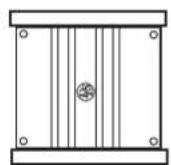
Allow air circulation around the amplifier.
The DLS Performance series of amplifiers have a compact design that allows great flexibility in mounting. You can mount it under a seat or in the trunk.
When you select a location, do remember that the amplifier generates a lot of heat.
Choose a location where air can circulate freely around the amplifier. Do not cover the amplifier with carpets or hide behind trim panels.
Do not mount the amplifier in an inverted or upside down position.
Check all locations and placements carefully before making any cuts, drilling any holes or making any connections.
This is the best direction to mount the amplifier to get the best cooling.
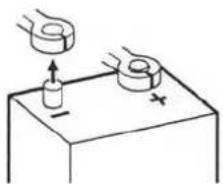
Disconnect Battery
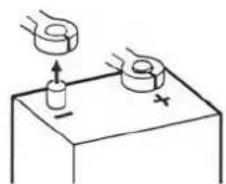
Before starting the installation, always disconnect the negative terminal of the battery.
natural_image
Simple line drawing of a hand holding a ring above a cylindrical object on a base, with no text or symbols present.DLS logo on amplifier cooling flange
The DLS logo on top of the amplifier is attached with two hex. screws. The logo can be removed and twisted 90 or 180 degrees, and then screwed back in wanted position. The logo can be mounted in four different ways to match your installation.
Removal of side flanges
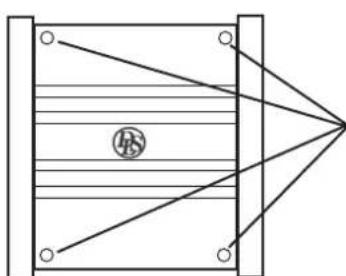
In order to fasten the amplifier to the surface and connect speaker and power cables, the flanges on the sides must be removed. This is done by loosening the hex screws on top of the amplifier. Use a 3 mm hex key.
natural_image
Pure diagram of a rectangular structure with diagonal lines and a central circular symbol, no text or labels present.Remove these screws using a 3 mm hex. key for removal of side flange. Remount after fastening the amplifier and connection of the speaker and power cables.
Tools and material needed
Tools:
◆ Flat and Phillips screwdrivers
Wire cutter
- Wire stripper
Electric drill with drills
- Crimping tool
◆ Digital multimeter or test lamp
◆ Wire brush, scraper or a piece of an abrasive sheet to remove paint for a good ground connection
♦ Grease to protect the ground connection from corrosion
Material:
- Speaker wire: minimum 12 AWG = 4 mm² for subwoofers
- Sheet metal screws for mounting the amplifier to the amplifier board and the amplifier board to the car + some extra for fuse holder, amplifier ground etc.
• Electrical insulation tape - ½ inch thick plywood or particle board for the amplifier to be mounted upon.
Amplifier installation kit:
If available, buy an amplifier installation kit. It contains normally all you need. This is what you have to buy if you buy the items separately
20-25 feet = 6-7.5 meter power cable, preferably AWG 0 (50 mm²) for CAD15 & 4AWG (21mm²) for CAD11
1 pc of ANL fuseholder to install close to the car battery + fuse. CAD11= 150A, CAD15= 200A
◆ 20 feet of AWG 15 = 1,5 mm ^2 wire for remote turn on / off cable from radio.
♦ RCA-cable for input from radio.
- 20 feet or 5 meter for trunk installations
-12 feet or 2 – 3 meter for under seat installations
One ring crimp terminal for the amplifier ground connection.
- Wire ties
- Insulating grommet or insulating tube
Routing wires
High current draw
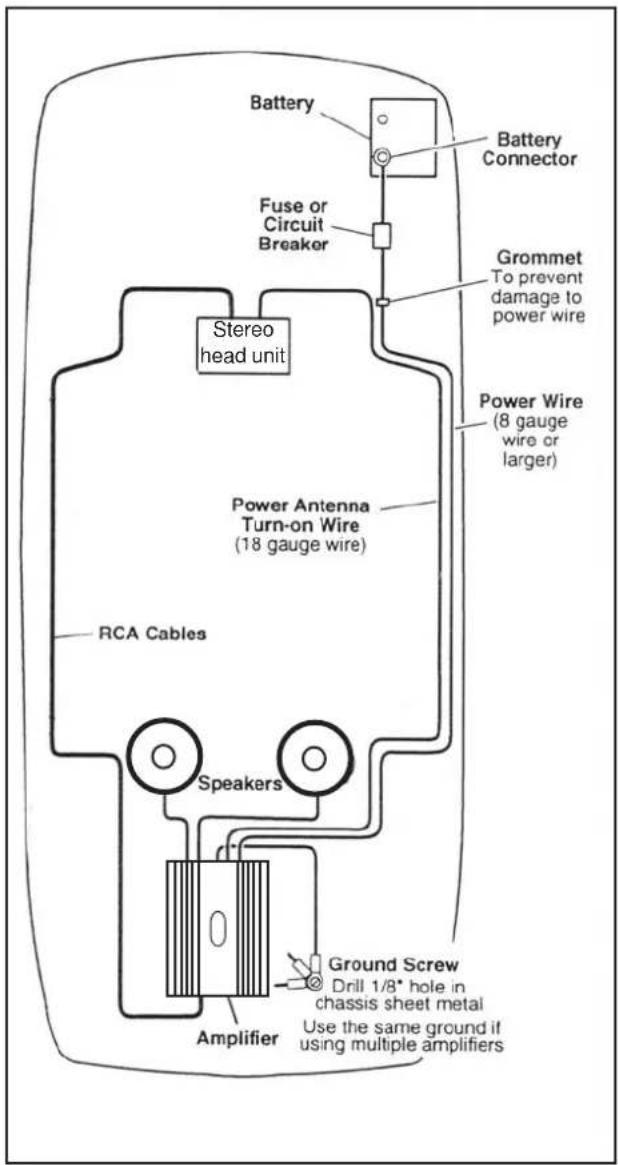
The CAD11 / 15 are mono amplifiers with high power output. The current draw is also high so you must make sure that your vehicles power system (battery and alternator) can provide all the power you need. If you have a bad battery or alternator in can result in a poor sound or even worse, a broken battery or alternator.
Professional Tip:
If amplifier installation kits are available with different size of power cable, chose the most heavy power cable to improve sound quality and to allow more amplifiers to be installed now or later.
If possible buy AWG 0 = 50 mm ^2 (or heavier) cable for best performance of CAD15, or AWG4 (21 mm ^2 ) for CAD11.
Wiring
Power and Outputs
Power terminal (+12V)
Connect the fuse holder as close to the vehicle battery + as possible, using AWG 0 = 50 mm².
Use ring crimp terminal cable to connect to battery +. Apply silicon grease to the fuse to prevent corrosion. Use a fuse holder for ANL fuses like the DLS FH2B.
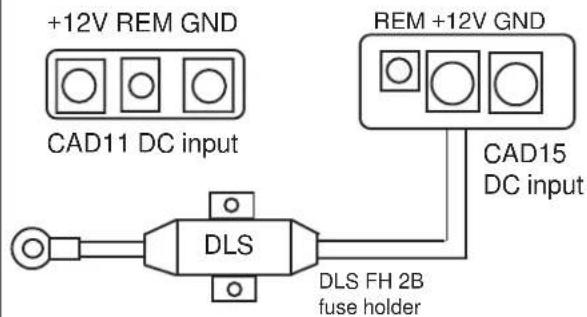
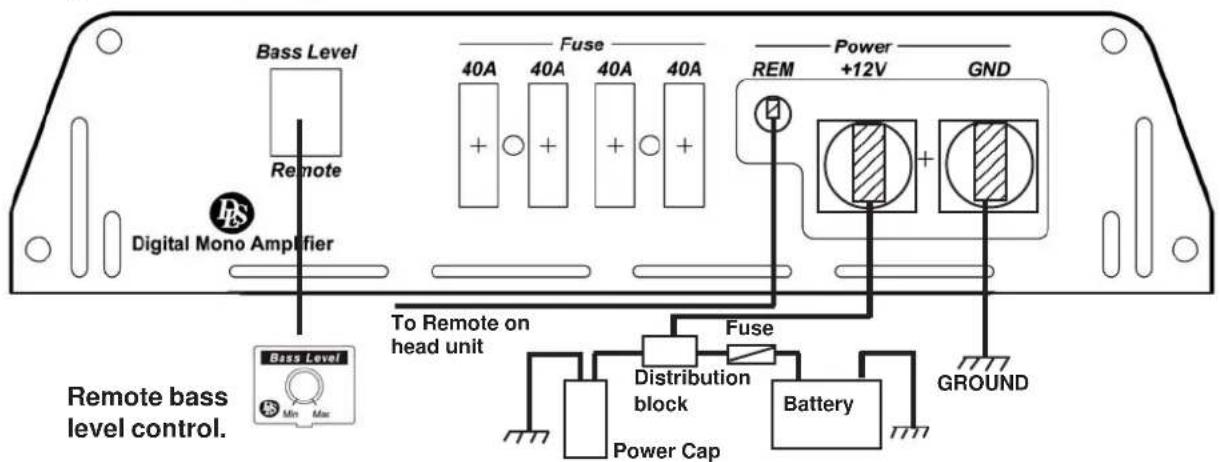
Connect the battery cable to the +12 Volt on the amplifier. If you want to improve the power capacity you can add a Power capacitor of 1 Farad in parallel with the DC input. See the drawing on page 7.
Be sure to use a rubber grommet or a plastic insulating tube where the cable passes the firewall or other places when it can easily be jammed.
Use wire ties to secure to existing cables in the engine room.
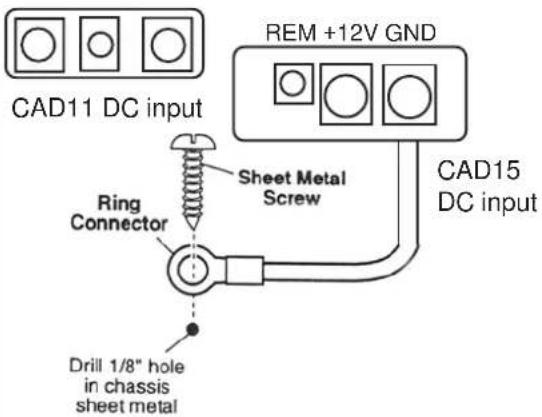
Ground Terminal ( GND )
Connect to a good chassis ground. The ground connection should be clean, unpainted metal to provide a good electrical connection. Use a wire brush, a scraper or a piece of an abrasive sheet to clean the metal. Use a lock washer or two to secure contact. Protect with silicon grease or by paint applied afterwards. Use the same cable area for the ground cable as for the + cable.
+12V REM GND
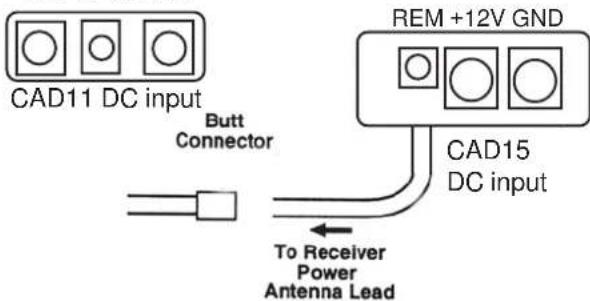
Remote terminal ( REM )
For RCA cable signal input:
Connect the radio power antenna lead = remote turn on/off from the car stereo to the amplifier remote connection. This turns on the amplifier whenever the car stereo is turned on.
You can either use the built in remote cable in the RCA cable itself or use a separate cable.
Sometimes a small disturbance may enter the amplifier coming from the remote voltage, through the built in remote wire and into the RCA cable.
Thus we recommend to use a separate remote wire and run the RCA lead separate from remote wire, power cables and speaker cables.
If there is no remote voltage available from the stereo, you must connect to the ignition key through the radio or any accessories fuse.
For High Level input:
We recommend you to connect the remote wire as described above. The amplifier will produce soft on / soft off operation this way. You must set the Hi level/Low level switch to Low level position in this case.
In the case that there is no remote voltage available from the car stereo or you want to simplify the installation, the amplifier can be turned on/ turned off by the high level input voltage. This is done when the Hi level/Low level switch is set to Hi level position. There is a small disadvantage that this function gives soft turn off operation but some plop sound when switching off.
+12V REM GND
Power Light / Protect light
The power light (green) comes on when the amplifier is turned on.
Power (Green)
The protect light (red) comes on when the amplifier shuts down from overheating or short circuit.
Protect (Red)
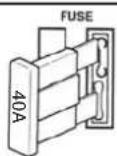
Fuses
Use only ATC blade type fuses. CAD11 uses four 30 amp fuses.
CAD15 use four 40 amp fuses
Input and controls
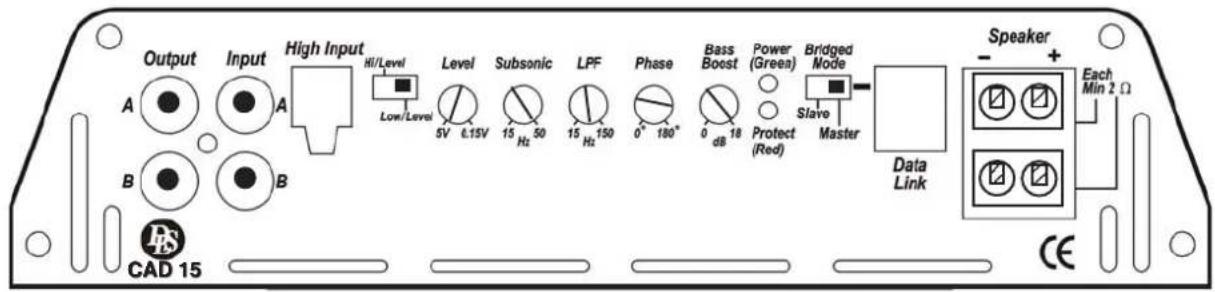
Input Wiring
Inputs may be low level from the RCA output of the car stereo or high level from the car stereo speaker output. Low level = RCA is to prefer for the best sound quality.
Important
Use either the low level or the high level input, do not use both at same time.
Low level input
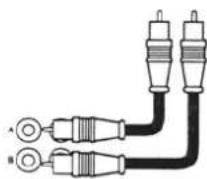
Use a pair of shielded stereo audio cables with RCA type jack. Most trunk-mount amplifiers need a 20 feet RCA cable (appr 5 - 6 meters). Most under
the seat installations require 12 feet (2 - 3 meters) RCA cables. Avoid placing the RCA cable close to speaker cables, power cables and remote control cable. Connect to input socket A & B.
High Level Input
Connect left and right speaker wires coming from the car stereo to the high level input as shown. You must connect both plus and minus as the inputs are balanced, connecting plus only gives lower level and bad sound quality. By changing the polarity of plus and minus, you can change the phase.
High Input
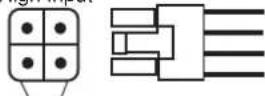
White : Ach.+
White/Black : A ch.- Grey/Black : B ch.-
Grey : Bch.+
Hi level input plug on amp.
Automatic turn on when using high level input.
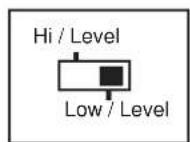
With the Hi/Low input switch set to Hi, the amplifier turns on automatically on high input. You dont need to connect a separate remote wire from your head unit.
When using High Level input:
Set the switch to position "Hi / Level"
When using Low level input:
Set the switch to position "Low / Level"
If the switch is set to wrong position, the amplifier still works, but the risk for disturbances or distortion increases.
Input Level control
The input level control, 5V - 0,15 V, matches the output of your radio to the input of the amplifier. After installation is complete, make sure the input of the amplifier is turned down all the way (counter-clockwise at 5V). Play a tape or CD, make sure all bass or treble settings or equalizer are flat, and turn the volume of the radio up until you just start to hear distortion. Turn the volume control down just a bit. On the amplifier increase the input level control (clockwise or to the right) until you just start to hear distortion, then back the level control just a bit. Now your radio and amplifier levels are matched.
Level

Subsonic filter
The Subsonic filter blocks the very deepest frequencies from reaching the subwoofers. It has a variable frequency from 15 to 50 Hz. A typical setting is 25-30 Hz.
Subsonic

Low Pass Filter
The LPF (low pass filter) allow low frequencies only and blocks higher frequencies. A typical setting is 60–80 Hz. Choose the setting that sounds best in your car.
LPF
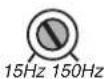
Phase control
The phase control can be set continuously from 0 - 180 degrees. This is very useful when you want to adjust the bass sound for best front stage image.
Phase
Start at 0 and turn the control slowly clockwise until you experience the bass sound coming from the front.

You may have to change the polarity of the speaker connection to get the best result.
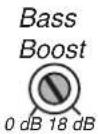
Bass boost control
Bass boost control is used to set the bass volume. You can select the amplification between 0 dB and +18 dB at a 45 Hz center frequency. This function is used to compensate for the bass box function and to adjust for your own taste of bass. Set level control at 0 dB if you want it to be inoperative.
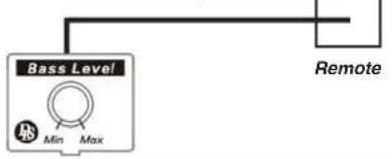
Remote Bass level control
You can fine tune your bass level from the front of your car. Connect the external bass level control box to the remote socket on the rear panel.
Single amplifier system
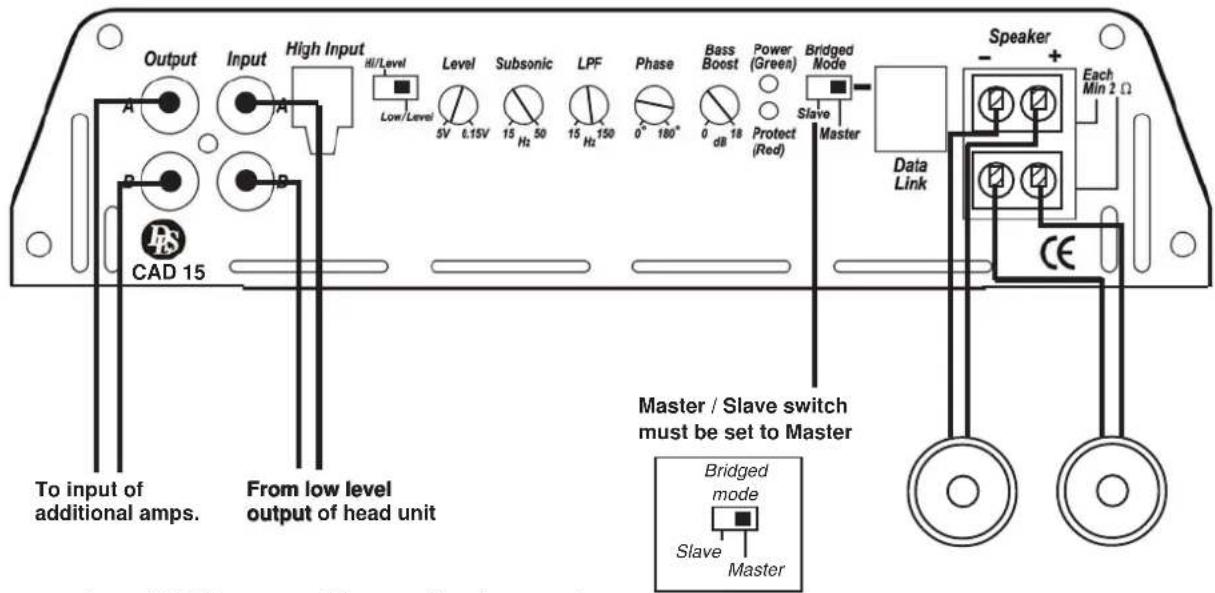
Connection of DC-input and Remote level control, see page 7 & 8.
Testing
Before you finish the installation, you should do the following tests to make sure the wiring is correct and everything is operating properly.
Reconnect Battery
When wiring is complete, reconnect the battery negative terminal.
natural_image
Simple line drawing of two hands holding a cylindrical object on a base, with no text or symbols present.Test power wiring
-
Turn on the head unit but do not turn up the volume. The amplifier power light should come on. If not, check the remote and +12 volt wires. Also check the ground connection.
-
Turn up the head units volume slightly. All speakers should operate. if not, check wiring connections at amplifier and speakers.
NOTE!
Minimum speaker load is one (1) ohm. You can connect four 4 ohm subwoofers or two 2 ohm subwoofers to the amplifier. Loads or speaker impedances less than 1 ohm could result in poor sound quality and/or damage to amplifier.
Filter settings
Subsonic
LPF

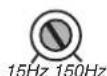
The Subsonic filter at 25-30 Hz and the LPF filter setting at 60-80 Hz.
RCA Output


Use RCA Outputs to connect additional amplifiers.


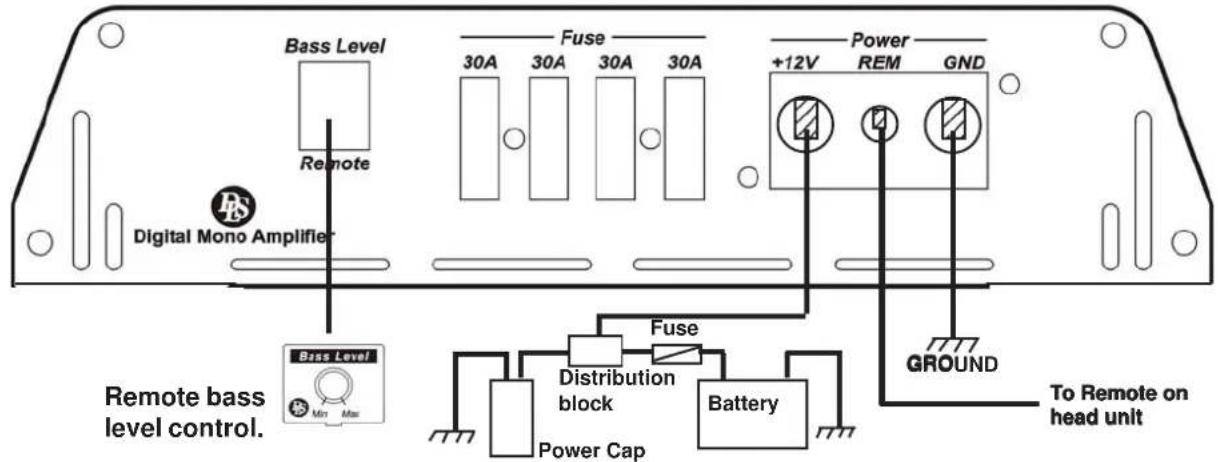
Bridging two CAD11
Connecting two CAD11 in bridge mode will double the output power. Minimum speaker load is then 2 ohms. The RCA signal must be connected only to the amplifier set to run as "Master". The filters as well as the level control is only working on the "Master" amplifier.
Bridging two amplifiers can be done only between amplifiers of the same model
Output power in bridge mode with two CAD11:
4 ohm load: 1500 watts
2 ohm load: 2000 Watts
1 ohm load: Do not use!!!
Master slave selector & Data link connection
You can connect two CAD11 in bridge mode.
One of the amplifiers is "Master" that controls the signal to the second amplifier that should be used in "Slave" position. The signal is fed through the Data link cable. Connect the amplifiers as in the drawing below.
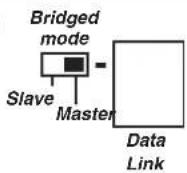
Modular 4-pole cable to connect between Data Link sockets
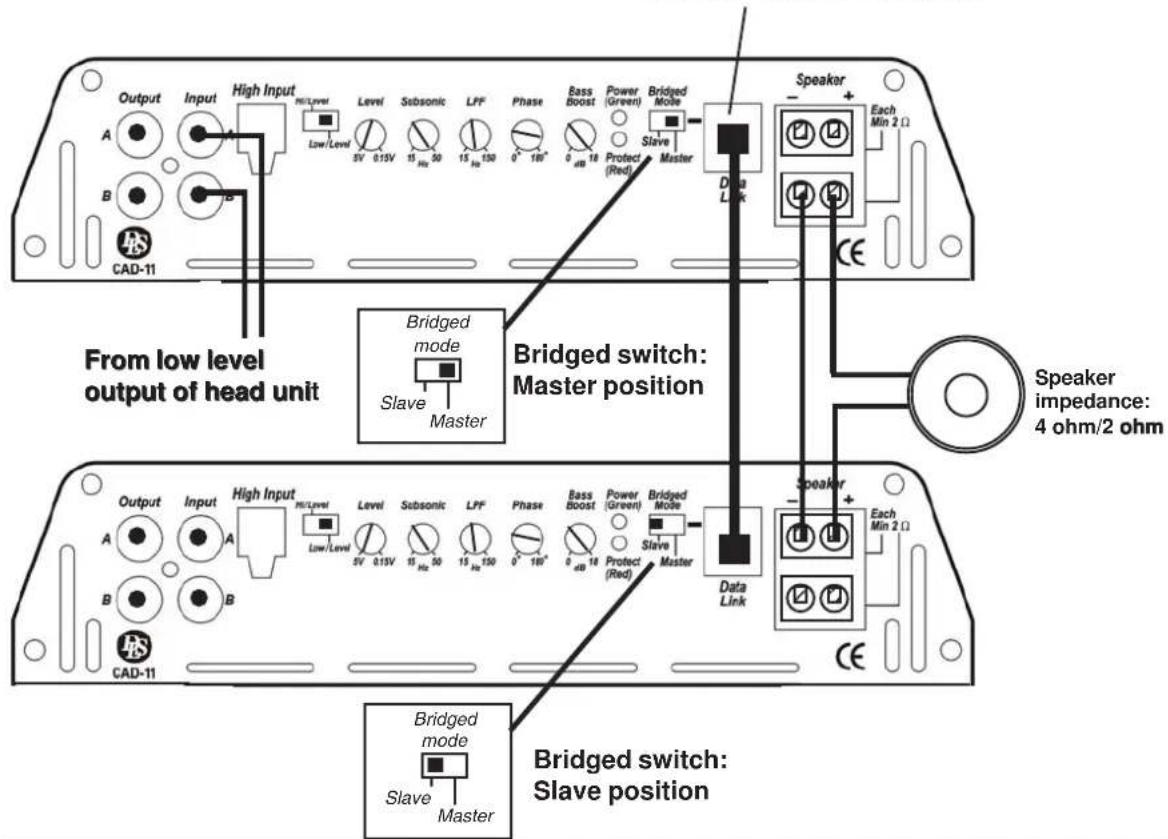
Connection of DC-input (to both amplifiers) and Remote sub level control (to Master amplifier).
Bridging two CAD15
Connecting two CAD15 in bridge mode will double the output power. Minimum speaker load is then 2 ohms. The RCA signal must be connected only to the amplifier set to run as "Master". The filters as well as the level control is only working on the "Master" amplifier. Bridging two amplifiers can be done only between amplifiers of the same model
Output power in bridge mode with two CAD15:
4 ohm load: 1800 watts
2 ohm load: 3200 Watts
1 ohm load: Do not use!!!
Master slave selector & Data link connection
You can connect two CAD15 in bridge mode. One of the amplifiers is "Master" that controls the signal to the second amplifier that should be used in "Slave" position. The signal is fed through the Data link cable. Connect the amplifiers as in the drawing below.
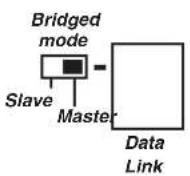
Modular 4-pole cable to connect between Data Link sockets
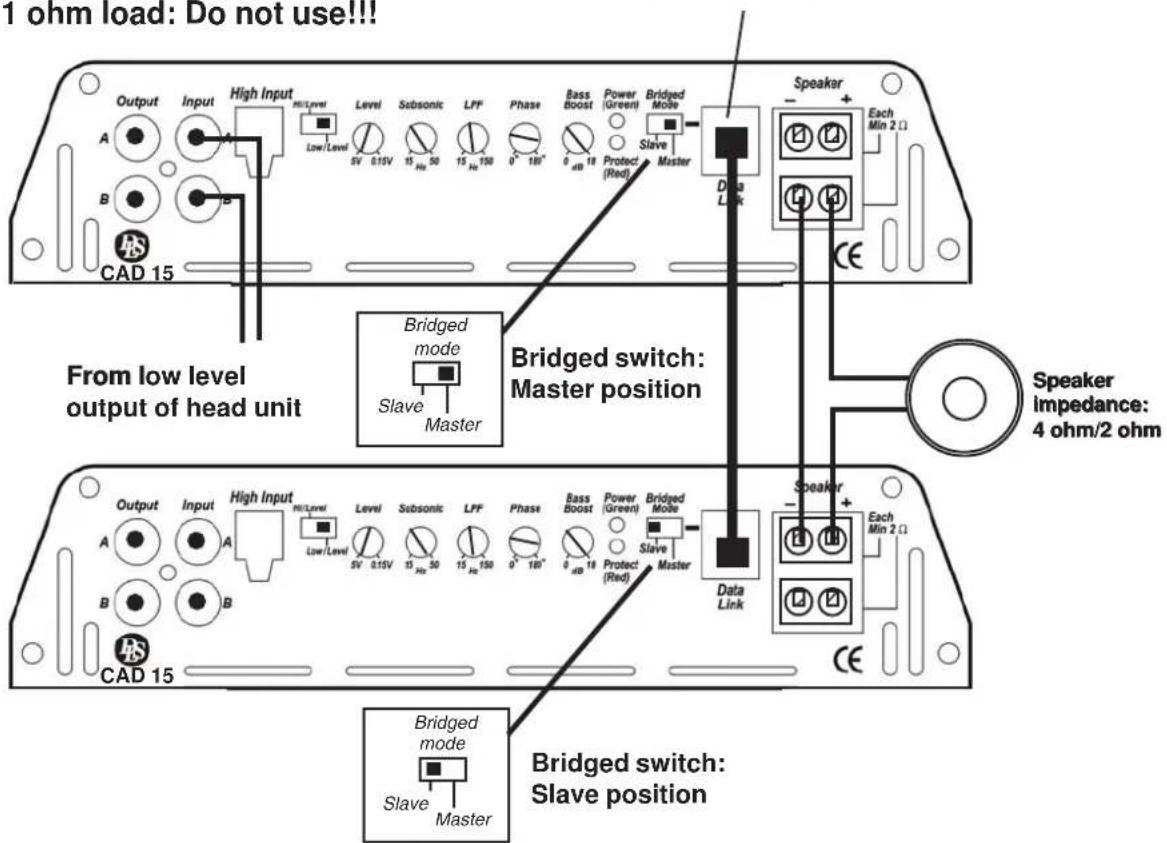
Connection of DC-input (to both amplifiers) and Remote sub level control (to Master amplifier).
CONNECTION OF SUBWOOFERS TO DLS MONO AMPS
Amplifier speaker terminal
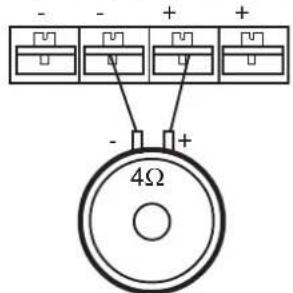
Connection of a subwoofer with 4 ohm single voice coil Impedance = 4 ohm
Amplifier speaker terminal
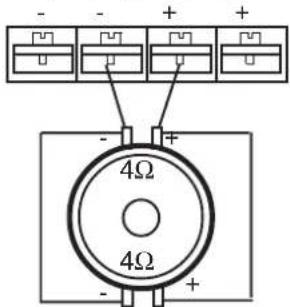
Connection of a subwoofer with 4 ohm dual voice coils Impedance = 2 ohm
Amplifier speaker terminal
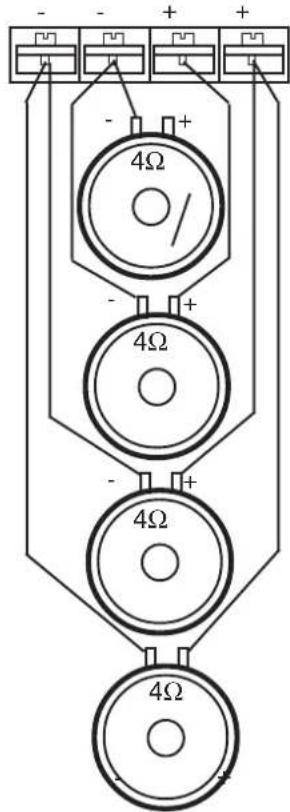
Connection of four subwoofers with 4 ohm single voice coil Impedance = 1 ohm
Amplifier speaker terminal
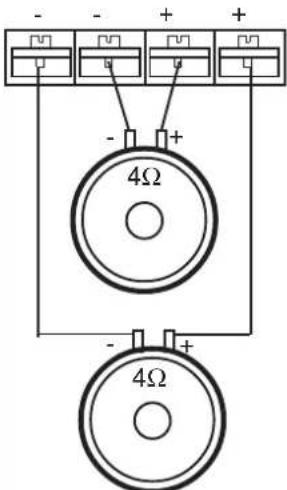
Connection of two subwoofers with 4 ohm single voice coil Impedance = 2 ohm
Amplifier speaker terminal
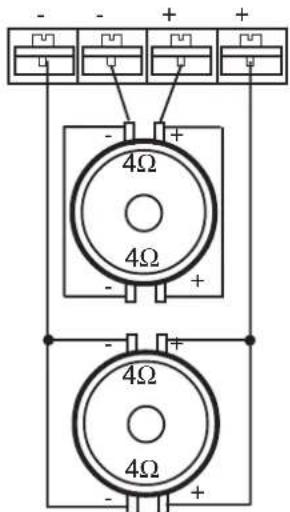
Connection of two subwoofers with 4 ohm dual voice coils Impedance = 1 ohm
Amplifier speaker terminal
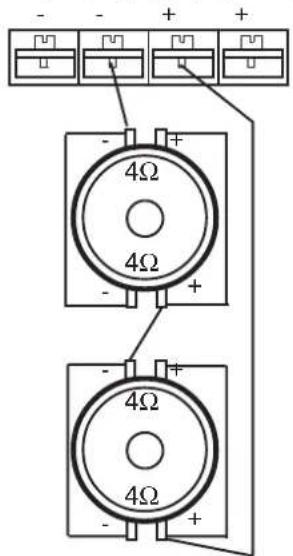
Connection of two subwoofers with 4 ohm dual voice coils in parallel and then in series to the amplifier with a resulting impedance of 4 ohms.
On DLS mono amplifiers, with dual speaker connectors, both the + and - terminals are internally connected in parallel.
CAD11 and CAD15 has a speaker terminal different from this illustration, but we hope you understand what we mean.
NOISE PROBLEMS
WHINING NOISE VARYING WITH ENGINE REVOLUTIONS:
Do this:
- Rewire the power supply (12 V) to source unit direct from battery.
- Rewire ground wire from source unit to clean position on chassis.
- Check all power connections to ensure that they are clean and tight.
- Check quality of system ground connection.
- Install a Power Cap capacitor. This can be helpful against most noise problems.
CONSTANT WHINING NOISE:
Do this:
- Ensure that all equipment has a common ground point.
- Check quality of earth strap connection from battery negative terminal to chassis.
- Disconnect signal cables from amplifier to see if noise disappears. If so the leads are picking up noise. Test this by laying a new cable over the seats and reconnecting to the amplifier. If the noise does not return, re-route original cable away from source of interference.
If noise remains regardless of cable position, try to use so called Quasi-balanced signal cables. DLS PRO or ULTIMATE cables are quasibalanced.
Professional Tip: Professional Tip:
Installing in trunk
When installing the amplifier in the trunk, run the power wires along the same path as the other vehicle wiring. Many cars have insulated channels for wiring. you will have to remove the door sill trim and the carpet.
Professional Tip:
Crimp connections
Purchase crimp connectors and crimping tool. Connectors are color coded.
- Strip 1/4 inch (6 mm) of insulation from the wire.
- Insert into connector
- Crimp tightly
Professional Tip: Professional Tip:
SPEAKER POLARITY CHECK.
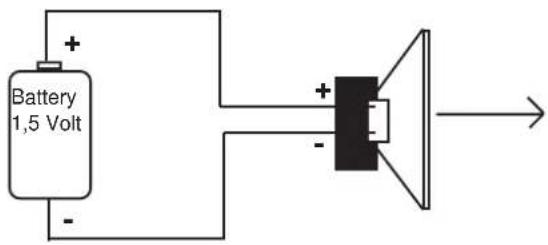
All speakers in a car audio system should be connected in phase (the same polarity). All speaker cones must move in the same direction. Out of phase speakers will cause a lack of bass, and a poor stereo soundstage.
Checking polarity:
Hold the - connection of the speaker wire to the - terminal of a 1,5 Volt flashlight battery. Tap the + wire on to the + terminal of the battery, and observe the movement of the cone. The cone should move outwards when the wire touches the battery, and inwards when the battery is removed. If it is the other way around, the speaker has been connected backwards and it must be removed and connected correctly.
If your system also has a subwoofer connected through a passive 6 or 12 dB crossover, try to connect this with various polarity and judge what sounds best. The phase shift in passive crossovers sometimes makes it necessary to change polarity.
Securing wires
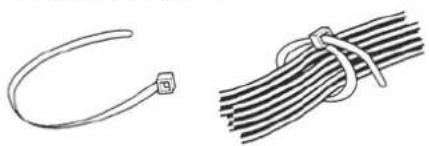
Use wire ties to bundle together when possible. (But never bundle speaker wires or signal cables together with power wires.
natural_image
Two types of wire or cable connectors: a curved wire and a straight bundle (no text or symbols)Professional Tip:
Speaker and power wires
Do not run speaker and power wires next to each other. Power wires can generate a "siren" sound in the speakers. Runs speaker and power wires on opposite sides of the car.
DLS PERFORMANCE CAD11 CAD15
Number of channels 1 1
Power output in 4 ohm (0,4% THD) 1 x 400 W 1 x 550 W
Max output in 2 ohm (0,7% THD) 1 x 750 W 1 x 900 W
Max output in 1 ohm (1% THD) 1 x 1050 W 1 x 1600 W
All above output power ratings at 13,8 Volt
Signal to noise ratio, A-weighted >100 dB >100 dB
Damping factor >100 >100
Frequency response 15 Hz - 160 Hz 15 Hz - 160 Hz
Input impedance, low level 10 kohm 10 kohm
Input impedance, high level 100 ohm 100 ohm
Input sensitivity 0,15 - 5V 0,15-5 V
Phase control 0-180 degrees variable yes yes
Remote bass level control yes yes
Bass boost adjustable gain @45 Hz 0 - +18 dB 0 - +18 dB
Filter subsonic, 24 dB slope 15 - 50 Hz 15 - 50 Hz
Filter lowpass 24 dB slope 15 - 150 Hz 15 - 150 Hz
Bridge mode (master/slave selector) yes yes
Max size for power cables 21 mm² (4AWG) 50 mm² (0AWG)
Max size for speaker cables 10 mm² (7AWG) 6 mm² (10AWG)
Power consumption, idle 1,5 A 2 A
Maximum current draw 120 A 160 A
Built-in fan cooling yes yes
Fuse 4 x 30A 4 x 40A
Dimensions (mm) 70x444x268 70x473x268
Dimensions (inch) 2,92x17,48x10,55 2,92x18,62x10,55
Weight 5,8 kg (12,79 lb) 6,4 kg (14,33 lb)
Troubleshooting
If problems occur during the installation, or later, this guide might help you to find out what's wrong.
The amplifier is dead:
- Check power lead, ground and connections at the amplifier using a multi meter.
- Check the battery terminal connections.
- Check the power lead fuse or circuit breaker. If fuse damage continues, inspect the power lead for short circuits.
- Check the amplifier protection fuses. Are these broken change to new ones with the same value.
If short circuiting continues, contact your local DLS dealer. A fault may exist in the amplifier.
- To start the amplifier requires a remote voltage of 9-15 volt. Check the voltage with a multi meter.
Amplifier protection fuse blows at low volume:
One or more speaker cables are shorted. Make an insulation test with a multi meter. The cables must not have a connection to earth.
The amplifier turns off after 10-30 minutes:
The amplifier is overheating due to inadequate ventilation. Check mounting position is free from obstruction.
Do this:
- Move the amplifier to a place with better ventilation.
- Install one or two fans to cool down the heatsink.
- Overheating can also be caused by an impedance load below the level permitted.
No output from the speakers:
Check the following:
- Speaker cable connections to both amplifier and subwoofers.
- Signal lead plugs and cables.

DLS Svenska AB
P.O. Box 13029