
8121 - AV Extender MONOPRICE - Free user manual and instructions
Find the device manual for free 8121 MONOPRICE in PDF.


| Product Type | HDMI Extender over CAT-5e/6 |
| Transmission Medium | CAT-5e/6 UTP cable with cross stand inside |
| Maximum Transmission Distance | 30 meters for 1080p |
| Supported Video Resolutions | 480i/p, 576i/p, 720p, 1080i/p (up to 1920x1080p) |
| HDMI Standard | HDMI 1.2a |
| Bandwidth | 165MHz / 1.65Gbps per channel (4.95Gbps total) |
| Color Depth | 8-bit per channel (24-bit total) |
| Audio Support | Uncompressed LPCM; compressed DTS Digital, Dolby Digital, DTS-HD, Dolby True HD |
| HDCP Pass-Through | Yes |
| Power Requirement | No external power supply needed (powered via HDMI source) |
| Power Consumption (Max) | 5W |
| Connectors | Fixed HDMI cables on sender and receiver; RJ45 for CAT-5e/6 |
| Package Contents | 1 Sender, 1 Receiver, User Manual |
| Compliance Standard | IEEE-568B |
| Operating Temperature | 0 to 70°C |
| Storage Temperature | -10 to 80°C |
| Operating Humidity | 10% to 85% RH (non-condensing) |
| Storage Humidity | 5% to 95% RH (non-condensing) |
| Warranty | 1 Year Parts and Labor |
| Regulatory Approvals | FCC, CE, UL |
Frequently Asked Questions - 8121 MONOPRICE
User questions about 8121 MONOPRICE
0 question about this device. Answer the ones you know or ask your own.
Ask a new question about this device
Download the instructions for your AV Extender in PDF format for free! Find your manual 8121 - MONOPRICE and take your electronic device back in hand. On this page are published all the documents necessary for the use of your device. 8121 by MONOPRICE.
USER MANUAL 8121 MONOPRICE
1.0 Introduction....1
2.0 Specifications....2
3.0 Package Contents....3
4.0 Panel Descriptions....3
5.0 Connection and operation....3
HDMI Extender (by cat-5e/6 cable)
Dear customer
Thank you for purchasing this product. For optimum performance and safety, please read these instructions carefully before connecting, operating or adjusting this product. Please keep this manual for future reference.
1.0 INTRODUCTION
This kind of HDMI Extender by CAT-5e/6 uses two pieces UTP cable with cross stand inside to extend the HDTV display up to 30 meters for 1080p. It not only breaks the limitation of the HDMI cable transmission length, but also CAT-5e/6 has more flexibility and convenience in cable construction.
Both the sender and receiver are equipped with fixed HDMI cable that allows consumers reduce cost and time for setting. It is capable of supporting DVI (digital visual interface) equipment when used with an HDMI to DVI Adapter, providing greater flexibility and options when integrating several home theater components.
This product offers solutions for residential consumers: HDTV retail and show site, HDTV, STUB, DVD and Projector factories, noise, space and security concerns, data center control, information distribution, conference room presentation, school and corporate training environments.
1.1 BENEFITS
1) The length of HDMI cable is fixed and unchangeable after it is produced. Because the HDMI connector can only be soldered or terminated by the professional workers in factory, the users can not reduce or increase by themselves. However CAT-5e/6 cables are available everywhere and be processed easily by the user or installer.
2) Because the header of the long HDMI cable is big, using it must in hidden method. What's more, it is not easy to bend the HDMI cable and to pull it through the in-wall tube or tray. However, CAT-5e/6 cable has no such problems.
3) Using this Extender together with UTP cable with cross stand inside, the transmission distance can be up to 30 meters for 1080p. For the general HDMI cables, they must be customized when the length is over 10 meters.
1.2 FEATURES
This HDMI Extender has many features that enable it to perform in a superior manner. Among those features you will find:
• One pair as a full functional module, no need of setting.
- CAT-5e/6 cable can substitute HDMI cable to achieve long distance transmission.
● Follow the standard of IEEE-568B.
● Transmission distance can be up to 30 meters for 1080p using UTP cable with cross stand inside. - Compact size.
● Supports HDMI1.2a.
● Supports highest video resolution 1080p.
● Supports 165MHz/1.65Gbps per channel (4.95Gbps all channel) bandwidth.
● Supports 8bit per channel (24bit all channel) deep color. - HDCP pass-through.
■ Supports uncompressed audio such as LPCM
● Supports compressed audio such as DTS Digital, Dolby Digital (including DTS-HD and Dolby True HD)
2.0 SPECIFICATIONS
| Signal Inputs/Output | |
| Input Video Signal | 0.5 -1.0 volts p-p |
| Input DDC Signal | 5 volts p-p (TTL) |
| Maximum Single Link Range | 1920X1080p |
| Output Video | HDMI 1.2a |
| Operating Frequency | |
| Vertical Frequency Range | 50/60Hz |
| Video Amplifier Bandwidth | 1.65Gbps/165MHz |
| Transmission distance | |
| UTP cable with cross stand inside | 30M for1080p |
| Resolutions(HDTV) | |
| Interlaced(50&60Hz) | 480i,576i,1080i |
| Progressive(50&60Hz) | 480p,576p,720p,1080p |
| Warranty | |
| Limited Warranty | 1 Year Parts and Labor |
| Environmental | |
| Operating Temperature | 0 to +70°C |
| Operating Humidity | 10% to 85 % RH (no condensation) |
| Storage Temperature | -10°C to +80°C |
| Storage Humidity | 5% to 95 % RH (no condensation) |
| Power Requirement | |
| External Power Supply | No power needed |
| Power consumption (Max) | 5W |
| Regulatory Approvals | |
| Converter Unit | FCC,CE,UL |
| Power Supply | UL,CE,FCC |
| Accessories Adapter | |
| AC Power Adapter | US standard, UK standard and so on |
| User Manual |
Note: In order to achieve the high transmission quality, please choose the UTP cable with cross stand inside.
2: The cables with lower quality will not achieve the perfect transmission effect and long distance.
3: Theoretically the function of the product is normal when adopt short distance transmission.
If the product cannot transmit long distance, this is to say, there are quality problems in the transmission cables.
3.0 PACKAGE CONTENTS
Before attempting to use this unit, please check the packaging and make sure the following items are contained in the shipping carton:
1) Main unit NO. 1 Sender
2) Main unit NO. 2 Receiver
3) User's Manual
4.0 PANEL DESCRIPTIONS
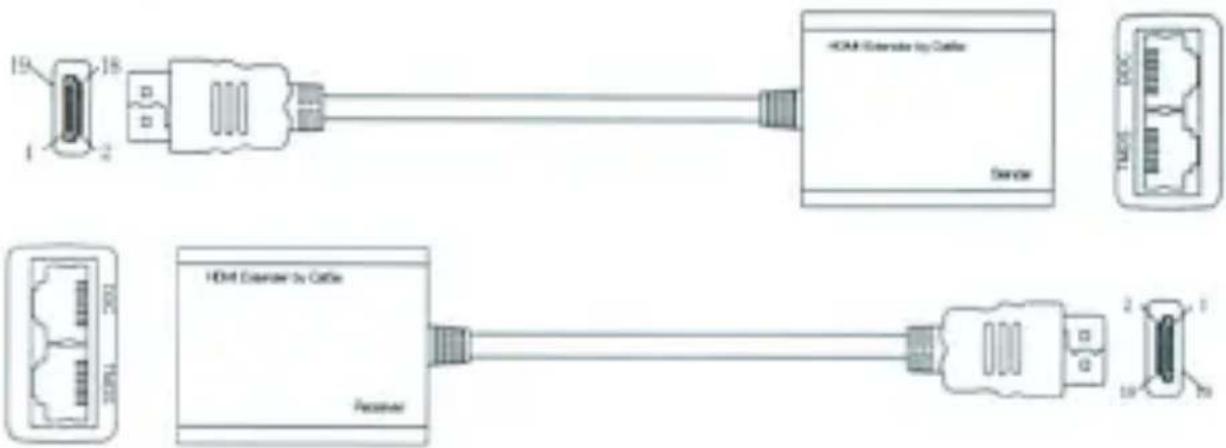
5.0 Connection and Operation
1) Plug the fixed HDMI cable of the sender into the HDMI input source such as HD-DVD, PS3, STB etc.
2) Connect two CAT-5e/6 cables to both the output of the transmitter and input of the receiver.
3) Plug the fixed HDMI cable of the receiver into the HDMI display(such as: HD-LCD、HD-DLP)
Attention: Insert / Extract cable gently.
5.1 CONNECTION DIAGRAM
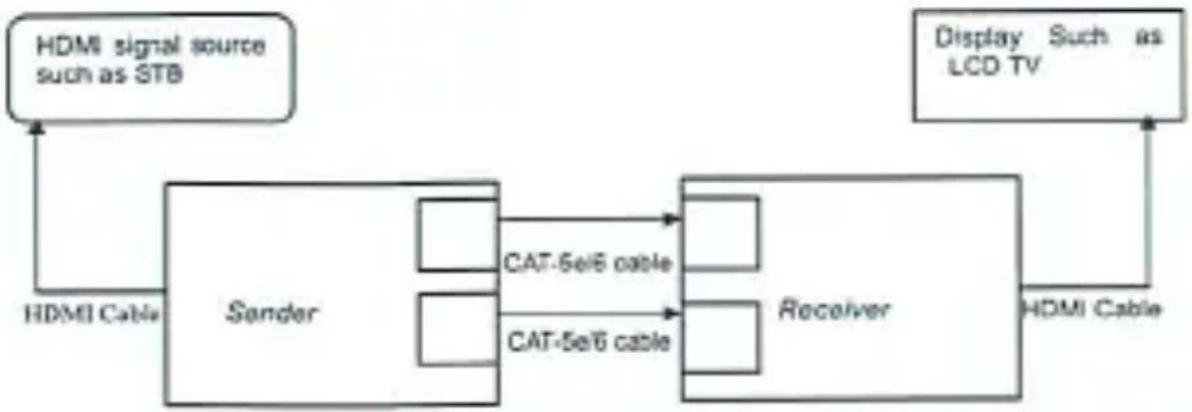
flowchart
graph LR
    A["HDMI Signal Source such as STB"] --> B["Sender"]
    C["Display Such as LCD TV"] --> D["Receiver"]
    B --> E["CAT-5e/6 cable"]
    B --> F["CAT-5e/6 cable"]
    E --> G["Receiver"]
    F --> G
    G --> H["HDMI Cable"]
    I["HDMI Cable"] --> B
P/N0008
Brand : MONOPRICE
Model : 8121
Category : AV Extender