519 - Hi-Fi System MERIDIAN - Free user manual and instructions
Find the device manual for free 519 MERIDIAN in PDF.


| Product Type | Hi-Fi System |
| Brand | Meridian |
| Model | 519 |
| Dimensions (W x H x D) | 430 mm x 100 mm x 350 mm |
| Weight | 8 kg |
| Power Supply | 230 V, 50 Hz |
| Power Consumption | 60 W (standby < 1 W) |
| Functions | CD player, FM/AM tuner, integrated amplifier, AUX input, headphone output |
| Remote Control | Included |
| Speaker Output | 2 x 50 W RMS |
| Frequency Response | 20 Hz - 20 kHz |
| Connections | RCA line in, FM antenna, AM loop, speaker terminals |
| Display | Backlit LCD |
| Cabinet Material | Aluminum front panel |
| Color | Black / Silver |
| Cleaning Instructions | Wipe with a soft dry cloth. Do not use liquids or solvents. |
| Safety Warnings | Do not open the unit. Disconnect before cleaning. Use only in dry indoor locations. |
| Spare Parts & Repairability | Contact authorized service center for genuine parts. |
| Documentation | User manual available for free download in PDF. |
Frequently Asked Questions - 519 MERIDIAN
User questions about 519 MERIDIAN
0 question about this device. Answer the ones you know or ask your own.
Ask a new question about this device
Download the instructions for your Hi-Fi System in PDF format for free! Find your manual 519 - MERIDIAN and take your electronic device back in hand. On this page are published all the documents necessary for the use of your device. 519 by MERIDIAN.
USER MANUAL 519 MERIDIAN
MERIDIAN 519 USER MANUAL
BOOTHROYD STUART
MERIDIAN
© 1992, 1993, 1995
Version 2: March 1996
Contents
Sales and service in the UK......2
Sales and service in the USA......2
Designed & manufactured in the UK by....2
Acknowledgements....2
Introduction......3
About the 500 Series ....3
Unpacking the 519....3
Installing your 519....3
General precautions ....3
Siting....3
Connections 4
Starting off with 519 ....5
Checking 5
Switching on....5
If there is no light ....5
Basic operation of 519 ....5
Jumper Options 6
Opening the Case 6
Locating the Jumper Positions...... 6
Jumper 1....6
Jumper 2....6
Jumpers 3-5....6
Help! 7
Yellow power light not lit.... 7
Red lock light not lit.... 7
No audio from AC-3 Decoder 7
No audio when playing a Laser Disc which is not AC-3 encoded....7
Radio interference....8
Cleaning 8
Maintenance & Service 8
Specification 9
Index......9
Sales and service in the UK
Meridian Audio Ltd
Stonehill
Huntingdon
Cambs. PE18 6ED
England
Tel (0) 1480 52144
Fax (0) 1480 459934
Sales and service in the USA
Meridian America Inc.
3800 Camp Creek Parkway
Building 2400, Suite 112
Atlanta, GA 30331
Tel. (404) 344-7111
Fax (404) 346-7111
Designed & manufactured in the UK by
Digital Gramophone & Wireless Ltd
Stonehill
Huntingdon
Cambs. PE18 6ED
England
Copyright © 1992,1993,1995 Digital Gramophone & Wireless Ltd
Acknowledgements
Trademarks etc.
Boothroyd/Stuart Meridian and Meridian are registered trademarks of Meridian Audio Ltd.
AC-3 is a trademark of Dolby Laboratories Licensing Corporation.
Author: Richard Hollinshead.
Introduction
The Meridian 519 Laser Demodulator is part of the 500 Series of advanced high-fidelity equipment.
In purchasing a Meridian 519 Laser Demodulator, you have acquired a refined piece of equipment that will continue to bring you listening pleasure for many years. This manual will enable you to get the most from it.
About the 500 Series
The Meridian 500 Series is a unique system of digital, analogue and video components designed to meet the demand for absolute quality, ease of use and lasting value.
The flexibility of the Meridian 500 Series is such that you can assemble a system as simple or as complex as you need, perfectly suited to your requirements, and with the ability to add to it or change it at a later date should those requirements change.
The Meridian 500 Series includes a sophisticated communications link, to ensure that any configuration of units will work together as a fully integrated system.
Unpacking the 519
On opening the carton, you should have found the following parts:
• Meridian 519 Laser Demodulator
- Power cord
• Meridian Comms lead
- This manual
If any of these items is missing, please contact your dealer. We suggest that you retain the packing carefully as it provides maximum protection for the unit in transit.
Installing your 519
General precautions
Before carrying out any installation, you should ensure that the 519 is marked with the correct voltage for your local AC supply. Should this not be the case, do not proceed – but contact your dealer.
As a general rule, you should not make any connections to the 519, or to any other component in your system, whilst the AC power supply is connected and switched on.
Siting
We recommend the following guidelines for location.
• The 519 should not be placed on top of a power amplifier.
- Avoid sites where it would be subjected to direct sunlight or where it is near a heat source, e.g. a central heating radiator
- Avoid sites where the 519 could be subjected to strong magnetic radiation, like near a power amplifier.
- Not too close to a television, or where connecting cables may be subject to, or cause, interference.
Connections
There are five types of connection that may be made to the 519:
- power
- Laser Disc RF
• electrical digital audio
• optical digital audio - communications.
Digital audio and RF connections need to be made to other components in your system. Communication connections have to be made to most of the other Meridian components in your system in order for them to act as one system. The connections to your 519 are very important and care should be taken in deciding which connections to make.
A typical installation would be:
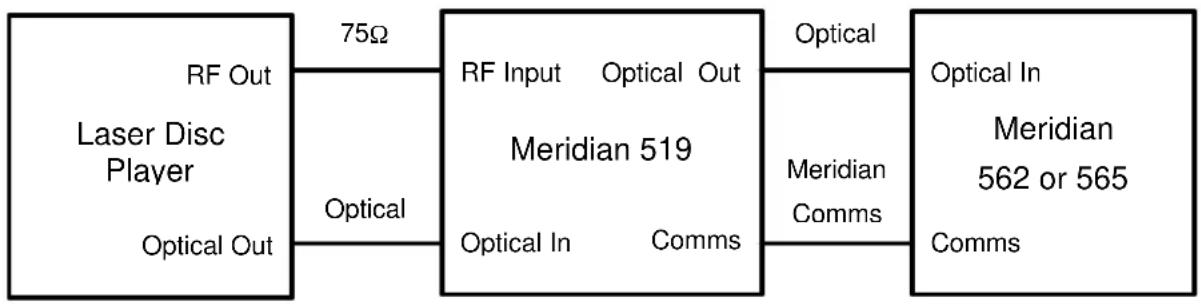
flowchart
graph LR
    A["Laser Disc Player"] -->|75Ω| B["Meridian 519"]
    A -->|Optical| B
    B -->|Optical In Comms| C["Meridian 562 or 565 Comms"]
    B -->|Optical| C
    D["RF Out"] --> A
    E["Optical Out"] --> A
Note Electrical digital audio connections may be used in place of the optical connections.
Tip In common with all digital products, the 519 emits some radio-frequency signals. For this reason, try to keep all power cables and Comms leads away from audio, antenna and loudspeaker cables. Some time spent laying out the cables carefully will repay you with the best possible performance later.
Starting off with 519
Checking
Before turning on the power, check once again that you have made all the connections correctly.
The 519 is designed to be left connected to AC power at all times and can be run continuously.
Switching on
The power switch is located directly next to the power inlet on the rear of the 519. Turn on the power switch at the rear of the unit. The yellow light on the front of the 519 will now be illuminated.
If there is no light
Check the power connections, including any fuses in the supply. If the light is still not illuminated, contact your dealer for help.
Basic operation of 519
The 519 Laser Demodulator takes the RF output of a Laser Disc player and extracts the AC-3 data stream. This stream is transmitted via the SPDIF digital audio interface to an AC-3 decoder to be decoded into discrete audio channels.
The 519 will also take the digital audio output of the Laser Disc player, and switch to it when the Laser Disc is not AC-3 encoded. AC-3 decoding is indicated by the red lock light.
The 519 has connections for the Meridian 500 Series Comms system. These connections are used only to communicate with other Meridian equipment. The 519 itself uses these connections only to suppress clicks as it switches between AC-3 decoding and regular digital audio.
Note The Meridian 519 can be used with or without other Meridian equipment. However an AC-3 decoder must be used to obtain an audio output.
Jumper Options
The 519 may be fitted with up to five internal jumpers which will change the way it operates. IN ALMOST ALL INSTALLATIONS NONE OF THESE JUMPERS WILL BE NEEDED. The unit is supplied with no jumpers fitted. It is recommended that the jumpers are fitted only by your dealer.
Opening the Case
WARNING: BEFORE OPENING THE CASE DISCONNECT THE 519 FROM THE AC SUPPLY. BEFORE RECONNECTING THE SUPPLY ENSURE THAT THE CASE IS FULLY REASSEMBLED.
To open the case remove the four screws at the corners of the rear of the 519 and the four screws at the corners of the base of the 519.
Locating the Jumper Positions
There are five sets of two pins each which may be fitted with jumpers. Jumper number 1 is located on the left of the 519 when viewed from the front.
Jumper 1
The Laser Disc RF output signal normally provides an 5 Volt DC signal to indicate that the Disc is playing. When jumper 1 is not fitted the Laser Disc 5 Volt signal is used by the 519 to enable AC-3 demodulation or switching to regular digital audio. If your Laser Disc player does not give the 5 Volt signal fit jumper 1.
Jumper 2
In normal use the 519 will switch to regular digital audio if it is unable to demodulate AC-3. This allows both AC-3 encoded and non AC-3 encoded discs to be replayed with no change of settings by the user. However, fitting jumper 2 tells the 519 not to switch to regular digital audio. In this case, if AC-3 cannot be decoded, the 519 will produce a silent digital audio output at 48kHz sampling rate.
Jumpers 3-5
These jumpers allow the system address for the Meridian 500 Series Comms to be changed:
| System Address | Jumper 3 | Jumper 4 | Jumper 5 |
| 1 | × | × | × |
| 2 | √ | × | × |
| 3 | × | √ | × |
| 4 | √ | √ | × |
| 5 | × | × | √ |
| 6 | √ | × | √ |
| 7 | × | √ | √ |
| 8 | √ | √ | √ |
Help!
Yellow power light not lit
Check the following:
- There is AC power connected to the socket on the rear of the 519.
- The power switch on the rear panel of the 519 is turned on.
If the yellow light will still not illuminate, check any fuses in your power supply and the fuse in the inlet of the 519. If these are all intact, contact your dealer.
Red lock light not lit
Check the following:
-
The Laser Disc RF output is connected to the RF input of the demodulator
-
The Laser Disc is playing.
-
The Laser Disc is AC-3 encoded.
If the Laser Disc player in use does not produce a 5V DC signal, this will prevent the 519 from decoding AC-3. To overcome this fit jumper 1.
No audio from AC-3 Decoder
Check the following:
- The yellow and red lights are lit on the 519 (see above).
- The audio system is able to replay non AC-3 sources (e.g. CD).
- The 519 digital audio output (either cable or optical) is connected to the AC-3 decoder.
- The correct physical input of the AC-3 decoder is selected.
No audio when playing a Laser Disc which is not AC-3 encoded
Check the following:
- The yellow light is lit on the 519.
- The audio system is able to replay non AC-3 sources (e.g. CD).
- The 519 digital audio input (either cable or optical) is connected to the Laser Disc player.
- The 519 digital audio output (either cable or optical) is connected to the AC-3 decoder.
- The correct physical input of the AC-3 decoder is selected.
- Jumper 2 is not fitted.
If the Laser Disc player in use does not produce a 5V DC signal, this will prevent the 519 from selecting its digital audio inputs. To overcome this fit a jumper in position 1.
Audible clicks or thumps when pressing play, stop or pause on the Laser Disc
If you are using a Meridian AC-3 decoder or Meridian Digital speakers, the 500 Comms system will help to reduce any clicks. Check that the Comms lead is in place.
If you are not using a Meridian 565 decoder, there may be some clicks as the 519 switches to and from its digital audio inputs. If the digital audio inputs are not in use, fit Jumper 2 to reduce the clicks.
Radio interference
NOTE 519 is a digital audio and computing device which has been designed to very high standards of electromagnetic compatibility.
FCC WARNING: This equipment generates and can radiate radio frequency energy and if not installed and used correctly in accordance with our instructions may cause interference to radio communications or radio and television reception. It has been type-tested and complies with the limits set out in Subpart J, Part 15 of FCC rules for a Class B computing device. These limits are intended to provide reasonable protection against such interference in home installations.
If this equipment does cause or suffer from interference to/from radio or television reception then the following measures should be tried:
- Reorient the receiving aerial (or antenna) or route the antenna cable of the receiver as far as possible from the 519 and its cabling.
- Ensure that the receiver uses well-screened antenna cable.
- Relocate the receiver with respect to the 519.
- Connect the receiver and this product to different AC outlets.
- If the problem persists contact your dealer.
EEC This product has been designed to comply with the limits set out in EN55013 and EN55020C.
REMEMBER to switch all units off before changing any connections.
Cleaning
Disconnect the power cord before cleaning the unit.
Note Do not use abrasive cleaners on any part of the 519.
Maintenance & Service
The Meridian 500 Series of hi-fi components have been carefully designed to give years of untroubled service, and there are no user-service-able parts inside the case, nor do the units require any form of maintenance.
In the unlikely event that your 519 fails to function correctly, it should be returned, in its original packing, to your Meridian dealer. In case of difficulty within the UK or USA please contact our sales and service offices shown on page 2.
Outside the UK: contact the importing agent for the territory. A list of Meridian agents abroad is available from the above address.
No responsibility can be accepted for the 519 whilst in transit to the factory or an agent and customers are, therefore, advised to insure the unit.
Specification
| Inputs | 1 Laser Disc RF 75 Ω 0.5V p-p nominal1 cable digital serial interface to SPDIF1 optical digital serial interface to SPDIF |
| Outputs 1 cable digital | serial interface to SPDIF1 optical digital serial interface to SPDIF |
| Indicators Yellow LED for PowerRed lock LED for AC-3 decoding | |
| User Options Jumper Options to:1. Disable 5V DC detection on RF input2. Disable switching to digital audio inputs3. Set Meridian Comms System Address | |
| Dimensions (WxDxH) | 246 x170 x 58mm, (9.7x 6.7 x 2.3") |
| Unpacked Weight 1.5 kg | (3.3 lb.) |
| Packed Weight 2 kg | (4.4 lb.) |
| Power Consumption 6 | VA Maximum |
Index
500-Series, 3
AC3, 5
Acknowledgements, 2
Cleaning, 8
Connections, 4
Contents, 2
Help!, 7
Installation, 3
Introduction, 3
Jumpers, 6
Opening the case, 6
Power switch, 5
Radio interference, 8
Repacking 519. see Unpacking
Service
where to get, 8
Specifications, 9
Switching on, 5
Unpacking 519, 3