PrimaNOVA D6 - Baby monitor NOVA - Free user manual and instructions
Find the device manual for free PrimaNOVA D6 NOVA in PDF.


| Product Type | Baby Monitor |
| Brand | Nova |
| Model | PrimaNOVA D6 |
| Frequency Band | 2.4 GHz |
| Outdoor Range | Up to 300 m |
| Indoor Range | Up to 50 m |
| Power Supply (Parent Unit) | Rechargeable Li-ion battery (3.7V) |
| Power Supply (Baby Unit) | AC adapter (5V/1A) |
| Battery Life (Parent Unit) | Up to 10 hours |
| Charging Time | Approx. 3 hours |
| Audio Monitoring | Yes |
| Two-Way Communication | Yes |
| Sound Level Indicator | LED bargraph |
| Lullabies | Built-in (5 melodies) |
| Night Light | Yes (adjustable brightness) |
| Temperature Sensor | Yes (baby room temperature display) |
| VOX Function | Yes (voice-activated transmission) |
| Low Battery Warning | Yes (visual and audible alert) |
| Out of Range Alarm | Yes |
| Cleaning | Wipe with dry, soft cloth. Do not use liquids or solvents. |
| Safety | Keep away from water. Do not disassemble. Use only supplied adapter. |
| Spare Parts | Available from Nova customer service |
Frequently Asked Questions - PrimaNOVA D6 NOVA
User questions about PrimaNOVA D6 NOVA
0 question about this device. Answer the ones you know or ask your own.
Ask a new question about this device
Download the instructions for your Baby monitor in PDF format for free! Find your manual PrimaNOVA D6 - NOVA and take your electronic device back in hand. On this page are published all the documents necessary for the use of your device. PrimaNOVA D6 by NOVA.
USER MANUAL PrimaNOVA D6 NOVA
Parent Unit
Congratulations!
Thank you for choosing the PrimaNOVA Digital Babycall, model GI-D6. This quality product developed for optimal safety and comfort is based on new highly sophisticated technology. An electronic babysitter can of course never replace parental care for a child, but it is a practical aid when it comes to your baby's safety and your peace of mind. Please read this user manual carefully and keep it in a safe place for future reference. For more information check out our website www.novababy.com
Quick start
The units have been set at the factory, but we recommend that you set your own personal DSIP code to avoid unnecessary interference when the monitors are on standby. See the section "Detailed instructions".
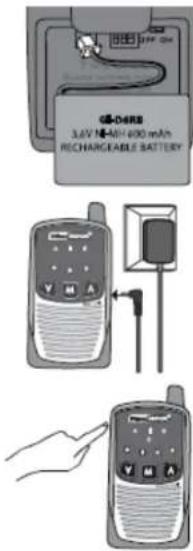
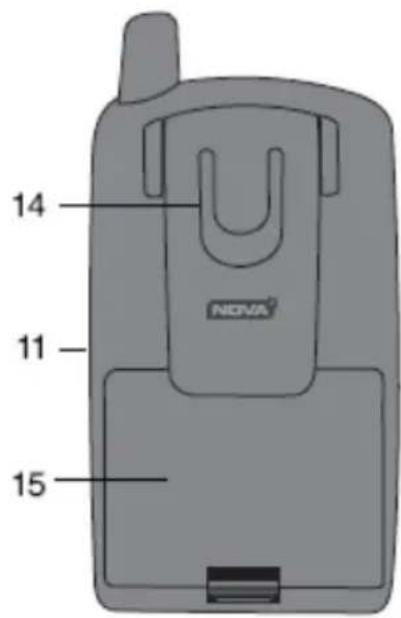
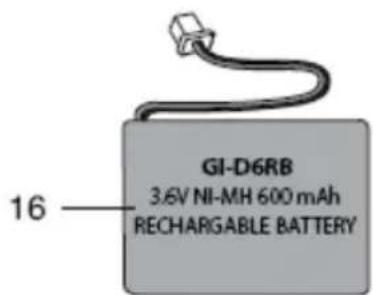
- Open the lid of the battery compartment (15) and plug the battery pack (16) into the contact (13) on the Baby Unit and the Parent Unit. Check that the side with the two metal slides is facing down, and that the cord is placed between the battery pack and the plug. Then put the battery compartment lid back on.
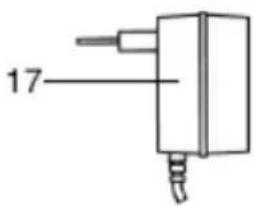
Plug the adapter (17) into the units and charge them for 12 hours the first time. The units can be used while being charged, but should then be charged for 24 hours the first time. - Place the baby unit and the adapter cord out of reach of the child. Turn the front of the unit so it is facing the child.
- Turn on both units by pressing the On/Off buttons (A1 and B1). The channel that has been set and the sensitivity or volume will now be displayed for two seconds before the unit enters normal operating mode. Test the communication between the baby unit and the parent unit by whistling into the baby unit. If there is a high screeching sound, increase the distance to the baby unit or press the ▼ button repeatedly on the parent unit.
- Place the units in a vertical (upright) position. Some noise during transmission may occur. This is due to local conditions, physical barriers between the units etc.
- The battery packs (16) should be removed from the units if they are not to be used for an extended period of time. Otherwise they will be completely discharged and destroyed, or will require many hours of charging with the units turned off. The units may also be damaged. The batteries should not be left discharged over a long period of time, they should be charged at least once a month.
- If you have any problems, read the troubleshooting guide carefully before you contact your dealer. This will provide answers to most questions.

Legend
Baby unit
A1 On/Off button .... Switches power on or off
A2 Channel indicator ..... Shows the channel that has been set. Blinks when the unit is in standby mode and remains on constantly when it is activated
A3 Low battery indicator .... Blinks when the battery is drained
A4 Sensitivity indicator ..... Lights up for two seconds when the unit is turned on and remains on when sensitivity is adjusted.
A5 ▼ button .... Programming function
A6 M button .... Button for programming/storing
A7 ▲ button ...... Programming function
A8 Microphone .... Must be facing the child
Parent unit
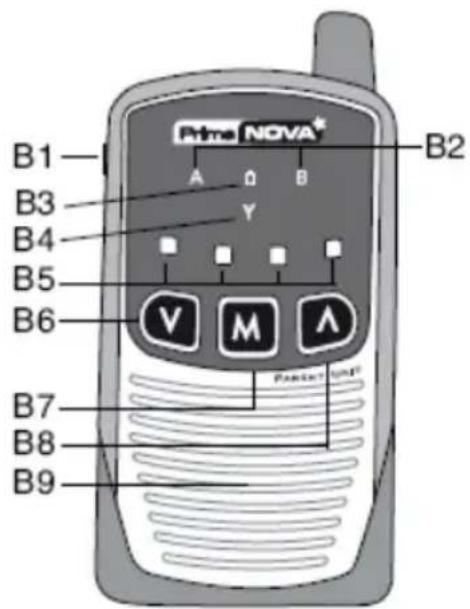
B1 On/Off button .... Switches power on or off
B2 Channel indicator.... Shows the channel that has been set. Blinks when the unit is in standby mode and remains on constantly when it is activated
B3 Low battery indicator ..... Blinks when the battery is drained
B4 Range indicator .... Blinks if there is no contact with the baby unit
B5 Volume indicator ..... Blinks to show sound level when the unit is activated. Shows the volume setting for two seconds when the unit is turned on and remains on constantly when setting the volume
B6 ▼ button .... Button for lower volume/programming
B7 M button..... Button for programming/storing
B8 ▲ button .... Button for higher volume/programming
B9 Speaker
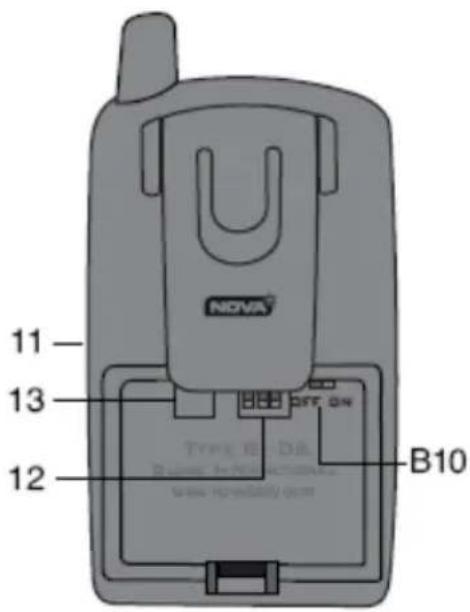
B10 Vibrator switch .... Switches vibrator function on/off
11 Adapter contact
12 Switches to set digital code .. This is set at the factory, but you can set your own digital code to avoid unnecessary interference. See detailed instructions
13 Battery pack contact
14 Belt clip
15 Battery compartment ..... Open to remove battery pack
16 Battery pack. NiMH rechargeable battery pack
17 Adapter
All warning sound signals from the parent unit are combined with a blinking symbol in one of the units showing the cause of the alarm. The baby unit only gives a sound signal when turned on or off, but not if the battery is weak. This means you can avoid waking the baby unnecessarily. A warning that the baby unit batteries are weak is indicated by a blinking symbol ☐ on the baby unit and a sound signal on the parent unit. If the parent unit emits a sound signal without any red lights blinking, it is warning that the batteries in the baby unit are weak.
When out of range of the baby unit, the parent unit will indicate this with a sound signal and the range indicator Y will blink. This is for safety reasons, as walls, particularly concrete walls, and ceilings can significantly reduce the range. Metal plates (cars, motor homes) may block reception of the signal. Relocating the baby unit and/or the parent unit may help because radio signals are reflected from objects, people etc. This means there will be areas where no communication is possible even if the range is short.
Detailed instructions
Setting the digital code
PrimaNOVA is equipped with a digital code system DSIP (Digital Selectable Interference Protection) with eight digital codes (1–8).

The same code MUST be used on both units! If the DSIP codes or the set channel (A or B) are different
you will not hear a sound from the child, and the units will indicate that they are not communicating with each other!
The digital codes can be set using the switches (12) in the battery compartment. Each unit has three switches and the code is set according to the following table.
| Code | Switch setting | Code | Switch setting |
| 1 | 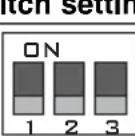 | 5 | 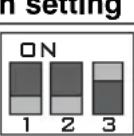 |
| 2 | 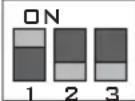 | 6 | 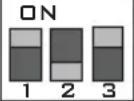 |
| 3 | 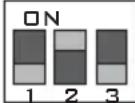 | 7 | 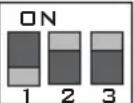 |
| 4 | 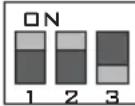 | 8 | 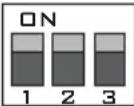 |
Baby unit
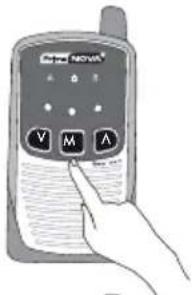
1. Adjust the channel
Press the M button once, A or B blinks rapidly.
Select the desired channel A or B using the ▲ and ▼ buttons.
Then press the M button to store.
The unit now returns to normal operations.
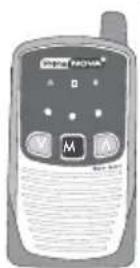
2. Adjust sound sensitivity
Press the M button and hold until the sensitivity indicator lights.
Adjust desired sensitivity using the ▲ and ▼ button. More arcs indicate higher sensitivity (one light = low, two lights = medium and three lights = high sensitivity).
Then press the M button to store.
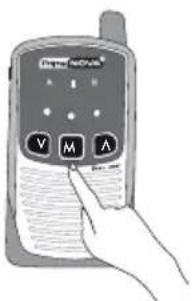
Parent unit
1. Adjust the channel
Press the M button once, A or B blinks rapidly.
Select the desired channel A or B using the ▲ and ▼ buttons.
Then press the M button to store.
The unit now returns to normal operations.
NOTE! If the M button is not pressed within 20 seconds after the last button press the unit will automatically return to normal operations without storing the new settings!
Using the charger and batteries
Both units can be used while being charged.
The units are connected to the wall power outlet using the adapters included (17). Only these adapters must be used.
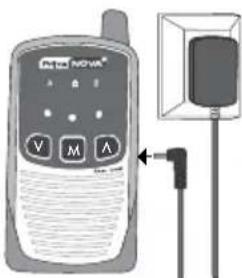
Plug the adapters into the contact (11) on the baby unit and the parent unit. The batteries will now be charging and will be fully charged within four to six hours. The units will then switch to maintenance mode. The batteries will therefore not be damaged even if they remain connected to the adapter for a long period.
Note: Rechargeable batteries are consumables, gradually losing power when used.
Extra battery packs can be purchased from the dealer. Read the troubleshooting guide in case of problems.
Technical specifications (subject to change)
* 2 sets of environmentally friendly battery packs 3.6V NiMH 600mAh.
* Transmitter frequency: 2 channels, frequency range 863 - 865 MHz.
* Working temperatures: 0°C to +40°C. Storage temperature: -20°C to +40°C.
* Output rating baby unit < 10mW.
General
The authorities have assigned only a limited number of frequencies and a very limited transmitter power rating to electronic baby monitors. Interference may therefore occur from other baby monitors while your baby unit has been activated by sounds from your child(traffic interference). This is normally heard as distortion and/or screeching/beeping sounds in the speaker. If this occurs, try to switch channels and select a lower sensitivity to prevent it from being activated due to weak sounds/movement from your child. If this does not help, there is nothing else that can be done, but
it was after all sounds from your child that activated your parent unit, so you have not been alerted unnecessarily! Distortion during transmission may thus be expected because units in the same area normally use the same frequency.
This is not a problem when your PrimaNOVA is on standby: You will not be disturbed unless another PrimaNOVA has been adjusted to identical codes and channels, in contrast to other baby monitors. Also bear in mind that radio signals may be blocked in areas where there is radio noise or physical barriers. Baby monitors work in a frequency range where there may be interference, and they may occasionally fail even if there is nothing wrong with the units. This applies in particular if there are many baby monitors within range of each other, or if there is another baby monitor between your units or close to the parent unit. The range is significantly reduced when the batteries begin to be drained.
Guarantee
The guarantee is void in the following cases:
* The unit seals have been broken
* The units or adapters have been damaged
* The label with the serial number has been removed, damaged or rendered unreadable
* The product has been damaged because the instructions provided in the user manual have not been followed
The guarantee does not apply to the batteries, which are consumable goods. If you wish to lodge a complaint about the product, a copy of the receipt must be attached. The guarantee is valid for 1 year from the date you purchased your unit. Both units must be sent for repair. Once they have been sent in, a decision will be made as to whether to repair or replace them. It is important to supply the most complete description of the defect. Please avoid descriptions like "does not work", "only works intermittently" or similar. If the description is incomplete or a complaint is lodged for a unit that has no defects, a fee may be charged to cover unnecessary additional expenses. In general all defects are repaired, but if the description is incomplete or unclear, the repairman may be unable to locate the defect. A complete description of the defect will tell the repairman what must be repaired even if the defect cannot be reproduced in the workshop.
Please remember to state:
* The distance between the units.
* Whether the defect occurs on battery power or power from the mains.
* Whether the channel indicator is illuminated constantly in the baby unit when the child cries.
* Does the defect occur after the unit has been on for some time – how long?
* If the defect is intermittent – how often?
If you supply a complete description of the defect you are ensured the best service and you will be just as happy with your NOVA quality product as thousands of others in Europe.
Troubleshooting chart
| Problem | Possible cause | Solution |
| No indicators are displayed.The unit turns itself off shortly after the unit is switched on, or the unit cannot be switched on. | The unit is not switched on.The batteries are discharged. | Press the On/Off button (A1, B1).Recharge the batteries while the units are turned off. Remove the batteries for 30 seconds then switch the unit on. |
| The unit cannot be switched on. | The batteries are low or dead.The adapter is not connected to the unit.The adapter is connected to a wall socket that does not work. | Charge the batteries. Try switching the batteries between the units to see whether the defect follows with the batteries.Plug the adapter into the wall socket and to the unit.If the wall socket has an On/Off switch, this must be on. |
| The batteries are not charged (also see above). | The batteries are completely deadThe batteries are spent/destroyedNOTE! Not covered by guarantee! | Charge the batteries for two days while the unit is off.Purchase new battery packs from the dealer. |
| No sound in the parent unit. | The volume has been turned right down. | Adjust the volume. |
| No contact between the baby unit and the parent unit. | The units are set to different DSIP codes and/or channels. | Set the same digital codes and/or channel on both units (see the section on setting the digital code). |
| The parent unit indicates that it is out of range. | The baby unit is not switched on.The baby unit and the parent unit are set to different channels.The baby unit and the parent unit are set to different DSIP codes.Out of range. | Turn the baby unit on.Check that they display the same letter, A or B.Check that the switches (12) are set the same on both units.Reduce the distance. Local conditions may reduce the range dramatically. Try switching channels. Charge the batteries for at least 12 hours. |
| Interference during transmission. | Too great a distance between the units.Local conditions, interference. | Reduce the distance.Move the units slightly.Local conditions cannot be changed.Try turning off light dimmers or other noise sources.Units rarely have a defect. |
| Loud screeching/beeping sound. | Units are too close to each other.Volume is too high. | Increase the distance.Adjust the volume. |
| Short range. | Destroyed or spent batteries.Local conditions. | Check the batteries as mentioned above.Other baby monitors in the vicinity may reduce range dramatically. Try to switch channels, or move the baby unit and/or parent unit. |
| The parent unit does not indicate that it is out of range even if the baby unit is switched off. | Another PrimaNOVA in the vicinity is adjusted to the same channel and DSIP code. | This can never be caused by a defect!Change the channel and DSIP channel code. That will resolve the problem! |