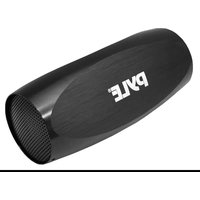
PLBSK30BK - Docking Station Pyle - Free user manual and instructions
Find the device manual for free PLBSK30BK Pyle in PDF.


| Product Type | Portable Bicycle & Sport Speaker with MP3 Playback |
| Brand | Pyle |
| Model | PLBSK30BK |
| Color | Black |
| Dimensions (W x D x H) | 3.5" x 3.5" x 3.7" |
| Weight | Approx. 0.6 lbs (estimated) |
| Speaker Power Output | 20 Watts |
| Sound Type | High Quality Stereo Sound |
| Media Playback | Micro SD/TF card up to 8 GB (MP3 files) |
| Battery Type | Built-in rechargeable lithium battery |
| Battery Capacity | 800 mAh |
| Charging Method | USB cable (computer or AC adapter) |
| Charging Time (First Use) | Up to 12 hours |
| Headphone Jack | Yes, for private listening (3.5mm) |
| Construction Material | Metal |
| Control Buttons | Power/Play/Pause, Volume up/down, Skip next/previous |
| LED Indicator | Flickers when power on |
| Cleaning | Wipe with dry cloth; do not use liquids |
| Safety Warning | Do not disassemble; avoid exposure to water or extreme temperatures |
| Spare Parts / Repairability | Contact Pyle support for battery or part replacements |
Frequently Asked Questions - PLBSK30BK Pyle
User questions about PLBSK30BK Pyle
0 question about this device. Answer the ones you know or ask your own.
Ask a new question about this device
Download the instructions for your Docking Station in PDF format for free! Find your manual PLBSK30BK - Pyle and take your electronic device back in hand. On this page are published all the documents necessary for the use of your device. PLBSK30BK by Pyle.
USER MANUAL PLBSK30BK Pyle
Portable Bicycle & Sport Speaker With Up To 8GB Storage

natural_image
Four colored pencils (yellow, blue, magenta, black) arranged vertically on a white background, no text or symbols visible.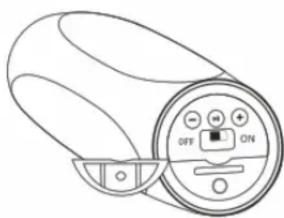
natural_image
Line drawing of a cylindrical device with an attached control panel showing ON/OFF states (no text or symbols beyond basic labels)• High Quality Stereo Sound
• Supports Micro SD Card (Up To 8 GB) To Play Back Mp3s
• Built-In Rechargeable Lithium Battery
• Headphone Jack for Private Listening
- Charges over USB — Just Connect To Your Computer
- Battery Capacity: 800mah
• Dimensions: 3.5" X 3.5" X 3.7"
- Speaker Power: 20 Watts
- Construction Material: Metal
Operation Manual:
1, Put Micro SD / TF card into the player

2-1
2, Power on and the LED will flicker
3, 3 seconds later, player will play the music automatically,
4, Press ⏻ , player will be stop and press again it is played.
5, Select songs : Short press ⏻ ,it play last song ,short press ⚠ ,it play next song
6. Adjust volume : Long press ⏻ , reduce volume , long time press ⚠ increase volume .
Charging:
- Use the original USB Charge cable or the AC adaptor for charging.
- Charging takes up to 12 hours the first time.



Brand : Pyle
Model : PLBSK30BK
Category : Docking Station