AWSBT4BK - Docking Station Acoustic Research - Free user manual and instructions
Find the device manual for free AWSBT4BK Acoustic Research in PDF.


| Product Type | Bluetooth Docking Station |
| Brand | Acoustic Research |
| Model | AWSBT4BK |
| Dimensions (W x D x H) | 10.2 x 5.5 x 4.3 inches |
| Weight | 2.2 lbs |
| Power Source | AC adapter (input 100-240V, output 12V/2A) |
| Bluetooth Version | 4.0 with A2DP |
| Frequency Response | 80 Hz - 20 kHz |
| Output Power | 2 x 10W RMS |
| Speaker Type | Full-range stereo drivers |
| Connectivity | Bluetooth, 3.5mm auxiliary input, USB charging port |
| Compatible Devices | Smartphones, tablets, laptops, MP3 players |
| Material | Plastic chassis with metal grille |
| Color | Black |
| Charging Time | Approximately 4 hours |
| Battery Life | Up to 8 hours at moderate volume |
| Battery Type | Rechargeable lithium-ion, built-in |
| Remote Control | Not included |
| Warranty | 1 year limited |
| Cleaning Instructions | Wipe with a dry soft cloth; avoid liquids |
| Safety Certifications | FCC, CE, RoHS |
Frequently Asked Questions - AWSBT4BK Acoustic Research
User questions about AWSBT4BK Acoustic Research
0 question about this device. Answer the ones you know or ask your own.
Ask a new question about this device
Download the instructions for your Docking Station in PDF format for free! Find your manual AWSBT4BK - Acoustic Research and take your electronic device back in hand. On this page are published all the documents necessary for the use of your device. AWSBT4BK by Acoustic Research.
USER MANUAL AWSBT4BK Acoustic Research
Caution: To reduce the risk of electric shock, daily remove cover (or book). No
RISK OF ELECTRIC SHOCK DO NOT OPEN
Important Safety Instructions
-
Read these instructions.
-
Keep these well actors.
-
Does all animals
-
Follow-up instructions
-
Clean only with cry cloth
-
Can not break any ventilation openings. Install in
-
For not install near any heat sources such as radiators, heat registers, sleeves, or other apparatus (including small inches) heat produce heat.
For FLUGGABLE EQUIPMENT, the socket outlet shall be installed near the equipment and shall be easily accessible.
-
Protect the power cord from being walked on or proched separately at plus, convenience receptacles, and the point where they exit from the approach.
-
Laclag this apparatus cutting lightning storms or when unused for long periods of time.
-
Refer to servicing to qualified service personnel. Serving is required when the apparatus has been damaged, in any way, such as power-sweep or cold or plug a damaged liquid has been spiked or objects here taken into the apparatus, the apparatus has been exposed to iron or moisture, does not outer are normally, or has been dropped.
The apparatus shall not be exposed to crippling or splashing or placed near objects in lieu with rifles.
Care and Maintenance
• Always use a soft cloth to clean the speaker and transmitter. Never use any crash containing a colon or other subsells as they may damage for surface
- Use caution when clugging the power transformers in an AC outlet to avoid the risk of electric shock. - If the speaker are used outside on a deck or panel, make sure you take them indicators in the event of a transformer to prevent possible damage.
Do not operate or store line system in extreme temperatures (below 3297.0°C and above 1247.5°C)
Product Information
Keep your sales except to obtain warranty for local service and for proof of purchase. Although here and ordered the sorts and model numbers in case you need them. These numbers are located on the product.
Model No.:
Purchase Date:
Dealer/Address/Phone:
INTRODUCTION
The portable wireless speaker makes it easy to take your music wherever you go and share it whenever you want, with Bluetooth® wireless connectivity and a built-in auxiliary input. It's compact, easy to carry and simple to use.
This manual covers various connection options and detailed operating instructions for making the customizable portable wireless speaker a part of your lifestyle. It, after having reviewed the instructions, you have any questions, please call toll-free 1-800-732-6866 or visit www.acoustic-research.com.
TOUR OF THE SPEAKER
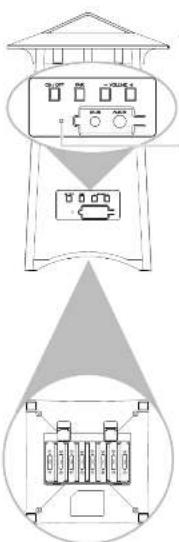
Back panel
Power and Pairing indicator shows the status of the speaker.
Blue, slow blinking: The speaker is on but not paired or connected.
Blue, fast blinking: The speaker is in Bluetooth pairing mode. See the Bluetooth Setup section for more information.
Solid blue: The speaker is paired with a Bluetooth-enabled device or the auxiliary audio input is connected.
ON/OFF button turns the speaker on and off.
• VOLUME + buttons adjust the speaker's volume level.
Pair button (Press and hold for 3 seconds) puts the speaker in pairing mode for Bluetooth setup (press and hold for 3 seconds). It also performs a fast reconnect with devices that have lost connection (press and release). See the Bluetooth setup section for more information
AUX IN connects directly to your MP3 player, smartphones, or other portable audio device, using the 3.5mm audio in cable provided.
DC IN receives the small round end of the included 12V DC 1000mA AC power adapter; remove the protective cover to insert the adapter.
Bottom panel
Battery Compartment Cover remove to install 8 AA batteries.
POWERING THE SPEAKER SYSTEM
Powering the Speaker
There are two options to power your wireless speaker: using the included AC power adapter or using 8 AA batteries (not included).
AC Power Adapter
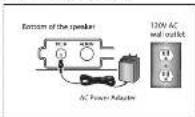
Insert the small, round plug from the speaker AC 1, power adapter into the DC IN jack on the bottom panel of the speaker.
Plug the other end of the speaker AC power Z, adapter into any standard 120V AC wall outlet.
Notes: Be sure to use the speaker AC power adapter rated 12V DC 1000 mA.
The power unit should be plugged in so that it stays vertical or lies flat.
AA Batteries
Remove the gallery compartment cover on the bottom of the speaker.1.
- Insert eight (8) AA batteries (not included) into the speaker (following the polarity ("+" and "-") as diagrammed inside the battery compartment.
Replace the battery compartment cover on the bottom of the speaker.3.
Note: Place the rubber cap in the speaker power input jack when using batteries.
DO NOT mix batteries with different chemistry types (for example, a zinc battery with an alkaline battery). DO NOT mix new and used batteries. DO NOT leave batteries installed in the product when not in use for long periods. Always remove old, weak or worn out batteries promptly and recycle or dispose of them in accordance with local and national regulations.
SETTING UP BLUETOOTH WIRELESS
Pairing
The Bluetooth enabled device that you wish to stream audio to your speaker system must first be paired to the speaker. The process is simple, and in most cases the pairing process needs to be done only once.
To pair your Bluetooth-enabled device with the speaker:
- Make sure your device's Bluetooth is turned on. See the wireless and/or network settings menu on your device to check.
- If the speaker isn't already on, press the ON/OFF button to turn it on. You will hear the turn on music to indicate the speaker is turned on. The indicator light at the back of the speaker starts if ashing blue.
- Open the Bluetooth settings menu on your device. Select "AR AWSBT4" from the list of devices available (you might have to scan for devices). If your device asks for a password, enter "0000".
- A confirmation screen will appear on your device once the speaker and the device are successfully paired. The blue indicator turns solid blue to indicate successful connection. The speaker is now ready for you to stream audio from your device.
- Turn the volume on your device to at least 3/4 max, then start playing something on the device. Control the speaker volume on the speaker itself, using the Volume +/- buttons at the back of the speaker.
Note:
- If you notice the sound from the speaker is distorted, turn down your device's volume.
Reconnecting
When you turn it on, the speaker reconnects automatically with the last paired device. When you leave the Bluetooth operating range, with the speaker turned ON. It disconnects. When you come back into the Bluetooth operating range, press the Pair button to reconnect to the last paired device. The successfully paired music will sound once it has been successfully connected.
SETTING UP BLUETOOTH WIRELESS
Streaming Audio With Bluetooth
Once you've paired and connected your device with the speaker, you can control music playback from the palm of your hand. Select your music, stop it, change songs and playlists, all right from your device's screen.
To adjust volume. Press the - VOLUME + buttons at the back of the speaker.
To disconnect from the speaker: Either turn Bluetooth off on your device or choose "Disconnect" from the list of options in your device's Bluetooth settings.
To reconnect with the speaker: Just turn the speaker on and wait a few seconds for the speaker to find and connect to your device. If the speaker still hasn't found your device (which may happen it, for instance, another device has been connected after yours) make sure the speaker isn't connected to another device currently. Then select the "AR AWSBT4" from the list of Bluetooth connections available in your device's Bluetooth menu to connect to it.
USING THE AUXILIARY AUDIO INPUT
Making a Direct Connection
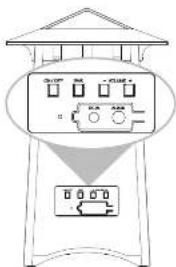
- If the speaker isn't already on, press the ON/OFF button to turn it on.
- Connect one end of the provided 3.5mm audio in cable to the AUX IN jack on the back of the speaker.
- Connect the other end of the cable to the headphone output on your MP3 player or other portable audio device.
Warning: This product is designed to work with line level outputs or headphone outputs only. DO NOT connect it directly to speaker outputs as it will permanently damage the speaker.
- Press the ON/OFF button at the back of the speaker to turn the speaker off.
- Confirm that the speaker is off by verifying that the indicator light at the back of the speaker is no longer illuminated.
TROUBLESHOOTING
The following troubleshooting guide takes you through some of the more common problems associated with the installation and/or operation of a wireless system. If the problem persists, please call toll-free at 1-800-732-6866 or visit www.acoustic-research.com.
Issue: Cause and solution:
| No sound | Note: When using AUX IN mode make sure the Bluetooth on a paired device is turned off. |
| • Check that the AC power adapter is fully inserted into the wall cutter and the power cord from the AC adapter is 4 only corrected to the speaker's power input jack. or | |
| • If you're using batteries for the speaker, check that they are fresh and inserted with correct proximity (or ,). Make sure the batteries are fresh and replace in necessary. | |
| • Confirm that the speaker is turned on. | |
| • Check that the audio source component (sistered, MP2 player, etc.) is turned on and transmitting sound as it normally should. | |
| • Make sure the volume on your audio source is turned up. | |
| • Check that the speaker volume is turned up. | |
| • Make the Bluetooth device and the speaker closer together. The Bluetooth wireless technology generally can operate within a range of 300 feet. However results may vary based on other factors such as room layout, wall material, weather conditions, etc. | |
| • Make sure you entered the correct passkey when pairing your device. | |
| Cannot pair the speaker with your Bluetooth device | • Make sure the Bluetooth capability of your device is turned on and discoverable. |
| • Make the Bluetooth device and the speaker closer together. | |
| • Make sure your device supports audio transfer. | |
| • Turn off all other nearby Bluetooth devices or disable their Bluetooth functionality. |
SPECIFICATIONS
Speaker
- Bluetooth® wireless technology: Bluetooth v4.0
Prof le: AZCP audio sink, AVRCP-
Class 2 Radio*
2-way automatic design:
• 3.104, 15.205
Passive Recal.0.4 Round
Operation distance (Up to 77.5 feet /space area) - [междите спорювань 20% - 20%]
• Generates wing supplied AC arteries or night (A) 9.5 batteries (not included).
*Maximum range; results may vary according to environment
FCC Statement
This device complies with Part 15 of the FCS Rules. Operation is subject to the following two conditions:
At this device may not cause harmful interference, and 2. This device must accept any interference received; including interference that may cause undesired operation.
This equipment has been tested and found to comply with the limits for a Class B digital device, pursuant to part 15 of the FCC Rucs. These limits are designed to provide reasonable protection against harmful interference in a residential installation. This equipment generates, uses, and can deliver radio frequency energy and, if not installed and used
in accordance with the instructions, may cause harmful interference to radio communication. However, there is no guarantee that interference will not occur in a particular socialist on. If this equipment does cause harmful interference to radio or television reception, which can be determined by turning the equipment off and on, the user is encouraged to try to correct the interference by one or more of the following measures:
• Recipient or reiterate the receiving attempts:
- Increase the signal and transce of the equipment, which is connected.
- Connect the equipment into an cullet on a circuit different from that to which the receiver is connected.
- Consult the dealer or an experienced radio/TV technician for help.
FCE. Regulat ons sace that unauthorized changes or modifications to its equipment may void the user's authority to operate it.
RF Exposure Warning
This equipment must be installed and operated in accordance with provided instructions and the antenna used for this transmitter must be installed to provide a separation distance of at least 20 cm from all persons and must not be located or operate main conduction with any other antenna or transmitter. End-users and installers must be provided with antenna installation instructions and continue installing conditions for satisfying PF exposure compliance.
Industry Canada Regulatory Information
This device complies with RSS 20 of the industry Canada Rules. Operation is subject to the following two conditions: this device may not cause interference and 2) this device must accept any interference, including interference that may cause undesired operation at the device.
Industry Canada Regulatory Information
LUN CE3-2, E, HOMS (B)
IC. Radinalis Exposure Statement: This equipment complies with half radinalis exposure limit set for an uncontrolled environment.
The Rhodnath B word mark and logos are registered trademarks owned by Rhodnath SIC, Inc. and are one of such marks by VOXX Accessories Corporation is under license. Other trademarks and other names are those of their respective owners.
12 MONTH LIMITED WARRANTY
YOXX Accessories Corporation (the Company's) warrants for the original retail purchaser of this product that should this product or any part thereof, under normal use and conditions, be proven defective in material or workmanship within 12 months from the date of original purchase, such defect(s) will be repaired or replaced at the Company's option) without charge for parts and repair labor. To obtain resale or replacement within the terms of this Warranty, the product along with any accessories included in the original packaging is to be delivered with proof of warranty coverage (e.g. rated bill at sale), specification of detricta, transportation presale, to the Company at the address shown below. Do not return this product to the Retailer.
This Warranty is not transferable and does not cover product purchased, serviced or used outside the United States or Canada. The warranty does not extend to the elimination at externally generated static or noise, to costs incurred for live installation, removal or reinstallation of the product.
The warranty does not apply to any product or part thereof which, in the opinion of the company, has suffered or been damaged through alteration, improper installation, mishanging misuse, neglect, accident or exposure to moisture. This warranty does not apply to damage caused by an AC adaptor nor provided with the product, or by leaving non-rechargeable batteries in the product while plugged into an AC outlet.
THE EXTENT OF THE COMPANY'S LIABILITY UNDER THIS WARRANTY IS LIMITED TO THE REPAIR OR REPLACEMENT PROVIDED ABOVE AND, IN NO EVENT, SHALL THE COMPANY'S LIABILITY EXCEED THE PURCHASE PRICE PAID BY PURCHASER FOR THE PRODUCT.
This Warranty is in lieu of all other express warranties or liabilities. ANY IMPLIED WARRANTIES, INCLUDING ANY IMPLIED WARRANTY OF MERCHANTABILITY OR FITNESS FOR A PARTICULAR PURPOSE, SHALL BE LIMITED TO DURATION OF THIS WARRANTY. ANY ACTION FOR BRETCH OF ANY WARRANTY HEREUNDER, INCLUDING ANY IMPLIED WARRANTY MUST BE BROUGHT WITHIN A PERIOD OF 26 MONTHS FROM THE DATE OF ORIGINAL PURCHASE. IN NO CASE SHALL THE COMPANY BE LIABLE FOR ANY CONSEQUENTIAL OR INCIDENTAL DAMAGES WHATSOEVER. No person or representative is authorized to assume for the Company any liability other than expressed herein in connection with the sale of this product.
Some states/provinces do not allow limitations or how long, an implied warranty lasts or the exclusion or limitation of incidental or consequential damage so the above limitations or exclusions may not apply to you. This Warranty gives you specific legal rights and you may also have other rights which vary from state/province to state/province.
U.S.A. Audiosae Return Center, ISO Marcus Blvd, Hauppauge, New York 11785
CANADA: Audiovox Return Center, clo Gencs, 6585 Kennedy Road, Unit #3 Door 14, Mississauga Ontario LST 3A5