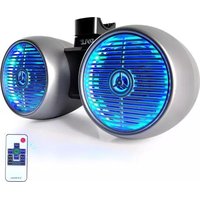
PLMRWB652LES - Docking Station Pyle - Free user manual and instructions
Find the device manual for free PLMRWB652LES Pyle in PDF.


| Product Type | Marine Bluetooth Stereo Docking Station |
| Brand | Pyle |
| Model | PLMRWB652LES |
| Dimensions (W x H x D) | 7.5 x 2.5 x 5.5 inches |
| Weight | 2.1 lbs |
| Power Source | 12V DC (cigarette lighter adapter) or 8 x AA batteries |
| Bluetooth Version | 5.0 |
| Bluetooth Range | 30 feet |
| Audio Inputs | Bluetooth, AUX (3.5mm), USB flash drive, FM radio |
| Speaker Output | 2 x 3 inch full-range drivers, 100W peak power |
| LED Lighting | RGB multi-color with multiple modes |
| Waterproof Rating | IPX5 (splash-proof) |
| FM Radio | Built-in, with digital LCD display |
| USB Port | For charging devices (5V/2.1A) and playing music |
| Controls | Front panel buttons and remote control included |
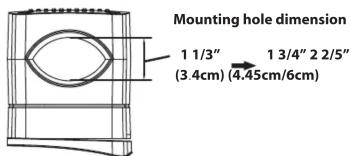
| Mounting | Universal bracket for marine/vehicle use |
| Material | ABS plastic with UV-resistant coating |
| Maintenance | Wipe with a soft, damp cloth; avoid abrasive cleaners |
| Safety | Do not exceed rated voltage; keep away from prolonged water immersion |
| Spare Parts | Remote control, mounting bracket, power cable available |
| Warranty | 1 year limited warranty |
Frequently Asked Questions - PLMRWB652LES Pyle
User questions about PLMRWB652LES Pyle
0 question about this device. Answer the ones you know or ask your own.
Ask a new question about this device
Download the instructions for your Docking Station in PDF format for free! Find your manual PLMRWB652LES - Pyle and take your electronic device back in hand. On this page are published all the documents necessary for the use of your device. PLMRWB652LES by Pyle.
USER MANUAL PLMRWB652LES Pyle
INSTALLATION INSTRUCTIONS FOR
PLMRWB652LEW/PLMRWB652LES/PLMRWB652LEB PLMRWB852LEW/PLMRWB852LES/PLMRWB852LEB
Product Technical Parameters
| MARINE SPEAKER MODEL | PLMRWB652LEW/PLMRWB652LES/PLMRWB652LEB |
| - Dual 2-Way Mini Box Speaker System | 2x6.5" |
| - Long Excursion Woofer | |
| - 1.0"Titanium Dome Tweeter | |
| - Heavy Duty ABS Construction | |
| - Quick Connect Speaker Terminals | |
| - Max Power 2x200 Watts | |
| - Magnet 10 Oz | |
| - Frequency Response | 60Hz-20KHz |
| - Impedance | 4 Ohms |
| - Sensitivity | 90 dB |
| - Dimensions(mm) | 283x480x240 mm (HxWxD) |
| MARINE SPEAKER MODEL | PLMRWB852LEW/PLMRWB852LES/PLMRWB852LEB |
| - Dual 2-Way Mini Box Speaker System | 2x8" |
| - Long Excursion Woofer | |
| - 1.0"Titanium Dome Tweeter | |
| - Heavy Duty ABS Construction | |
| - Quick Connect Speaker Terminals | |
| - Max Power 2x300 Watts | |
| - Magnet 20 Oz | |
| - Frequency Response | 40Hz-20KHz |
| - Impedance | 4 Ohms |
| - Sensitivity | 91 dB |
| - Dimensions(mm) | 340x577x290 mm (HxWxD) |
PART 1.
- The base of the bracket.
- The connecting base of the bracket, 360^ ratation, connect to picture1.
- The cover of the bracket, is fixed by 4 mounting screws after picture 2 rotates to an angle.

Remark: two types of screws for choice: M5x65/M5x80
PART 2.

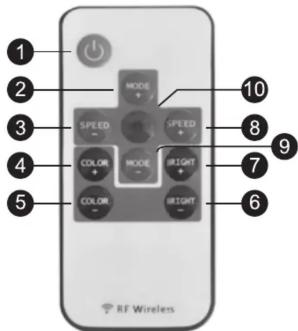
REMOTE CONTROL FEATURES
- Turn On / Standby: Press this key to turn on LEDs or switch to standby mode.
2 / 9. Dynamic Mode button: Switch from dynamic mode to color mode or switch between dynamic modes.
3 / 8. Dynamic Mode Speed button: Use these buttons to adjust dynamic mode speed. If the unit is in static mode, pressing these buttons will switch unit to dynamic mode.
4 / 5. Static Color Adjust button: Use this button to swithc between static colors. Pressing these keys while in dynamic mode will switch the unit to static mode.
6 / 7. Brightness Adjust button: Pressing these buttons will adjust brightness while in static mode. If these buttons are pressed while unit is in dynamic mode, it will switch to static mode. - Demo Mode button: this button will switch the unit into demo mode. While in demo mode, unit will loop through 9 of the dynamic modes with each repeating 3 times.
- Please remember to remove plastic insulator from remote unit battery compartment.
- This remote uses a 3 volt CR2025 type battery. When replacing be sure to use only the same type of battery
- The remote signal can pass though most obstacles.
- Do not install unit in areas surrounded by metal as the remote signal will not reach the unit.

For more detailed information visit us at:
PyleAudio.com
1600-63rd Street
Brooklyn,NY 11204 USA
PYLE®
PyleAudio.com


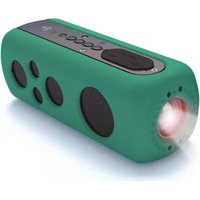

Brand : Pyle
Model : PLMRWB652LES
Category : Docking Station