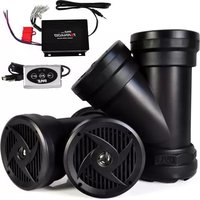
PLABTV660 - Docking Station Pyle - Free user manual and instructions
Find the device manual for free PLABTV660 Pyle in PDF.


| Product Type | Dual Waterproof Powered Speaker Sound System with 4-Channel Amplifier |
| Model | PLABTV660 |
| Brand | Pyle |
| Power Output | 1200 Watts (peak) |
| Speaker Configuration | 4 x 6.5-inch speakers in two angular Y-shaped enclosures |
| Amplifier Channels | 4-Channel Digital Amplifier |
| Bluetooth | Yes, version 3.0, supports wireless audio streaming (PLABTV660 only) |
| Bluetooth Range | 30+ feet (10+ meters) |
| Bluetooth Network Name | Pyle Audio |
| Additional Input | 3.5mm Auxiliary Input |
| Power Supply | 12V DC; can be hard-wired to battery or via vehicle cigarette lighter (20A fuse recommended) |
| Waterproof Rating | Waterproof marine-grade housing (IPX rating not specified, weather-resistant) |
| Mounting | Universal vehicle mounting; includes P-shaped and Z-shaped clamps, Velcro, and mounting belts |
| Controls | Bluetooth remote controller (PLABTV660 only) with play/pause, next/previous track, volume |
| Compatible Devices | Smartphones, tablets, iPhones, iPads, Android, and other Bluetooth or 3.5mm audio devices |
| Enclosure Design | Engineered tube enclosure for maximum bass response |
| Sound System | Full range stereo sound reproduction |
| Installation | Plug & play; easy installation on ATV, UTV, 4x4, golf carts, jetski, snowmobile, etc. |
| Accessories Included | Bluetooth controller, carrying bag, mounting belts, zip ties, clamps, Velcro, and remote control |
| Safety | Do not operate while driving; avoid submersion; use only provided parts; ensure proper fuse rating |
| Dimensions (each speaker) | Approximately 12 x 10 x 6 inches (estimated from typical form factor) |
| Weight (total system) | Approximately 20 lbs (estimated) |
Frequently Asked Questions - PLABTV660 Pyle
User questions about PLABTV660 Pyle
0 question about this device. Answer the ones you know or ask your own.
Ask a new question about this device
Download the instructions for your Docking Station in PDF format for free! Find your manual PLABTV660 - Pyle and take your electronic device back in hand. On this page are published all the documents necessary for the use of your device. PLABTV660 by Pyle.
USER MANUAL PLABTV660 Pyle
Dual Waterproof Powered Speaker Sound Systems, 4-Channel Amplifier, (4) 6.5" Speakers, 1200 Watt
PLABTV 660
Dual Bluetooth & Waterproof Powered Speaker Sound Systems, 4-Channel Amplifier, (4) 6.5" Speakers, 1200 Watt

natural_image
Two black industrial fan-shaped devices with ventilation grilles and a small electronic device connected to wires (no visible text or symbols)User's Manual
PLATV650/PLABTV660
Dual Waterproof Powered Speaker Sound Systems
• Includes (2) Angular 'Y-Shaped' Speakers
• *Built-in Bluetooth Wireless Music Streaming (PLABTV660 ONLY)
• 4-Channel Digital Amplifier
• Universal Vehicle Mounting Ability
• Waterproof Marine Grade Housing
• Rugged, Heavy-Duty & Weather Resistant Design
• Dual Speaker 2-Way Powered Audio System
• Full Range Stereo Sound Reproduction
• Engineered Tube Enclosure for Maximum Bass Response
• Aux (3.5mm) Input Connector Jack
• Ability to Connect External Devices
• Instant Connect & Stream Audio Ability
• 'Plug & Play' Connection for Easy Installation
• Perfect for ATV, UTV, 4x4, Golf Carts, Jetski, Snowmobile & More!
• *Can be Hard-Wired or Powered via Vehicle Cigarette Lighter Power Outlet
Bluetooth Connectivity for PLABTV660 Only
• Wireless Audio Streaming Ability
• Works with All of Your Favorite Devices
• (iPhone, Android, Smartphones, iPad, Tablet, etc.)
• Includes Bluetooth Console Controller
• Bluetooth Version: 3.0
• Bluetooth Network Name: Pyle Audio
• Bluetooth Wireless Range: 30'+ Feet
• Automatic Bluetooth Activation with System Power On
• Automatic Bluetooth Disconnection with Aux-in Connection

natural_image
Exterior view of a yellow and black C80-901 motorcycle parked outdoors (no signage or text visible on body)SAFETY PRECAUTIONS:
- Do not operate any mobile video equipment while driving – safe driving should always be your highest priority.
- Do not open or attempt to repair this unit yourself. Refer any repairs to a qualified Pyle Audio technician.
- If there is smoke or any peculiar odor present during use or if there is damage to any of the component enclosures, immediately remove it from your system and send to your local dealer or service center as soon as possible.
ACCESSORIES

- Bluetooth Device Carying Bag
- 4 Channel Amplifier
- Bluetooth Remote control (PLABTV660 only)
- Belt for Carying Bag
- Mounting Belt to Attach Unit to ATV
- Zip Ties for Wireing and Mounting
- Bluetooth Controller Hook (PLABTV660 only)
- Black Industrial Velcro for P Clamp (PLABTV660 only)
- Pand Z shaped Clamps for Handlebar (PLABTV660 only)
INSTALLATION PRECAUTIONS
- The unit has to be wired to a switched source to avoid draining your vehicles battery.
- Unit can be powered from a vehicles cigarette lighter port, or be hard wired to the battery.
- When wired directly to the vehicles battery, please insure proper fuse rating of 20 Amps is placed in line with the positive battery terminal.
- The unit is weather proof but should not be submerged in water under any circumstances.
- Unit can play audio out of any device that has a 3.5mm output audio jack
- Use only the installation parts provided with the unit.
INPUT AND OUTPUT CABLES:

① INPUT Aux (3.5mm) input connector Jack for connecting other audio devices for PLATV650
① INPUT Connected with Bluetooth controller for PLABTV660
POWER AND SPEAKER WIRING
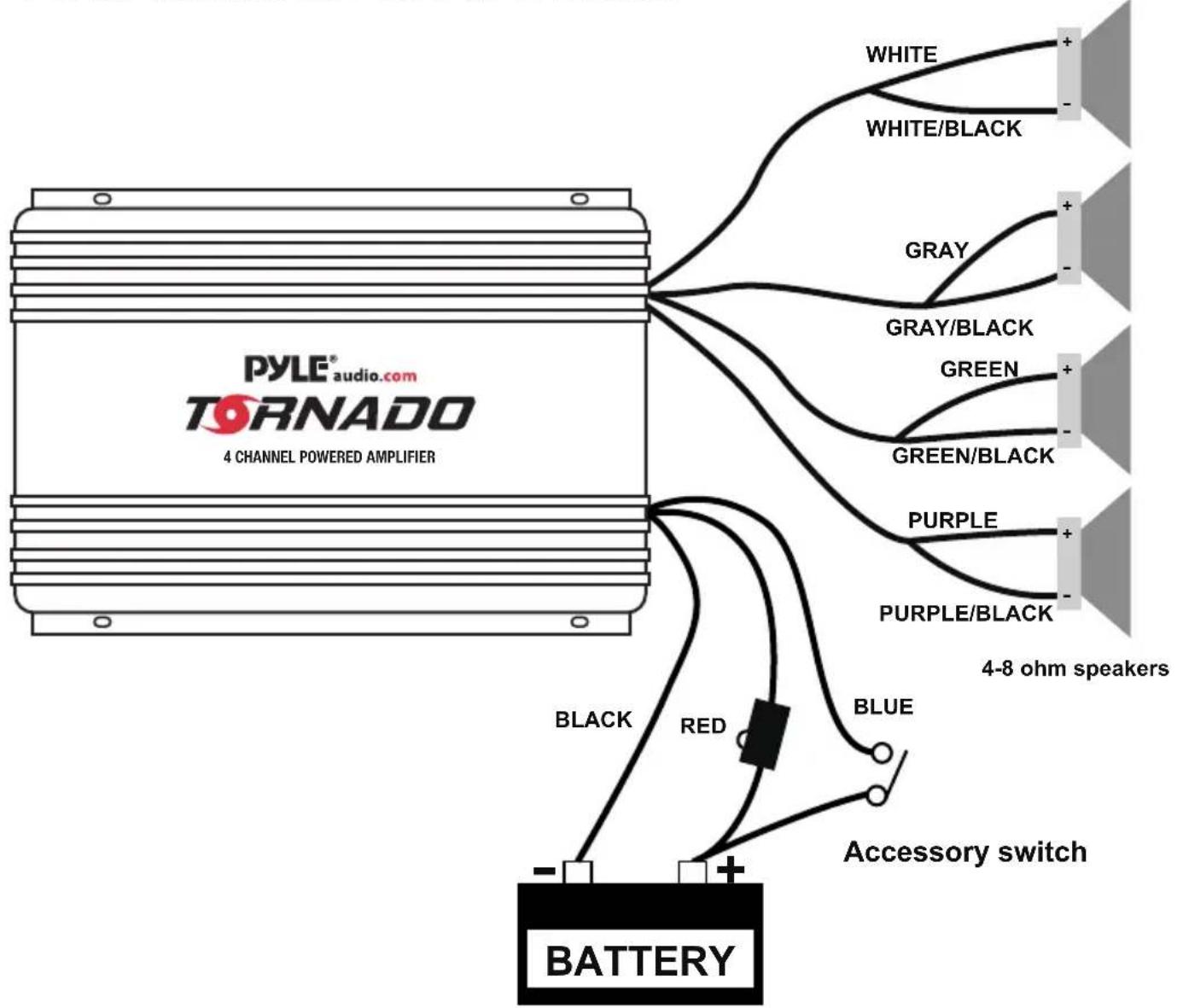
flowchart
graph TD
    A["4 CHANNEL POWERED AMPLIFIER"] --> B["BATTERY"]
    B --> C["Black"]
    B --> D["Red"]
    B --> E["Blue"]
    B --> F["Purple"]
    B --> G["GREEN/BLACK"]
    B --> H["GRAY/BLACK"]
    B --> I["WHITE/BLACK"]
    B --> J["4-8 ohm speakers"]
    style A fill:#f9f,stroke:#333
    style B fill:#ccf,stroke:#333
    style C stroke:#000,stroke-width:2px
    style D stroke:#000,stroke-width:2px
    style E stroke:#000,stroke-width:2px
    style F stroke:#000,stroke-width:2px
    style G stroke:#000,stroke-width:2px
    style H stroke:#000,stroke-width:2px
    style I stroke:#000,stroke-width:2px
    style J stroke:#000,stroke-width:2px
    style K stroke:#000,stroke-width:2px
    style L stroke:#000,stroke-width:2px
    style M stroke:#000,stroke-width:2px
    style N stroke:#000,stroke-width:2px
    style O stroke:#000,stroke-width:2px
    style P stroke:#000,stroke-width:2px
    style Q stroke:#000,stroke-width:2px
    style R stroke:#000,stroke-width:2px
    style S stroke:#000,stroke-width:2px
    style T stroke:#000,stroke-width:2px
    style U stroke:#000,stroke-width:2px
    style V stroke:#000,stroke-width:2px
    style W stroke:#000,stroke-width:2px
    style X stroke:#000,stroke-width:2px
    style Y stroke:#000,stroke-width:2px
    style Z stroke:#000,stroke-width:2px
    style AA stroke:#000,stroke-width:2px
    style AB stroke:#000,stroke-width:2px
    style AC stroke:#000,stroke-width:2px
    style AD stroke:#000,stroke-width:2px
    style AE stroke:#000,stroke-width:2px
    style AF stroke:#000,stroke-width:2px
    style AG stroke:#000,stroke-width:2px
    style AH stroke:#000,stroke-width:2px
    style AI stroke:#000,stroke-width:2px
    style AJ stroke:#000,stroke-width:2px
    style AK stroke:#000,stroke-width:2px
    style AL stroke:#000,stroke-width:2px
    style AM stroke:#000,stroke-width:2px
    style AN stroke:#000,stroke-width:2px
    style AO stroke:#000,stroke-width:2px
    style AP stroke:#000,stroke-width:2px
    style AQ stroke:#000,stroke-width:2px
    style AR stroke:#000,stroke-width:2px
    style AS stroke:#000,stroke-width:2px
    style AT stroke:#f99,stroke-width:1px
wire color
Red
Black
Blue
White
White/Black
Gray
Gray/Black
Green
Green/Black
Purple
Purple/Black
Description
Battery (+), 12dc
Battery (-), Ground
Remote Turn On, 12vdc = ON
CH1 (+)
CH1 (-)
CH2 (+)
CH2 (-)
CH3 (+)
CH3 (-)
CH4 (+)
CH4 (-)
BLUETOOTH INSTALLATION

- Install "P" shaped clamp or "Z" shaped bracket (Item#9) threaded on to the Bluetooth controller hook. (packed with Bluetooth controller). Use the provided bolt to fix on the handlebar, it can be adjusted the tightness by provided EVA & rubber pad.
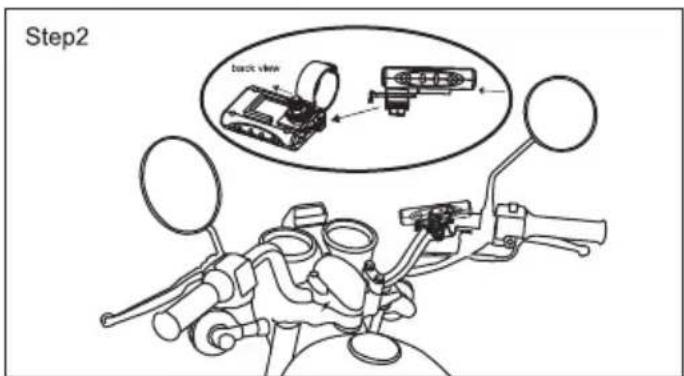
- Slide the Bluetooth controller into the hook.

- Press down the Bluetooth controller hook and then slide out the Bluetooth controller box at the same time to remove the Bluetooth controller.

BLUETOOTH PAIRING AND CONNECTION:
- Connect Bluetooth controller box to your device
- Press and Hold >|| for three seconds until power indicator lights (red)
- The system will automatically go into pairing mode The power indicator will turn red for about 7 seconds and then alternating red and blue (Bluetooth blue Power red)
Please be sure that Bluetooth is turned on your device Select Pyle Audio on your device to connect Bluetooth controller (if the Bluetooth controller is connected the light will turn blue and not flash)
-
When the device is out of Bluetooth range, Bluetooth will be disconnected automatically and automatically reconnect when detected in range again. (If not please just repeat steps 1 and 2)
-
When Bluetooth is disconnected or the 3.5mm AUX Input is plugged in, the power indicator will glow red.
PLAYING MUSIC:
- Press >|| to start or pause the music
- Press >>>+ shortly for next track, Press and hold for Volume up
- Press -<< shortly for previous track, Press and hold for Volume down
Pyleaudio.com
PYLE® TORNADO
IMPORTANT: Pack carefully in original package if possible. We are not responsible for damage incurred in returning items for repair. A letter stating your exact street address, daytime phone number, and the problem you are experiencing should be included. You must also enclose a copy of the original receipt as proof of date of purchase
Brooklyn, NY 11204
(718)535-1800
Monday Through Thursday. 9AM to 5PM
Friday 9AM to 12PM Eastern.

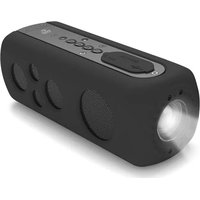

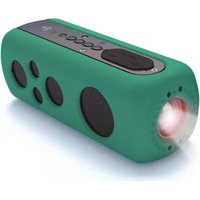

Brand : Pyle
Model : PLABTV660
Category : Docking Station