
ActivEyes MS3020 - Massage device PHILIPS - Free user manual and instructions
Find the device manual for free ActivEyes MS3020 PHILIPS in PDF.


| Brand | Philips |
| Model | ActivEyes MS3020 |
| Category | Massage device |
| Product type | Eye massager |
| Dimensions (approx.) | 180 x 80 x 70 mm |
| Weight | 200 g |
| Power supply | Rechargeable lithium battery, USB charging |
| Charging time | 2 hours |
| Battery life | Up to 60 minutes per charge |
| Functions | Air pressure massage, heat therapy, vibration modes |
| Number of massage modes | 3 |
| Heat temperature | Approx. 40°C (104°F) |
| Material | ABS plastic, breathable fabric |
| Waterproof | No (only spot clean with damp cloth) |
| Cleaning | Wipe with soft dry cloth; do not use water or solvents |
| Safety features | Auto shut-off after 15 minutes, low battery indicator |
| Spare parts | USB cable included; other parts not available separately |
| Repairability | Non-repairable by user; contact Philips support |
| Warranty | 2 years |
Frequently Asked Questions - ActivEyes MS3020 PHILIPS
User questions about ActivEyes MS3020 PHILIPS
0 question about this device. Answer the ones you know or ask your own.
Ask a new question about this device
Download the instructions for your Massage device in PDF format for free! Find your manual ActivEyes MS3020 - PHILIPS and take your electronic device back in hand. On this page are published all the documents necessary for the use of your device. ActivEyes MS3020 by PHILIPS.
USER MANUAL ActivEyes MS3020 PHILIPS
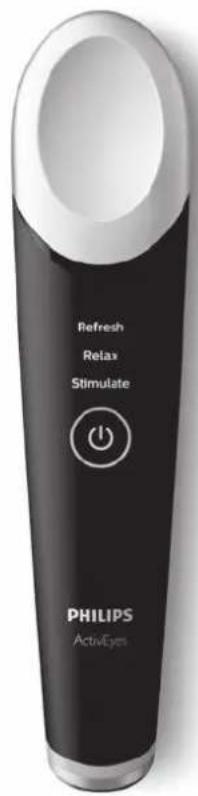
Eye energizing device
1

2
The image is too blurry to recognize any text content.
6
English
Introduction
Congratulations on your ActivEyes purchase and welcome to Philips! Philips ActivEyes is designed to combat puffiness, fatigue and dark circles, giving you energized, refreshed eyes whenever and wherever you need. To fully benefit from the support that Philips offers, register your product at www.philips.com/welcome.
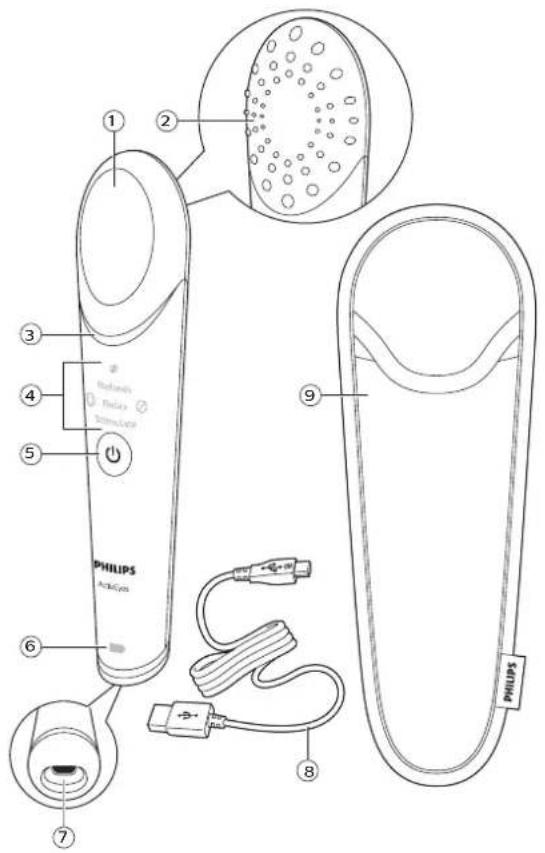
General description (Fig. 1)
1 Multi-temperature surface
2 Massage surface
3 Light and sound guides
4 Treatment modes: Refresh, Relax, Stimulate
5 On/off button
6 Battery indicator
7 Socket for micro USB plug
8 USB cable
9 Travel pouch
USB supply unit (HX9200)*
*The supply unit is not supplied with the appliance, but is available separately. If you want to obtain a USB supply unit, only buy the Philips USB supply unit, type HX9200. See chapter ,Ordering accessories' for more information on how to obtain the USB supply unit.
Important
Read this user manual carefully before you use the appliance and save it for future reference.
Danger
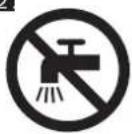
-Keep the appliance, the USB cable and the USB supply unit* dry (Fig. 2).
-For additional protection, the installation of a residual current device (RCD) having a rated residual operating current not exceeding 30 mA is advisable in the electrical circuit supplying the bathroom. Ask your installer for advice.
Warning
-This appliance can be used by children aged from 8 years and above and persons with reduced physical, sensory or mental capabilities or lack of experience and knowledge if they have been given supervision or instruction concerning use of the appliance in a safe way and understand the hazards involved. Children shall not play with the appliance. Cleaning and user maintenance shall not be made by children without supervision.
-Do not use this appliance close to a bathtub, shower or other containers, filled with water.
-If you want to charge the appliance with a supply unit, only use Philips USB supply unit type HX9200*.
-Check if the voltage indicated on the type plate corresponds to the local mains voltage before you connect the appliance.
-Do not insert material into the USB socket to avoid short-circuiting.
-Do not use the appliance if the treatment head or massage pad is broken, cracked, damaged or dirty. Always inspect the treatment head before use.
-Do not apply pressure on your eyeball.
-This appliance contains batteries that are non-replaceable.
-Do not open the appliance to replace the rechargeable battery.
Caution
-Do not use the appliance, the USB cable or the USB supply unit* if it is damaged.
-If the USB supply unit* is damaged, always replace it with one of the original type, in order to avoid a hazard.
-Do not use the appliance for any other purpose than gently treating the upper and lower eyelids and the full eye.
-It is advised to use no more than 3 modes per day.
-Use the appliance at an ambient temperature between 15 °C/40 °F and 30 °C/90 °F.
-Charge and store the appliance at an ambient temperature between 5 °C/40 °F and 35 °C/95 °F.
-For hygienic reasons, we advise you to not share the appliance with other people.
-The treatment may lead to mild redness directly after the treatment, because the blood flow will be influenced. You may experience a warm, tingly sensation during the treatment. These effects usually disappear within several minutes and are generally experienced as pleasant. If you still experience these skin reactions one hour after the treatment, consult your physician.
General
-If you have a significant skin condition (including, but not limited to, melanoma, basal cell carcinoma, actinic keratosis, melasma, systemic lupus erythematosus, porphyria, coagulation abnormality and collagen abnormalities such as keloid wounds, excessive scar formation or a history of bad wound healing), consult your physician before you start using the appliance.
Electromagnetic fields (EMF)
This Philips appliance complies with all applicable standards and regulations regarding exposure to electromagnetic fields.
*The USB supply unit is not supplied with the appliance, but is available separately. If you want to charge the appliance with the supply unit, only use the Philips USB supply unit (HX9200). Contact the Consumer Care Center to obtain this supply unit.
Contraindications and other warnings
The following conditions may be contraindications for use of this appliance:
-Conditions of (or having a possible impact on) the skin.
-Condition s that influence heat perception or fine motor skills.
-Recent surgery, cosmetic treatment or current implants in the eye area.
-The use of medication that could influence the skin, heat perception or fine motor skills.
If any of the above conditions apply to you, always consult your physician before you start using the appliance.
Charging the appliance
- Make sure the appliance is fully charged before you use it for the first time. If the rechargeable battery is empty when you want to use the appliance, charge it for at least 15-20 minutes to be able to perform one treatment (Refresh, Relax, Stimulate).
- A fully charged appliance provides approximately the following number of treatments:
-23 treatments in Refresh mode; -or 28 treatments in Relax mode; -or 13 treatments in Stimulate mode.
1 Make sure the appliance is switched off.
2 Insert the micro USB plug in the socket of the appliance and put the USB plug into the charging device. The appliance cannot be used while charging. During charging, the battery indicator flashes white until the battery is full.
3 When the battery is fully charged, the battery indicator lights up white continuously and goes out after 30 min.
Battery-low indicator
When the battery is almost empty, the battery indicator flashes amber constantly during use. The battery still contains enough energy for at least one treatment. When the battery is empty, the battery indicator lights up amber and the appliance switches off right away.
Preparing for use
Always clean and completely dry your face before use.
Note: The appliance is intended for dry use only. Do not use it on a wet face or in the shower or bathtub.
Using the appliance
If you wear glasses, take them off before you start the treatment. If you wear contact lenses, it is advised to take them out.
Note: It is advised to use no more than 3 modes per day.
1 Press the on/off button to switch on the appliance.
2 Before using the appliance on your eye area, it is advised to put the treatment head on your forearm to check the temperature.
3 Choose one of the 3 modes below by pressing the on/off button. Make movements according to the schedule below:
| Mode Temperature | Treatment duration | Application area | How to apply | Expected effect |
| Refresh Cool at approx. 19 °C. | Ready to use in approx. 30 sec, treat 60 sec per eye. | Above the eyelid and under the eye | Make tapping movements from nose to ear.NOTE: Do not apply this treatment on the eyeball. | Reduces puffiness and refreshes. |
| Relax Warm at approx. 40 °C. | Ready to use in approx. 30 sec, treat 120 sec per eye. | Full eye Gently place and hold the treatment head stable on a closed eye.NOTE: Do not apply pressure or move the head on your eye. | Relieves eye fatigue and relaxes. |
| Stimulate | Combination mode: warm at approx. 40 °C, massage at room temperature and cold at approx. 19 °C. | Ready to use in approx. 30 sec, treat 90 sec warm, 30 sec massage and 15 sec cool. Wait approx. 30 sec before you treat the second eye. | Under the eye | For warm and cold setting, make tapping movements. For massage setting, make stroke movements from nose to ear.NOTE: Do not apply this treatment on the eyeball. | Combats dark circles and stimulates eyes for a healthy glow. |
4 After selecting the mode, the light guide will flash to indicate that the appliance is warming up or cooling down the treatment head. When the light guide lights up continuously, it indicates that you can start treating your eye. During the treatment you hear different sounds to remind you to switch eyes (during all modes) or switch treatment (only during the Stimulate mode) and see different icons (.switch eye', 'massage' and, not available' icons) to guide you through the process.
Symbol Explanation
| This symbol means that you have to switch the appliance to the other eye. | |
| This symbol means that you have to use the massage surface (only during the Stimulate mode). | |
| This symbol means that you cannot perform the selected mode, since the appliance is still cooling down from a previous treatment. |
5 Put the treatment head on your lower eyelid (in Refresh or Stimulate mode), full eye/eyeball (in Relax mode) in such a way that you feel the warmth or cold produced by the treatment head. Make sure there is always skin contact between the treatment head and the area to be treated. However, do not press the treatment head hard onto the skin's surface or your eyeball.
For every eye concern, there are different modes:
-For puffiness, you can use the Refresh mode.
-For eye fatigue, you can use the Relax mode.
-For dark circles, you can use the Stimulate mode.
Note: Make sure you treat both eyes.
Note: See the facial map in the Quick Start Guide for detailed instructions on how to move the appliance across your eyelids.
Note: If you use a topical cream, we advise you to apply it after using the appliance.
Note: The handle feels hot during/after use because the heat transfers in and out of the handle when the tip is treating your eyes at different temperatures.
The appliance automatically switches off after completion of the selected mode to prevent overtreatment.
Rare side effects
The following side effects are rare. However, in the event that they do occur, they are usually only temporary. If any of the following conditions appear and last more than 24 hours, you should consult your physician:
-Prolonged pain
-Damage to natural skin texture (crusting, blistering, burning)
-Fragile skin
-Bruising
Cleaning
1 Make sure the appliance is switched off before you start cleaning it.
2 Clean the appliance using an alcohol swab or damp cloth.
3 Do not immerse the appliance in water.
4 Do not use chemicals to clean the appliance.
5 Never use scouring pads, abrasive cleaning agents or aggressive liquids such as petrol or acetone to clean the appliance.
Storage
Store the appliance in the travel pouch.
Note: Do not store a damp appliance in the pouch.
Ordering accessories
To buy accessories or spare parts, visit www.philips.com/parts-and-accessories or go to your Philips dealer. You can also contact the Philips Consumer Care Center in your country (see the international warranty leaflet for contact details).
Recycling
- Do not throw away the product with the normal household waste at the end of its life, but hand it in at an official collection point for recycling. By doing this, you help to preserve the environment.
- This product contains a built-in rechargeable battery which shall not be disposed of with normal household waste. Please take your product to an official collection point or a Philips service center to have a professional remove the rechargeable battery.
- Follow your country's rules for the separate collection of electrical and electronic products and rechargeable batteries. Correct disposal helps prevent negative consequences for the environment and human health.
Removing the rechargeable battery
Only remove the rechargeable battery when you discard the appliance. Make sure the battery is completely empty when you remove it.
| Take any necessary safety precautions when you handle tools to open the appliance and when you dispose of the battery. |
| Do not connect the appliance to the USB port again after you have removed the battery. |
1 Remove the USB plugs from the USB port and the appliance.
2 Let the appliance run until it stops working.
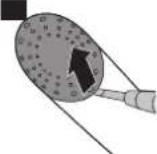
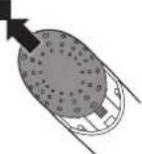
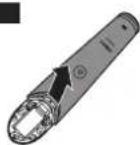
3 Pry the massage surface loose with a flathead screwdriver (Fig. 3) and remove it (Fig. 4).
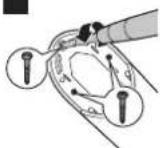
4 Loosen and remove the 3 screws (Fig. 5).
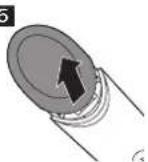
5 Turn the appliance and remove the treatment head (Fig. 6).
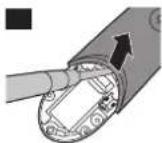
6 Remove the front shell using a screwdriver (Fig. 7) and cut the battery tags (Fig. 8).
7 Remove the rechargeable battery.
Warranty and support
If you need information or support, please visit www.philips.com/support or read the international warranty leaflet.
Troubleshooting
This chapter summarizes the most common problems you could encounter with the appliance. If you are unable to solve the problem with the information below, visit www.philips.com/support for a list of frequently asked questions or contact the Consumer Care Center in your country.
Problem Solution
| I do not know if the appliance is suitable for use on my eyes. | Do not use the appliance on wet, chapped skin, open wounds, or when you suffer from eye diseases, eye irritation, eye infection, etc.If you had any surgery on your face/eyes, please consult your doctor before using the appliance.It is advised to remove contact lenses before using the appliance. |
| The appliance does not charge. | Make sure the socket or the USB port to which you connect the appliance is live. Check if the voltage indicated on the appliance corresponds to the local mains voltage. Check if the contact pins on the appliance are in proper contact with the contact points. If you use a socket in a bathroom cabinet, you may need to switch on the light to activate the socket. When the battery indicator on the appliance still does not light up or when the appliance still does not charge, take it to your Philips dealer or the nearest Philips Service Center. |
| The appliance does not work anymore. | Wait until the appliance has cooled down for at least 60 minutes. |
| I have trouble keeping the appliance on my lower/upper eyelid or eyeball. | Try different ways of holding the appliance in order to find the right angle of the treatment head on the upper or lower eyelid (Refresh and Stimulate modes) or on the eyeball (Relax mode) for proper skin contact. Make sure that you move the appliance slowly over the upper/lower eyelid. Check if the treatment head and/or massage pad is dirty. If so, clean with an alcohol swab or damped cloth. |
| It is difficult to tap the appliance over my upper and lower eyelids. | Make sure you clean these parts of the appliance carefully to remove any dirt. |
Problem Solution
| My skin/eye is reacting to the treatment (burning feeling/ itchiness). | You may experience mild redness directly after the treatment, as the treatment has an effect on the blood flow. You may experience a warm, tingly sensation during the treatment. These effects usually disappear within several minutes and are generally experienced as pleasant. If you still experience these skin reactions after 24 hours of use, consult your physician. If the appliance is going to be used by different users, make sure you clean it after each use to avoid transmission of eye/skin problems. The appliance has been tested and confirmed safe for use when used as described in the user manual. Medicines or products and their possible side effects can affect individual people in different ways. Since there is always the possibility that a rare or previously unknown side effect may occur with the use of this appliance or any other product, please contact the Philips Consumer Care Center in case you experience a side effect which is not mentioned above. |
| I do not know when to use which eye treatment mode (Refresh, Relax or Stimulate). | Please use the different treatments according to the instructions in this user manual. |
| The handle feels hot during/after use. | This is normal because the heat transfers in and out of the handle when the tip is treating your eyes at different temperatures. |
简体中文
说明
- English
- Introduction
- General description (Fig. 1)
- Important
- Danger
- Warning
- Caution
- General
- Electromagnetic fields (EMF)
- Contraindications and other warnings
- Charging the appliance
- Battery-low indicator
- Preparing for use
- Using the appliance
- Rare side effects
- Cleaning
- Storage
- Ordering accessories
- Recycling
- Removing the rechargeable battery
- Warranty and support
- Troubleshooting
- 简体中文
- 说明
Brand : PHILIPS
Model : ActivEyes MS3020
Category : Massage device