BTR-150 - Pregnant OSD Audio - Free user manual and instructions
Find the device manual for free BTR-150 OSD Audio in PDF.


| Product Type | Wireless Speaker |
| Brand | OSD Audio |
| Model | BTR-150 |
| Connectivity | Bluetooth 5.0 |
| Battery Type | Rechargeable Lithium-ion, 2000mAh |
| Battery Life | Up to 8 hours |
| Charging Time | 2-3 hours |
| Output Power | 20W |
| Frequency Response | 80Hz - 20kHz |
| Driver Size | 2 x 2.5 inches |
| Water Resistance | IPX5 |
| Dimensions (W x H x D) | 7.5 x 3.5 x 3.5 inches |
| Weight | 1.5 lbs |
| Input Ports | Micro USB (charging), 3.5mm auxiliary |
| Built-in Microphone | Yes, for hands-free calling |
| Pairing | TWS (True Wireless Stereo) with two units |
| Material | Plastic with fabric grille |
| Color | Black |
| Included Accessories | Speaker, USB charging cable, 3.5mm cable, user manual |
Frequently Asked Questions - BTR-150 OSD Audio
User questions about BTR-150 OSD Audio
0 question about this device. Answer the ones you know or ask your own.
Ask a new question about this device
Download the instructions for your Pregnant in PDF format for free! Find your manual BTR-150 - OSD Audio and take your electronic device back in hand. On this page are published all the documents necessary for the use of your device. BTR-150 by OSD Audio.
USER MANUAL BTR-150 OSD Audio

Master Speaker
Bluetooth Receiver
Internal Stereo Amplifier

Pairing Speaker
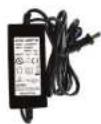
110-240V
Water Proof IP67
Rated Power Supply
Basic Setup of the BTR Speakers:
1) Determine the ideal location where the Speakers are not exposed directly to the elements. Note: speakers typically should be placed between 8 to 12 feet apart for proper stereo separation.
2) The Master Speaker needs to be located near an AC outlet where you can connect the Power Supply to the Master Speaker in order provide the electrical current needed for the Internal Stereo Power Amplifier and Bluetooth Receiver.
3) The Pairing speaker must be connected to the Master Speaker with Speaker Cable. The length of the speaker cable should not be extended beyond 30 feet.
4) Be sure to match the polarity when connecting the Master Speaker to the Pairing Speaker. Connect Positive + to Positive + (copper lead) & Negative - to Negative - (silver lead)
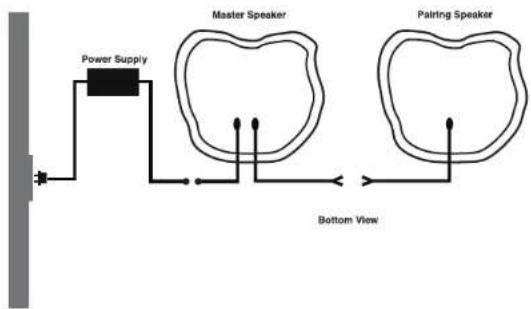
flowchart
graph TD
    A["Power Supply"] --> B["Master Speaker"]
    B --> C["Bottom View"]
    D["Pairing Speaker"] --> E["Bottom View"]
Power Supply
The power supply is IP67 rated and waterproof, As a precaution try and limit harsh weather and over exposure to the elements whenever possible.
"State of the art" Bluetooth Operation Connects to any Bluetooth enabled device
Sync to Bluetooth-enabled devices like smartphones and tablets
Bluetooth Range
30-50 feet
Range may vary:
Distances, both unobstructed and obstructed, may differ depending on device you are syncing up to the BTR.
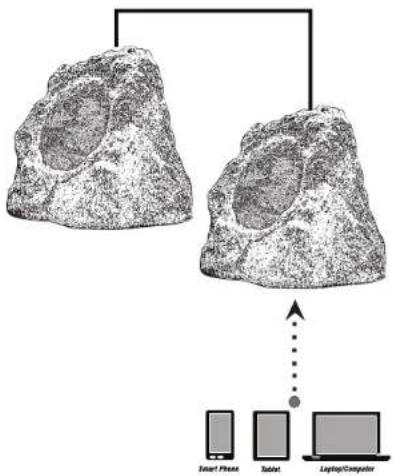
flowchart
graph TD
    A["Large Rock"] --> B["Smart Phone"]
    A --> C["Talmit"]
    A --> D["Laptop/Computer"]
    B <--> E["Data Flow"]
    C <--> E
    D <--> E
Make sure both your Bluetooth device and the OSD BTR speakers are turned on!
To pair two Bluetooth enabled devices, both the Bluetooth Device and the BTR must be turned on and fully powered or fully charged. Bluetooth controls are typically found in the device's Setting or Connections menu. The BTR will output a Bluetooth Sync code that will be received by the Bluetooth Device. Settings such as Volume, Mute, etc., will be controlled directly from your Bluetooth phone, tablet or other device.
Only one connection at a time:
The BTR syncs with only one device at a time. You must disconnect the current device before Syncing to another device.

natural_image
Illustration of hands holding a smartphone with Bluetooth logo (no text or symbols on the device itself)OSD Audio | Brea, CA | osdaudio.com
Brand : OSD Audio
Model : BTR-150
Category : Pregnant