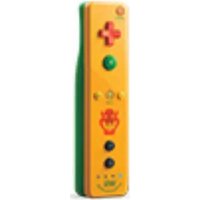
Wii Remote Plus Bowser - Game controller NINTENDO - Free user manual and instructions
Find the device manual for free Wii Remote Plus Bowser NINTENDO in PDF.


| Product Type | Game Controller |
| Brand | Nintendo |
| Model | Wii Remote Plus Bowser Edition |
| Compatible Platforms | Nintendo Wii, Wii U |
| Dimensions | Approx. 148 mm × 36 mm × 30 mm |
| Weight | Approx. 130 g (with batteries) |
| Power Supply | 2 × AA batteries (alkaline recommended) |
| Battery Life | Approx. 40 hours (depends on usage) |
| Connectivity | Bluetooth 2.0 |
| Motion Sensing | Built-in MotionPlus (accelerometer + gyroscope) |
| Buttons | A, B, +, -, Home, 1, 2, D-Pad |
| Pointer Function | Infrared sensor bar required |
| Rumble Feature | Yes |
| Speaker | Built-in |
| Expansion Port | For Nunchuk, Classic Controller, etc. |
| Color / Design | Bowser theme (red, yellow, green accents) |
| Warranty | 1 year (varies by region) |
| Maintenance & Cleaning | Wipe with a soft, dry cloth. Do not use liquids or abrasives. |
| Safety Precautions | Keep away from water; avoid dropping; remove batteries if not in use for long periods. |
| Spare Parts / Repairability | Battery cover, wrist strap, silicone jacket (not user-serviceable internal parts); contact Nintendo support. |
| General Information | Intended for indoor use; operating temperature 5-35°C; CE marked. |
Frequently Asked Questions - Wii Remote Plus Bowser NINTENDO
User questions about Wii Remote Plus Bowser NINTENDO
0 question about this device. Answer the ones you know or ask your own.
Ask a new question about this device
Download the instructions for your Game controller in PDF format for free! Find your manual Wii Remote Plus Bowser - NINTENDO and take your electronic device back in hand. On this page are published all the documents necessary for the use of your device. Wii Remote Plus Bowser by NINTENDO.
USER MANUAL Wii Remote Plus Bowser NINTENDO
The official seal is your assurance that this product is licensed or manufactured by Nintendo. Always look for this seal when buying video game systems, accessories, games and related products.

Product recycling information:
visit recycle.nintendo.com
NEED HELP WITH INSTALLATION, MAINTENANCE OR SERVICE?
Nintendo Customer Service
SUPPORT.NINTENDO.COM
or call 1-800-255-3700
BESOIN D'AIDE POUR L'INSTALLATION, L'ENTRETIEN OU LA RÉPARATION?
PLEASE CAREFULLY READ THE Wi™ OPERATIONS MANUAL COMPLETELY BEFORE USING THIS ACCESSORY. THIS MANUAL CONTAINS IMPORTANT HEALTH AND SAFETY INFORMATION.
THE Wii REMOTE™ PLUS CONTROLLER MUST BE SYNCHRONIZED WITH YOUR Wii CONSOLE BEFORE USE. SEE THE Wii OPERATIONS MANUAL FOR COMPLETE INSTRUCTIONS.
WARNING - Radio Frequency Interference
The Wii console and Wii Remote Plus can emit radio waves that can affect the operation of nearby electronics, including cardiac pacemakers.
- Do not operate the Wii console or remote within 9 inches of a pacemaker.
- If you have a pacemaker or other implanted medical device, do not use the Wii console or remote without first consulting your doctor or the manufacturer of your medical device.
WARNING - Battery Leakage
Leakage of battery fluid can cause personal injury as well as damage to your remote. If battery leakage occurs, thoroughly wash the affected skin and clothes. Keep battery fluid away from your eyes and mouth. Leaking batteries may make popping sounds.
To avoid battery leakage:
- Do not mix used and new batteries (replace all batteries at the same time).
- Do not mix different brands of batteries.
- Nintendo recommends alkaline batteries. Do not use Lithium ion, nickel cadmium (nicad), or carbon zinc batteries.
- Do not leave batteries in the Wii Remote Plus for long periods of non-use.
- Do not recharge alkaline or non-rechargeable batteries
- Do not put the batteries in backwards. Make sure that the positive (+) and negative (-) ends are facing in the correct directions. Insert the negative end first. When removing batteries, remove the positive end first.
- Do not use damaged, deformed or leaking batteries.
- Do not dispose of batteries in a fire.
IMPORTANT SAFETY INFORMATION WHEN USING THE Wii SYSTEM
Before setup and use of the Wii system, please review this safety information to insure an enjoyable and safe play experience.
1. WEAR THE WRIST STRAP WHEN USING THE Wii REMOTE PLUS CONTROLLER.
• Make sure all players use the wrist strap and that the strap lock is correctly tightened.
- When sharing Wii Remote accessories between multiple players, make sure each person uses the wrist strap properly.
- Wearing the wrist strap will prevent you from accidentally dropping or throwing the remote during game play, which could
damage the remote or surrounding objects, or cause injury to other people.
2. DO NOT LET GO OF THE REMOTE DURING GAME PLAY.
- Read the Instruction booklet for the game you are playing and follow all game control instructions for correct use of the Wii Remote Plus or accessory controllers.
- Hold the remote securely and avoid excessive motion, as it may cause you to let go of the remote and may break the wrist strap.
- If your hands become moist, stop and dry your hands.
3. ALLOW ADEQUATE ROOM AROUND YOU DURING GAME PLAY.
- Stay at least three (3) feet away from the television.
- As you may move around during game play, make sure objects and other people are out of your range of movement or arm motion to prevent damage or injury.
4. USE THE Wii REMOTE JACKET.
Unlicensed Accessories
Do not attach unlicensed accessories to the Wii Remote Plus, as the use of unlicensed accessories may lead to injury to yourself or others and may cause performance issues and/or damage to the system. Use of any such unlicensed accessories will invalidate your Nintendo product warranty.
NOTE: This product does not contain latex.
This product complies with applicable laws barring the use of toxic materials such as lead, mercury, cadmium, hexavalent chromium, PBB or PBDE in consumer products.
TM, ^® and the Wii logo are trademarks of Nintendo. © 2010 Nintendo.
Wii Remote Plus Features
The Wii Remote Plus controller incorporates the technology of the Wii MotionPlus™ accessory, allowing more precise and detailed control of gameplay. The Wii Remote Plus is compatible with both standard Wii games and all Wii MotionPlus games, without having to attach the Wii MotionPlus accessory.
- Some software may require additional accessories.
NOTE: The Wii MotionPlus accessory can be attached to the Wii Remote Plus without damaging it or effecting its operation, however this is unnecessary and will not provide any additional features or benefit when using the Wii Remote Plus.

- If the cursor on the TV screen moves even if the Wii Remote Plus is not being moved, or moves differently than when the Wii Remote Plus is moved, the remote may need to be recalibrated due to the following:
- Changing batteries in the Wii Remote Plus during gameplay.
- Moving the Wii Remote Plus from a cold environment into a warm environment.
To recalibrate the Wii Remote Plus, place it on a flat horizontal surface with the buttons facing down. It should be 20" or more from your television and Wii console for correct calibration. Wait for a few seconds and check the operation. Also, review the instruction manual for the game you are playing for more information.
NOTE: This procedure must be done during gameplay.
Setup of the Wii Remote Plus
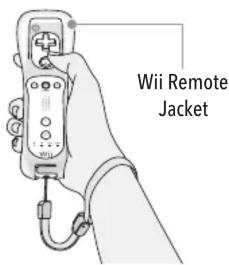
The Wii Remote Plus comes with the Wii Remote Jacket installed.
- Be sure that the Wii Remote Jacket is installed during gameplay to reduce the risk of harm to the remote, surrounding objects, or people.
- It may be necessary to remove the Wii Remote Jacket – for example, to replace the batteries in the Wii Remote Plus. If you do remove the Wii Remote Jacket, be sure to replace it before further play.
Installing Batteries
The Wii Remote Plus uses AA batteries. Nintendo recommends high quality alkaline batteries for best performance and longevity of battery life. If you use rechargeable nickel metal hydride (NiMH) batteries, be sure to follow the manufacturer's guidelines for safety and proper usage.

natural_image
Illustration of a blood pressure monitor being held, with an inset showing a hand holding a remote control (no text or symbols present)- Pull the Wii Remote Jacket off the base of the Wii Remote Plus and pull the wrist strap out of the hole in the bottom of the jacket.

natural_image
Illustration of a hand using a tool to adjust or install a mechanical component, with no visible text or symbols.- Insert the batteries into the battery chamber. Be sure to insert the minus (-) end first when inserting new batteries, and remove the plus (+) end first when replacing the batteries.

natural_image
Illustration of a hand using a tool to adjust or install a cylindrical component (no text or symbols visible)- Pull the jacket up the remote far enough to expose the entire battery door and remove the door.

natural_image
Illustration of a medical or laboratory device with a curved arrow indicating rotation (no text or symbols)- IMPORTANT: If this is the first time you have installed batteries in the Wii Remote Plus, you must synchronize the remote with the Wii console before using it. See the next page, Synchronizing your Wii Remote Plus with the Wii console, for instructions. Then return to Step 4.
Replace the battery cover, thread the wrist strap through the hole in the bottom of the jacket and pull the jacket back over the bottom of the remote.
Installing Batteries (continued)

natural_image
Illustration of a hand holding a tool with a magnified inset showing the blade and handle (no text or symbols)- If you remove the jacket from the remote, replace it by inserting the top of the remote into the large hole on the front of the jacket. Be sure to push it all the way into the inside of the jacket.
Thread the wrist strap through hole in the bottom of the jacket, as shown in step 4, above.
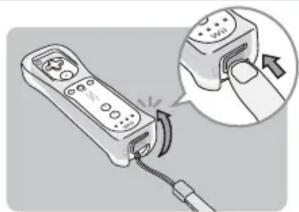
natural_image
Illustration of a remote control device with a hand gesture pointing to its right button (no text or symbols present)- Insert the connector cover into the External Extension Connector on the bottom of the remote.
Synchronizing your Wii Remote Plus with the Wii console
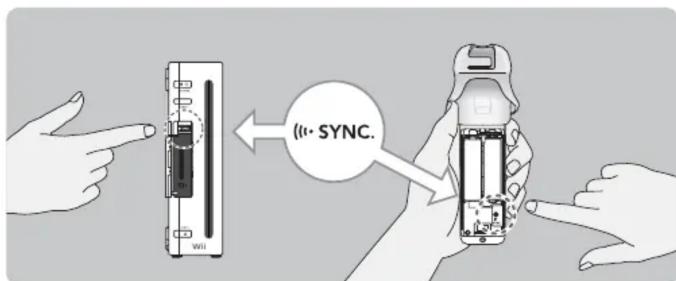
This procedure must be followed for each additional Wii Remote Plus added to your system.
- Press the Power button on the Wii console to turn it on.
- Remove the battery cover on the back of the remote. Press and release the SYNC. button inside the cover. The Player LEDs will blink.
- Open the SD Card Slot cover on the front of the Wii console. Press and release the SYNC. button on the inside of the compartment.
- When the Player LED blinking stops, connection is complete. The LED that is illuminated indicates the player number.
- Close the SD Card Slot cover on the front of the Wii console and replace the battery cover on the Wii Remote Plus.
Wearing the Wii Remote Wrist Strap

natural_image
Illustration of a hand holding a small object with a circular arrow, no text or symbols present- Open the lever on the strap lock and place your hand through the wrist strap. Hold the remote firmly in your hand.

- Slide the strap lock up so that the strap will not fall off your wrist. Do not over tighten the strap lock so that it's uncomfortable. It should just be tight enough to hold the wrist strap in place. Close the lever to hold the strap lock in place.
FCC and Industry Canada Information
Regulations for Equipment Use in U.S.A. and Canada
This device complies with Part 15 of the FCC rules and RSS-210 of Industry Canada. Operation is subject to the following two conditions: (1) this device may not cause harmful interference, and (2) this device must accept any interference received, including interference that may cause undesired operation. Changes or modifications not expressly approved by the manufacturer could void the user's authority to operate this device.
This equipment has been tested and found to comply with the limits for a Class B digital device, pursuant to part 15 of the FCC Rules. These limits are designed to provide reasonable protection against harmful interference in a residential installation. This equipment generates, uses and can radiate radio frequency energy and, if not installed and used in accordance with the instructions, may cause harmful interference to radio communications. However, there is no guarantee that interference will not occur in a particular installation. If this equipment does cause harmful interference to radio or television reception, which can be determined by turning the equipment off and on, the user is encouraged to try to correct the interference by one or more of the following measures:
- Reorient or relocate the receiving antenna.
- Increase the separation between the equipment and receiver.
- Connect the equipment into an outlet on a circuit different from that to which the receiver is connected.
- Consult the dealer or an experienced radio/TV technician for help.
The term IC before the certification/registration number only signifies that the Industry Canada technical specifications were met.
Warranty and Service Information
Rev. R
You may need only simple instructions to correct a problem with your product. Try our web site at support.nintendo.com or call our Consumer Assistance Hotline at 1-800-255-3700, rather than going to your retailer. Hours of operation are 6 a.m. to 7 p.m., Pacific Time, Monday - Sunday (times subject to change). If the problem cannot be solved with the troubleshooting information available online or over the telephone, you will be offered express factory service through Nintendo. Please do not send any products to Nintendo without contacting us first.
HARDWARE WARRANTY
Nintendo of America Inc. ("Nintendo") warrants to the original purchaser that the hardware product shall be free from defects in material and workmanship for twelve (12) months from the date of purchase. If a defect covered by this warranty occurs during this warranty period, Nintendo will repair or replace the defective hardware product or component, free of charge.* The original purchaser is entitled to this warranty only if the date of purchase is registered at point of sale or the consumer can demonstrate, to Nintendo's satisfaction, that the product was purchased within the last 12 months.
GAME & ACCESSORY WARRANTY
Nintendo warrants to the original purchaser that the product (games and accessories) shall be free from defects in material and workmanship for a period of three (3) months from the date of purchase. If a defect covered by this warranty occurs during this three (3) month warranty period, Nintendo will repair or replace the defective product, free of charge.*
SERVICE AFTER EXPIRATION OF WARRANTY
Please try our web site at support.nintendo.com or call the Consumer Assistance Hotline at 1-800-255-3700 for troubleshooting information and repair or replacement options and pricing.*
* In some instances, it may be necessary for you to ship the complete product, FREIGHT PREPAID AND INSURED FOR LOSS OR DAMAGE, to Nintendo. Please do not send any products to Nintendo without contacting us first.
WARRANTY LIMITATIONS
THIS WARRANTY SHALL NOT APPLY IF THIS PRODUCT: (a) IS USED WITH PRODUCTS NOT SOLD OR LICENSED BY NINTENDO (INCLUDING, BUT NOT LIMITED TO, NON-LICENSED GAME ENHANCEMENT AND COPIER DEVICES, ADAPTERS, SOFTWARE, AND POWER SUPPLIES); (b) IS USED FOR COMMERCIAL PURPOSES (INCLUDING RENTAL); (c) IS MODIFIED OR TAMPERED WITH; (d) IS DAMAGED BY NEGLIGENCE, ACCIDENT, UNREASONABLE USE, OR BY OTHER CAUSES UNRELATED TO DEFECTIVE MATERIALS OR WORKMANSHIP; OR (e) HAS HAD THE SERIAL NUMBER ALTERED, DEFACED OR REMOVED.
ANY APPLICABLE IMPLIED WARRANTIES, INCLUDING WARRANTIES OF MERCHANTABILITY AND FITNESS FOR A PARTICULAR PURPOSE, ARE HEREBY LIMITED IN DURATION TO THE WARRANTY PERIODS DESCRIBED ABOVE (12 MONTHS OR 3 MONTHS, AS APPLICABLE). IN NO EVENT SHALL NINTENDO BE LIABLE FOR CONSEQUENTIAL OR INCIDENTAL DAMAGES RESULTING FROM THE BREACH OF ANY IMPLIED OR EXPRESS WARRANTIES. SOME STATES DO NOT ALLOW LIMITATIONS ON HOW LONG AN IMPLIED WARRANTY LASTS OR EXCLUSION OF CONSEQUENTIAL OR INCIDENTAL DAMAGES, SO THE ABOVE LIMITATIONS MAY NOT APPLY TO YOU.
This warranty gives you specific legal rights. You may also have other rights which vary from state to state or province to province.
Nintendo's address is: Nintendo of America Inc., P.O. Box 957, Redmond, WA 98073-0957 U.S.A.
This warranty is only valid in the United States and Canada.


- PLEASE CAREFULLY READ THE Wi™ OPERATIONS MANUAL COMPLETELY BEFORE USING THIS ACCESSORY. THIS MANUAL CONTAINS IMPORTANT HEALTH AND SAFETY INFORMATION.
- THE Wii REMOTE™ PLUS CONTROLLER MUST BE SYNCHRONIZED WITH YOUR Wii CONSOLE BEFORE USE. SEE THE Wii OPERATIONS MANUAL FOR COMPLETE INSTRUCTIONS.
- WARNING - Radio Frequency Interference
- WARNING - Battery Leakage
- To avoid battery leakage:
- IMPORTANT SAFETY INFORMATION WHEN USING THE Wii SYSTEM
- WEAR THE WRIST STRAP WHEN USING THE Wii REMOTE PLUS CONTROLLER.
- DO NOT LET GO OF THE REMOTE DURING GAME PLAY.
- ALLOW ADEQUATE ROOM AROUND YOU DURING GAME PLAY.
- USE THE Wii REMOTE JACKET.
- Unlicensed Accessories
- Wii Remote Plus Features
- Setup of the Wii Remote Plus
- Installing Batteries
- Installing Batteries (continued)
- Synchronizing your Wii Remote Plus with the Wii console
- Wearing the Wii Remote Wrist Strap
- FCC and Industry Canada Information
- Regulations for Equipment Use in U.S.A. and Canada
- Warranty and Service Information
- HARDWARE WARRANTY
- GAME & ACCESSORY WARRANTY
- SERVICE AFTER EXPIRATION OF WARRANTY
- WARRANTY LIMITATIONS
Brand : NINTENDO
Model : Wii Remote Plus Bowser
Category : Game controller