
EM8650 - Motion detector Eminent - Free user manual and instructions
Find the device manual for free EM8650 Eminent in PDF.


| Product Type | Motion Detector |
| Brand | Eminent |
| Model | EM8650 |
| Sensor Type | Passive Infrared (PIR) |
| Detection Range | Up to 12 meters |
| Detection Angle | 120° |
| Power Source | 2x AA batteries (not included) |
| Battery Life | Approximately 12 months under normal use |
| Mounting | Wall mount with included bracket |
| Dimensions (H x W x D) | 100 x 60 x 45 mm |
| Weight (without batteries) | 85 g |
| Indoor/Outdoor Use | Indoor use only |
| Weatherproof Rating | IP20 |
| Operating Temperature | -10°C to 40°C |
| Detection Zones | Multiple zones with curtain pattern |
| Pet Immunity | Up to 25 kg (to avoid false alarms from pets) |
| Output Signal | Wireless 433 MHz |
| Alarm Duration | Adjustable: 3 seconds to 2 minutes |
| Light Sensor | Built-in dusk sensor (disable in daytime) |
| Compatible Systems | Compatible with most 433 MHz alarm panels |
| Maintenance | Clean lens with soft dry cloth; check batteries monthly |
| Spare Parts | Contact Eminent support for replacement brackets or sensors |
| Safety | Low power consumption; no sharp edges; CE marked |
| User Manual | Download from notice-facile.com |
Frequently Asked Questions - EM8650 Eminent
User questions about EM8650 Eminent
0 question about this device. Answer the ones you know or ask your own.
Ask a new question about this device
Download the instructions for your Motion detector in PDF format for free! Find your manual EM8650 - Eminent and take your electronic device back in hand. On this page are published all the documents necessary for the use of your device. EM8650 by Eminent.
USER MANUAL EM8650 Eminent
EM8650 Pet immune PIR Motion Detector 2-way
en
Manual
EM8650 - Pet immune PIR Motion Detector
1.0 Introduction ...... 2
2.0 Front of motion detector....2
3.0 Inside the motion detector .... 3
3.1 Infrared sensors....3
3.2 Anti sabotage button....3
3.3 LED On/Off....3
3.4 Group settings (jumpers)....3
4.0 Rear motion detector....4
4.1 Test mode ....5
4.2 Activated ....5
4.3 Pair the motion detector....5
5.0 Installation tips....5
6.0 Test the motion detector....6
7.0 Frequently Asked Questions and other related information....6
8.0 Service and support....6
9.0 Warning and points of attention ....7
10.0 Warranty conditions....8
11.0 Declaration of Conformity ....8
1.0 Introduction
Congratulations with the purchase of this high-quality Eminent product! This product has undergone extensive testing by Eminent's technical experts. Should you experience any problems with this product, you are covered by a five-year Eminent warranty. Please keep this manual and the receipt in a safe place.
Register your product now on www.eminent-online.com and receive product updates!
2.0 Front of motion detector

- Detection window
- LED indicator
- Mounting bracket
LED indicator :
Flashes continuously : Motion detector is performing a self-test
Flashes 1x : Motion detected
Flashes 2x : Self-test completed. Motion detector is active
Flash once per 3 seconds : Battery power low, exchange battery*
* You will receive a text message if battery level is low. The message contains the following information (up to sensor 9) Sensor name with additionally the text 'battery almost empty'. From sensor 10 the name will be replaced by a zone nr. with additionally the text 'battery almost empty'.
3.0 Inside the motion detector
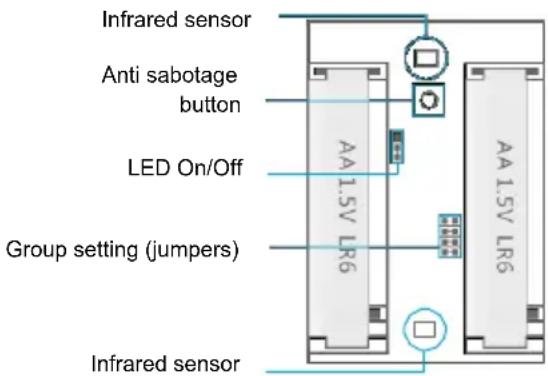
Remove the screw on top of the motion detector and gently remove the front and back.
3.1 Infrared sensors
The infrared sensors detect the motion. These sensors need to be clean at all time. Do no touch the sensors!
3.2 Anti sabotage button
If the motion detector is opened this switch will detect it and trigger the alarm.
3.3 LED On/Off
By switching this jumper setting you can set if the LED in front of the motion detector will be switched "On or Off". By default this setting is turned ON (LED ON).
3.4 Group settings (jumpers)
Every sensor can be configured to be added to a dedicated group by setting the jumper settings; home-group, normal group, single group or 24-hours group.
Bellow you will see an overview of the meaning and how to configure the jumper settings for that type of zone.
Remark : Determine before pairing with the alarm system in which group the sensor will be operational. Once the sensor is successfully paired with the system. The group cannot be changed after pairing!
Remark: If the group of a sensor needs to be changed, all sensors need to be paired with the alarm system once more. It is not possible to remove one single sensor from a group ! (See chapter “Delete all wireless sensors by text message”)

Home-group
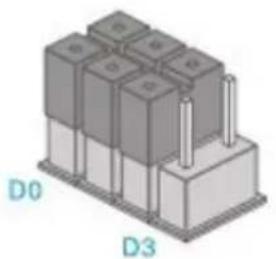
Normal-group
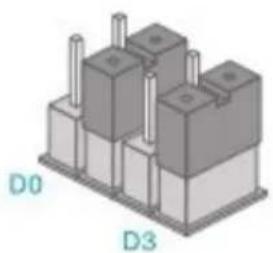
Single-group

24-hours-group
Remark : It's recommended to install detectors that needs to be operational 24-hours, for example smoke detectors, in the 24-hours-group.
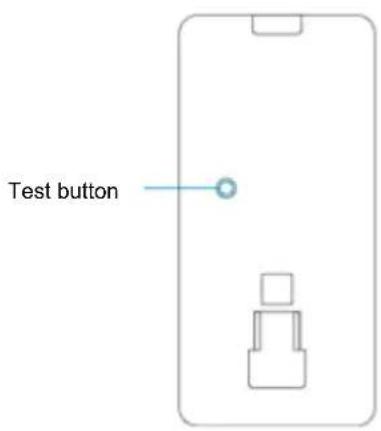
4.0 Rear motion detector
4.1 Test mode
After the self-test has finished press the test button once. The motion detector will send a trigger signal (flashes 1x).
4.2 Activated
If the motion sensor is triggered more than 2 times within 3 minutes the device switches automatically to power saving mode. The motion detector will activate again if it does not register motion for a time period of 3 minutes.
4.3 Pair the motion detector
Enter the password and press button on the control panel.
The LED will turn on. Press 2x the test button of the motion detector you wish to register. If you hear a beep the sensor is registered to the system. If you hear 2 beeps this indicates this sensor is already registered.
Notice: During the registration process be sure no other sensor is triggered. If a motion detector is in the same room make sure you cover the motion detector or place the motion detector temporarily in a different room.
5.0 Installation tips
Avoid installation of the motion detector in range of a window, air-conditioning, radiator, refrigerator, oven, direct sunlight or other places with high temperature fluctuation.
Do not place 2 motion detectors facing each other or within each other's range.
Motion detectors are usually placed at 2 meters from the floor on the wall.
First install the mounting bracket before placing the motion detector in the bracket. Point the detector in the direction you wish to secure. Test if the motion detector is working properly in test mode.


Top view
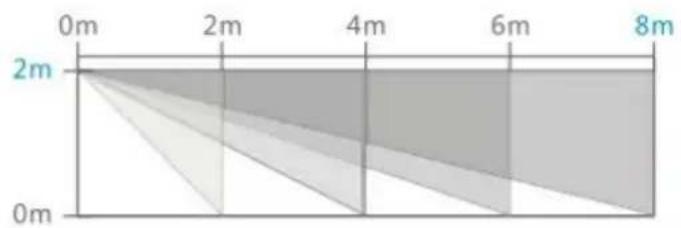
Side view
6.0 Test the motion detector
After you fully installed the motion detector and the self-test is completed you can test the motion detector by walking within the range of the motion detector from one side to the other side. The LED indicator of the motion detector will flash if motion is detected. Adjust the motion sensor to get the best results. And repeat the test.
7.0 Frequently Asked Questions and other related information
The latest Frequently asked questions for your product can be found on the support page of your product. Eminent will update these pages frequently to assure you have the most recent information. Visit www.eminent-online.com for more information about your product.
8.0 Service and support
This users manual has been carefully written by Eminent's technical experts. If you have problems installing or using the product, please fill out the support form at the website www.eminent-online.com/support.
You can also contact us by phone. Below you will find a list with phone numbers for each supported country.
| Country | Phone number | Rate per minute* |
| Belgium (Dutch) | 070 277 286 | €0.30 |
| Belgium (French) | 070 277 286 | €0.30 |
| Denmark | +45 69918565 | Local Costs |
| Finland | +35 8942415826 | Local Costs |
| Germany | +49 (0)30 887 89 298 | Local Costs |
| Italy | +39 0240042016 | Local Costs |
| Norway | +47 21075033 | Local Costs |
| Spain | 807 080 042 | €0.41 |
| Sweden | +46 840 309985 | Local Costs |
| The Netherlands | 0900-3646368 | €0.45 |
| UK | +44 (0)203 318 9998 | Local Costs |
| Hungary | 1-4088902 (From Budapest) | Local Costs |
| Hungary | 06-1-4088902 (From the rest of Hungary) | Local Costs |
| Hungary | +36 1-4088902(International) | Local Costs |
* Rates mentioned in this table do not include cell phone charges.
9.0 Warning and points of attention
Due to laws, directives and regulations set out by the European parliament, some (wireless) devices could be subject to limitations concerning its use in certain European member states. In certain European member states the use of such devices could be prohibited. Contact your (local) government for more information about this limitations.
Always follow up the instructions in the manual*, especially where it concerns devices which need to be assembled.
Warning: In most cases this concerns an electronic device. Wrong/improper use may lead to (severe) injuries!
Repairing of the device should be done by qualified Eminent staff. The warranty immediately voids when products have undergone self repair and/or by misuse. For extended warranty conditions, please visit our website at www.eminent-online.com/warranty.
*Tip: Eminent manuals are written with great care. However, due to new technological developments it can happen that a printed manual does not longer contain the most recent information. If you are experiencing any problems with the printed manual or you can not find what you are looking for, please always check our website www.eminent-online.com first for the newest updated manual.
Also, you will find frequently asked questions in the FAQ section. It is highly recommended to consult the FAQ section. Very often the answer to your questions will be found here.

10.0 Warranty conditions
The five-year Eminent warranty applies to all Eminent products unless mentioned otherwise before or during the moment of purchase. When having bought a second-hand Eminent product the remaining period of warranty is measured from the moment of purchase by the product's first owner. The Eminent warranty applies to all Eminent products and parts inextricably connected to and/or mounted on the main product. Power supply adapters, batteries, antennas and all other products not integrated in or directly connected to the main product and/or products of which, without reasonable doubt, can be assumed that wear and tear show a different pattern than the main product are not covered by the Eminent warranty. Products are not covered by the Eminent warranty when subjected to incorrect/improper use, external influences and/or when opened by parties other than Eminent.
11.0 Declaration of Conformity
To ensure your safety and compliance of the product with the directives and laws created by the European Commission you can obtain a copy of the Declaration of Conformity concerning your product by sending an e-mail message to: info@eminent-online.com. You can also send a letter to:
Eminent Europe BV
PO Box 276
6160 AG Geleen
The Netherlands
Clearly state ‘Declaration of Conformity’ and the article code of the product of which you would like to obtain a copy of the Declaration of Conformity.

WWW.EMINENT-ONLINE.COM
Trademarks: all brand names are trademarks and/or registered trademarks of their respective holders.
The information contained in this document has been created with the utmost care. No legal rights can be derived from these contents. Eminent cannot be held responsible, nor liable for the information contained in this document.
Eminent is a member of the Intronics Group


- EM8650 PET IMMUNE PIR MOTION DETECTOR 2-WAY
- EN
- EM8650 - PET IMMUNE PIR MOTION DETECTOR
- 1.0 INTRODUCTION
- 2.0 FRONT OF MOTION DETECTOR
- 3.0 INSIDE THE MOTION DETECTOR
- 3.1 INFRARED SENSORS
- 3.2 ANTI SABOTAGE BUTTON
- 3.3 LED ON/OFF
- 3.4 GROUP SETTINGS (JUMPERS)
- 4.0 REAR MOTION DETECTOR
- 4.1 TEST MODE
- 4.2 ACTIVATED
- 4.3 PAIR THE MOTION DETECTOR
- 5.0 INSTALLATION TIPS
- 6.0 TEST THE MOTION DETECTOR
- 7.0 FREQUENTLY ASKED QUESTIONS AND OTHER RELATED INFORMATION
- 8.0 SERVICE AND SUPPORT
- 9.0 WARNING AND POINTS OF ATTENTION
- 10.0 WARRANTY CONDITIONS
- 11.0 DECLARATION OF CONFORMITY
Brand : Eminent
Model : EM8650
Category : Motion detector