
650-00842 - Inverter Adj - Free user manual and instructions
Find the device manual for free 650-00842 Adj in PDF.


| Product Type | Uninterruptible Power Supply (UPS) / Inverter |
| Model | 650-00842 |
| Brand | Adj (American DJ) |
| Input Voltage | 120 V AC, 60 Hz |
| Output Voltage | 120 V AC, Pure Sine Wave |
| Power Capacity | 600 VA / 360 W |
| Battery Type | Sealed Lead-Acid (SLA), 12 V |
| Battery Capacity | 7 Ah |
| Typical Backup Time | 10–20 minutes at half load |
| Number of Outlets | 4 NEMA 5-15R |
| Surge Protection | Yes, 480 Joules |
| Dimensions (H x W x D) | 6.3 x 3.9 x 10.2 inches (16 x 10 x 26 cm) |
| Weight | 8.8 lbs (4 kg) |
| Indicators/LEDs | Power On, Battery Mode, Fault |
| Audible Alarms | Battery mode, low battery, overload |
| Cooling Method | Passive convection |
| Operating Temperature | 32°F to 104°F (0°C to 40°C) |
| Certifications | UL, cUL, FCC |
| Warranty | 2 years limited |
Frequently Asked Questions - 650-00842 Adj
User questions about 650-00842 Adj
0 question about this device. Answer the ones you know or ask your own.
Ask a new question about this device
Download the instructions for your Inverter in PDF format for free! Find your manual 650-00842 - Adj and take your electronic device back in hand. On this page are published all the documents necessary for the use of your device. 650-00842 by Adj.
USER MANUAL 650-00842 Adj
IT IS ADVISED TO READ THIS MANUAL CAREFULLY AND TO KEEP IT!
Thank you for choosing UPS ADJ OFFICE. This UPS (Uninterruptible Power Supply) provides a perfect protection to all feeding devices. This manual is a guide which enables you to correctly install and use your UPS. This manual includes important SAFETY instructions for the operator, for the UPS correct installation, and gives useful advice on the product and battery maintenance. For any type of problem, please refer to this manual before calling the customer service.
IMPORTANT SAFETY INSTRUCTIONS
- Only properly trained personnel must use the UPS. To ensure correct and safety operations, it is necessary that operators and maintenance personnel observe the general Safety Standards as well as the specific instructions included in this manual.
- Electric Shock risk: do not remove the cover. The UPS contains internal parts at high voltage which are potentially dangerous, capable of causing injury or death by electric shock.
- In the UPS there are no parts which are subject to user's maintenance. Any type of maintenance and repair must be carried out exclusively by a qualified technical personnel authorised by the producer. The producer declines any responsibility if this warning is disregarded.
- It is compulsory to ground the UPS according to Safety Standards in force.
- When the UPS is ON there are risks of electric shock at the output sockets.
• There are risks of electric shock at the output sockets if the unit is connected to the AC utility line. - Do not obstruct ventilation slots or holes and do not lean any object on top of the UPS. Do not insert objects or pour liquids in the ventilation holes. Do not keep liquids, flammable gases or corrosive substances near the UPS.
• Install the UPS indoors, in a protected, clean and moisture free environment.
INTRODUCTION
UPS ADU OFFICE is a Line Interactive UPS (Uninterruptible Power Supply) specifically designed to protect your computer from any type of irregularities in the AC line (such as black-outs, under or overvoltages, micro-interruptions) which often cause damage to your Hardware and Software. Under normal AC line condition, UPS ADU OFFICE performs output voltage regulation and filters frequently occurring electrical disturbances (such as transients, spikes, Interferences, etc.), thus protecting all devices connected to the outlets, and recharging the batteries in an ideal way. In case of anomaly to the AC line. The UPS continues supplying the correct power to all connected equipments. UPS ADU OFFICE is equipped with USB interface, which can be used to notify a power failure or a low battery condition directly to a computer: this makes it possible to automatically save your data during an extended back-out with the most widespread operating systems (Windows, Novel, Unix, etc.)
ATTENTION: UPS ADJ OFFICE is equipped for three UPS OUTLETS and one FILTERED OUTLET of protection from spike and surge. This outlet protects the devices connected from overvoltages and disturbances of the AC line. In case of black out it is not supplied by UPS battery. In case of anomaly to the AC line, the UPS outlets continue supplying the correct power to all connected equipments.
The UPS general characteristics are:
• All functions are controlled by a microprocessor, giving full guarantee on high reliability.
• Output Voltage regulation through AVR (Automatic Voltage Regulation)
• Overload protection both in normal functioning and in battery mode.
• High performance battery charger which extends the battery medium if he ensuring an optimal recharge.
• starts up even if the electrical network is not available.
• Automatic restart after an automatic shut down due to a low battery condition once the AC utility power returns.
• Adapts automatically to 50 dB/60Hz input frequency.
• Visual by fed and acoustic signals indicating operating mode and strain conditions.
• Communicates with the computer through use communication part.
- Compact dimension and smart design
INSTALLATION
INSPECTION AND PLACEMENT CHOICE
Carefully remove the UPS from its packaging, and carry out a meticulous inspection. We recommend keeping the original packaging in case you need to send the UPS for maintenance purposes.
We recommend to pay attention to the below points in order to choose a correct placement for your UPS:
• Place UPS ADJ OFFICE as close as possible both to the input electrical line and to the equipment to be supplied.
UPS ADJ OFFICE is designed to operate in protected environments (for example: offices). We therefore recommend to install it in a place with no humidity, dust, or smoke. However, for the environmental requirements please refer to the "Specifications" chapter, and check that the selected place meets with such specifications.
• It is necessary to leave at least 20 cm of space all around UPS ADJ OFFICE in order to permit reasonable ventilation.
• Do not obstruct ventilation helps and do not insert objects or liquids in the ventilation helps
• Do not place any object on top of the UPS.
• Do not keep liquids, flammable gases, or corrosive substances near the unit.
INSTALLATION
For a correct installation please carry out the following points:
-
Switch your PC off.
-
Unplug the PC feeding cable and use it to connect the UPS to an AC line outlet. It is mandatory to ground the outlet according to the Safety Standards. Carefully check the grounding, make sure that the utility power is available, and that its range falls within the UPS specifications (refer to the "Specifications" chapter).
-
Turn the UPS ON (by pressing the front panel button) and leave it in ON for at least 8 hours in order to completely re-charge the battery.
-
Switch the UPS OFF (by pressing again the front panel button).
-
Connect the devices to the UPS output socket by using the supplied output cables and turn all the switches ON.
-
Restart the UPS, check that the power up performance takes place properly and that the UPS does not give any warning signals. Make sure that all devices are turned ON accordingly.
FUNCTIONING
TURN ON AND FUNCTIONING
To turn your UPS on it is sufficient to plug it to the AC utility line outlet and press the ON/OFF button on the front panel. The UPS emits an acoustic signal, the led on the front panel turns on and the UPS begins working in "AC mode".
ATTENTION: UPS ADJ OFFICE automatically switches to the BATTERY ("BATTERY" mode) whenever the Maine voltage amplitude is out of the safety limit (due to: black-out /surge /over/ under voltage).
- ATTENTION: never power a laser printer or plotter on to your UPS: the laser printer or the plotter absorb a higher power than the one absorbed in waiting mode, and this may over charge your UPS.
TURN OFF
To turn your UPS ADJ OFFICE OFF, it is enough to press the ON/OFF button.
ALARMS
"BATTERY" mode (slow alarm)
When UPS ADJ OFFICE works in "BATTERY" mode, it omits a sustained acoustic signal. The alarm stops as soon as the UPS returns to normal on "AC" functioning mode.
• ATTENTION: in "BATTERY" mode, the UPS emits an acoustic alarm signal every 10 seconds.
"LOW BATTERY" CONDITIONS (fast alarm)
When the UPS operates in "BATTERY" mode and the remaining autonomy of the battery is around 25%, the UPS emits a sustained acoustic signal. If the AC utility line is not restored, the UPS continues working in "LOW BATTERY" condition, until it switches off due to battery exhaustion of energy. When the AC line returns, the UPS switches on automatically and restarts working on "AC" mode.
• ATTENTION: In "LOW BATTERY" condition, the UPS emits an acoustic alarm signal every 0.5 seconds.
"OVERLOAD" CONDITIONS (continued alarm)
The UPS indicates an "OVERLOAD" condition through a continuing acoustic sound signalling. In such case, the user must reduce the output power within the specification range, by disconnecting the device causing the overload. In case of "OVERLOAD", the UPS may automatically switch off, protecting itself from this anomalous situation.
TROUBLESHOOTING
| PROBLEM | POSSIBLE CAUSE | HOW TO RESOLVE |
| The UPS does not turn on. | Front ON/OFF button | Press the front button and check that is pushed |
| Battery is flat | Recharge the battery for at least 6 hours | |
| Electronic board failure | Refer to Technical Service | |
| The UPS always function on "BATTERY" mode | Input mains power cable is disconnected | Check the input mains power cable |
| Input mains fuse is burnt | Replace the fuse with another of the same type | |
| Black-out conditions / surge/ Over-or Undervoltage | Wait until utility power returns to normal conditions | |
| Electronic board failure | Refer to Technical Service | |
| Battery Autonomy is too short | Battery is not fully charged | Recharge the battery for at least 6 hours |
| Electronic board failure | Refer to Technical Service | |
| Continuing Acoustic signal | "OVERLOAD" condition | Disconnect all devices which cause the overload condition |
UPS SOFTWARE ON WEB
Connecting to the Web site www.sdf.it It is possible to download free of charge. the UPS updated Software version. The connection between the UPS and PC is carried out through a standard USB cable (optional).
SERVICE : WWW.ADJ.IT

UPS ADJ OFFICE can not be treated like urban waste; it must be addressed to the separate refuse collection; the violation of this disposal will be punished with pecuniary sanctions according to the legislation in force.
SI CONSIGLIA DI LEGGERE ATTENTAMENTE QUESTO MANUALE E CONSERVARLO!
Technical data may change without prior notice
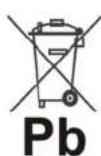
LEAD BATTERIES
UPS ADJ OFFICE contains lead acid, sealed, maintenance free batteries.
This kind of batteries, if handled by non-experienced personnel, can cause electric shock or short-circuits.
For this reason the batteries can be removed only by qualified technical personnel, specialized and authorized by the producer.
The producer declines any responsibilities if this rule is not followed.
To remove the batteries, firstly you have to take off UPS cover, then disconnect batteries and take them off from their housing.
The batteries cannot be disposed as an urban waste, but must be treated in conformity with 2008/66/CE European Directive; any violation is indictable with financial sanctions as established into 2008/66/CE European Directive.

EUROPEAN DIRECTIVES CONFORMITY
CONFORMITÀ ALLE DIRETTIVE EUROPEE

The producer confirms that LPS ADJ OFFICE models comply with the requirements set out in: the Low Voltage Directive (Safety) 2006/95 CE and following amendments, The EMC (Electro-Magnetic Compatibility) Directive 2004/108 CE and following amendments.
The following standards were applied:
Low Voltage Directive (Safety): EN62040-1-1: 2003
EMC Directive (Electro-Magnetic Compatibility): IEC62040-2: 2001, IEC61000-3-2: 2001, IEC61000-3-3: 2001, EN55022: 1998, IEC61000-6-4: 2001
CARATTERISTICHE TECNICHE
| UPS ADJ OFFICE | UPS842 | UPS1122 | UPS1402 | |
| POTENZA | VA | 840 | 1120 | 1400 |
| TENSIONE NOMINALE INGRESSO | V | 230 | ||
| TOLLERANZA TENSIONE INGRESSO | % | -20/-25 | ||
| FREQUENZA INGRESSO / USCITA | Hz | 50/60 (solicazione automatica) | ||
| TOLLERANZA FREQUENZA INGRESSO | % | ±5 | ||
| TENSIONE NOMINALE USCITA | V | 230 | ||
| STABILIZZAZIONE TENSIONE USCITA (+LINE+MODE) | Tramite AVR(Automatic Voltage Regulation) | |||
| STABILIZZAZIONE TENSIONE USCITA (+BATTERY+MODE) | % | ±5 | ||
| FORMA USCITA INVERTER | Pseudosinusoscale | |||
| SOYRACCARICO AMMESO | < 130% | |||
| CERTIFICAZIONI | CE | |||
| AUTONOMIA (tipica) | min | 10 | ||
| TENSIONE NOMINALE BATTERIE | Vcc | 12 | ||
| BATTERIE ERMETICHE AL PICOMBO ACIDO SENZA MANUTENZIONE | 1 unità12V 4,5Ah | 1 unità12V 7Ah | 1 unità12V 3Ah | |
| TEMPO DI NICARICA (tipico) | 4 ore | |||
| RUMORCISITA (ad 1 metro) | dBA | < 40 | ||
| RAFFREDDAMENTO | Naturale | |||
| PESO | Kg | 5,5 | 6 | 6,5 |
| DIMENSIONI (L x H x P) | cm | 10,1 x 14,2 x 27,9 cm | ||
| CONDIZIONI AMBIENTALI OPERATIVE | Temporatura 0-40 °CUmidità 0-95% serosa condensazioneAltitudino massima 3000 metrici | |||
| INTERFACOIA USB | Di serie | |||
| PLUG TELEFONICO FILTRATO | Plug RJ11 In'Out | |||
| UPS ADJ SERVER | |
| Rear - Retro | |
| 1. | AC inlet socketPress ingressco |
| 2. | Input FuseFusible Ingressco |
| 3. | UPS outlet socketPress d'usola UPS |
| 4. | UPS filtered outlet socketPress d'usla filtrata UPS |
| 5. | Filters ahone plugPlug telefonico filtrato |
| 6. | USB interfaceIcorraccia USB |
| 7. | ON/OFF ButtonPulsante ON/OFF |

computer and peripherals
UPS ADJ OFFICE
USER'S MANUAL
- IT IS ADVISED TO READ THIS MANUAL CAREFULLY AND TO KEEP IT!
- IMPORTANT SAFETY INSTRUCTIONS
- INTRODUCTION
- INSTALLATION
- INSPECTION AND PLACEMENT CHOICE
- FUNCTIONING
- TURN ON AND FUNCTIONING
- TURN OFF
- ALARMS
- "BATTERY" mode (slow alarm)
- "LOW BATTERY" CONDITIONS (fast alarm)
- "OVERLOAD" CONDITIONS (continued alarm)
- UPS SOFTWARE ON WEB
- SERVICE : WWW.ADJ.IT
- SI CONSIGLIA DI LEGGERE ATTENTAMENTE QUESTO MANUALE E CONSERVARLO!
- LEAD BATTERIES
- EUROPEAN DIRECTIVES CONFORMITY
- CONFORMITÀ ALLE DIRETTIVE EUROPEE
- UPS ADJ OFFICE
Brand : Adj
Model : 650-00842
Category : Inverter