CTF03 - Ventilateur domestique Convair - Free user manual and instructions
Find the device manual for free CTF03 Convair in PDF.


| Product Type | Domestic Fan |
| Brand | Convair |
| Model | CTF03 |
| Dimensions (Height) | 130 - 150 cm (adjustable) |
| Weight | Approx. 5 kg |
| Power Supply | AC 220-240V, 50Hz |
| Power Consumption | 50 W |
| Speed Settings | 3 speeds (Low, Medium, High) |
| Oscillation | Yes, wide-angle oscillation |
| Tilt Adjustment | Yes, adjustable head tilt |
| Blade Diameter | Approx. 40 cm (16 inches) |
| Material | ABS plastic body, metal stand |
| Safety Features | Mesh guard, tip-over switch |
| Cleaning | Wipe with damp cloth; do not immerse |
| Spare Parts Available | Blades, guard, motor, base unit |
| Repairability | Modular design for easy part replacement |
| Noise Level | Approx. 45-55 dB depending on speed |
| Warranty | 1 year limited warranty |
Frequently Asked Questions - CTF03 Convair
User questions about CTF03 Convair
0 question about this device. Answer the ones you know or ask your own.
Ask a new question about this device
Download the instructions for your Ventilateur domestique in PDF format for free! Find your manual CTF03 - Convair and take your electronic device back in hand. On this page are published all the documents necessary for the use of your device. CTF03 by Convair.
USER MANUAL CTF03 Convair
natural_image
Modern digital fan with dual circular blades and black base (no text or symbols visible)(English) (CTF03)
SAFETY
General Safety
Please read these instructions before using the fan and keep for future reference.
This appliance is not intended for use by persons (including children) with reduced physical, sensory or mental capabilities, or lack of experience and knowledge, unless they have been given supervision or instruction in using the appliance by a person responsible for their safety.
Children should be supervised to ensure that they do not play with the appliance. Do not poke anything through the ventilating slits.
Assemble the fan completely before use.
Always use the fan in an upright position. Stand it on a firm, solid, horizontal base (not on thick pile carpets).
Clean the air inlets and outlets at regular intervals to prevent airflow reduction (refer Maintenance section).
For indoor use only. Do not use this fan outdoors, or on wet surfaces. Do not use the fan near flammable areas or substances.
Electrical Safety
Before connecting your electrical power cord to a power outlet, check that the fan voltage is the same as your power supply. The fan voltage will be stated on the rating label.
Make sure that the fan never comes into contact with water.
Never turn the fan on if the lead is damaged or if the fan's casing is obviously damaged.
If the power supply cord is damaged it must be replaced by the manufacturer, a service agent or similarly qualified persons in order to avoid a hazard.
Do not pull the fan along by the power cord. Always uncoil the power cord completely.
Always turn the fan off and unplug from the power socket when not in use.
ASSEMBLY
Component List
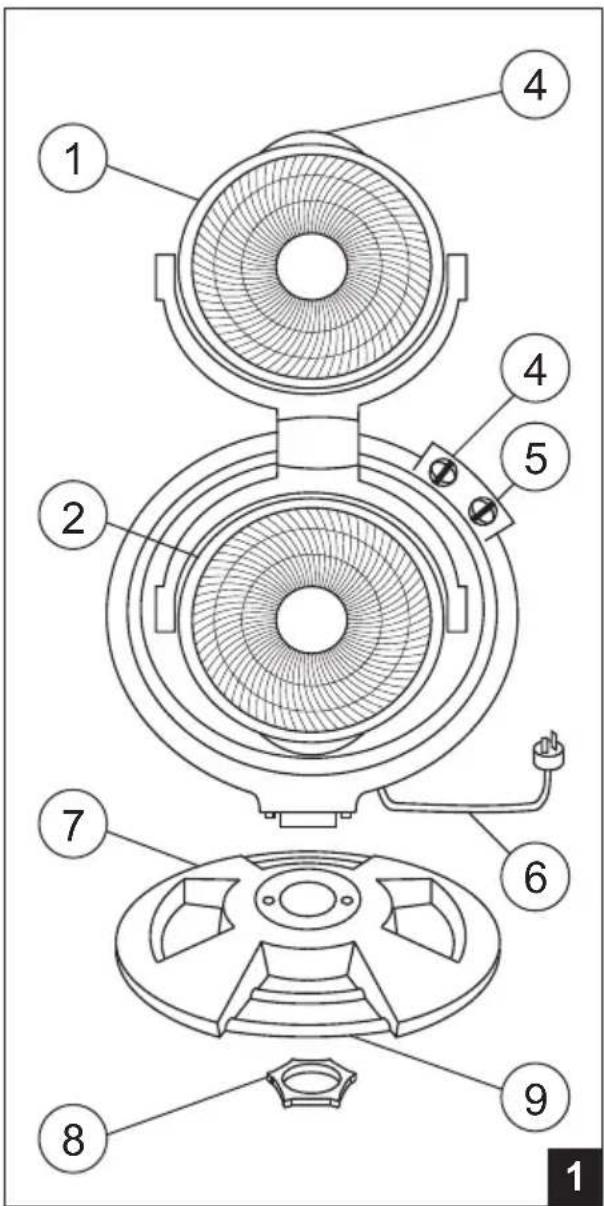
Assembly
Unpack the fan and check that you have all of the components.
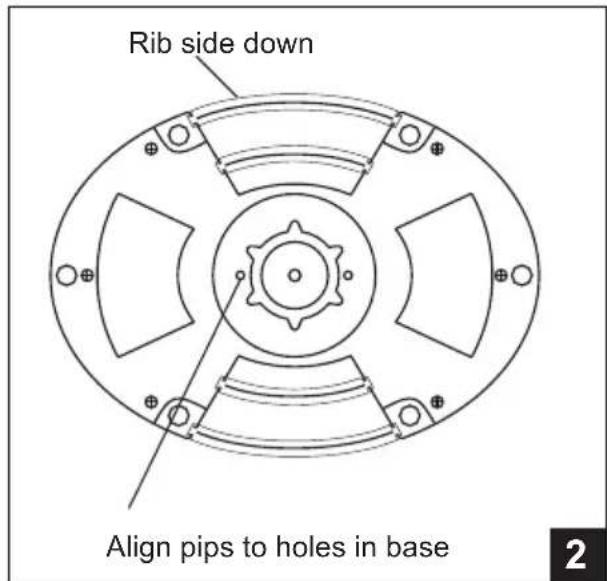
Clip the decorative strips into the fan base, ribbed side downwards.
Remove the locking nut from the fan. Align the holes on the base to the locating pips on the fan, then fix firmly with the locking nut (Fig 2).
1 Upper Fan
2 Lower Fan
3 Handle
4 Upper Fan Control Knob
5 Lower Fan Control Knob
6 Power Cord & Plug
7 Base Stand
8 Locking Nut
9 Decorative Strips
OPERATION
Operation
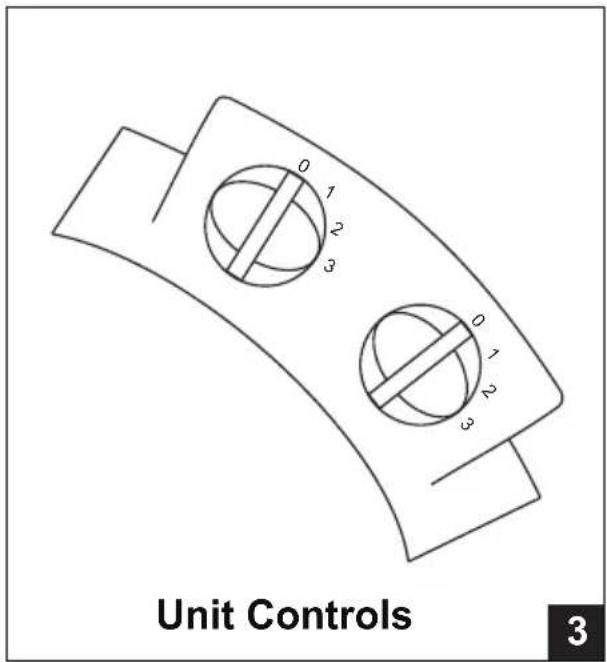
There are two independent fan controls on the control pad, allowing you to operate the upper and lower fans.
Select the desired fan speed by rotating the control knob to the desired selection. Your selection is indicated by the “” on the control knob.
Each fan has 3 speeds - refer to Fig 3 and the selections below :-
0 Off position
1 Speed Low
2 Speed Medium
3 Speed High
Fan Positions
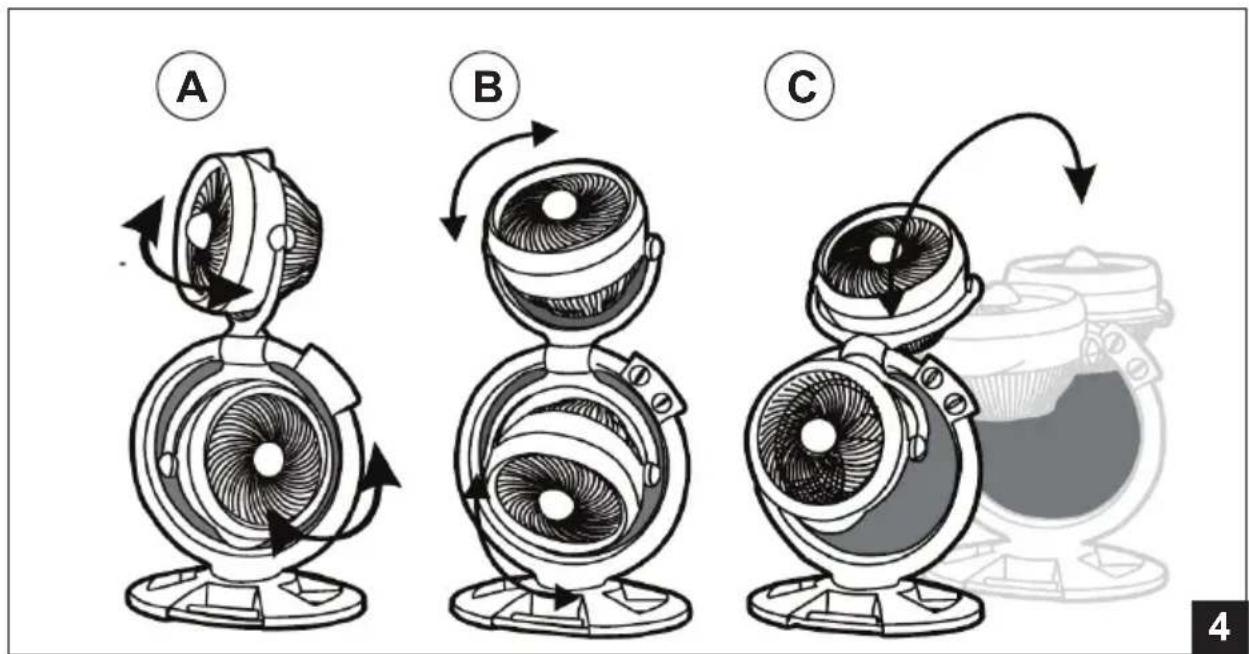
You can adjust the fan angles as shown in Fig 4
A. Left to Right, 90°
B. Up and Down, 120°
C. Pivot through the centre, 180^
MAINTENANCE
To maximise the efficiency of the fan, clean the inlet and outlet grilles regularly.
- Unplug the fan from the mains power supply before cleaning.
- Use a soft, damp cloth to wipe the outside. Never use thinners or other strong chemicals on the fan surfaces.
- Use a vacuum cleaner to remove dirt and dust from the inlet and outlet grilles.
- Ensure the fan is dry before plugging back into the mains power supply.
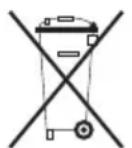
Waste electrical products must not be disposed of with household waste. This product should be taken to your local recycling centre for safe treatment.
As the policy of this company is one of continuous improvement, all specifications are subject to change without notice.
WARRANTY
Subject to the terms of the warranty Seeley International Pty Ltd ("Seeley") will repair or replace at its option, the product or any part thereof, which examination shows to be defective for a period of 24 months from purchase.
This warranty is conditional upon the fan being used only for personal, domestic or household purposes and installed and operated in accordance with our instructions, and does not apply to:
- Adjustments necessary due to misuse of the fan,
• Normal user maintenance, - Setting of controls,
• Transit damage, or - Damage caused by user misuse, tampering, or failure to observe the care and special provisions in the instructions.
Our goods come with guarantees that cannot be excluded under the Australian Consumer Law. You are entitled to a replacement or refund for a major failure and for compensation for any other reasonably foreseeable loss or damage. You are also entitled to have the goods repaired or replaced if the goods fail to be of acceptable quality and the failure does not amount to a major failure.
No other person, firm or corporation is authorised by us to offer or give on our behalf any other or greater warranty than that given under this warranty. The benefits conferred by this warranty are in favour of the original retail purchaser and any person deriving title to the goods through or under such person and are in addition to other rights and remedies of the consumer under a law in relation to the goods or services to which the warranty relates.
To make a warranty claim, you will need to return the appliance along with the original invoice/receipt to the place of purchase for assessment.
For technical assistance before returning the product please contact: 1300 650 399
Please retain your original invoice/receipt as proof of purchase. Every request for warranty must be accompanied by proof of purchase.
It is your responsibility to cover all forwarding and return freight costs incurred in returning the appliance to the place of purchase, or if necessary, in sending the appliance to a service centre.
Please complete the following for your records:
Serial Number:
Product:
Convair
Model:
CTF03
Purchased from:
Date purchased: ...../...../..... The above warranty applies only to Australia.
Seeley's address is 112 O'Sullivan Beach Road, Lonsdale, South Australia 5160, and the telephone number is 08 8328 3850.
It is the policy of Seeley International to introduce continual product improvement. Accordingly, specifications are subject to change without notice. Please consult with your dealer to confirm the specifications of the model selected.

Warranty Service
Australia 1-300-650-399
seeleyinternational.com
cenvair®