
5704 - Scale Taylor - Free user manual and instructions
Find the device manual for free 5704 Taylor in PDF.


| Product Type | Digital Weight Tracking Scale with Cal-Max™ and BMI |
| Brand | Taylor |
| Model | 5704 |
| Weight Capacity | 400 lbs / 180 kg |
| Weight Graduation | 0.2 lb / 0.1 kg |
| Height Range | 2'8" - 7'3" (80.0 - 220.0 cm) |
| Age Range | 10 - 80 years |
| Units | lb/in or kg/cm (selectable) |
| Functions | Weight, Cal-Max™ daily calorie estimate, BMI calculation |
| Memory | 4 personal profiles (P1-P4) |
| Power Source | 1 CR2032 lithium battery (included) |
| Battery Low Indicator | Displays "Lo" |
| Initialization | Press firmly on platform after battery change or movement |
| Auto Off | Yes (after inactivity) |
| Warranty | 5 years limited (excluding batteries) |
| Compliance | FCC Part 15 Class B |
| Not Legal for Trade | Yes |
| Cleaning | Soft damp cloth, mild soap; no harsh chemicals |
| Precautions | Do not exceed 400 lbs; avoid rough treatment; store flat |
| Battery Disposal | Recycle per local regulations; do not incinerate |
Frequently Asked Questions - 5704 Taylor
Note: Recycle or dispose of the old battery per local regulations.
User questions about 5704 Taylor
0 question about this device. Answer the ones you know or ask your own.
Ask a new question about this device
Download the instructions for your Scale in PDF format for free! Find your manual 5704 - Taylor and take your electronic device back in hand. On this page are published all the documents necessary for the use of your device. 5704 by Taylor.
USER MANUAL 5704 Taylor
Leading the Way in Accuracy®
Model 5704 Digital Weight Tracking Scale with Cal-Max™ & BMI (Body Mass Index) Instruction Manual
Thank you for purchasing a Taylor® scale. We strive to provide you with a high quality bath scale that meets your needs. Your opinion and experience with our product is important to us. If you are pleased with your Taylor product, please take a moment to share your thoughts with others by writing an on-line review. If you have questions or are not satisfied with your purchase, please contact us at www.prodsupport@taylorusa.com or call 1-866-843-3905.
These instructions contain important and useful information about this unit's operation. Please read instructions thoroughly to ensure that you have the full benefit of all the unit's features. Keep these instructions handy for future reference.
How Does the Cal-Max™ Function Work?
The Cal-Max™ function uses your gender, height and age to calculate the estimated number of calories you can consume a day to maintain your present weight. This estimation may gradually help you with a weight loss, gain or maintenance plan.
Following are 2 examples of the Cal-Max ^TM scale in use:
Jack is:
6' tall
35 years old
220 Lbs
- Cal-Max™ shows he needs to consume 2542 calories per day to remain at 220 pounds.
- Jack decides to cut 300 calories per day from his diet while maintaining his current activity level
- In less than 12 days Jack may lose up to a pound (based on calories alone)
• In one year Jack may lose up to 31.29 pounds (based on calories alone)
Jill is:
5'6" tall
32 years old
140 Lbs
- Cal-Max™ shows she needs to consume 1708 calories per day to remain at 140 pounds.
- Jill also decides to cut 300 calories per day from her diet while maintaining her current activity level.
• In less than 12 days Jill may lose up to a pound (based on calories alone)
• In one year Jill may lose up to 31.29 pounds (based on calories alone)
IMPORTANT: Proper calorie intake and nutrition are important to maintain a healthy body. Always consult a physician before undertaking any exercise or diet program.
How does BMI Work?
The scale will calculate your BMI (body mass index) based on your height and weight. Once you input your personal data into the scale and step on the platform, the scale will display your weight and your BMI number.
Body Mass Index (BMI) – Why Measure It?
Maintaining proper weight is essential to healthy living. Obesity has been linked to a higher risk of heart disease, diabetes and some forms of cancer. The Body Mass Index (BMI) is calculated from a person's weight and height, and is a widely accepted measurement of weight by most. IMPORTANT: Always consult a physician before beginning any diet or exercise program.
Battery Information and General Operation
This scale operates on 1 – 3 volt CR2032 lithium battery (installed). There is a strip under the lithium battery cover to prevent battery drain in shipping. Please remove the strip before continuing with these instructions (you may need to remove the battery compartment cover to avoid breaking the strip). Also, some models have a static cling label on the lens to prevent scratching. Please remove before use.
This scale is set to pounds. Press firmly on the platform to turn the scale on. Press the "Set" button to toggle between pound (lb) and kilogram (kg) units of measurement. Allow the scale to turn off. The scale is set to weigh in the unit last displayed.
The scale needs to be initialized before first use or after battery replacement, or if it is moved or bumped. Press firmly on the scale platform. The display will turn on and automatically turn off. Your scale is now ready for use.
Replace the CR2032 lithium battery when "Lo" appears on the LCD screen or the readings grow dim or irregular. To replace the battery:
- Use one 3 volt CR2032 lithium battery.
- Remove screw (or screws) from the battery compartment cover on the bottom of the scale and remove the cover.
- Remove the old battery from the compartment.
- Place the new battery with the "+" sign up into the battery compartment.
- Replace the battery compartment cover and screw(s).
NOTE: Please recycle or dispose of batteries per local regulations.
WARNING: Batteries may pose a choking hazard. As with all small items, do not let children handle batteries. If swallowed, seek medical attention immediately.
PRECAUTION: Do not dispose of batteries in fire. Batteries may explode or leak. Remove the battery if the scale will not be used for a long period of time.
Weight Only Operation
Your Taylor® Cal-Max™ and BMI Scale will operate as a basic weight-reading scale.
No special programming steps are required.
Once the scale is initialized, as previously described, you may simply step on the scale to obtain your current weight. For a weight only reading:
- Place the scale on a flat, hard surface. Carpeted or uneven floors may affect accuracy.
- Step onto the scale platform and remain still. The scale will count up to your weight. The display will flash 3 times when the weight is locked. Your weight is now displayed.
- The scale will automatically turn off.
Using Your Cal-Max™ / BMI Scale
In order for your Cal-Max ^™ scale to estimate calories and compute your BMI number, you must first enter your gender, height and age. The scale uses these factors to calculate your results.
Onscreen prompts will lead you through programming your personal information into the scale.
The analyzer will then use this data to compute your results.
REMINDER: The scale needs to be initialized after battery installation. The scale may also need to be initialized if it is moved or bumped. At all other times, you may directly proceed with the following instructions for programming your personal data into the scale.
To initialize the scale, simply press firmly on the scale platform while the scale is on. The scale will turn on and automatically turn off. Your scale is now ready for use.
How to Enter Personal Data into Memory
This scale has 4 personal memory numbers (P1-P4). In order to estimate calories and compute BMI, you must first save your gender, age and height into memory. The scale will then use these factors to calculate your Cal-Max ^™ and BMI results.
You will store your data into memory before first use, thus eliminating the need to enter your personal information before each reading. To enter your data into memory:
- Press the "Set" button. The scale turns on and "1-4" blinks on the screen. Press "Set" again to display a memory number (P1-P4).

- Press the (▲) or (▼) button to move to a memory number (P1-P4). Press the "Set" button to select the displayed memory number. The unit of measurement screen appears.

- Your scale is set to weigh in pounds (lb). Press the "Set" button to select pounds, or press the (▲) or (▼) button to toggle to kilograms (kg). Press the "Set" button to select the displayed units of measurement. A gender icon blinks.
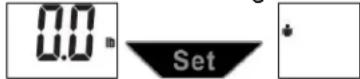
- Press the (▲) or (▼) button to toggle between the male and female icons. Press the "Set" button to confirm your gender. The age digits blink.

- Press the (▲) or (▼) button to increase / decrease the age value. Press the "Set" button to confirm displayed age. The height digits blink.

- Press the (▲) or (▼) button to increase / decrease the height value. Press the "Set" button to confirm displayed height. Press the "Set" button to confirm your height and all other selections.

- When the scale shows zero, you may step on the scale for a measurement. Otherwise, the scale will turn off automatically. Your data remains saved in memory.
- To change personal data, repeat the above steps.
Note #1: You have approximately 10 seconds to complete each programming step. If no buttons are pressed within 10 seconds, the scale will turn off automatically to conserve battery power. If this occurs, simply repeat the programming steps above.
Note #2: If a memory already has data saved in it, the screen will show the existing data, then zero. Select another memory number, or follow the steps above to enter and save new data.
How to Take a Weight / Cal-Max™/ BMI Reading
- Press the "Set" button to turn the scale on.
- Press the (▲) or (▼) button to scroll to your memory number. After a few seconds your personal data will display, then zero.
- When the display shows zero, then step onto the scale and remain still. The display will count up to your weight and flash 3 times when the weight is locked.
-
The display will show your results in order:
-
Current weight reading;
- Last weight reading;
- Difference between current and last weight readings (an "up" arrow under the weight digits indicates an increase in weight, while a "down" arrow indicates a decrease);
- BMI (Body Mass Index) reading;
- Cal-Max™ daily calories estimate (Kcal).
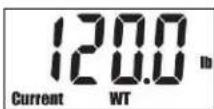
Current Weight
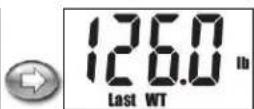
Last Weight
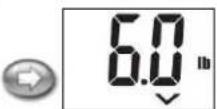
Difference
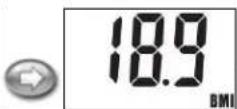
BMI
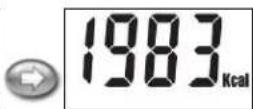
Calorie Estimate
- The results repeat and the scale turns off automatically.
Reaching Target Weight
Maintaining proper weight is essential to healthy living. Obesity has been linked to a higher risk of heart disease, diabetes and some forms of cancer. The Body Mass Index (BMI) is the most widely accepted measurement of weight according to health professionals. Use the chart below to determine your own BMI by matching your height in the left hand column with your weight in the center. Anyone, male or female, with a BMI of 25 to 29 is considered over weight and a body mass index of 30 is considered obese. Remember to eat right and exercise.
Body Mass Index
| Height (inches) | Body Weight (pounds) | Overweight | Obese | ||||||||||||||
| 58 | 91 | 96 | 100 | 105 | 110 | 115 | 119 | 124 | 129 | 134 | 138 | 143 | 148 | 153 | 158 | 162 | |
| 59 | 94 | 99 | 104 | 109 | 114 | 119 | 124 | 128 | 133 | 138 | 143 | 148 | 153 | 158 | 163 | 168 | |
| 60 | 97 | 102 | 107 | 112 | 118 | 123 | 128 | 133 | 138 | 143 | 148 | 153 | 158 | 163 | 168 | 174 | |
| 61 | 100 | 106 | 111 | 116 | 122 | 127 | 132 | 137 | 143 | 148 | 153 | 158 | 164 | 169 | 174 | 180 | |
| 62 | 104 | 109 | 115 | 120 | 126 | 131 | 136 | 142 | 147 | 153 | 158 | 164 | 169 | 175 | 180 | 186 | |
| 63 | 107 | 113 | 118 | 124 | 130 | 135 | 141 | 146 | 152 | 158 | 163 | 169 | 175 | 180 | 186 | 191 | |
| 64 | 110 | 116 | 122 | 128 | 134 | 140 | 145 | 151 | 157 | 163 | 169 | 174 | 180 | 186 | 192 | 197 | |
| 65 | 114 | 120 | 126 | 132 | 138 | 144 | 150 | 156 | 162 | 168 | 174 | 180 | 186 | 192 | 198 | 204 | |
| 66 | 118 | 124 | 130 | 136 | 142 | 148 | 155 | 161 | 167 | 173 | 179 | 186 | 192 | 198 | 204 | 210 | |
| 67 | 121 | 127 | 134 | 140 | 146 | 153 | 159 | 166 | 172 | 178 | 185 | 191 | 198 | 204 | 211 | 217 | |
| 68 | 125 | 131 | 138 | 144 | 151 | 158 | 164 | 171 | 177 | 184 | 190 | 197 | 203 | 210 | 216 | 223 | |
| 69 | 128 | 135 | 142 | 149 | 155 | 162 | 169 | 176 | 182 | 189 | 196 | 203 | 209 | 216 | 223 | 230 | |
| 70 | 132 | 139 | 146 | 153 | 160 | 167 | 174 | 181 | 188 | 195 | 202 | 209 | 216 | 222 | 229 | 236 | |
| 71 | 136 | 143 | 150 | 157 | 165 | 172 | 179 | 186 | 193 | 200 | 208 | 215 | 222 | 229 | 236 | 243 | |
| 72 | 140 | 147 | 154 | 162 | 169 | 177 | 184 | 191 | 199 | 206 | 213 | 221 | 228 | 235 | 242 | 250 | |
| 73 | 144 | 151 | 159 | 166 | 174 | 182 | 189 | 197 | 204 | 212 | 219 | 227 | 235 | 242 | 250 | 257 | |
| 74 | 148 | 155 | 163 | 171 | 179 | 186 | 194 | 202 | 210 | 218 | 225 | 233 | 241 | 249 | 256 | 264 | |
| 75 | 152 | 160 | 168 | 176 | 184 | 192 | 200 | 208 | 216 | 224 | 232 | 240 | 248 | 256 | 264 | 272 | |
| 76 | 156 | 164 | 172 | 180 | 189 | 197 | 205 | 213 | 221 | 230 | 238 | 246 | 254 | 263 | 271 | 279 | |
| 19 | 20 | 21 | 22 | 23 | 24 | 25 | 26 | 27 | 28 | 29 | 30 | 31 | 32 | 33 | 34 | ||
Warning Messages
Err = Initialization or Instability error. To correct, press on the platform. The scale will turn on and off. Repeat measurement. Ensure the scale is on a flat, stable surface. Step off and back onto the scale, standing still while your weight computes.
O-Ld = Overload Warning. The maximum weighing capacity of the scale has been exceeded. Remove the weight immediately; otherwise permanent damage to the scale may occur.
Lo = Low Battery Warning. Replace the CR 2032 lithium battery with the “+” sign up.
Specifications
- Weight capacity: 400 lbs or 180 kgs
• Weight graduation: 0.2 lb or 0.1 kg
• Height range: 2'8" - 7'3" (80.0-220.0 cm)
• Age range: 10-80 years - Unit selectable: lb/in or kg/cm
- Measures weight, Cal-Max™ calorie estimates, and calculates BMI
• Data can be stored for up to 4 individuals - Weight-only function with auto on
- Low battery indicator
- Operates on 1 CR2032 lithium battery (included)
Trouble Shooting
In Case of Difficulty...
- Place your feet in the same position every time you weigh yourself. Stand still during measurement.
- Weigh yourself without clothing whenever possible. Clothes can vary in weight.
- Move the scale to a location where it won't be bumped. If your scale is bumped while being activated or while in use, an inaccurate reading may occur.
- For the most consistent readings, weigh yourself at the same time of day. Allow for weight fluctuations due to food or drink in your system.
- The maximum capacity of this scale is 400 lbs / 180 kgs. Should "O-Ld" appear on the display during a weighing, this indicates that the maximum weighing capacity of the scale has been exceeded. Remove the weight immediately; otherwise, permanent damage may occur.
Precautions
- Clean exposed parts with a soft, slightly damp cloth. To remove stains, use a mild soap. Never use detergents, excess water, treated cloths, harsh cleaning agents, or sprays. Do not attempt to lubricate or open scale casing.
- Although your scale is designed to be maintenance-free, it contains sensitive electronic parts. Avoid rough treatment. Do not drop, kick, or jump on it. Treat it with care to ensure the best performance.
- This scale is designed to read weights between 11 and 400 lbs / 5 and 180 kgs. To prevent damage do not place more than 400 lbs / 180 kgs on it.
- Do not store scale where you store cleaning chemicals. The vapors from some household products may affect the electronic components of your scale. Do not store scale on its side.
- This scale is an extremely sensitive weighing device. In order to prevent run down of the battery, do not store anything on the scale.
- Do not dispose of batteries in fire. Batteries may explode or leak. Remove the battery if the scale will not be used for a long period of time.
Caution: Changes or modifications not expressly approved by the party responsible for compliance could void the user's authority to operate the equipment.
Note: This device complies with part 15 of the FCC Rules. Operation is subject to the following two conditions: (1) this device may not cause harmful interference, and (2) this device must accept any interference received, including interference that may cause undesired operation. This equipment has been tested and found to comply with the limits for a Class B digital device, pursuant to part 15 of the FCC rules. These limits are designed to provide reasonable protection against harmful interference in a residential installation. This equipment generates, uses and can radiate radio frequency energy and, if not installed and used in accordance with the instructions, may cause harmful interference to radio communications. However, there is no guarantee that interference will not occur in a particular installation. If this equipment does cause harmful interference to radio or television reception, which can be determined by turning the equipment off and on, the user is encouraged to try to correct the interference by one or more of the following measures:
-Reorient or relocate the receiving antenna.
-Increase the separation between the equipment and receiver.
-Connect the equipment into an outlet on a circuit different from that to which the receiver is connected.
-Consult the dealer or an experienced radio/TV technician for help.
Five (5) Year Limited Warranty
This scale is warranted against defects in materials of workmanship (excluding batteries) for five (5) years for the original purchaser from date of retail purchase. It does not cover damages or wear resulting from accident, misuse, abuse, commercial use, or unauthorized adjustment and/or repair. Do not return to retailer. For product support & warranty information: Please contact us with proof of purchase (purchase receipt) at:
Taylor Precision Products, Inc.
2220 Entrada Del Sol, Suite A
Las Cruces, New Mexico 88001 USA
Phone: 1-866-843-3905
Email: www.prodsupport@taylorusa.com
There are no express warranties except as listed above. This warranty gives you specific legal rights, and you may have other rights which vary from state to state.
For additional product information, or warranty information outside the USA, please contact us through www.taylorusa.com.
©2014 Taylor Precision Products, Inc. and its affiliated companies, all rights reserved. Taylor® and Leading the Way in Accuracy® are registered trademarks of Taylor Precision Products, Inc. and its affiliated companies. Cal-Max™ is a trademark of Taylor Precision Products, Inc. and its affiliated companies. All rights reserved.
Made to our exact specifications in China.
Not legal for trade.
- Model 5704 Digital Weight Tracking Scale with Cal-Max™ & BMI (Body Mass Index) Instruction Manual
- How Does the Cal-Max™ Function Work?
- How does BMI Work?
- Body Mass Index (BMI) – Why Measure It?
- Battery Information and General Operation
- Weight Only Operation
- Using Your Cal-Max™ / BMI Scale
- How to Enter Personal Data into Memory
- How to Take a Weight / Cal-Max™/ BMI Reading
- Reaching Target Weight
- Warning Messages
- Specifications
- Trouble Shooting
- Precautions
- Five (5) Year Limited Warranty
Brand : Taylor
Model : 5704
Category : Scale