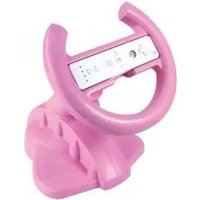
DREAMGEAR DGWII-1079 - Game controller

DGWII-1079 - Game controller DREAMGEAR - Free user manual and instructions

Find the device manual for free DGWII-1079 DREAMGEAR in PDF.

📄 1 pages English EN Download 💬 AI Question 10 questions ⚙️ Specs
Notice DREAMGEAR DGWII-1079 - page 1
Pick your language and provide your email: we'll send you a specifically translated version.
Product Type Wii Racing Wheel Controller
Brand dreamGEAR
Model DGWII-1079
Compatibility Nintendo Wii (Wii Remote required)
Package Contents Racing Wheel, Suction Base
Dimensions (approx) 30 x 25 x 15 cm
Weight (approx) 1.5 kg
Power Source None (uses Wii Remote batteries)
Main Functions Steering wheel control, suction base for desktop, in-air gameplay, directional lock (left-right or multi-directional)
Control Lock Mechanism Slide switch: UP for complete control, DOWN for left-right only
Setup Insert Wii Remote into wheel slot; attach suction base for desktop use
Cleaning Instructions Wipe with a dry, soft cloth. Do not use liquids or cleaners.
Safety Precautions Use on a stable surface; avoid liquids; keep away from heat sources
Spare Parts & Repairability No user-serviceable parts. Contact dreamGEAR support for assistance.
Technical Support Phone: 1-877-999-DREAM, Email: support@dreamgear.net

Frequently Asked Questions - DGWII-1079 DREAMGEAR

How do I set up the racing wheel?
Insert your Wii Remote into the slot on the wheel. For desktop use, attach the suction base to a flat surface. For in-air gameplay, simply hold the wheel without the base.
Can I use the racing wheel without the suction base?
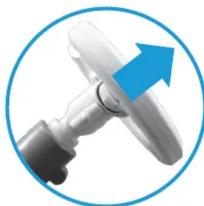
Yes, the wheel can be used in-air by detaching the base. The steering wheel can be removed from the base by holding the base and pulling the wheel towards you.
How do I change the steering direction settings?
Slide the control locking mechanism on the wheel: UP for full multi-directional control, DOWN for left-right only.
Is the racing wheel compatible with all Wii games?
The wheel works with any game that supports the Wii Remote in a steering orientation. Some games may require specific settings.
How do I clean the racing wheel?
Use a dry, soft cloth to wipe the wheel. Do not use water, cleaning fluids, or abrasive materials.
What should I do if the wheel stops working?
First, check that the Wii Remote is fully inserted and has fresh batteries. If issues persist, contact dreamGEAR support at 1-877-999-DREAM or support@dreamgear.net.
Can I use the wheel on my lap or on a soft surface?
For best performance, use the wheel on a stable, flat surface. The suction base works best on smooth, non-porous surfaces.
Does the racing wheel require batteries?
No, the wheel itself does not require batteries. It uses the Wii Remote's power and wireless connection.
How do I detach the wheel from the base?
Hold the base firmly and pull the wheel towards you. The wheel separates from the base for in-air use.
Is there a warranty for the DGWII-1079?
dreamGEAR offers a limited lifetime warranty. For details, contact support at 1-877-999-DREAM or visit www.dreamgear.net.

User questions about DGWII-1079 DREAMGEAR

0 question about this device. Answer the ones you know or ask your own.

Ask a new question about this device

The email remains private: it is only used to notify you if someone responds to your question.

No questions yet. Be the first to ask one.

Download the instructions for your Game controller in PDF format for free! Find your manual DGWII-1079 - DREAMGEAR and take your electronic device back in hand. On this page are published all the documents necessary for the use of your device. DGWII-1079 by DREAMGEAR.

USER MANUAL DGWII-1079 DREAMGEAR

dreamGEAR®
www.dreamgear.net

Package Contents:

1 - Racing Wheel
1 - Racing Wheel Suction Base

RACING WHEEL SET UP:

1) To use the Racing Wheel, place your Wii Remote into the Racing Wheel's remote slot.
Close-up of a white mechanical component with a blue upward arrow, enclosed in a blue circular border (no text or symbols)

Circular icon with a blue downward arrow and a white device outline, no text or symbols present.

2) The Racing Wheel's steering wheel can be removed from the base by holding the base and pulling the wheel towards you.


Close-up of hands holding a white gaming controller with a curved grip, enclosed in a circular frame (no text or symbols visible)

DREAMGEAR DGWII-1079 - RACING WHEEL SET UP: - 4
www.dreamgear.net

FOR TECHNICAL SUPPORT

PLEASE CONTACT: 1-877-999-DREAM or support@dreamgear.net

USING THE RACING WHEEL

There are 2 possible racing configurations when using the Racing Wheel.

1) Desktop Gameplay

This image shows the Racing Wheel being played on a desktop or table.

Close-up of a medical procedure in progress, showing hand placement and plastic tube placement (no text or symbols visible)

Close-up of hands holding a gaming controller with a circular frame (no visible text or symbols)

2) In-Air Gameplay

This image shows the Racing Wheel being played in mid-air.

Wheel Settings

Depending on the game you are playing, you may want to adjust the Racing Wheel's settings. The Racing Wheel can be locked for LEFT to RIGHT control only. The Racing Wheel can also be set to allow MUTLI-DIRECTIONAL control.

To lock and un-lock the Racing Wheel's directional setting, slide the control locking mechanism UP for COMPLETE control and DOWN for LEFT to RIGHT control only.


Close-up of a white mechanical component with blue directional arrows indicating rotation or movement (no text or symbols)

Manual assistant
Powered by Anthropic
Waiting for your message
Product information

Brand : DREAMGEAR

Model : DGWII-1079

Category : Game controller