TRUST 18480 - Battery

18480 - Battery TRUST - Free user manual and instructions

Find the device manual for free 18480 TRUST in PDF.

📄 2 pages English EN Download 💬 AI Question 10 questions ⚙️ Specs
Notice TRUST 18480 - page 1
Pick your language and provide your email: we'll send you a specifically translated version.
Product Type Smartphone Battery Backup Pack
Model 18480
Brand Trust
Dimensions (approx.) 100 x 60 x 20 mm
Weight (approx.) 150 g
Battery Capacity (approx.) 2600 mAh
Input Micro USB, 5V/1A
Output USB-A, 5V/1A
Charging Time (approx.) 3-4 hours
Main Functions Portable charging for smartphones and other USB devices
LED Indicators Battery level indicator lights
Maintenance Keep dry; clean contacts with a soft cloth
Safety Precautions Do not short-circuit; avoid exposure to high temperatures
Spare Parts / Repairability No user-serviceable parts; dispose of properly
Compatibility Most USB-charged devices (smartphones, tablets, etc.)

Frequently Asked Questions - 18480 TRUST

How do I charge the battery pack itself?
Connect the included Micro USB cable to the input port of the Trust 18480 and a USB power source (e.g., a wall charger or computer). The LED indicators will show the charging status.
How do I charge my phone with this battery pack?
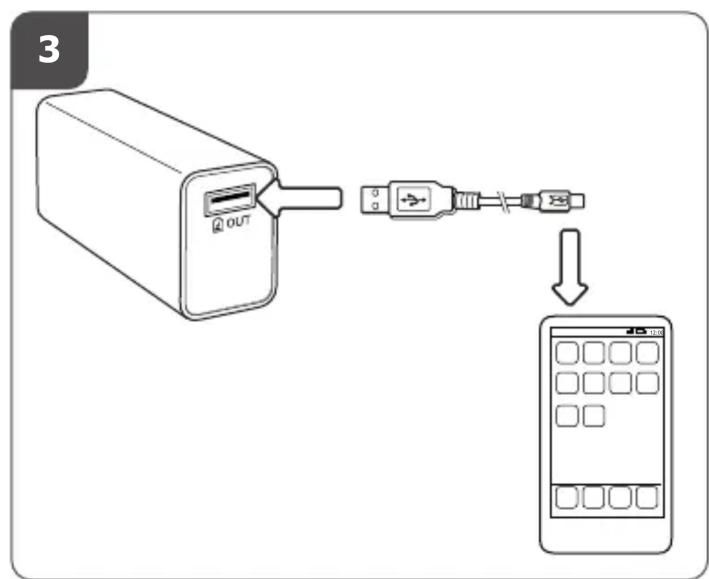
Connect your phone's charging cable to the USB output port of the Trust 18480. The battery pack will automatically start charging your device.
What do the LED indicators mean?
The LEDs show the remaining battery capacity: more lights indicate a higher charge level. When charging, the lights will flash to indicate the charging progress.
Can I charge the battery pack and my phone at the same time?
Yes, the Trust 18480 supports pass-through charging, allowing you to charge both the battery pack and your connected device simultaneously.
Is this battery pack compatible with my phone?
It is compatible with any device that charges via a standard USB cable, including most smartphones, tablets, and other gadgets.
How long does it take to fully charge the Trust 18480?
Approximately 3-4 hours when using a 5V/1A charger.
What safety precautions should I take?
Avoid short-circuiting the output ports, do not expose the battery to water or high heat, and use only the provided or certified cables. Do not attempt to open the device.
How should I store the battery pack when not in use?
Store in a cool, dry place at a partial charge (around 50%) to prolong battery life. Avoid leaving it fully discharged for extended periods.
What should I do if the battery pack stops working?
First, ensure it is charged and the cable is properly connected. If it still does not work, contact Trust support for assistance. Do not attempt to repair it yourself.
How do I dispose of this battery pack?
Do not dispose of it in household waste. Follow local regulations for recycling of electronic devices and batteries to protect the environment.

User questions about 18480 TRUST

0 question about this device. Answer the ones you know or ask your own.

Ask a new question about this device

The email remains private: it is only used to notify you if someone responds to your question.

No questions yet. Be the first to ask one.

Download the instructions for your Battery in PDF format for free! Find your manual 18480 - TRUST and take your electronic device back in hand. On this page are published all the documents necessary for the use of your device. 18480 by TRUST.

USER MANUAL 18480 TRUST

Frequently asked questions

www.trust.com/18480/faq

Trust

© 05-03-2012 Trust International B.V. All rights reserved.

Quick Installation Guide

Smartphone Battery Backup Pack

1 IN IN

2 IN IN IN

TRUST 18480 - 3

flowchart
graph TD
    A["Device 1"] --> B["USB Port"]
    B --> C["Switch"]
    C --> D["Mobile Screen"]
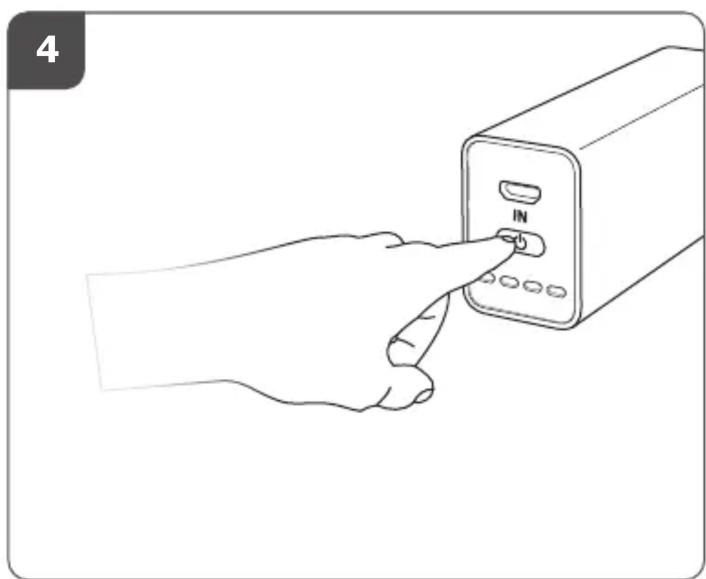
TRUST 18480 - 4

natural_image Line drawing of a hand pressing a button on a device (no text or symbols)
Manual assistant
Powered by Anthropic
Waiting for your message
Product information

Brand : TRUST

Model : 18480

Category : Battery