
PC-112174 - Loudspeaker Perfect Choice - Free user manual and instructions
Find the device manual for free PC-112174 Perfect Choice in PDF.


| Type de produit | Bluetooth Speaker |
| Marque | Perfect Choice |
| Modèle | PC-112174 |
| Dimensions (L x H x P) | 180 x 60 x 60 mm |
| Poids | 350 g |
| Alimentation | Batterie lithium-ion rechargeable 2000 mAh |
| Autonomie | Jusqu'à 8 heures |
| Connectivité | Bluetooth 5.0 |
| Entrée auxiliaire | Oui (3.5 mm) |
| Portée Bluetooth | 10 m |
| Puissance de sortie | 10 W RMS |
| Réponse en fréquence | 100 Hz - 20 kHz |
| Fonctions principales | Lecture Bluetooth, mains-libres, radio FM, carte microSD |
| Entretien et nettoyage | Nettoyer avec un chiffon doux et sec. Ne pas utiliser de produits chimiques. |
| Sécurité | Ne pas exposer à l'eau ou à l'humidité excessive. Débrancher lors de la charge. |
| Pièces détachées et réparabilité | Pièces disponibles sur demande. Réparation par un professionnel recommandée. |
| Informations générales | Utilisation intérieure/extérieure. Convient pour musique portable. |
Frequently Asked Questions - PC-112174 Perfect Choice
User questions about PC-112174 Perfect Choice
0 question about this device. Answer the ones you know or ask your own.
Ask a new question about this device
Download the instructions for your Loudspeaker in PDF format for free! Find your manual PC-112174 - Perfect Choice and take your electronic device back in hand. On this page are published all the documents necessary for the use of your device. PC-112174 by Perfect Choice.
USER MANUAL PC-112174 Perfect Choice
Welcome to the world of PERFECT CHOICE Design
Before using this product, it is important to read the manual.
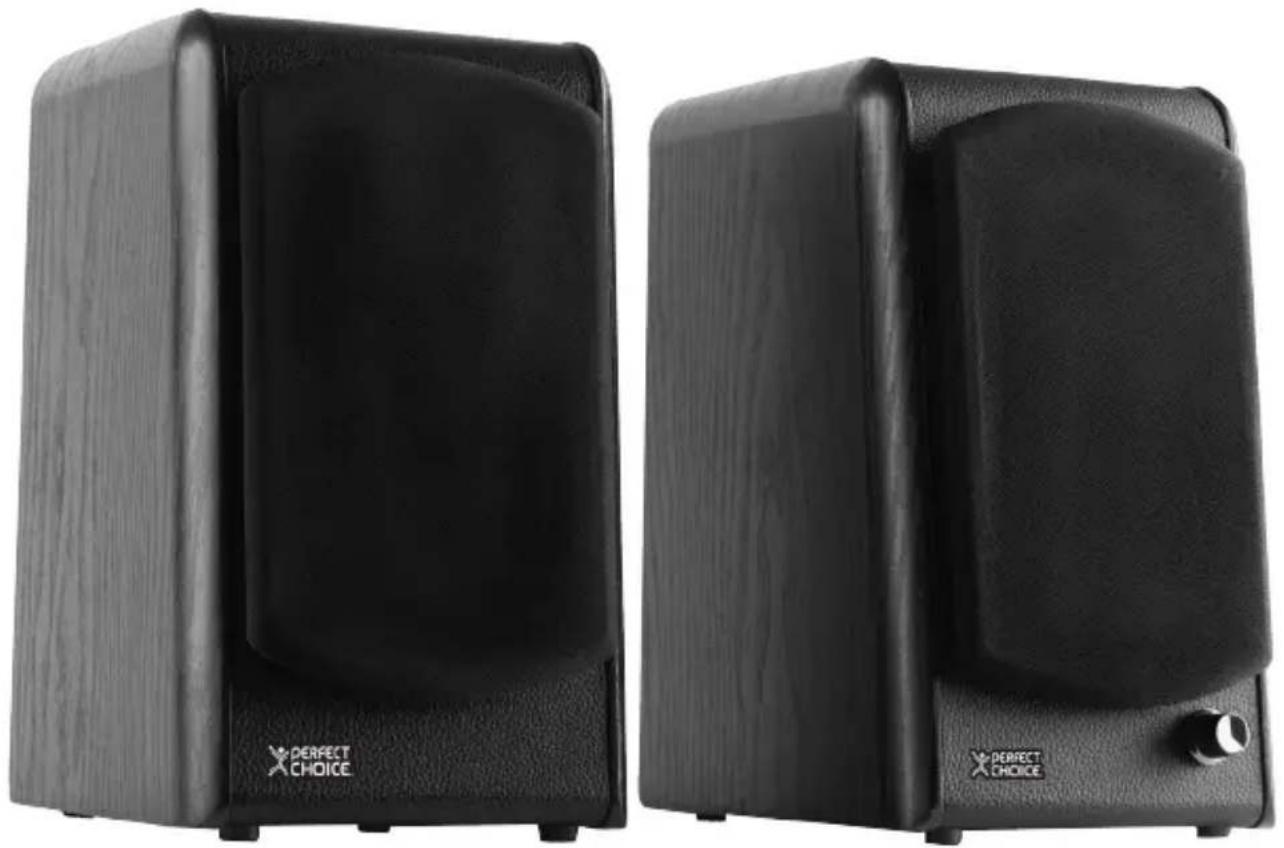
High Fidelity Stereo Speakers
PC-112174
V.PCD 1.1
Content
- Stereo speakers 1 piece • RCA/3.5 mm audio cable 1 piece • Interconnecting cable 1 piece
- User's manual 1 piece
Features
- Classic bookshelf design for crystal clear sound quality.
- Stereo speaker system with bass reflex tunnel for deeper resolution.
- 4" bass and 0.75" treble drivers for excellent range.
- Ideal for all digital and analog sounds.
- Wooden body for better acoustics. • Built-in amplifier ideal for any audio source with a 3.5 mm output.
- Features 2 sets of RCA inputs connection for added convenience.
Installation

Left speaker
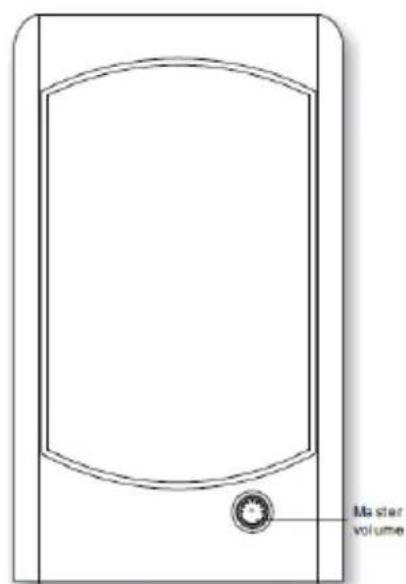
Right speaker
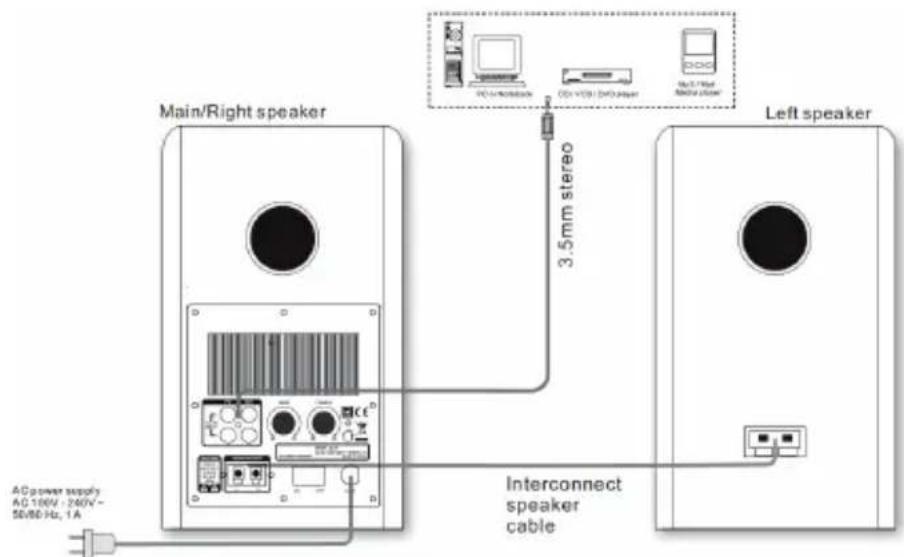
- Connect the left speaker to the main/right speaker terminal clamp interfaces. Use the provided interconnecting speaker cable and clamp the terminals with the bare copper wires.
- Connect the playback device to the rear PC or AUX input interfaces of the right speaker. Use the included 2 RCA to 3.5 mm stereo cable. Please use only one set of RCA connectors at a time to avoid interference.
- Connect the AC power cable at the rear of the main/right speaker to the AC power supply source. Please ensure the AC power supply matches the power requirement printed at the rear panel.

Troubleshooting
The audio source you want to hear cannot be heard
- Check that the audio source is working well.
- Check that the audio and speaker cables are well connected.
- Check that the volume is at the right level.
Cannot hear sound from speakers
- Check that the satellite cable is well connected, and ensure the source connection is correctly inserted.
Static sound heard when volume knob is turned
- Turn off the playback source, and then turn the speaker volume knob several times. Playback again and monitor. The static noise is due to dust, so simply turning the volume will remove it.
Safety and care information
- Place the speakers on a firm, smooth surface.
- Avoid spilling liquids over the speakers.
- Before plugging your equipment into the AC power outlet, make sure the connections between the audio source and speakers are properly done.
- Handle the speakers carefully, avoid dropping or shocking them.
- When listening for the first time, set the master volume at the lowest setting, then slowly adjust it to your preferred level.
- Do not roll up the AC cable with the audio cables together, this might cause interference.
- To disconnect, grab the connector on the base and pull it out, do not grab from the cable in order to pull it out. If you are not going to use the speakers for a long period of time, unplug the AC power.
- Keep the speakers away from direct sunlight, do not place them in high temperature places, this may damage the speakers or the internal components.
- Clean the speakers with a dry cloth.
Technical Specifications
Power supply: 100 - 240 V~, 1 A, 50-60 Hz
Output power: 48 W
Frequency response: 55 - 20,000 Hz
Driver diameter: 4" and 3/4" (tweeter)
Contents, specifications, and options are subject to change without notice to provide better equipment.
Regulatory Information
Federal Communication Commission Interference Statement
This equipment has been tested and found to comply with the limits for a Class B digital device, pursuant to Part 15 of the FCC Rules. These limits are designed to provide reasonable protection against harmful interference in a residential installation.
This equipment generates, uses, and can radiate radio frequency energy and, if not installed and used in accordance with the instructions, may cause harmful interference to radio communications.
However, there is no guarantee that interference will not occur in a particular installation. If this equipment does cause harmful interference to radio or television reception, which can be determined by turning the equipment off and on, the user is encouraged to try to correct the interference by one of the following measures:
- Reorient or relocate the receiving antenna.
- Increase the separation between the equipment and receiver.
- Connect the equipment into an outlet on a circuit different from that to which the receiver is connected.
- Consult the dealer or an experienced radio/TV technician for help.
This device complies with Part 15 of the FCC Rules. Operation is subject to the following two conditions: (1) This device may not cause harmful interference, and (2) this device must accept any interference received, including interference that may cause undesired operation.
FCC Caution: Any changes or modifications not expressly approved by the party responsible for compliance could void the user's authority to operate this equipment.
Technical Support
Rest of the country (Mexico only)
soporte@perfectchoice.com.mx

design
Welcome to the PERFECT CHOICE Design world
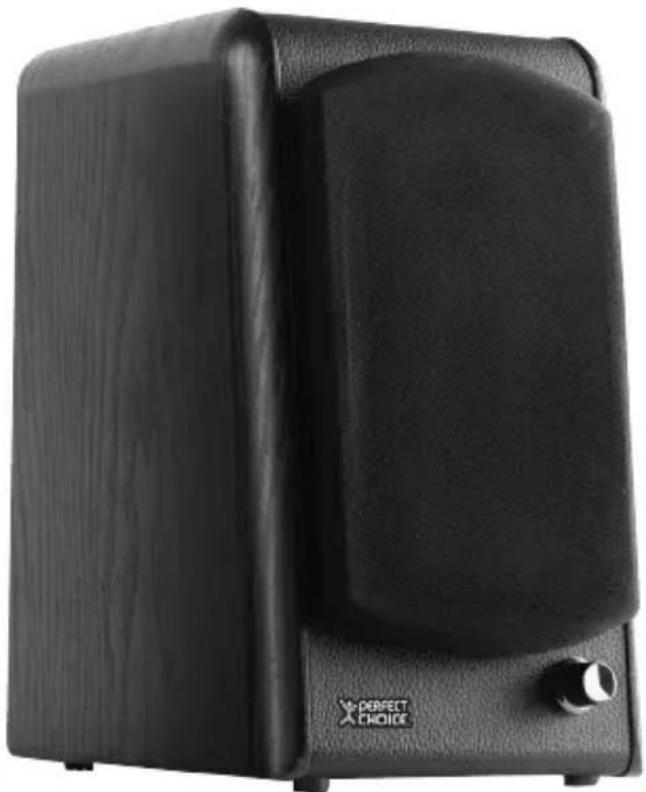
Contents
Right speaker

Left speaker

Col. Santa Anita Zip. 4 5603
Master Choice, S.A. of C.V. warrants this product for a period of three years (36 months) covering all parts and labor against any manufacturing or operational defects from the date of purchase, and is responsible for the transportation costs of the product arising from the fulfillment of this warranty.
CONDITIONS
- To make this warranty valid, you must provide all the information required in the DATA section of this policy and take the product to the establishment where it was purchased (only within the period indicated by the establishment). At any later time within the warranty period, you can call our Technical Support department: Guadalajara, Mexico and Monterrey 47 77 08 53, all other regions 01 800 PCHOICE (724-6423), or email soporte@perfectchoice.com.mx to be advised on the procedure to make this warranty valid.
- Master Choice, S.A. of C.V. is committed to repairing or replacing any product bearing our brand Perfect Choice® at no charge to the consumer.
- The response time will not exceed 30 calendar days from the date of receipt of the product at our Technical Support department at the facilities of Master Choice, S.A. of C.V.
THIS WARRANTY IS NOT VALID IN THE FOLLOWING CASES
- When the product has been used under conditions different from normal use.
- When the product has not been operated according to instructions.
- When the product has been altered or repaired by unauthorized people by Master Choice, S.A. of C.V.
- When the product has suffered damages caused by external agents or natural disasters outside the control of Master Choice S.A. of C.V. like voltage variations, electrical discharges, earthquakes, floods, hurricanes, or any other similar, as well as damages caused by accidental or intentional knocks, or is exposed to injurious elements for the product like water, acids, fire, or any other similar.
- False cable contacts caused by tugs or excessive stretching.
DATA For Product
Product:
Brand: Model:
Date of acquisition: Rubber stamp
For Dealer
Company name:
Address:
Residential development: City:
State: Zip code:
You can buy parts, consumables, and accessory components at the establishment where you purchased this product or from authorized distributors. For more information, consult our Sales or Technical Support department: 01 800 PCHOICE (724-6423) Sales: 01 800 148 48 48. Importer: Master Choice S.A. de C.V. Magallanes #1155, Col. Santa Anita Zip. 45603, Tlaquepaque, Jalisco. México R.F.C. MCH-920810-FE6 Phone (33) 32 83 15 00; 01 800 PCHOICE (724-6423)
WARRANTY POLICY
- WELCOME TO THE WORLD OF PERFECT CHOICE DESIGN
- HIGH FIDELITY STEREO SPEAKERS
- CONTENT
- FEATURES
- INSTALLATION
- TROUBLESHOOTING
- SAFETY AND CARE INFORMATION
- TECHNICAL SPECIFICATIONS
- REGULATORY INFORMATION
- WELCOME TO THE PERFECT CHOICE DESIGN WORLD
- CONTENTS
- CONDITIONS
- THIS WARRANTY IS NOT VALID IN THE FOLLOWING CASES
- WARRANTY POLICY
Brand : Perfect Choice
Model : PC-112174
Category : Loudspeaker