
DAS-TAMP4-SIG - Receiver AMX - Free user manual and instructions
Find the device manual for free DAS-TAMP4-SIG AMX in PDF.


| Product Type | Receiver |
| Brand | AMX |
| Model | DAS-TAMP4-SIG |
| Category | Digital Audio Receiver |
| Connectivity | Ethernet, RS-232, IR, GPIO |
| Audio Formats | PCM, Dolby Digital, DTS |
| Dimensions (HxWxD) | 1.75 x 19 x 12 inches (1U rack mount) |
| Weight | 8.5 lbs (3.86 kg) |
| Power Supply | 100-240V AC, 50/60 Hz |
| Power Consumption | 40W typical |
| Audio Inputs | 4x balanced analog, 2x digital (S/PDIF) |
| Audio Outputs | 4x balanced analog, 1x digital (S/PDIF) |
| Control Interface | AMX NetLinx, web GUI |
| Mounting | 19-inch rack mount, 1U |
| Operating Temperature | 0°C to 40°C (32°F to 104°F) |
| Storage Temperature | -20°C to 60°C (-4°F to 140°F) |
| Humidity | 10% to 90% non-condensing |
| Safety Certifications | UL, CE, FCC |
| Maintenance | Keep vents clean; periodic firmware updates |
| Cleaning Instructions | Wipe with dry cloth; no liquid cleaners |
| Spare Parts | Contact AMX support for replacement parts |
| Repairability Index | 6/10 (modular design, some soldering required) |
Frequently Asked Questions - DAS-TAMP4-SIG AMX
User questions about DAS-TAMP4-SIG AMX
0 question about this device. Answer the ones you know or ask your own.
Ask a new question about this device
Download the instructions for your Receiver in PDF format for free! Find your manual DAS-TAMP4-SIG - AMX and take your electronic device back in hand. On this page are published all the documents necessary for the use of your device. DAS-TAMP4-SIG by AMX.
USER MANUAL DAS-TAMP4-SIG AMX
Operation/Reference Guide
Tango Amplifiers
DAS-TAMP4-SIG
Tango 4-Channel Amplifier
DAS-TAMP8-SIG
Tango 8-Channel Amplifier

natural_image
Black electronic device labeled 'AHX' with ventilation grille and indicator lights (no readable text beyond branding)AMX Limited Warranty and Disclaimer
This Limited Warranty and Disclaimer extends only to products purchased directly from AMX or an AMX Authorized Partner which include AMX Dealers, Distributors, VIP's or other AMX authorized entity.
AMX warrants its products to be free of defects in material and workmanship under normal use for three (3) years from the date of purchase, with the following exceptions:
- Electroluminescent and LCD Control Panels are warranted for three (3) years, except for the display and touch overlay components are warranted for a period of one (1) year.
• Disk drive mechanisms, pan/tilt heads, power supplies, and MX Series products are warranted for a period of one (1) year. - AMX lighting products are guaranteed to switch on and off any load that is properly connected to our lighting products, as long as the AMX lighting products are under warranty. AMX also guarantees the control of dimmable loads that are properly connected to our lighting products. The dimming performance or quality there of is not guaranteed, impart due to the random combinations of dimmers, lamps and ballasts or transformers.
- AMX software is warranted for a period of ninety (90) days.
- Batteries and incandescent lamps are not covered under the warranty.
- AMX AutoPatch Epica, Modula, Modula Series4, Modula CatPro Series and 8Y-3000 product models will be free of defects in materials and manufacture at the time of sale and will remain in good working order for a period of three (3) years following the date of the original sales invoice from AMX. The three-year warranty period will be extended to the life of the product (Limited Lifetime Warranty) if the warranty card is filled out by the dealer and/or end user and returned to AMX so that AMX receives it within thirty (30) days of the installation of equipment but no later than six (6) months from original AMX sales invoice date. The life of the product extends until five (5) years after AMX ceases manufacturing the product model. The Limited Lifetime Warranty applies to products in their original installation only. If a product is moved to a different installation, the Limited Lifetime Warranty will no longer apply, and the product warranty will instead be the three (3) year Limited Warranty.
All products returned to AMX require a Return Material Authorization (RMA) number. The RMA number is obtained from the AMX RMA Department. The RMA number must be clearly marked on the outside of each box. The RMA is valid for a 30-day period. After the 30-day period the RMA will be cancelled. Any shipments received not consistent with the RMA, or after the RMA is cancelled, will be refused. AMX is not responsible for products returned without a valid RMA number.
AMX is not liable for any damages caused by its products or for the failure of its products to perform. This includes any lost profits, lost savings, incidental damages, or consequential damages. AMX is not liable for any claim made by a third party or by an AMX Authorized Partner for a third party.
This Limited Warranty does not apply to (a) any AMX product that has been modified, altered or repaired by an unauthorized agent or improperly transported, stored, installed, used, or maintained; (b) damage caused by acts of nature, including flood, erosion, or earthquake; (c) damage caused by a sustained low or high voltage situation or by a low or high voltage disturbance, including brownouts, sags, spikes, or power outages; or (d) damage caused by war, vandalism, theft, depletion, or obsolescence.
This limitation of liability applies whether damages are sought, or a claim is made, under this warranty or as a tort claim (including negligence and strict product liability), a contract claim, or any other claim. This limitation of liability cannot be waived or amended by any person. This limitation of liability will be effective even if AMX or an authorized representative of AMX has been advised of the possibility of any such damages. This limitation of liability, however, will not apply to claims for personal injury.
Some states do not allow a limitation of how long an implied warranty last. Some states do not allow the limitation or exclusion of incidental or consequential damages for consumer products. In such states, the limitation or exclusion of the Limited Warranty may not apply. This Limited Warranty gives the owner specific legal rights. The owner may also have other rights that vary from state to state. The owner is advised to consult applicable state laws for full determination of rights.
EXCEPT AS EXPRESSLY SET FORTH IN THIS WARRANTY, AMX MAKES NO OTHER WARRANTIES, EXPRESSED OR IMPLIED, INCLUDING ANY IMPLIED WARRANTIES OF MERCHANTABILITY OR FITNESS FOR A PARTICULAR PURPOSE. AMX EXPRESSLY DISCLAIMS ALL WARRANTIES NOT STATED IN THIS LIMITED WARRANTY. ANY IMPLIED WARRANTIES THAT MAY BE IMPOSED BY LAW ARE LIMITED TO THE TERMS OF THIS LIMITED WARRANTY. EXCEPT AS OTHERWISE LIMITED BY APPLICABLE LAW, AMX RESERVES THE RIGHT TO MODIFY OR DISCONTINUE DESIGNS, SPECIFICATIONS, WARRANTIES, PRICES, AND POLICIES WITHOUT NOTICE.
IMPORTANT SAFETY INSTRUCTIONS

- Read instructions.
- Keep these instructions.
- Heed all warnings.
- Follow all instructions.
- Do not use this apparatus near water.
- Clean only with dry cloth.
- Do not block any ventilation openings. Install in accordance with the manufacturer's instructions.
- Do not install near any heat sources such as radiators, heat registers, stoves, or other apparatus (including amplifiers) that produce heat.
- Do not defeat the safety purpose of the grounding-type plug. The grounding plug has two blades and a third grounding prong. The third prong is provided for your safety. If the provided plug does not fit into your outlet, consult an electrician for replacement of the obsolete outlet.
- Protect the power cord from being walked on or pinched particularly at plugs, convenience receptacles, and the point where they exit from the apparatus.
- Only use attachments/accessories specified by the manufacturer.
- Use only with cart, stand, tripod, bracket, or table specified by the manufacturer, or sold with the apparatus. When a cart is used, use caution when moving the cart/apparatus combination to avoid injury from tip-over.
- Unplug this apparatus during lightning storms or when unused for long periods of time.
- Refer all servicing to qualified personnel. Servicing is required when the apparatus has been damaged in any way, such as power supply cord or plug is damaged, liquid has been spilled or objects have fallen into the apparatus, the apparatus has been exposed to rain or moisture, does not operate normally, or has been dropped.

Warning: Shock Hazard - The lightning flash within an equilateral triangle, intended to alert the user to the presence of un-insulated "Dangerous voltage" within the products enclosure that may be of significant magnitude to constitute a risk of electric shock to persons


Read Accompanying Documentation – The exclamation point within an equilateral triangle is intended to alert the user to the presence of important operating and maintenance (servicing) instructions in the literature accompanying the product.
- The fuse should only be replaced with a T8AL250V fuse.
- The RCA, RJ11 and RJ45 Jacks shall only be used for their intended use. Refer to accompanying documentation to insure that they are being used as intended.
- The spring clip terminals and F-connector on the tuner module should only be used to connect an AM and FM antenna.
- A grounded power outlet is required for safe operation.
- The grounded 3 prong power cable will be the mains disconnect and it should remain readily available.
- To completely disconnect the unit from the AC mains, disconnect the power supply cord plug from the AC receptacle.
- The main voltage for the AC mains is 120v AC
Warning – To reduce the risk of fire or electric shock, do not expose this apparatus to rain or moisture. Do not expose this equipment to dripping or splashing and ensure that no objects filled with liquids are placed on the equipment.
IMPORTANT SAFETY INSTRUCTIONS
Table of Contents
IMPORTANT SAFETY INSTRUCTIONS ...... a
Tango Amplifiers ....1
Overview 1
Product Specifications 2
Rack Mounting 3
Overview 3
Ventilation 3
Wiring and Connections 5
Overview - Speaker Wire Technology (SWT).... 5
Front and Rear Panel Components 5
Cabling Instructions 5
Cable Type 6
Connecting Zone Outputs (Speakers) 6
SWT Connectors.... 6
Connecting SWT Speakers 6
Connecting Non-SWT Speakers 6
Connecting To a Tango Audio Controller 6
Connecting SWT Keypads.... 6
Wiring Diagram - Single Amplifier 7
Wiring Diagram - Expanded Configuration 8
Table of Contents
Tango Amplifiers
Overview
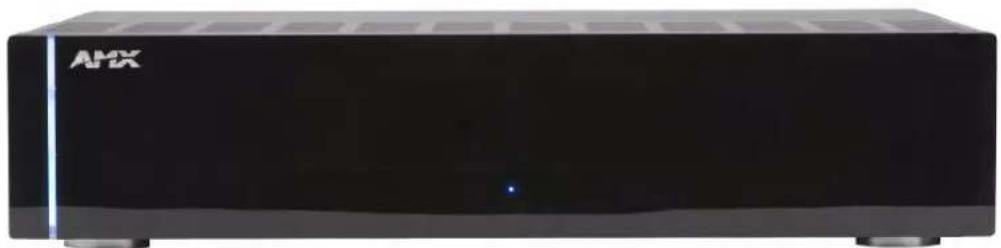
Where more than one pair of speakers is required in Tango Distributed Audio zones, the Tango Amplifier (FIG. 1) provides the extra power needed to drive up to 4 additional speaker pairs per unit for a total of 12 additional speaker pairs or 24 channels per zone. Use Tango Amplifiers in backyards, large rooms or other zones where additional speakers are needed.
natural_image
Exterior view of a black rectangular electronic device labeled 'AMX' (no additional text or symbols visible)FIG. 1 DAS-TAMP4/8-SIG Tango Amplifier (front panel)
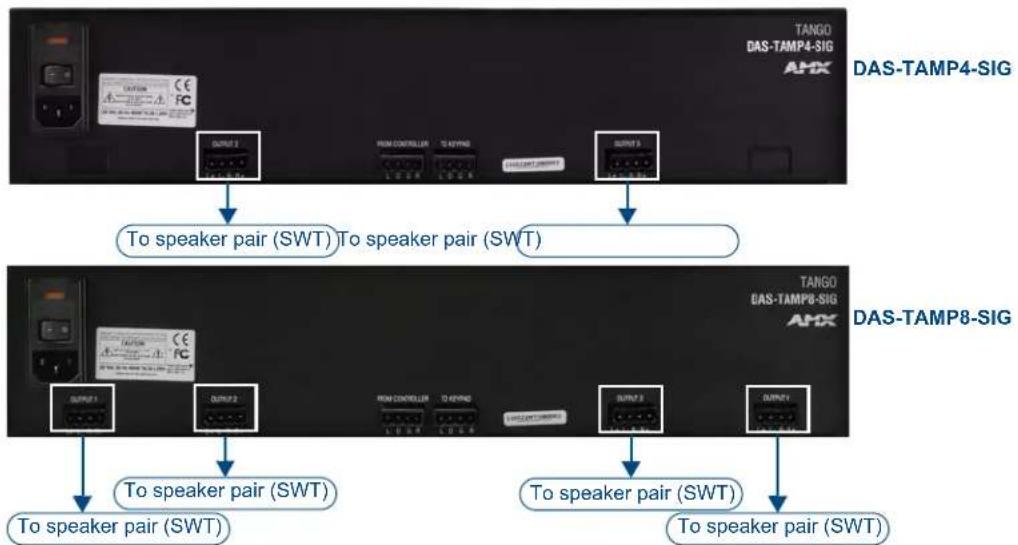
The DAS-TAMP4-SIG Tango 4-Channel Amplifier is a 4-channel amp that supports an additional 2 speaker pairs per unit.
The DAS-TAMP8-SIG Tango 8-Channel Amplifier is an 8-channel amp that supports an additional 4 speaker pairs per unit.
flowchart
graph TD
    A["DAS-TAMP4-SIG"] --> B["To speaker pair (SWT)"]
    B --> C["To speaker pair (SWT)"]
    D["DAS-TAMP8-SIG"] --> E["To speaker pair (SWT)"]
    E --> F["To speaker pair (SWT)"]
    G["DAS-TAMP4-SIG"] --> H["To speaker pair (SWT)"]
    H --> I["To speaker pair (SWT)"]
    J["DAS-TAMP8-SIG"] --> K["To speaker pair (SWT)"]
    K --> L["To speaker pair (SWT)"]
FIG. 2 Tango Amplifiers (rear panels)
Features
● High-quality sound - delivers 60 watts of high-quality sound per channel.
- Expandable - stack up to three Tango Amplifiers units per zone to allow up to 12 speaker pairs (24 channels) in a single zone.
- Easy installation - SWT (Speaker Wire Technology) makes installation simple using four conductor speaker wire.
- Integrates with Tango Series, Delta Series and Mi Series controllers, as well as the W, C, C-DT and EL Series speakers.
Product Specifications
| Tango Amplifiers - Product Specifications | |
| Models Available: DAS-TAMP4-SIG 4-Channel Amplifier:• US version (120V) - FG1103-21• Int'l version (240V) - FG1103-23DAS-TAMP8-SIG 8-Channel Amplifier:• US version (120V) - FG1103-22• Int'l version (240V) - FG1103-24 | |
| Dimensions (HWD): • 3 1/16" x 17" x 13 1/2" (7.68cm x 43.18cm x 33.52cm)• R U : 2 | |
| Weight: 25.75 lbs (11.68 kg) | |
| Power: • Average usage: 250 W• Maximum: 750 W• High current Toroidal power supply | |
| Stereo Output: • Dual mono amplifier stage design• 60 W per channel (1 KHz continuous .006%@ 8 Ohms THD+N)• Each Tango amplifier is capable of providing 480 watts @ 8 Ohms | |
| Configuration: • Modular Design - configurable in single pairs up to 4 stereo pairs (8 channels).• Stackable (up to 3 Tango Amplifiers) | |
| Control Options: • Metreau Audio Keypads (DAS-MET-6SRC, DAS-MET-NUM)• C-Series speakers using SWT | |
| Front Panel Components: | |
| Light Bar • Blue light bar indicates power status. | |
| Status LED • Blue LED lights when active | |
| Rear Panel Components: | |
| Power Switch & Receptacle | The master power switch will remain in the ON position normally. |
| Output 1-4: SWT connectors | provide direct connection to speakers. |
| From Controller: | SWT input port (connects to an Audio Controller) |
| To Keypad: SWT output port | (connects to Matrix keypad or interface)This connector can also be used to connect to a another Tango Amplifier, to allow for expansion (up to three Tango Amplifiers units per zone).See the Wiring Diagram - Expanded Configuration section on page 8 for details. |
| Included Accessories: | Power Cord |
| Other AMX Equipment: | DAS-MRMK Mi Series Rack Mount Kit (FG1101-60) |
Audio Switching
When no audio is present, the Tango amplifier will go into Standby mode and mute the speakers after about 5 seconds. When audio is sensed at the input, the device will un-mute the speakers and the volume may be controlled by the keypad or remote. The switch time between muting and un-muting is approximately 200 milliseconds.
Wiring and Connections
Overview - Speaker Wire Technology (SWT)
Speaker Wire Technology (SWT) allows both data and audio signals to travel over the same four conductor wire. This remarkable technology removes the need for control wire since the control and audio signals are shared on the same wire. The reliability and simplicity of this system has been proven for years. AMX Matrix Audio is the only company that offers a “retrofit solution”, one which allows the replacement of volume controls with AMX Matrix Audio keypads and Controllers, giving full control over the sources. Additionally, the versatility of SWT also allows AMX Matrix Audio products to be connected where the control wire has been run separately from the speaker cable.
Front and Rear Panel Components
FIG. 1 provides views of the front and rear panels of the DAS-TAMP4/8-SIG Tango Amplifiers.
Note that the front panel is identical for both Tango Amps, and the only difference between the two relative to the rear panel is the number of Zone Outputs (2 on the DAS-TAMP4-SIG, or 4 on the DAS-TAMP8-SIG).

FIG. 1 Tango Amplifiers (DAS-TAMP4-SIG shown)
Cabling Instructions
This installation uses low voltage cabling similar to telephone and alarm wiring, and as such does not commonly have very many restrictions on their installation. However rules may vary in different regions.

Be sure to check for any wiring restrictions required by the electrical code in your area.
Cable Type
The Tango Amplifier is cabled using standard 4-conductor speaker cable originating at the Tango Controller, passing through the Keypad, and terminating at the speaker location. AMX recommends using a bundled 4-conductor 16-gauge stranded copper wire in a single continuous run.
Connecting Zone Outputs (Speakers)
SWT Connectors
SWT cabling follows a specific pinout configuration that is labelled on the Tango Amplifier, Controller, Metreau keypads, and other Matrix devices, as shown in FIG. 2.

L = Left audio channel (+) D = Data / Power (+) G = Ground (-) - also provides return for L/R Audio R = Right audio channel (+)
FIG. 2 SWT pinout configuration
Connecting SWT Speakers
Matrix Audio SWT Speakers are different from any other speaker available on the market. They allow you to control a single zone of audio without a keypad being installed. Therefore, some different wiring practices must be considered for proper operation and control.
This is achieved by “daisy-chaining” from the first speaker to the second speaker. The main run of 16/4 from the controller will go directly to the first speaker in the zone.
- At the controller end, the wiring is left-to-right: L D G R.
- At the speaker end, refer to the labeling on speaker PCB to ensure the correct wiring.
The labelling at both ends must match or the IR control will not work (i.e.: if you used the RED wire for the Left Audio labelled "L" at the zone output, you must use the RED wire for the pin labelled "L" on the speaker connector).

Be sure to screw the connector down to the speaker crossover board before installing and securing in the ceiling. This will ensure that the connector will not disconnect after installation.
A single run of 16/2 must be run from the first speaker to the second speaker.
Connecting Non-SWT Speakers
Each speaker has a Red (positive) terminal and a Black (negative) terminal. Connect the appropriate wire from the keypad to Red and Black terminals on the Left and Right speakers, as with any standard speaker installation.
Connecting To a Tango Audio Controller
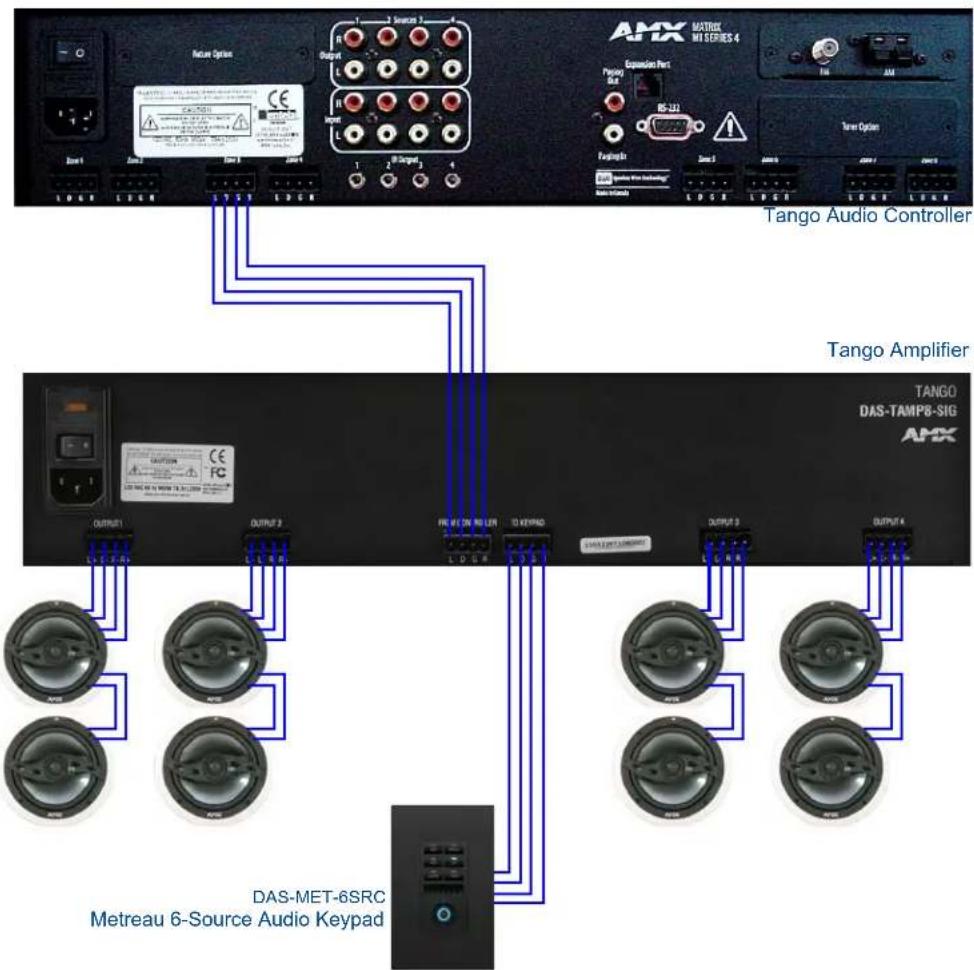
Connect the Tango Amplifier to the Tango Audio Controller via the 4-pin connector labelled From Controller on the rear panel of the Amplifier (see FIG. 3).
Connecting SWT Keypads
Connect SWT Keypads (DAS-MET-6SRC or K-Series) to the Tango Amplifier via the SWT connector labelled To Keypad on the rear panel of the Amplifier (see FIG. 3).

When stripping cable for use with SWT connector, only strip away about 14 " (6mm) of the insulation from each wire. The complete assembly should not have more than 1/32" (1mm) of bare wire exposed from the bottom of the connector.
Wiring Diagram - Single Amplifier
FIG. 3 illustrates the connections from a Tango Audio Controller, and to SWT Speakers and Metreau (SWT) Keypad.
flowchart
graph TD
    subgraph Tango Ampifier
        A["Tango Audio Controller"] --> B["AmX"]
        C["DAS-MET-6SRC Metreau 6-Source Audio Keypad"] --> D["AmX"]
    end
    subgraph Tango Controller
        E["Tango Audio Controller"] --> F["AmX"]
        G["DAS-TAMP8-SIG Metreau 6-Source Audio Keypad"] --> H["AmX"]
    end
    style Tango Ampifier fill:#f9f,stroke:#333
    style Tango Controller fill:#ccf,stroke:#333
    style Tango Controller fill:#cfc,stroke:#333
    style Tango Controller fill:#fcc,stroke:#333
    style Tango Controller fill:#cff,stroke:#333
    style Tango Controller fill:#ffc,stroke:#333
    style Tango Controller fill:#cfc,stroke:#333
    style Tango Controller fill:#fcc,stroke:#333
    style Tango Controller fill:#ffc,stroke:#333
    style Tango Controller fill:#cfc,stroke:#333
    style Tango Controller fill:#fcc,stroke:#333
    style Tango Controller fill:#ffc,stroke:#333
    style Tango Controller fill:#cfc,stroke:#333
    style Tango Controller fill:#fcc,stroke:#333
</details>
FIG. 3 Wiring Diagram - Single Amp
<h1 id="wiring-diagram-expanded-configuration">Wiring Diagram - Expanded Configuration</h1>
FIG. 4 illustrates stacking up to three Tango Amplifiers units per zone, to allow up to 12 speaker pairs (24 channels) in a single zone:

<details>
<summary>flowchart</summary>
```mermaid
graph TD
A["AMX"] -->|DAS-MET-6SRC Metreau 6-Source Audio Keypad| B["Tango Audio Controller"]
B --> C["Note: Only one Keypad can be installed per zone"]
C --> D["Tango Amplifier #1"]
C --> E["Tango Amplifier #2"]
C --> F["Tango Amplifier #3"]
D --> G["AMX"]
E --> H["AMX"]
F --> I["AMX"]
FIG. 4 Wiring Diagram - Expanded Configuration (showing three DAS-TAMP8-SIG 8-Channel Amps)
To "stack" Tango amplifiers, connect the To Keypad connector on the first Tango Amplifier to the From Controller connector on the second Amplifier. To add a third Amp to the configuration, connect the To Keypad connector on the second Amp to the From Controller connector on the third Amp.
The DAS-MET-6SRC Audio Keypad can be connected serially between the Audio Controller and the first Amp as shown in FIG. 4.
It can also be connected serially between the first and second Amp, between the second and third Amp, or to the To Keypad port on Amp #3, but only one Keypad can be connected in one zone.
Wiring and Connections

It's Your World - Take Control™

- Operation/Reference Guide
- Tango Amplifiers
- AMX Limited Warranty and Disclaimer
- IMPORTANT SAFETY INSTRUCTIONS
- Table of Contents
- IMPORTANT SAFETY INSTRUCTIONS ...... a
- Tango Amplifiers ....1
- Rack Mounting 3
- Wiring and Connections 5
- Overview
- Features
- Audio Switching
- Wiring and Connections
- Overview - Speaker Wire Technology (SWT)
- Front and Rear Panel Components
- Cabling Instructions
- Cable Type
- Connecting Zone Outputs (Speakers)
- SWT Connectors
- Connecting SWT Speakers
- Connecting Non-SWT Speakers
- Connecting To a Tango Audio Controller
- Connecting SWT Keypads
- Wiring Diagram - Single Amplifier
Brand : AMX
Model : DAS-TAMP4-SIG
Category : Receiver