MEQ5.2 - Receiver APART - Free user manual and instructions
Find the device manual for free MEQ5.2 APART in PDF.


| Product Type | Audio Receiver (Amplifier) |
| Brand | APART |
| Model | MEQ5.2 |
| Dimensions (W x H x D) | 482 x 44 x 200 mm (19-inch rackmount, 1U) |
| Weight | Approx. 3.0 kg |
| Power Supply | AC 100-240 V, 50/60 Hz |
| Power Consumption | 100 W max. |
| Output Power | 2 x 50 W RMS into 4 Ω |
| Audio Inputs | 2 x unbalanced RCA, 1 x balanced XLR |
| Audio Outputs | 2 x speaker binding posts, 1 x pre-out RCA |
| Frequency Response | 20 Hz – 20 kHz (±1 dB) |
| Total Harmonic Distortion | < 0.05% |
| Signal-to-Noise Ratio | > 90 dB |
| Protection Features | Short-circuit, over-temperature, over-current |
| Cooling | Variable speed fan |
| Mounting | 19-inch rackmount (1U) |
| Operating Temperature | 0°C to 40°C |
| Care and Cleaning | Disconnect power, wipe with a soft dry cloth. Do not use liquids. |
| Safety Notes | Do not expose to rain or moisture. Ensure proper ventilation. |
| Spare Parts and Repairability | Contact APART service for authorized spare parts and repairs. |
| Regulatory Compliance | CE, RoHS |
Frequently Asked Questions - MEQ5.2 APART
User questions about MEQ5.2 APART
0 question about this device. Answer the ones you know or ask your own.
Ask a new question about this device
Download the instructions for your Receiver in PDF format for free! Find your manual MEQ5.2 - APART and take your electronic device back in hand. On this page are published all the documents necessary for the use of your device. MEQ5.2 by APART.
USER MANUAL MEQ5.2 APART
- Read all documentation before operating your equipment. Retain all documentation for future reference.
- Save the carton and packing material even if the equipment has arrived in good condition. Should you ever need to ship the unit, use only the original factory packing.
- Do not spill water or other liquids into or on the unit.
- Make sure power outlets conform to the power requirements listed on the back of the unit.
- Do not use the unit if the electrical power cord is frayed or broken.
• Always operate the unit with the AC ground wire connected to the electrical system ground. - Have gain controls on amplifiers turned down during power-up to prevent speaker damage if there are high signal levels at the inputs.
- Do not connect the inputs / outputs of amplifiers or consoles to any other voltage source, such as a battery, mains source, or power supply, regardless of whether the amplifier or console is turned on or off.
- Power down & disconnect units from mains voltage before making connections.
- Do not use the unit near stoves, heat registers, radiators, or other heat producing devices.
- Do not block fan intake or exhaust ports. Do not operate equipment on a surface or in an environment which may distort the normal flow of air around the unit. If the unit is used in an extremely dusty or smoky environment, the unit should be periodically "blown free" of dust.
- Do not remove the cover. Removing the cover will expose you to potentially dangerous voltages.
- Do not drive the inputs with a signal level greater than that required to drive equipment to full output.
- Do not run the output of any amplifier back into another input.
- Do not ground the red output terminal, never connect a red output terminal to another red output terminal.
- In case of mal-function this device should be serviced by qualified service personnel only.

CAUTION
TO REDUCE THE RISK OF ELECTRIC SHOCK DO NOT REMOVE COVER OR BACK NO USER-SERVICEABLE PARTS INSIDE SERVICING ONLY FOR QUALIFIED PERSONNE


STEREO EQUALIZER
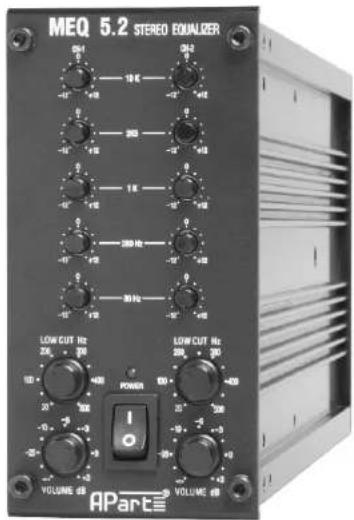
MEQ 5.2
OWNER'S MANUAL

STEREO EQUALIZER
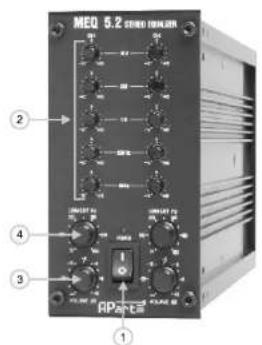
- Power switch
To turn the unit ON or OFF, press the upper or lower part of this button. The LED above the switch will light to indicate that the unit is ON.
- Filter level controls
Each one of these linear potentiometers will boost or attenuate (+/-12dB) the selected frequency at a preset bandwidth. When all knobs are in the centre position, the output of the equalizer has a flat response.
- Volume
This control sets the signal level of the equalizer.
Separate controls for CH1 and CH2
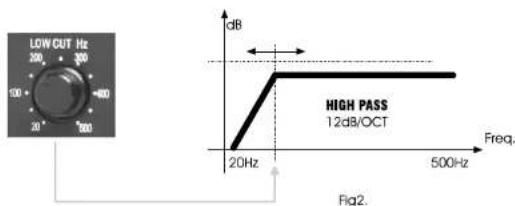
- Low CUT Hz
You can change the frequency of the low cut filter.
This Low Cut filter can be used to remove low frequencies from the signal
You can use this function to protect small speakers like: satellite speakers.horns.
For technical specifications please look at Fig2.
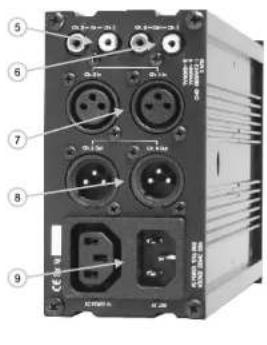
- INPUT RCA
Input RCA cinch connector for CH1 and CH2.
- OUTPUT RCA
Output BCA cinch connector for CH1 and CH2
Z INPUT XLR
Balanced input xir connectors for CH1 and CH2
8 OUTPUT XLR
0.001 OF ALN Balanced output
Balanced output xin connector for the CHT and CHZ. 9. AC inlet
- AC limits
HUMM & BUZZ
- If 'Hum' or Buzz' occurs when connecting different inputs, then this is often caused by 'GROUND or EARTH LOOPS'. If this is the case, remove jumper (JP1). This jumper is located inside the unit.

STEREO EQUALIZER
FEATURES
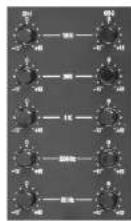
Equalizer function
You can use the appropriate knob to adjust the volume of each frequency.
10KHz, 2K5, 1K, 250, 80Hz
TECHNICAL SPECIFICATIONS
| MEQ 5.2 | |
| Input | Balanced : XLR (775 mV) |
| Unbalanced : RCA cinch (500 mV) | |
| Balanced : XLR (775 mV) | |
| Output | Unbalanced : RCA cinch (500 mV) |
| 20 Hz - 20 kHz | |
| Frequency resopnse | 80 / 250 / 1000 / 2500 / 10000 Hz |
| EQ Freq. | 12 dB / 20-500 Hz adjustable |
| Low Cut | >93 dB |
| Signal to Noise Ratio | < 0.01% |
| Dimensions (H x W x D): | 140 x 70 x 325 mm |
| Weight | 1.5 Kg |