MBA3300NP - Hard Drive FUJITSU - Free user manual and instructions
Find the device manual for free MBA3300NP FUJITSU in PDF.


User questions about MBA3300NP FUJITSU
0 question about this device. Answer the ones you know or ask your own.
Ask a new question about this device
Download the instructions for your Hard Drive in PDF format for free! Find your manual MBA3300NP - FUJITSU and take your electronic device back in hand. On this page are published all the documents necessary for the use of your device. MBA3300NP by FUJITSU.
USER MANUAL MBA3300NP FUJITSU
Careful handling and installation of your HDD is paramount to the longevity of the unit. The internal mechanism of the HDD can be seriously damaged if the HDD is subjected to forces outside the environmental specifications. When transporting the HDD, always use the original packaging in which the HDD was delivered to you, and avoid exposing the HDD to extreme changes in temperature to minimize the risk of condensation.
Handling
- Never drop the unit. Handle it with care.
- Never move the HDD while the disks are spinning. Note that the disks spin when the HDD is powered on and also immediately after power off. Refer to the Start/Stop specification for your HDD.
- Always turn off the power before connecting or disconnecting the interface cable. The same applies to changing any of the switches or terminal settings except Write protect switch on NP model drives.
- Never place the HDD in the vicinity of equipment giving off strong magnetic fields, such as CRT monitors, televisions, or loudspeakers.
- Never use any cleaning agents or liquids on the HDD.
- Always use an antistatic mat and wrist strap when handling the HDD. Hold the HDD by the base casting and never touch the components on printed circuit board assembly.
- Never remove any labels from the HDD or deface them in any way.
- Never open the HDD for any reason. Doing so will void any warranties.
- Always pay close attention to the mounting specifications such as those for sway space and cooling. If the temperature difference between the storage location and installation locations exceeds 10^ C, for temperature acclimation purposes, leave the HDD in the new location for at least two hours before turning it on. This minimizes any risk of condensation forming on the HDD.
The HDD needs NO preventative or periodic maintenance during its service life if properly used in the appropriate environment.
INSTALLATION
-
ORIENTATION-The HDD can be installed flat on any of its six sides. Inclination from vertical or horizontal plane should not exceed 5°.
-
MOUNTING SCREW INSTALLATION-When the mounting screw holes on the side of the HDD are used, be sure to use the two pairs of outer holes. Do not use the center hole in conjunction with only one of the outer holes. The screws must not penetrate the HDD by more than 5.0 millimeters. Impact caused by the electric screwdriver must be within the HDD specifications.
-
COOLING-Allow space above and below the HDD to provide an adequate air flow. Fan cooling is recommended. The HDD temperature measured at center of top cover (label side) should never exceed 60^ . See Table 1.
Table 1. Reference value of airflow
Environmental temperature Required velocity of airflow
| 30°C > 0.3m/s |
| 35°C > 0.6 m/s |
| 40°C > 0.9 m/s |
| 45°C > 1.5 m/s |
-
TERMINATION-A terminator should be installed externally at both ends of the SCSI bus.
-
TERMINATOR POWER-Terminator power must be supplied to terminator for correct operation. This can be supplied from either the HDD, except for NC model or the SCSI bus. If only NC models are connected to the SCCI bus, terminator power should be supplied externally.
-
CONNECTING-To avoid potential damage to the HDD, make sure that connector type and orientation is correct.
CAUTION: Your warranty may be voided if the connector is damaged as a result of incorrect insertion.
FUJITSU LIMITED
Storage Products Group
4-1-1 Kamikodanaka, Nakahara-ku, Kawasaki 211-8588, Kanagawa-ken, Japan
Copyright © 2007 FUJITSU LIMITED
Undermentioned information is effective only in EU for traceability of the EMC Directive
Manufacturer:
Fujitsu Limited
4-1-1 Kamikodanaka, Nakahara-ku, Kawasaki 211-8588, Kanagawa-ken, Japan
Authorized representative importer / distributor in EU:
Fujitsu Europe Limited
Hayes Park Central, Hayes End Road, Hayes, Middlesex, UB4 8FE, United King dom
http://www.fujitsu.com/
C141-E271-01EN
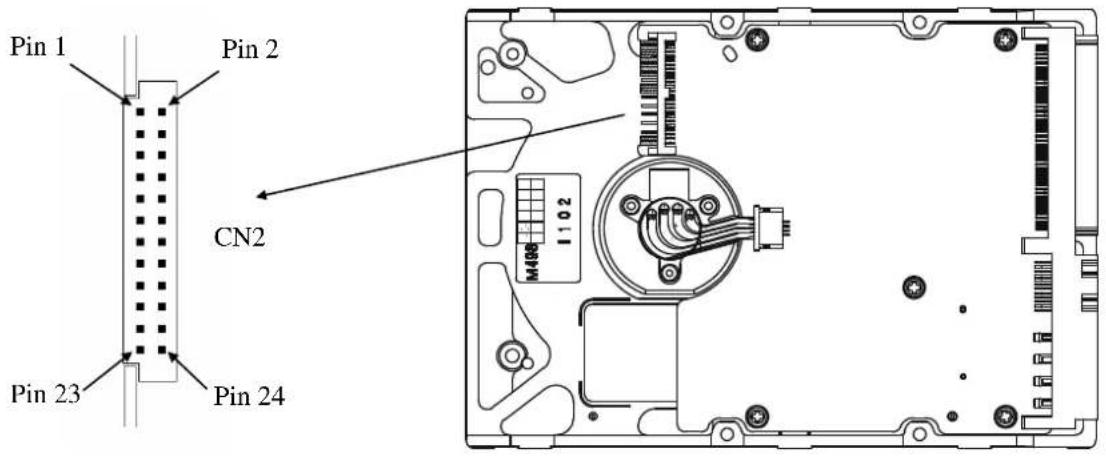
Diagram and user-selectable options (on NP models only)
Below is a diagram of the main board of SCSI HDD and also a summary of the user-selectable options including guidelines for installation of the HDD.
This setting applies only for NP models.
text_image
Pin 1 Pin 2 CN2 Pin 23 Pin 24Figure 1. Option select terminal
Table 2. CN2 Terminal Setting (on NP models only)
| Pin # | Setting Item | Function |
| 1-2 SCSI ID 0 See Table 3. | ||
| 3-4 SCSI ID 1 | ||
| 5-6 SCSI ID 2 | ||
| 7-8 SCSI ID 3 | ||
| 9-10 | Write protect | Open .....Write operation is enabled. |
| Short .....Write operation is disabled. | ||
| 11-12 | Motor start mode | Open .....Starting of motor is controlled with START/STOP UNIT command. |
| Short .....Motor is started immediately after power supply is turned on or microcode is downloaded. | ||
| 13-14 | Force Narrow | Open .....16-bit bus mode |
| Short .....Pull upper 8bits and parity internally when HDD is connected to Narrow SCSI bus. | ||
| 15-16 | Force Single Ended | Open .....Follows DIFFSNS signal level on SCSI bus. |
| Short .....Single-Ended mode | ||
| 17 | GND | |
| 18, 19 | N.C | |
| 20 | IDD Reset | Input signal |
| 21-22 Remote LED Output signal | ||
| 23-24 | Terminal power supply | Open .....HDD does not supply terminator power to SCSI bus. |
| Short .....HDD supplies terminator power to SCSI bus. | ||
Table 3. SCSI ID Setting on CN2 (on NP models only)
| Pin 1-2 | Pin 3-4 | Pin 5-6 | Pin 7-8 | ID | Pin 1-2 | Pin 3-4 | Pin 5-6 | Pin 7-8 | ID |
| Open | Open | Open | Open | 0 | Open | Open | Open | Short | 8 |
| Short | Open | Open | Open | 1 | Short | Open | Open | Short | 9 |
| Open | Short | Open | Open | 2 | Open | Short | Open | Short | 10 |
| Short | Short | Open | Open | 3 | Short | Short | Open | Short | 11 |
| Open | Open | Short | Open | 4 | Open | Open | Short | Short | 12 |
| Short | Open | Short | Open | 5 | Short | Open | Short | Short | 13 |
| Open | Short | Short | Open | 6 | Open | Short | Short | Short | 14 |
| Short | Short | Short | Open | 7 | Short | Short | Short | Short | 15 |
(default)
