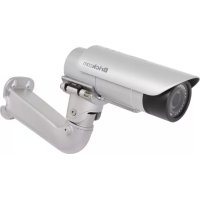
KCM-8211 - Security Camera United Digital Technologies - Free user manual and instructions
Find the device manual for free KCM-8211 United Digital Technologies in PDF.


Pick your language and provide your email: we'll send you a specifically translated version.
| Product Type | Security Camera |
| Brand | United Digital Technologies |
| Model | KCM-8211 |
| Resolution | 1920 x 1080 (Full HD) |
| Night Vision | Up to 30m, IR LEDs |
| Field of View | 90° diagonal |
| Weatherproof Rating | IP66 (outdoor use) |
| Connectivity | RJ45 Ethernet, Wi-Fi 802.11 b/g/n |
| Power Supply | 12V DC, 1A (adapter included) |
| Dimensions (WxHxD) | 70mm x 70mm x 120mm |
| Weight | 300g |
| Storage | microSD card up to 128GB (not included) |
| Motion Detection | Yes, with customizable zones |
| Two-Way Audio | Yes, built-in speaker and microphone |
| Operating Temperature | -20°C to 50°C |
| Mounting | Wall or ceiling mount (bracket included) |
| Maintenance | Clean lens with soft, dry cloth |
| Safety | Built-in surge protection |
| Spare Parts | Power adapter, mounting kit, screws |
| Repair | Contact support for repair options |
Frequently Asked Questions - KCM-8211 United Digital Technologies
How do I reset the KCM-8211 camera to factory defaults?
Press and hold the reset button (located on the camera body) for 10 seconds until you hear a beep. The camera will reboot and restore factory settings.
Can I use the camera without Wi-Fi?
Yes, the KCM-8211 supports wired Ethernet connection via RJ45 for stable networking. You can also use a PoE injector if available.
What mobile app is compatible?
The camera works with the UDT Cam app (available on iOS and Android). Download it from the App Store or Google Play.
How far can the night vision see?
The infrared LEDs provide clear night vision up to 30 meters (100 feet) in complete darkness.
Is the camera weatherproof?
Yes, it has an IP66 rating, meaning it is dust-tight and protected against heavy rain and snow. Suitable for outdoor use.
What type of power supply is required?
The camera requires a 12V DC, 1A power adapter. A compatible adapter is included in the box.
How do I set up motion detection alerts?
In the UDT Cam app, go to Settings > Motion Detection. Enable it and adjust sensitivity, zones, and schedule. Alerts are sent to your phone.
What is the maximum microSD card capacity?
The camera supports microSD cards up to 128GB (Class 10 or higher). Format the card in the app before use.
How to clean the camera lens?
Use a soft, lint-free cloth slightly dampened with water. Gently wipe the lens. Avoid abrasive cleaners.
What is the warranty period?
United Digital Technologies offers a 2-year limited warranty against manufacturing defects. Register your product online for support.
User questions about KCM-8211 United Digital Technologies
0 question about this device. Answer the ones you know or ask your own.
Ask a new question about this device
No questions yet. Be the first to ask one.
Download the instructions for your Security Camera in PDF format for free! Find your manual KCM-8211 - United Digital Technologies and take your electronic device back in hand. On this page are published all the documents necessary for the use of your device. KCM-8211 by United Digital Technologies.