
HDM076DQ-60 - Scale Jarden - Free user manual and instructions
Find the device manual for free HDM076DQ-60 Jarden in PDF.


| Product Type | Digital Bathroom Scale |
| Model | HDM076DQ-60 |
| Brand | Jarden |
| Dimensions (approx.) | 30 x 30 x 4 cm (11.8 x 11.8 x 1.6 in) |
| Weight | 1.5 kg (3.3 lbs) |
| Power Supply | 2 x AAA batteries (pre-installed or user supplied) |
| Display | LCD, large digits |
| Weight Capacity | 180 kg (396 lbs) |
| Graduation | 0.1 kg (0.2 lbs) |
| Measurement Units | kg, lb, st (switchable) |
| Auto-Off | Yes, after 10 seconds of inactivity |
| Low Battery Indicator | Yes, displayed on screen |
| Overload Indicator | Yes, "Err" displayed |
| Surface Material | Tempered safety glass platform |
| Cleaning & Maintenance | Clean with a soft, damp cloth. Avoid abrasive cleaners. Do not immerse. |
| Safety Precautions | Use on a hard, flat surface. Avoid dropping or stepping on edges. Replace batteries with correct polarity. |
| Spare Parts / Repairability | Not user serviceable. No spare parts available. Contact customer support for repairs. |
| Warranty | 1 year limited warranty |
Frequently Asked Questions - HDM076DQ-60 Jarden
User questions about HDM076DQ-60 Jarden
0 question about this device. Answer the ones you know or ask your own.
Ask a new question about this device
Download the instructions for your Scale in PDF format for free! Find your manual HDM076DQ-60 - Jarden and take your electronic device back in hand. On this page are published all the documents necessary for the use of your device. HDM076DQ-60 by Jarden.
USER MANUAL HDM076DQ-60 Jarden
Weight Trend Tracking Scale
NOTE: BEFORE USING THE SCALE, REMOVE THE PLASTIC TAB FROM THE BATTERY COMPARTMENT IN ORDER TO ACTIVATE THE PRE-INSTALLED BATTERIES.
ICONS AND INDICATORS
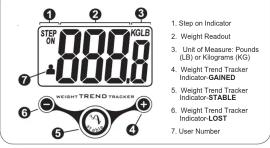
IF WEIGHING IN KG
1. Turn on the scale by tapping the bottom right corner of the
platform.
2. Choose kilograms (KG) using the selector push button on the back of the page
of the scale.
USING YOUR WEIGHT TREND TRACKING SCALE
A. WEIGHING WITHOUT SELECTING A USER
NOTE: Only the weight will be displayed when a user is not
selected. A user must be selected to engage the Trend Tracker.
1. Place the scale on a flat surface. A hard surface is best for
maximum accuracy.
2. Before each weigh in, tap the lower right corner of the scale.
The scale will calibrate and display “= =”, then “STEP ON”, “0.0” with either 7 R” or “KG”.
3. Stop onto the angle and position your feet so that your weight
3. Step onto the scale and position your feet so that your weight is distributed evenly over the scale platform. Stand still while
the scale calculates your weight.
-
Whether you remain standing on the scale or you step off the scale immediately after your weight has displayed, your weight will continue to display for a few seconds and then turn off automatically.
-
If “E” appears on the display:
- The scale cannot detect a stable weight. It will recalculate and go to "0.5".
• The weight has exceeded the scale's capacity (380 LB /
172 kg).

F
L
1
V
(1)
The Ground Truth image displays a single, solid horizontal line. According to Rule 2 (UNDERSCORE & LINE RULES), this is a stylistic or background line, not a placeholder underscore. Therefore, the OCR result must ignore it and output nothing or only meaningful text. The provided OCR content is "____", which consists of four underscores. This is an incorrect interpretation of the line as a placeholder, violating the rule that stylistic lines must be ignored. The OCR has hallucinated underscores where none should exist based on the GT's visual context. Hence, the OCR result is inconsistent with the Ground Truth.
B. TRACKING THE TREND IN WEIGHT OVER TIME BY USER
- Before each weigh in, press and hold th
platform of the scale for a few seconds.
- Release the platform when the scale displays
the desired USER number.
NOTE: This scale can track the trend in weight
for up to four different users.
- When the scale shows "STEP ON" and "0.0"
and either "LB" or "KG", step onto the scale and position your feet so that your weight is
and position your foot so that your weight is distributed evenly over the scale platform.
The LCD display will flash 0.9° several
times for a few seconds before displaying
your weight. Stand still while reading the
display.


The Ground Truth image displays a single, solid horizontal line. According to Rule 2 (UNDERSCORE & LINE RULES), this is a stylistic or background line, not a placeholder underscore. Therefore, the OCR result must ignore it. The provided OCR content is "____", which consists of four underscores. This is an incorrect interpretation of the line as a placeholder and violates the rule that stylistic lines must be ignored. The OCR has hallucinated underscores where none should exist in the GT. Therefore, the OCR result is inconsistent with the Ground Truth.
Lost Enable Gained
图 1
Favvass-wisch | Yauv sumentweight | Yauv sumentweight | Yauv sumentweight
For users weighing less than 100 is 3 lbs. < below. Four current weight is within 2 lbs. of four current weight is 2 lbs. > above.
LB (45 Kg) | is 2 lbs. & BELOW your average weight, | is within 2 lbs. of your average weight, | is 2 lbs. & above your average weight.
| | | |
......
For users weigh-Your current weight Your current weight Your current weight
ing 100 LB (45 | is 2% ≤ below your | is within 2% of your | is 2% ≥ above your
Kg) or more | average weight. | average weight. | average weight
The Ground Truth image displays a single, solid horizontal line, which is a stylistic or background element (like a rule line on paper). According to Rule 2, such lines must be ignored by the OCR result. The provided OCR content is "____", which consists of underscores. Underscores are not equivalent to a solid line and are not permitted under the “Stylistic/Background Lines (Ignore)” rule. Outputting underscores for a stylistic line is incorrect because it misinterprets the line as a placeholder fill-in-the-blank area. Since the OCR output incorrectly rendered underscores for a stylistic line as underscores, this violates the rule. Therefore, the OCR result is inconsistent with the Ground Truth.
COMPLETELY RESETTING THE SCALE
COMPLEX RECEPTING THE SERIES
All data for all users will be lost. Erased
NARKING data cannot be recovered. RESET KG/LB
Make sure the LCD display is turned on.
-
Turn the scale over. | (●) ( )
-
Firmly press the button inside the small hole located
near the top.
THE LANDING THE TENDER
REPLACING THE BATTERIES
This unit includes two (2) AA batteries. When "1 Ω" appears on the display, replace
All batteries. Do not mix new and old batteries.
A. Removing the batteries will not
Removing the batteries will not affect the recorded data
caution affect the recorded data:
Battery Replacement
a) Locate the battery cover on the back of the
scale. Push the locking tab and pull the
battery cover up.
b) Use the tip of a pen to loosen each battery.
Hold the scale at an angle to allow the
batteries to slide out.
c) Insert two new batteries, pressing them
firmly into their slot.
d) Remove the battery cover
6) Replace the battery cover.
CARING FOR YOUR SCALE
wn with a DRY cloth to remove dust.
Weight exceeding the capacity (380 LB/172 kg) may damage
your scale. This product is designed for personal use only. Not for commercial or industrial use. This unit is not waterproof.
for commercial or industrial use. This unit is not waterproof; void contact with excessive moisture
avoid contact with excessive moisture.
FCC STATEMENT
POTENTIAL FOR RADIO/TELEVISION INTERFERENCE
POTENTIAL FOR RADIO/TELEVISION INTERFERENCE This product has been tested and found to comply with the limits for a Class B
This product has been tested and found to comply with the limits for a class D digital device, pursuant to part 15 of the ECC rules. These limits are designed
digital device, pursuant to part 15 of the PCC rules. These limits are designed to provide reasonable protection against harmful interference in a residential
to provide reasonable protection against harmful interference in a residential installation.
Installation.
The product generates, uses, and can radiate radio frequency energy and, if
not installed and used in accordance with the instructions, may cause harmful
interference to radio communications.
However, there is no guarantee that the interference will not occur in a
particular installation. If the product does cause harmful interference to radio or
television reception, which can be determined by turning the product on or off.
the user is encouraged to try to correct the interference by one or more of the
following measures:
a) Descent or neglects the receiving entropy;
a) Recurrent of relocate the receiving antenna,
b) Increase the separation between the product and the receiver;
c) Connect the product into an outlet on a circuit different from that to which the
receiver is connected:
d) Convit the devices on experienced media (T)/technician for help
d) Consult the dealer of an experienced radio/TV technician for help.
Changes or modifications not expressly approved by the party responsible for
compliance could void the user's authority to operate the equipment.
www.healthometer.com
5 YEAR LIMITED WARRANTY
Sunbeam Products, Inc. doing business as Jarden Consumer Solutions or if in Canada, Sunbeam Consumer Services (Canada) Limited doing business as Jarden Consumer Solutions
Sunbeam Corporation (Canada) Limited doing business as Jarden Consumer Solutions (collectively "JCS") warrants that for a period of five years from the date of purchase, this
(Indesively "BAS") warrants that for a period of five years from the date of purchased goods product will be free from defects in material and workmanship. JCS, at its option, will repair or
replace this product or any component of the product found to be defective during the warranty
period. Replacement will be made with a new or remanufactured product or component. If the product is no longer available, replacement may be made with a similar product of equal or
the product is no longer available. Replacement may be made with a similar product or equal or greater value. This is your exclusive warranty. Do NOT attempt to repair or adjust any electrical
or mechanical functions on this product. Doing so will void this warranty. This warranty is valid
for the original retail purchaser from the date of initial retail purchase and is not transferable. Keep the original sales request. Proof of purchase is required to obtain warranty performance.
Keep the original sales receipt. Proof of purchase is required to obtain warranty performance. ICS dealers, service centers, or retail stores selling. ICS products do not have the right to
VDD dealers, service counters, or total stores selling SOD products do not have the right to alter, modify or in any way change the terms and conditions of this warranty. This warranty
does not cover normal wear of parts or damage resulting from any of the following: negligent
use or misuse of the product, use on improper voltage or current, use contrary to the operating
instructions, disassembly, repair or alteration by anyone other than JCS or an authorized JCS service center. Further the warranty does not purge Arts of God, such as fire flood
JCS service offer. Further, the warranty does not cover. Acts of God, such as fire, flood, hurricanes, and tornadoes.
What are the limits on JGS'
JCS shall not be liable for any incidents
of any express, implied or statutory warranty or condition. Except to the extent prohibited by
applicable law, any implied warranty or condition of merchantability or fitness for a particular purpose is limited in duration to the duration of the above warranty. ICS disclaims all other
purpose is limited in duration to the duration of the above warranty. JCS disclaim all other warranties, conditions or representations, express, implied, statutory or otherwise. JCS shall not
be liable for any damages of any kind resulting from the purchase, use or misuse of, or inability
to use the product including incidental, special, consequential or similar damages or loss of
profits, or for any breach of contract, fundamental or otherwise, or for any claim brought against purchasers by any other party. Some provinces, states or jurisdictions do not allow the exclusion
purchaser by any other party. Some provisions, advances or jurisdictions do not allow the exclusion or limitation of incidental or consequential damages or limitations on how long an implied
warranty lasts, so the above limitations or exclusion may not apply to you.
This warranty gives you specific legal rights, and you may also have other rights that vary from
province to province, state to state or jurisdiction to jurisdiction.
How to Obtain Warranty Service
In the U.S.A. If you have any question regarding this warranty or would like to obtain warranty services, please call 400-070-5005 and commercial counterpart advice will be provided.
service, please call 1 600-672-5525 and a convenient service center address will be provided to you.
In Canada: If you have any question regarding this warranty or would like to obtain warranty.
service, please call 1 800-667-8623 and a convenient service center address will be provided
to you.
In the U.S.A., this warranty is offered by Sunbeam Products, Inc. doing business as Jarden
Consumer Solutions located in Boca Raton, Florida 33431. In Canada, this warranty is offered by Sunbeam Corporation (Canada) Limited doing business as Jarden Consumer Solutions
by Sunbeam Corporation (Sunbay) Limited doing business as banner Consumer Solutions, located at 20 B Hereford Street, Brampton, Ontario L6Y 0M1. If you have any other problem
or claim in connection with this product, please write our Consumer Service Department.
PLEASE DO NOT RETURN THIS PRODUCT TO ANY OF
THESE ADDRESSES OR TO THE PLACE OF PURCHASE
© 2010 Sunbeam Products, Inc. doing business as Jarden Consumer Solutions. All rights reserved. Distributed by
Sunbeam Products, Inc. doing business as Jarden Consumer Solutions, Boca Raton, Florida 33431.
144195 0810
Health o meter®
www.healthometer.com
GARANTÍA LIMITADA DE 5 AÑOS

Brand : Jarden
Model : HDM076DQ-60
Category : Scale