
Wireless Multimedia + EasyGlide - Keyboard Micro Innovations - Free user manual and instructions
Find the device manual for free Wireless Multimedia + EasyGlide Micro Innovations in PDF.


| Product Type | Wireless keyboard and mouse combo |
| Model | 4270200 |
| Brand | Micro Innovations |
| Operating Systems | Windows XP/Vista/7, Mac OS X v10.4+ |
| Interface | USB (nano receiver) |
| Keyboard Battery | 2 x AAA alkaline |
| Mouse Battery | 2 x AA alkaline |
| Mouse Technology | Optical with SurfaceTrack |
| Keyboard Features | Multimedia keys, EasyGlide |
| Connection Range | Up to 30 feet (typical) |
| Warranty | Limited lifetime |
| Included Items | Keyboard, mouse, nano dongle, batteries, quick start guide |
| Color | Black (likely) |
| Keyboard Layout | US (assumed) |
| Mouse Buttons | 2 buttons + scroll wheel |
| Dongle Storage | Inside mouse battery compartment |
| Power Switch | On mouse bottom |
| Maintenance | Clean with dry cloth |
| Safety | Use in dry environment, avoid liquid |
| Repairability | Not user-serviceable |
| Spare Parts Available | Batteries, nano dongle |
Frequently Asked Questions - Wireless Multimedia + EasyGlide Micro Innovations
User questions about Wireless Multimedia + EasyGlide Micro Innovations
0 question about this device. Answer the ones you know or ask your own.
Ask a new question about this device
Download the instructions for your Keyboard in PDF format for free! Find your manual Wireless Multimedia + EasyGlide - Micro Innovations and take your electronic device back in hand. On this page are published all the documents necessary for the use of your device. Wireless Multimedia + EasyGlide by Micro Innovations.
USER MANUAL Wireless Multimedia + EasyGlide Micro Innovations
Wireless Multimedia + EasyGlide™ Mouse
Model 4270200

natural_image
Line drawing of a computer keyboard and mouse with an inset showing a small USB drive component (no text or symbols)System Requirements:
- PC with Windows®
XP/Vista /Win7
• Mac OS X v10.4 or above
• Available USB port
Packaging Contents:
- Wireless multimedia keyboard
- EasyGlide™ SurfaceTrack™ mouse
- Nano dongle
• 2 AAA + 2 AA batteries - Quick Start Guide
1
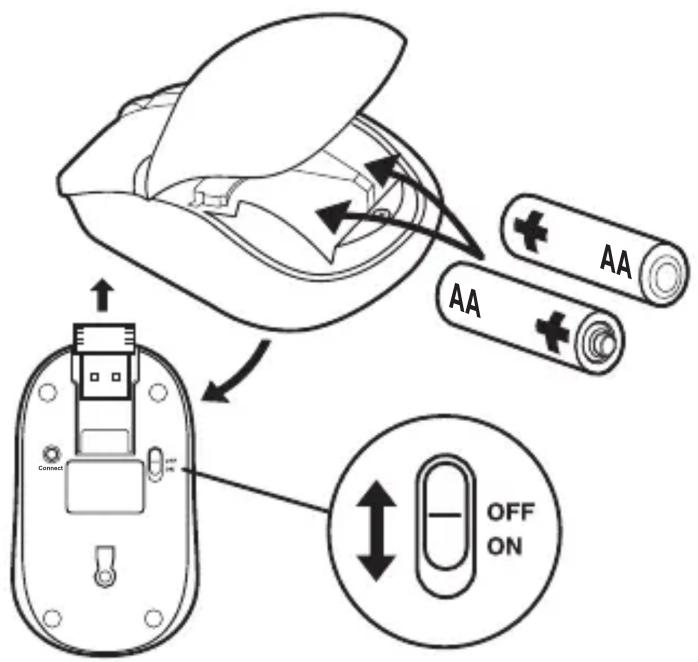
Remove the battery cover and the USB receiver from the optical mouse. Install 2 AA alkaline batteries and replace the cover. Slide the power switch to the On position.
To register this product visit www.digitalinnovations.com and select Product Registration
2

Remove the battery cover from the wireless keyboard. Install 2 AAA alkaline batteries and replace the cover.
3
natural_image
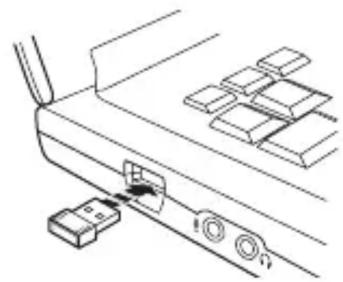
Line drawing of a mechanical component with a connector and multiple rectangular blocks (no text or symbols)Plug the USB receiver into an available USB port on the computer. USB ports are identified as
Note:
Press the Connect button on the bottom of the mouse. The mouse and keyboard will synchronize automatically. Once connected to the computer, it will be available for use.
Limited Lifetime Warranty:
Digital Innovations, LLC, warrants to the first consumer purchaser that this product shipped in its original container, will be free from defective workmanship and materials and agrees that it will, at its option, either repair the defect or replace the defective product or part thereof at no charge to the purchaser for parts or labor. This warranty does not apply to any excluded item(s) set forth below nor to any product the exterior of which has been damaged or defaced, which has been subjected to misuse, abnormal service or handling, or which has been altered or modified in design or construction. The limited warranty described herein is in addition to law. ALL IMPLIED WARRANTIES, INCLUDING THE WARRANTIES OF MERCHANTABILITY AND FITNESS FOR USE, ARE LIMITED TO THE PERIOD FROM THE DATE OF ORIGINAL PURCHASE SET FORTH BELOW. Some states do not allow limitations on how long an implied warranty lasts, so the above limitation may not apply to you. Neither the sales personnel of the seller nor any other person is authorized to make any warranties other than those described herein or to extend the duration of any warranties beyond the time period described herein on the behalf of Digital Innovations, LLC. The warranties described herein shall be the sole and exclusive warranties granted by Digital Innovations, LLC and shall be the sole and exclusive remedy available to the purchaser for the correction of defects, in the manner and for the period of time described herein, shall constitute complete fulfillment of all liabilities and responsibilities of Digital Innovations, LLC to the purchaser with respect to the product and shall constitute full satisfaction of all claims, whether based on contract negligence, strict liability or otherwise. In no event shall Digital Innovations, LLC be liable or in any way responsible for any incidental of consequential economic or property damage. Some states do not allow the exclusion of incidental or consequential damages, so the above exclusion may not apply to you. THIS WARRANTY GIVES YOU SPECIFIC LEGAL RIGHTS. YOU MAY ALSO HAVE OTHER RIGHTS, WHICH VARY FROM STATE TO STATE.
Warranty Period: Limited lifetime warranty on parts and labor from the date of purchase, proof of purchase required. For warranty issues, please contact Digital Innovations at www.digitalinnovations.com.
For Technical Support please visit www.digitalinnovations.com/support.html


Brand : Micro Innovations
Model : Wireless Multimedia + EasyGlide
Category : Keyboard