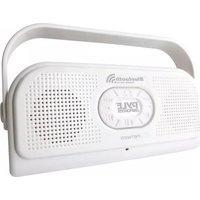
Surf Sound - Docking Station Pyle - Free user manual and instructions
Find the device manual for free Surf Sound Pyle in PDF.


| Product Type | Docking Station |
| Brand | Pyle |
| Model | Surf Sound |
| Color | Black |
| Dimensions (W x H) | 411 mm x 279 mm |
| Weight | Approx. 1.5 kg |
| Power Supply | AC Adapter (included) |
| Speaker Output | 2 x 10W RMS |
| Connectivity | Bluetooth 5.0, Aux Input |
| Compatible Devices | Smartphones, Tablets, MP3 Players |
| Charging Port | USB Port for Device Charging |
| Audio Playback | CD, USB, FM Radio (if applicable) |
| Control Type | Touch Buttons or Remote Control |
| Display | LED Screen |
| Material | Plastic and Metal Grille |
| Care Instructions | Wipe with dry cloth, avoid moisture |
| Safety | Do not expose to water or extreme temperatures |
| Spare Parts | Contact Pyle customer service |
| Warranty | 1 Year Limited Warranty |
Frequently Asked Questions - Surf Sound Pyle
User questions about Surf Sound Pyle
0 question about this device. Answer the ones you know or ask your own.
Ask a new question about this device
Download the instructions for your Docking Station in PDF format for free! Find your manual Surf Sound - Pyle and take your electronic device back in hand. On this page are published all the documents necessary for the use of your device. Surf Sound by Pyle.
USER MANUAL Surf Sound Pyle
2 IN 1 WATERPROOF BLUETOOTH SPEAKER + HANDSET
2 IN 1 WATERPROOF BLUETOOTH SPEAKER + HANDSET

This product is of waterproof construction with quality sound that will enrich your shower time, enjoy your favorite music, anywhere and anytime. This Blantooth wireless system can be easily paired with most Blantooth devices (such as tablets, notebooks, smartphones, PCs, etc.). Also, built - in microphone enables you to talk on the phone while you are showering.
Waterproof performance: The waterproof level of this product complice with IP47 standards, it is designed to ensure normal operation in water at a specified condition.
Bluetooth Wireless Waterproof Shower Speaker & Hands Free

Product Description:
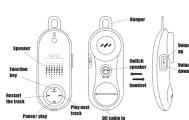
Before using this unit:


* when he battery power is depleted, a beeping alarm will sound, and the LED logo will blink red. After a whole product will run off.
help will be started from a visit, please wait at the
Pairing the product with your device:
- To turn on the product, hold ON/OFF for around 7 seconds, a signal will sound (SPDR) to ensure that the light is light in solution and read
- BE:EP—'keep pressing until the red & blue light is missing, and you hear the sound 'BIB'. this notifies you that it is ready to be-noired.
- The first time the unit is mixed, use your device to search for the product model.
“PBTWP24”
- When your device finds the product model, press to connect, your device will
show if it is successfully connected or not.
- If it is necessarily connected, you can play little through the product. Yes: Terminate are correction between the product and you desire before starting the noise mixture.
Note: Tochnise my connection between the product and any other route, making on pairing procedure. The pairing procedure cannot be started while a Bluetooth connection is established between the product.
www.PyleAudio.com
PYLE
BACK
SIZE: 411(W) X 279(H)mm
COLOUR: BLACK
2 IN 1 WATERPROOF BLUETOOTH SPEAKER + HANDSET
2 IN 1 WATERPROOF BLUETOOTH SPEAKER + HANDSET
2 IN 1 WATERPROOF BLUETOOTH SPEAKER + HANDSET
Up to eight Bluetooth device scan be registered:
When rising or moving devices are registered, the previvals registered devices will be
made both of some devices and regiments, and the ability regiments devices. The deleted starting from the oldest, to register new ones. A device that is registered two
or more is identified as one device.
Play music:
• 2017
Press D|v to increase the Volcanic. (which up to maximum, it will sound a map over D ).
Press vol. to choose for volume (online up to minimum, it will cover a 70mm
FIGURE 701-2 TO EXCLUDE THE VOLUME. (WHIP UP TO MAXIMUM, IT WILL MAKE a 100% sound)
Press to restart the current track. Press tries to play previous track.
- 2017年1月1日
Press to play next track.
Press ▶ to parse/ play the track.
3.2.1.
-
when it is lit green LED, sound source play via handset
-
when it is not lit, sound source plays xin speaker.
-
Mean of the _1 , mean of the _2 , mean of the _3 .
Hold O&OFF for 7 seconds to turn off connection of Bluetooth
Part 1: pick up call:
-
For improving call press, to pick up for calls you will have spent this week
-
For incoming care, you do “BUSH” to pick up the line, you will near 900ms via special
-
Press (with green LED on), you can hear the sound via handset. Press
(with green LED light off) to switch the sound source to speaker
-
W2 manuava su kursa suad venuasis sputus schaffert, yve ne, vol
-
Whenever you are hearing sound source via speaker of microphone, you can't tell you what your voice
Vol+ to adjust the bound source volume.
-
Press 11 once to make sound, press 11 once again to return to normal.
-
After finish the conversation, please choose to hang up.
**Notes: To avoid / reduce objects, please do not turn the speaker to maximum volume.
** The blue light will be blinking for all incoming call.
** The blue light will be blinking when talking via speaker.
** The green light button will sit up when talking via handset
Part 2: Wake a cell
Part 2: Made a cell.
-
Hold for 2 seconds to redial the latest call you make.
-
Some smartphones have voice command, press once to enter voice
-
Full communication is 4. All information, please contact the command function with your smartphone. Eat details, please refer your
smartphone instructions. This feature may be different depending on your
smartphone's settings.
- After you are finished with the conversation, press down to hang up.
t. While you are talking over the phone and have another incoming call, press
prior to pick an incoming call
ON/OFF
-
Press twice ON/OFF to obtain to the other party.
-
Press once 🔊 to hang up the phone
■ 2016-04-20
Part 4 project incoming date
-
While unit is ringing with incoming call, hold call-off to reject the call.
-
If you are slowing the screen more rapidly, you again to continue, playing the app
-
If you are playing the song, please check again to confirm [playing the sun
Speaker & handset sound source switching:
■
Press (with green LED on), you can hear the sound via handset.
Press ON/OFF(with green LED light off) to hear the sound via speaker
Initiating the registration history / reselling the hardware of product:
# volt
While unit is powered off , press order & vol+ together until sounds
a signal with red light.
Caution:
- The value of the information derived from the accounting procedure
Please take full precautions when setting the ringsome volume.
When the product is paired with a mobile phone, a total mortgage city starts one, which is over new credit in an equivalent as a hot stock. Orchelly invest
you, which it isn't may result in an accident of a bear attack. Consequently there the volume from the minimums to set it approximately
The volatile influence of the risk is appropriately.
- Use the damage costs that are controlled to tax products. First, revs result from damaged cables
Never knows this product in a car.
Loving this product in a hot car for many hours will result in rupture of the
built-in batteries, sparking, and other dangers - posing significant danger.
• Do not leave this product under birth temperature conditions.
This product is a precision clostranic device. Avoid using/ keeping this prada
in a location that is subject to high temperature, high humidity or direct sunia
for many hours. When subject to significant temperature changes in the
environment, this product may malfunction due to condensation inside the
product.
Do not touch the metal parts of this product such as the power supply
connectors and the charging cable's connector terminals.
Static electricity or fouling may cause a malfunction or electric shock.
Do not disassemble this product.
operational instructions to the contrary are given in this user's manual. Electric
shock, tire, or turns may result. Make sure to close the waterlight car when using this product in a net or
damp environment.
Make sure to remove any dust, hair, etc., that is present between the waterlight cup and the main unit.
Follow the user's manual instructions of devices (ex. iPhones and mobile
phones) to be connected to this product.
This product can be wirelessly connected to iPhones, mobile phones, etc. The
setting procedures and precautions are different depending on the devices to be
connected to this product. Carefully read the user's manual for these devices
and observe any precautions. Do not reflect this product in a net or down environment for a happy
Do not develop this project in a wet of damp oven/walker lot a long time. If you do not use it.
Any liquid entering this product may result in danger, fire, or electric shock.
Do not keep this product within reach of small children. Unexpected accidents (cry, accidental intention) may result
This product is a precision electronic device. Avoid using/keeping this
product in an environment that is subject to impact/vibration, strong
Burgène Tavon, state electricity, etc.
Risk of evolution if better is replaced by an incorrect type. Disperse of pro
Risk of expansion in battery is replaced by an inductor type. Despite the batteries according to the instructions.
ICC Requirement:
Farming: Changes or modifications to this unit not exclusively approved by
the party responsible for compliance could void the warranty.
NOTE: This equipment has been tested and found to comply with the
units for a Class B digital device, pursuant to Part 15 of the FCC Rules.
these limits are designed to provide reasonable protection against harmful
interference in a residential installation. This equipment generates, uses
nd can radiate radio frequency energy and, if not installed and used in
accordance with the instructions, may cause harmful interference to radio
communication.
However, there is no guarantee that interference will not occur in a
articular installation. If this equipment does cause harmful interference
to radio or television reception, which can be determined by turning the
equipment off and on, the user is encouraged to try to correct the
interference by one or more of the following measures:
- Reorient or relocate the receiving antenna. - Increase the separation between the sentence and receiver.
Connect the equipment into an entlet on a circuit different from
that is which the receiver is connected.
DISPOSAL ONLY
Through APPROVED OUTLETS: (80)
www.Polekarlin.com

Please ensure that the waterlight cap of the DC plug is suacably cloud before print this pair. Drawout can happen to unit by water recipient into the unit.
From the living room which is happy that happens to eat by water sleeping and the bath from to loosely closed water/tight cup.
Water droplets that enter the speaker or microphone holes do not cause damage.
However, the product performance may temporarily decrease until the water droplets are
dried. Problems may include unclear sound and microphone insensitivity. If such
circumstances exist, please remove water droplets and dry the product
[Non-Text]
[Non-Text]
[Non-Text]
[EMPTY]
[Non-Text]
[Non-Text]
[Non-Text]
[Non-Text]
[Non-Text]
[Non-Text]
[Non-Text]
[Non-Text]
[Non-Text]
[Non-Text]
[Non-Text]
[Non-Text]
[Non-Text]
[Non-Text]
[Non-Text]
[Non-Text]
[Non-Text]
[Non-Text]
[Non-Text]
[Non-Text]
[Non-Text]
[Non-Text]
[Non-Text]
[Non-Text]
[Non-Text]
[Non-Text]
[Non-Text]
[Non-Text]
[Non-Text]
[Non-Text]
[Non-Text]
[Non-Text]
[Non-Text]
[Non-Text]
[Non-Text]
[Non-Text]
[Non-Text]
[Non-Text]
[Non-Text]
[Non-Text]
[Non-Text]
[Non-Text]
[Non-Text]
[Non-Text]
[Non-Text]
[Non-Text]
[Non-Text]
[Non-Text]
[Non-Text]
[Non-Text]
[Non-Text]
[Non-Text]
[Non-Text]
[Non-Text]
[Non-Text]
[Non-Text]
[Non-Text]
[Non-Text]
[Non-Text]
[Non-Text]
[Non-Text]
[Non-Text]
[Non-Text]
[Non-Text]
[Non-Text]
[Non-Text]
[Non-Text]
[Non-Text]
[Non-Text]
[Non-Text]
[Non-Text]
[Non-Text]
[Non-Text]
[Non-Text]
[Non-Text]
[Non-Text]
[Non-Text]
[Non-Text]
[Non-Text]
[Non-Text]
[Non-Text]
[Non-Text]
[Non-Text]
[Non-Text]
[Non-Text]
[Non-Text]
[Non-Text]
[Non-Text]
[Non-Text]
[Non-Text]
[Non-Text]
[Non-Text]
[Non-Text]
[Non-Text]
[Non-Text]
[Non-Text]
[Non-Text]
[Non-Text]
[Non-Text]
[Non-Text]
[Non-Text]
[Non-Text]
[Non-Text]
[Non-Text]

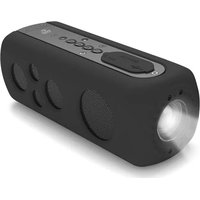

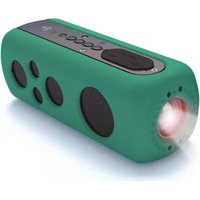

Brand : Pyle
Model : Surf Sound
Category : Docking Station