Present Central Pro 5.7 - Desktop software ADOBE - Free user manual and instructions
Find the device manual for free Present Central Pro 5.7 ADOBE in PDF.


| Product Type | Desktop Software |
| Brand | Adobe |
| Model | Present Central Pro 5.7 |
| Category | Presentation Software |
| Version | 5.7 |
| Supported Platforms | Windows 10/11, macOS 11+ |
| Language | English |
| License Type | Commercial, Subscription-based |
| File Size | Approximately 500 MB |
| Installation Method | Download from Adobe website or Creative Cloud desktop app |
| System Requirements (Minimum) | 4 GB RAM, 2 GHz processor, 1 GB free disk space, 1280x800 display |
| Key Functions | Create, edit, and deliver presentations; support for multimedia (video, audio, images); real-time collaboration; integration with Adobe Creative Cloud; advanced animations and transitions |
| Supported Output Formats | PPTX, PDF, HTML5, video (MP4), and more |
| Templates | Built-in library of professional templates |
| Collaboration Tools | Co-editing, comments, version history, cloud storage |
| Security Features | User authentication, password protection, encryption for shared content |
| Maintenance | Software updates via Creative Cloud (automatic or manual) |
| Reparability | Not applicable (software); reinstall available from installer |
| Customer Support | Adobe Help Center, community forums, online chat |
| Warranty | Standard Adobe software warranty (30 days refund policy) |
Frequently Asked Questions - Present Central Pro 5.7 ADOBE
User questions about Present Central Pro 5.7 ADOBE
0 question about this device. Answer the ones you know or ask your own.
Ask a new question about this device
Download the instructions for your Desktop software in PDF format for free! Find your manual Present Central Pro 5.7 - ADOBE and take your electronic device back in hand. On this page are published all the documents necessary for the use of your device. Present Central Pro 5.7 by ADOBE.
USER MANUAL Present Central Pro 5.7 ADOBE
Adobe® Central Pro Output Server
Transforming business information into effective documents
TABLE OF CONTENTS
1 Adobe Central Pro Output Server
2 How Central Pro Output Server Works
4 The Components of Central Pro Output Server
6 Languages Supported
7 Key Features and Benefits
Today's enterprises are discovering that documents can do much more than just communicate and inform. Compelling, high-quality documents—from printed 1-page invoices to Web-delivered 100-page user manuals—can actually drive business and generate revenue. Targeted marketing programs rely on brochures and other documentation created for highly specific audiences, and other customized documents can help build customer satisfaction and loyalty. The key to producing documents that drive business is a document-generation solution that takes content from multiple sources, dynamically generates documents, and then delivers documents over any device.
Leveraging the strengths of eXtensible Markup Language (XML), Adobe document-generation solutions work together with core enterprise applications to create effective documents that can be delivered in several formats, including Adobe Portable Document Format (PDF), print, fax, e-mail, and the Web. Enterprises that choose Adobe solutions for document generation can get materials to market faster because they do not have to print and physically deliver them, thereby lowering their costs and improving their competitive advantage.
Adobe Central Pro Output Server
Adobe Central Pro Output Server software offers document-generation capabilities that can enable organizations to produce high-quality documents from core business systems. Central Pro Output Server processes XML data streams to create Intelligent Documents quickly and easily, regardless of the application software producing the data. With Central Pro Output Server, organizations can generate documents that maintain their professional image and better communicate with customers, partners, and suppliers.
In many cases, invoices, purchase orders, contracts, and shipping documents are an organization's only touch point with customers, business partners, and other key audiences. Central Pro Output Server helps ensure that business documents clearly convey valuable information and reinforce an organization's image.
Dynamic, Personalized Document Generation
Central Pro Output Server helps improve service and increase customer retention by giving customers easy-to-understand, professional documents in their preferred format. The dynamic document feature in Central Pro Output Server allows application data to control the look-and-feel of each document. Central Pro Output Server can include personalized messages in documents, promoting successful upselling and cross-selling.
Efficient Document Output and Archiving
Central Pro Output Server and Adobe Output Manager work together to manage document generation and the printing process, saving organizations time and money. Output Manager allows organizations to maximize their use of printing resources. It guarantees that documents are printed and provides tools to address print errors through job management and reprint capabilities.
How Central Pro Output Server Works
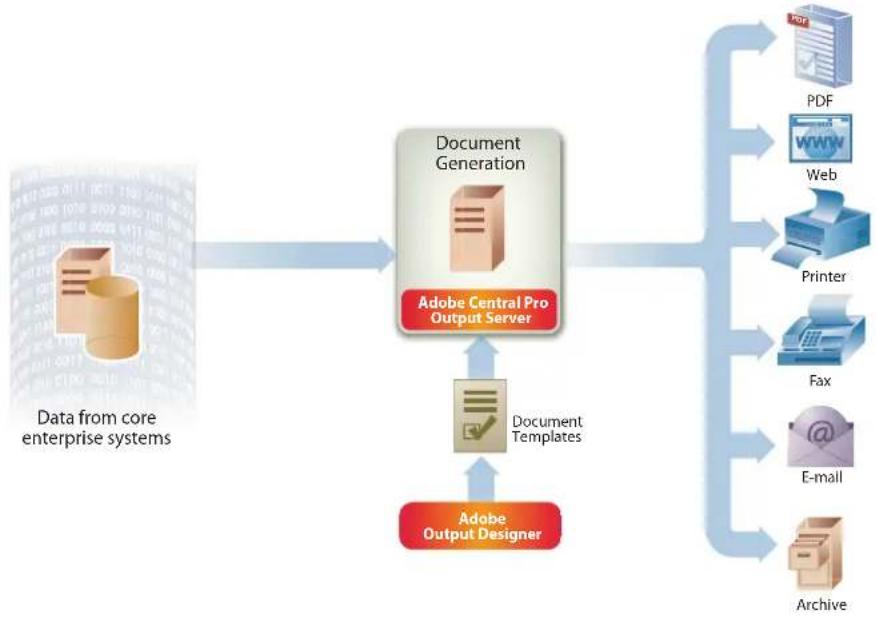
Adobe Central Pro Output Server is a server-based core processing engine for dynamically generating Intelligent Documents. It merges data—including XML—from legacy, enterprise resource planning (ERP), and other core business applications with an electronic document template created using Adobe Output Designer.
flowchart
graph TD
    A["Data from core enterprise systems"] --> B["Document Generation"]
    B --> C["Adobe Central Pro Output Server"]
    C --> D["Document Templates"]
    D --> E["Adobe Output Designer"]
    E --> F["PDF"]
    E --> G["Web"]
    E --> H["Printer"]
    E --> I["Fax"]
    E --> J["E-mail"]
    E --> K["Archive"]
Central Pro Output Server
Central Pro Output Server is the ideal solution for leveraging the data in your existing business applications to produce high-quality document output in a variety of formats.
Central Pro Output Server accepts input from different sources and produces output in a variety of formats, as shown in the figure above. Documents can be dynamically generated to an Adobe PDF document or sent to print, fax, e-mail, or the Web. Additionally, each page of a multipart document can be generated in a different format. If needed, multiple documents can be produced from one data stream for different devices. For example, both shipping documents and labels can be printed in one transaction.
Central Pro Output Server enables organizations to remotely generate documents at different subsidiaries, from a single data stream, and each with a different look-and-feel. This allows a Central Pro Output Server line-of-business application to process data for multiple business units, yet still deliver customer-focused documents locally. A single document can have hundreds of compliance and legal requirements, depending on where it is distributed. With Central Pro Output Server, local formatting and regulatory requirements can be easily met without the need to modify your organization's business application.
Easy Document Design
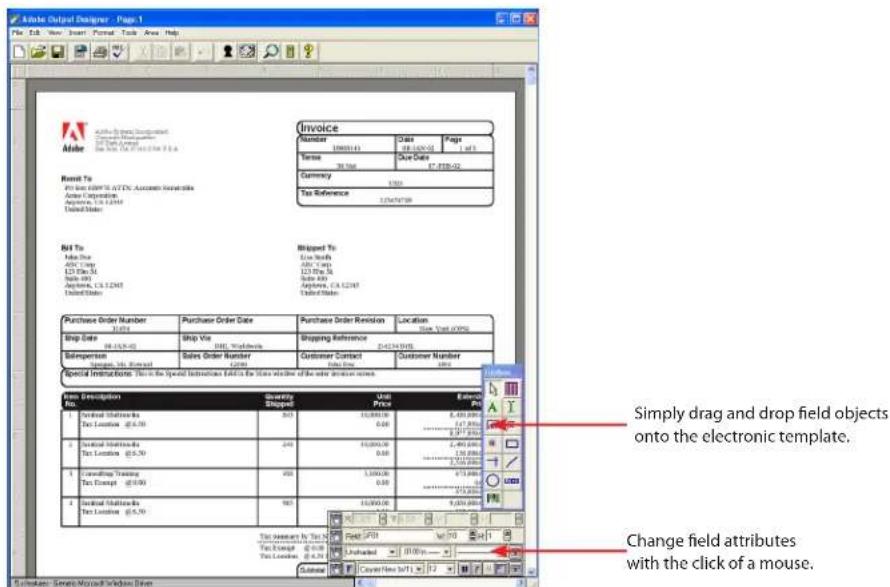
The template design tool in Adobe Output Designer is an easy-to-use graphical user interface (GUI) that is used to format document templates for Central Pro Output Server. Document objects and attributes are easily moved, changed, added, or deleted with the click of a mouse—no programming skills are required. Page sizes, font types, line spacing, justification, shading, logos,
bar codes, and sizing are all specified graphically within the template itself—document formatting is independent of the data-merging process. Output Designer provides a test-generation feature to help ensure that the data is properly positioned within the template.
text_image
Adobe Origin Designer - Page 1 File Edit View Insert Format Tools Area Help Invoice Number Credit Pages 1980/145 Date 2019-02 Terms Due Date Currency $700 Tax Reference 12/04/2009 Receipt To File List EPS/ATTC Accounts Receivables Adder Composites Accounts: 1.4.12M United States Not To Add Date Add Date ED Date Add Date Balance: 0.0 Amounts: 14.12M United States Blipped To: Live North Add Date ED Date Add Date Balance: 0.0 Amounts: 14.12M United States Purchase Order Number Purchase Order Date Purchase Order Revision Location 31/04 Shop Date 2019-02 Stop Date Ship Via Shipping Reference 06:15:14 GMT Sibeperson Sales Order Number Customer Contact Customer Number Sales Order Number Cuts Special Instructions: This is the Special Instructions Exhibit the Time Window of the order instruction name. Print Description Quantity Unit Expense 1 Personal Multiscale Shop Price $33 10,000.00 5,430,000 Tgt Location @$0.50 0.00 127,800 2 Personal Multiscale Shop Price 243 10,000.00 2,490,000 Tgt Location @$0.50 0.00 127,800 3 Consulting Training Shop Price 655 1,000.00 675,800 Tgt Expense @$0.50 0.00 127,800 4 Personal Multiscale Shop Price 162 10,000.00 9,675,800 This January to July 2019 Print PDF Vol. 158 - 43 Pay Except @$0.50 Unchanged 11:00:15 - 5% Tax Lending @$0.50 Outflow Copy New BPTI X 12 Change field attributes with the click of a mouse. Simple drag and drop field objects onto the electronic template. Change field attributes with the click of a mouse.Output Designer
Output Designer is an easy-to-use WYSIWYG electronic template-creation tool. It is used to format document templates for Central Pro Output Server.
As shown in the figure above, field objects are moved by selecting and dragging them to their new location. This feature enables you to place fields anywhere on the page—even multiple times—with only one occurrence of the data appearing in the data stream. For example,
"Amount Due" can appear at the top of a page, with a "Pay This Amount" message at the bottom as a column total. Data from any field also can be represented as a bar code and printed on any laser printer, allowing documents with paper-handling marks, postal bar codes, or shipping data to be generated easily.

text_image
Use different logos and colors for output generated for subsidiaries and foreign offices. Create personalized documents for each customer. Create dynamic documents— growing or shrinking to accommodate the data. Use the number of pages to let custom- ers know they have not missed anything. Easily incorporate complex document design elements such as bar codes. Print data anywhere on the page. For example, put "Amount Due" at the top.Create professional-looking documents without complex programming.
Dynamic Document Generation
The powerful subform capabilities of Central Pro Output Server enable the data to intelligently control the look-and-feel of each document. With dynamic subforms, market-focused business documents can be personalized to satisfy specific customer preferences and your upsell strategies. For example, you can add a tailored message based on customer information. Dynamic subforms can also be used to allocate the exact amount of space required in a document to accommodate repeating information. The document grows to accommodate the exact number of line items, using the minimum number of pages required while maintaining a quality presentation. For instance, you can use the same invoice template to print an invoice with 3 or 153 line items—a vast improvement over the cumbersome and wasteful one-size-fits-all presentation provided by inflexible preprinted form stock. Dynamic subforms also allow free text areas on documents, such as invoices, sales orders, and purchase orders, to grow and shrink as required by the amount of text in the data.
The Components of Central Pro Output Server
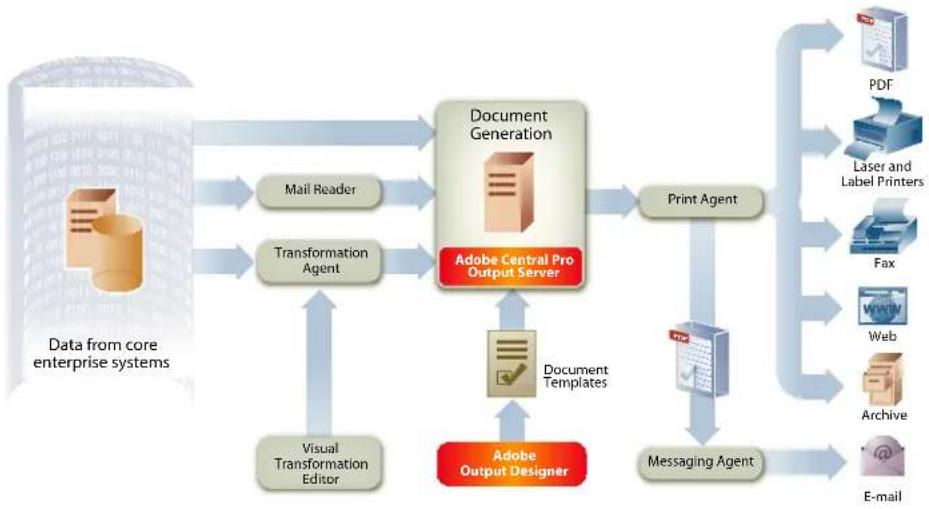
Central Pro Output Server automates document output processes by executing several agents that perform individual tasks, as shown below.
flowchart
graph TD
    A["Data from core enterprise systems"] --> B["Document Generation"]
    B --> C["Print Agent"]
    C --> D["PDF"]
    C --> E["Laser and Label Printers"]
    C --> F["Fax"]
    C --> G["Web"]
    C --> H["Archive"]
    C --> I["E-mail"]
    B --> J["Mail Reader"]
    B --> K["Transformation Agent"]
    B --> L["Visual Transformation Editor"]
    B --> M["Document Templates"]
    B --> N["Adobe Output Designer"]
    N --> O["Document Servers"]
    O --> P["Adobe Central Pro Output Server"]
    P --> Q["Document Templates"]
    Q --> R["Adobe Output Designer"]
Adobe Central Pro Output Server agents work together to create a robust output solution.
Transformation Agent
Central Pro Output Server includes a Transformation Agent, a powerful data-transformation utility that analyzes incoming data streams from any application, extracts the relevant information, and converts the data—at production speed—into a highly-efficient, field-nominated format or XML format. It can accept data in a variety of formats: fixed record, overlay, and character delimited. The Transformation Agent can also perform other actions on an application's data stream:
- Calculations including +, -, *, /, **, log, ln, abs, exp, floor, frac, int, round, sqrt, and trunc.
- Reading data from an external file and using that information in calculations or other functions.
- Currency conversion for documents with dual currencies to meet the EMU Euro requirements.
Visual Transformation Editor
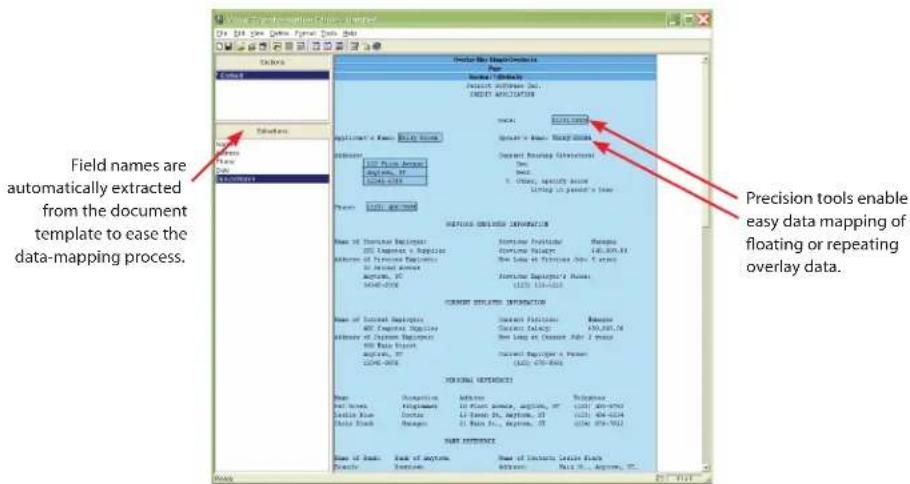
Central Pro Output Server includes a Visual Transformation Editor, which allows the application developer to display a sample data file in a GUI and visually define where and how the Transformation Agent will locate the information that will be extracted.
text_image
Field names are automatically extracted from the document template to ease the data-mapping process. Precision tools enable easy data mapping of floating or repeating overlay data.Visual Transformation Editor
Visual Transformation Editor maps the extracted data into fields defined on a template.
You can also use the Visual Transformation Editor to map the extracted data into fields defined on a template. The Visual Transformation Editor can read the field names of any template created in Output Designer. It also supports dynamic and multipage templates.
Print Agent
The Print Agent is the core component of Central Pro Output Server. It performs the process of merging a template created using Output Designer with data from a core business application, and rendering the document in the format required for the destination output. With Print Agent, you can create a document that can be printed, faxed, or rendered as an Adobe PDF file for print preview, e-mailing, or archiving.
Central Pro Output Server supports a wide variety of output devices, allowing you to leverage your existing hardware. Almost any PostScript or PCI laser printer is supported, including:
- Xerox
- Hewlett-Packard
- Lexmark
Central Pro Output Server also supports thermal transfer printers from the following vendors:
- Zebra
- Intermec
- Datamax
• TEC
In addition, Central Pro Output Server supports printer features such as duplexing, tray selection, page orientation, and size. Laser printers do not require additional hardware to print bar codes.
The Print Agent can transmit output to several fax servers including:
- AIFP HostFax Server
• Fenestrae Faxination - Merkur
- Omtool Fax Sr.
- RightFax
- Teubner Faxgate
- TOPCALL
• VSI-Fax GoldSeries
Messaging Agent and Mail Reader
The Messaging Agent is a Central Pro Output Server component that enables document delivery and customer notification via e-mail. Print-ready documents are easily distributed by e-mail from Central Pro Output Server to a customer's mailbox. For example, instead of printing monthly account statements for mail delivery, an investment dealer can e-mail them to a client or send a message to a pager or cell phone to notify a customer that the statement is ready—saving paper and time.
The Mail Reader provides the ability to read incoming messages and provide data to Central Pro Output Server for further processing. It also can receive data from different sources, such as a client application or an Adobe data capture solution.
The Messaging Agent and Mail Reader both support Microsoft ^® Exchange, Lotus ^® Notes ^® and most SMTP/POP3-enabled mail systems.
Custom Agents
Central Pro Output Server also enables you to create and launch your own agent. Custom agents can be written to perform any task, such as data conversion, communication with external applications, or data transfer.
Languages Supported
In a global, competitive business environment, documents must be created and delivered worldwide. A document must meet the legal requirements for the location in which it is distributed. A global corporation managing multiple businesses and operating in multiple languages can have hundreds of requirements for a single document such as an invoice. These documents must be designed to meet customer requirements as well as the business needs of the organization. For effective communication, documents should be tailored to the recipients and presented to them in their native languages.
Central Pro Output Server supports the needs of organizations around the globe and can generate documents in English, French, German, Swedish, Spanish, Italian, Finnish, Norwegian, Danish, Portuguese, Czech, Polish, Hungarian, Russian, Simplified Chinese, Traditional Chinese, Korean, and Japanese.
System Requirements
Adobe Central Pro Output Server is available for the following platforms:
- Microsoft Windows NT®, Windows® 2000 Server, Windows Server™ 2003
- Sun® Solaris™
- IBM® AIX®
- Red Hat® Linux®
(Intel®-based systems)
- HP-UX ^®
- IBM OS/400® Portable Application Solutions Environment (PASE)
Key Features and Benefits
Central Pro Output Server provides powerful capabilities for generating customer-focused documents from ERP, customer relationship management (CRM), financial, manufacturing, healthcare, and other core business applications. The features and benefits of Central Pro Output Server are summarized below.
| Feature Benefit | |
| Accepts a variety of input formats, including XML, legacy, line-of-business, and ASCII data streams | Integrates quickly with most applications without the need to modify or reprogram systems |
| Produces high-fidelity output in multiple formats to multiple output devices: PDF, HTML, print, fax, or e-mail | Accommodates output requirements of paper/Web environment leveraging multiple output channels to communicate with customers |
| Stores templates and logos on the server; transmits only the data stream across the network | Greatly reduces network traffic (because the ASCII data stream is as small as one-tenth of the typical document size) |
| Works seamlessly with an easy-to-use, feature-rich WYSIWIYG template design tool | Makes template changes quick, easy, and inexpensive |
| Provides extensive document-processing capabilities (graphics, boxes, logos, watermarks, flexible field placement, font control, bar codes, rotated text, and calculated fields) | Generates high-quality documents while eliminating the need for preprinted forms; replicates complex regulatory-compliant documents |