Battery BacPac HD HERO3 - Batterie pour caméra GOPRO - Free user manual and instructions
Find the device manual for free Battery BacPac HD HERO3 GOPRO in PDF.


| Product Type | Camera Battery Pack |
| Brand | GoPro |
| Model | Battery BacPac HD HERO3 |
| Compatibility | GoPro HERO3 cameras |
| Battery Type | Rechargeable Lithium-Ion |
| Capacity | 1500 mAh |
| Voltage | 3.7 V |
| Dimensions (W x H x D) | 60 x 40 x 20 mm |
| Weight | 80 g |
| Charging Method | USB (Micro-USB) |
| Charging Time | Approx. 2.5 hours |
| Operating Time | Extends recording time by up to 2 hours |
| Main Features | Extra battery life for extended recording |
| Maintenance | Keep contacts clean; store in cool, dry place |
| Safety Precautions | Avoid extreme temperatures; do not disassemble |
| Repairability | Non-user-serviceable; dispose of properly |
| Spare Parts | Replacement battery available from GoPro |
| Warranty | 1 year limited warranty |
| Country of Origin | China |
Frequently Asked Questions - Battery BacPac HD HERO3 GOPRO
User questions about Battery BacPac HD HERO3 GOPRO
0 question about this device. Answer the ones you know or ask your own.
Ask a new question about this device
Download the instructions for your Batterie pour caméra in PDF format for free! Find your manual Battery BacPac HD HERO3 - GOPRO and take your electronic device back in hand. On this page are published all the documents necessary for the use of your device. Battery BacPac HD HERO3 by GOPRO.
USER MANUAL Battery BacPac HD HERO3 GOPRO
GoPro adds new camera features through software updates. An update to the original HD HERO and the HD HERO2 is required for compatibility with the Battery BacPac.
To download, visit gopro.com/update.
BaTTeRy BacPac FeaTURes
- Attaches to your GoPro camera to double* battery capacity.
- Plugs into any USB charging source (PC, wall, auto charger).
- Displays the battery level and charge status in LCD window.
- Displays the charge and record activity with LED light.
- May be attached/detached at any time.

text_image
GoPro ① ② ③ ④* Actual battery life may vary.
aTTacHING BaTTeRy BacPac TO GOPRO caMeRa
AttAcHing BAttERy BAcPAc
The Battery BacPac can be attached to the original HD HERO, HD HERO2 and HERO3 cameras.
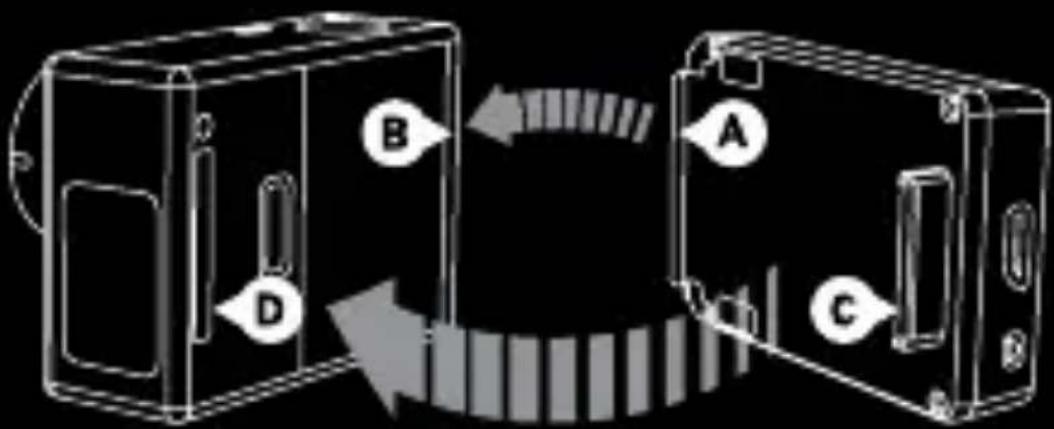
flowchart
graph TD
    A["Component A"] --> B["Component B"]
    B --> C["Component C"]
    C --> D["Component D"]
    D --> A
    style A fill:#f9f,stroke:#333
    style B fill:#ccf,stroke:#333
    style C fill:#cfc,stroke:#333
    style D fill:#fcc,stroke:#333
- Slide hooked end of the Battery BacPac (A) into groove on the right side of camera body (B).
- Insert the Battery BacPac connector (C) into the HERO Port (D) on back of the camera.
REmOVing BAttERy BAcPAc
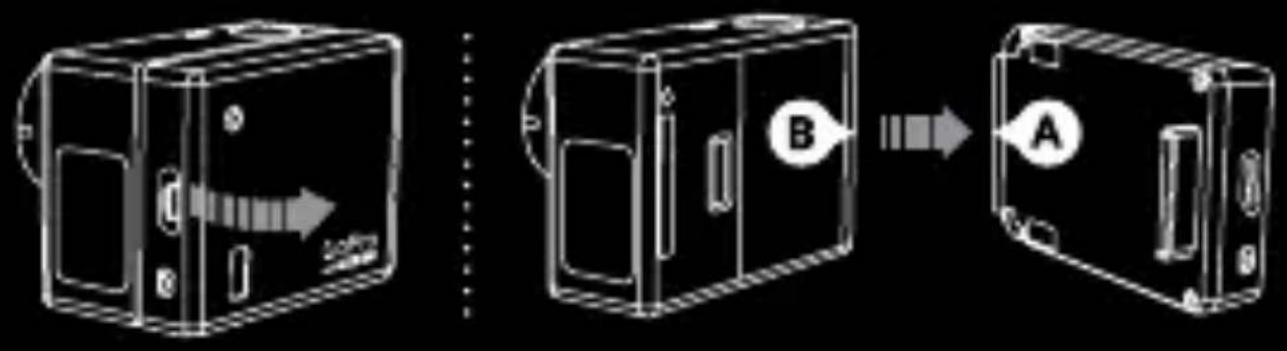
flowchart
graph LR
    A["External Box"] -->|Arrow to Internal Unit| B["Internal Unit"]
    B --> C["Final Unit"]
    style A fill:#f9f,stroke:#333
    style B fill:#bbf,stroke:#333
    note1["Label B"] --> B
    note2["Label A"] --> C
- Pull back on the left side of the Battery BacPac marked with arrow to disconnect from the HERO Port.
- Slide hooked end of the Battery BacPac (A) out of the camera groove (B).
sWaPPING HOUsING DOORs
Attaching the Battery BacPac to your GoPro camera will require the use of a deeper backdoor when used with the housing. Two different backdoors are supplied with the Battery BacPac: one Standard (waterproof) and one Skeleton (non-waterproof). The Skeleton backdoor allows for improved audio capture and camera cooling. The backdoors are compatible with all GoPro housings.
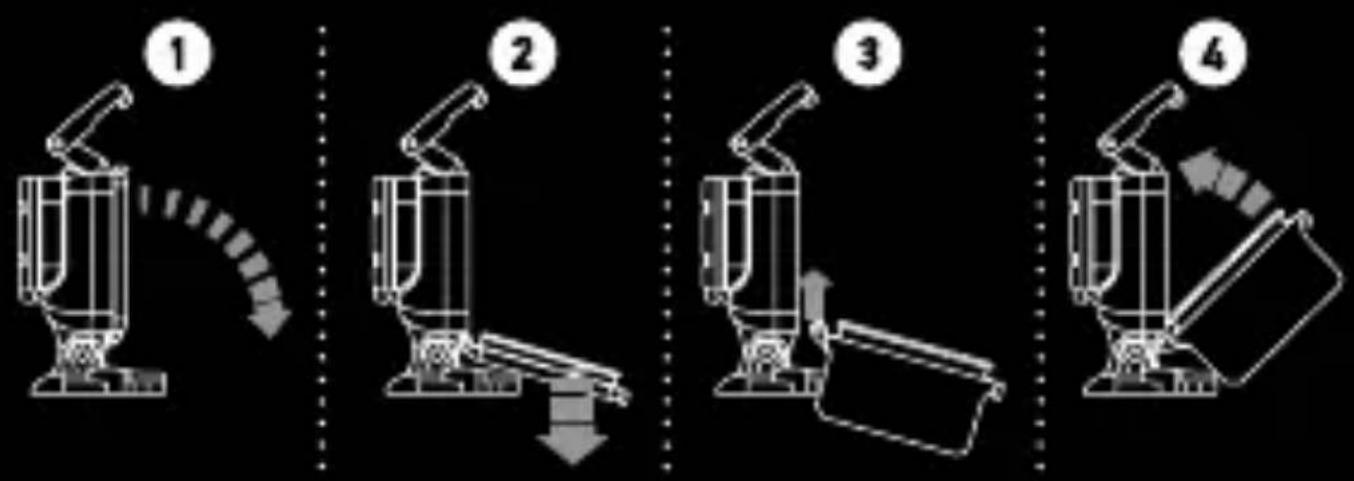
- Open the backdoor of housing so it hangs downward.
- Gently pull downward on the backdoor until it snaps free from hinge.
- Line up replacement backdoor to hinge opening.
- Push upwards on the backdoor until it clicks into place.
UsING THE BaTTeRy BacPac
When connected and powered ON, the Battery BacPac serves as an initial source of power. Once the Battery BacPac is depleted, your GoPro will switch over to draw from the battery inside the camera. The battery switch over happens automatically and does NOT interrupt recording.
When attached to the original HD HERO or the HD HERO2 camera:
- The camera LCD displays “2” next to battery icon when drawing from the Battery BacPac.
- The camera LCD displays “1” when drawing from the internal battery.
- The Battery BacPac LCD displays the BacPac's charge level.
- The Battery BacPac LCD is blank when the BacPac is depleted.
When attached to the HERO3 camera:
- The camera LCD displays charge status of each battery: top row for Battery BacPac, bottom row for internal battery.
- The Battery BacPac LCD displays the BacPac's charge level.
- The Battery BacPac LCD is blank when the BacPac is depleted.
PRO TIP: The Battery BacPac will only function if the GoPro camera battery is installed.
cHEcKing BAttERy BAcPAc POWER LEVEL
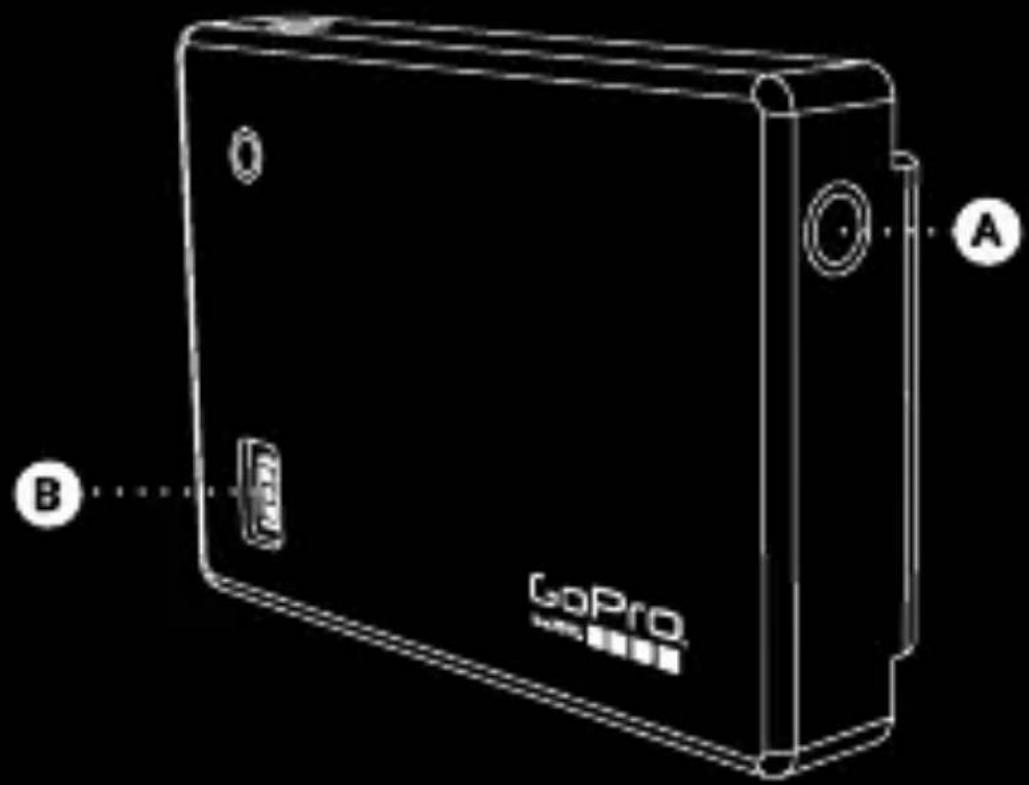
text_image
GoPro A BPress the Battery BacPac button (A) once and LCD (B) will illuminate to show power level.

text_image
100-70% 70-40% 40-10% <10%cHaRGING
DiREct cHARgE

flowchart
graph LR
    A["Laptop"] --> B["Device"]
    B --> C["OR Gate"]
    C --> D["Device"]
    D --> E["Device"]
- Connect the Battery BacPac to a computer or a USB compatible charger via included USB cable.
- While charging, the Battery BacPac will display an animated icon.
- When completely charged, the Battery BacPac will display a full battery icon.
PASS-tHROugH cHARging
For the original HD HERO or the HD HERO2 cameras: A pass-through charge is NOT possible. The Battery BacPac must be connected directly to a USB charging device (see above for DiREct cHARgE).
For the HERO3 camera: A pass-through charge will flow to BOTH the Battery BacPac and the internal HERO3 battery when combined and connected to a source of power (USB connection to computer or other charging device). Power will first charge the internal HERO3 battery, then the Battery BacPac.
IMPORTaNT saFeTy aND HaNDLING INFORMaTION
WARning: Failure to follow these safety instructions could result in fire, electric shock or other injury or damage to the Battery BacPac or other property. Risk of explosion if battery is replaced by an incorrect type. Dispose of used batteries according to instructions.
HAnDLing
The Battery BacPac contains sensitive components. Do not drop, disassemble, open, crush, bend, deform, puncture, shred, microwave, incinerate, paint or insert foreign objects into the Battery BacPac. Do not use Battery BacPac if it has been damaged—for example cracked, punctured or harmed by water.
AVOiD WAtER AnD WEt LOcAtiOnS
Do not use an unprotected Battery BacPac in rain or near washbasins or other wet locations. Do not spill food or liquid onto Battery BacPac. If Battery BacPac gets wet, turn off camera and disconnect before cleaning. Allow to dry thoroughly before using again. Do not dry Battery BacPac with an external heat source such as a microwave oven or hair dryer. Damage to Battery BacPac caused by contact with liquid is not covered under the warranty.
uSing cOnnEctORS AnD PORtS
Never force a connector into a port; check for obstructions on the port. If the connector and port do not join with reasonable ease there may be a mismatch. Be sure the connector matches the port and that connections line up.
AccEPtABLE tEmPERAtuRE RAngE FOR BAttERy BAcPAc
Extreme low or high temperature conditions may temporarily shorten battery life. Avoid dramatic changes in temperature or humidity when using Battery BacPac. The device may get warm during use or charge process.
Learn about more GoPro products at: gopro.com
130-02319-000 REVA

Please Recycle