LS-88 - Uncategorized Listen - Free user manual and instructions
Find the device manual for free LS-88 Listen in PDF.


User questions about LS-88 Listen
0 question about this device. Answer the ones you know or ask your own.
Ask a new question about this device
Download the instructions for your Uncategorized in PDF format for free! Find your manual LS-88 - Listen and take your electronic device back in hand. On this page are published all the documents necessary for the use of your device. LS-88 by Listen.
USER MANUAL LS-88 Listen
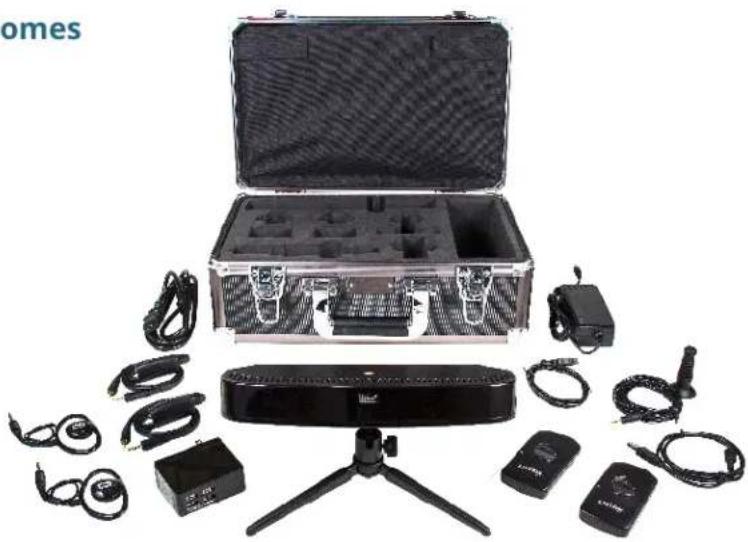
1 Your Portable ListenIR System Comes with the Following Products
• LT-84 ListenIR Transmitter/Radiator Combo
Power Supply
Tripod
- Microphone
- LR-4200-IR iDSP Receivers
• Universal Ear Speakers
- Neck Loop/Lanyards
4-Port USB Charger
• USB to Micro-USB Charging cables
- Assistive Listening Compliance Sign
- Portable IR Carrying Case
natural_image
Assorted electronic devices including a case, remote control unit, and handheld devices arranged around a tripod (no visible text or symbols)2 Transmitter & Microphone Set-Up

text_image
VOLUME CONTROL POWER POWER SWITCH MICROPHONE INPUTStep One: Remove the LT-84, power supply, tripod and microphone.
Step Two: Screw the tripod into the bottom of the LT-84.
Step Three: Plug the power supply into the back of the LT-84.
Step Four: Plug the microphone into the back of the LT-84.
Step Five: Plug power supply into an outlet. Turn on power switch.
Step Six: Make sure the microphone is placed close to the sound source.
Step Seven: Turn the volume all the way up.

PRO TIP:
Make sure that the LT-84 is not concealed behind walls, curtains, or treated glass, as Infrared light needs a clear line-of-sight to the receiver for the best performance.
3 Listening with the iDSP IR Receiver

natural_image
Close-up of a black electronic device with two metallic leads and a central control knob (no visible text or symbols)Step One: Plug the Neck loop/lanyard into both audio jacks on the iDSP IR receiver.

natural_image
Portrait of a smiling man wearing a blue polo shirt and a black lanyard (no text or symbols visible)Step Two:
For Listeners Using Ear Speakers: Plug the ear speaker into the audio jack two thirds up the Neck loop/lanyard, then place the Neck loop/ lanyard around the listener's neck, and the speaker on the ear.
text_image
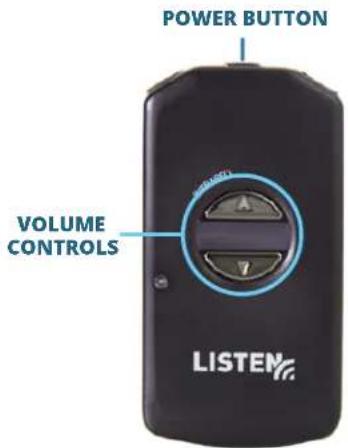
POWER BUTTON VOLUME CONTROLS LISTEMStep Three: Turn on by holding down the power button for one second; turn off by holding down for three seconds.
Step Four: Adjust volume with the volume buttons on the front of the receiver.

PRO TIP:
Make sure your iDSP IR Receiver is worn on the outside of clothing for the best performance.
For Listeners with Telecoils:
Telecoil users do not need an ear speaker. Place the Neck loop/lanyard around the listener's neck; it will interact with the listener's telecoil.
4 Charging your iDSP IR Receiver
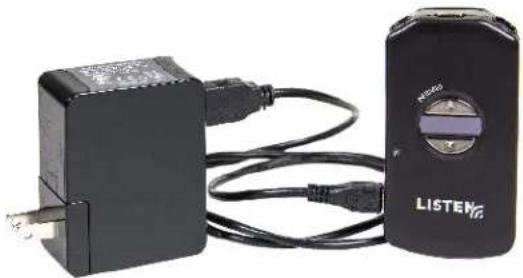
There are two ways to charge your iDSP IR Receiver.
natural_image
Two electronic devices: a black-and-white charging unit connected to a black listeners device with cable (no visible text or symbols)Option One: Use the 4-Port USB Charger and USB to Micro-USB charging cables. Insert the charging cables into the receiver and charger, then plug into an outlet to charge.
Option Two: Use the USB to Micro-USB charging cables with your PC. Insert the charging cables into the receiver, then plug into the USB on your computer.

PRO TIP:
It is best to let the receivers charge fully between each use.