
PPT001 - Digital SLR Camera PUR - Free user manual and instructions
Find the device manual for free PPT001 PUR in PDF.


| Brand | PUR |
| Model | PPT001 |
| Product Type | Digital SLR Camera |
| Image Sensor | APS-C CMOS |
| Effective Pixels | 24.2 MP |
| Lens Mount | PUR Bayonet |
| ISO Sensitivity | 100 - 25600 |
| Shutter Speed | 30 - 1/4000 sec |
| Continuous Shooting | Up to 5 fps |
| Viewfinder | Optical pentamirror |
| LCD Screen | 3.0 inch TFT LCD, 920k dots |
| Video Recording | Full HD 1080p at 30 fps |
| Storage Media | SD/SDHC/SDXC memory card |
| Connectivity | USB 2.0, HDMI mini, Wi-Fi |
| Power Source | Rechargeable Li-ion battery |
| Battery Capacity | 1200 mAh |
| Dimensions (W x H x D) | 130 x 97 x 71 mm |
| Weight (with battery) | Approx. 500 g |
| Operating Temperature | 0°C to 40°C |
| Cleaning | Use dry soft cloth; avoid liquids |
| Safety | Do not disassemble; keep away from water |
| Spare Parts | Battery, charger, lens cap available |
| Warranty | 1 year limited |
Frequently Asked Questions - PPT001 PUR
User questions about PPT001 PUR
0 question about this device. Answer the ones you know or ask your own.
Ask a new question about this device
Download the instructions for your Digital SLR Camera in PDF format for free! Find your manual PPT001 - PUR and take your electronic device back in hand. On this page are published all the documents necessary for the use of your device. PPT001 by PUR.
USER MANUAL PPT001 PUR
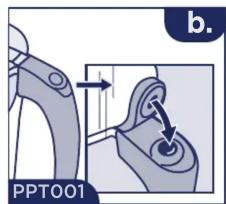
a. To remove lid, lift tab to unlock.
b. To replace lid with models with rubber tab, lock the tab in place.
a. Para quitar la tapa, levante la pestaña para desbloquearla.
b. Para volver a colocar la tapa con modelos con pestaña de goma, bloquee la pestaña en su lugar.

natural_image
Illustration of a medical device with arrows indicating movement or force (no text or symbols)Remove filter light from underside of lid before washing. Push tab away and lift to remove light. Replace before using.
Rinse filter for 15 seconds. Install filter then twist and lock to align.
Hold reset button for 10 seconds until it blinks green.
natural_image
Illustration of a cleaning or cleaning device with a funnel and container (no text or symbols)Fill reservoir with cool tap water and enjoy!
Filter Light flashes green with every pour.
Replace filter when light flashes red.
Filters faster (Included with system).
(Certified with system, sold separately).
40 gallons (151 liters), up to 2 months
Max Water Temp: 82°F (28°C)
Min Water Temp: 34^ F ( 2^ C)
Filter will last up to 2 months.
Independently Certified / Certificado Independientemente

Effective water filter that does not remove fluoride from water.
Visit PUR.com/PDS for performance data sheet and filter replacement information.
NSF/ANSI Standard 401 has been deemed as “incidental contaminants/emerging compounds.” Incidental contaminants are those compounds that have been detected in drinking water supplies at trace levels. While occurring at only trace levels, these compounds can affect the public acceptance/perception of drinking water quality.
This PUR Pitcher is not intended to purify water. Do Not use with water that is microbiologically unsafe or of unknown quality without adequate disinfection before or after the system. PUR does not filter microbes.

Brand : PUR
Model : PPT001
Category : Digital SLR Camera