DC-T4516WRX-A - Security Camera IDIS - Free user manual and instructions
Find the device manual for free DC-T4516WRX-A IDIS in PDF.


| Product Type | Security Camera |
| Model | DC-T4516WRX-A |
| Brand | IDIS |
| Resolution | 4MP (2560 x 1440) |
| Lens | Fixed focal, 2.8mm |
| Night Vision | Infrared LEDs up to 30m |
| Field of View | Horizontal: 103°, Vertical: 57° |
| Power Supply | PoE (IEEE 802.3af) or DC 12V |
| Power Consumption | Max 7W |
| Dimensions (Ø x H) | 70mm x 163mm |
| Weight | 500g |
| IP Rating | IP67 (weatherproof) |
| Operating Temperature | -30°C to 60°C |
| Storage | MicroSD card slot (up to 256GB), NVR support |
| Video Compression | H.265/H.264 |
| Motion Detection | Yes (configurable areas) |
| Audio | Built-in microphone |
| Network Interface | RJ45 10/100 Mbps |
| Protocols | TCP/IP, HTTP, DHCP, DNS, RTSP, ONVIF |
| Maintenance | Clean lens with soft dry cloth; avoid harsh chemicals |
| Security | User authentication, HTTPS, firmware encryption |
| Compliance | CE, FCC, RoHS |
Frequently Asked Questions - DC-T4516WRX-A IDIS
User questions about DC-T4516WRX-A IDIS
0 question about this device. Answer the ones you know or ask your own.
Ask a new question about this device
Download the instructions for your Security Camera in PDF format for free! Find your manual DC-T4516WRX-A - IDIS and take your electronic device back in hand. On this page are published all the documents necessary for the use of your device. DC-T4516WRX-A by IDIS.
USER MANUAL DC-T4516WRX-A IDIS
Before reading this manual
This is a basic installation manual for use of an IDIS network camera. Users who are using this product for the first time, as well as users with experience using comparable products, must read this operation manual carefully before use and heed to the warnings and precautions contained herein while using the product. Safety warnings and precautions contained in this operation manual are intended to promote proper use of the product and thereby prevent accidents and property damage and must be followed at all times. Once you have read this operation manual, keep it at an easily accessible location for future reference.

- The manufacturer will not be held responsible for any product damage resulting from the use of unauthorized parts and accessories or from the user's failure to comply with the instructions contained in this manual.
- The information in this document is believed to be accurate as of the date of publication even though explanation about some functions may not be incorporated. The manufacturer is not responsible for any problems resulting from the use thereof. The information contained herein is subject to change without notice. Revisions or new editions to this publication may be issued to incorporate such changes.
- It is recommended that first-time users of this network camera and individuals who are not familiar with its use seek technical assistance from their retailer regarding product installation and use.
- If you need to disassemble the product for functionality expansion or repair purposes, you must contact your retailer and seek professional assistance.
- Both retailers and users should be aware that this product has been certified as being electromagnetically compatible for commercial use. If you have sold or purchased this product unintentionally, please replace with a consumer version.
Safety Symbols
| Symbol | Type Description | |
 | Warning | An important instruction or set of important instructions that can lead to severe injury or even death if not followed. |
 | Caution | An instruction or set of instruction that can lead to personal injury and/or property damage if not followed. |
In-Text
| Symbol | Type Description |
 | Caution Important information concerning a specific function. |
 | Note Useful information concerning a specific function. |
Safety Precautions
WARNING
RISK OF ELECTRIC SHOCK
DO NOT OPEN
WARNING: TO REDUCE THE RISK OF ELECTRIC SHOCK,
DO NOT REMOVE COVER (OR BACK).
NO USER-SERVICEABLE PARTS INSIDE.
REFER SERVICING TO QUALIFIED SERVICE PERSONNEL.
Important Safeguards
1. Read Instructions
All the safety and operating instructions should be read before the appliance is operated.
2. Retain Instructions
The safety and operating instructions should be retained for future reference.
3. Cleaning
Unplug this equipment from the wall outlet before cleaning it. Do not use liquid aerosol cleaners. Use a damp soft cloth for cleaning.
4. Attachments
Never add any attachments and/or equipment without the approval of the manufacturer as such additions may result in the risk of fire, electric shock or other personal injury.
5. Water and/or Moisture
Do not use this equipment near water or in contact with water.
6. Placing and Accessories
Do not place this equipment on an wall or ceiling that is not strong enough to sustain the camera. The equipment may fall, causing serious injury to a child or adult, and serious damage to the equipment. Wall or shelf mounting should follow the manufacturer's instructions, and should use a mounting kit approved by the manufacturer.

This equipment and cart combination should be moved with care.
Quick stops, excessive force, and uneven surfaces may cause the equipment and cart combination to overturn.
Do not place this equipment in an enclosed space. Sufficient ventilation is required to prevent an increase in ambient temperature which can cause malfunction or the risk of fire.
7. Power Sources
This equipment should be operated only from the type of power source indicated on the marking label. If you are not sure of the type of power, please consult your equipment dealer or local power company.
You may want to install a UPS (Uninterruptible Power Supply) system for safe operation in order to prevent damage caused by an unexpected power stoppage. Any questions concerning UPS, consult your UPS retailer.
8. Power Cord
Operator or installer must remove power and TNT connections before handling the equipment.
9. Lightning
For added protection for this equipment during a lightning storm, or when it is left unattended and unused for long periods of time, unplug it from the wall outlet and disconnect the antenna or cable system. This will prevent damage to the equipment due to lightning and power-line surges. If thunder or lightning is common where the equipment is installed, use a surge protection device.
10. Overloading
Do not overload wall outlets and extension cords as this can result in the risk of fire or electric shock.
11. Objects and Liquids
Never push objects of any kind through openings of this equipment as they may touch dangerous voltage points or short out parts that could result in a fire or electric shock. Never spill liquid of any kind on the equipment.
12. Servicing
Do not attempt to service this equipment yourself. Refer all servicing to qualified service personnel.
13. Damage requiring Service
Unplug this equipment from the wall outlet and refer servicing to qualified service personnel under the following conditions:
A. When the power-supply cord or the plug has been damaged.
B. If liquid is spilled, or objects have hit the equipment.
C. If the equipment has been exposed to rain or water.
D. If the equipment does not operate normally by following the operating instructions, adjust only those controls that are covered by the operating instructions as an improper adjustment of other controls may result in damage and will often require extensive work by a qualified technician to restore the equipment to its normal operation.
E. If the equipment has been dropped, or the cabinet damaged.
F. When the equipment exhibits a distinct change in performance — this indicates a need for service.
14. Replacement Parts
When replacement parts are required, be sure the service technician has used replacement parts specified by the manufacturer or that have the same characteristics as the original part. Unauthorized substitutions may result in fire, electric shock or other hazards.
15. Safety Check
Upon completion of any service or repairs to this equipment, ask the service technician to perform safety checks to determine that the equipment is in proper operating condition.
16. Field Installation
This installation should be made by a qualified service person and should conform to all local codes.
17. Tmra
A manufacturer's maximum recommended ambient temperature (Tmra) for the equipment must be specified so that the customer and installer may determine a suitable maximum operating environment for the equipment.
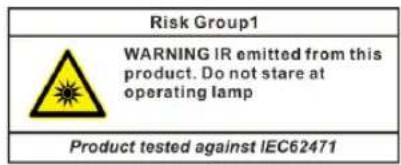
Warning: This product emits infrared light. Do not look into the IR LED.
FCC Compliance Statement
THIS EQUIPMENT HAS BEEN TESTED AND FOUND TO COMPLY WITH THE LIMITS FOR A CLASS A DIGITAL DEVICE, PURSUANT TO PART 15 OF THE FCC RULES. THESE LIMITS ARE DESIGNED TO PROVIDE REASONABLE PROTECTION AGAINST HARMFUL INTERFERENCE WHEN THE EQUIPMENT IS OPERATED IN A COMMERCIAL ENVIRONMENT. THIS EQUIPMENT GENERATES, USES, AND CAN RADIATE RADIO FREQUENCY ENERGY AND IF NOT INSTALLED AND USED IN ACCORDANCE WITH THE INSTRUCTION MANUAL, MAY CAUSE HARMFUL INTERFERENCE TO RADIO COMMUNICATIONS. OPERATION OF THIS EQUIPMENT IN A RESIDENTIAL AREA IS LIKELY TO CAUSE HARMFUL INTERFERENCE, IN WHICH CASE USERS WILL BE REQUIRED TO CORRECT THE INTERFERENCE AT THEIR OWN EXPENSE.
WARNING: CHANGES OR MODIFICATIONS NOT EXPRESSLY APPROVED BY THE PARTY RESPONSIBLE FOR COMPLIANCE COULD VOID THE USER'S AUTHORITY TO OPERATE THE EQUIPMENT. THIS CLASS OF DIGITAL APPARATUS MEETS ALL REQUIREMENTS OF THE CANADIAN INTERFERENCE CAUSING EQUIPMENT REGULATIONS.
WEEE (Waste Electrical & Electronic Equipment)
Correct Disposal of This Product
(Applicable in the European Union and other European countries with separate collection systems)

This marking shown on the product or its literature, indicates that it should not be disposed with other household wastes at the end of its working life. To prevent possible harm to the environment or human health from uncontrolled waste disposal, please separate this from other types of wastes and recycle it responsibly to promote the sustainable reuse of material resources.
Household users should contact either the retailer where they purchased this product, or their local government office, for details of where and how they can take this item for environmentally safe recycling.
Business users should contact their supplier and check the terms and conditions of the purchase contract. This product should not be mixed with other commercial wastes for disposal.
Copyright
© 2021 IDIS Co., Ltd.
IDIS Co., Ltd. reserves all rights concerning this operation manual.
Use or duplication of this operation manual in part or whole without the prior consent of IDIS Co., Ltd. is strictly prohibited.
Contents of this operation manual are subject to change without prior notice for reasons such as functionality enhancements.
Registered Trademarks
IDIS is a registered trademark of IDIS Co., Ltd.
Other company and product names are registered trademarks of their respective owners.
This product contains software built partially on open-source content. You may obtain the complete corresponding source code depending on whether or not the source is publicly available under a license policy. For more information, refer to System > General page. This product includes software developed by the University of California, Berkeley and its contributors, and software developed by the OpenSSL Project for use in the OpenSSL Toolkit (http://www.oepnssl.org/). Also, this product includes cryptographic software written by Eric Young (eay@cryptsoft.com).
1
Part 1 – Introduction......6
Product Features 6
Accessories....7
Overview 8
Body....8
Cable 9
Installation....9
Inserting a SD Memory Card....10
Waterproof Cable Installation....10
Installation....11
Dimensions....12
2
Part 2 - Camera Connection ....13
With DirectIP™ NVR-based Layout....13
With non DirectIP™ NVR-based Layout 14
3
Part 3 - Appendix....15
Troubleshooting 15
Specifications 16
Product Features
DC-T4516WRX / DC-T4516WRX-A is an IP-based network camera that compresses and transmits video over ethernet.
You can use the IDIS Discovery program to change network camera settings or the IDIS Solution Suite Compact program to manage multiple network cameras. In addition, the embedded web server (IDIS Web) lets you remotely view live video using a web browser. In addition, you can use the IDIS Solution Suite Compact to manage network cameras and view/record video.

In this operation manual, the term Remote System refers to the computer on which the remote program (IDIS Solution Suite Compact or IDIS Web) is running.
- Supports DirectIP mode working with a DirectIP™ NVR that allows users to simply set up all required configurations without a PC
• Supports ONVIF protocol (Profile S) - Multi-streaming for high-resolution and high-quality video monitoring and simultaneous recording in real-time as well as flexible configurations for those
• Supports H.265 and H.264 video compression and M-JPEG still image compression algorithms
• Supports 4-stage video compression rate and multiple compression resolutions - Two-way audio communication support for remote audio dialog
- Video stream buffering to counter pre-/post-event buffering and network delays for improved network recording reliability
- Remote monitoring via web browser or remote software
• Automatic web casting code (HTML) generation -
Up to 10 simultaneous remote monitoring connections
-
IP filtering, HTTPS, SSL, IEEE 802.1X, and configurable user authority levels for greater security
• Network bandwidth limitation and MAT features for more efficient use of network bandwidth - Easy network access via UPnP (Universal Plug and Play) function and embedded mDNS (Multicast DNS) protocol
- Wide dynamic range compensation (True WDR) for improved video quality in high-contrast situations
- Slow shutter support for improved low-lighting video capture performance
• Day & Night feature (built-in IR cut filter changer) - Quick and easy firmware upgrade over the network
- Redundant firmware and auto recovery features for improved system stability
• Network-based integrated management of multiple network cameras - Multiple event detection modes: Motion Detection, Trip Zone, and Tampering
- Backup storage on a micro SD memory card as a safeguard against data loss during network interruptions
• Features a fixed focus lens(mega pixel lens) - IK10, IP67-level for water resistant protection and dust proof against rain and dust

Remote monitoring and recording via multistreaming are available using the IDIS Solution Suite Compact program. For more information on using IDIS Solution Suite Compact, refer to its operation manual.

There is a limit to the number of users allowed to connect remotely via the Internet at the same time.
Accessories
Upon purchasing the product, check inside the box to make sure all the following accessories are included. External appearances and colors of the accessories may vary depending on the model.
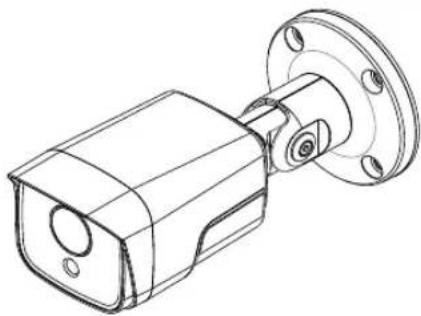 | 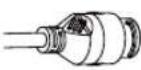 |
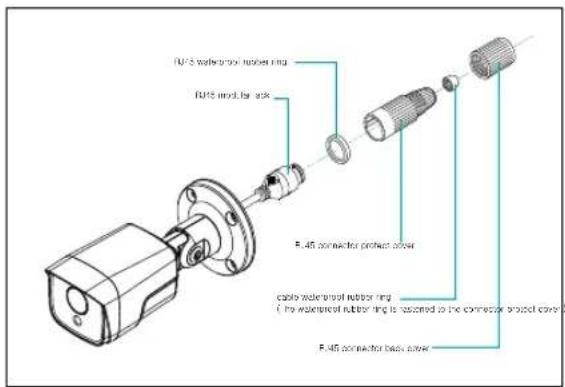
| Network Camera | RJ45 moduler jack, RJ45 waterproof rubber ring, RJ45 connector protect cover, cable waterproof rubber ring, RJ45 connector back cover |
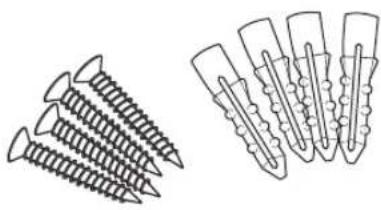 |  |
| Screws and Anchors (each 4 ea.) Quick Guide | |
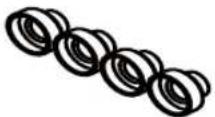 | |
| Bushings (4 ea.) |
Overview

Product color and design may vary depending on the model.
Body
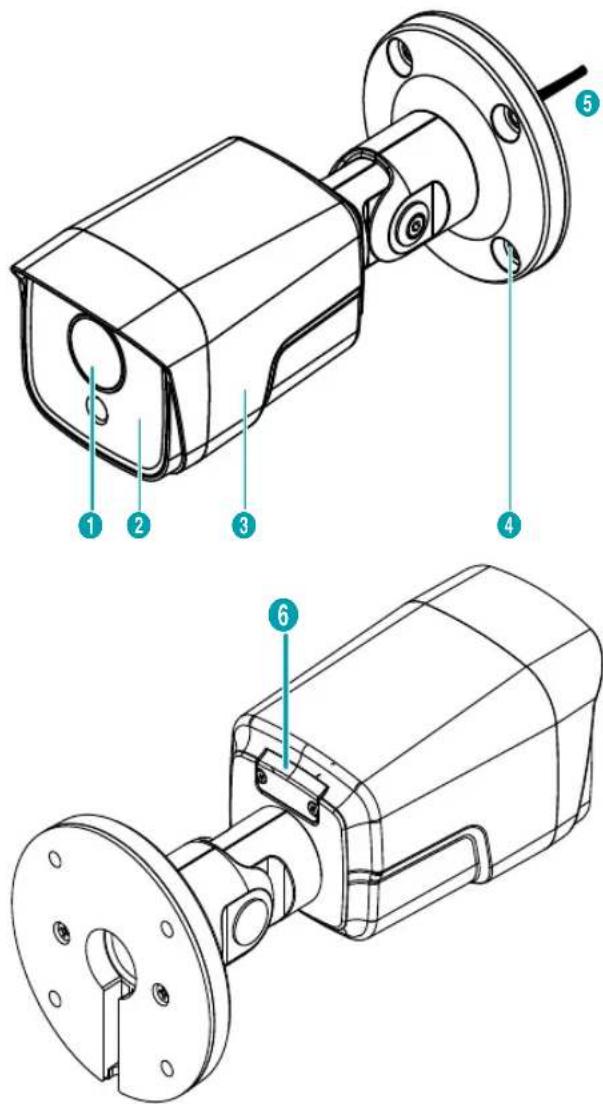
| 1 | Lens |
| 2 | IR LED |
| 3 | Body |
| 4 | Bracket |
| 5 | Cable |
| 6 | SD Memory Card Slot |
- Lens
Fixed lens is installed.
- IR LED
A sensor in the bottom middle monitors lighting levels and activates the IR LED during low-lighting conditions.
- Body
The cables are connected through the body.
- Bracket
Allows you to mount the camera to the wall or ceiling.
- Cable
Refer to the Cable.
• SD Memory Card Slot
Used to insert a microSD memory card into the camera. (An SLC (Single Level Cell) or MLC (Multi Level Cell) card by SanDisk or Transcend is recommended) Remove the lens rear side's cover in order to remove or insert the SD memory card. Make sure that the cover is joined properly when screwing it; otherwise, the IP66 level is not guaranteed.

- To remove/insert the SD memory card or perform the factory reset, make sure that the cover is joined properly when screwing it. Otherwise, the IP67 level is not guaranteed. For more information, contact your product retailer.
- Do not remove the SD memory card while the system is in operation. Removing the card while the system is in operation can cause the system to malfunction and/or corrupt data stored on the SD memory card.
- An SD memory card is a consumable product with a finite service life. Prolonged use will damage the card's memory sectors and result in data loss or memory card failure. Test the SD memory card regularly and replace it whenever necessary.
Cable
natural_image
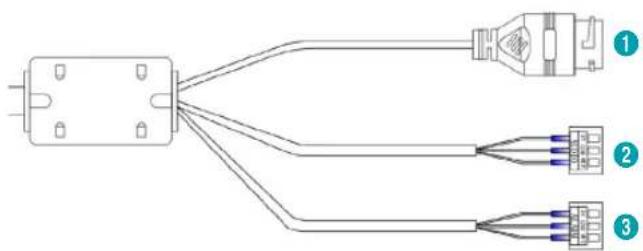
Pure electrical wiring diagram showing three connected components (no text or symbols)| 1 | Network Port |
| 2 | Audio In/Out |
| 3 | Alarm In/Out |
- Network Port
Connect a network cable with an RJ-45 connector to this port. If using a PoE switch, you can supply power to the camera using an ethernet cable. For more information on PoE switch use, refer to the switch manufacturer's operation manual. You can configure, manage, and upgrade this camera and monitor its images from a remote computer over the network. For more information on network connection setup, refer to the IDIS Discovery operation manual.
• Audio InDC-T4516WRX model only
Connect an audio source to this port. (line in)
• Audio OutDC-T4516WRX model only
Connect an amplifier to this port (line out). This device does not feature a built-in audio amplifier unit and therefore requires the user to purchase a separate speaker system with a built-in amplifier.
- Alarm in
Connect an alarm-in device to this port. Connect a mechanical or electrical switch to the IN and GND (ground) connectors. Alarm in range is 0V to 5V. In order to detect alarm input from an electrical switch, the signal must be higher than 4.3V from an NC switch or less than 0.3V from an NO switch and must last for longer than 0.5 seconds.
- Alarm Out
It is the BJT (Bipolar Junction Transistor) - open collector output. If the voltage and current exceed the specification limit (max. load: 30mA, max. voltage: 5VDC), the product could be damaged. When connecting the device which exceeds the specification limit, refer to the picture (circuit) below.

If used with an external inductive load(e.g. relay), a diode must be connected in parallel with the load for protection. Otherwise, the product could be damaged.
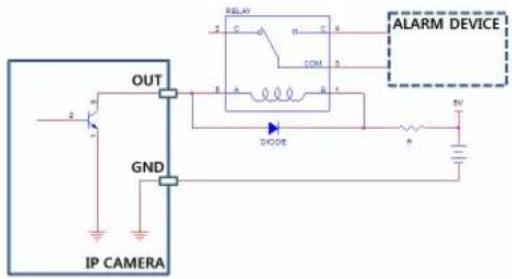

- Check your local laws and regulations on making video or audio recordings. The user will be held liable for any violation of the law.
- The network connector is not designed to be connected directly with cable or wire intended for outdoor use.
Installation
Installation of this product does not require the use of special tools.
For more information on other devices comprising the overall system, refer to their respective installation manuals.

Product color and design may vary depending on the model.
Inserting a SD Memory Card
1 Loosen the screws counterclockwise and remove the cover.
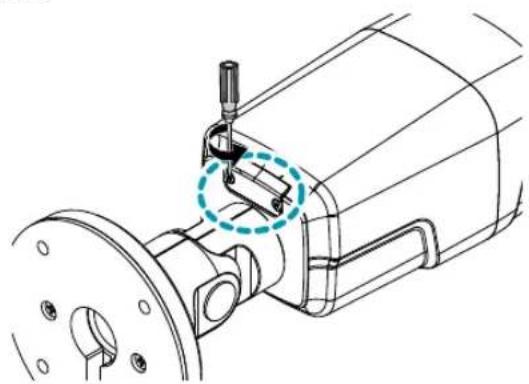
natural_image
Technical line drawing of a mechanical assembly with a highlighted component (no text or symbols)2 Insert a SD memory card into the SD memory card slot with the 'micro SD' print facing upward.
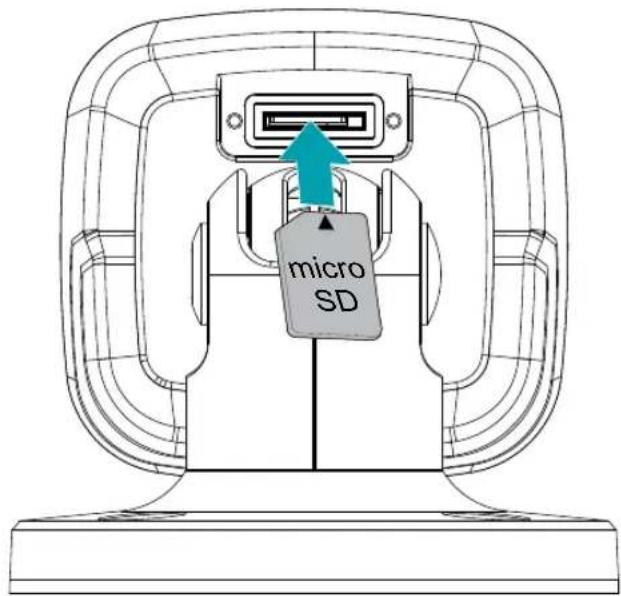

Push the SD memory card until it disengages from the slot, and then pull it out.
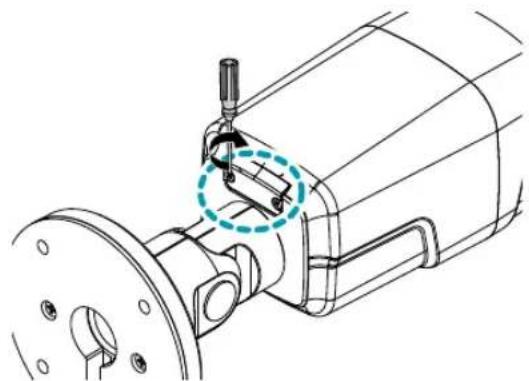
3 Cover the lens cover and tighten the screws clockwise.
natural_image
Technical line drawing of a mechanical assembly with a highlighted component (no text or symbols)
Make sure that the cover is joined properly when screwing it; otherwise, the IP67 level is not guaranteed.
Waterproof Cable Installation
natural_image
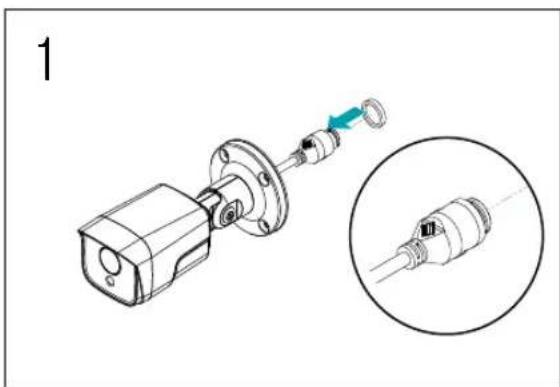
Mechanical assembly diagram showing a connector with a magnified inset view (no text or symbols)1 Insert a round rubber ring (silicone rubber) into the RJ45 jack.
natural_image
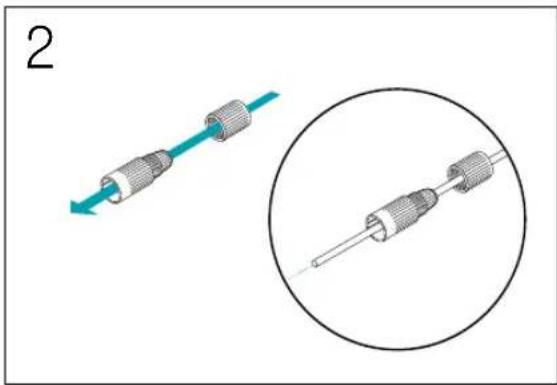
Diagram showing two types of mechanical components: a linear connector with a blue arrow and a circular inset view (no text or symbols)2 Insert the network cable into the waterproof cap, rubber bushing, and waterproof cap body in order.
natural_image
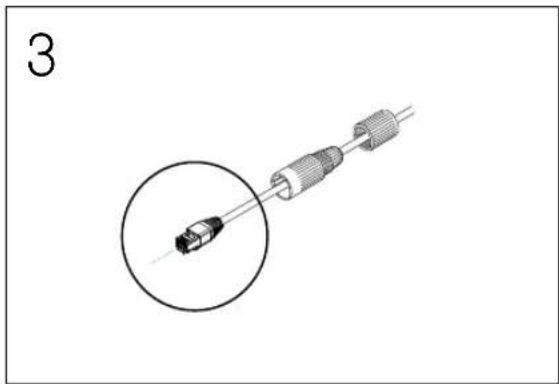
Diagram of a mechanical assembly with a magnified inset showing a connector (no text or symbols)3 Plug in the network cable.
natural_image
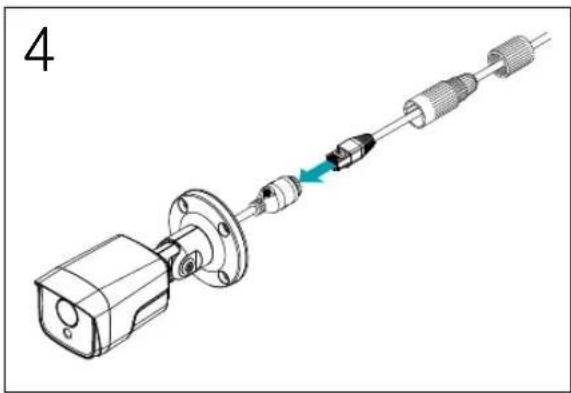
Mechanical assembly diagram showing a shaft connected to a housing and cable, with a blue arrow indicating a component (no text or symbols present)4 Connect the plug terminal to the RJ45 jack.
natural_image
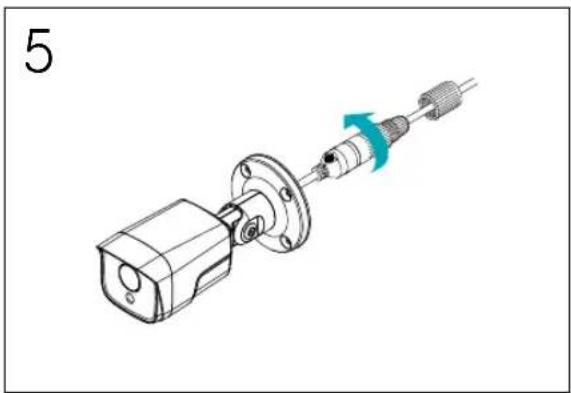
Technical line drawing of a mechanical assembly with a flanged base and threaded shaft (no text or symbols)5 Push the waterproof cap body and cap into the RJ45 jack and rotate it.
natural_image
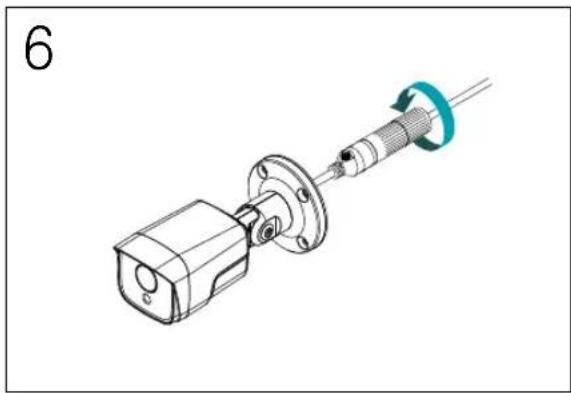
Mechanical assembly diagram showing a shaft and housing with a rotating component (no text or symbols)6 Lock the waterproof cap into the waterproof cap body.
Not pulling the cable back may cause water to seep in and damage the product.
Installation
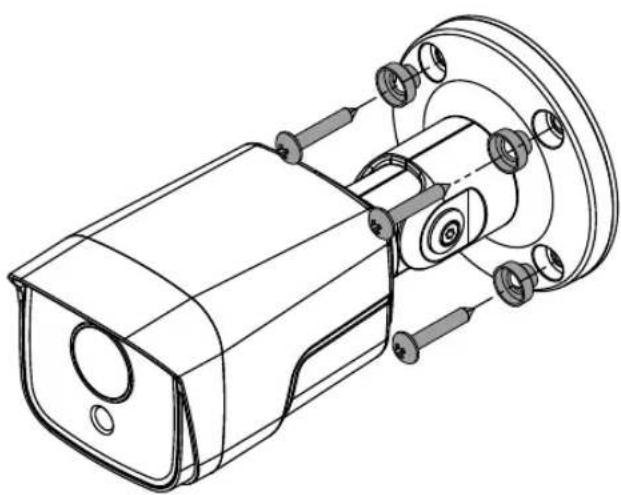
- Check the wall or ceiling to see if it needs to be reinforced. The camera may fall off if the wall or ceiling is not strong enough to support its weight. - Install the camera in a shaded area. If the camera is installed in direct sunlight, it may be affected adversely.
natural_image
Technical line drawing of a mechanical assembly with mounting flange and housing (no text or symbols)1 Screw the mounting bracket to the wall or ceiling by using screws(4) and bushings(4) provided with the camera.
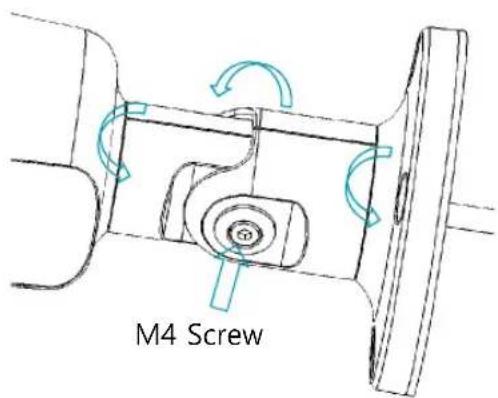
2 Adjust the camera angle by bending the stand. After fully assembling the joint screws, unscrew it 2 \~ 2.5 turns again and move the cover of the joints of the left 3 places slightly. (The screws should not be completely released to prevent it from falling.) After adjusting the direction of the camera, turn the screw clockwise to secure it completely.
Part 1 - Introduction
3 Connect external devices, network and power adapter.
4 Applypower.
Dimensions
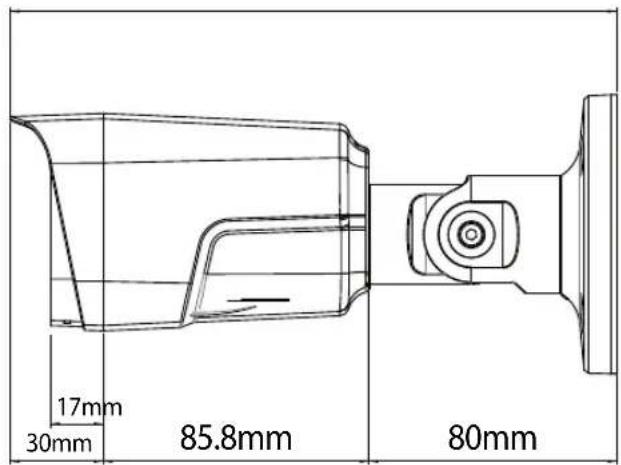
195.8mm
Part 2 - Camera Connection
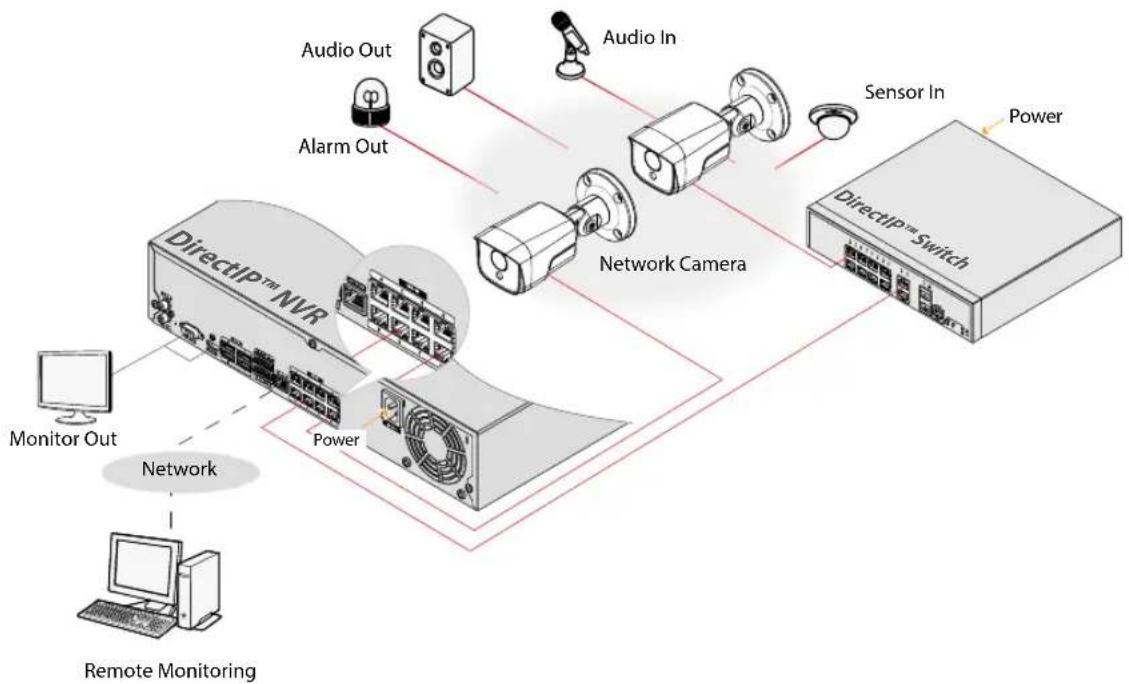
Use the camera by connecting to DirectIP™ NVR or non DirectIP™ NVR, VMS such as IDIS Solution Suite Compact.
With DirectIP™ NVR-based Layout
flowchart
graph TD
    A["Monitor Out"] --> B["Network"]
    C["Remote Monitoring"] --> D["Power"]
    E["DirectIP™ NVR"] --> F["Network Camera"]
    G["Sensor In"] --> H["Switch"]
    I["Audio In"] --> J["Monitor"]
    K["Audio Out"] --> L["Alarm Out"]
    M["Power"] --> N["Switch"]
DirectIP™ NVR makes it easy to use cameras without extra network configurations.
Each camera can be controlled via the DirectIP™ NVR setup menu, without any PC.
For detailed camera settings, please see the camera setting pages of DirectIP™ NVR manual.
For users using the camera with DirectIP™ NVR connection, do not need to consider contents in the camera operation manual.
With non DirectIP™ NVR-based Layout
Sensor In
Alarm Out
Audio In
Network Camera
Network
microSD Memory Card
Audio Out
Remote Monitoring
(IDIS Solution Suite
(IDIS Solution Suite
Compact)
Control the camera over the network from software installed on a computer.
Ideal for using the camera over the network from a remote location.
The contents in the camera operation manual are only for users using the camera with non DirectIP™ NVR connection or VMS connection such as IDIS Solution Suite Compact.
Part 3 - Appendix
Troubleshooting
| Problem Check | |
| The main unit won't turn on. | Check the power cable connection.Check the power outlet. |
| PoE switch isn't being recognized. | Check the grounding status of the I/O device connected to the camera and the PoE switch. If they are not grounded, ground them and try again. |
| I can't see Live videos. | Check the camera's power status.Check the network connection status of the computer and the network camera. |
| Images are blurry. | Make sure the lens is clean. If not, clean it using a soft piece of cloth or a brush.If there is too much light coming into the camera or the camera is picking up an overly bright light source, adjust the camera's position/angle accordingly. |
| Video color appears incorrect. | Check the white balance settings. If using theAutooption, it may take some time for the white balance to be adjusted. |
| Images are blinking. | If the camera is pointed at the sun or a fluorescent lamp, adjust the camera's angle away. |
| Lost the admin ID and password and unable to connect to a network camera. | You must perform a factory reset. A factory reset will revert all settings, including network settings, to their factory defaults. After performing a factory reset, make a memo of the admin ID and password as a safety precaution. |
| Unable to launch IDIS Web. | If the IDIS Web login screen is not loading, check which version of Microsoft Internet Explorer you are using. IDIS Web may not launch properly on versions10 or below. |
Specifications

These product specifications may change without prior notice.
Video
| Image Sensor | 1/2.8" CMOS |
| Max. Resolution | 2592 x 1944 |
| Scanning Mode | Progressive Scan |
| Lens type | Fixed-focal |
| Focal Length | f=2.8mm / f=4.0mm / f=6.0mm |
| Aperture | F2.0 / F2.15 / F1.6 |
| Angular Field of View | 104.8°(H), 76.9°(V), 130°(D) (2.8mm)79.2°(H), 56.6°(V), 103°(D) (4.0mm)49.9°(H), 37°(V), 63.6°(D) (6.0mm) |
| Min. Illumination | COLOR : 0.15 luxB/W : 0 lux (IR LED ON) |
| Dynamic Range | 120dB, True WDR |
| Electronic Shutter Speed | Auto / Manual (1/30 ~ 1/10,000), Anti-Flicker, Slow Shutter(1~1/5,1/7.5,1/15) |
| Day & Night | IR cut filter with auto switch |
| IR Distance (LEDs) | 30m (4ea) |
| Edge Storage* (Optional) |  (micro SD/SDHC/SDXC memory card (class 6 or higher, max. 256GB)) (micro SD/SDHC/SDXC memory card (class 6 or higher, max. 256GB)) |
* An SLC (Single Level Cell) or MLC (Multi Level Cell) card by SanDisk or Transcend is recommended to ensure stable recording performance.
* An SD memory card is a consumable product with a finite service life. Prolonged use will damage the card's memory sectors and result in data loss or memory card failure. Test the SD memory card regularly and replace it whenever necessary.
* microSD Logo is a trademark of SD-3C, LLC.
Network
| Video Compression | H.265, H.264(MP), M-JPEG |
| Bitrate Control | CBR / VBR |
| Max. Frame Rate | 30ips: 2592x1944 |
| Audio Compression DC-T4516WRX model only | ADPCM 16K, G.726, G.711 u-Law, G.711 a-Law |
| Supported Resolution | (4:3) 2592x1944, 1920x1440, 1280x960, 640x480(16:9) 2592x1456, 1920x1080, 1280x720, 640x360 |
| Multi-Video Streaming | Quadruple |
| Ethernet | RJ45(10/100BASE-T) |
I/O
| Audio In/Out | Line-in 1ea / Line-out 1ea DC-T4516WRX model only |
| Alarm In | 1 TTL, NC/NO Programmable, 4.3V(NC) or 0.3V(NO) threshold, 5V DC |
| Alarm Out | 1 TTL open collector, Max. load: 30mA, Max. voltage: 5VDC |
General
| Out-door Ready | IP67, IK10 |
| Operating Temperature | -30°C ~ +55°C (-4°F ~ +131°F) |
| Boot Up Temperature | 0°C ~ +55°C (32°F ~ +131°F) |
| Operating Humidity | 0% ~ 90% |
| Power Source | PoE(IEEE 802.3af class 3) |
| Power Consumption | PoE(IEEE 802.3af class 3), 7.9W |
| Approval | FCC, CE |
| External Dimensions (∅ x H) | 90mm X 195.8mm |
| Weight (Main Unit) | 0.66 kg (1.44lb) |
IDIS®
IDIS Co., Ltd.
For more information, please visit at
www.idisglobal.com
- Before reading this manual
- Safety Symbols
- In-Text
- Safety Precautions
- WARNING
- Important Safeguards
- Read Instructions
- Retain Instructions
- Cleaning
- Attachments
- Water and/or Moisture
- Placing and Accessories
- Power Sources
- Power Cord
- Lightning
- Overloading
- Objects and Liquids
- Servicing
- Damage requiring Service
- Replacement Parts
- Safety Check
- Field Installation
- Tmra
- FCC Compliance Statement
- WEEE (Waste Electrical & Electronic Equipment)
- Correct Disposal of This Product
- Copyright
- Registered Trademarks
- 1
- Part 1 – Introduction......6
- 2
- Part 2 - Camera Connection ....13
- 3
- Part 3 - Appendix....15
- Product Features
- Accessories
- Overview
- Body
- - Lens
- - IR LED
- - Body
- - Bracket
- - Cable
- • SD Memory Card Slot
- Cable
- - Network Port
- • Audio InDC-T4516WRX model only
- • Audio OutDC-T4516WRX model only
- - Alarm in
- - Alarm Out
- Installation
- Inserting a SD Memory Card
- Waterproof Cable Installation
- Part 1 - Introduction
- Dimensions
- Part 2 - Camera Connection
- With non DirectIP™ NVR-based Layout
- Part 3 - Appendix
- Specifications
- IDIS®
Brand : IDIS
Model : DC-T4516WRX-A
Category : Security Camera