APM80.1500 - Hand blender ALTO - Free user manual and instructions
Find the device manual for free APM80.1500 ALTO in PDF.


| Product Type | Hand Blender |
| Brand | ALTO |
| Model | APM80.1500 |
| Power | 800 W |
| Voltage | 220-240 V |
| Frequency | 50/60 Hz |
| Speed Settings | 2 speeds + Turbo |
| Shaft Material | Stainless Steel |
| Blade Material | Stainless Steel |
| Detachable Shaft | Yes |
| Ergonomic Handle | Yes |
| Cord Length | 1.2 m |
| Weight | 0.9 kg |
| Dimensions (L x W x H) | 400 x 70 x 70 mm |
| Dishwasher Safe Parts | Shaft and blade attachment |
| Safety Features | Overheat protection, non-slip handle |
| Maintenance | Rinse shaft immediately after use; do not immerse motor unit |
| Spare Parts Availability | Replacement shaft and blade sold separately |
| Repairability | Motor unit not user-serviceable; contact authorized service center |
| General Information | Ideal for soups, sauces, smoothies, and baby food |
Frequently Asked Questions - APM80.1500 ALTO
User questions about APM80.1500 ALTO
0 question about this device. Answer the ones you know or ask your own.
Ask a new question about this device
Download the instructions for your Hand blender in PDF format for free! Find your manual APM80.1500 - ALTO and take your electronic device back in hand. On this page are published all the documents necessary for the use of your device. APM80.1500 by ALTO.
USER MANUAL APM80.1500 ALTO
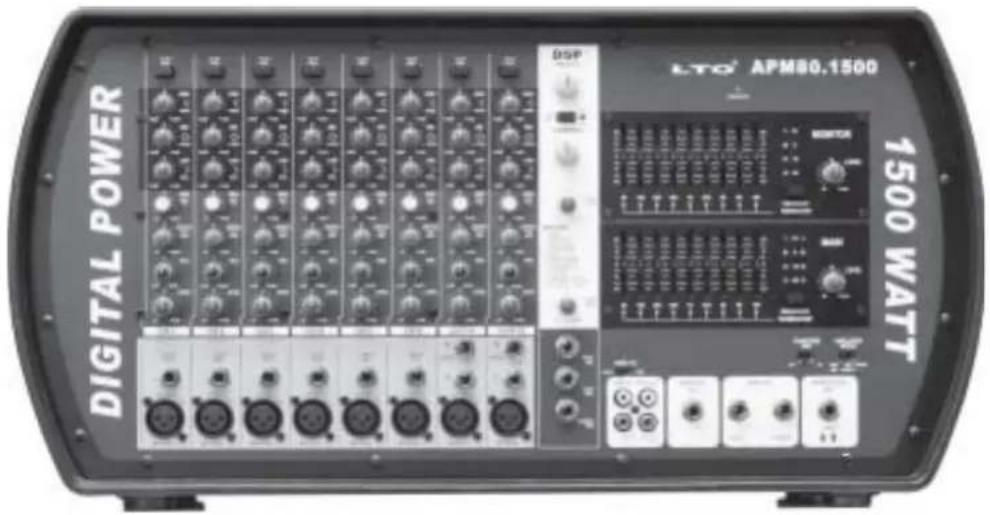
Stereo Powered Mixer with DSP
SAFETY RELATED SYMBOLS


This symbol, wherever used, alerts you to the presence of un-insulated and dangerous voltages within the product enclosure. These are voltages that may be sufficient to constitute the risk of electric shock or death.

This symbol, wherever used, alerts you to important operating and maintenance instructions. Please read.
⊕
Protective Ground Terminal
\~
AC mains (Alternating Current)
4
Hazardous Live Terminal
ON: Denotes the product is turned on.
OFF: Denotes the product is turned off.
WARNING
Describes precautions that should be observed to prevent the possibility of death or injury to the user.
CAUTION
Describes precautions that should be observed to prevent damage to the product.

Disposing of this product should not be placed in municipal waste and should be Separate collection.
WARNING
- Power Supply
Ensure that the mains source voltage (AC outlet) matches the voltage rating of the product. Failure to do so could result in damage to the product and possibly the user.
Unplug the product before electrical storms occur and when unused for long periods of time to reduce the risk of electric shock or fire.
- External Connection
Always use proper ready-made insulated mains cabling (power cord). Failure to do so could result in shock/death or fire. If in doubt, seek advice from a registered electrician.
- Do Not Remove Any Covers
Within the product are areas where high voltages may present. To reduce the risk of electric shock do not remove any covers unless the AC mains power cord is removed.
Covers should be removed by qualified service personnel only.
No user serviceable parts inside.
- Fuse
To prevent fire and damage to the product, use only the recommended fuse type as indicated in this manual. Do not short-circuit the fuse holder. Before replacing the fuse, make sure that the product is OFF and disconnected from the AC outlet.
- Protective Ground
Before turning the product ON, make sure that it is connected to Ground. This is to prevent the risk of electric shock.
Never cut internal or external Ground wires. Likewise, never remove Ground wiring from the Protective Ground Terminal.
- Operating Conditions
Always install in accordance with the manufacturer's instructions.
To avoid the risk of electric shock and damage, do not subject this product to any liquid/rain or moisture. Do not use this product when in close proximity to water.
Do not install this product near any direct heat source.
Do not block areas of ventilation. Failure to do so could result in fire.
Keep product away from naked flames.
IMPORTANT SAFETY INSTRUCTIONS
Read these instructions
Follow all instructions
Keep these instructions. Do not discard.
Heed all warnings.
Only use attachments/accessories specified by the manufacturer.
• Power Cord and Plug
Do not tamper with the power cord or plug. These are designed for your safety.
Do not remove Ground connections!
If the plug does not fit your AC outlet seek advice from a qualified electrician.
Protect the power cord and plug from any physical stress to avoid risk of electric shock.
Do not place heavy objects on the power cord. This could cause electric shock or fire.
- Cleaning
When required, either blow off dust from the product or use a dry cloth.
Do not use any solvents such as Benzol or Alcohol.
For safety, keep product clean and free from dust.
- Servicing
Refer all servicing to qualified service personnel only.
Do not perform any servicing other than those instructions contained within the User's Manual.
PREFACE
Dear customer
Thank you for choosing the ▲LTO APM80.1500 8-channel stereo powered mixer with DSP, which is the result of our ▲AUDIO TEAM's endeavours.LTO
For the ▲LTO AUDIO TEAM, music and audio are more than a profession, it is a passion and an obsession!
We have, in fact, been designing professional audio products for a number of years in cooperation with many of the world's major brands.
The ▲LTO line represents unparalleled analogue and digital products made by musician, for musicians. With our design centres in Italy, Netherlands, and United Kingdom we provide you with world-class designs, while our software development teams continue to develop an impressive range of audio specific algorithms.
By purchasing our ▲LTO products you become the most important member of our ▲LTO AUDIO TEAM. We would like to share with you our passion for what we design and invite you to make suggestions, which will aid us in developing future products for you. We guarantee you our commitment for quality, continual research and development, and of course the best prices.
The ▲LTO APM80.1500 is extremely flexible, ultra-low noise 8-channel stereo powered mixer with DSP, which is configured with six MIC/line and two stereo inputs channels, each of them is equipped with a variety of key features including a 3-band equalizer, two aux sends and pan control etc. Besides, the miraculous DSP with 256 presets and powerful digital power amplifier will meet your requirements. To deserve to be mentioned, the output power of ▲LTO APM80.1500 is 2 × 750W . Seeing is believing, let's meet the ▲LTO APM80.1500.
We would like to thank all the people who made the ▲LTO APM80.1500 possible, especially to our designers and ▲LTO staff. It is their passion for music and professional audio that has made it possible for us to offer you, our most important team member, our continued support.
Thank you very much
▲LTO AUDIO TEAM
TABLE OF CONTENTS
- INTRODUCTION....4
- FEATURES....5
- QUICK START....6
- CONTROL ELEMENTS....7
4.1 MONO/STEREO Input Channel Section
4.2 MASTER SECTION Control
4.3 MASTER SECTION INPUT and OUTPUT Jacks
4.4 DSP Section
4.5 Rear Panel
-
PRESET LIST....15
-
INSTALLATION AND CONNECTION ....16
6.1 Audio Connections
6.2 Speaker Connections
6.3 Possible System Connection Mode for Live Sound Application
-
TECHNICAL SPECIFICATION....20
-
WARRANTY....22
1. INTRODUCTION
Thank you very much for expressing your confidence in ▲LTO products by purchasing ▲LTO APM80.1500 8-channel stereo powered mixer with DSP. The APM80.1500 is professional, powerful mixer, which provides the state of the art digital amplifier technology specifically. You will get the smooth, accurate more natural and open sound from this apparatus, it is really ideal for large gigs, recording and fixed PA installations.
The APM80.1500 8-channel stereo powered mixer with DSP is packed with some key features. For example: there is six MIC/line inputs which provided with ultra low noise microphone pre-amplifiers and phantom power at +48V plus two stereo inputs, each of them features a 3-band equalizer, two aux sends, pan and level control. The master section includes stereo return, 2-track input/output for playing back stereo devices for recording your mix, sweet equalizers for main and monitor, 256 position multieffect and built-in feedback terminator and so on.
Though your APM80.1500 is very easy to operate, we strongly recommend you to go through each section of this manual carefully, in this way you will get the best out of your APM80.1500.
2. FEATURES
The APM80.1500 8-channel stereo powered mixer with DSP is designed for professional application. It provides the following features:
- Digital amplifier technology, offering high power and a very dynamic sound
• 9-band graphic EQ for MAIN / MONITOR
• Built-in feedback terminator - 6 MIC/line input channels with gold plated XLRs and balanced LINE inputs
• 2 Stereo input channels with balanced TRS jacks - Ultra-low noise discrete MIC preamps with +48V phantom power
- Extremely high headroom offering more dynamic range
• 3-band equilizer on input channels
• Each input channel with -20dB PAD, PAN and level control - 2 AUX sends for built-in or external effects, on-stage monitor mix, or headphone mixing
• 256 position multieffect
• 2-track recording IN/OUT (phono) - Headphone output
- 2×750 watt EIAJ amplifiers (For APM80.1500)
• Output connector: 6.3 jack + 4 way-speakon
3. QUICK START
3.1 Please check the AC Voltage available in your country before connecting your APM80.1500 to the AC socket.
3.2 Be sure that the main power switch is turned off before connecting the Mixer to the AC socket. Also, you should make sure that all Input and output controls are turned down. This will avoid damages to your speakers and avoid excessive noise.
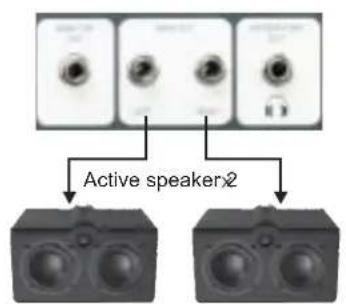
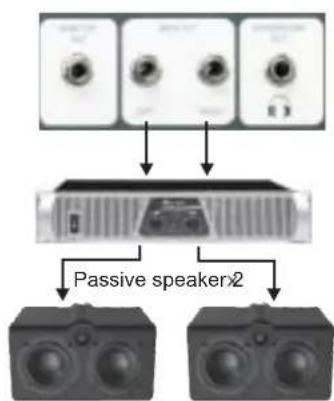
3.3 Please connect one side of the speaker cable to speak on or phone jacks of your APM80.1500 and the other side to the input socket of your speaker cabinet; or connect one side to the main output L/R of your APM80.1500 And other side to the input socket of your active speaker cabinet or other stereo power amplifier.
3.4 Complete these connections as illustrated.
3.5 When no external power amplifier or active speaker connected to the main output L/R of your APM80.1500, please switch on your APM80.1500 after turning on all external devices; after using, switch off your APM80.1500 Before all external devices.
3.6 When the external power amplifier or active speaker connected to the main output L/R of your APM80.1500 please switch on your APM80.1500 before the external power amplifier or active speaker. After using, switch off your APM80.1500 after the external power amplifier or active speaker.
3.7 Before disconnecting the APM80.1500 always turn-off the Power switch.
3.8 Do not use solvents to clean your APM80.1500. A dry and clean cloth will be OK.
flowchart
graph TD
    A["Audio Unit 1"] --> C["Passive Speaker2"]
    B["Audio Unit 2"] --> C
    D["Audio Unit 3"] --> C
    E["Audio Unit 4"] --> C
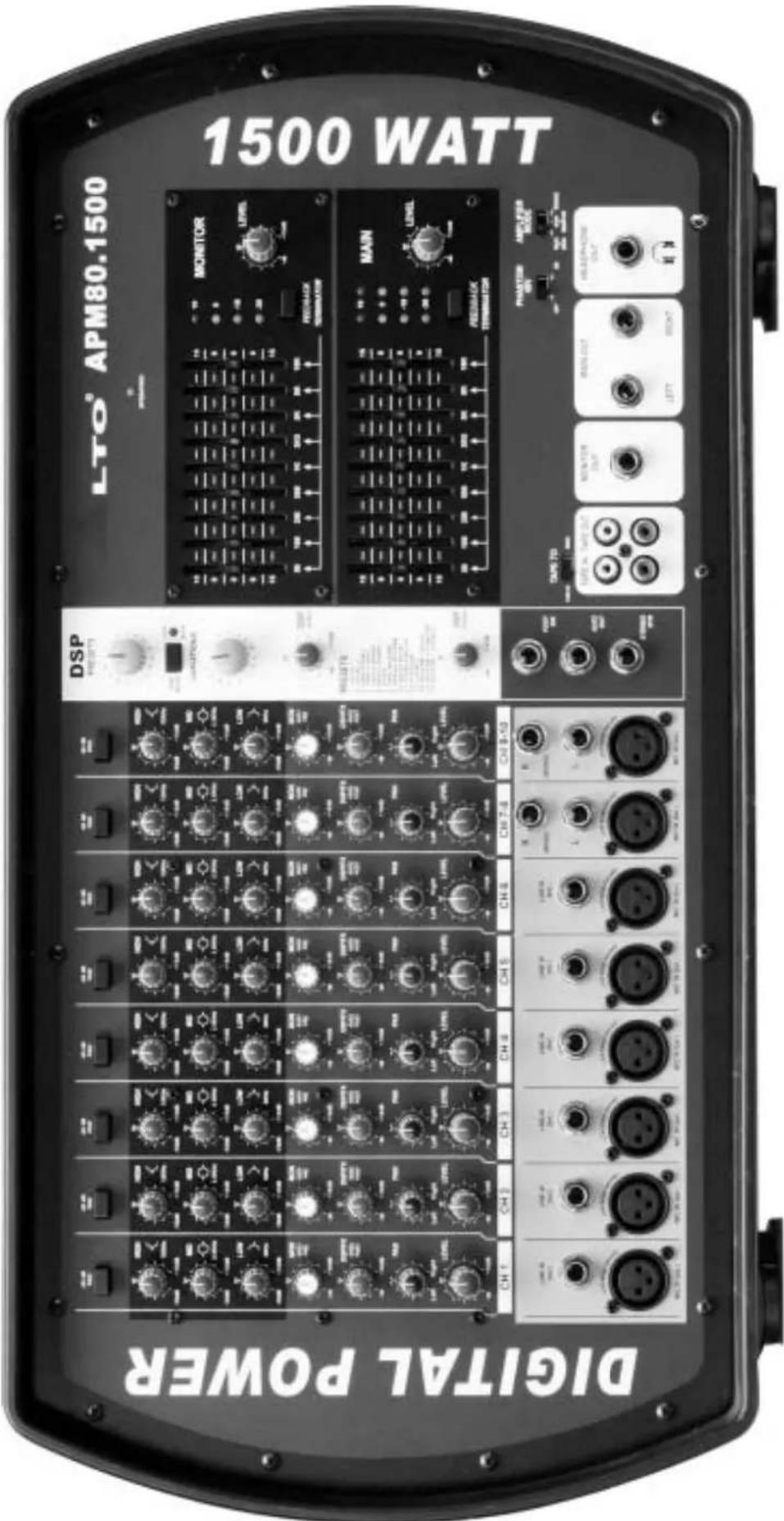
4.1 MONO/STEREO Input Channel Section
Your APM80.1500 comprises 6 mono input channels and 2 stereo input channels, each of them including -20dB PAD, 3-band equalizer, AUX sends, PAN and LEVEL controls. The following content will detail the each part.
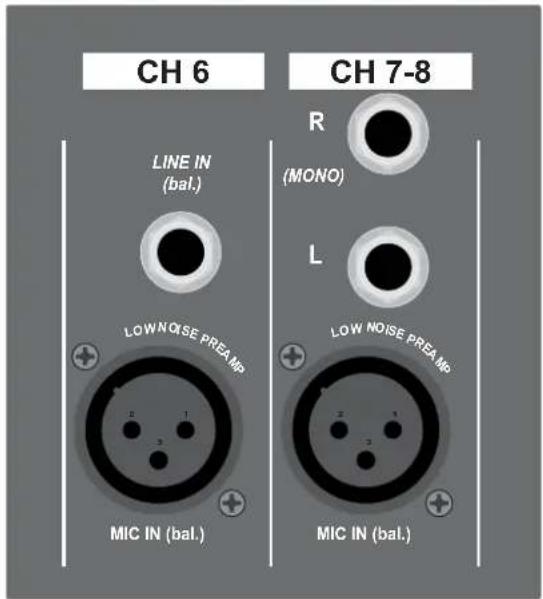
1 MONO Input Channels (1 \~ 6)
There are CH1 through CH6, which comes with MIC IN and LINE IN connector. Use the XLR MIC IN connector to connect low noise microphones preamp and low level signal, which also feature +48V phantom power, allowing you to connect condenser microphones. Use the 1/4" TRS LINE IN connector to connect either a microphone or a line level instrument such as synthesizers, drum machines, effects processors...
Note: You shall never connect an unbalanced microphone to the XLR connector if you do not want to damage both the microphone and the mixer.
2 STEREO Input Channels (7 \~ 10)
There are CH7 through CH10. They are organised in stereo pair. Via the 1/4" TRS input connectors, you can connect the outputs from stereo devices such as synthesizers, effects processor or any stereo line level signal. If only the right jack was connected, the input will operate in mono mode.
Via the XLR MIC IN connector, you can input the low level signal.
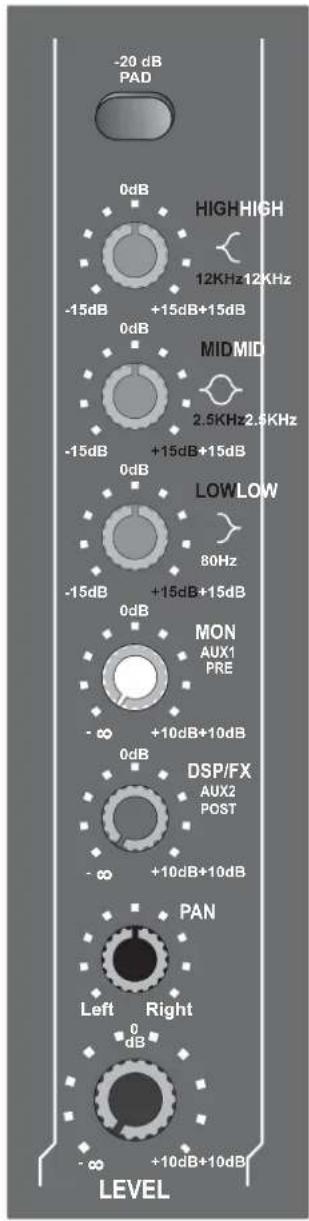
3 -20dB PAD Button
Pressing this button will attenuate the input signal by 20dB. In such way you can produce increased headroom and reduce the risk of distortion because of level peaks at input level when the input signal is quite hot.
4 EQUALIZER
Your APM80.1500 features a 3-band equalizer allowing you adjust the high, mid and low frequencies separately on each channel. All bands provide up to 15dB of boost or cut, flat at the center detent.
HIGH
This is the treble control. You can use it to get rid of high frequency noises or to boost the sound of cymbals or the high harmonics of the human voice.
MID
This is the midrange control. It can affect most fundamental frequencies of all musical instruments and human voice. An attentive use of this control will give you a very wide panorama of sound effects.
LOW
This is the bass control. It is used to Boost male voice or kickdrum and bass guitar. Your system will sound much bigger than what it is.
1
2
3
4
5
6
7
8
5 MON (AUX1) Control
Your APM80.1500 has two auxiliary sends which can be used for sending signals to external or internal effects device or for creating a monitor mix, they are used to adjust the level of respective channel signal sent to AUX bus, and the adjustable range goes from - to +10dB.
The AUX1 control is configured as PRE-FADER, which means that the signal is sent out before reaching the channel fader. It is used for a monitor mix in a live sound mixing, or for a headphone mix in recording application.
6 DSP/FX (AUX2) Control
The AUX2 control is configured as POST-FADER, so the audio signal will be affected by channel fader. Via the AUX2 OUT jack, the AUX2 signal can be sent to an external effects device, furthermore, the AUX2 signal can also be assigned to internal onboard effect module.
7 PAN Control
Abbreviation of PANORAMA control for mono and stereo channels. It is used to determine the amount of channel signal sent to left and right of main mix. Keep this control in center position, then the signal will be positioned in middle of stage. Turn this control fully counterclockwise, the signal will be present only on the left of main mix and vice-versa.
8 Channel LEVEL Control
This control is used to adjust the overall level of respective channel. The adjustable range goes from - to +10dB.
4.2 MASTER SECTION Controls
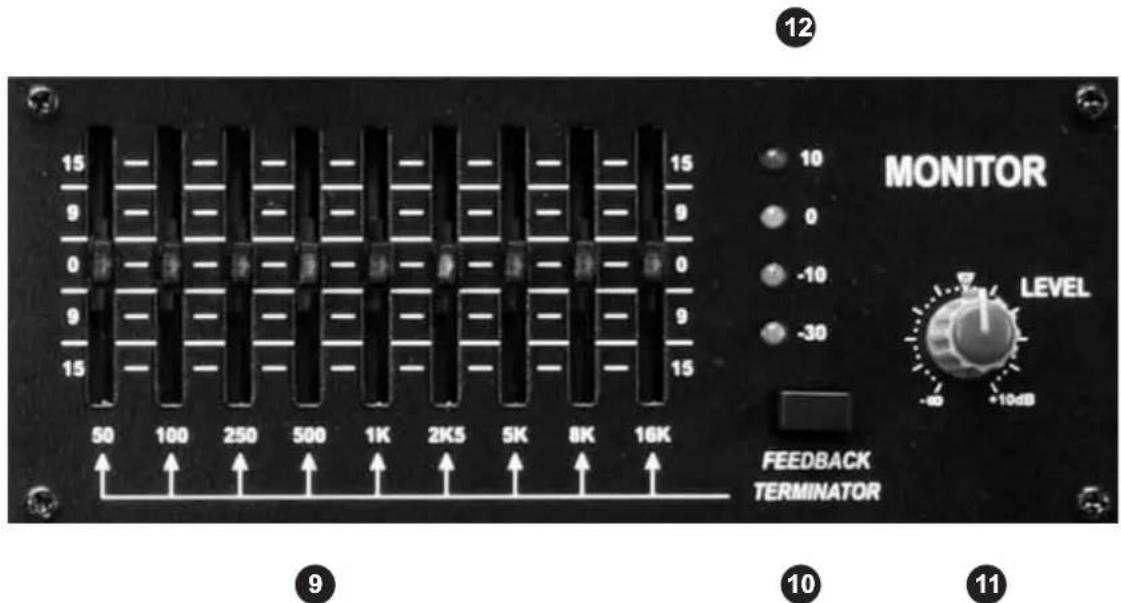
9 STEREO GRAPHIC EQ
Your APM80.1500 is equipped with both stereo graphic EQs, one is for MAIN MIX; another for MONITOR MIX, each of them provides 9-band fader controls. Via these faders, you can boost or attenuate the selected frequency by 15dB at a preset bandwidth. When all faders are at the center position, the output of the equalizer is flat response. They are used to modify the frequency "contour" of a sound. The EQ function will be activated automatically as soon as you operate your APM80.1500.
10 FEEDBACK TERMINATOR Button (MONITOR MIX)
Pressing this button the automatic feedback detection function will be activated in monitor signal path. When a frequency band fader lights up, it means the level of this frequency band is too high, i.e. there is a little feedback occurring in this frequency band, which may result in unpleasant speaker "howling" or "whistling". In this case, in order to eliminate feedback, you need to turn down the corresponding fader.
11 MONITOR LEVEL Control
This control is used to adjust the level of monitor output.
12 MONITOR LEVEL LED Display
This LED display is used to monitor the monitor output level.
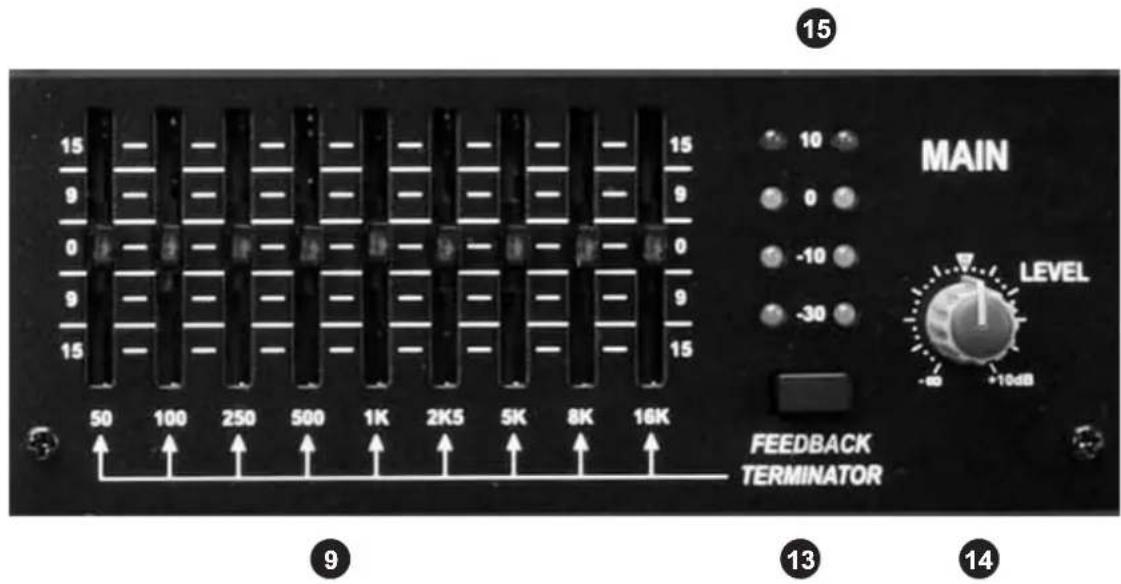
13 FEEDBACK TERMINATOR Button (MAIN MIX)
Pressing this button the automatic feedback detection function will be activated in main mix signal path. When a frequency band fader lights up, it means the level of this frequency band is too high, i.e. there is a little feedback occurring in this frequency band, which may result in unpleasant speaker "howling" or "whistling". In this case, in order to eliminate feedback, you need to turn down the corresponding fader.
14 MAIN MIX LEVEL Control
This control is used to adjust the overall volume of main mix output.
15 MAIN MIX LEVEL LED Display
The stereo 4 segments LED display is used to monitor the main mix output level.

16 OPERATING LED Display
The LED indicates when the power is switched on in your APM80.1500.
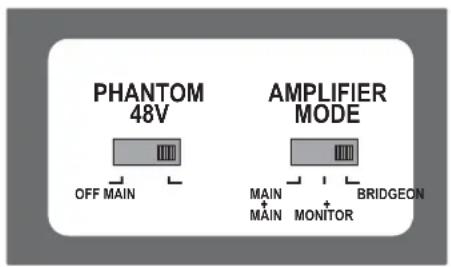
17 PHANTOM 48V Switch
It is available only to the XLR MIC sockets. Never plug in a microphone when phantom power is already on. Before turning phantom power on, make sure that all faders are all the way down. In this way you will protect your stage monitors and main loudspeakers.
Pushing the switch to right will apply +48V phantom power only to the 8 XLR microphone inputs.
17
18
18 AMPLIFIER MODE Switch
This switch provides three modes: MAIN/MAIN; MAIN/MONITOR; BRIDGE. Select any one of these modes to specify the signals to be routed to the corresponding jacks according to the speaker connection at speaker jacks on the rear panel. The details refer to later content.
4.3 MASTER SECTION INPUT and OUTPUT Jacks
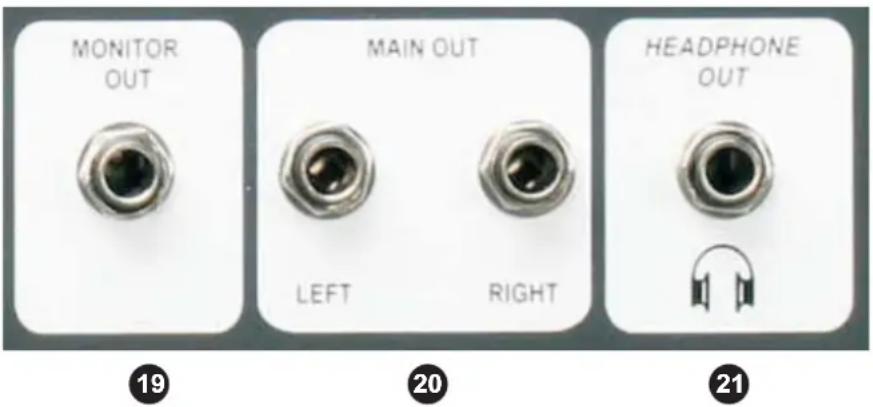
19 MONITOR OUT Jack
Use the balanced MONITOR jack to connect the input of external monitor amplifier or active monitor speaker.
20 MAIN OUT Jacks
The both jacks are used to output the main mix signal to an external amplifier or active speaker.
21 HEADPHONE OUT Jack
This is a stereo phone type output jack, it is used to send out the monitor signal to a pair of headphones.
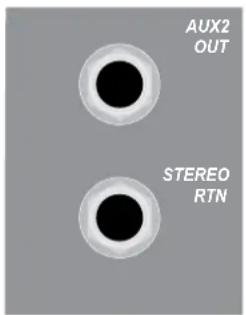
22 AUX2 OUT Jack
The phone jack is used to output the line level signal of AUX2 bus. Generally, it is available to connecting effects unit.
23 STEREO RTN. Jack
Use the stereo phone jack to return the sound of an effect unit to the main mix. You can also use it as the extra auxiliary inputs.
22
23
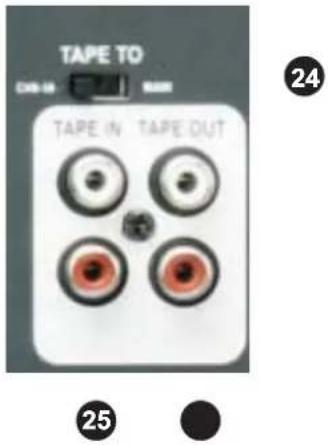
24 TAPE TO Select Switch
Pushing this switch to left will route the signal from TAPE IN to CH9\~10 path, and the signal will be affected by channel level control and main level control, while to right will route the signal to main mix bus, the signal will be affected only by main level control.
25 2-TRACK IN
Your APM80.1500 features dual RCA jacks for 2-track in (left and right). If you wish to listen to your mix from a tape recorder, DAT or cassette, please use these tape input jacks. Depending on the setting of TAPE TO select switch, you can assign the signal coming from the tape recorder (DAT or cassette) to CH9\~10 path or main mix bus.
26 2-TRACK OUT
Your APM80.1500 features dual RCA jacks for 2-track out (left and right). Via these jacks, you can route the main mix signal into a tape recorder or DAT for recording.
4.4 DSP Section
APM80.1500 features the special 256 position multi-effect, further details please refer to following content.
27 PRESETS Control
Adjust this knob to select the right effect you wish to perform. There are total 16 options for you: several kinds of reverb, mono and stereo delay, modulation effects, and versatile two-effect combination.
28 VARIATIONS Control
Since you have selected the preferable effect, the next step, please go with the fine consideration, there are also total 16 variations for each preset, and each variation has been designed modifying several parameters.
29 DSP MUTE Switch
This switch is used to activate/deactivate the effect facility. Sometimes, you can also use the following FOOT SW jack for convenient operation
30 CLIP/MUTE LED
This LED lights up when the input signal is too strong. In case of the digital effect module being muted, this LED also lights up.
31 DSP TO MON Control
This control is used to control the volume of effect signal sent to monitor mix, which can be varied from - to +10dB.
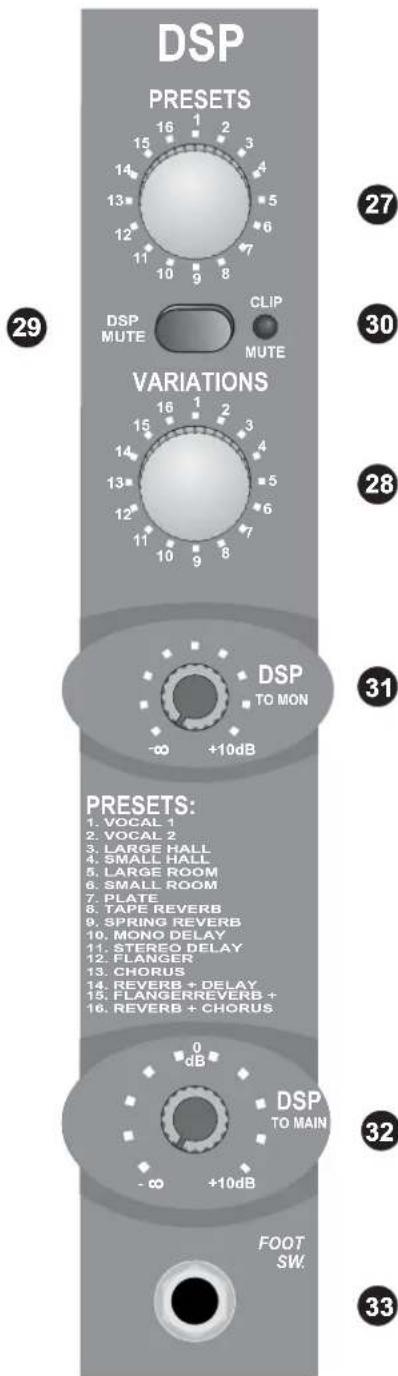
32 DSP TO MAIN Control
This control is used to control the volume of effect signal sent to main mix bus, which can be varied from - to +10dB.
33 FOOT SW. Jack
Here, you can connect an external footswitch to turn on/off the onboard effect module. It is 1/4" phone jack.
4.5 Rear Panel
34
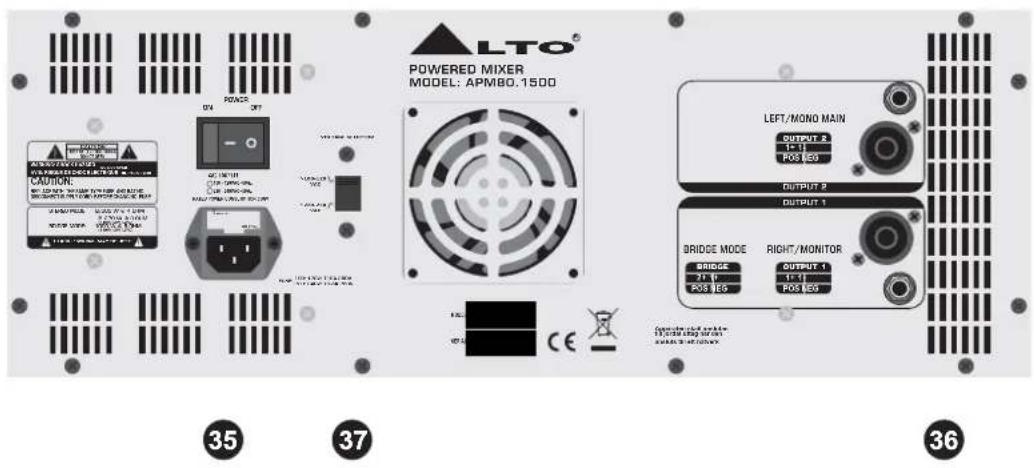
34 POWER ON/OFF Switch
This switch is used to turn the main power ON and OFF.
35 AC Inlet with FUSE Holder
Use it to connect your APM80.1500 to the main AC with the supplied AC cord. Please check the voltage available in your country and how the voltage for your APM80.1500 is configured before attempting to connect your APM80.1500 to the main AC.
36 SPEAKERS Jacks
These jacks are used to connect speakers. They are configured with 4-way speakon connectors and 1/4" phone jacks. You can determine the signal that is output to these jacks according to the setting of AMPLIFIER MODE select switch.
Note: In order to avoid damaging your built-in amplifier, please pay more attention to the impedance of speaker. Lower load impedances are not permitted.
37 AC Select Switch
This switch has two choices for voltage, 115 VAC or 230 VAC.
Note: If you want to switch the voltage, remove the cover plate with a screwdriver and set the switch to the 115 VAC or 230VAC as the actual requirement. Refer to the specification page 20 for instructions of replacing fuse.
- PRESET LIST
| No. | Preset | Description | Controllable parameter | |
| Parameter Variable range | ||||
| 1 | VOCAL 1 | Simulate a room with small delay time. | Decay timePre-delay | 0.8~1.1s0~79ms |
| 2 | VOCAL 2 | Simulate a small space with slight decay time. | Decay timePre-delay | 0.8~2.5s0~79ms |
| 3 | LARGE HALL | Simulate a large acoustic space of the sound. | Decay timePre-delay | 3.6~5.4s23~55ms |
| 4 | SMALL HALL | Simulate a small acoustic space of the sound. | Decay timePre-delay | 1.0~2.9s20~45ms |
| 5 | LARGE ROOM | Simulate a studio room with many early reflections. | DecaytimePre-delay | 2.9~4.5s23~55ms |
| 6 | SMALL ROOM | Simulate a bright studio room. | Decay timePre-delay | 0.7~2.1s20~45ms |
| 7 | PLATE | Simulate the transducers sound like classic bright vocal plate. | Decay timePre-delay | 0.6~6.1s10ms |
| 8 | TAPE REVERB | Simulate a record head and multiple playback heads at intervals along the tape. | Decay timePre-delay | 1.3~5.4s0~84ms |
| 9 | SPRING REVERB | Simulate the analog transducers' springs lightly stretched sound. | Decay timePre-delay | 1.3~5.4s0~35ms |
| 10 | MONO DELAY | Reproduce the sound input on the outputafter a lapse of time. | Period | 60~650ms |
| 11 | STEREO DELAY | Recreate the input sound on the stereo output with different time. | PeriodFeedback | 210~400ms37~73% |
| 12 | FLANGER | Simulate to play with another person carryingout sam e the notes on the same instrument | Rate | 0.16~2.79Hz |
| 13 | CHORUS | Recreate the illusion of more than one instrument from a single instrument sound | Rate | 0.5~5Hz |
| 14 | REV.+DELAY | Delay with room effect | Delay periodRev. decay time | 211~375ms1.0~2.9s |
| 15 | REV.+FLANGER | Stereo chorus and large room reverb | Flanger RateRev. decay time | 0.16~2.52Hz1.5~2.9s |
| 16 | REV.+CHORUS | Simulate the sound effect achieved by rotating horn speakers and a bass cylinder | Chorus rateRev. decay time | 0.5~4.74Hz1.5~2.9s |
6. INSTALLATION AND CONNECTION
Ok, you have got to this point and you are now in the position to successfully operate your APM80.1500. However, we advise you to read carefully the following section to be the real master of your own mix. Not paying attention enough to the input signal level, to the routing of the signal and the assignment of the signal will result in unwanted distortion, a corrupted signal or no sound at all. So you should follow this procedure for every single channel:
- Turn down all Input and output gain controls.
- Connect phantom powered microphones before switching on the +48Volt phantom power switch.
- Set the output level of your APM80.1500 or the connected power amplifier at no more than 75% .
- Now, set the MONITOR level at no more than 50% . In this way you will be able to hear later what you are doing connecting a pair of headphones or a pair of powered studio monitor speakers.
- Position EQ controls on middle position.
- Position panoramic (PAN) control on center position.
- Increase the input gain properly for maintaining the good headroom and ideal dynamic range.
- Depending on the actual application, turn slowly the input and output level controls for obtaining the maximum gain before distortion.
- Now repeat the same sequence for all input channels. The main LED meter could move up into the red section. In this case you can adjust the overall output level through the MAIN MIX control.
6.1 Audio Connections
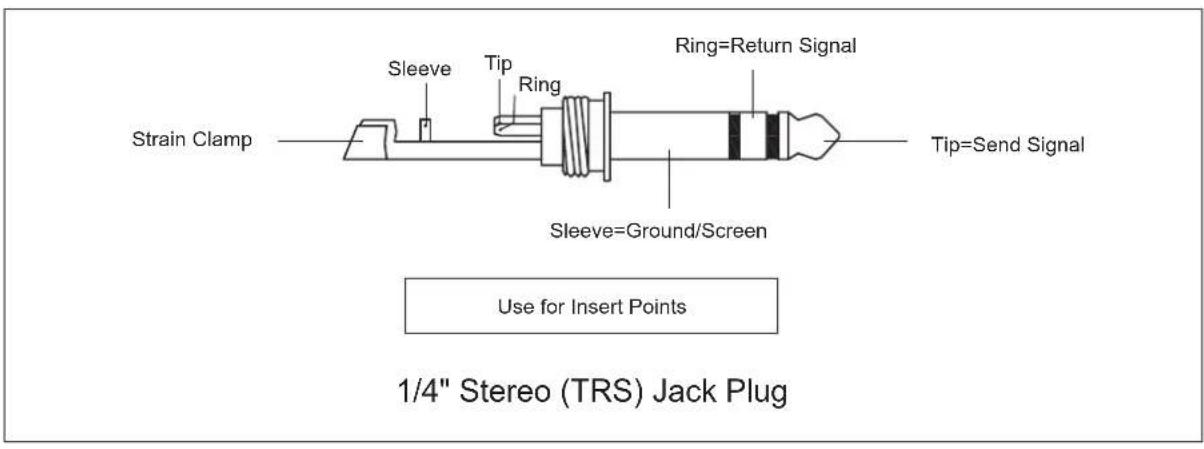
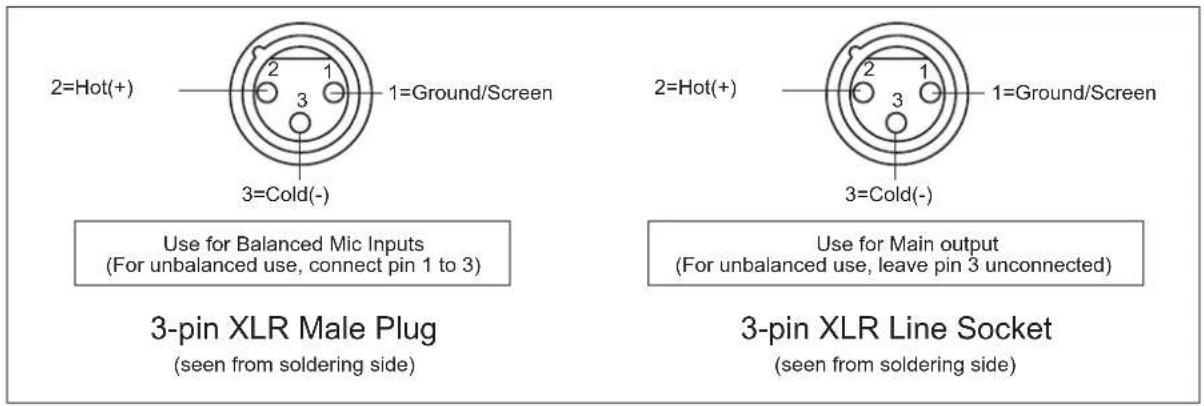
You can connect unbalanced equipment to balanced inputs and outputs. Simply follow these schematics.
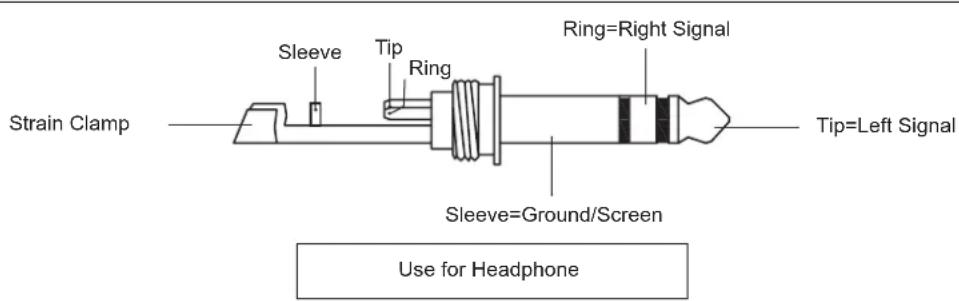
1/4" Stereo (TRS) Jack Plug
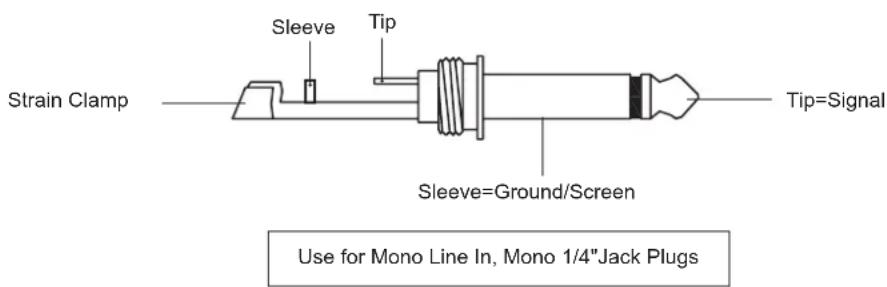
1/4" Mono (TS) Jack Plug
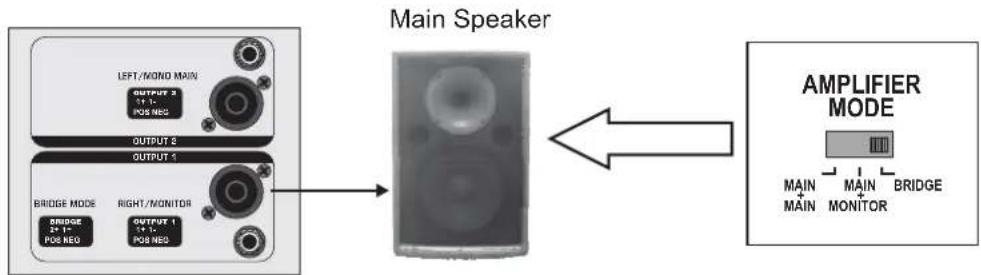
6.2 Main Speaker Connections
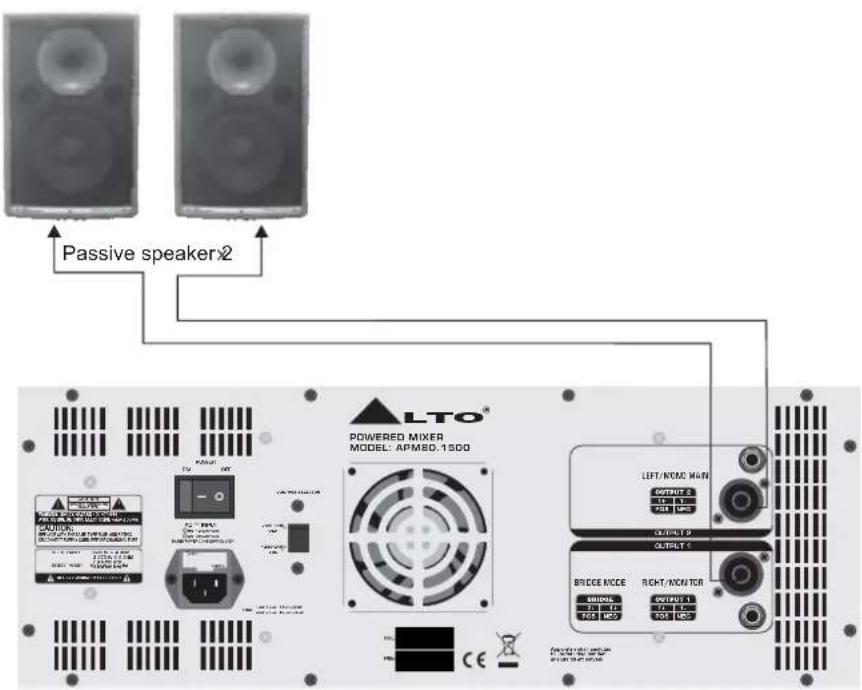
Please use only the power connectors to make connections with other signal source equipment for the passive speaker cabinets. The power connector has four terminals: 1+, 1-, 2+, 2-.
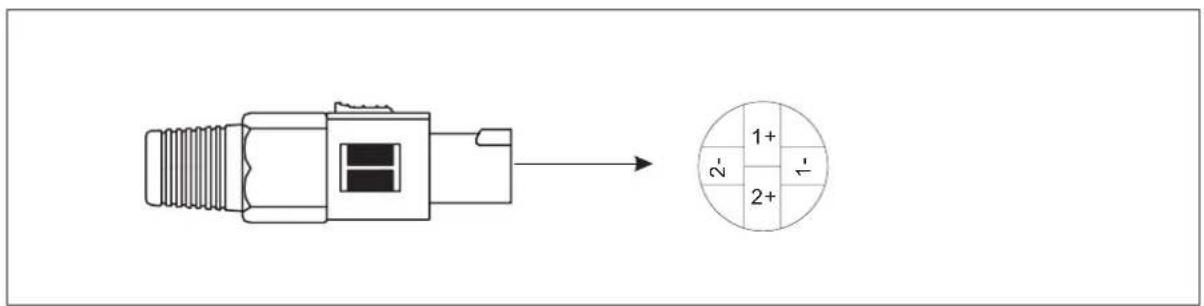
Speakon connector
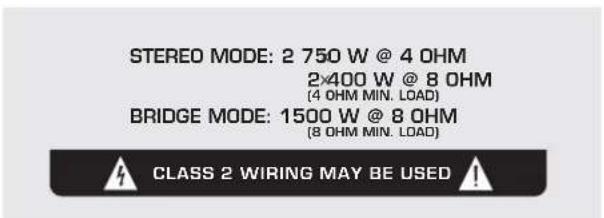
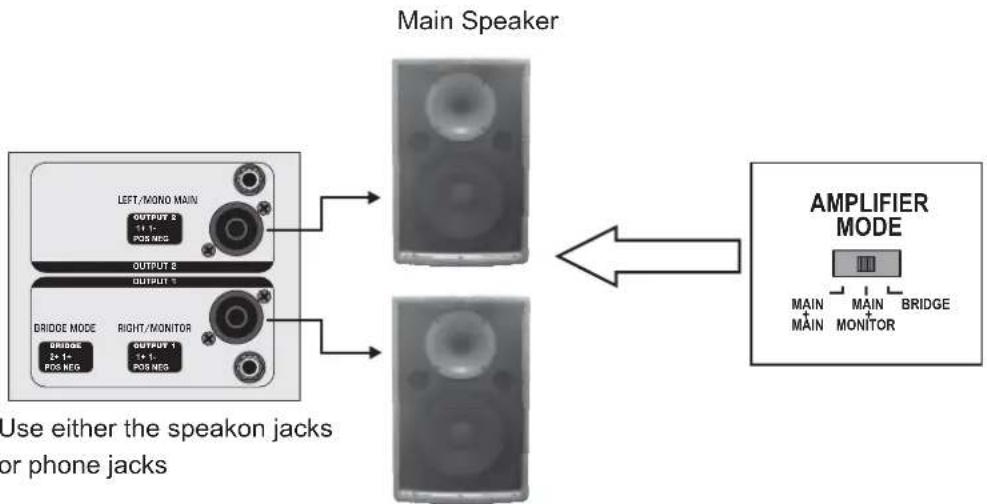
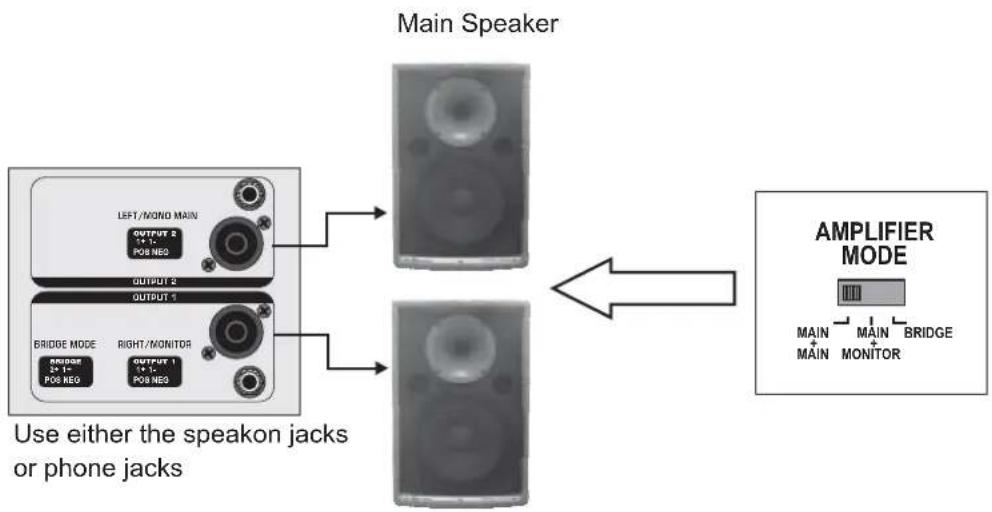
Your APM80.1500 features three modes for connecting the main speakers. The speaker impedance requirement varies depending on how you connect the speaker. In order to avoid damaging your built-in amplifier, please pay more attention to the impedance of speaker. Lower load impedances are not permitted. The further details, you can refer to the mark on rear panel.
Here some illustrations will give you some helpful suggestions.
flowchart
graph LR
    A["LEFT/MONO MAIN"] --> B["BRIDGE MODE"]
    B --> C["RIGHT/MONITOR"]
    C --> D["OUTPUT 1"]
    C --> E["OUTPUT 2"]
    D --> F["POB NEO"]
    E --> G["POB NEO"]
    H["AMPLIFIER MODE"] --> I["MAIN"]
    H --> J["MAIN"]
    H --> K["BRIDGE"]
    H --> L["MONITOR"]
    M["Main Speaker"] --> N["->"]
    style A fill:#f9f,stroke:#333
    style H fill:#ccf,stroke:#333
Bridge Mode
flowchart
graph LR
    A["LEFT/MONO MAIN OUTPUT 2 11-5 POS NEG"] --> B["Main Speaker"]
    C["BRIDGE MODE 2x 1- POS NEG"] --> D["Main Speaker"]
    E["RIGHT/MONITOR 1x 1- POS NEG"] --> F["Main Speaker"]
    G["AMPLIFIER MODE"] --> H["AMPLIFIER MODE"]
    style A fill:#f9f,stroke:#333
    style C fill:#f9f,stroke:#333
    style E fill:#f9f,stroke:#333
    style G fill:#f9f,stroke:#333
    style B fill:#ccf,stroke:#333
    style F fill:#ccf,stroke:#333
    style H fill:#cfc,stroke:#333
Monitor Speaker
MAIN + MONITOR Mode
flowchart
graph TD
    A["Use either the speakon jacks or phone jacks"] --> B["Main Speaker"]
    A --> C["AMPLIFIER MODE"]
    B <--> C
Main Speaker
MAIN + MAIN Mode
6.3 Possible System Connection Mode for Live Sound Application
Read through the "QUICK START" chapter and previous setting procedures, you will know how to start your system quickly and adjust the channel setting under safety conditions. Here shows the APM80.1500 in a live sound system. The following section explains the basic connection and operating.
For input section, connect three or more microphones to mono MIC channels (1\~3); connect synthesizers or signal processor to either line input of stereo channel 7\~8 or line input of mono channel; connect the CD player to line input of mono or stereo channel; other stereo line signal source can be connected to line input of channel 9\~10.
For output section, you can connect either an external amplifier or active speaker to the monitor output jack. Through the main output jacks on front panel, you can connect an external power amplifier to driving the 2 sub-woofers or 2 active speakers. Besides, you can connect a pair of headphone to headphone output jack. There are powered mix output connectors on rear panel, through these, you can connect 2 passive main speakers.
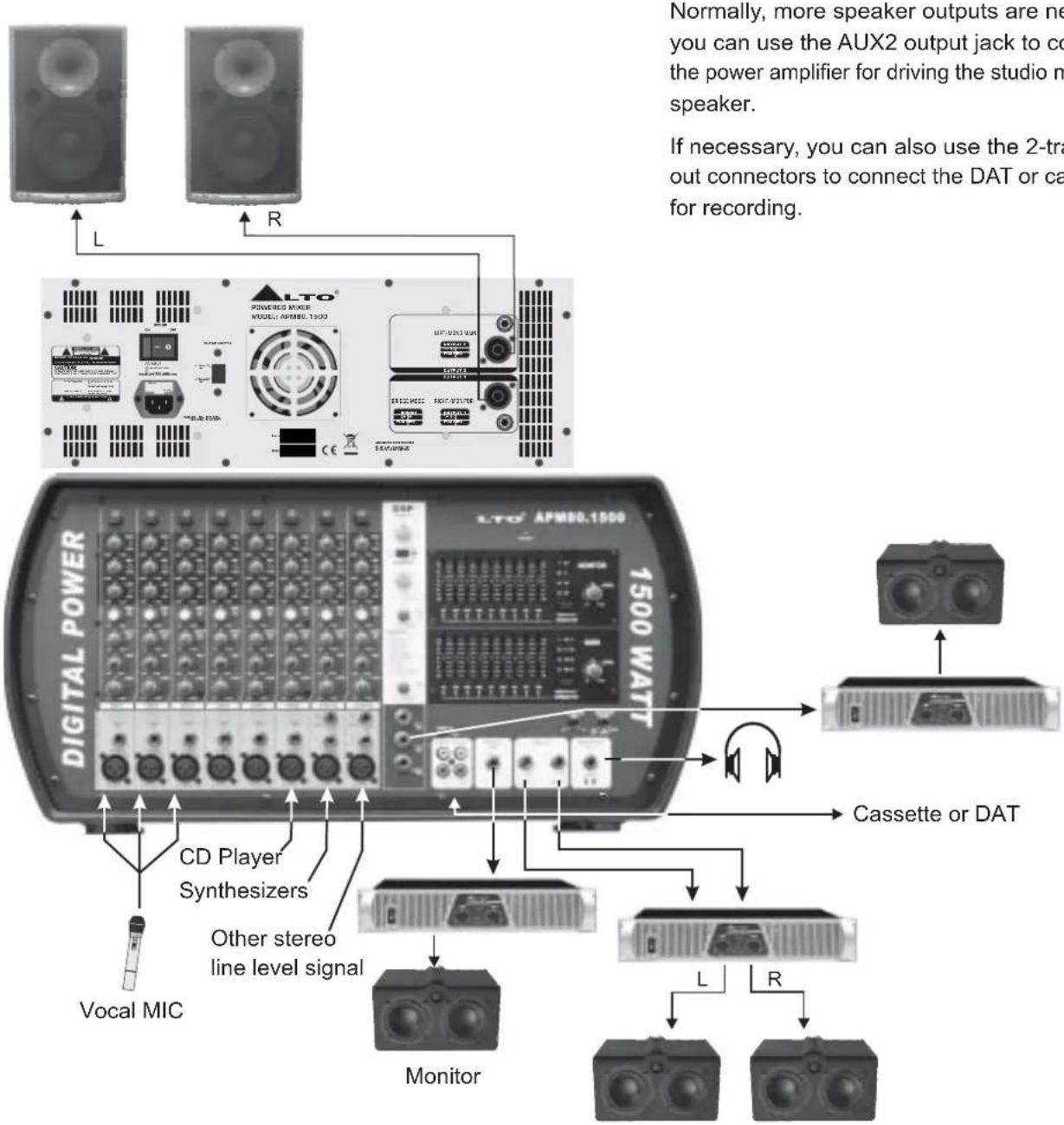
Normally, more speaker outputs are needed, you can use the AUX2 output jack to connect the power amplifier for driving the studio monitor speaker.
If necessary, you can also use the 2-track in/out connectors to connect the DAT or cassette for recording.
- TECHNICAL SPECIFICATION
| Mono input channels | ||
| Microphone input | electronically balanced, discrete input configuration | |
| Frequency response | 10Hz to 55kHz, ± 3dB | |
| Distortion (THD & N) | 0.006% at 4dBu, 1kHz+ | |
| Gain 50dB (MIC) | ||
| SNR (Signal to Noise Ratio) | >90dB | |
| Line input | electronically balanced | |
| Frequency response | 10Hz to 55kHz, ± dB | |
| Distortion (THD & N) | 0.04% at 4dBu, 1kHz+ | |
| Gain | 30dB | |
| Stereo input channels | ||
| Line input | Unbalanced | |
| Frequency response | 10Hz to 55kHz, ± dB | |
| Distortion (THD & N) | 0.006% at +4dBu, 1kHz | |
| Impedances | ||
| Microphone input | 1.4kOhm | |
| Channel Insert return | 2.5kOhm | |
| All other inputs | 10kOhm or greater | |
| Tape out | 1kOhm | |
| All other output | 120Ohm | |
| Equalization | ||
| Hi shelving | ± 15dB @12kHz | |
| Mid bell | ± 15dB @2.5kHz | |
| Low shelving | ± 15dB @ 80Hz | |
| DSP Section | ||
| A/D and D/A converters | 24 bit | |
| DSP resolution | 24 bit | |
| Type of effects | Hall, Room, Vocal & Plate REVERBS | |
| Mono & Stereo DELAY (max DELAY TIME 650ms) | ||
| Chorus, Flanger & Reverb MODULATIONS | ||
| REVERB+DELAY, REVERB+CHORUS, | ||
| REVERB+FLANGER combinations | ||
| Presets | 256 | |
| Controls | 16-position PRESET Selector | |
| 16-position VARIATION selector | ||
| CLIP LED | ||
| MUTE SWITCH with LED indicator | ||
| Main Mix Section | ||
| Noise (Bus noise) | Fader 0 dB, channels muted: - 85dBr (ref.:+4dBu) | |
| Fader 0dB, all input channels assigned and set to | ||
| UNITY gain: 71dBr (ref.:+4dBu) | ||
| Max output | +27dBu balanced , | |
| 22dBu unbalanced, 1/4" jacks+ | ||
| AUX Sends max out | +22dBu | |
| Output Power | ||
| APM80.1500 | Stereo mode: 680W(RMS) @ 4ohm | |
| 770W(EIAJ) @ 4ohm | ||
| 429W(RMS) @ 8ohm | ||
| 399W(EIAJ) @ 8ohm | ||
| Bridge mode: 1553W @ 8ohm | ||
| Power supply | ||
| Main voltage | 100 - 120VAC ~ 60Hz220 - 240VAC ~ 50Hz | |
| Fuse | 100 ~ 120V : T10A 250V | |
| 220 ~ 240V : T6.3A 250V | ||
| Physical | ||
| Dimension (W×D ×I) | 550mm×220mm ×10mm | |
| (8.66"×12.20" ×1.65") | ||
| Weight | (Net) : 8.0kg (17.63lb) | |
| (Gross) : 10.8kg (23.8lb) | ||
8. WARRANTY
1. WARRANTY REGISTRATION CARD
To obtain Warranty Service, the buyer should first fill out and return the enclosed Warranty Registration Card within 10 days of the Purchase Date.
All the information presented in this Warranty Registration Card gives the manufacturer a better understanding of the sales status, so as to purport a more effective and efficient after-sales warranty service.
Please fill out all the information carefully and genuinely, miswriting or absence of this card will void your warranty service.
2. RETURN NOTICE
2.1 In case of return for any warranty service, please make sure that the product is well packed in its original shipping carton, and it can protect your unit from any other extra damage.
2.2 Please provide a copy of your sales receipt or other proof of purchase with the returned machine, and give detail information about your return address and contact telephone number.
2.3 A brief description of the defect will be appreciated.
2.4 Please prepay all the costs involved in the return shipping, handling and insurance.
3. TERMS AND CONDITIONS
3.1 ▲LTO warrants that this product will be free from any defects in materials and/or workmanship for a period of 1 year from the purchase date if you have completed the Warranty Registration Card in time.
3.2 The warranty service is only available to the original consumer, who purchased this product directly from the retail dealer, and it can not be transferred.
3.3 During the warranty service, ▲LTO may repair or replace this product at its own option at no charge to you for parts or for labor in accordance with the right side of this limited warranty.
3.4 This warranty does not apply to the damages to this product that occurred as the following conditions:
- Instead of operating in accordance with the user's manual thoroughly, any abuse or misuse of this product.
• Normal tear and wear. - The product has been altered or modified in any way.
- Damage which may have been caused either directly or indirectly by another product / force / etc.
- Abnormal service or repairing by anyone other than the qualified personnel or technician.
And in such cases, all the expenses will be charged to the buyer.
3.5 In no event shall ▲LTO be liable for any incidental or consequential damages. Some states do not allow the exclusion or limitation of incidental or consequential damages, so the above exclusion or limitation may not apply to you.
3.6 This warranty gives you the specific rights, and these rights are compatible with the state laws, you may also have other statutory rights that may vary from state to state.
SEIKAKU TECHNICAL GROUP LIMITED
No. 1, Lane 17, Sec. 2, Han Shi West Road, Taichung 40151, Taiwan
http://www.altoproaudio.com Tel: 886-4-22313737
email: alto@altoproaudio.com Fax: 886-4-22346757
All rights reserved to ALTO. All features and content might be changed without prior notice. Any photocopy, translation, or reproduction of part of this manual without written permission is forbidden. Copyright © 2007 SEIKAKU GROUP
- SAFETY RELATED SYMBOLS
- WARNING
- CAUTION
- - Power Supply
- - External Connection
- - Do Not Remove Any Covers
- Covers should be removed by qualified service personnel only.
- - Fuse
- - Protective Ground
- - Operating Conditions
- IMPORTANT SAFETY INSTRUCTIONS
- • Power Cord and Plug
- - Cleaning
- - Servicing
- PREFACE
- TABLE OF CONTENTS
- INTRODUCTION
- FEATURES
- QUICK START
- MONO/STEREO Input Channel Section
- MONO Input Channels (1 \~ 6)
- STEREO Input Channels (7 \~ 10)
- -20dB PAD Button
- EQUALIZER
- HIGH
- MID
- LOW
- MON (AUX1) Control
- DSP/FX (AUX2) Control
- PAN Control
- Channel LEVEL Control
- MASTER SECTION Controls
- STEREO GRAPHIC EQ
- FEEDBACK TERMINATOR Button (MONITOR MIX)
- MONITOR LEVEL Control
- MONITOR LEVEL LED Display
- FEEDBACK TERMINATOR Button (MAIN MIX)
- MAIN MIX LEVEL Control
- MAIN MIX LEVEL LED Display
- OPERATING LED Display
- PHANTOM 48V Switch
- AMPLIFIER MODE Switch
- MASTER SECTION INPUT and OUTPUT Jacks
- MONITOR OUT Jack
- MAIN OUT Jacks
- HEADPHONE OUT Jack
- AUX2 OUT Jack
- STEREO RTN. Jack
- TAPE TO Select Switch
- 2-TRACK IN
- 2-TRACK OUT
- DSP Section
- PRESETS Control
- VARIATIONS Control
- DSP MUTE Switch
- CLIP/MUTE LED
- DSP TO MON Control
- DSP TO MAIN Control
- FOOT SW. Jack
- Rear Panel
- POWER ON/OFF Switch
- AC Inlet with FUSE Holder
- SPEAKERS Jacks
- AC Select Switch
- INSTALLATION AND CONNECTION
- Audio Connections
- Main Speaker Connections
- Possible System Connection Mode for Live Sound Application
- WARRANTY
- WARRANTY REGISTRATION CARD
- RETURN NOTICE
- TERMS AND CONDITIONS
Brand : ALTO
Model : APM80.1500
Category : Hand blender