
PW-2407RU - Power Supply Crestron - Free user manual and instructions
Find the device manual for free PW-2407RU Crestron in PDF.


| Product Type | Power Supply Module |
| Brand | Crestron |
| Model | PW-2407RU |
| Input Voltage | 100-240 V AC, 50/60 Hz |
| Output Voltage | 24 V DC |
| Output Current | 7 A |
| Dimensions (H x W x D) | 1.7 x 17.0 x 10.0 inches (1U rackmount) |
| Weight | 4.0 lb (1.8 kg) |
| Protection Features | Overcurrent, short circuit, overvoltage |
| Cooling | Built-in fan |
| Mounting | 19-inch rackmount, 1U |
| Indicators | Power LED, status LED |
| Connections | Input: IEC C14, Output: screw terminals |
| Operating Temperature | 32°F to 104°F (0°C to 40°C) |
| Storage Temperature | -4°F to 140°F (-20°C to 60°C) |
| Humidity | 10% to 90% non-condensing |
| Safety Certifications | UL, CE, FCC |
| Maintenance | Wipe with dry cloth; disconnect power before cleaning |
| Repair / Spare Parts | Contact Crestron service center; no user-serviceable parts |
Frequently Asked Questions - PW-2407RU Crestron
User questions about PW-2407RU Crestron
0 question about this device. Answer the ones you know or ask your own.
Ask a new question about this device
Download the instructions for your Power Supply in PDF format for free! Find your manual PW-2407RU - Crestron and take your electronic device back in hand. On this page are published all the documents necessary for the use of your device. PW-2407RU by Crestron.
USER MANUAL PW-2407RU Crestron
Power Pack: PW-2407RU
Description
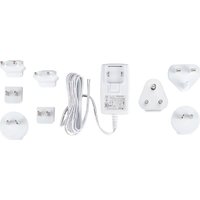
The PW-2407RU is a regulated universal power pack that is used to power a 24 volt Crestron ® product from a standard AC receptacle (100-240 VAC, 50-60 Hz). It is designed for indoor use only.
CAUTION: Only connect this power pack to a Crestron device that is rated at 24 volts (regulated) and no more than 0.75 amp. Plugging this power pack into a Crestron device that has a different rating could damage the device or the power pack.
Specifications
Specifications for the PW-2407RU are listed in the following table.
PW-2407RU Specifications
| SPECIFICATION | DETAILS |
| PowerInput 100-240 VAC, 50-60 HzOutput 24 VDC @.75 Amp, regulated | |
| Cable Length 6 feet | |
| EnvironmentalTemperature 41° to 104° F (5° to 40°C)Humidity 10% to 90% RH(non-condensing) | |
| DimensionsHeight 1.23 in (3.10 cm)Width 1.97 in (5.00 cm)Depth 3.18 in (8.05 cm) | |
| Weight 5.6 oz (157.8 g) |
Setup
Complete the following steps to properly set up and connect the power pack. Refer to the illustration that follows this procedure.
- Attach the white striped lead to the 24 pin on the Cresnet connector of the device to be powered.
- Attach the lead with writing to the G pin on the Cresnet connector of the device to be powered.
- Attach the line cord (supplied) to the IEC connector on the power pack.
- Insert the power pack into an active AC receptacle.
PW-2407RU Power Pack Hookup

flowchart
graph LR
    A["AC RECEPTACLE"] --> B["AC LINE CORD"]
    B --> C["PW-2407RU POWER PACK"]
    C --> D["CRESNET DEVICE"]
    D --> E["24 Y Z G"]
    D --> F["WHITE STRIPED LEAD"]
Further Inquiries
If you cannot locate specific information or have questions after reviewing this guide, please take advantage of Crestron's award winning customer service team by calling Crestron at 1-888-CRESTRON [1-888-273-7876].
You can also log onto the online help section of the Crestron website (www.crestron.com/onlinehelp) to ask questions about Crestron products. First-time users will need to establish a user account to fully benefit from all available features.
Industry Compliance
This product is Listed to applicable UL Standards and requirements by Underwriters Laboratories Inc.

As of the date of manufacture, the PW-2407RU has been tested and found to comply with specifications for CE marking and standards per EMC and Radiocommunications Compliance Labelling.

The PW-2407RU complies with section 301 of the Energy Independence and Securities Act (EISA).
Energy Efficiency Level ④
Return and Warranty Policies
Merchandise Returns / Repair Service
- No merchandise may be returned for credit, exchange or service without prior authorization from CRESTRON. To obtain warranty service for CRESTRON products, contact an authorized CRESTRON dealer. Only authorized CRESTRON dealers may contact the factory and request an RMA (Return Merchandise Authorization) number. Enclose a note specifying the nature of the problem, name and phone number of contact person, RMA number and return address.
- Products may be returned for credit, exchange or service with a CRESTRON Return Merchandise Authorization (RMA) number. Authorized returns must be shipped freight prepaid to CRESTRON, 6 Volvo Drive, Rockleigh, N.J. or its authorized subsidiaries, with RMA number clearly marked on the outside of all cartons. Shipments arriving freight collect or without an RMA number shall be subject to refusal. CRESTRON reserves the right in its sole and absolute discretion to charge a 15% restocking fee plus shipping costs on any products returned with an RMA.
- Return freight charges following repair of items under warranty shall be paid by CRESTRON, shipping by standard ground carrier. In the event repairs are found to be non-warranty, return freight costs shall be paid by the purchaser.
CRESTRON Limited Warranty
CRESTRON ELECTRONICS, Inc. warrants its products to be free from manufacturing defects in materials and workmanship under normal use for a period of three (3) years from the date of purchase from CRESTRON, with the following exceptions: disk drives and any other moving or rotating mechanical parts, pan/tilt heads and power supplies are covered for a period of one (1) year; touchscreen display and overlay components are covered for 90 days; batteries and incandescent lamps are not covered.
This warranty extends to products purchased directly from CRESTRON or an authorized CRESTRON dealer. Purchasers should inquire of the dealer regarding the nature and extent of the dealer's warranty, if any.
CRESTRON shall not be liable to honor the terms of this warranty if the product has been used in any application other than that for which it was intended or if it has been subjected to misuse, accidental damage, modification or improper installation procedures. Furthermore, this warranty does not cover any product that has had the serial number altered, defaced or removed.
This warranty shall be the sole and exclusive remedy to the original purchaser. In no event shall CRESTRON be liable for incidental or consequential damages of any kind (property or economic damages inclusive) arising from the sale or use of this equipment. CRESTRON is not liable for any claim made by a third party or made by the purchaser for a third party.
CRESTRON shall, at its option, repair or replace any product found defective, without charge for parts or labor. Repaired or replaced equipment and parts supplied under this warranty shall be covered only by the unexpired portion of the warranty.
Except as expressly set forth in this warranty, CRESTRON makes no other warranties, expressed or implied, nor authorizes any other party to offer any warranty, including any implied warranties of merchantability or fitness for a particular purpose. Any implied warranties that may be imposed by law are limited to the terms of this limited warranty. This warranty statement supersedes all previous warranties.
Trademark Information
All brand names, product names and trademarks are the sole property of their respective owners. Windows is a registered trademark of Microsoft Corporation. Windows95/98/Me/XP/Vista and WindowsNT/2000 are trademarks of Microsoft Corporation.

CRESTRON®
Crestron Electronics, Inc. Installation Guide - DOC. 6733A
15 Volvo Drive Rockleigh, NJ 07647
Tel: 888.CRESTRON
Fax: 201.767.7576 Specifications subject to
www.crestron.com change without notice.
(2022046)
01.09



Brand : Crestron
Model : PW-2407RU
Category : Power Supply