
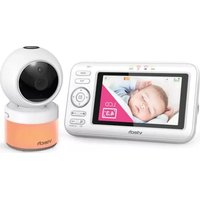
RM9751 - Baby monitor VTECH - Free user manual and instructions
Find the device manual for free RM9751 VTECH in PDF.


| Product Type | Video Baby Monitor |
| Brand | VTech |
| Model | RM9751 |
| Parent Unit Display | 2.8-inch color LCD |
| Camera Type | Infrared camera with night vision |
| Night Vision | Yes, automatic infrared LEDs |
| Two-Way Talk | Yes |
| Temperature Monitoring | Yes, displayed on parent unit |
| Lullabies | Built-in lullabies |
| Range (outdoor) | Up to 300 meters |
| Power Supply (Parent Unit) | Rechargeable lithium-ion battery |
| Power Supply (Baby Unit) | AC adapter (included) |
| Battery Life (Parent Unit) | Up to 8 hours |
| Weight (Parent Unit) | 150 g |
| Weight (Baby Unit) | 200 g |
| Dimensions (Parent Unit) | 130 x 80 x 20 mm |
| Dimensions (Baby Unit) | 100 x 70 x 50 mm |
| Operating Temperature | 0°C to 40°C |
| Cleaning Instructions | Wipe with a dry or slightly damp cloth |
| Safety Certifications | CE, RoHS |
| Warranty | 1 year |
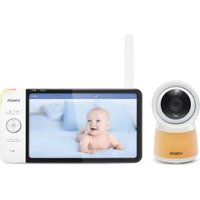
| Included Accessories | Camera unit, parent unit, AC adapters, user manual |
Frequently Asked Questions - RM9751 VTECH
User questions about RM9751 VTECH
0 question about this device. Answer the ones you know or ask your own.
Ask a new question about this device
Download the instructions for your Baby monitor in PDF format for free! Find your manual RM9751 - VTECH and take your electronic device back in hand. On this page are published all the documents necessary for the use of your device. RM9751 by VTECH.
USER MANUAL RM9751 VTECH
Go to www.vtechcanada.com
for the latest VTech product news
RMQ751
(1977)51

Yellow Dairy Baby Camera
RETURN ON EQUITY SHEET CORNERS
vtech
Quick start guide
(Consolidated Series)
(Canada version)
Congress
Congratulations
on purchasing your new VTech product. Before using this HD video monitor, please read
Important safety instructions.
For support, shopping, and everything new at Vtech, visit our website at www.vtedcanada.com
IMPORTANT SAFETY INSTRUCTIONS
The applied nanoplate is located at the bottom of the camera's lamp. Often requires an impound, low safety residues.
should always be followed to reduce the risk of fine, electric shock and injury, including the following:
- Follow all warnings and instructions marked on the product.
-
Refit sure is required
-
CAUTION: Do not install the camera at a height above 2
-
This product is not a substitute for adult supervision of the
Infant. Supervising the inferi is the parent's or caregiver's responsibility. This product could cause operating, and
therefore you should not assume it will continue working properly for any given period of time. Further, this is not a
medical device said should not be used as such. This product is intended to assist you in supervising your baby.
- Do not use this product near water. For example, do not use it used to a half-bit, much lower kitchen diet, independently or
A. How only the exercise included with this product improvement
adapter polarity or voltage can seriously damage the product.
Power adapters information:
NTech Telecommunications Ltd.;
Model: V705W2583200 7. The power adapters are intended to be correctly oriented in a
vertical or floor mount position. The prongs are not designed to hold the plug in place if it is plugged into a railing, under-
the-table or cabinet outlet. 8. For pluggable equipment, the socket outlet shall be installed
near the equipment and shall be easily accessible.
- Deploy the product from the well-comber before cleaning.
-
Do not use liquid or aerosol cleaners. Use a damp-cloth-for-decision. Do not cut off the covers after doing to replace them.
-
The following cases are not to be seen in the hospital's hospital, and the number of patients with other plugs, as this causes a hazardous situation.
-
Do not show anything to Next on the proper context. Do not install this product where the conditions may be walked by or replaced.
-
This product should be operated only from the type of power
source indicated on the marking date. If you are not sure of the type of power supply in your home, consult your dealer as
-
Do not overload/well outlets or use an extension card.
-
Do not place this product on an unstable table, shelf, stand or other vegetable samples.
-
This product should not be placed in any area where proper ventilation is not provided. Tikis and sweeteners in the book are
ventilation of the germlister. Stoffs and upper limb in the board for bottoms of this product are provided for ventilation. To protect them, does overheating, these oogenesis must not be blinded
by placing the production of stiff surface such as a bed, soda
or rug. This product should never be placed fear or offer a radiator or fleet register.
- Never push objects or any kind into the product through the 60s because they reach cloud dangerous software points
or create a short circuit. Never spill liquid of any kind on the product.
- To reduce the risk of electric shock, do not disassemble this product, but take it to an authorized service facility. Opening
or removing parts of the product other than specified access, since may expose you to dangerous voltage or otherwise
Incorrect reassembling can cause electric shock when the product is subsequently used.
-
You should test the sound/reception every time you turn on the units or move one at the components.
-
Periodically examine all components for damage.
-
There is a previous risk of privacy in each other
-
There is a very poor risk of privacy that is under using certain electronic devices, such as cameras, cordless telephones, pets. To protect your privacy, make sure the product has never
been used before purchase, reset the camera periodically by powering off and then powering on the unit, and power off.
the camera if you will not use it for some time. 71. Children should be unsupervised to ensure that they do not play
with the product.

WHAT'S IN THE BOX
Your baby monitor package contains the following items. Save your sales receipt and original
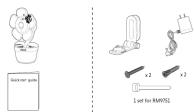

WHAT'S IN THE BOX

DOWNLOAD APP FOR MOBILE ACCESS
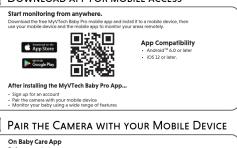

PAIR THE CAMERA WITH YOUR MOBILE DEVICE

- Enable the location server of your mobile device for the purpose of camera setup. 195th e 2.4GHz Finstvush and applied Location family
With a 2.4GHz Wi-Fi network and enabled Location service... You can start to join the camera with your own mobile device following the instructions in the app.
Upon the successful peiting, you can hear and watch your baby via your mobile device.
Tips: - How to the corset and fix 140.5 rules involve in each other in order in transformation for network visual
POSITION THE CAMERA

OVERVIEW

[EMPTY]
[Non-Text]
③—
②——
①—
④—
③—
⑥—
[Non-Text]
[Non-Text]
[Non-Text]
[Non-Text]
[Non-Text]
[Non-Text]
[Non-Text]
。
⑤—
0—
[Non-Text]
[Non-Text]
[Non-Text]
①
3
[Non-Text]
C
7
J. 1
1
∴ m = 3/11
1
( x - 2x) t - xy2 = ( x - 2x) f t
∴ m = 3/11
1 Boc
- Box 2. Linel
10p
3 Can
4 Mio
5 Nlg
6 Spe
7 star
8 PAI
[Non-Text]
[Non-Text]
[Non-Text]
[Non-Text]
[Non-Text]
[Non-Text]
[Non-Text]
[Non-Text]
§ Ter
30 Pc
11 W
2017
PRIVACY MODE
Designed for extra peace of mind, turn on Privacy Mode for a moment of peace and quiet.
When the Privacy Mode is turned on, audio transmission and video monitoring will be disabled or motion recording, motion detection, and sound detection will be temporarily unavailable.

CABLE MANAGEMENT

PROTECT YOUR PRIVACY AND ONLINE SECURITY
VTech cares about your privacy and peace of mind. That's why we've put together a list of industry-
recommended best practice to help keep your wireless connection private and your devices protected
When online, we recommend you carefully review and consider competing with the following tips. For your advisors' connection it secure
• Before installation a device, ensure your contact velocity do
with AEC options in your network environment security data.
Change default settings
- is at least 10 characters long.
- la complex.
- Does not contain dictionary words or personal information,
- Contains a mix of appreciation efforts, lower costs efforts, special character and manufacturer.
- Downloaded security patch from manufacturers as soon as they have been available. This will
always have the latest security updates.
- If the feature is available, enable automatic updates for future releases.
Disable Universal Plug and Plug (UPnP) on your router.
- LiPm 2 unablued on a router can limit the effectiveness of your Drwell by allowing other network devices
to open inbound ports without any intervention or approval from you. A virus or
program could use this function to compromise security for the entire network.
For more information on wireless connections and protecting your data, please review the following
resources from industry experts:
- Federal Communications Commission: Wireless Connections and Bluetooth Security Tips =
www.foc.gov/consumers/guides/how-protect-yourself-online.
- U.S. Department of Homeland Security: Before You Connect a New Computer to the Internet -
www.uo.net.gov/roos/clps/3718-959
-
Federal Trade Commission: Using IP Canicabs Safety - MPAs//www.computer.Ps.001particles/SPB by aiv
-
H.E. Wijnay, Stenavatti, S.F. (any)
-
WPH Atlanta: Discover WPH security http://www.wi-fj.org/Discover-val-5/severity
(1) 2017年1月1日(星期五)
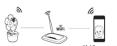
HOW THE SYSTEM WORKS?
The Ground Truth image displays a single, solid horizontal line, which is a stylistic or background element (like a ruled paper line). According to Rule 2, such lines must be ignored by the OCR result. The provided OCR content is "____", which consists of underscores. Underscores are not equivalent to a solid line and are not permitted under the “Stylistic/Background Lines (Ignore)” rule. Outputting underscores for a stylistic line is incorrect because it misinterprets the line as a fill-in-the-blank placeholder. Since the OCR output incorrectly rendered a stylistic line as underscores (which should be ignored), this violates the rule. Therefore, the OCR result is inconsistent with the Ground Truth.
Your home Wi-Fi network provides Internet connection to your camera so that you can
monitor and control your camera whenever you are through the MyVtech Baby Pro App
Your Wi-Fi router (not included) provides the Internet connectivity, which serves as a
communicating channel.

TEST THE LOCATION FOR THE CAMERA
If you plan to install your camera in a disordered location, and will use your home Wi-Fi network to
connect your mobile device, lost whether your selected monitoring area has good Wi-Fi signal
strength. Adjust the direction and distance between your careers, mobile device and Wi-Fi router until
you have identified a suitable location with good connection.
Note:
- Depending on surroundings and obstructing factors, such as the effect distance and internal walls.

FCC AND IC REGULATIONS
FCC Part 15
This equipment has been tested and found to comply with the requirements for a Class B limited device unit.
Part 15 of the Federal Communications Commission
(FCC) rules. These requirements are intended to provide
Reasonable protection against harmful interference in a residential installation. This equipment generates
uses and can radiate radio frequency energy and, if not
installed and used in accordance with the instructions.
In my Google Foundation's reference to Radio Communications. However, there is no guarantee that interference will
not occur in a particular installation. If this equipment
Both close homin interference to RAGS or relaxation reception, which can be determined by turning the
equipment off and on. The year is encouraged to 2017
eagagement will be able; the user is external agent to try no correct the interference by one or more of the following
Публичес President on requests the working environment
- Increase the separation between the equipment
and receiver.
- Connect the equipment into an outlet on a circuit different from that to which the receiver is
connected.
- Consult the dealer or an experienced radio/TV acquisition for help
WARNING: Changes or modifications to this use of them
weak Senior: Changes of interventions to mid equipment not expressly approved by the party responsible for
compliance could void the user's authority to operate two environment
This device complies with Part 25 of the FCC ruling
Operation is subject to the following two conditions:
(1) this device may not cause harmful interference, and (2) this device must prevent interference as received.
(a) In Denmark must accept any interference received, including interference that may cause undesired
operation.
To ensure safety of users, the FCC has established criteria
for the amount of radio frequency energy that can be
tally subscribed by a case of Dynanban according to the intended usage of the product. This product has
been tested and found to comply with the FCC criteria.
The camera shall be illuminated and used such that parts of all persons' body are maintained at a distance of
or all given property are not limited or no distance or approximately 8 in (20 cm) or more.
This Class B digital apparatus complies with Canadian
requirement: CAN IC(s)-I (k)/NMI-1(k)
Industry Canada
This service contains brand-to-high profitability/p-recognized part comply with innovation, Science and
Economic Development Canada's licence-exempt RSS(a).
Operation is subject to the following two conditions: (1) This device may not cause interference; (2) This device
must accept any interference, including interference that
may cause undesired operation of the device. The term IUC will believe the certifying insisting
number only signifies that the Industry Canada technical
specifications were met.
This product makes the applicable innovation, science- and Economic Development Canada technical
specifications.
PIF radiation exposure statement
The product complies with FCC RF radiation exposure
limits get form for an uncontrolled environment. The camera should be installed and operated with a
minimum distance-of-0 in [32 cm] between the camera
and all persons' body. Use of other accessories may not use any samplers with DCC DF surveys or guidelines. This
ensure compliance with FCC AP exposure guideline. The equipment complies also with Industry Canada R55-302
with respect to Canada's Health Code & for Exposure of
MOUNT THE CAMERA (OPTIONAL)
No
neck for reception strength and the camera viewing angle before drilling the holes.
the types of screws and anchors you need depend on the composition of the wall. You may need to
purchase the screws and anchors separately to mount your camers.


DISCLAIMER AND LIMITATION OF LIABILITY
VTech and its suppliers assume no responsibility for any damage or loss resulting from the use of this handbook. VTech and its
suppliers assume no responsibility nor any vote or claims by third parties that may arise through that use of this firmware. A tech. and by a member, assume no responsibility. Not only damage or loss caused by debiting of data as a result of staff members, deal
In this statement, the responsibility for any damage or loss of a land that is given for land and land on the land in the land. In fact, liability, or remains. The sure to make backup copies of important data on other media to protect against data loss.
THIS DEVICE COMPLIES WITH PART 15 OF THE FCC RULES. OPERATION IS SUBJECT TO THE FOLLOWING TWO
CONDITIONS: (1) THIS DEVICE MAY NOT CAUSE HARMFUL INTERFERENCE, AND (2) THIS DEVICE MUST ACCEPT
ANY INTERFERENCE REQUIRED, INCLUDING INTERFERENCE THAT MAY CAUSE UNDESIRED OPERATION.
CAIR LEAF (B) NIM-3(8),
Cataloric Changes of Information for Exports approved by the Saudi Responsible for commercial credit voids to operate for equipment.
Warranty: Please visit our website at www.bhomes.com (for full details of the warranty provided in our countries
1.
LIMITED WARRANTY
What does this limited warranty cave
The manufacturer of this V-arch product, if Iach Communications, Inc. ("Vtech"), surveys to the holder of a NOTE: Before calling for service, please review the user's
vistil gvoxt of jpucheen; "Consumer" or "you"? that Ife-Product and all accessories provided by Vtech in sales package manual – a check of Ife-Product's controls and features may save you a service call.
("Product") see heat from material defects in material and workmanship, pursuant to the following terms and conditions. Excess as provisions by applicable law, you assume the risk
when installed and used正式 and is accordance with agreements instructions. This limited warranty orders only to
the-Consumer for Products purchased and used in the United States of America and Canada
What will VTech do if the Product is not free from defects in. Transportation, delivery or handling charges prepared. Vtech assumes no risk for damage or loss of the Product in transit.
materials and workmanship during the limited warranty period ("Materially Defective Product")? What must you return with the Product to get warranty service
During the limited warranty period, Vfledvi's authorized service regeneration will replace in Vfledvi's position, different shares. 1. Before the entire original package and contents including Product to the Vfledvi service location along with a decou
a. Materially Defective Product. If we choose to replace the of the malfunction or difficulty; and
Product, will replace a net (net of restructured Product) of the same or similar design. VTech will return replacement 2. Inougal II - Vella proton or purchaser (sales receipt) (denire) the Product purchased (Product model) and the date of
product, so you in handling processors, a test-and-aater-determine agri, crosslakes, or equipment). Replacement of free Product, it
purchase of receipt, and
- Protection system, complete and contact station adopted
If you don't opinion, is your exclusive remedy. You should expect the replacement to take approximately 30 days.
How long is the limited warranty period? Other limitations This company in the company and production management
The limited warranty period for the product extends for CARE (1) YEAR from date of purchase (VII) plans on products
guofased as "Refurbished"). This limited warranty also applies to replacement products for a period of either (or 80 days) long. and investigations related to this product. With recommendations no other warranties for this product, the warranty exclusively
the date the replacement Product is shipped to you or (b) described all of HICH's responsibilities regarding the product. There are no other approved warranties. No one is authorized
OPO due limited warranty or products that are purchased at (substandard) wholesale, you can not
*Re Established products purchased from our online store carry a State Law Rights: This warranty gives you specific legal rights.
90-day replacement warranty. and you also have other rights which vary from state to state.
What is not covered by this limited warranty? Limited or inspired against, including more on interest in a particular purpose and merchantability (an unwerten
- Product that has been subjected to misuse, accident,
shipping or other physical damage, improper installation, abnormal isolation or handling, neglect, invasulation, fire. limitations on flow king an implied warranty lists, to the above limitation may not apply to you.
water or other liquid intrusion; By To rise event shall VTech be liable for any indirect, special, incident, economical, or similar disputes (both clients, in
-
FLOSO that has been damaged due to repair, alteration of modification by anyone either than an authorized service (including the following):
-
Product to the extent that the problems experienced is caused other Japanese equipment, the cost of fabrication equipment and plants (by third parties) requiring from the use of this
By signal conditions, networks reliability, or cable or antenna cytopenic; or
-
Product to the extent that the problem is caused by use with PRACTICE ACCESSORIES OF exclusion may not apply to you. Please apply your original value required as part of number
-
Product whose warranty/guality stickers, product serial
number plates or electronic server numbers have been removed, altered or remodeled illegiate; or
- Product purchased, used, serviced, or shipped for repair from outside the United States of America or Canada, or used
for commercial or institutional purposes (including bank not limited to products used for real estate purchase)
-
Product returned without a valid proof of purchase (see item
-
Charges for inflation or set up, adjustment of customer
controls, and installation or repair of systems outside the unit. How do you not manage any use?
To obtain quarterly service in the United States of America,
please visit our website at www.inechphones.com or call (860) 945-952, for instructions regarding where to return the

NEED HELP?
Driven by system updates, the software, online help topics, and online
FAQs will be updated periodically.
for operations and guides to help you using your BD video monitors.
For openfronts and guides to help you using your No Video Monitor, and for latent information and supports, no and hereby the online help.
and for latest information and supports, go and check the online help
topics

Use your smartphone or mobile device to access our online help.
- Go to https://phones.vtechcanada.com/manuals-08
Scan the QR code on the right. Launch the camera app or
Scan the disk code on the right. Addition the camera app or OR code scanner app on your smartphone or tablet. Hold
an code scanner app on your smartphone or tablet. Hold the device's camera up to the OR code and frame it. Tap the
the device's camera up to the off case and frame it: Top the notification to trigger the redirection of the
online help
If the 2016 data is not due to disclosure of first-year revenue.
- If the GA
focus by moving your device closer or turnker away until it is clear.
is clear.
- Search for the model - RM9751
[Non-Text]
You can also call our Customer Support at 1-888-211-2005 for help.

TECHNICAL SPECIFICATIONS
Open-up 3.11/2012-2062 Mkt
C. Smith 1-11 (Fall - Sept 10-4)
Internet Connection - Minimum Requirement: 1.3 Mbps (0.72GHz or 2.5 Mbps) (0.26GHz) - Mixed Ethernet ports required
options broadband per camera
Nominal effective | Maximum power allowed by FCC and IC. Actual operating tan
Hinge may vary according to environmental conditions at the time of
Power requirements | Camera unit power adapter Output 3V DC @ 1 A
nediv
the Background Noise sound file was created by Caroline Ford, and is used under the Creative Commons
the Stream Noise sound file was created by Caroline Font, and is used under the Creative Commons logo. At World sound file was created by Milta Russia, and is used under the Creative Commons
The Chested Air High sound. He was desired by Mike Working, and is also under the Creative Commons. The Heart Beat sound file was created by Zanobawles, and is used under the Creative Commons license.


Specifications are subject to change without notice © 3022 VTech Communications, Inc.

- VTECH
- CONGRATULATIONS
- IMPORTANT SAFETY INSTRUCTIONS
- WHAT'S IN THE BOX
- DOWNLOAD APP FOR MOBILE ACCESS
- PAIR THE CAMERA WITH YOUR MOBILE DEVICE
- POSITION THE CAMERA
- OVERVIEW
- PRIVACY MODE
- CABLE MANAGEMENT
- PROTECT YOUR PRIVACY AND ONLINE SECURITY
- HOW THE SYSTEM WORKS
- TEST THE LOCATION FOR THE CAMERA
- FCC AND IC REGULATIONS
- MOUNT THE CAMERA (OPTIONAL)
- DISCLAIMER AND LIMITATION OF LIABILITY
- NEED HELP
- TECHNICAL SPECIFICATIONS
Brand : VTECH
Model : RM9751
Category : Baby monitor