CA70 - Audio Receiver HARMAN KARDON - Free user manual and instructions
Find the device manual for free CA70 HARMAN KARDON in PDF.


User questions about CA70 HARMAN KARDON
0 question about this device. Answer the ones you know or ask your own.
Ask a new question about this device
Download the instructions for your Audio Receiver in PDF format for free! Find your manual CA70 - HARMAN KARDON and take your electronic device back in hand. On this page are published all the documents necessary for the use of your device. CA70 by HARMAN KARDON.
USER MANUAL CA70 HARMAN KARDON
Congratulations on your purchase of a Harman Kardon CA140Q/CA70 High Fidelity Car Amplifier.
To fully understand its capability, please read this manual carefully and follow all of the instructions regarding its use and installation.
ACCESSORIES
- Power Cord with Fuse and Holder (Red) (1 pc.)
- Ground Cord (Black) (1 pc.)
- Connector with Tube (1 set)
- Mounting Screws (1 set)
SPECIFICATIONS
| Number of Channels | : CA140Q : 4CA70 : 2 |
| Continuous Average Power per Channel,All Channels Driven from 20Hz-20kHz | : 35 Watts @ <0.1% THD into 4 Ohms35 Watts @ <0.3% THD into 2 Ohms70 Watts @ <0.3% THD bridged into 4 Ohms |
| HCC | : ±30 Amps |
| Frequency Response | : 5Hz-100kHz (+0, -3dB) |
| Signal-to-Noise Ratio | : 100dB |
| Input Sensitivity/Impedance | : 250mV/22kΩ (variable) |
| Power Supply | : DC+14.4V (11-16V usable), negative ground |
| Dimensions (H x W x D) | : CA140Q : 2.25" x 12.6" x 9.4"(57 x 320 x 240 mm)CA70 : 2.05" x 10.6" x 6.7"(52 x 270 x 170 mm) |
| Weight | : CA140Q : 9 lbs. 1 oz (4.1 kg)CA70 : 5 lbs. 1 oz (2.3 kg) |
All specifications and features subject to change without notice.
FEATURES
■ 30 Amperes of HCC (High Instantaneous Current Capability) maintains a wide dynamic range and low distortion when driving low impedance or reactive loads.
■ High Power Output of 35 watts per channel into 4 Ohms, 35 watts per channel into 2 Ohms and 70 watts bridged into 4 Ohms.
■ Ultrawide Bandwidth is achieved by the use of inherently fast open-loop circuitry. This improves transient accuracy and phase linearity.
■ Low Negative Feedback
Highly linear circuitry produces low distortion with only 25dB of negative feedback. This further improves dynamic accuracy.
■ Discrete Component Audio Circuitry is used because it was found to be the only way to provide HCC, Ultrawide Bandwidth and Low Negative Feedback.
■ A High Capacity Power Supply enables stable operating voltages even under high power conditions. This results in improved low frequency sound quality.
■ High Heat Dissipation Capability is provided by a large heatsink, efficient circuitry and rugged circuit components.
■ Protection Circuitry assures reliability under high temperature, reverse-voltage and short-circuit conditions, without degrading the sound quality during normal high power operation.
■ Simultaneous Stereo/Bridged Operation provides operating flexibility, system simplicity and added value.
GENERAL INSTRUCTIONS
- Be sure that metal objects or other foreign materials do not enter the unit. This can cause immediate trouble or reduce the unit's long-term reliability.
- It is natural for this unit to become warm while operating. It incorporates thermal protection circuitry to shut off the unit when operating abnormally.
- It is recommended that this unit be operated in a vehicle only while the engine (and electrical charging system) is running. At high power output, it typically draws about as much current as an automobile's headlights, and therefore can eventually discharge the battery.
● The speaker output terminals are protected from damage due to short-circuited speakers or speaker wires. When this protection circuitry is momentarily activated, the power output is muted for several seconds and is then restored. When the terminals are continuously short-circuited, the power output will remain muted. Should the latter occur, shut off the unit and check the speakers and speaker wires. - The heat generated by this amplifier is dissipated into the air by the entire chassis. If it is covered, or becomes dirty so that the circulation of the air around it is reduced, the unit's ability to dissipate heat will also be reduced. Under most conditions, the heat dissipating capability of this unit is more than enough to provide uninterrupted operation. However, when full power is drawn in an already hot environment, any loss in heat dissipating capability is likely to result in activating the thermal protection circuits.
- When replacing the fuse, be sure to use an identical value (CA140Q: 30 ampere, CA70: 15 ampere) auto fuse.
- If your unit behaves abnormally, turn it off immediately and consult an authorized Harman Kardon Service Station.
JACKS, TERMINALS AND CONTROLS

text_image
CA140Q ① ② ③ ④ ⑤ ⑥ ⑤ ④ CA70 ① ② ③ ④ ⑥ ⑤INSTALLATION INSTRUCTIONS
Locate and drill 4 holes corresponding to those in the chassis. Securely mount the amplifier to the surface with the four 5 mm tapping screws. Drill undersized holes in the car chassis so that the 5 mm tapping screws fit tightly. We recommend 3.5 mm or 1/8 inch diameter holes.
① Power input terminals
② 2Ω/4Ω switch
③ Speaker terminals
④ 50 Hz boost control
⑤ Input level control
⑥ Input jacks

text_image
Tapping Screw (241-168)CONNECTIONS
General
Caution 1: The ignition key switch should be turned off before any connections are made to the car electrical system.
Caution 2: Use a flat-bladed screwdriver with a blade width of less than 5 mm to connect the cables. Using a screwdriver with a blade width of more than 5 mm can damage the screw slot.
Caution 3: The last connection to be made should be to the positive terminal of the car battery.
Caution 4: Do not connect any of the CA70 or CA140Q speaker terminals to the car chassis or to a common ground. Also, do not connect the speaker terminals of the CA70 or CA140Q to the input terminals of another amplifier or signal processor.
Connect the CA140Q/CA70 to the car electrical system and to the other components in the audio system as per the following instructions:
Remote
This terminal enables the power switch of the car tuner/CD or tuner/deck to also turn on the CA140Q/CA70. Connect one end of the accessory yellow cord to the appropriate lead (power amplifier remote) on the car tuner/CD or tuner/deck and the other end to the remote terminal on the CA140Q/CA70.
If a specific wire for this purpose is not provided on the tuner/deck, use the wire for controlling the power antenna. If that wire is already connected to the power antenna, the CA140Q/CA70 can be connected in addition.
+B
The +B terminal is the positive power input terminal. It should be connected to the positive (+) terminal of the car battery using the accessory red cord. The cord should be installed such that the attached fuse holder is located near the car battery.
GND
This is the negative power input terminal. It should be connected directly to the car chassis using the accessory black cord. It is not necessary to connect this terminal to the negative battery terminal.
Input Jacks
These input jacks are for connection to the line (preamplifier) output jacks on the car stereo or tuner/deck. It is recommended that high quality shielded coaxial cables with tight-fitting RCA plugs be used for this connection.
If the car in-dash unit has a built-in power amplifier and does not have line (preamplifier) output jacks, connect the speaker wires to these input jacks. Male phone plugs (not provided) are required. If the built-in amplifier is the "High Power" type (rated 12 watts per channel or more), a power-line adaptor (not provided) must be used.
Adjusting Input Level and 50 Hz Boost Controls
Input level - This continuously variable control allows the amplifier's sensitivity to be matched to the output level of the in-dash unit. Initially, set this control to a low position. Turn on the car audio system and attempt to play it at a comfortable listening level. If the volume control on the in-dash unit cannot increase the level sufficiently, increase the input level control setting accordingly.
50 Hz boost - This continuously variable control can add up to 12 dB of boost to low frequencies in the 50 Hz range. This can be used to compensate for the poor low frequency response from some car speaker systems. Set the bass and treble controls on the in-dash unit to their center positions. Defeat or bypass an equalizer, if used. While the car audio system is playing at a comfortable listening level, increase the setting of the 50 Hz boost control until the desired low frequency effect is achieved.
Stereo (CA70) and 4-channel (CA140Q) Systems
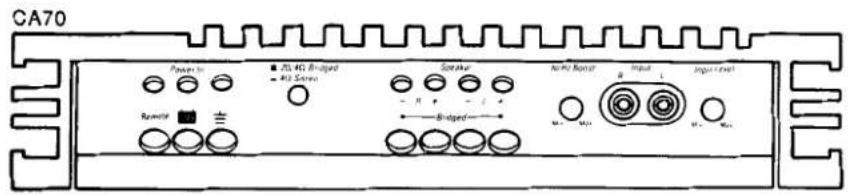
CA70

text_image
Power In 702.451 Bridged 403 Stereo Speaker 30 Hz Boost Input Input Level Beamtr Bridged Mn Mn
text_image
CA140Q Power Amplifier Remote Lead Power in 2Ω 4Ω Bracket -4Ω Stator Speaker 1 Speaker 1 -6 -1 -6 -1 -6 -1 -6 -1 -6 -1 Set to 4Ω position Input 2 Input 1 50 Hz Bracket Min Max Input Level Min Max Max Front Rear To in-dash unit Fuse (+12V) Car Battery Chassis Rear Speakers Front SpeakersThe following instructions and illustration as shown left apply to typical 2 and 4 channel systems, where one 4 Ohm speaker system is used per channel, and 2 or 4 line output connectors are provided by the in-dash unit.
Note: CA140Q only – The input 1 jacks and the controls on their right side correspond to the speaker 1 terminals. The input 2 jacks and the controls on their left side correspond to the speaker 2 terminals.
CA140Q - Connect two pairs of signal leads from the in-dash unit to the input jacks on the CA140Q. Connect the left and right front leads to the input 1 jacks, and the left and right rear leads to the input 2 jacks. If the in-dash unit has only one pair of output leads, "Y" connector may be used so that the left lead can connect to the left jacks for both input 1 and input 2, and the right lead can connect to the right jacks for both input 1 and input 2.
- Set the 2Ω/4Ω switch to the 4Ω position.
CA70 - Connect one pair of signal leads from the in-dash unit to the input jacks on the CA70. Connect one pair of speaker systems to the left and right speaker terminals. Set the 2Ω/4Ω switch to the 4Ω position.
- If two 4 Ohm speaker systems are to be connected to each channel, set the 2/4 switch to the 2 position.

text_image
CA70 Power ■ 25410 GHz ■ 163 Linear Speaker 50 Hz Road Input Input Level Remote R A Bridged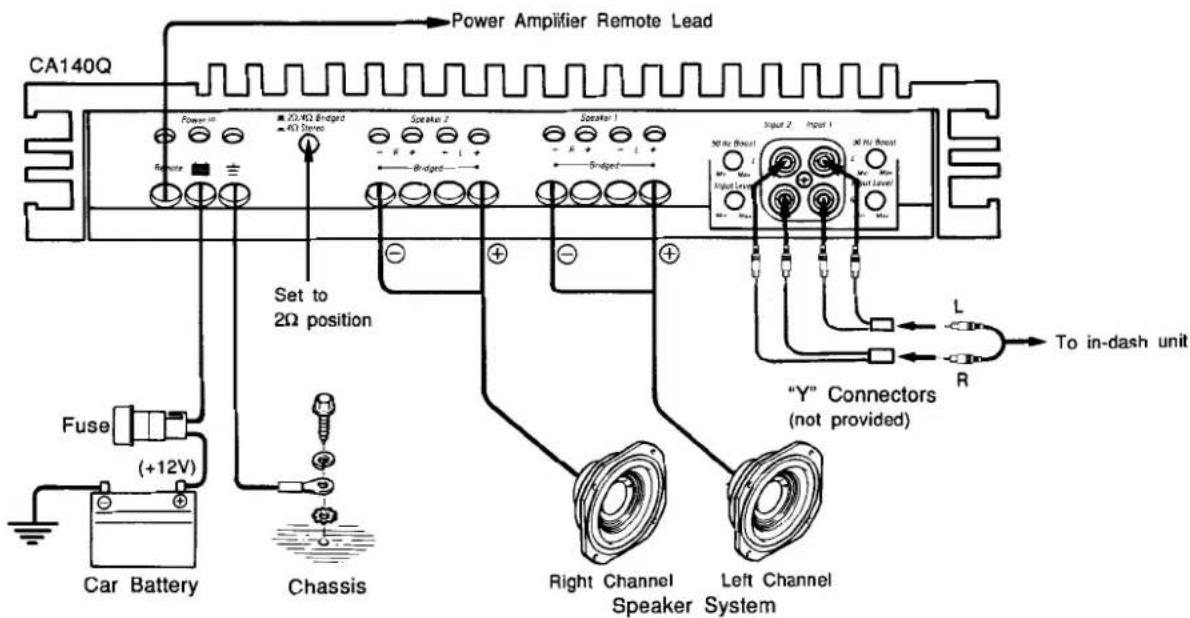
text_image
CA140Q Power Amplifier Remote Lead Power IO-KΩ Bndgird IO Stereo Speaker 2 Speaker 1 5-ndgird Set to 2Ω position 50 Hz (Rout) Input 1 30 Hz (Rout) Input Level L To in-dash unit Fuse (+12V) Car Battery Chassis Right Channel Speaker System Left Channel Y" Connectors (not provided) RIn this mode of operation, two channels work together so that their combined power can be driven into one speaker system. Only 4 Ohm speaker systems can be used in this way.
CA140Q - The left input signal must be fed to both input 1 jacks, and the right input signal must be fed to both input 2 jacks. Two "Y" connectors (not provided) are required. Connect the left loudspeaker from the left "+" to the right "-" terminals of speaker 1. Connect the right loudspeaker from the left "+" to the right "-" terminals of speaker 2. Be sure to connect each speaker's positive terminal to the left "+" terminals.
- Set the 2Ω/4Ω switch to the 2Ω position.
CA70 - The same input signal must be fed to each channel. This can be done by connecting a "Y" connector (not provided). One 4 Ohm speaker system should be connected with its positive terminal connected to the left "+" terminal, and its negative terminal connected to the right "-" terminal.
● The 2/4 switch should be set in the 2 position.
Simultaneous Stereo - Bridged Operation
text_image
CA70 Power to ■ 314 HD Brugged → 412 Screen Sensatur Mn/Fe Brugged Input Input Level Brugged Max Max Max Max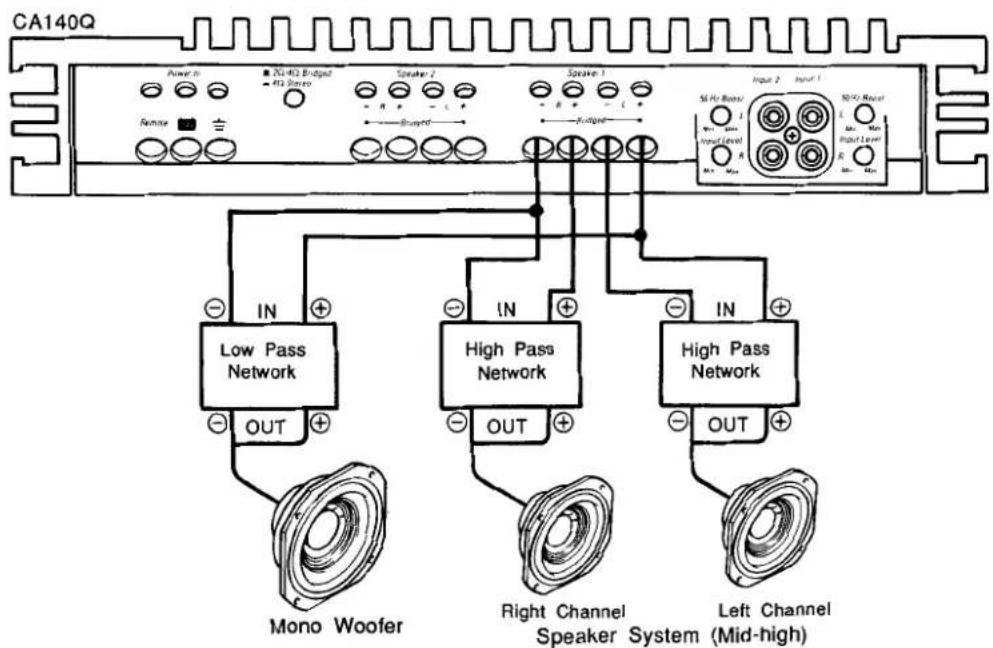
text_image
CA140Q Power In 20x-402 Bridged 413 Stereo Speaker 2 R Speaker 1 R Input 2 Input 1 Remote Bridged 56 Hz Boost Input Level 50Hz Max Input Level In In IN High Pass Network High Pass Network High Pass Network OUT OUT OUT Mono Woofer Right Channel Speaker System Left Channel (Mid-high)When passive crossover networks are available, both mid-high speaker systems and woofers can be connected to the same terminals.
First, connect the mid-high speaker systems and their high-pass networks to the left and right speaker terminals. Be sure to maintain the correct polarities. Also, be sure to connect the amplifier's speaker terminals to the network inputs and the speaker systems to the network outputs.
Next, connect the low-pass network and woofer from the left "+" to the right "-" terminals, with the network's "+" input connected to the left "+"
Two such systems can be used with the CA140Q.
Three Channel Operation - CA140Q Only
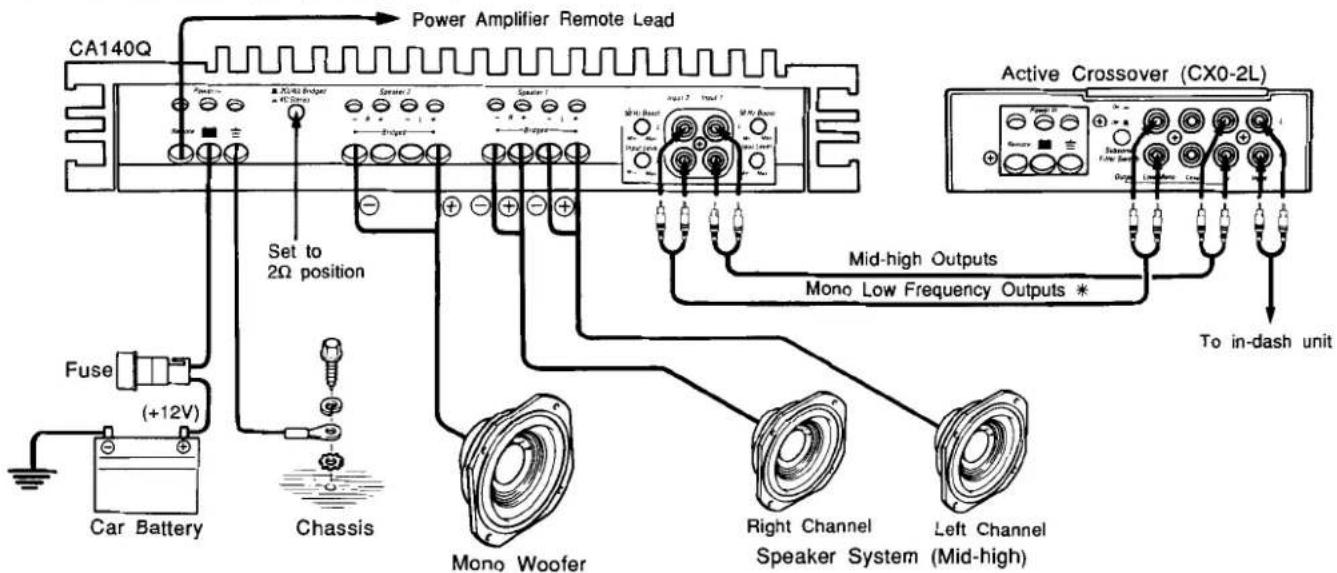
This system configuration can be used to drive one stereo pair of speakers in the mid-high frequency range and one mono woofer. An active crossover network (not provided) is required.
text_image
CA140Q Power Amplifier Remote Lead Set to 2Ω position Fuse (+12V) Car Battery Chassis Mono Woofer Right Channel Speaker System (Mid-high) Active Crossover (CX0-2L) Mid-high Outputs Mono Low Frequency Outputs * To in-dash unitNote: * If only one mono jack is provided, a "Y" connector can be used.
Connect a pair of signal leads from the in-dash unit to the active crossover. Connect the mid-high crossover output jacks to the left and right input 1 jacks. Connect the mono low output jacks to the left and right input 2 jacks.
- If only one mono jack is provided, a "Y" connector can be used.
Connect the left and right mid-high speaker systems to the left and right speaker 1 terminals. Connect the woofer from the left "+" to the right "-" terminal of speaker 2. Connect the speaker's positive terminal to left "+"
- Set the 2Ω/4Ω switch to the 2Ω position.
harman/kardon
A Harman International Company
8380 Balboa Blvd.
Northridge, CA 91325
Printed in Japan
1111-J30349 9104-1