WEBE15911 - Fitness Equipment WEIDER - Free user manual and instructions
Find the device manual for free WEBE15911 WEIDER in PDF.


User questions about WEBE15911 WEIDER
0 question about this device. Answer the ones you know or ask your own.
Ask a new question about this device
Download the instructions for your Fitness Equipment in PDF format for free! Find your manual WEBE15911 - WEIDER and take your electronic device back in hand. On this page are published all the documents necessary for the use of your device. WEBE15911 by WEIDER.
USER MANUAL WEBE15911 WEIDER
www.weiderfitness.com
Model No. WEBE15911.0 Serial No. ____
Write the serial number in the space above for reference.
ACTIVATE YOUR WARRANTY
To register your product and activate your warranty today, go to www.weiderservice.com/registration.
CUSTOMER CARE
For service at any time, go to www.weiderservice.com.
Or call 1-877-992-5999 Mon.-Fri. 6 a.m.-6 p.m. MT Sat. 8 a.m.-12 p.m. MT
Please do not contact the store.
CAUTION
Read all precautions and instructions in this manual before using this equipment. Keep this manual for future reference.
USER'S MANUAL
natural_image
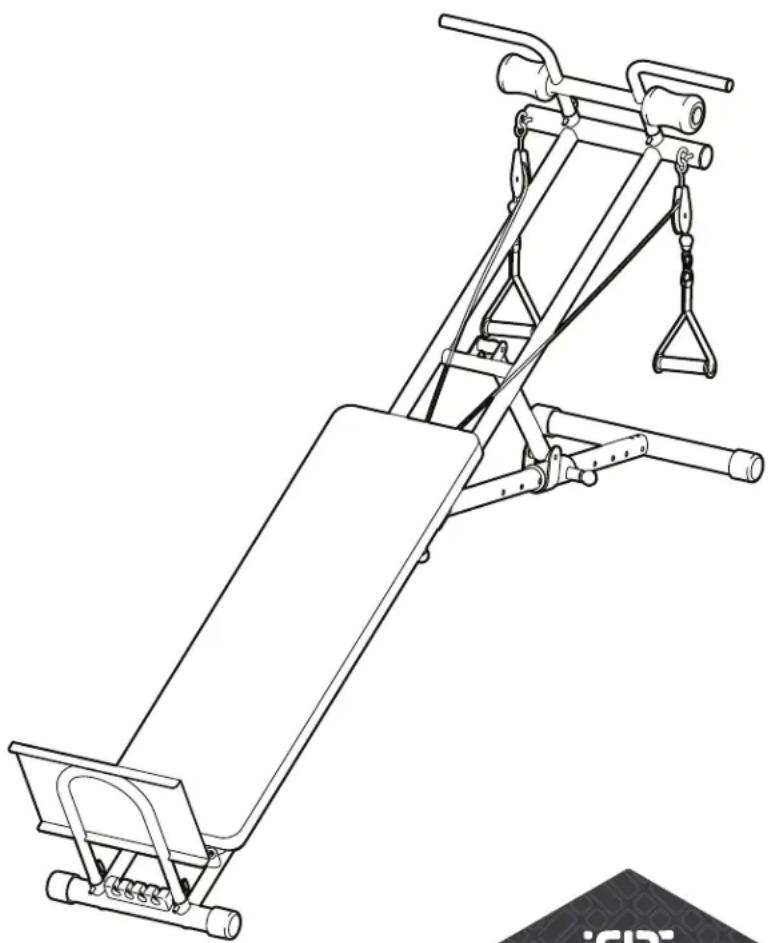
Line drawing of a stationary exercise machine with adjustable arms and legs (no text or symbols)iFIT.
MAKE YOUR FITNESS GOALS A REALITY
IFIT.COM
TABLE OF CONTENTS
WARNING DECAL PLACEMENT 2
IMPORTANT PRECAUTIONS....3
BEFORE YOU BEGIN. 5
ASSEMBLY 6
ADJUSTMENT 10
EXERCISE GUIDELINES 13
PART LIST....14
EXPLODED DRAWING....15
ORDERING REPLACEMENT PARTS .... Back Cover
LIMITED WARRANTY.... Back Cover
WARNING DECAL PLACEMENT
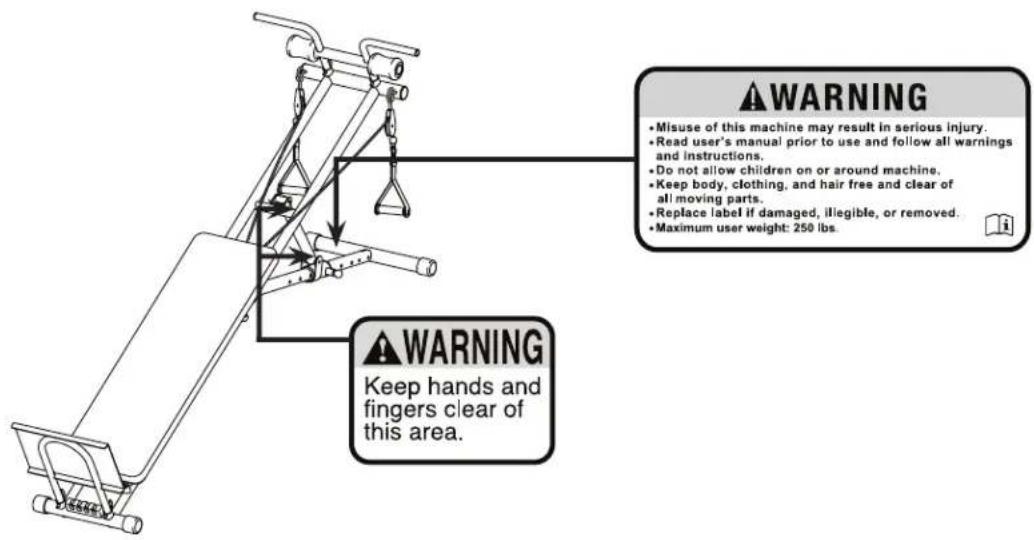
This drawing shows the location(s) of the warning decal(s). If a decal is missing or illegible, see the front cover of this manual and request a free replacement decal. Apply the decal in the location shown. Note: The decal(s) may not be shown at actual size.
IMPORTANT PRECAUTIONS
⚠ WARNING: To reduce the risk of serious injury, read all important precautions and instructions in this manual and all warnings on your weight training system before using your weight training system. ICON assumes no responsibility for personal injury or property damage sustained by or through the use of this product.
- It is the responsibility of the owner to ensure that all users of the weight training system are adequately informed of all precautions.
- Before beginning any exercise program, consult your physician. This is especially important for persons over age 35 or persons with pre-existing health problems.
- Read all instructions in this manual and all warnings on the weight training system before using the weight training system.
- The weight training system is intended for home use only. Do not use the weight training system in a commercial, rental, or institutional setting.
-
Keep the weight training system indoors, away from moisture and dust. Place the weight training system on a level surface, with a mat beneath it to protect the floor or carpet. Make sure that there is enough clearance around the weight training system to mount, dismount, and use the weight training system.
-
Inspect and properly tighten all parts regularly. Replace any worn parts immediately.
- The weight training system is designed to support a maximum user weight of 250 lbs. (113 kg).
- Keep children under age 12 and pets away from the weight training system at all times.
- Keep hands and feet away from moving parts.
- Always wear athletic shoes for foot protection while using the weight training system.
- When using the backrest in the level position or an inclined position, make sure that the knob is firmly engaged in an adjustment hole in the adjustment leg.
- Over exercising may result in serious injury or death. If you feel faint or if you experience pain while exercising, stop immediately and cool down.
PROTECT
YOUR FITNESS EQUIPMENT
WITH AN EXTENDED SERVICE PLAN

natural_image
Abstract shield-shaped icon with two interlocking gears, no text or symbols presentYour new fitness equipment is not an ordinary purchase; it is an investment in your health and well being for years to come.
As the leading provider of manufacturer's extended service plans, ICON strives to protect your equipment and your future.
Please review the following service plans and find one that best fits your needs.
PREVENTIVE MAINTENANCE SERVICE PLANS
| Equipment Price | 3-Year Plan | 5-Year Plan |
| 0.00 to1000.00 | 199.99 | 289.99 |
| 1001.00 to1500.00 | 259.99 | 379.99 |
| 1501.00 to2500.00 | 339.99 | 489.99 |
| (Bikes/Systems Only)0.00 to2500.00 | $139.99 | NA |
Features:
• Includes an annual preventive maintenance and performance check at your convenience
- Unlimited in-home repairs; no shipping required
• Covers parts and labor on all manufacturer's defects, as well as wear and tear on parts
- Up to 5 years of coverage available
STANDARD SERVICE PLANS
| Equipment Price | 1-Year Plan | 2-Year Plan | 3-Year Plan |
| 0.00 to300.00 | 29.99 | 39.99 | 59.99 |
| 301.00 to 1000.00 | 89.99 | 119.99 | 149.99 |
| 1001.00 to2000.00 | 109.99 | 139.99 | 179.99 |
| 2001.00 to 3000.00 | 179.99 | 209.99 | 239.99 |
Features:
- Unlimited in-home repairs; no shipping required
• Covers parts and labor on all manufacturer's defects, as well as wear and tear on parts
• Up to 3 years of coverage available
To protect your fitness equipment today, please
call Customer Care at 1-800-677-3838.
Or, visit us online at www.utserv.com.
UTS

UNIVERSAL TECHNICAL SERVICES
BEFORE YOU BEGIN
Thank you for selecting the WEIDER® ULTIMATE BODYWORKS weight training system. The versatile weight training system is designed to help you develop the major muscle groups of the body. Whether your goal is to tone your body, build dramatic muscle size and strength, or improve your cardiovascular system, the weight training system will help you to achieve the specific results you want.
For your benefit, read this manual carefully before using the weight training system. If you have
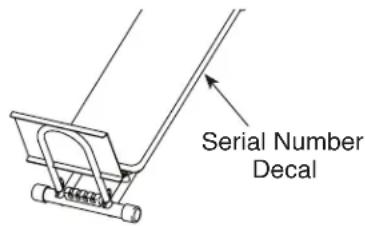
questions after reading this manual, please see the front cover of this manual. To help us assist you, note the product model number and serial number before contacting us. The model number and the location of the serial number decal are shown on the front cover of this manual.
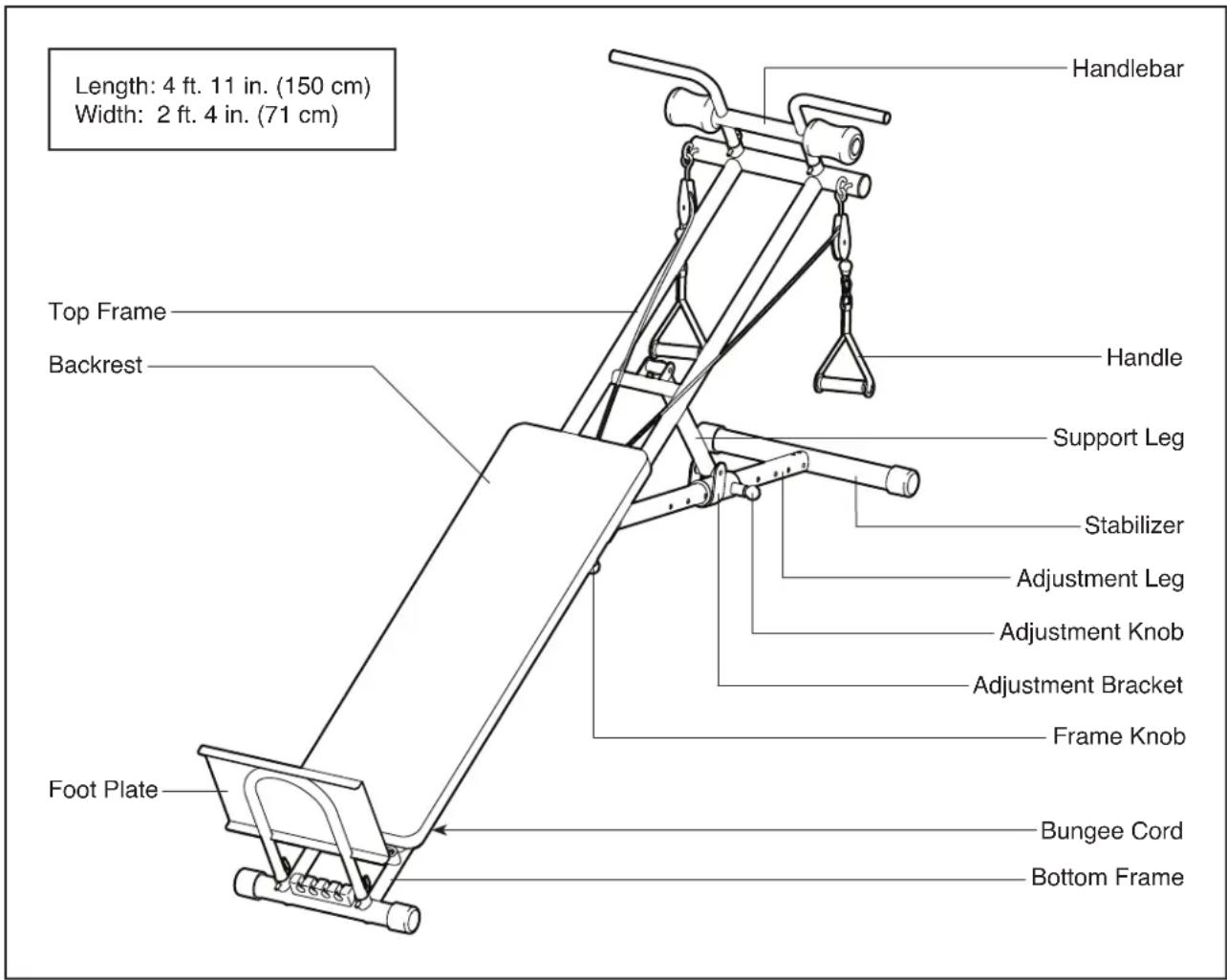
Before reading further, please review the drawing below and familiarize yourself with the parts that are labeled.
ASSEMBLY
• To hire an authorized service technician to assemble this product, call 1-800-445-2480.
- Assembly requires two persons.
- Place all parts in a cleared area and remove the packing materials. Do not dispose of the packing materials until you finish all assembly steps.
- Left parts are marked "L" or "Left" and right parts are marked "R" or "Right."
- In addition to the included tool(s), assembly requires the following tool(s):
one Phillips screwdriver
one adjustable wrench
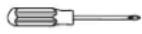
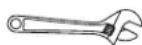
Assembly may be easier if you have a set of wrenches. To avoid damaging parts, do not use power tools.
1. Go to www.weiderservice.com/registration on your computer and register your product.
- activates your product manufacturer's warranty
- saves you time if you ever need to contact Customer Care
- allows us to notify you of upgrades and offers
Note: If you do not have Internet access, call CUSTOMER CARE (see the front cover of this manual) to register your product.
1
natural_image
Line drawing of a laptop computer with open lid and visible screen (no text or symbols)- Pull the Short Knob (44) outward, extend the Top Frame (1) as far as possible, and then release the Knob. Make sure that the Knob is engaged in the hole in the Bottom Frame (2).
Then, pull the Long Knob (55) outward, move the Adjustment Leg (5) outward as far as possible, and release the Knob into one of the adjustment holes in the Adjustment Leg. Make sure that the Knob is engaged in an adjustment hole in the Adjustment Leg.
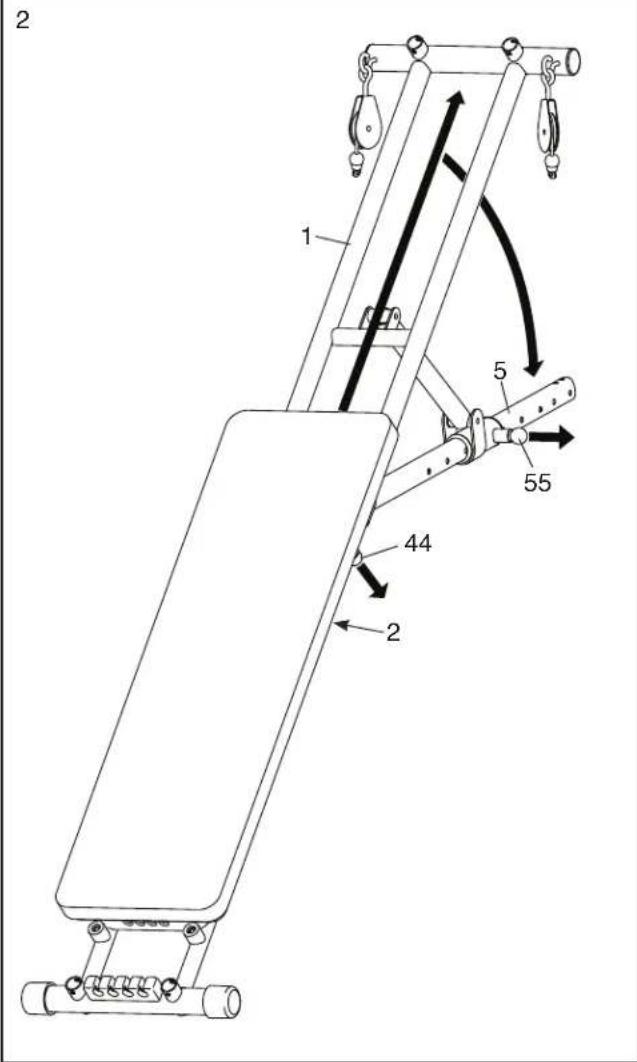
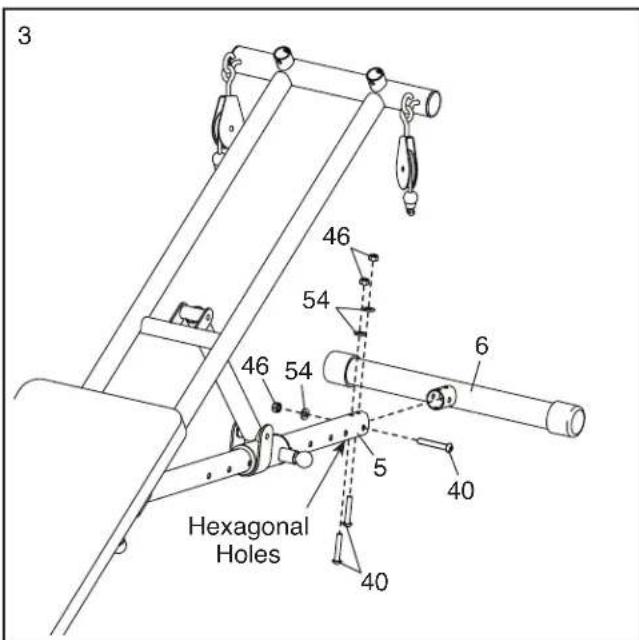
- Attach the Stabilizer (6) to the Adjustment Leg (5) with three M8 x 52mm Bolts (40), three M8 Washers (54), and three M8 Locknuts (46). Make sure that the Bolts are in the hexagonal holes.
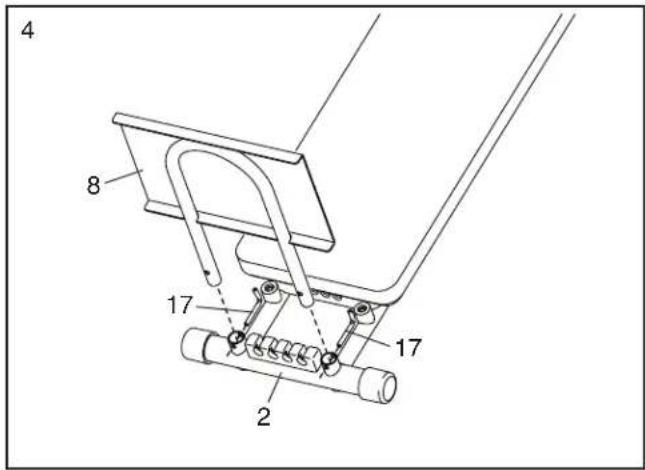
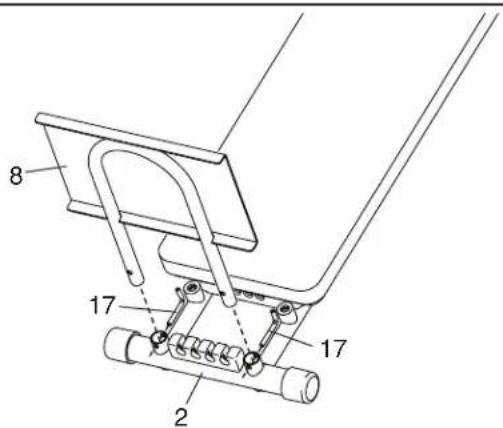
- Insert the Foot Plate (8) into the Bottom Frame (2) and secure it with two L-pins (17).
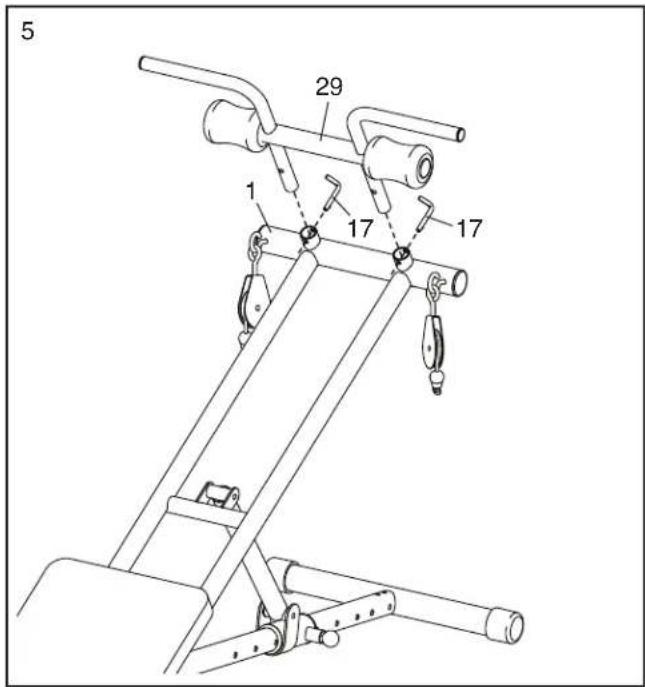
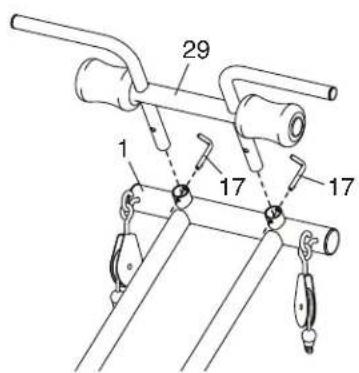
- Insert the Handlebar (29) into the Top Frame (1) and secure it with two L-pins (17).
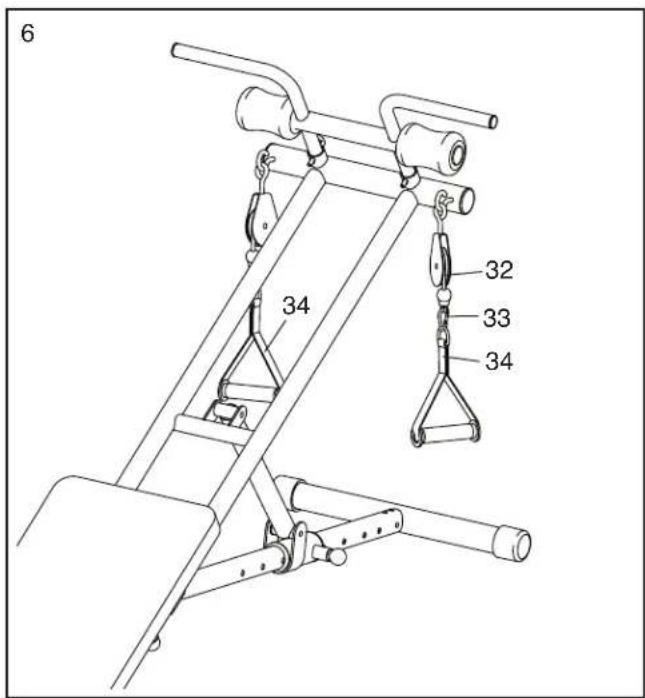
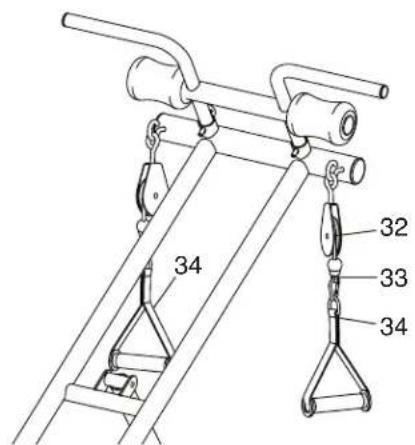
- Attach a Handle (34) to one end of the Cable (32) with a Cable Clip (33).
Attach the other Handle (34) in the same way.
- Make sure that all parts are properly tightened before you use the weight training system. To adjust the weight training system, see ADJUSTMENT on page 10.
ADJUSTMENT
The weight training system is designed to use your own body weight as resistance. The information below explains how the weight training system can be adjusted and folded for storage.
Make sure that all parts are properly tightened each time you use the weight training system. Replace any worn parts immediately. The weight training system can be cleaned with a damp cloth and mild, non-abrasive detergent; never use solvents to clean the weight training system.
ATTACHING THE FOOT BRACKET OR THE HANDLEBAR
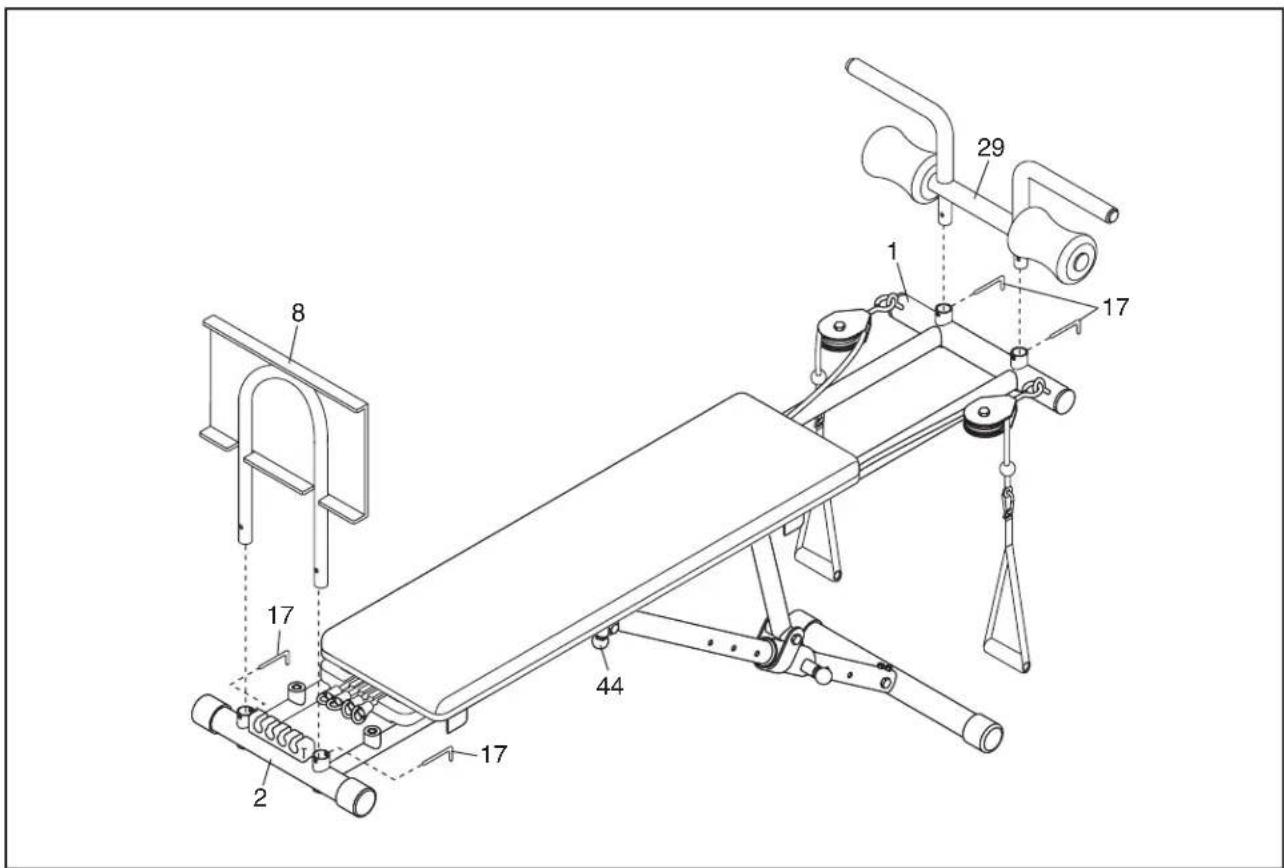
See the upper drawing. For some exercises, the Foot Plate (8) must be attached to the weight training system. Insert the Foot Plate into the Bottom Frame (2) and secure it with two L-pins (17).
See the lower drawing. For some exercises, the Handlebar (29) must be attached. Insert the Handlebar into the Top Frame (1) and secure it with two L-pins (17).

CAUTION: Remove the
Handlebar (29) when performing an exercise that does not require it.
ATTACHING THE HANDLES
Attach the Handles (34) to the ends of the Cable (32) with the two Cable Clips (33).
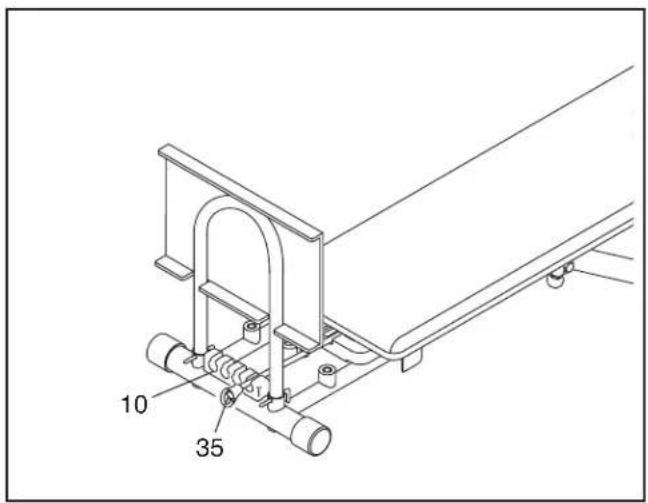
To increase the resistance of the weight training system, pull a Bungee Cord (35) and insert it into the Bungee Bracket (10). For more resistance, insert additional Bungee Cords into the Bungee Bracket.
ADJUSTING THE INCLINE
To change the resistance of the weight training system, you can adjust the incline.
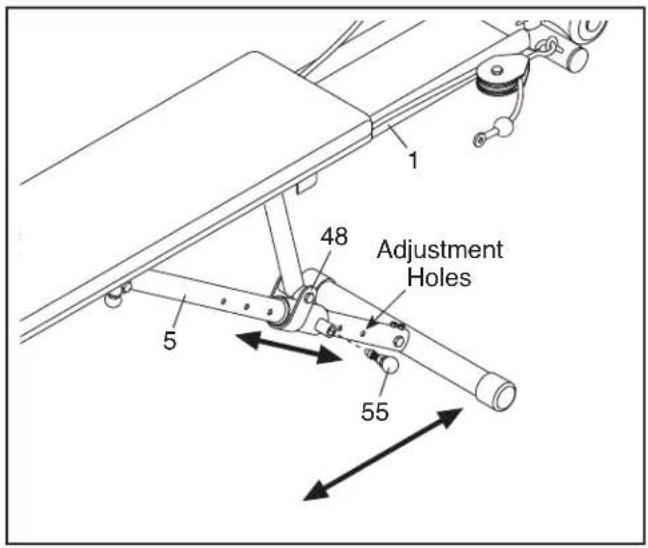
To adjust the incline, first lift the Top Frame (1) and pull the Long Knob (55).
Slide the Adjustment Bracket (48) to the desired position, and release the Long Knob (55) into one of the adjustment holes in the Adjustment Leg (5). Make sure that the Long Knob is engaged in an adjustment hole.
STORING THE WEIGHT TRAINING SYSTEM
To store the weight training system, first remove the four L-Pins (17). Next, detach the Handlebar (29) and the Foot Plate (8). Then, pull the Short Knob (44), slide the Bottom Frame into the Top Frame as far as possible, and release the Short Knob.
To use the weight training system, pull the Short Knob (44), extend the Bottom Frame (2) as far as possible, and then release the Short Knob. Make sure that the Short Knob is engaged in a hole in the Top Frame (1).
EXERCISE GUIDELINES
FOUR TYPES OF STRENGTH WORKOUTS
Note: A “repetition” is one complete cycle of an exercise, such as one sit-up. A “set” is a series of repetitions.
Muscle Building—Work your muscles near their maximum capacity and progressively increase the intensity of your exercise. Adjust the intensity level of an individual exercise as follows:
- Change the amount of resistance used.
- Change the number of repetitions or sets performed.
Use your own judgment to determine the amount of resistance that is right for you. Begin with 3 sets of 8 repetitions for each exercise you perform. Rest for 3 minutes after each set. When you can complete 3 sets of 12 repetitions without difficulty, increase the amount of resistance.
Toning—Tone your muscles by working them to a moderate percentage of their capacity. Select a moderate amount of resistance and increase the number of repetitions in each set. Complete as many sets of 15 to 20 repetitions as possible without discomfort. Rest for 1 minute after each set. Work your muscles by completing more sets rather than by using high amounts of resistance.
Weight Loss—To lose weight, use a low amount of resistance and increase the number of repetitions in each set. Exercise for 20 to 30 minutes, resting for a maximum of 30 seconds between sets.
Cross Training—Combine strength training and aerobic exercise by following this type of program:
- Strength training workouts on Monday, Wednesday, and Friday.
- 20 to 30 minutes of aerobic exercise on Tuesday and Thursday.
- One full day of rest each week to give your body time to regenerate.
WORKOUT GUIDELINES
Familiarize yourself with the equipment and learn the proper form for each exercise. Use your own judgment to determine the appropriate length of time for each
workout, and the numbers of repetitions and sets to complete. Progress at your own pace and be sensitive to your body's signals. Follow each workout with at least one day of rest.
Warming Up—Start with 5 to 10 minutes of stretching and light exercise. A warm-up increases your body temperature, heart rate, and circulation in preparation for exercise.
Working Out—Include 6 to 10 different exercises in each workout. Select exercises for every major muscle group, emphasizing areas that you want to develop. To give balance and variety to your workouts, vary the exercises from workout to workout.
Cooling Down—Finish with 5 to 10 minutes of stretching. Stretching increases the flexibility of your muscles and helps to prevent post-exercise problems.
EXERCISE FORM
Move through the full range of motion for each exercise and move only the appropriate parts of the body. Perform the repetitions in each set smoothly and without pausing. The exertion stage of each repetition should last about half as long as the return stage. Exhale during the exertion stage of each repetition and inhale during the return stroke. Never hold your breath.
Rest for a short period of time after each set:
- Muscle Building—Rest for three minutes after each set.
- Toning—Rest for one minute after each set.
- Weight Loss—Rest for 30 seconds after each set.
STAYING MOTIVATED
For motivation, keep a record of each workout. Write the date, the exercises performed, the resistance used, and the numbers of sets and repetitions completed. Record your weight and key body measurements once a month. To achieve good results, make exercise a regular and enjoyable part of your life.
Key No. Qty. Description Key No. Qty. Description
| 1 1 Top Frame | 30 2 60mm Eyebolt |
| 2 1 Bottom Frame | 31 2 108mm Eyebolt |
| 3 1 Backrest Frame | 32 1 Cable |
| 4 1 Backrest | 33 2 Cable Clip |
| 5 1 Adjustment Leg | 34 2 Handle |
| 6 1 Stabilizer | 35 4 Bungee Cord |
| 7 1 Support Leg | 36 2 Leg Bushing |
| 8 1 Foot Plate | 37 2 M10 x 30mm Bolt |
| 9 2 M10 x 20mm Screw | 38 2 M8 x 90mm Bolt |
| 10 1 Bungee Bracket | 39 4 M6 Washer |
| 11 1 Backrest Bracket | 40 3 M8 x 52mm Bolt |
| 12 4 50mm Outer Cap | 41 2 M10 x 63mm Bolt |
| 13 2 50mm Inner Cap | 42 1 M10 x 175mm Bolt |
| 14 4 25mm Round Inner Cap | 43 1 M10 x 80mm Bolt |
| 15 2 Handgrip | 44 1 Short Knob |
| 16 2 Foam Pad | 45 7 M10 Locknut |
| 17 4 L-Pin | 46 9 M8 Locknut |
| 18 2 Pulley Housing | 47 6 ST4 x 20mm Self-tapping Screw |
| 19 2 70mm Pulley | 48 1 Adjustment Bracket |
| 20 1 90mm Pulley | 49 2 56/45mm Bushing |
| 21 1 Right 38/32mm Bushing | 50 2 38mm Round Inner Cap |
| 22 1 M10 x 45mm Bolt | 51 4 M6 x 42mm Screw |
| 23 6 Small Bushing | 52 2 M10 Ball Head Nut |
| 24 2 Small Wheel | 53 2 M8 x 85mm Bolt |
| 25 2 Big Bushing | 54 5 M8 Washer |
| 26 2 Big Wheel | 55 1 Long Knob |
| 27 2 Bumper | 56 2 M10 Washer |
| 28 2 32mm Round Inner Cap | 57 1 Left 38/32mm Bushing |
| 29 1 Handlebar | * - User's Manual |
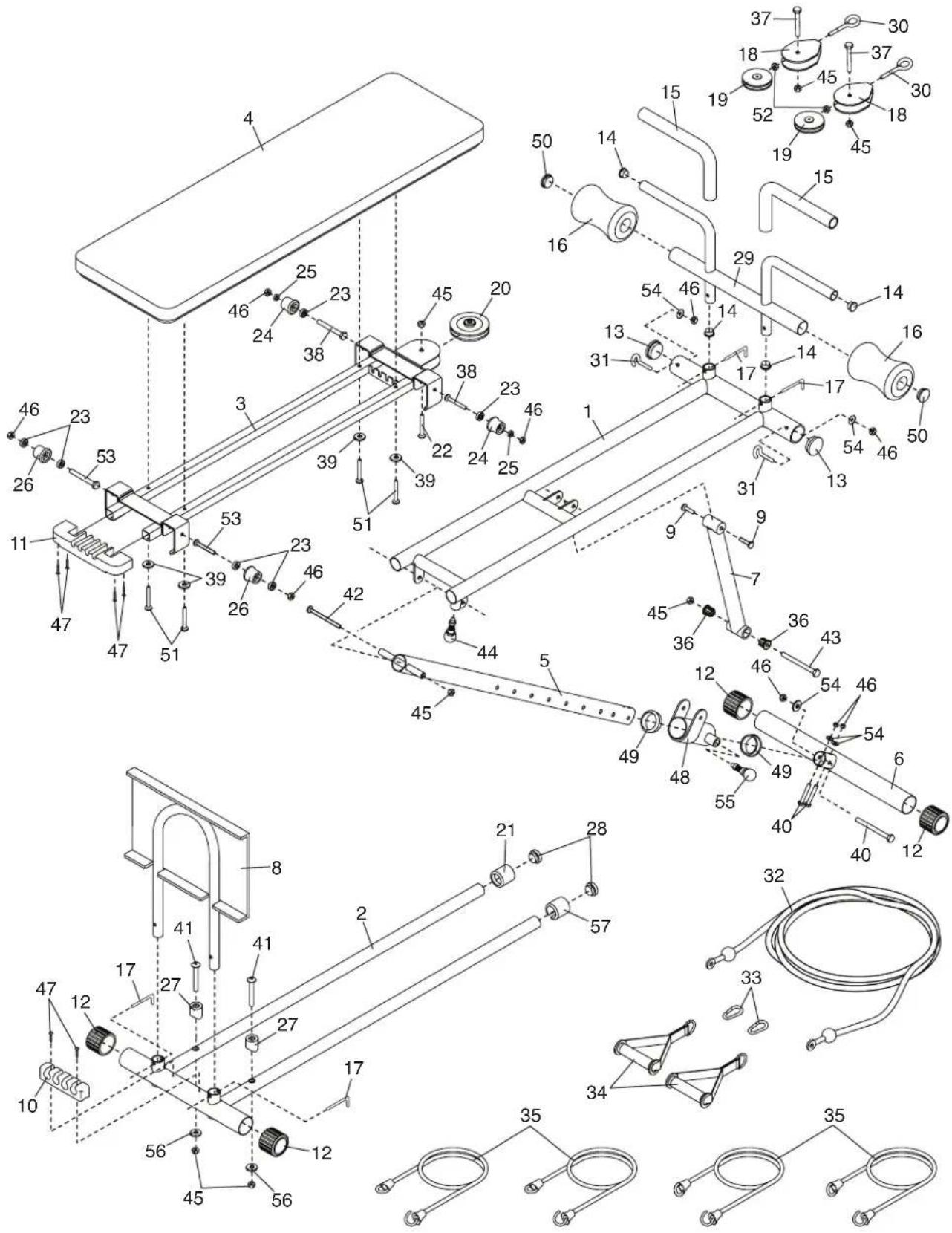
Note: Specifications are subject to change without notice. For information about ordering replacement parts, see the back cover of this manual. *These parts are not illustrated.
ORDERING REPLACEMENT PARTS
To order replacement parts, please see the front cover of this manual. To help us assist you, be prepared to provide the following information when contacting us:
- the model number and serial number of the product (see the front cover of this manual)
- the name of the product (see the front cover of this manual)
- the key number and description of the replacement part(s) (see the PART LIST and the EXPLODED DRAWING near the end of this manual)
LIMITED WARRANTY
IMPORTANT: To protect your fitness equipment with an extended service plan, see page 4.
ICON Health & Fitness, Inc. (ICON) warrants this product to be free from defects in workmanship and material, under normal use and service conditions. Parts and labor are warranted for ninety (90) days from the date of purchase.
This warranty extends only to the original purchaser (customer). ICON's obligation under this warranty is limited to repairing or replacing, at ICON's option, the product through one of its authorized service centers. All repairs for which warranty claims are made must be preauthorized by ICON. If the product is shipped to a service center, freight charges to and from the service center will be the customer's responsibility. If replacement parts are shipped while the product is under warranty, the customer will be responsible for a minimal handling charge. For in-home service, the customer will be responsible for a minimal trip charge. This warranty does not extend to freight damage to the product. This warranty will automatically be voided if the product is used as a store display model, if the product is purchased or transported outside the USA, if all instructions in this manual are not followed, if the product is abused or improperly or abnormally used, or if the product is used for commercial or rental purposes. No other warranty beyond that specifically set forth above is authorized by ICON.
ICON is not responsible or liable for indirect, special, or consequential damages arising out of or in connection with the use or performance of the product; damages with respect to any economic loss, loss of property, loss of revenues or profits, loss of enjoyment or use, or costs of removal or installation; or other consequential damages of any kind. Some states do not allow the exclusion or limitation of incidental or consequential damages. Accordingly, the above limitation may not apply to the customer.
The warranty extended hereunder is in lieu of any and all other warranties, and any implied warranties of merchantability or fitness for a particular purpose are limited in their scope and duration to the terms set forth herein. Some states do not allow limitations on how long an implied warranty lasts. Accordingly, the above limitation may not apply to the customer.
This warranty provides specific legal rights; the customer may have other rights that vary from state to state.
ICON Health & Fitness, Inc., 1500 S. 1000 W., Logan, UT 84321-9813