
SAT3510U2F - NAS StarTech.com - Free user manual and instructions
Find the device manual for free SAT3510U2F StarTech.com in PDF.


| Product Type | Network Attached Storage (NAS) |
| Brand | StarTech.com |
| Model | SAT3510U2F |
| Drive Bays | 1 x 3.5" or 2.5" SATA (user-installable) |
| Supported Drives | SATA I, II, III (up to 10TB) |
| Network Interface | 1 x Gigabit Ethernet RJ-45 |
| USB Ports | 1 x USB 2.0 Type-B (for external expansion) |
| Data Transfer Rate | Up to 100 MB/s (over Gigabit LAN) |
| Dimensions (W x D x H) | 200 x 120 x 60 mm (7.9 x 4.7 x 2.4 in) |
| Weight | 0.8 kg (1.8 lbs) |
| Power Supply | 12V DC, 2A (external adapter) |
| Power Consumption | 6W (typical) |
| Operating Temperature | 0°C to 40°C (32°F to 104°F) |
| Storage Temperature | -20°C to 60°C (-4°F to 140°F) |
| Supported Network Protocols | SMB/CIFS, NFS, FTP, HTTP, HTTPS |
| RAID Support | JBOD (single disk, no RAID) |
| Supported File Systems | EXT4, NTFS, FAT32 |
| Backup Features | Scheduled backup, cloud backup (e.g., Dropbox, Google Drive) |
| Security | User accounts, password protection, firewall, HTTPS encryption |
| Cooling | Fanless (passive cooling) |
| Management | Web-based user interface (HTTP/HTTPS) |
| LED Indicators | Power, Ethernet, HDD activity |
| Included Accessories | Power adapter, Ethernet cable, quick start guide |
| Warranty | 2 years (limited) |
| Certifications | CE, FCC, RoHS |
Frequently Asked Questions - SAT3510U2F StarTech.com
User questions about SAT3510U2F StarTech.com
0 question about this device. Answer the ones you know or ask your own.
Ask a new question about this device
Download the instructions for your NAS in PDF format for free! Find your manual SAT3510U2F - StarTech.com and take your electronic device back in hand. On this page are published all the documents necessary for the use of your device. SAT3510U2F by StarTech.com.
USER MANUAL SAT3510U2F StarTech.com
3.5in USB FireWire SATA External Hard Drive Enclosure
SAT3510U2F
SAT3510U2FGB
natural_image
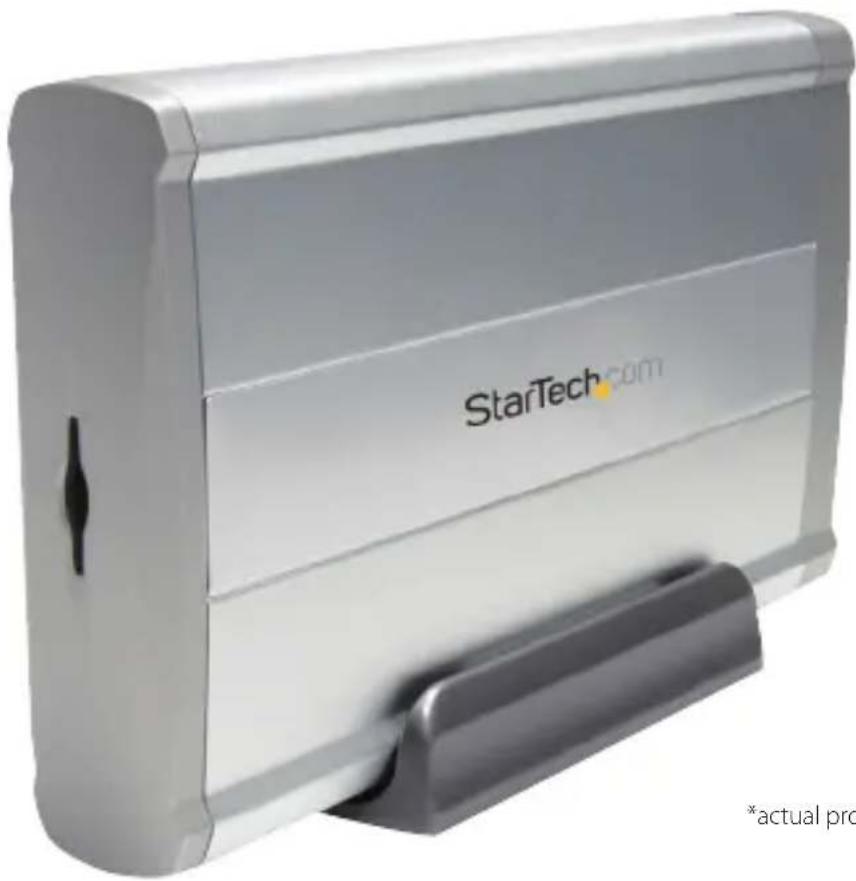
Exterior view of a StarTech device with a gray handle and logo (no readable text or symbols beyond branding)*actual product may vary from photos
For the most up-to-date information, please visit: www.startech.com
FCC Compliance Statement
This equipment has been tested and found to comply with the limits for a Class B digital device, pursuant to part 15 of the FCC Rules. These limits are designed to provide reasonable protection against harmful interference in a residential installation. This equipment generates, uses and can radiate radio frequency energy and, if not installed and used in accordance with the instructions, may cause harmful interference to radio communications. However, there is no guarantee that interference will not occur in a particular installation. If this equipment does cause harmful interference to radio or television reception, which can be determined by turning the equipment off and on, the user is encouraged to try to correct the interference by one or more of the following measures:
• Reorient or relocate the receiving antenna.
- Increase the separation between the equipment and receiver.
- Connect the equipment into an outlet on a circuit different from that to which the receiver is connected.
- Consult the dealer or an experienced radio/TV technician for help.
Use of Trademarks, Registered Trademarks, and other Protected Names and Symbols
This manual may make reference to trademarks, registered trademarks, and other protected names and/or symbols of third-party companies not related in any way to StarTech.com. Where they occur these references are for illustrative purposes only and do not represent an endorsement of a product or service by StarTech.com, or an endorsement of the product(s) to which this manual applies by the third-party company in question. Regardless of any direct acknowledgement elsewhere in the body of this document, StarTech.com hereby acknowledges that all trademarks, registered trademarks, service marks, and other protected names and/or symbols contained in this manual and related documents are the property of their respective holders.
Table of Contents
Introduction ....1
Packaging Contents ....1
System Requirements....1
Installation 2
Hardware Installation 2
Driver Installation....3
Using the Enclosure ....4
Specifications 6
Technical Support 7
Warranty Information 7
Introduction
The SAT3510U2F External Hard Drive Enclosure supports both USB 2.0 and FireWire 400 (IEEE1394a) host connections, providing the compatibility needed to create a convenient and versatile external SATA storage solution for desktop computers as well as MacBooks® and Windows® based laptops.
The USB/FireWire enclosure features a slim, lightweight aluminum design and includes a 6-pin FireWire cable simplifying the option to connect through IEEE 1394a, as well as a USB cable for USB 2.0 connections to the host.
Packaging Contents
• 1x 3.5" SATA Hard Drive Enclosure
• 1x USB A to B Cable
• 1x 6pin FireWire Cable
• 1x Plastic Stand
• 1x Power Adapter
• 1x Instruction Manual
System Requirements
• USB and/or FireWire enabled computer system with available port
• Microsoft Windows® 2000/XP/Vista/7, Mac OS® 9.2/10.x, and Linux®
Installation
WARNING: Hard drives require careful handling, especially when being transported. If you are not careful with your hard disk, lost data may result. Always handle your hard drive and storage device with caution.
Hardware Installation
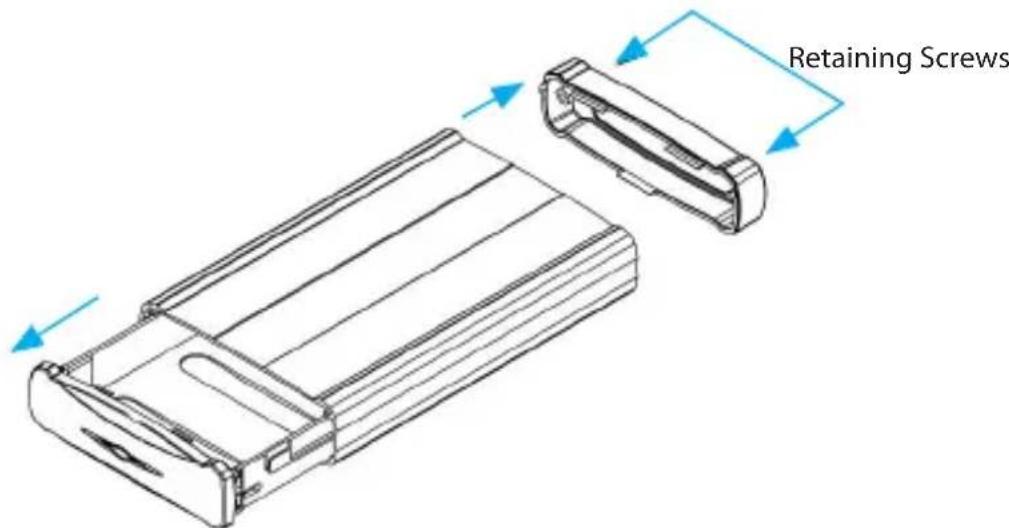
- Remove the two small screws from either side of the rear panel of the enclosure and then remove the rear panel bezel. The drive tray should now slide out from the front side.
-
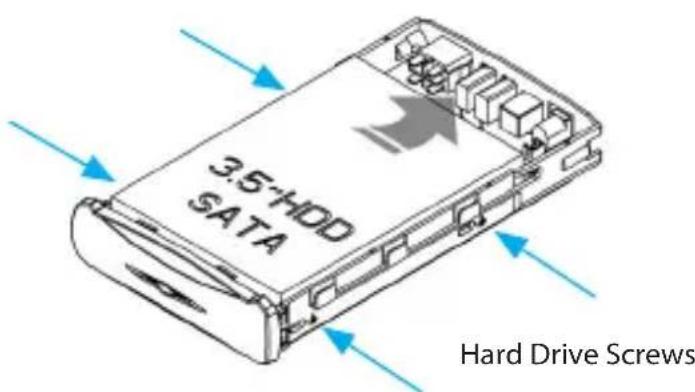
Place a 3.5" SATA hard drive into the drive tray and then slide it into the 7+15 SATA connector on the rear panel.
-
Fasten the hard drive to the drive tray from the sides with the supplied hard drive screws
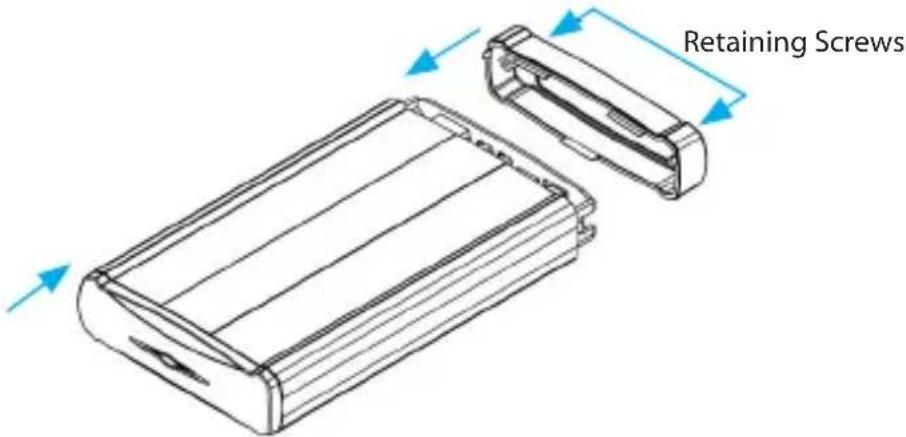
- Slide the hard drive tray back into the enclosure and place the reawr panel bezel over the rear panel. Fasten the two side screws for the rear panel bezel.
-
Connect the power adapter from the enclosure to an available power outlet and then turn the enclosure on, via switch on the rear panel.
-
Connect the enclosure to the host computer system via FireWire or USB cable.
Driver Installation
Windows 2000/XP/Vista/7, Mac OS 9.2/10.x, or Linux/Unix
No driver installation is required for these operating systems, as this enclosure is natively supported, so the drivers are already installed.
Using the Enclosure
Windows 2000/XP/Vista/7
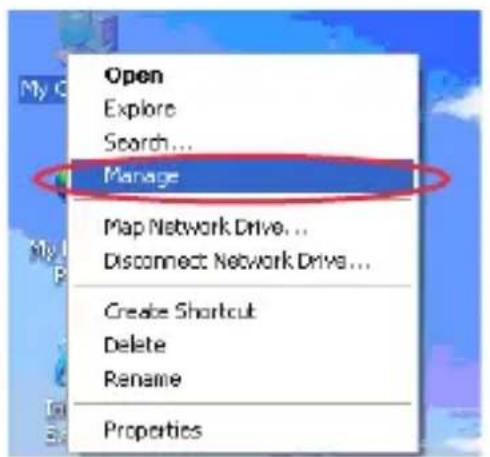
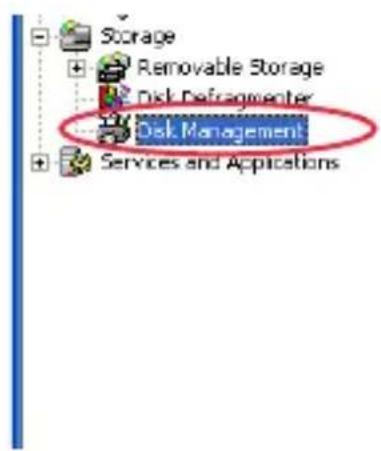
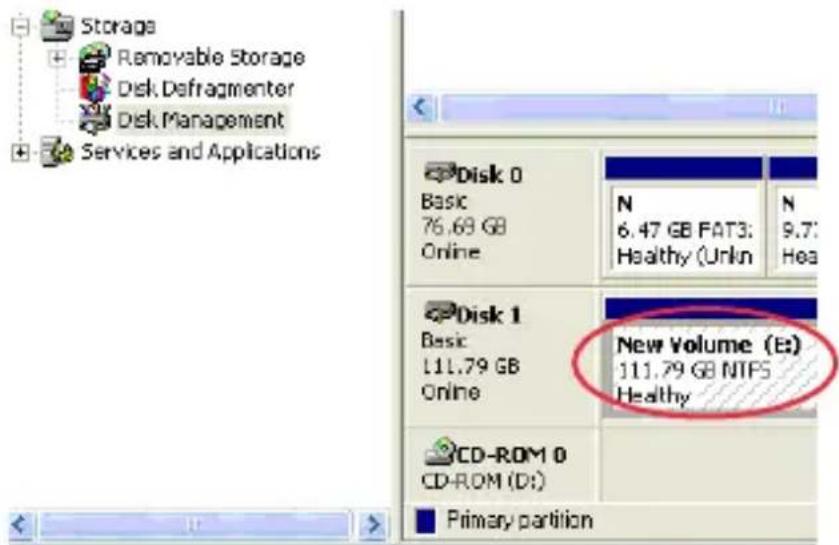
If you are using a brand new hard drive that does not contain any data, then you will first need to prepare the hard drive for use. From the main desktop, right-click on "My Computer" ("Computer" in Vista), then select Manage. In the new Computer Management window, select Disk Management from the left window panel.
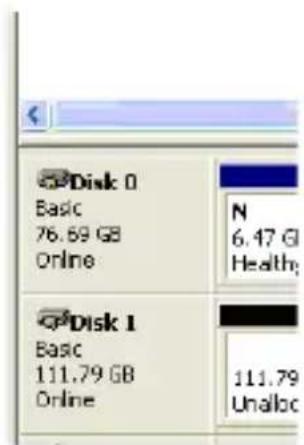
Locate the Disk that says it is "Unallocated" (check hard drive capacity to confirm it's the correct hard drive) and then right-click in the section that says "Unallocated" and select "New Partition".
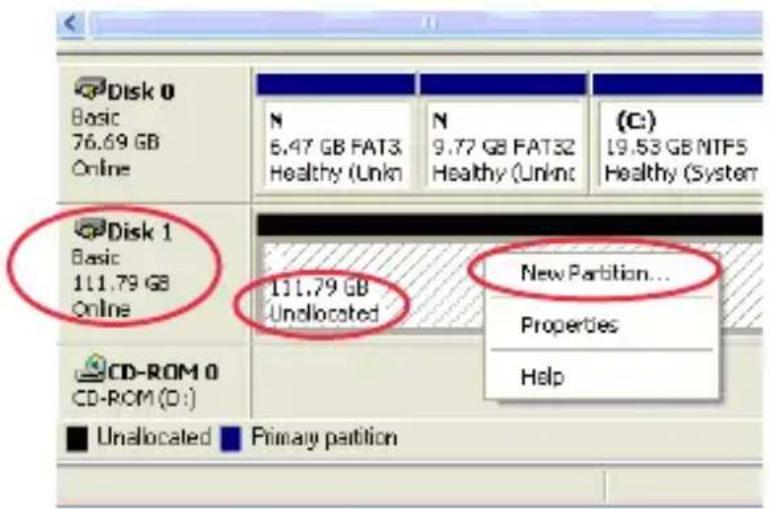
The New Partition Wizard will appear. Follow the instructions in the wizard to complete setting up the drive. Once complete, the Disk should show up as "Healthy" with a drive letter assigned (ie. E:). This drive letter should now appear within My Computer.
If you are installing a hard drive that already has data on it, then after plugging it in, the drive should automatically show up with a drive letter assigned within My Computer.
Specifications
| Bus Interface | USB 2.0FireWire400 (IEEE1394a) |
| Connectors | 1 x USB type B2 x 6-pin FireWire1 x DC power connector |
| LEDs 1 x Power/Activity | |
| Chipset Oxford OXUF934SSA | |
| Hard Drive Support 3.5" SATA 1.5/3.0Gbps, | |
| Maximum Data Transfer Rate | USB: 480Mb/sFireWire: 400Mb/s |
| Power Adapter | 12VDC, 2A, center positive,type N plug |
| Dimensions 208.0mm x 118.0mm x 30.0mm | |
| Weight 400g | |
| Compatible Operating Systems | Windows 2000/XP/Vista/7,Mac OS 9.2/10.x, Linux/Unix |
Technical Support
StarTech.com's lifetime technical support is an integral part of our commitment to provide industry-leading solutions. If you ever need help with your product, visit www.startech.com/support and access our comprehensive selection of online tools, documentation, and downloads.
For the latest drivers/software, please visit www.startech.com/downloads
Warranty Information
This product is backed by a two year warranty.
In addition, StarTech.com warrants its products against defects in materials and workmanship for the periods noted, following the initial date of purchase. During this period, the products may be returned for repair, or replacement with equivalent products at our discretion. The warranty covers parts and labor costs only. StarTech.com does not warrant its products from defects or damages arising from misuse, abuse, alteration, or normal wear and tear.
Limitation of Liability
In no event shall the liability of StarTech.com Ltd. and StarTech.com USA LLP (or their officers, directors, employees or agents) for any damages (whether direct or indirect, special, punitive, incidental, consequential, or otherwise), loss of profits, loss of business, or any pecuniary loss, arising out of or related to the use of the product exceed the actual price paid for the product. Some states do not allow the exclusion or limitation of incidental or consequential damages. If such laws apply, the limitations or exclusions contained in this statement may not apply to you.
Hard-to-find made easy. At StarTech.com, that isn't a slogan. It's a promise.
StarTech.com is your one-stop source for every connectivity part you need. From the latest technology to legacy products — and all the parts that bridge the old and new — we can help you find the parts that connect your solutions.
We make it easy to locate the parts, and we quickly deliver them wherever they need to go. Just talk to one of our tech advisors or visit our website. You'll be connected to the products you need in no time.
Visit www.startech.com for complete information on all StarTech.com products and to access exclusive resources and time-saving tools.
StarTech.com is an ISO 9001 Registered manufacturer of connectivity and technology parts. StarTech.com was founded in 1985 and has operations in the United States, Canada, the United Kingdom and Taiwan servicing a worldwide market.
- 3.5in USB FireWire SATA External Hard Drive Enclosure
- FCC Compliance Statement
- Use of Trademarks, Registered Trademarks, and other Protected Names and Symbols
- Table of Contents
- Introduction ....1
- Installation 2
- Using the Enclosure ....4
- Specifications 6
- Technical Support 7
- Warranty Information 7
- Introduction
- Packaging Contents
- System Requirements
- Installation
- Hardware Installation
- Driver Installation
- Using the Enclosure
- Windows 2000/XP/Vista/7
- Specifications
- Technical Support
- Warranty Information
- Limitation of Liability
Brand : StarTech.com
Model : SAT3510U2F
Category : NAS